brake VOLVO V90 2017 User Guide
[x] Cancel search | Manufacturer: VOLVO, Model Year: 2017, Model line: V90, Model: VOLVO V90 2017Pages: 594, PDF Size: 15.07 MB
Page 97 of 594
INSTRUMENTS AND CONTROLS
}}
95
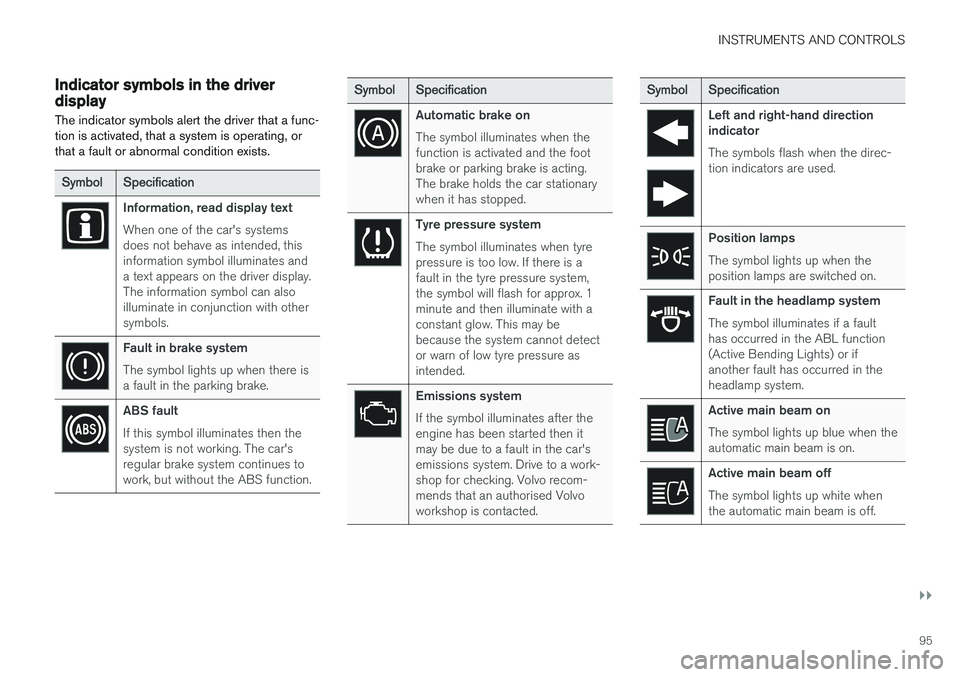
Indicator symbols in the driver display The indicator symbols alert the driver that a func- tion is activated, that a system is operating, orthat a fault or abnormal condition exists.
SymbolSpecification
Information, read display text When one of the car's systems does not behave as intended, thisinformation symbol illuminates anda text appears on the driver display.The information symbol can alsoilluminate in conjunction with othersymbols.
Fault in brake system The symbol lights up when there is a fault in the parking brake.
ABS fault If this symbol illuminates then the system is not working. The car'sregular brake system continues towork, but without the ABS function.
SymbolSpecification
Automatic brake on The symbol illuminates when the function is activated and the footbrake or parking brake is acting.The brake holds the car stationarywhen it has stopped.
Tyre pressure system The symbol illuminates when tyre pressure is too low. If there is afault in the tyre pressure system,the symbol will flash for approx. 1minute and then illuminate with aconstant glow. This may bebecause the system cannot detector warn of low tyre pressure asintended.
Emissions system If the symbol illuminates after the engine has been started then itmay be due to a fault in the car'semissions system. Drive to a work-shop for checking. Volvo recom-mends that an authorised Volvoworkshop is contacted.
Symbol Specification
Left and right-hand direction indicator The symbols flash when the direc- tion indicators are used.
Position lamps The symbol lights up when the position lamps are switched on.
Fault in the headlamp system The symbol illuminates if a fault has occurred in the ABL function(Active Bending Lights) or ifanother fault has occurred in theheadlamp system.
Active main beam on The symbol lights up blue when the automatic main beam is on.
Active main beam off The symbol lights up white when the automatic main beam is off.
Page 99 of 594
INSTRUMENTS AND CONTROLS
}}
97
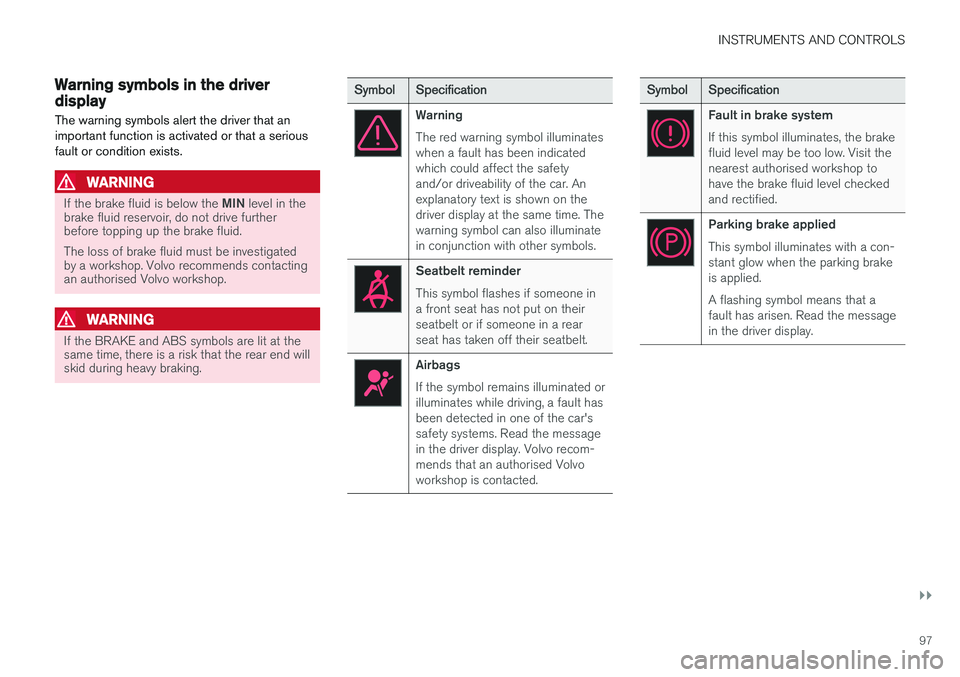
Warning symbols in the driver display The warning symbols alert the driver that an important function is activated or that a seriousfault or condition exists.
WARNING
If the brake fluid is below the MIN level in the
brake fluid reservoir, do not drive further before topping up the brake fluid. The loss of brake fluid must be investigated by a workshop. Volvo recommends contactingan authorised Volvo workshop.
WARNING
If the BRAKE and ABS symbols are lit at the same time, there is a risk that the rear end willskid during heavy braking.
Symbol Specification
Warning The red warning symbol illuminates when a fault has been indicatedwhich could affect the safetyand/or driveability of the car. Anexplanatory text is shown on thedriver display at the same time. Thewarning symbol can also illuminatein conjunction with other symbols.
Seatbelt reminder This symbol flashes if someone in a front seat has not put on theirseatbelt or if someone in a rearseat has taken off their seatbelt.
Airbags If the symbol remains illuminated or illuminates while driving, a fault hasbeen detected in one of the car'ssafety systems. Read the messagein the driver display. Volvo recom-mends that an authorised Volvoworkshop is contacted.
Symbol Specification
Fault in brake system If this symbol illuminates, the brake fluid level may be too low. Visit thenearest authorised workshop tohave the brake fluid level checkedand rectified.
Parking brake applied This symbol illuminates with a con- stant glow when the parking brakeis applied. A flashing symbol means that a fault has arisen. Read the messagein the driver display.
Page 145 of 594
INSTRUMENTS AND CONTROLS
}}
* Option/accessory.143
Press the on/off button. The
symbol in the
driver display illuminates when the rear fog lamp is switched on. The rear fog lamp is switched off automatically when:
• the ignition knob is turned to
STOP or when
the stalk switch's rotating ring is set in posi- tion
• the stalk switch's rotating ring is in position
and the front fog lamps are switched
off.
NOTE
Regulations on the use of rear fog lamps vary from country to country.
Related information
• Headlamp control (p. 134)
• Front fog lamps/cornering lights
* (p. 142)
• Ignition positions (p. 385)
Brake lights The brake light automatically comes on during braking.
The brake light is switched on when the brake pedal is depressed. In addition, it is switched onwhen one of driver support systems Adaptive cruise control
*, City Safety or Rear Collision
Warning brakes the car.
Related information
• Emergency brake lights (p. 408)
• Adaptive cruise control
* (p. 290)
• City Safety (p. 330)
• Rear Collision Warning (p. 340)
Hazard warning flashers
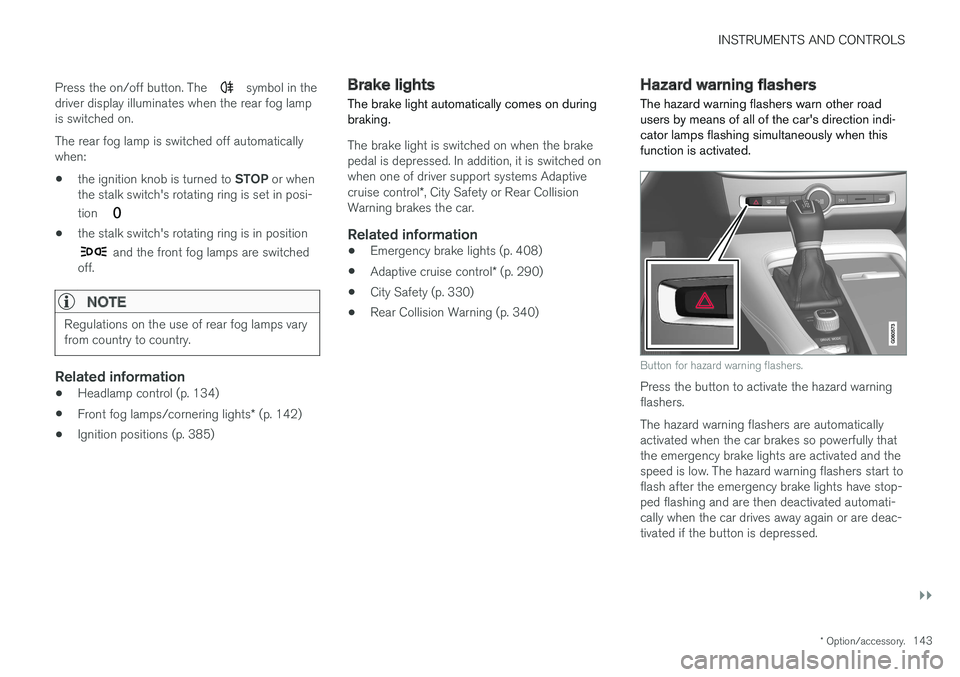
The hazard warning flashers warn other road users by means of all of the car's direction indi-cator lamps flashing simultaneously when thisfunction is activated.
Button for hazard warning flashers.
Press the button to activate the hazard warning flashers. The hazard warning flashers are automatically activated when the car brakes so powerfully thatthe emergency brake lights are activated and thespeed is low. The hazard warning flashers start toflash after the emergency brake lights have stop-ped flashing and are then deactivated automati-cally when the car drives away again or are deac-tivated if the button is depressed.
Page 146 of 594
||
INSTRUMENTS AND CONTROLS
144
Related information
•Using direction indicators (p. 144)
• Emergency brake lights (p. 408)
Using direction indicators
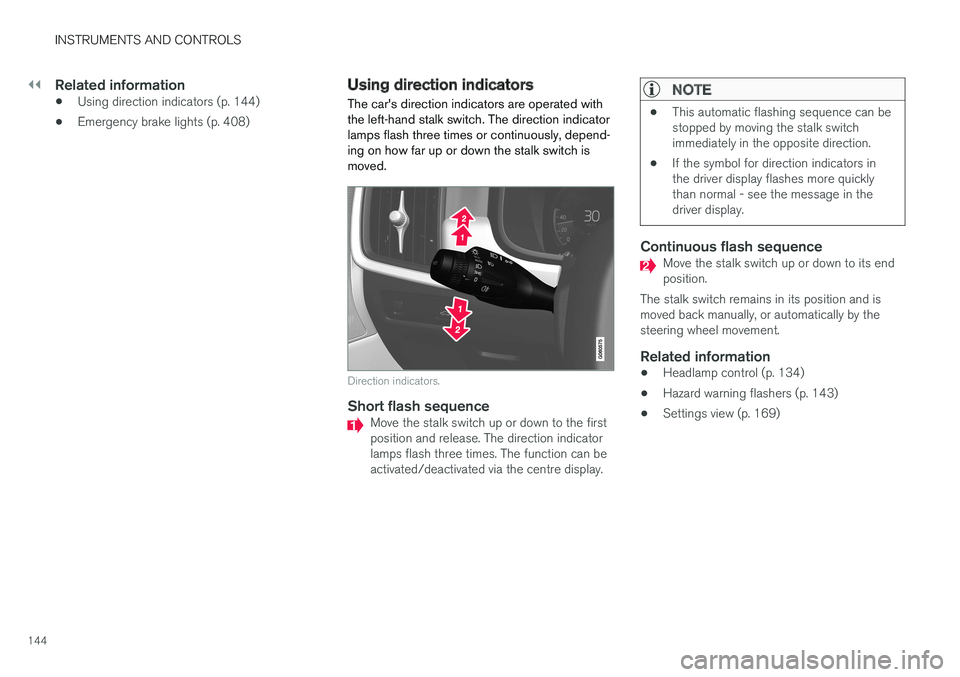
The car's direction indicators are operated with the left-hand stalk switch. The direction indicatorlamps flash three times or continuously, depend-ing on how far up or down the stalk switch ismoved.
Direction indicators.
Short flash sequenceMove the stalk switch up or down to the first position and release. The direction indicatorlamps flash three times. The function can beactivated/deactivated via the centre display.
NOTE
• This automatic flashing sequence can be stopped by moving the stalk switchimmediately in the opposite direction.
• If the symbol for direction indicators inthe driver display flashes more quicklythan normal - see the message in thedriver display.
Continuous flash sequenceMove the stalk switch up or down to its end position.
The stalk switch remains in its position and ismoved back manually, or automatically by thesteering wheel movement.
Related information
• Headlamp control (p. 134)
• Hazard warning flashers (p. 143)
• Settings view (p. 169)
Page 173 of 594
INSTRUMENTS AND CONTROLS
}}
* Option/accessory.171
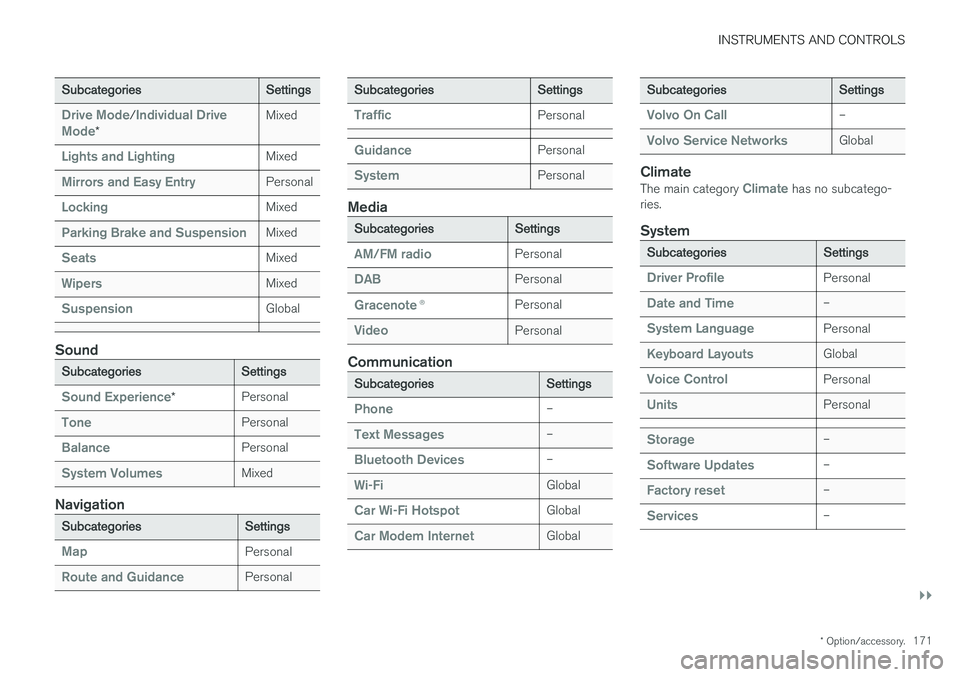
Subcategories Settings
Drive Mode/Individual Drive
Mode* Mixed
Lights and LightingMixed
Mirrors and Easy EntryPersonal
LockingMixed
Parking Brake and SuspensionMixed
SeatsMixed
WipersMixed
SuspensionGlobal
Sound
Subcategories
Settings
Sound Experience*Personal
TonePersonal
BalancePersonal
System VolumesMixed
Navigation
Subcategories
Settings
MapPersonal
Route and GuidancePersonal
SubcategoriesSettings
TrafficPersonal
GuidancePersonal
SystemPersonal
Media
SubcategoriesSettings
AM/FM radioPersonal
DABPersonal
Gracenote®Personal
VideoPersonal
Communication
Subcategories Settings
Phone–
Text Messages–
Bluetooth Devices–
Wi-FiGlobal
Car Wi-Fi HotspotGlobal
Car Modem InternetGlobal
SubcategoriesSettings
Volvo On Call–
Volvo Service NetworksGlobal
ClimateThe main category Climate has no subcatego-
ries.
System
Subcategories Settings
Driver ProfilePersonal
Date and Time–
System LanguagePersonal
Keyboard LayoutsGlobal
Voice ControlPersonal
UnitsPersonal
Storage–
Software Updates–
Factory reset–
Services–
Page 274 of 594
DRIVER SUPPORT
* Option/accessory.
272
Speed-dependent steering force Speed related power steering causes the steer- ing wheel force to increase with the speed of thecar in order to give the driver enhanced sensitiv-ity.
On motorways the steering feels firmer. When parking and at low speed steering is light andrequires only a slight effort.
NOTE
In certain situations the power steering may become too hot and then needs to be tempo-rarily cooled - during this time the powersteering operates with reduced power andturning the steering wheel may then be per-ceived to be slightly heavier. In parallel with the temporarily reduced steer- ing assistance, the driver display shows amessage.
Change the steering force level *To select the steering force level, go to the "Drive modes" section and see the description at thealternative INDIVIDUAL under the heading"Selectable drive modes". For the car models without a drive mode control with its INDIVIDUAL option, the selection ofsteering force is instead made via the centre dis-play's top view and the following search path:
SettingsMy CarDrive ModesSteering force
Selection of steering force is not accessible while turning is in progress.
Related information
•Drive modes
* (p. 400)
Roll Stability Control Roll Stability Control (RSC) is a stabiliser sys- tem that minimises the risk of overturning, forexample during sudden evasive manoeuvres or ifthe car skids.
The RSC system registers if and how much the car's lateral inclination changes. This informationis used to calculate the risk of the car overturn-ing. If the car is at risk, its electronic stability con-trol system engages, the engine torque isreduced and one or more wheels are braked untilthe car has regained its stability.
WARNING
Under normal driving conditions, the RSC sys- tem improves the car's road safety, but thismust not be taken as a reason to increasespeed. Always follow the normal precautionsfor safe driving.
Related information
• Electronic stability control (p. 273)
• Safety (p. 56)
Page 277 of 594
DRIVER SUPPORT
}}
275
Symbols and messages for electronic stability control
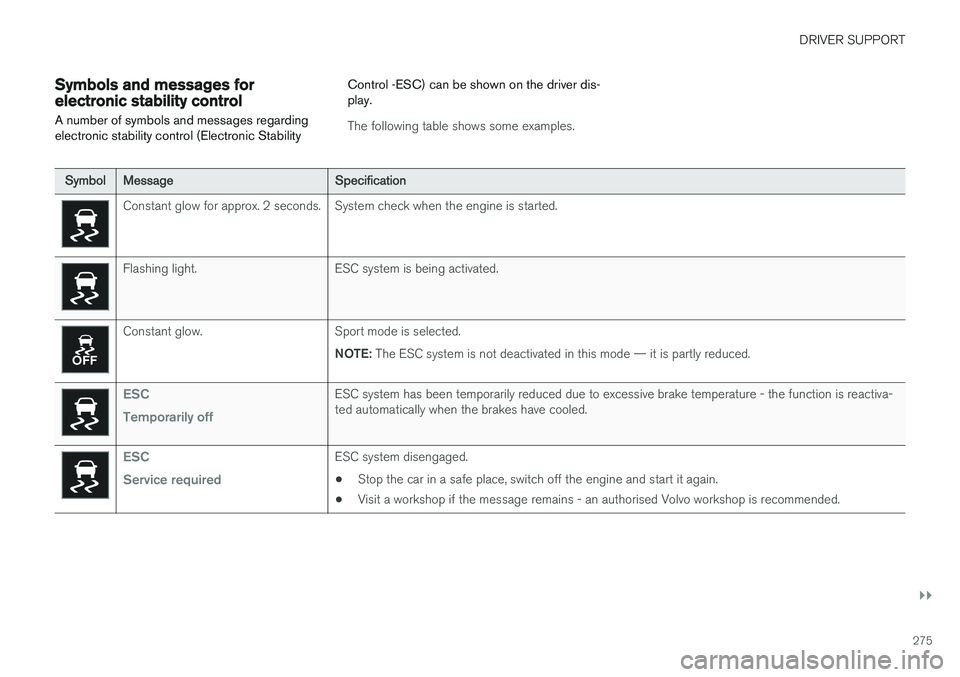
A number of symbols and messages regarding electronic stability control (Electronic Stability Control -ESC) can be shown on the driver dis-play.
The following table shows some examples.
Symbol
Message Specification
Constant glow for approx. 2 seconds. System check when the engine is started.
Flashing light. ESC system is being activated.
Constant glow. Sport mode is selected.
NOTE: The ESC system is not deactivated in this mode — it is partly reduced.
ESC Temporarily offESC system has been temporarily reduced due to excessive brake temperature - the function is reactiva- ted automatically when the brakes have cooled.
ESC Service requiredESC system disengaged.
• Stop the car in a safe place, switch off the engine and start it again.
• Visit a workshop if the message remains - an authorised Volvo workshop is recommended.
Page 281 of 594
DRIVER SUPPORT
}}
* Option/accessory.279
Related information
•Speed limiter
* (p. 277)
• Activating and starting the speed limiter (p. 278)
• Deactivating/reactivating the speed limiter(p. 279)
• Switching off the speed limiter (p. 280)
Deactivating/reactivating the speed limiter
The speed limiter (Speed Limiter - SL) can be temporarily deactivated so that it is set in thestandby mode and can be reactivated later.
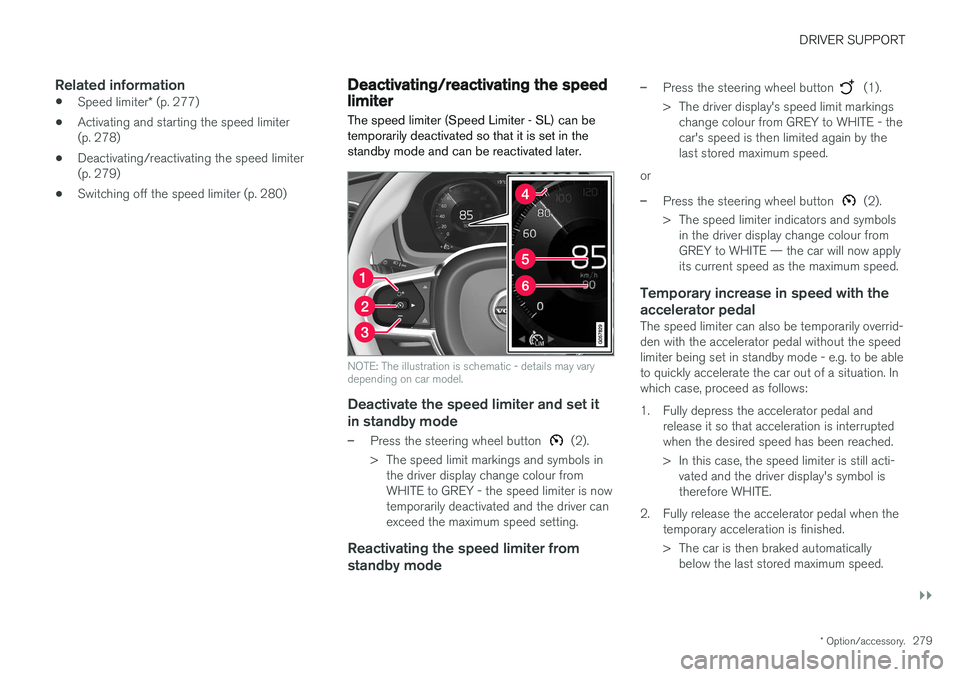
NOTE: The illustration is schematic - details may vary depending on car model.
Deactivate the speed limiter and set it
in standby mode
–Press the steering wheel button (2).
> The speed limit markings and symbols in the driver display change colour from WHITE to GREY - the speed limiter is nowtemporarily deactivated and the driver canexceed the maximum speed setting.
Reactivating the speed limiter from standby mode
–Press the steering wheel button (1).
> The driver display's speed limit markings change colour from GREY to WHITE - the car's speed is then limited again by thelast stored maximum speed.
or
–Press the steering wheel button (2).
> The speed limiter indicators and symbols in the driver display change colour from GREY to WHITE — the car will now applyits current speed as the maximum speed.
Temporary increase in speed with the accelerator pedal
The speed limiter can also be temporarily overrid- den with the accelerator pedal without the speedlimiter being set in standby mode - e.g. to be ableto quickly accelerate the car out of a situation. Inwhich case, proceed as follows:
1. Fully depress the accelerator pedal and release it so that acceleration is interrupted when the desired speed has been reached.
> In this case, the speed limiter is still acti-vated and the driver display's symbol is therefore WHITE.
2. Fully release the accelerator pedal when the temporary acceleration is finished.
> The car is then braked automaticallybelow the last stored maximum speed.
Page 283 of 594
DRIVER SUPPORT
}}
* Option/accessory.281
Automatic speed limiter *
The automatic speed limiter (Automatic Speed
Limiter - ASL) function helps the driver to adaptthe car's maximum speed to the speed shownon the road signs.
The speed limiter function (Speed Limiter — SL) can be changed to automatic speed limiter. The automatic speed limiter uses speed informa- tion from the Road Sign Information 3
function to
automatically adapt the car's maximum speed.
WARNING
The automatic speed limiter function is an aid, and does not work in all driving situations,traffic, weather and road conditions. The driveralways bears responsibility for maintaining thecorrect distance and speed, as well as whenthe automatic speed limiter is being used. Even if the driver clearly sees the speed-rela- ted road sign, the speed from the Road signinformation function many be incorrect - insuch cases the driver must intervene him/herself and accelerate or brake to a suitablespeed. See also the heading "Limitations for Road sign information".
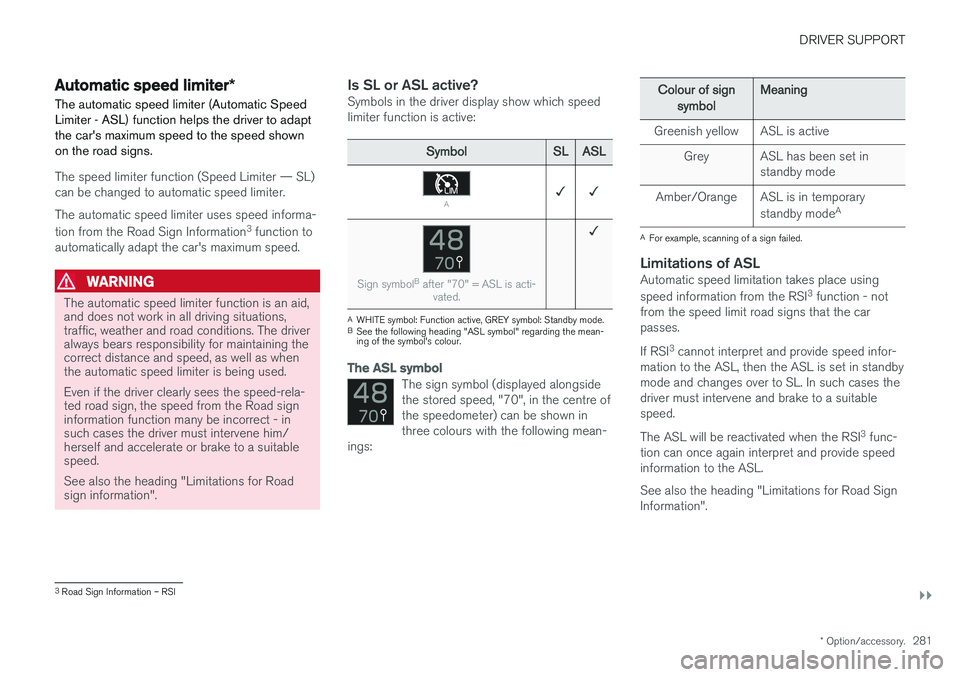
Is SL or ASL active?Symbols in the driver display show which speed limiter function is active:
Symbol SLASL
A✓ ✓
Sign symbol B
after "70" = ASL is acti-
vated.
✓
AWHITE symbol: Function active, GREY symbol: Standby mode.
B See the following heading "ASL symbol" regarding the mean- ing of the symbol's colour.
The ASL symbol
The sign symbol (displayed alongside the stored speed, "70", in the centre ofthe speedometer) can be shown inthree colours with the following mean-
ings:
Colour of sign
symbol Meaning
Greenish yellow ASL is active Grey ASL has been set in standby mode
Amber/Orange ASL is in temporary standby modeA
A
For example, scanning of a sign failed.
Limitations of ASLAutomatic speed limitation takes place using speed information from the RSI 3
function - not
from the speed limit road signs that the car passes. If RSI 3
cannot interpret and provide speed infor-
mation to the ASL, then the ASL is set in standby mode and changes over to SL. In such cases thedriver must intervene and brake to a suitablespeed. The ASL will be reactivated when the RSI 3
func-
tion can once again interpret and provide speed information to the ASL. See also the heading "Limitations for Road Sign Information".
3 Road Sign Information – RSI
Page 288 of 594
DRIVER SUPPORT
286•
Deactivating/reactivating the cruise control (p. 286)
• Deactivating Cruise Control (p. 287)
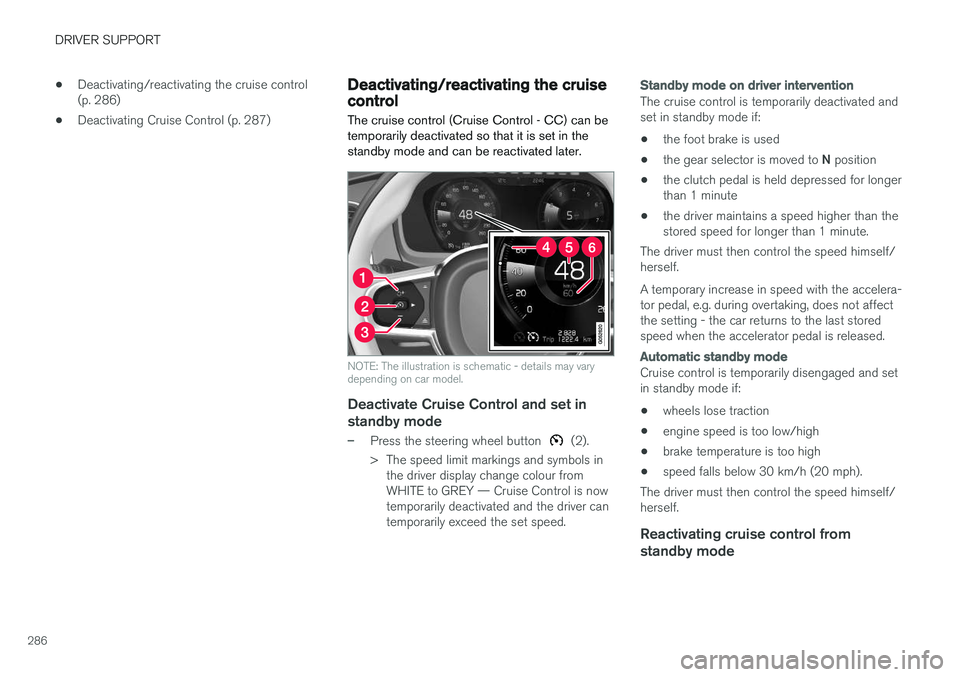
Deactivating/reactivating the cruise control The cruise control (Cruise Control - CC) can be temporarily deactivated so that it is set in thestandby mode and can be reactivated later.
NOTE: The illustration is schematic - details may vary depending on car model.
Deactivate Cruise Control and set in
standby mode
–Press the steering wheel button (2).
> The speed limit markings and symbols in the driver display change colour from WHITE to GREY — Cruise Control is nowtemporarily deactivated and the driver cantemporarily exceed the set speed.
Standby mode on driver intervention
The cruise control is temporarily deactivated and set in standby mode if:
• the foot brake is used
• the gear selector is moved to
N position
• the clutch pedal is held depressed for longerthan 1 minute
• the driver maintains a speed higher than thestored speed for longer than 1 minute.
The driver must then control the speed himself/herself. A temporary increase in speed with the accelera- tor pedal, e.g. during overtaking, does not affectthe setting - the car returns to the last storedspeed when the accelerator pedal is released.
Automatic standby mode
Cruise control is temporarily disengaged and set in standby mode if:
• wheels lose traction
• engine speed is too low/high
• brake temperature is too high
• speed falls below 30 km/h (20 mph).
The driver must then control the speed himself/herself.
Reactivating cruise control from standby mode