brake VOLVO V90 2017 Workshop Manual
[x] Cancel search | Manufacturer: VOLVO, Model Year: 2017, Model line: V90, Model: VOLVO V90 2017Pages: 594, PDF Size: 15.07 MB
Page 393 of 594
STARTING AND DRIVING
* Option/accessory.391
Drive position - D
D is the normal driving position. Shifting up and
down takes place automatically based on the level of acceleration and speed. The car must be stationary when changing gear from R position to
D position.
Manual gearshift mode - M
The manual gearshift mode can be selected at any time while driving. The car engine-brakeswhen the accelerator pedal is released. Select manual gearshift mode by moving the gear selector sideways from position D to the
end position at " ±". The driver display shows
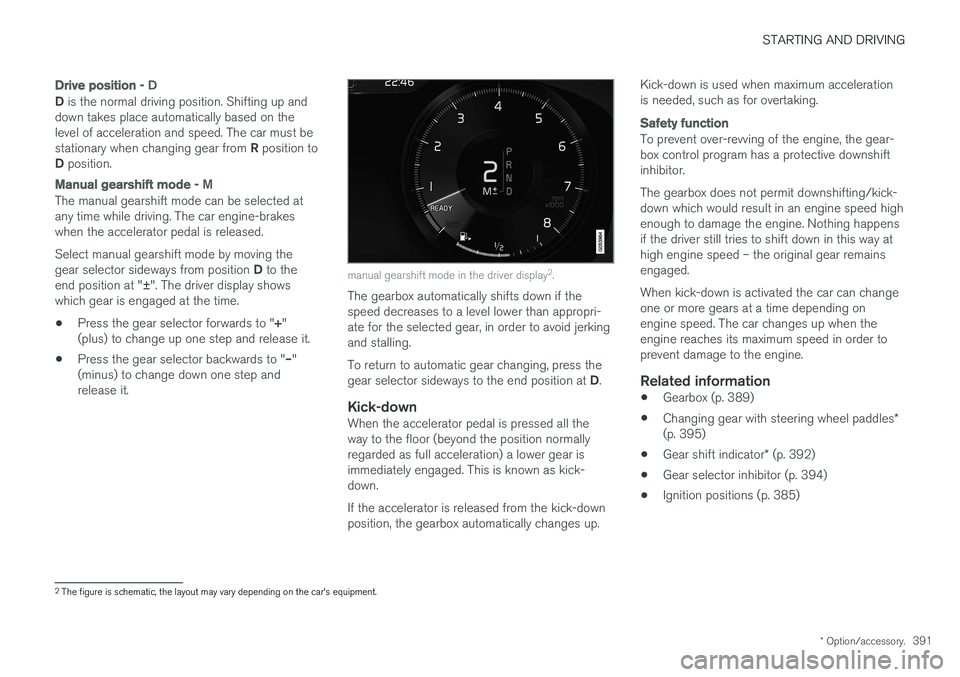
which gear is engaged at the time.
• Press the gear selector forwards to "
+"
(plus) to change up one step and release it.
• Press the gear selector backwards to "
–"
(minus) to change down one step and release it.
manual gearshift mode in the driver display 2
.
The gearbox automatically shifts down if the speed decreases to a level lower than appropri-ate for the selected gear, in order to avoid jerkingand stalling. To return to automatic gear changing, press the gear selector sideways to the end position at D.
Kick-downWhen the accelerator pedal is pressed all the way to the floor (beyond the position normallyregarded as full acceleration) a lower gear isimmediately engaged. This is known as kick-down. If the accelerator is released from the kick-down position, the gearbox automatically changes up. Kick-down is used when maximum accelerationis needed, such as for overtaking.
Safety function
To prevent over-revving of the engine, the gear- box control program has a protective downshiftinhibitor. The gearbox does not permit downshifting/kick- down which would result in an engine speed highenough to damage the engine. Nothing happensif the driver still tries to shift down in this way athigh engine speed – the original gear remainsengaged. When kick-down is activated the car can change one or more gears at a time depending onengine speed. The car changes up when theengine reaches its maximum speed in order toprevent damage to the engine.
Related information
•
Gearbox (p. 389)
• Changing gear with steering wheel paddles
*
(p. 395)
• Gear shift indicator
* (p. 392)
• Gear selector inhibitor (p. 394)
• Ignition positions (p. 385)
2
The figure is schematic, the layout may vary depending on the car's equipment.
Page 394 of 594
STARTING AND DRIVING
* Option/accessory.
392
Manual gearbox
With a manual gearbox, the driver selects a suit- able gear manually, according to speed andpower requirements at the time.
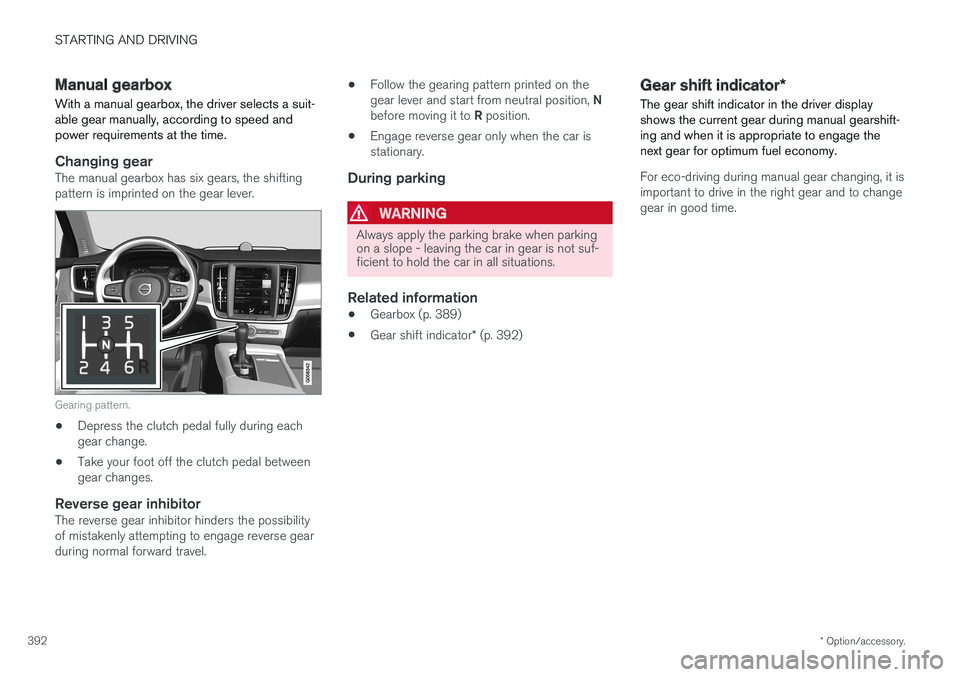
Changing gearThe manual gearbox has six gears, the shifting pattern is imprinted on the gear lever.
Gearing pattern.
• Depress the clutch pedal fully during each gear change.
• Take your foot off the clutch pedal betweengear changes.
Reverse gear inhibitorThe reverse gear inhibitor hinders the possibilityof mistakenly attempting to engage reverse gearduring normal forward travel. •
Follow the gearing pattern printed on the gear lever and start from neutral position,
N
before moving it to R position.
• Engage reverse gear only when the car is stationary.
During parking
WARNING
Always apply the parking brake when parking on a slope - leaving the car in gear is not suf-ficient to hold the car in all situations.
Related information
• Gearbox (p. 389)
• Gear shift indicator
* (p. 392)
Gear shift indicator *
The gear shift indicator in the driver display shows the current gear during manual gearshift-ing and when it is appropriate to engage thenext gear for optimum fuel economy.
For eco-driving during manual gear changing, it is important to drive in the right gear and to changegear in good time.
Page 396 of 594
STARTING AND DRIVING
394
Gear selector inhibitorThe gear selector inhibitor prevents accidental changing between different gear positions in anautomatic gearbox.
There are two different types of gear selector inhibitor - mechanical and automatic.
Mechanical gear selector inhibitor
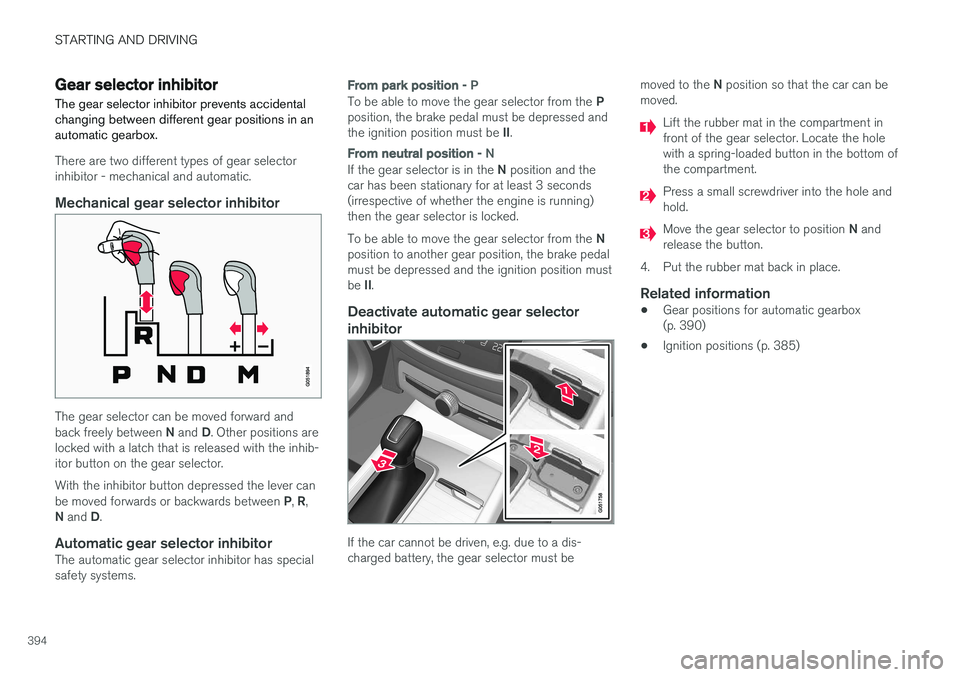
The gear selector can be moved forward and back freely between N and D. Other positions are
locked with a latch that is released with the inhib- itor button on the gear selector. With the inhibitor button depressed the lever can be moved forwards or backwards between P, R ,
N and D.
Automatic gear selector inhibitorThe automatic gear selector inhibitor has special safety systems.
From park position - P
To be able to move the gear selector from the P
position, the brake pedal must be depressed and the ignition position must be II.
From neutral position - N
If the gear selector is in the N position and the
car has been stationary for at least 3 seconds (irrespective of whether the engine is running)then the gear selector is locked. To be able to move the gear selector from the N
position to another gear position, the brake pedal must be depressed and the ignition position must be II.
Deactivate automatic gear selector
inhibitor
If the car cannot be driven, e.g. due to a dis- charged battery, the gear selector must be moved to the
N position so that the car can be
moved.
Lift the rubber mat in the compartment in front of the gear selector. Locate the holewith a spring-loaded button in the bottom ofthe compartment.
Press a small screwdriver into the hole and hold.
Move the gear selector to position N and
release the button.
4. Put the rubber mat back in place.
Related information
• Gear positions for automatic gearbox (p. 390)
• Ignition positions (p. 385)
Page 399 of 594
STARTING AND DRIVING
}}
397
With automatic gearbox
• Stop the car with the foot brake and then keep your foot on the brake pedal - theengine stops automatically.
With manual gearbox
• Declutch, set the gear lever in neutral posi-tion and release the clutch pedal - theengine stops automatically.
In drive mode
Eco or Comfort3 , the engine may
auto-stop before the car is completely stationary. With the
Adaptive cruise or Pilot Assist func-
tion activated, the engine will autostop after approximately three seconds. See the section "Conditions for Start/Stop func- tion".
AutostartThe following is required for the engine to auto-start: With automatic gearbox
• Release the brake pedal - the engine will autostart and you can continue driving. On anuphill gradient hill start assist (HSA) engages, which prevents the car from rollingbackwards.
• When the
Auto hold function is activated,
auto-start is delayed until the accelerator pedal is depressed.
• When the
Adaptive cruise or Pilot Assistfunction are activated, the engine will autos- tart when the accelerator pedal is depressed, or by pressing the
button on the left
keypad of the steering wheel.
• Maintain foot pressure on the brake pedal and depress the accelerator pedal - theengine auto-starts.
• On a downhill gradient: Release pressure onthe brake pedal slightly so that the carbegins to roll - the engine will auto-start aftera slight speed increase.
With manual gearbox
• With the gear lever in neutral position:Depress the clutch pedal or depress theaccelerator pedal - the engine starts.
• On a downhill gradient: Release pressure onthe brake pedal slightly so that the carbegins to roll - the engine will auto-start aftera slight speed increase.
Symbols in the driver display
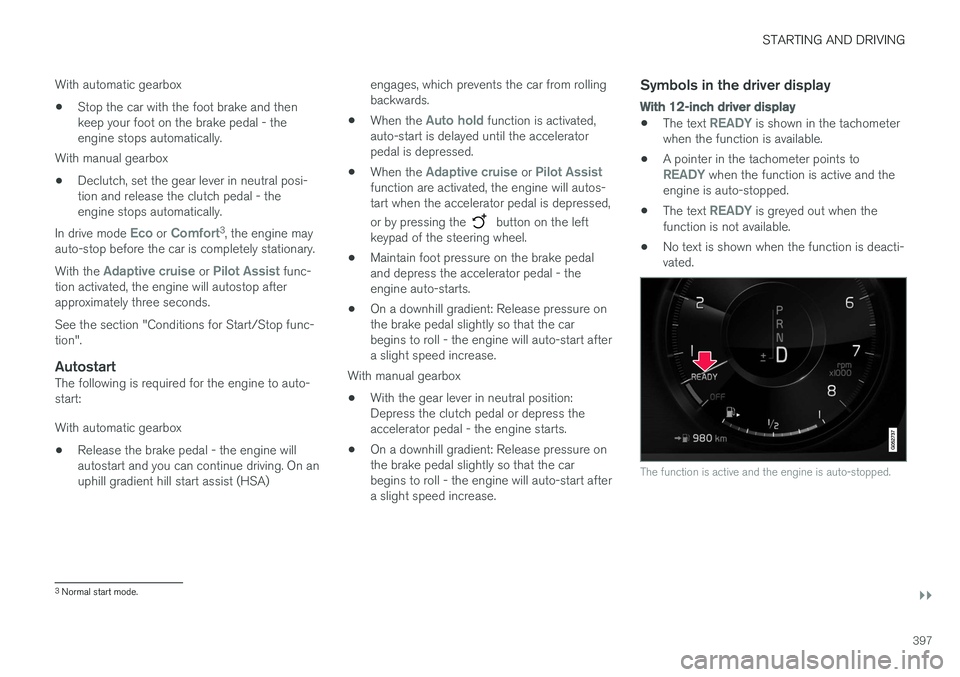
With 12-inch driver display
•
The text READY is shown in the tachometer
when the function is available.
• A pointer in the tachometer points to
READY when the function is active and the
engine is auto-stopped.
• The text
READY is greyed out when the
function is not available.
• No text is shown when the function is deacti- vated.
The function is active and the engine is auto-stopped.
3
Normal start mode.
Page 402 of 594
||
STARTING AND DRIVING
* Option/accessory.
400
Related information
• Start/Stop (p. 396)
• Using the Start/Stop function (p. 396)
• Support battery (p. 533)
Drive modes
*
Selection of drive mode affects the car's driving characteristics in order to enhance the drivingexperience and facilitate driving in special situa-tions.
Using the drive modes it is possible to quickly have access to the car's numerous functions andsettings for different driving needs. The followingsystems are adapted to obtain the best possibledriving characteristics in each respective drivemode: • Steering
• Engine/gearbox 5
/all-wheel drive *
• Brakes
• Shock absorption
• Driver display
• Start/Stop function
• Climate settings
Select the drive mode that best suits the current driving conditions. Remember that not all drivemodes can be selected in all situations.
Selecting drive mode
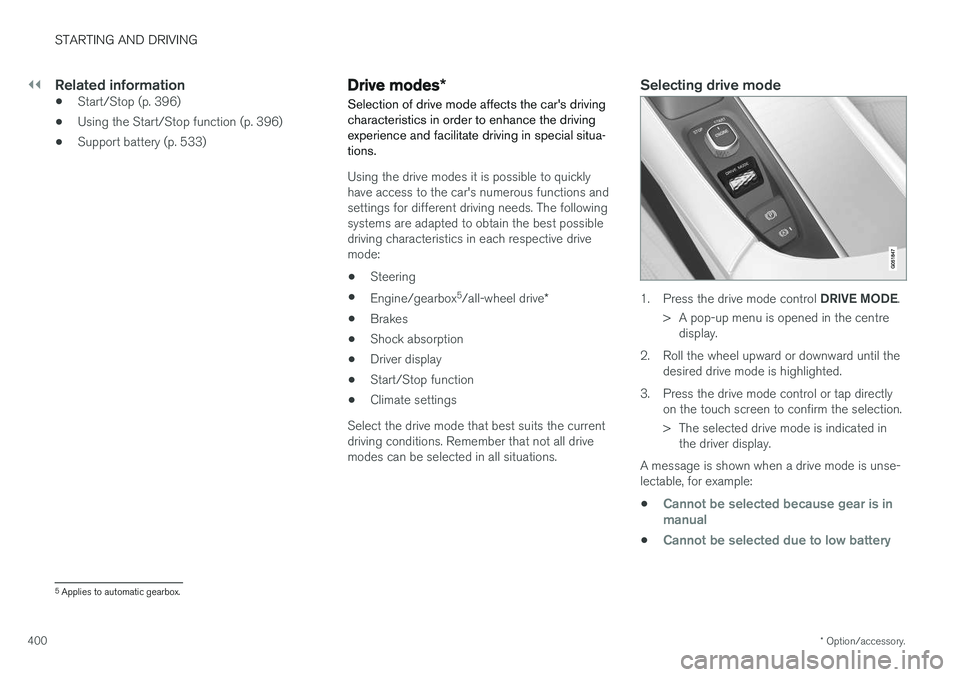
1. Press the drive mode control DRIVE MODE.
> A pop-up menu is opened in the centre display.
2. Roll the wheel upward or downward until the desired drive mode is highlighted.
3. Press the drive mode control or tap directly on the touch screen to confirm the selection.
> The selected drive mode is indicated inthe driver display.
A message is shown when a drive mode is unse- lectable, for example:
•
Cannot be selected because gear is in manual
•Cannot be selected due to low battery
5 Applies to automatic gearbox.
Page 404 of 594
||
STARTING AND DRIVING
* Option/accessory.
402 3.
In
Presets, select a drive mode to start from:Eco, Comfort or Dynamic.
Possible adjustments apply to settings for:
•
Driver Display
•Steering force
•Powertrain Characteristics
•Brake Characteristics
•Suspension Control
•ECO Climate
•Start/Stop.
Related information
• Speed-dependent steering force (p. 272)
• Level control
* and shock absorption (p. 405)
• Start/Stop (p. 396)
• Drive mode ECO (p. 402)
• All-wheel drive
* (p. 405)
Drive mode ECO
Driving mode ECO mode optimises the car's
driving characteristics for more fuel efficient and environmentally-conscious driving.
Use this drive mode to save fuel and the environ- ment. The following properties are adapted for Eco driv- ing:
• Gearbox gearshift points 8
.
• Engine management and response from theaccelerator pedal.
• The Eco Coast 9
freewheel function is acti-
vated and engine braking is deactivatedwhen the accelerator pedal is released atspeeds between 65 and 140 km/h(40 and 87 mph).
• Some of the climate control system's set-tings work at reduced power or are deacti-vated.
• The driver display shows information in anECO gauge which facilitates environmentally-conscious and fuel-efficient driving.
Selecting ECO modeThe Eco mode is deactivated when the engine isswitched off, and it must therefore be activatedafter each time the engine is started. The driver display shows ECO when the function is acti-vated.
With drive mode control
*
1.
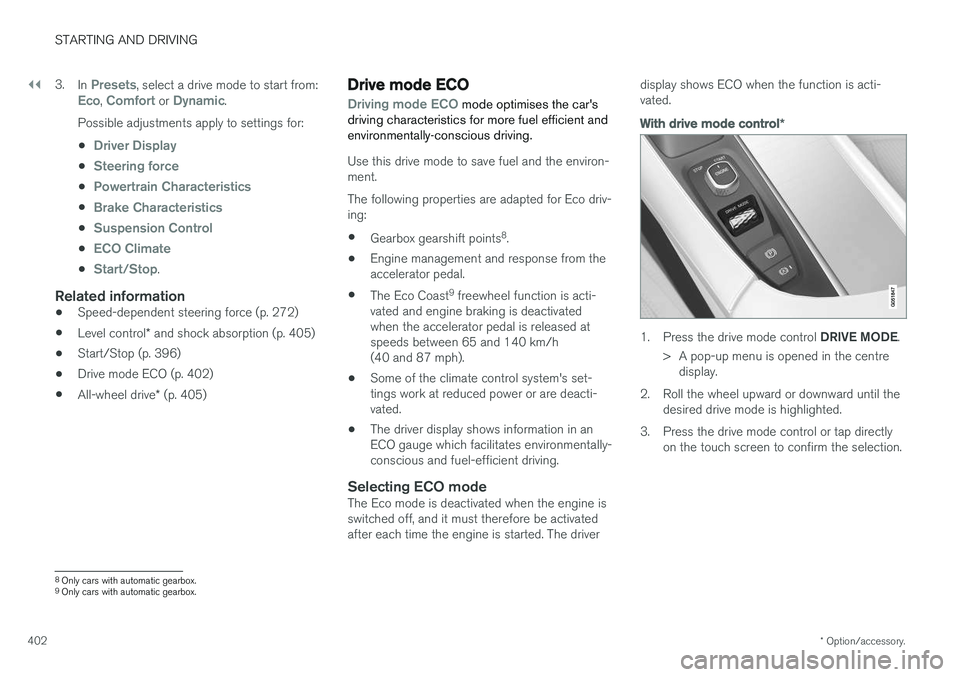
Press the drive mode control DRIVE MODE.
> A pop-up menu is opened in the centre display.
2. Roll the wheel upward or downward until the desired drive mode is highlighted.
3. Press the drive mode control or tap directly on the touch screen to confirm the selection.
8Only cars with automatic gearbox.
9 Only cars with automatic gearbox.
Page 405 of 594
STARTING AND DRIVING
}}
* Option/accessory.403
In the centre display's function view
A car without drive mode con- trol has a function button for
Driving mode ECO in the
centre display's function view.
–Press the button in order to activate the function.
> An indicator in the button illuminates when the function is activated.
Freewheel function Eco Coast 10The freewheel function Eco Coast means in prac- tice that engine braking ceases, meaning in turnthat the car's kinetic energy is used to freewheelfor longer distances. When the driver releasesthe accelerator pedal the gearbox is automaticallydisengaged from the engine whose speed isreduced to idling speed with reduced consump-tion. The function is best used where it is possible to freewheel a long way, e.g. roads with a slightdownhill gradient or when there is a predictablespeed reduction to freewheel into a zone with alower speed limit.
Activating the freewheel function
The function is activated when the accelerator pedal is fully released, in combination with thefollowing parameters:
• Drive mode
Eco is activated.
• The gear selector is in
D position.
• Speed within the range of approx. 65-140 km/h (40-87 mph).
• The road's downhill gradient is not steeperthan approx. 6%.
The driver display shows
COASTING when the
freewheel function is being used.
Limitations
The freewheel function is not available if:
• Engine and/or gearbox are not at normal operating temperature.
• The cruise control is activated.
• The gear selector is moved from the
D posi-
tion and the manual position.
• The speed is outside the range ofapprox. 65-140 km/h (40-87 mph).
• The road's downhill gradient is steeper thanapprox. 6%.
• Manual gear changing is performed with the steering wheel paddles
*.
Deactivating and switching off the freewheel function
In certain situations it may be desirable to deacti- vate or switch off the function in order to useengine braking. Examples of such situations maybe on steep downhill gradients or before animminent overtaking manoeuvre - in order to beable to do it in the safest way possible. Deactivate the freewheel function as follows:
• Actuate the accelerator or brake pedal.
• Move the gear selector to manual position.
• Changing gear with steering wheel paddles
*.
Switch off the freewheel function as follows:
• Change drive mode
*, or switch off the
Driving mode ECO in the function view.
Even without the freewheel function, it is possible to freewheel for short distances. This, in turn,reduces consumption. However, for the best fueleconomy it is better to have the freewheel func-tion activated and be able to freewheel for longerdistances.
ECO gauge in the driver displayThe ECO gauge indicates how fuel-efficient thedriving is:
10 Only cars with automatic gearbox.
Page 408 of 594
STARTING AND DRIVING
406
Brake functions
The car's brakes are used to reduce the speed or prevent the car from rolling.
Besides the foot brake and parking brake, the car is equipped with several automatic brake assistfunctions. These can assist the driver by notneeding to keep his/her foot on the brake pedalwhen stationary at a traffic light, when starting onan uphill gradient or when driving on a downhillgradient. Depending on the car's equipment, the following auto braking functions are available:
• Automatic braking when stationary (AutoHold)
• Hill start assist (Hill Start Assist)
• Auto braking after a collision
• City Safety
Related information
•
Foot brake (p. 406)
• Parking brake (p. 409)
• Hill start assist (p. 412)
• Automatic braking when stationary (p. 412)
• Auto braking after a collision (p. 408)
Foot brake
The foot brake is used to reduce the car's speed while driving.
Foot brake systemThe car is equipped with two brake circuits. If a brake circuit is damaged, the brake pedal willengage deeper. Higher pressure on the pedal willtherefore be needed to produce the normal brak-ing effect. The driver's brake pedal pressure is assisted by a brake servo.
WARNING
The brake servo only works when the engine is running.
If the foot brake is used when the engine is switched off then the pedal will feel stiff and ahigher pedal pressure must be used to brake thecar. In very hilly terrain or when driving with a heavy load the brakes can be relieved by using enginebraking in manual gearshift mode. Engine brakingis most efficiently used if the same gear is useddownhill as up.
Anti-lock braking systemThe car has anti-lock brakes, Anti-lock BrakingSystem (ABS), which prevent the wheels fromlocking while braking and allows maintained steering control. Vibration may be felt in thebrake pedal when this is engaged and this is nor-mal. A short test of the ABS system is made automat- ically after the engine has been started when thedriver releases the brake pedal. A further auto-matic test of the system may be made at lowspeed. The test may be experienced as pulses inthe brake pedal.
Braking on wet roadsWhen driving for a prolonged period of time inheavy rain without braking, the braking effect maybe delayed slightly when next using the brakes.This may also be the case after a car wash. It isthen necessary to depress the brake pedal moreforcefully. You should therefore maintain agreater distance to the vehicles in front. Brake the car firmly after driving on wet roads or using a car wash. This warms up the brake discs,enabling them to dry faster and protecting themagainst corrosion. Bear in mind the current trafficsituation when braking.
Braking on salted roadsWhen driving on salted roads, a layer of salt mayform on the brake discs and brake linings. Thismay extend braking distance. You should there-fore maintain an extra large safety distance tovehicles in front. In addition, make sure you dothe following:
Page 409 of 594
STARTING AND DRIVING
407
•
Brake now and again to remove any layer of salt. Make sure that other road users are notput at risk by the braking.
• Gently depress the brake pedal after finish-ing driving and before starting your next trip.
MaintenanceTo keep the car as safe and reliable as possible,follow the Volvo service intervals as specified inthe Service and Warranty Booklet. New and replaced brake linings and brake discs do not provide optimal braking effect until theyhave been "worn in" a few hundred kilometres.Compensate for the reduced braking effect bydepressing the brake pedal harder. Volvo recom-mends only fitting brake linings that are approvedfor your Volvo.
IMPORTANT
The wear on the brake system's components must be checked regularly. Contact a workshop for information about the procedure or engage a workshop to carry outthe inspection - an authorised Volvo work-shop is recommended.
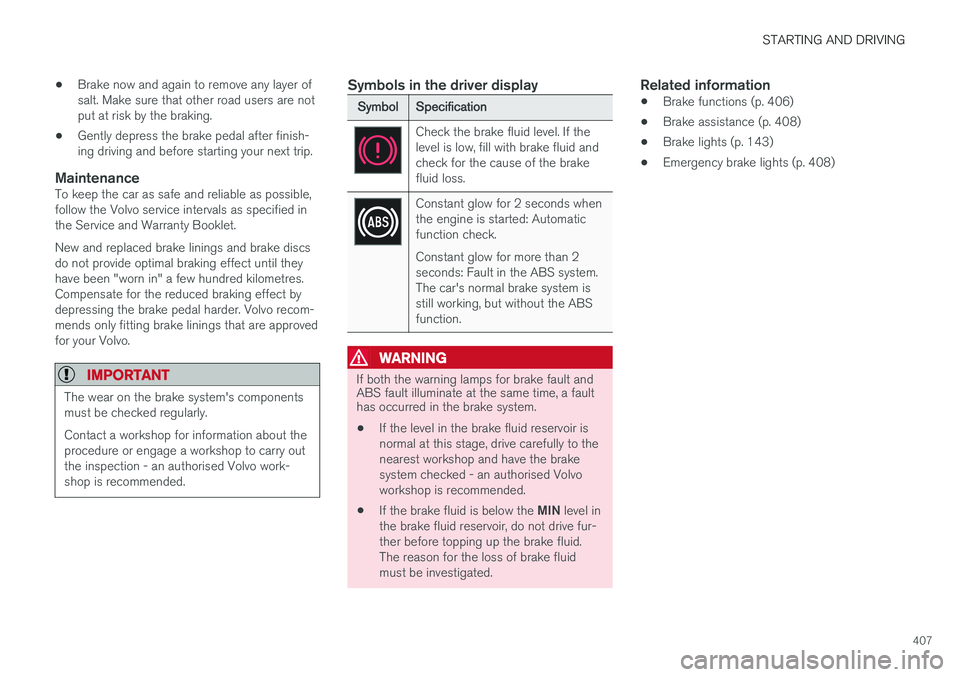
Symbols in the driver display
Symbol
Specification
Check the brake fluid level. If the level is low, fill with brake fluid andcheck for the cause of the brakefluid loss.
Constant glow for 2 seconds when the engine is started: Automaticfunction check. Constant glow for more than 2 seconds: Fault in the ABS system.The car's normal brake system isstill working, but without the ABSfunction.
WARNING
If both the warning lamps for brake fault and ABS fault illuminate at the same time, a faulthas occurred in the brake system.
• If the level in the brake fluid reservoir is normal at this stage, drive carefully to thenearest workshop and have the brakesystem checked - an authorised Volvoworkshop is recommended.
• If the brake fluid is below the
MIN level in
the brake fluid reservoir, do not drive fur-ther before topping up the brake fluid.The reason for the loss of brake fluidmust be investigated.
Related information
• Brake functions (p. 406)
• Brake assistance (p. 408)
• Brake lights (p. 143)
• Emergency brake lights (p. 408)
Page 410 of 594
STARTING AND DRIVING
408
Emergency brake lightsEmergency brake lights are activated to alert vehicles behind about heavy braking. The func-tion means that the brake light flashes instead of- as in normal braking - shining with a constantglow.
The emergency brake lights are activated during heavy braking or if the ABS system is activated athigh speeds. After emergency braking to a lowspeed, the brake lights return from flashing to thenormal constant glow. The car's hazard warningflashers are activated at the same time. Theseflash until the driver accelerates the car to ahigher speed again or switches off the hazardwarning flashers.
Related information
• Foot brake (p. 406)
• Hazard warning flashers (p. 143)
• Brake lights (p. 143)
Brake assistance
The brake assist system, BAS (Brake Assist System), helps to increase brake force duringbraking, thereby shortening the braking distance.
The system detects the way in which the driver brakes and increases brake force where neces-sary. The brake force can be boosted up to thelevel when the ABS system is engaged. Thefunction is suspended when the pressure on thebrake pedal decreases.
NOTE
When BAS is activated the brake pedal low- ers slightly more than usual, depress (hold)the brake pedal as long as necessary. When the brake pedal is released, all braking ceases.
Related information
• Foot brake (p. 406)
Auto braking after a collision In the event of a collision in which the activation level is reached for the pyrotechnic seatbelt ten-sioners or airbags, or if a collision with a largeanimal is detected, the car's brakes are automat-ically applied. This function is to prevent orreduce the effects of any subsequent collision.
After a serious collision there is a risk that it is no longer possible to control and steer the car. Inorder to avoid or mitigate a possible further colli-sion with a vehicle or an object in the vehicle'spath, the auto braking system is activated auto-matically and brakes the car in a safe manner. Brake lights and hazard warning lights are acti- vated during braking. When the car has stopped,the hazard warning lights continue to flash andthe parking brake is applied. If braking is not appropriate, e.g. if there is a risk of being hit by following traffic, the system can beoverridden by the driver depressing the accelera-tor pedal. The function assumes that the brake system is intact after the collision. See also the sections "Rear Collision Warning" and "Blind Spot Information".
Related information
• Brake functions (p. 406)
• Seatbelt tensioner (p. 59)
• Airbags (p. 63)