heating VOLVO V90 2017 User Guide
[x] Cancel search | Manufacturer: VOLVO, Model Year: 2017, Model line: V90, Model: VOLVO V90 2017Pages: 594, PDF Size: 15.07 MB
Page 172 of 594
||
INSTRUMENTS AND CONTROLS
170
Types of settings
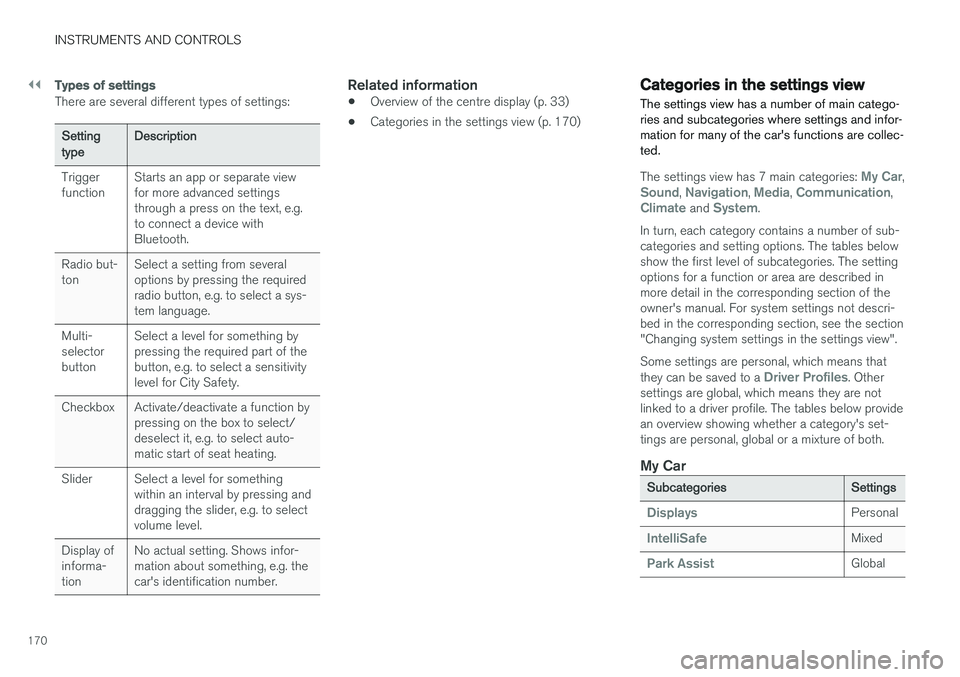
There are several different types of settings:
Setting typeDescription
Trigger function Starts an app or separate viewfor more advanced settingsthrough a press on the text, e.g.to connect a device withBluetooth.
Radio but-ton Select a setting from severaloptions by pressing the requiredradio button, e.g. to select a sys-tem language.
Multi-selectorbutton Select a level for something bypressing the required part of thebutton, e.g. to select a sensitivitylevel for City Safety.
Checkbox Activate/deactivate a function by pressing on the box to select/deselect it, e.g. to select auto-matic start of seat heating.
Slider Select a level for something within an interval by pressing anddragging the slider, e.g. to selectvolume level.
Display ofinforma-tion No actual setting. Shows infor-mation about something, e.g. thecar's identification number.
Related information
•
Overview of the centre display (p. 33)
• Categories in the settings view (p. 170)
Categories in the settings view The settings view has a number of main catego- ries and subcategories where settings and infor-mation for many of the car's functions are collec-ted.
The settings view has 7 main categories: My Car,Sound, Navigation, Media, Communication,Climate and System.
In turn, each category contains a number of sub- categories and setting options. The tables belowshow the first level of subcategories. The settingoptions for a function or area are described inmore detail in the corresponding section of theowner's manual. For system settings not descri-bed in the corresponding section, see the section"Changing system settings in the settings view". Some settings are personal, which means that they can be saved to a
Driver Profiles. Other
settings are global, which means they are not linked to a driver profile. The tables below providean overview showing whether a category's set-tings are personal, global or a mixture of both.
My Car
Subcategories Settings
DisplaysPersonal
IntelliSafeMixed
Park AssistGlobal
Page 190 of 594
||
CLIMATE CONTROL
* Option/accessory.
188
Rear climate control *
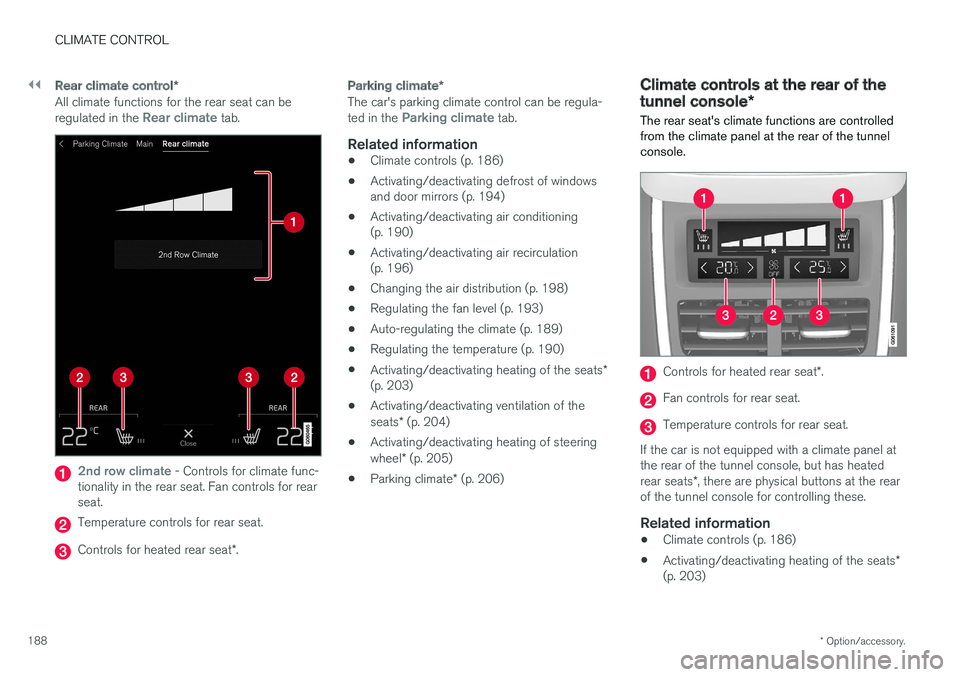
All climate functions for the rear seat can be regulated in the Rear climate tab.
2nd row climate - Controls for climate func-
tionality in the rear seat. Fan controls for rear seat.
Temperature controls for rear seat.
Controls for heated rear seat *.
Parking climate *
The car's parking climate control can be regula- ted in the Parking climate tab.
Related information
•Climate controls (p. 186)
• Activating/deactivating defrost of windows and door mirrors (p. 194)
• Activating/deactivating air conditioning(p. 190)
• Activating/deactivating air recirculation(p. 196)
• Changing the air distribution (p. 198)
• Regulating the fan level (p. 193)
• Auto-regulating the climate (p. 189)
• Regulating the temperature (p. 190)
• Activating/deactivating heating of the seats
*
(p. 203)
• Activating/deactivating ventilation of the seats
* (p. 204)
• Activating/deactivating heating of steeringwheel
* (p. 205)
• Parking climate
* (p. 206)
Climate controls at the rear of the tunnel console *
The rear seat's climate functions are controlled
from the climate panel at the rear of the tunnel console.
Controls for heated rear seat *.
Fan controls for rear seat.
Temperature controls for rear seat.
If the car is not equipped with a climate panel at the rear of the tunnel console, but has heated rear seats *, there are physical buttons at the rear
of the tunnel console for controlling these.
Related information
• Climate controls (p. 186)
• Activating/deactivating heating of the seats
*
(p. 203)
Page 194 of 594
||
CLIMATE CONTROL
* Option/accessory.
192
Temperature control.
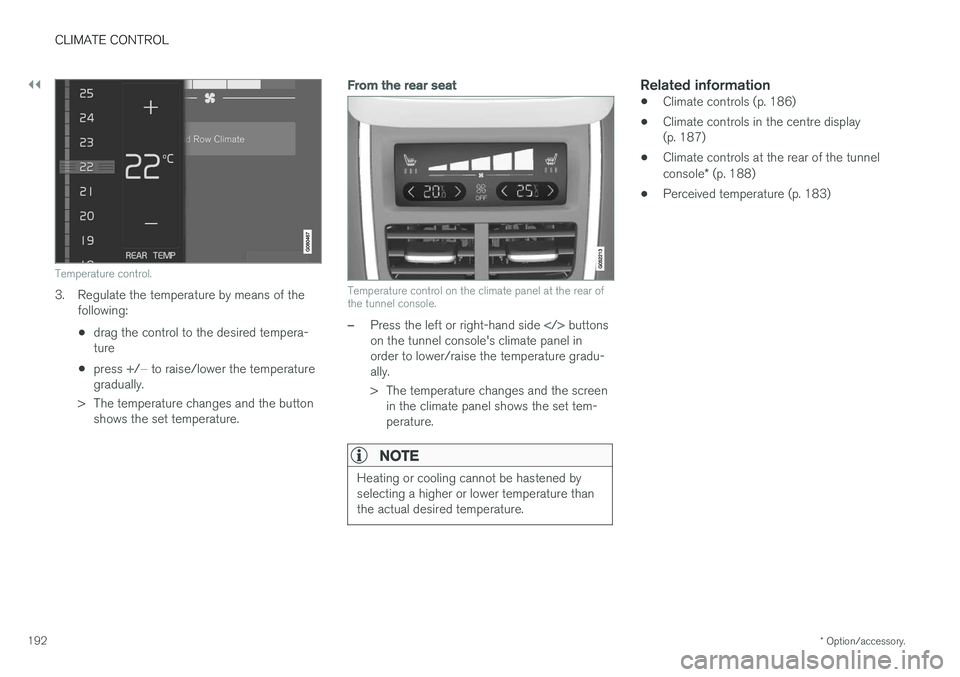
3. Regulate the temperature by means of the
following:
• drag the control to the desired tempera- ture
• press
+/− to raise/lower the temperature
gradually.
> The temperature changes and the button shows the set temperature.
From the rear seat
Temperature control on the climate panel at the rear of the tunnel console.
–Press the left or right-hand side buttons
on the tunnel console's climate panel in order to lower/raise the temperature gradu-ally.
> The temperature changes and the screen in the climate panel shows the set tem- perature.
NOTE
Heating or cooling cannot be hastened by selecting a higher or lower temperature thanthe actual desired temperature.
Related information
• Climate controls (p. 186)
• Climate controls in the centre display (p. 187)
• Climate controls at the rear of the tunnel console
* (p. 188)
• Perceived temperature (p. 183)
Page 198 of 594
||
CLIMATE CONTROL
* Option/accessory.
196
Activating/deactivating heated rear window and door mirrors
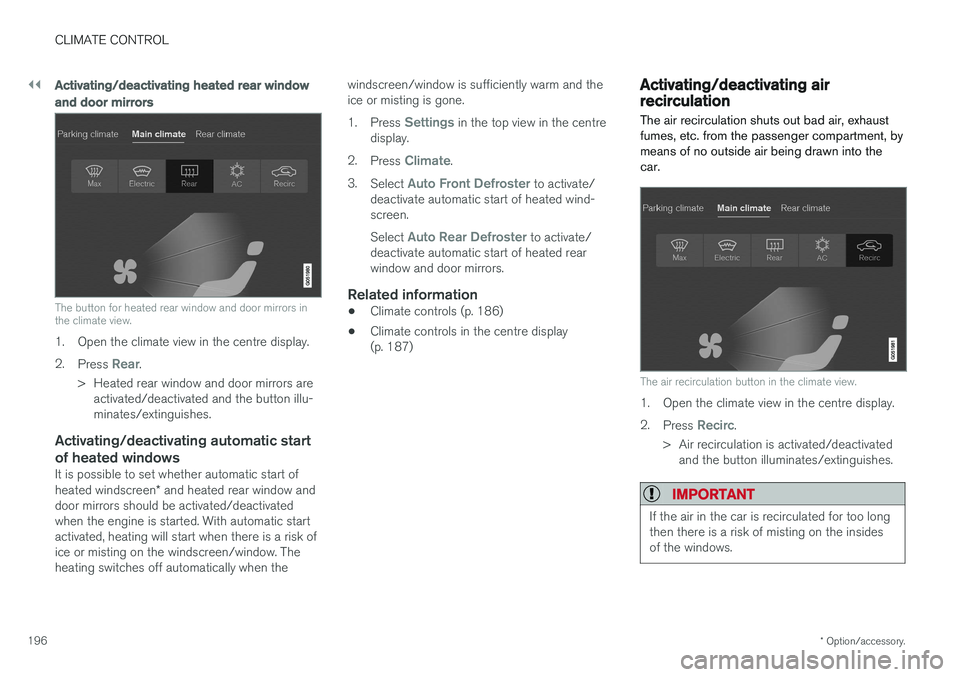
The button for heated rear window and door mirrors in the climate view.
1. Open the climate view in the centre display. 2.
Press
Rear.
> Heated rear window and door mirrors are activated/deactivated and the button illu- minates/extinguishes.
Activating/deactivating automatic start of heated windows
It is possible to set whether automatic start of heated windscreen * and heated rear window and
door mirrors should be activated/deactivated when the engine is started. With automatic startactivated, heating will start when there is a risk ofice or misting on the windscreen/window. Theheating switches off automatically when the windscreen/window is sufficiently warm and theice or misting is gone. 1.
Press
Settings in the top view in the centre
display.
2. Press
Climate.
3. Select
Auto Front Defroster to activate/
deactivate automatic start of heated wind- screen. Select
Auto Rear Defroster to activate/
deactivate automatic start of heated rear window and door mirrors.
Related information
• Climate controls (p. 186)
• Climate controls in the centre display(p. 187)
Activating/deactivating air recirculation
The air recirculation shuts out bad air, exhaust fumes, etc. from the passenger compartment, bymeans of no outside air being drawn into thecar.
The air recirculation button in the climate view.
1. Open the climate view in the centre display. 2. Press
Recirc.
> Air recirculation is activated/deactivated and the button illuminates/extinguishes.
IMPORTANT
If the air in the car is recirculated for too long then there is a risk of misting on the insidesof the windows.
Page 205 of 594
CLIMATE CONTROL
}}
* Option/accessory.203
Activating/deactivating heating of the seats*
The seats can be heated in order to increase comfort for driver and passengers when it iscold.
Activating/deactivating heating of the
front seat *
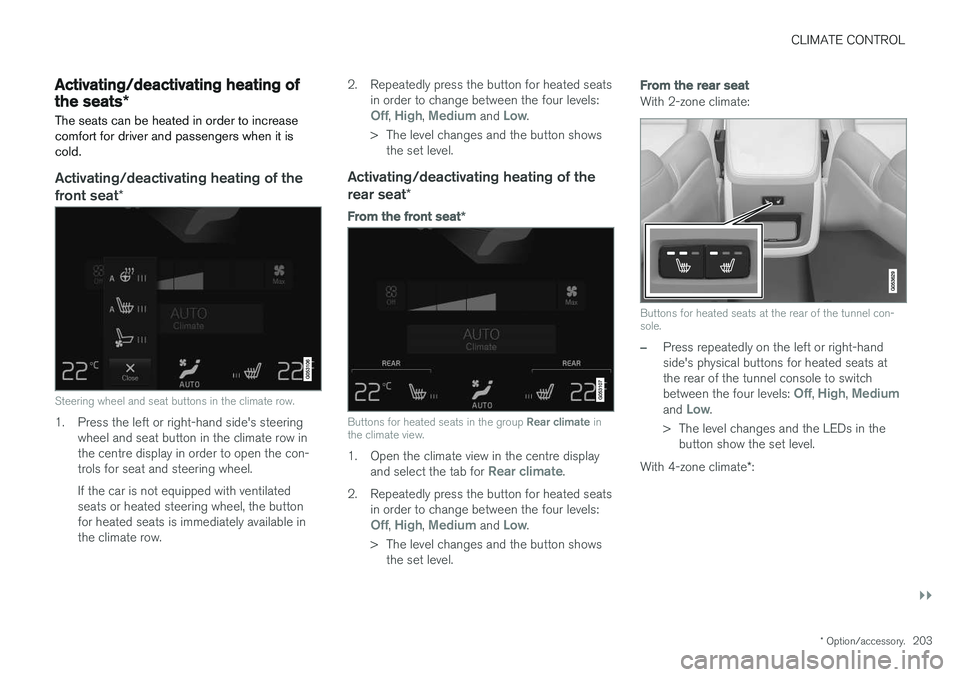
Steering wheel and seat buttons in the climate row.
1. Press the left or right-hand side's steering
wheel and seat button in the climate row in the centre display in order to open the con-trols for seat and steering wheel. If the car is not equipped with ventilated seats or heated steering wheel, the buttonfor heated seats is immediately available inthe climate row. 2. Repeatedly press the button for heated seats
in order to change between the four levels:
Off, High, Medium and Low.
> The level changes and the button shows the set level.
Activating/deactivating heating of the rear seat *
From the front seat *
Buttons for heated seats in the group Rear climate in
the climate view.
1. Open the climate view in the centre display
and select the tab for Rear climate.
2. Repeatedly press the button for heated seats in order to change between the four levels:
Off, High, Medium and Low.
> The level changes and the button shows the set level.
From the rear seat
With 2-zone climate:
Buttons for heated seats at the rear of the tunnel con- sole.
–Press repeatedly on the left or right-hand side's physical buttons for heated seats atthe rear of the tunnel console to switch between the four levels:
Off, High, Mediumand Low.
> The level changes and the LEDs in the button show the set level.
With 4-zone climate *:
Page 206 of 594
||
CLIMATE CONTROL
* Option/accessory.
204
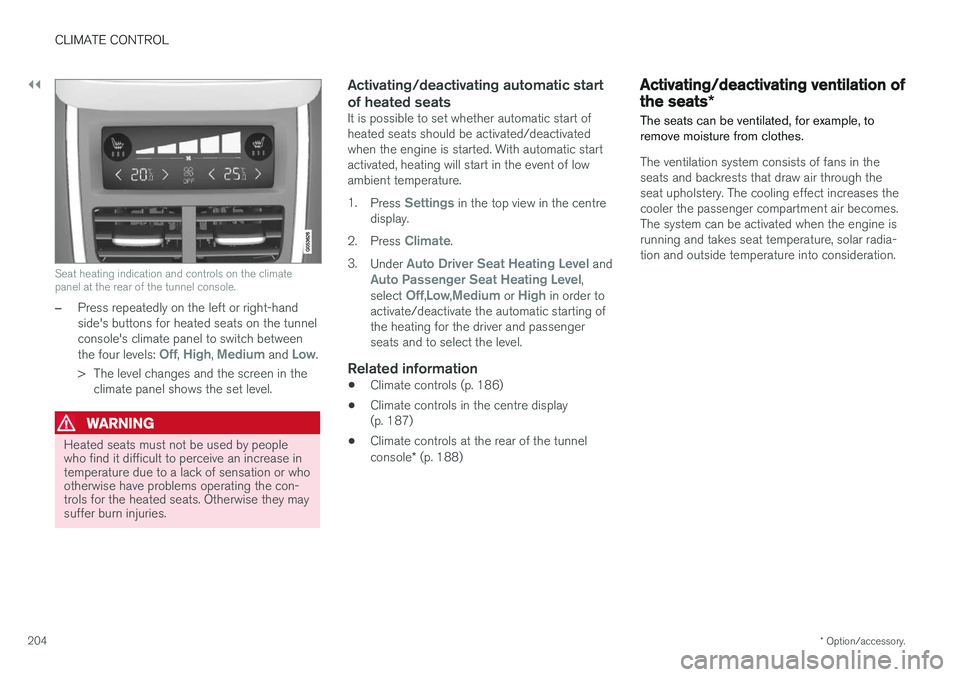
Seat heating indication and controls on the climate panel at the rear of the tunnel console.
–Press repeatedly on the left or right-hand side's buttons for heated seats on the tunnelconsole's climate panel to switch between the four levels:
Off, High, Medium and Low.
> The level changes and the screen in the climate panel shows the set level.
WARNING
Heated seats must not be used by people who find it difficult to perceive an increase intemperature due to a lack of sensation or whootherwise have problems operating the con-trols for the heated seats. Otherwise they maysuffer burn injuries.
Activating/deactivating automatic start of heated seats
It is possible to set whether automatic start of heated seats should be activated/deactivatedwhen the engine is started. With automatic startactivated, heating will start in the event of lowambient temperature. 1. Press
Settings in the top view in the centre
display.
2. Press
Climate.
3. Under
Auto Driver Seat Heating Level andAuto Passenger Seat Heating Level,
select Off,Low,Medium or High in order to
activate/deactivate the automatic starting of the heating for the driver and passengerseats and to select the level.
Related information
• Climate controls (p. 186)
• Climate controls in the centre display(p. 187)
• Climate controls at the rear of the tunnel console
* (p. 188)
Activating/deactivating ventilation of the seats *
The seats can be ventilated, for example, to remove moisture from clothes.
The ventilation system consists of fans in the seats and backrests that draw air through theseat upholstery. The cooling effect increases thecooler the passenger compartment air becomes.The system can be activated when the engine isrunning and takes seat temperature, solar radia-tion and outside temperature into consideration.
Page 207 of 594
CLIMATE CONTROL
}}
* Option/accessory.205
Activating/deactivating ventilation of the front seat*
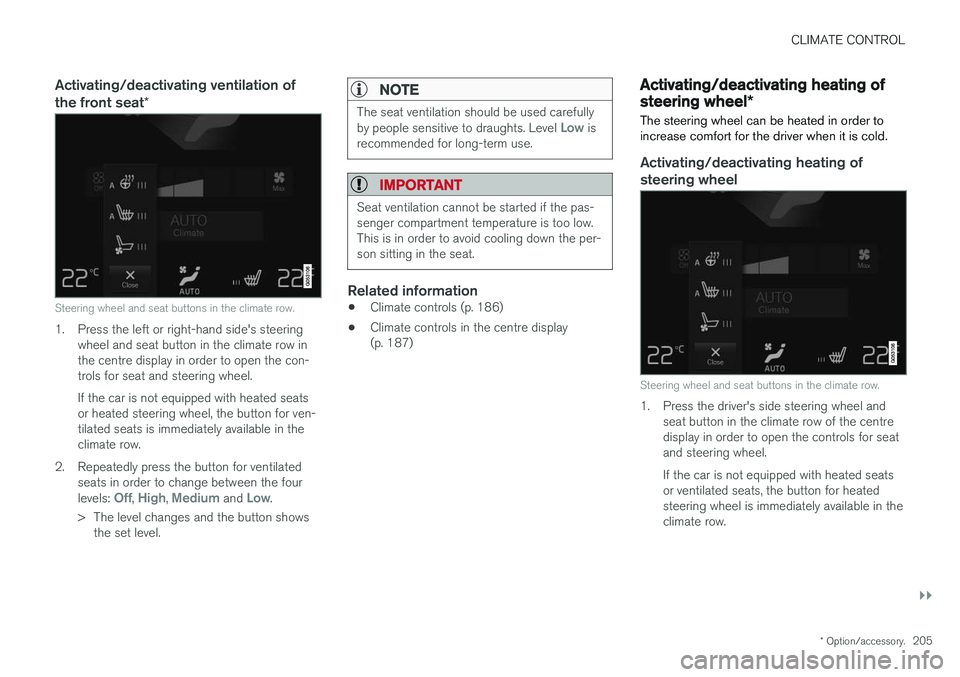
Steering wheel and seat buttons in the climate row.
1. Press the left or right-hand side's steering
wheel and seat button in the climate row in the centre display in order to open the con-trols for seat and steering wheel. If the car is not equipped with heated seats or heated steering wheel, the button for ven-tilated seats is immediately available in theclimate row.
2. Repeatedly press the button for ventilated seats in order to change between the four levels:
Off, High, Medium and Low.
> The level changes and the button shows the set level.
NOTE
The seat ventilation should be used carefully by people sensitive to draughts. Level Low is
recommended for long-term use.
IMPORTANT
Seat ventilation cannot be started if the pas- senger compartment temperature is too low.This is in order to avoid cooling down the per-son sitting in the seat.
Related information
• Climate controls (p. 186)
• Climate controls in the centre display (p. 187)
Activating/deactivating heating of steering wheel
*
The steering wheel can be heated in order to increase comfort for the driver when it is cold.
Activating/deactivating heating of
steering wheel
Steering wheel and seat buttons in the climate row.
1. Press the driver's side steering wheel and seat button in the climate row of the centre display in order to open the controls for seatand steering wheel. If the car is not equipped with heated seats or ventilated seats, the button for heatedsteering wheel is immediately available in theclimate row.
Page 208 of 594
||
CLIMATE CONTROL
* Option/accessory.
206 2. Repeatedly press the button for heated
steering wheel in order to change between the four levels:
Off, High, Medium and Low.
> The level changes and the button shows the set level.
Activating/deactivating automatic start of heated steering wheel
It is possible to set whether automatic start of heated steering wheel should be activated/deac-tivated when the engine is started. With auto-matic start activated, heating will start in theevent of low ambient temperature. 1. Press
Settings in the top view in the centre
display.
2. Press
Climate.
3. Under
Auto Steering Wheel Heating
Level, select Off,Low,Medium or High in
order to activate/deactivate the automatic starting of steering wheel heating and toselect the level.
Related information
• Climate controls (p. 186)
• Climate controls in the centre display(p. 187)
• Steering wheel (p. 131)
Parking climate
*
The climate of the car's passenger compartment can be preconditioned or maintained while thecar is parked.
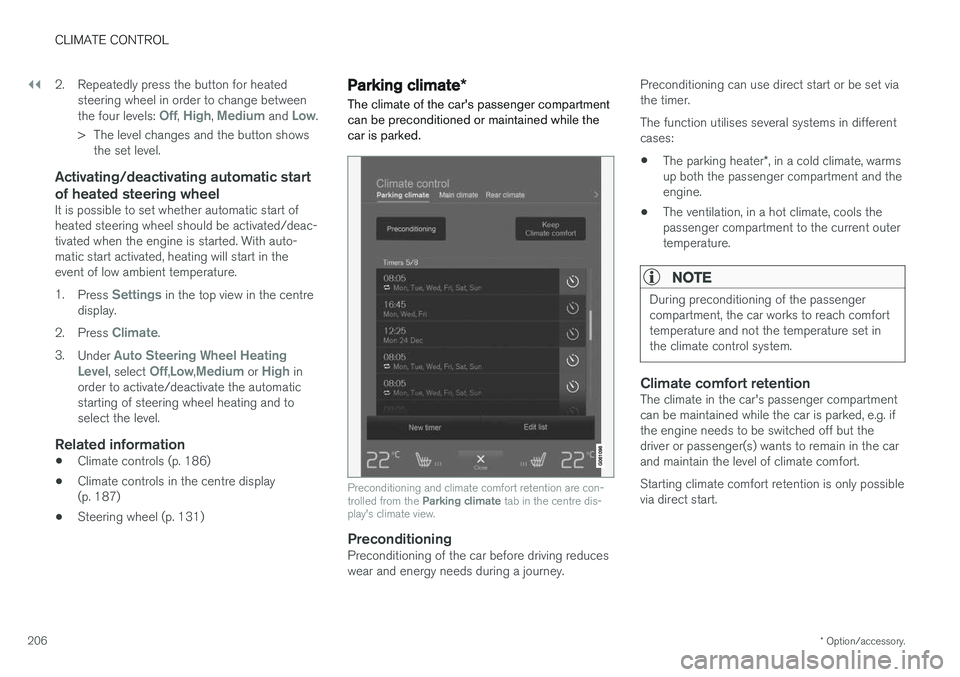
Preconditioning and climate comfort retention are con- trolled from the Parking climate tab in the centre dis-
play's climate view.
PreconditioningPreconditioning of the car before driving reduces wear and energy needs during a journey. Preconditioning can use direct start or be set viathe timer. The function utilises several systems in different cases: •
The parking heater
*, in a cold climate, warms
up both the passenger compartment and the engine.
• The ventilation, in a hot climate, cools thepassenger compartment to the current outertemperature.
NOTE
During preconditioning of the passenger compartment, the car works to reach comforttemperature and not the temperature set inthe climate control system.
Climate comfort retentionThe climate in the car's passenger compartment can be maintained while the car is parked, e.g. ifthe engine needs to be switched off but thedriver or passenger(s) wants to remain in the carand maintain the level of climate comfort. Starting climate comfort retention is only possible via direct start.
Page 217 of 594
CLIMATE CONTROL
* Option/accessory.215
Additional heater *
The additional heater helps the passenger com- partment and engine reach the correct tempera-ture while driving.
The additional heater is one of two subfunctions of the car's heater. The heater is fitted in thefront right-hand wheel housing.
NOTE
When the heater is running, smoke may be emitted from the right-hand front wheel hous-ing and a low hum may be heard. A tickingsound from the fuel pump may also be heardfrom the rear section of the car. This is per-fectly normal.
The additional heater starts and is controlled automatically when heating is required while thecar is being driven. It then switches off automatically when the car is switched off.
NOTE
Make sure there is enough fuel in the car's normal fuel tank if the heater needs to beused. Make sure that there is enough charge in the starter battery if the heater needs to be used.
Activating/deactivating automatic start for the additional heater
It is possible to set whether automatic start for the additional heater should be activated/deacti-vated. 1. Press
Settings in the top view in the centre
display.
2. Press
Climate.
3. Select
Additional Heater to activate/deac-
tivate automatic start of the additional heater.
NOTE
Volvo recommends that the automatic start for the additional heater should be switchedoff for short driving distances.
Related information
• Heater
* (p. 213)
• Parking heater
* (p. 214)
Page 387 of 594
STARTING AND DRIVING
}}
385
Ignition positions The car's electrical system can be set in different levels/positions and in this way make the differ-ent functions available.
In order to facilitate the use of a limited number of functions with the engine switched off, thecar's electrical system can be set in 3 different levels - 0, I and II. These levels are described
with the denomination "ignition position" throughout the owner's manual. The following table shows the functions available in each ignition position/level:
Level Functions
0 •Odometer, clock and temperature gauge are illuminated.
• Power seats can be adjusted.
• The power windows can be used.
• The centre display is started andcan be used.
• It is possible to start the audio.
The functions are time-controlled inthis ignition position and are switchedoff automatically after a period of time.
I •Panorama roof, power windows,12V socket in the passenger com-partment, navigation, phone, venti-lation fan and windscreen wiperscan be used.
• Power seats can be adjusted.
• 12 V sockets in the cargo areacan be used.
• The audio is started automaticallyif it was running when the car wasleft.
Power is taken from the battery inthis ignition position.Level Functions
II •The headlamps come on.
• Warning/indicator lamps illuminate for 5 seconds.
• Several other systems are acti-vated. However, heating in seatcushions and the rear window canonly be activated after the car hasbeen started.
This ignition position consumes alot of current from the battery andshould therefore be avoided!
Selecting ignition position
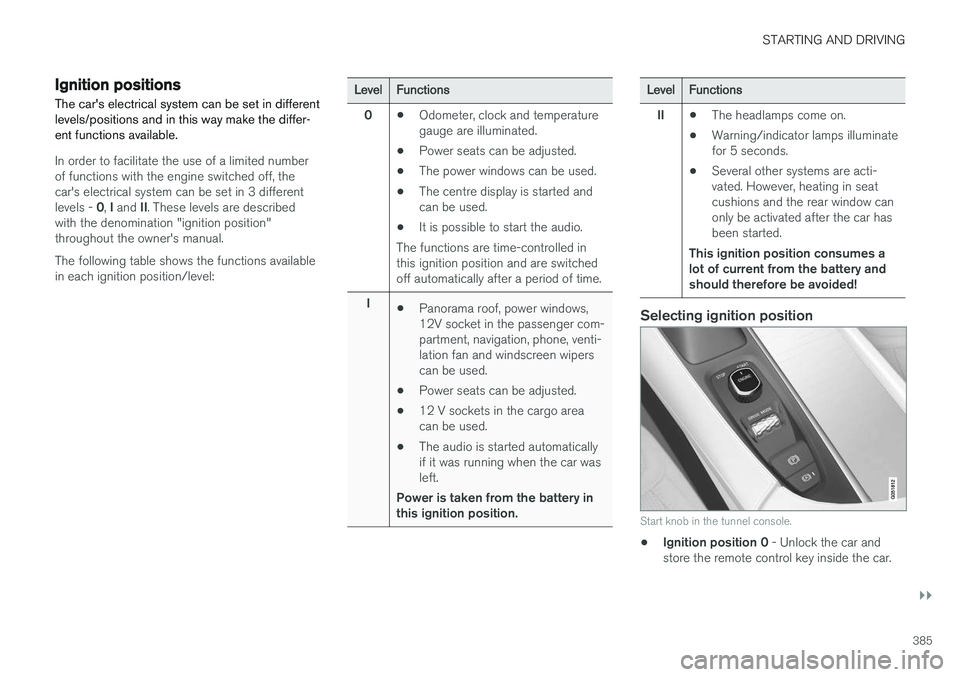
Start knob in the tunnel console.
• Ignition position 0
- Unlock the car and
store the remote control key inside the car.