light VOLVO V90 2017 User Guide
[x] Cancel search | Manufacturer: VOLVO, Model Year: 2017, Model line: V90, Model: VOLVO V90 2017Pages: 594, PDF Size: 15.07 MB
Page 48 of 594
||
INTRODUCTION
46With
Normal, the screen background is dark and
the text is light. This alternative is the default for all themes. A light variant can also be selected, inwhich the background is light and the text is dark.This alternative can be useful in e.g. strong day-light. This alternative is always available for the user and is not affected by the surrounding lighting.
Related information
• Settings view (p. 169)
• Sensus - connection and maintenance(p. 29)
• Cleaning the centre display (p. 553)
• Operating the centre display (p. 36)
Page 56 of 594
INTRODUCTION
* Option/accessory.
54
Introduction to vehicle gas (Bi- Fuel) *
Cars with Bi-Fuel engines can be driven on either vehicle gas or petrol. Vehicle gas can bebiogas or natural gas, or a mixture of the two.Vehicle gas is also called CNG (CompressedNatural Gas).
Methane is the main component in vehicle gas. In natural gas, the methane content varies between85% and 98%. In biogas, the content is almost100%. The tanks for vehicle gas are mounted under the floor in the cargo area and do not affect the nor-mal petrol tank. The system is tested in the same way as for pet- rol cars. The system is closed which means thatleaks are avoided during filling, for example. Thegas tanks are protected and are made to with-stand a collision. The gas is lighter than air, non-toxic and has a higher ignition temperature thanpetrol and diesel. The risk of fire or explosions inthe event of traffic accidents is therefore lowerthan with petrol and diesel. The tank is equipped with a safety valve that allows the gas to evacuate from the tank in theevent of abnormally high pressures. This valveensures that the tank cannot explode.
WARNING
In the event of an accident, the vehicle must be inspected and approved by an authorisedVolvo workshop before it may be used again.Always notify the emergency services on sitethat the vehicle is equipped with a CNG-sys-tem.
WARNING
Smoking and naked flames are prohibited during refuelling, service and repair work. Inthe event of a possible fire, leave the vehicleimmediately and stand a safe distance away. Do not under any circumstances disassemble or adjust the system or its component partsyourself. Carrying out such acts entails risk ofserious personal injury. All service and repairwork must therefore, for safety reasons, onlybe carried out by a trained mechanic - anauthorized Volvo workshop is recommended.
WARNING
If you smell gas in or around the vehicle, switch over to petrol immediately and havethe vehicle checked by the nearest trainedmechanics. If the car is placed in a spray/paint curing booth with a drying temperature higher than60 °C the system pressure must not exceed50 bar, check that the CNG tank is almostempty for this.
Page 71 of 594
SAFETY
}}
69
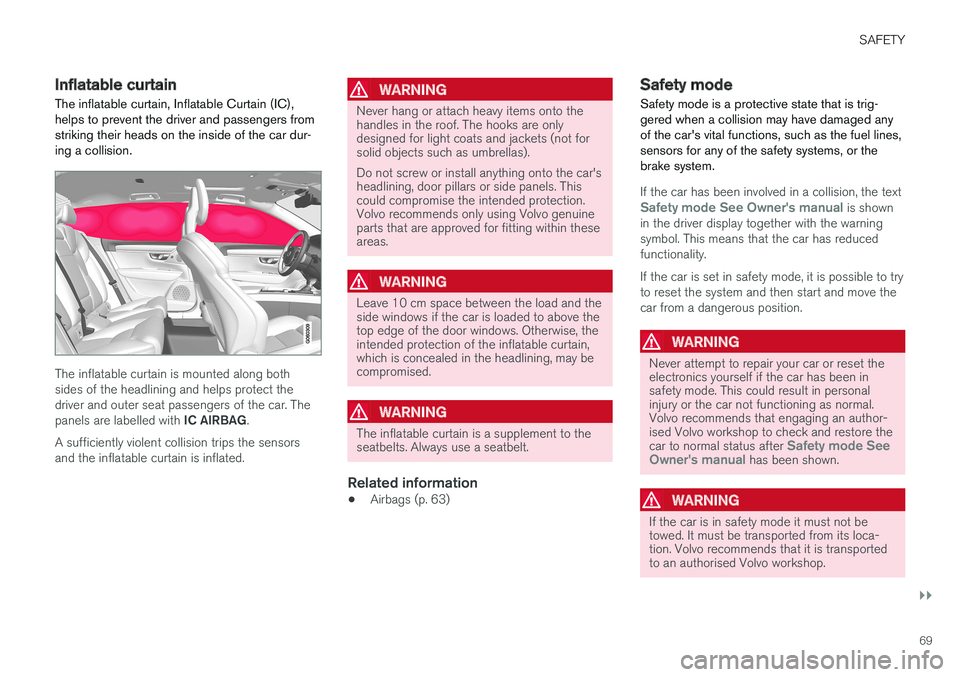
Inflatable curtain The inflatable curtain, Inflatable Curtain (IC), helps to prevent the driver and passengers fromstriking their heads on the inside of the car dur-ing a collision.
The inflatable curtain is mounted along both sides of the headlining and helps protect thedriver and outer seat passengers of the car. The panels are labelled with IC AIRBAG.
A sufficiently violent collision trips the sensors and the inflatable curtain is inflated.
WARNING
Never hang or attach heavy items onto the handles in the roof. The hooks are onlydesigned for light coats and jackets (not forsolid objects such as umbrellas). Do not screw or install anything onto the car's headlining, door pillars or side panels. Thiscould compromise the intended protection.Volvo recommends only using Volvo genuineparts that are approved for fitting within theseareas.
WARNING
Leave 10 cm space between the load and the side windows if the car is loaded to above thetop edge of the door windows. Otherwise, theintended protection of the inflatable curtain,which is concealed in the headlining, may becompromised.
WARNING
The inflatable curtain is a supplement to the seatbelts. Always use a seatbelt.
Related information
• Airbags (p. 63)
Safety mode Safety mode is a protective state that is trig- gered when a collision may have damaged anyof the car's vital functions, such as the fuel lines,sensors for any of the safety systems, or thebrake system.
If the car has been involved in a collision, the textSafety mode See Owner's manual is shown
in the driver display together with the warning symbol. This means that the car has reducedfunctionality. If the car is set in safety mode, it is possible to try to reset the system and then start and move thecar from a dangerous position.
WARNING
Never attempt to repair your car or reset the electronics yourself if the car has been insafety mode. This could result in personalinjury or the car not functioning as normal.Volvo recommends that engaging an author-ised Volvo workshop to check and restore the car to normal status after
Safety mode See
Owner's manual has been shown.
WARNING
If the car is in safety mode it must not be towed. It must be transported from its loca-tion. Volvo recommends that it is transportedto an authorised Volvo workshop.
Page 88 of 594
INSTRUMENTS AND CONTROLS
* Option/accessory.
86
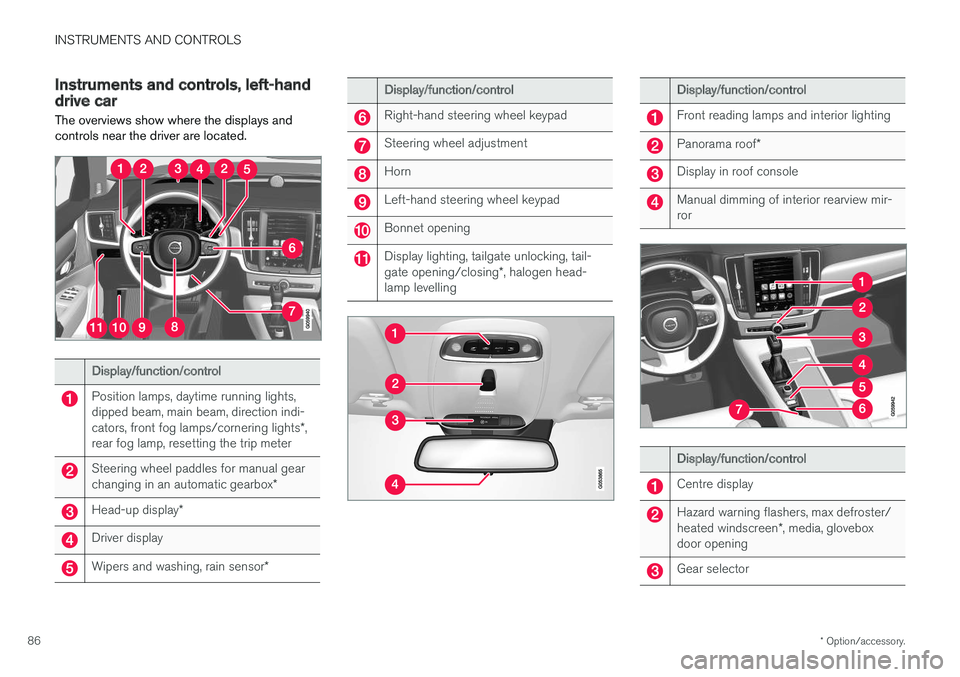
Instruments and controls, left-hand drive car The overviews show where the displays and controls near the driver are located.
Display/function/control
Position lamps, daytime running lights, dipped beam, main beam, direction indi- cators, front fog lamps/cornering lights *,
rear fog lamp, resetting the trip meter
Steering wheel paddles for manual gear changing in an automatic gearbox *
Head-up display*
Driver display
Wipers and washing, rain sensor *
Display/function/control
Right-hand steering wheel keypad
Steering wheel adjustment
Horn
Left-hand steering wheel keypad
Bonnet opening
Display lighting, tailgate unlocking, tail- gate opening/closing*, halogen head-
lamp levelling
Display/function/control
Front reading lamps and interior lighting
Panorama roof *
Display in roof console
Manual dimming of interior rearview mir- ror
Display/function/control
Centre display
Hazard warning flashers, max defroster/ heated windscreen *, media, glovebox
door opening
Gear selector
Page 89 of 594
INSTRUMENTS AND CONTROLS
}}
* Option/accessory.87
Display/function/control
Ignition dial
Drive mode control *
Parking brake
Automatic braking when stationary
Display/function/control
Memory for setup of:
• power front seat
*
• Door mirrors
• Head-up display
*
Door opening, locking/unlocking of side doors and tailgate
Display/function/control
Power windows, door mirrors
Adjusting front seat
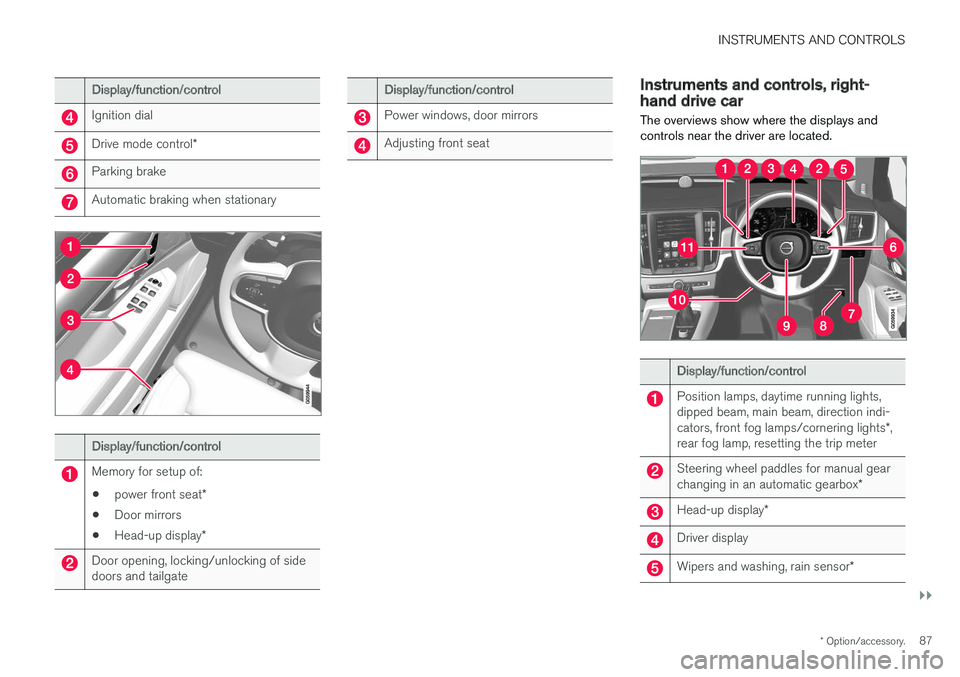
Instruments and controls, right- hand drive car
The overviews show where the displays and controls near the driver are located.
Display/function/control
Position lamps, daytime running lights, dipped beam, main beam, direction indi- cators, front fog lamps/cornering lights *,
rear fog lamp, resetting the trip meter
Steering wheel paddles for manual gear changing in an automatic gearbox *
Head-up display*
Driver display
Wipers and washing, rain sensor *
Page 90 of 594
||
INSTRUMENTS AND CONTROLS
* Option/accessory.
88
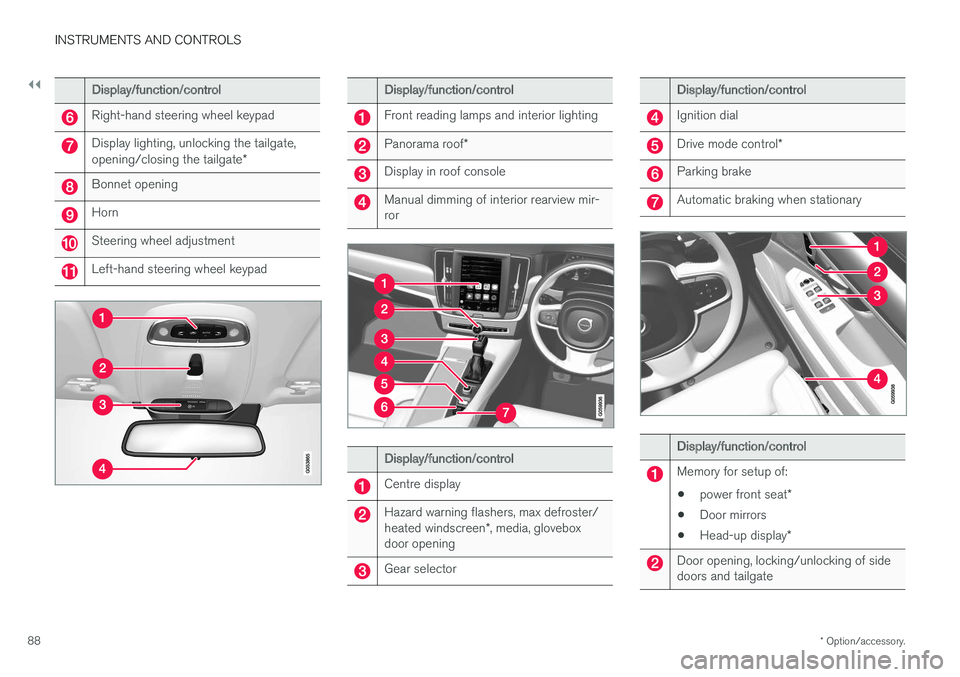
Display/function/control
Right-hand steering wheel keypad
Display lighting, unlocking the tailgate, opening/closing the tailgate *
Bonnet opening
Horn
Steering wheel adjustment
Left-hand steering wheel keypad
Display/function/control
Front reading lamps and interior lighting
Panorama roof*
Display in roof console
Manual dimming of interior rearview mir- ror
Display/function/control
Centre display
Hazard warning flashers, max defroster/ heated windscreen *, media, glovebox
door opening
Gear selector
Display/function/control
Ignition dial
Drive mode control *
Parking brake
Automatic braking when stationary
Display/function/control
Memory for setup of:
• power front seat
*
• Door mirrors
• Head-up display
*
Door opening, locking/unlocking of side doors and tailgate
Page 97 of 594
INSTRUMENTS AND CONTROLS
}}
95
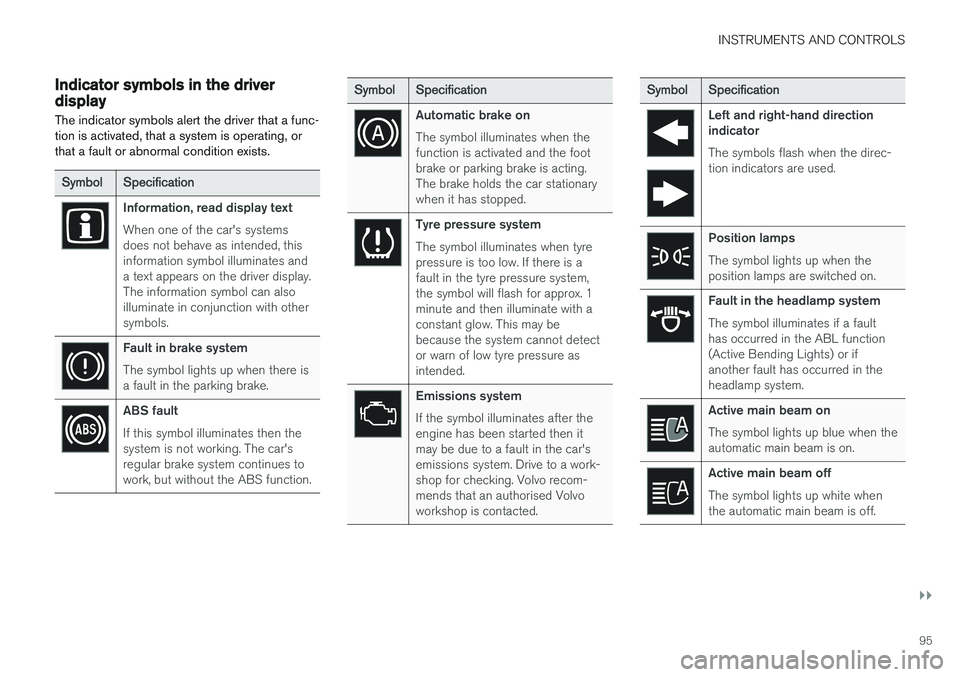
Indicator symbols in the driver display The indicator symbols alert the driver that a func- tion is activated, that a system is operating, orthat a fault or abnormal condition exists.
SymbolSpecification
Information, read display text When one of the car's systems does not behave as intended, thisinformation symbol illuminates anda text appears on the driver display.The information symbol can alsoilluminate in conjunction with othersymbols.
Fault in brake system The symbol lights up when there is a fault in the parking brake.
ABS fault If this symbol illuminates then the system is not working. The car'sregular brake system continues towork, but without the ABS function.
SymbolSpecification
Automatic brake on The symbol illuminates when the function is activated and the footbrake or parking brake is acting.The brake holds the car stationarywhen it has stopped.
Tyre pressure system The symbol illuminates when tyre pressure is too low. If there is afault in the tyre pressure system,the symbol will flash for approx. 1minute and then illuminate with aconstant glow. This may bebecause the system cannot detector warn of low tyre pressure asintended.
Emissions system If the symbol illuminates after the engine has been started then itmay be due to a fault in the car'semissions system. Drive to a work-shop for checking. Volvo recom-mends that an authorised Volvoworkshop is contacted.
Symbol Specification
Left and right-hand direction indicator The symbols flash when the direc- tion indicators are used.
Position lamps The symbol lights up when the position lamps are switched on.
Fault in the headlamp system The symbol illuminates if a fault has occurred in the ABL function(Active Bending Lights) or ifanother fault has occurred in theheadlamp system.
Active main beam on The symbol lights up blue when the automatic main beam is on.
Active main beam off The symbol lights up white when the automatic main beam is off.
Page 98 of 594
||
INSTRUMENTS AND CONTROLS
96
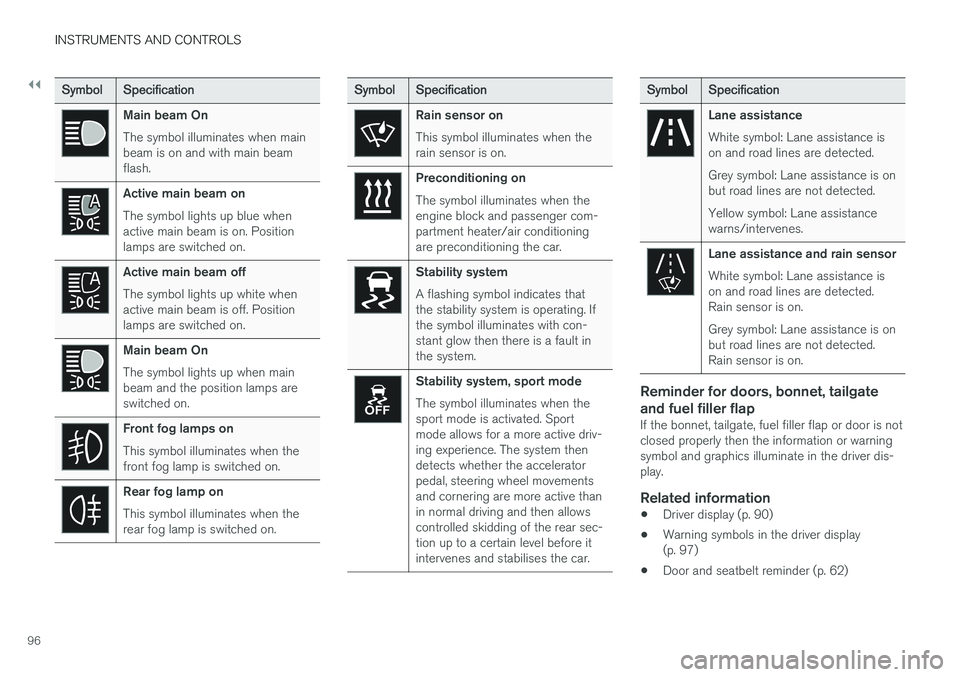
SymbolSpecification
Main beam On The symbol illuminates when main beam is on and with main beamflash.
Active main beam on The symbol lights up blue when active main beam is on. Positionlamps are switched on.
Active main beam off The symbol lights up white when active main beam is off. Positionlamps are switched on.
Main beam On The symbol lights up when main beam and the position lamps areswitched on.
Front fog lamps on This symbol illuminates when the front fog lamp is switched on.
Rear fog lamp on This symbol illuminates when the rear fog lamp is switched on.
SymbolSpecification
Rain sensor on This symbol illuminates when the rain sensor is on.
Preconditioning on The symbol illuminates when the engine block and passenger com-partment heater/air conditioningare preconditioning the car.
Stability system A flashing symbol indicates that the stability system is operating. Ifthe symbol illuminates with con-stant glow then there is a fault inthe system.
Stability system, sport mode The symbol illuminates when the sport mode is activated. Sportmode allows for a more active driv-ing experience. The system thendetects whether the acceleratorpedal, steering wheel movementsand cornering are more active thanin normal driving and then allowscontrolled skidding of the rear sec-tion up to a certain level before itintervenes and stabilises the car.
Symbol Specification
Lane assistance White symbol: Lane assistance is on and road lines are detected. Grey symbol: Lane assistance is on but road lines are not detected. Yellow symbol: Lane assistance warns/intervenes.
Lane assistance and rain sensor White symbol: Lane assistance is on and road lines are detected.Rain sensor is on. Grey symbol: Lane assistance is on but road lines are not detected.Rain sensor is on.
Reminder for doors, bonnet, tailgate and fuel filler flap
If the bonnet, tailgate, fuel filler flap or door is not closed properly then the information or warningsymbol and graphics illuminate in the driver dis-play.
Related information
•Driver display (p. 90)
• Warning symbols in the driver display(p. 97)
• Door and seatbelt reminder (p. 62)
Page 108 of 594

||
INSTRUMENTS AND CONTROLS
106
Opening/closing the app menu
–Press on open/close (1). (It is not possible to open the app menu while there is an unacknowledged messagein the driver display. The message must beconfirmed before the app menu can beopened.)
> The app menu opens/closes.
The app menu closes automatically after a period of inactivity or after certain options have beenselected.
Navigating and selecting in the app
menu
1. Navigate between the different apps that are available by tapping on left or right (2).
> Functions for previous/next app areshown in the app menu.
2. Browse through the functions for the selected app by tapping on up or down (3).
3. Confirm or highlight an option for the func- tion by pressing on confirm (4).
> The function is activated and for someoptions the app menu then closes.
If the app menu is opened again, the functions of the most recently selected app are shown first.
Related information
• Application menu in the driver display(p. 105)
• Managing messages in the driver display andthe centre display (p. 108)
Messages in the driver display and the centre display
The driver display and centre display can show messages to inform or assist the driver in theevent of different events.
Driver display
Message in the driver display 2
.
2 With 8-inch driver display.
Page 114 of 594
INSTRUMENTS AND CONTROLS
* Option/accessory.
112
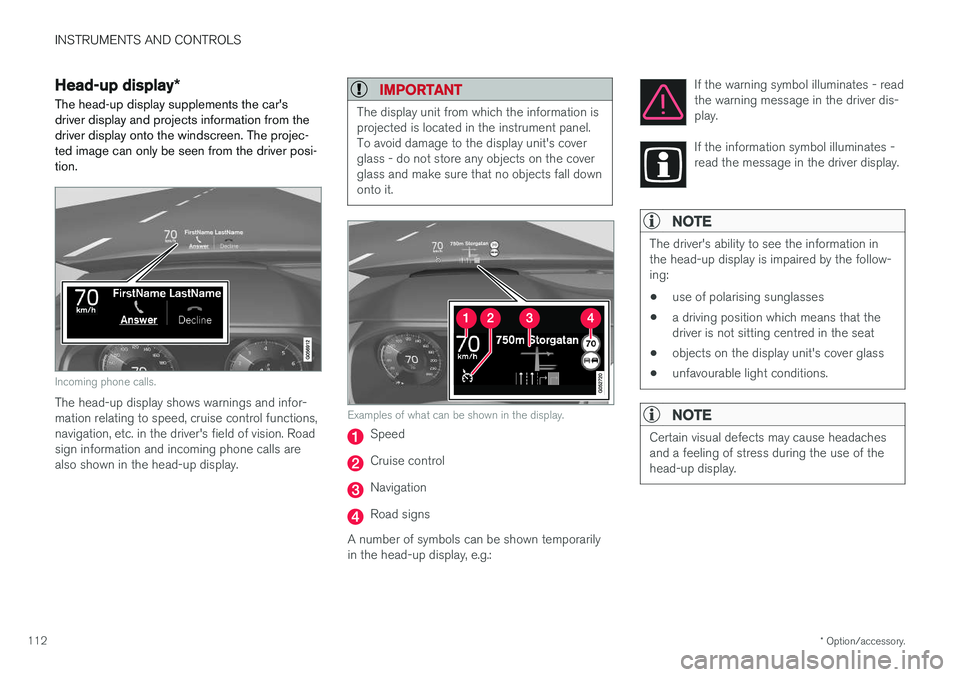
Head-up display *
The head-up display supplements the car's driver display and projects information from thedriver display onto the windscreen. The projec-ted image can only be seen from the driver posi-tion.
Incoming phone calls.
The head-up display shows warnings and infor- mation relating to speed, cruise control functions,navigation, etc. in the driver's field of vision. Roadsign information and incoming phone calls arealso shown in the head-up display.
IMPORTANT
The display unit from which the information is projected is located in the instrument panel.To avoid damage to the display unit's coverglass - do not store any objects on the coverglass and make sure that no objects fall downonto it.
Examples of what can be shown in the display.
Speed
Cruise control
Navigation
Road signs
A number of symbols can be shown temporarily in the head-up display, e.g.: If the warning symbol illuminates - readthe warning message in the driver dis-play.
If the information symbol illuminates - read the message in the driver display.
NOTE
The driver's ability to see the information in the head-up display is impaired by the follow-ing:
• use of polarising sunglasses
• a driving position which means that thedriver is not sitting centred in the seat
• objects on the display unit's cover glass
• unfavourable light conditions.
NOTE
Certain visual defects may cause headaches and a feeling of stress during the use of thehead-up display.