light VOLVO V90 2017 Owner's Manual
[x] Cancel search | Manufacturer: VOLVO, Model Year: 2017, Model line: V90, Model: VOLVO V90 2017Pages: 594, PDF Size: 15.07 MB
Page 116 of 594
||
INSTRUMENTS AND CONTROLS
* Option/accessory.
114
Adjusting brightness and vertical position
1.
Press the Head-up display adjustmentsbutton in the function view in the centre dis- play.
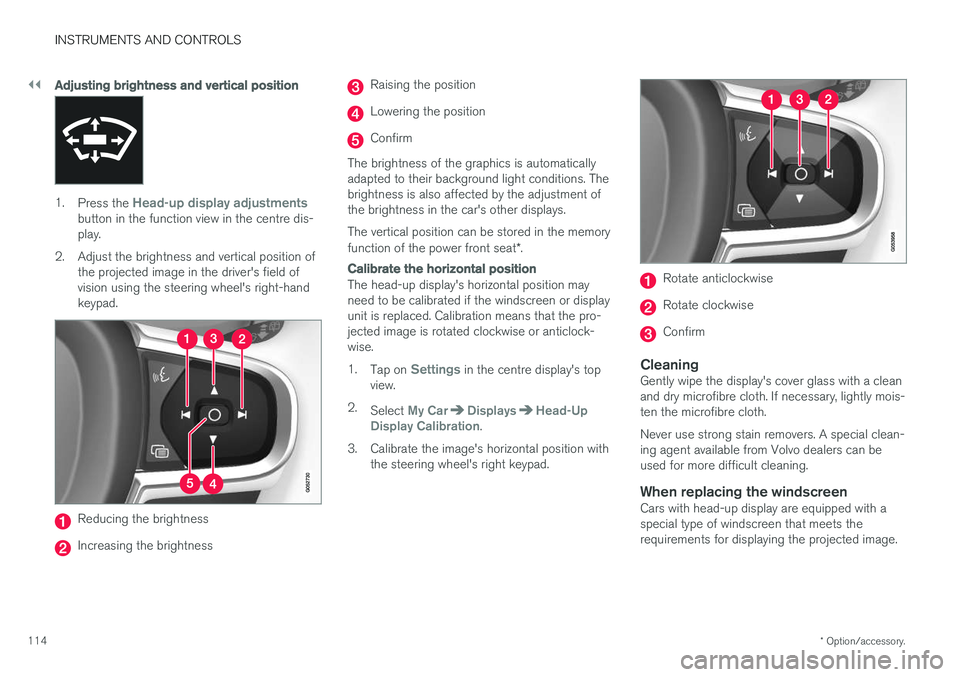
2. Adjust the brightness and vertical position of the projected image in the driver's field ofvision using the steering wheel's right-handkeypad.
Reducing the brightness
Increasing the brightness
Raising the position
Lowering the position
Confirm
The brightness of the graphics is automatically adapted to their background light conditions. Thebrightness is also affected by the adjustment ofthe brightness in the car's other displays. The vertical position can be stored in the memory function of the power front seat *.
Calibrate the horizontal position
The head-up display's horizontal position may need to be calibrated if the windscreen or displayunit is replaced. Calibration means that the pro-jected image is rotated clockwise or anticlock-wise. 1.
Tap on
Settings in the centre display's top
view.
2. Select
My CarDisplaysHead-Up
Display Calibration.
3. Calibrate the image's horizontal position with the steering wheel's right keypad.
Rotate anticlockwise
Rotate clockwise
Confirm
CleaningGently wipe the display's cover glass with a clean and dry microfibre cloth. If necessary, lightly mois-ten the microfibre cloth. Never use strong stain removers. A special clean- ing agent available from Volvo dealers can beused for more difficult cleaning.
When replacing the windscreenCars with head-up display are equipped with aspecial type of windscreen that meets therequirements for displaying the projected image.
Page 124 of 594
INSTRUMENTS AND CONTROLS
* Option/accessory.
122
Adjusting the power front seat *
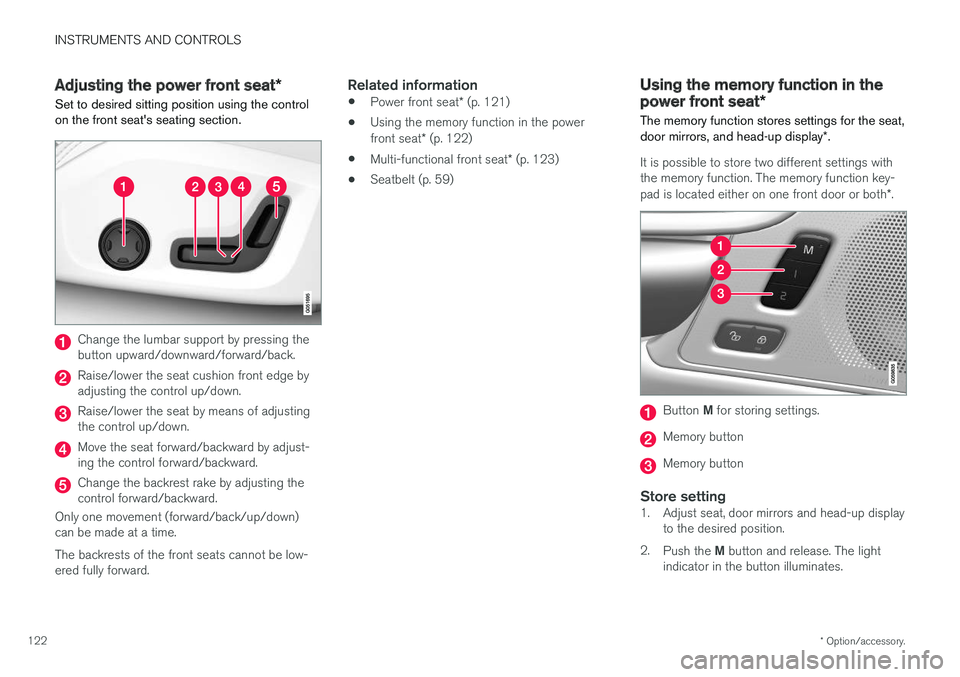
Set to desired sitting position using the control on the front seat's seating section.
Change the lumbar support by pressing the button upward/downward/forward/back.
Raise/lower the seat cushion front edge by adjusting the control up/down.
Raise/lower the seat by means of adjusting the control up/down.
Move the seat forward/backward by adjust- ing the control forward/backward.
Change the backrest rake by adjusting the control forward/backward.
Only one movement (forward/back/up/down)can be made at a time. The backrests of the front seats cannot be low- ered fully forward.
Related information
• Power front seat
* (p. 121)
• Using the memory function in the power front seat
* (p. 122)
• Multi-functional front seat
* (p. 123)
• Seatbelt (p. 59)
Using the memory function in the power front seat
*
The memory function stores settings for the seat, door mirrors, and head-up display *.
It is possible to store two different settings with the memory function. The memory function key- pad is located either on one front door or both *.
Button M for storing settings.
Memory button
Memory button
Store setting1. Adjust seat, door mirrors and head-up display
to the desired position.
2. Push the M button and release. The light
indicator in the button illuminates.
Page 125 of 594
INSTRUMENTS AND CONTROLS
}}
* Option/accessory.123
3.
Within three seconds, depress the 1 or 2
button.
> When the position has been stored in the selected memory button an acoustic sig- nal sounds and the light indicator in the M
button extinguishes.
If none of the memory buttons is depressedwithin three seconds then the M button extin-
guishes and no storing takes place. The seat must be adjusted again before a new memory can be set.
Using a stored settingA stored setting can be used with the front dooreither open or closed:
Open front door
–Depress one of the memory buttons 1 or 2
with a short press. Seat, door mirrors and head-up display move and then stop at thepositions stored in the selected memory but-ton.
Closed front door
–Hold one of the memory buttons 1 or 2
depressed until seat, door mirrors and head- up display stop in the positions that arestored in the selected memory button.
If the memory button is released, the movementof the seat, door mirrors and head-up display willbe stopped.
WARNING
Risk of crushing! Make sure that children do not play with the keypad. Check that there areno objects in front of, behind or under theseat during adjustment. Make sure that noneof the passengers in the rear seat is in dangerof becoming trapped.
Related information
• Power front seat
* (p. 121)
• Adjusting the power front seat
* (p. 122)
Multi-functional front seat *
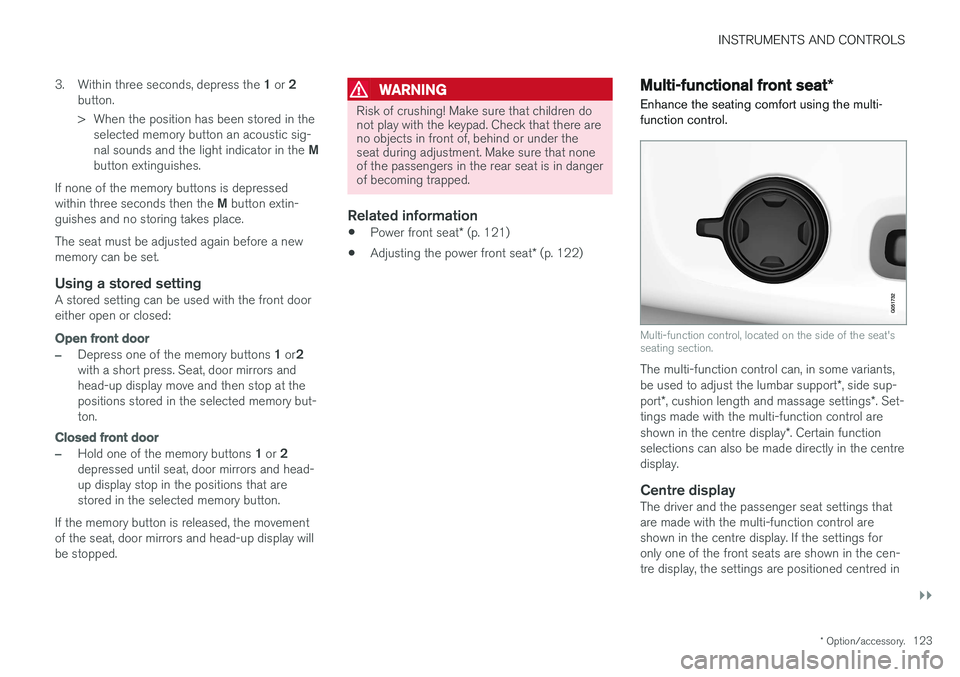
Enhance the seating comfort using the multi- function control.
Multi-function control, located on the side of the seat's seating section.
The multi-function control can, in some variants, be used to adjust the lumbar support *, side sup-
port *, cushion length and massage settings *. Set-
tings made with the multi-function control areshown in the centre display *. Certain function
selections can also be made directly in the centre display.
Centre displayThe driver and the passenger seat settings thatare made with the multi-function control areshown in the centre display. If the settings foronly one of the front seats are shown in the cen-tre display, the settings are positioned centred in
Page 135 of 594
INSTRUMENTS AND CONTROLS
133
Steering wheel adjustment can be made in differ- ent ways depending on whether or not the car is equipped with knee airbag
19
.
WARNING
Adjust the steering wheel and fix it before driving away.
With speed related power steering the level of steering force can be adjusted. Steering force isregulated according to the car's speed in order togive the driver enhanced road responsiveness.
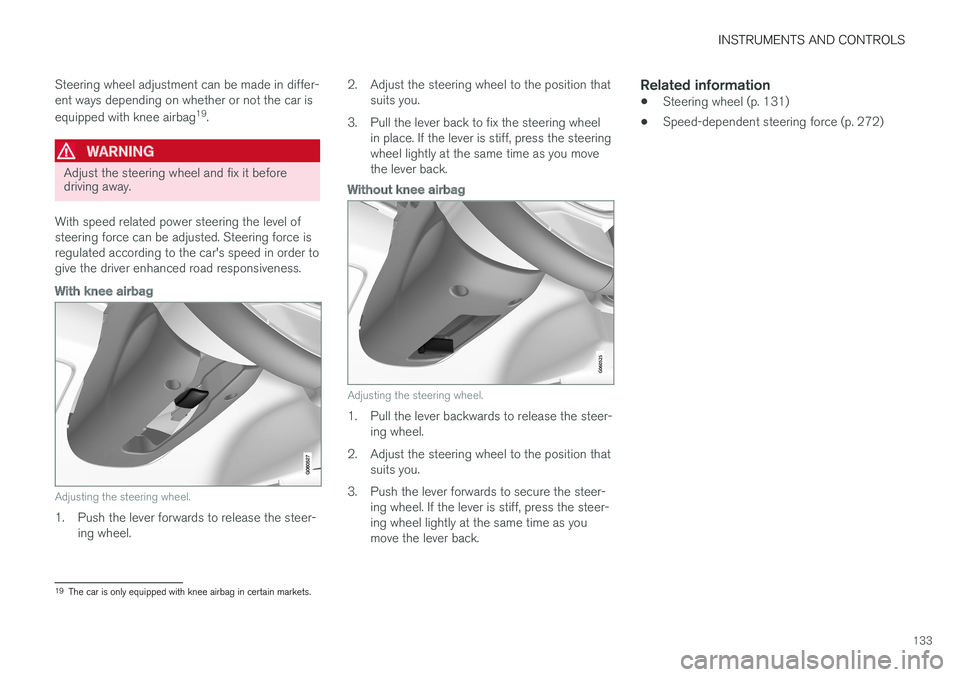
With knee airbag
Adjusting the steering wheel.
1. Push the lever forwards to release the steer- ing wheel. 2. Adjust the steering wheel to the position that
suits you.
3. Pull the lever back to fix the steering wheel in place. If the lever is stiff, press the steering wheel lightly at the same time as you movethe lever back.
Without knee airbag
Adjusting the steering wheel.
1. Pull the lever backwards to release the steer-ing wheel.
2. Adjust the steering wheel to the position that suits you.
3. Push the lever forwards to secure the steer- ing wheel. If the lever is stiff, press the steer- ing wheel lightly at the same time as youmove the lever back.
Related information
• Steering wheel (p. 131)
• Speed-dependent steering force (p. 272)
19
The car is only equipped with knee airbag in certain markets.
Page 136 of 594
INSTRUMENTS AND CONTROLS
* Option/accessory.
134
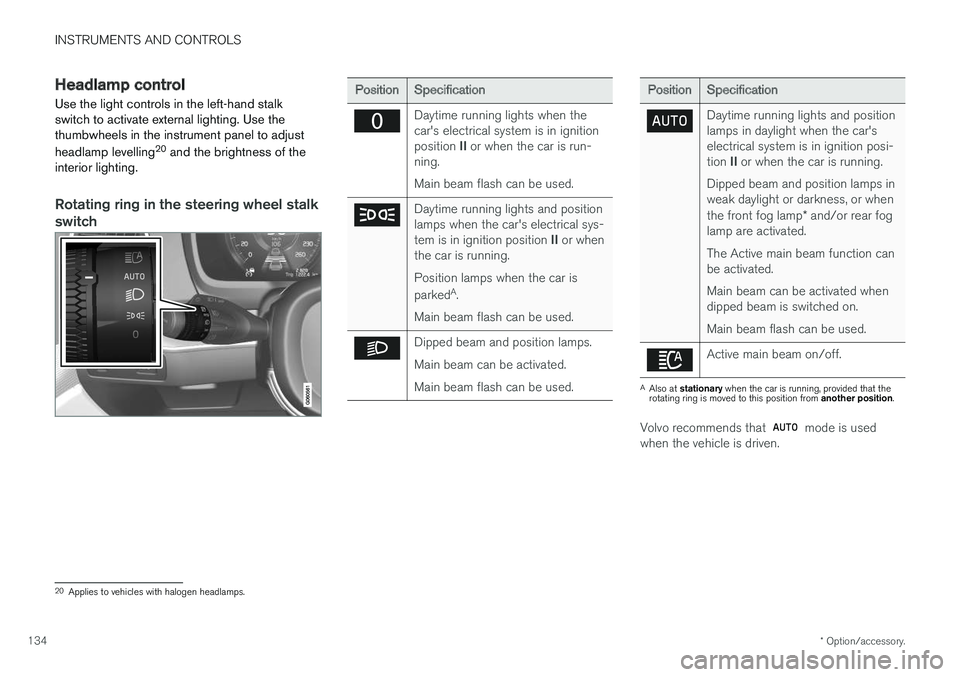
Headlamp control
Use the light controls in the left-hand stalk switch to activate external lighting. Use thethumbwheels in the instrument panel to adjust headlamp levelling 20
and the brightness of the
interior lighting.
Rotating ring in the steering wheel stalk
switch
Position Specification
Daytime running lights when the car's electrical system is in ignition position II or when the car is run-
ning. Main beam flash can be used.
Daytime running lights and position lamps when the car's electrical sys- tem is in ignition position II or when
the car is running. Position lamps when the car is parked A
.
Main beam flash can be used.
Dipped beam and position lamps. Main beam can be activated.Main beam flash can be used.
Position Specification
Daytime running lights and position lamps in daylight when the car'selectrical system is in ignition posi- tion II or when the car is running.
Dipped beam and position lamps in weak daylight or darkness, or when the front fog lamp * and/or rear fog
lamp are activated. The Active main beam function can be activated. Main beam can be activated when dipped beam is switched on. Main beam flash can be used.
Active main beam on/off.
A Also at stationary when the car is running, provided that the
rotating ring is moved to this position from another position.
Volvo recommends that mode is used
when the vehicle is driven.
20 Applies to vehicles with halogen headlamps.
Page 137 of 594
INSTRUMENTS AND CONTROLS
}}
* Option/accessory.135
WARNING
The car's audio system is not able to deter- mine when daylight is too weak or sufficientlystrong, e.g. in fog and rain, in all situations. The driver is always responsible for ensuring that the car is driven with a beam pattern suit-able for the traffic situation and in accordancewith applicable traffic regulations.
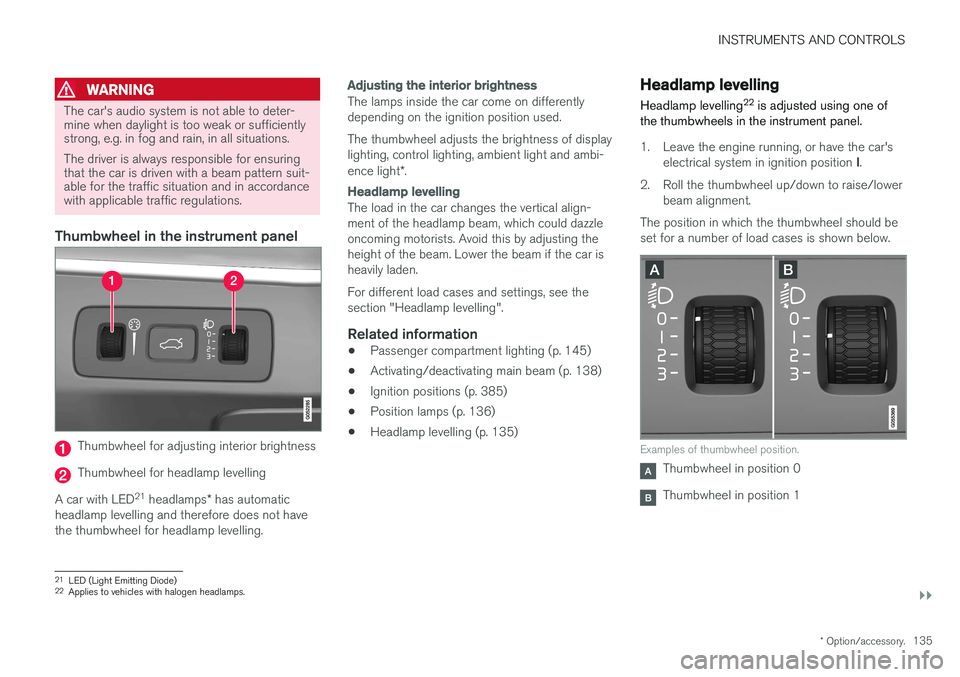
Thumbwheel in the instrument panel
Thumbwheel for adjusting interior brightness
Thumbwheel for headlamp levelling
A car with LED 21
headlamps * has automatic
headlamp levelling and therefore does not have the thumbwheel for headlamp levelling.
Adjusting the interior brightness
The lamps inside the car come on differently depending on the ignition position used. The thumbwheel adjusts the brightness of display lighting, control lighting, ambient light and ambi- ence light *.
Headlamp levelling
The load in the car changes the vertical align- ment of the headlamp beam, which could dazzleoncoming motorists. Avoid this by adjusting theheight of the beam. Lower the beam if the car isheavily laden. For different load cases and settings, see the section "Headlamp levelling".
Related information
• Passenger compartment lighting (p. 145)
• Activating/deactivating main beam (p. 138)
• Ignition positions (p. 385)
• Position lamps (p. 136)
• Headlamp levelling (p. 135)
Headlamp levelling
Headlamp levelling 22
is adjusted using one of
the thumbwheels in the instrument panel.
1. Leave the engine running, or have the car's
electrical system in ignition position I.
2. Roll the thumbwheel up/down to raise/lower beam alignment.
The position in which the thumbwheel should be set for a number of load cases is shown below.
Examples of thumbwheel position.
Thumbwheel in position 0
Thumbwheel in position 1
21 LED (Light Emitting Diode)
22 Applies to vehicles with halogen headlamps.
Page 138 of 594
||
INSTRUMENTS AND CONTROLS
136
Load caseThumb- wheelposition
Only driver. 0 Driver and passenger in the front passenger seat. 0
Driver and passenger in the frontpassenger seat. Three passengers in the rear seat. 1
Driver and passenger in the frontpassenger seat. Three passengers in the rear seat. 220 kg load in the cargo area. 1
Driver and maximum load in the cargo area. 2
Related information
•
Headlamp control (p. 134)
Position lamps
The position lamps are switched on with the rotating ring on the stalk switch.
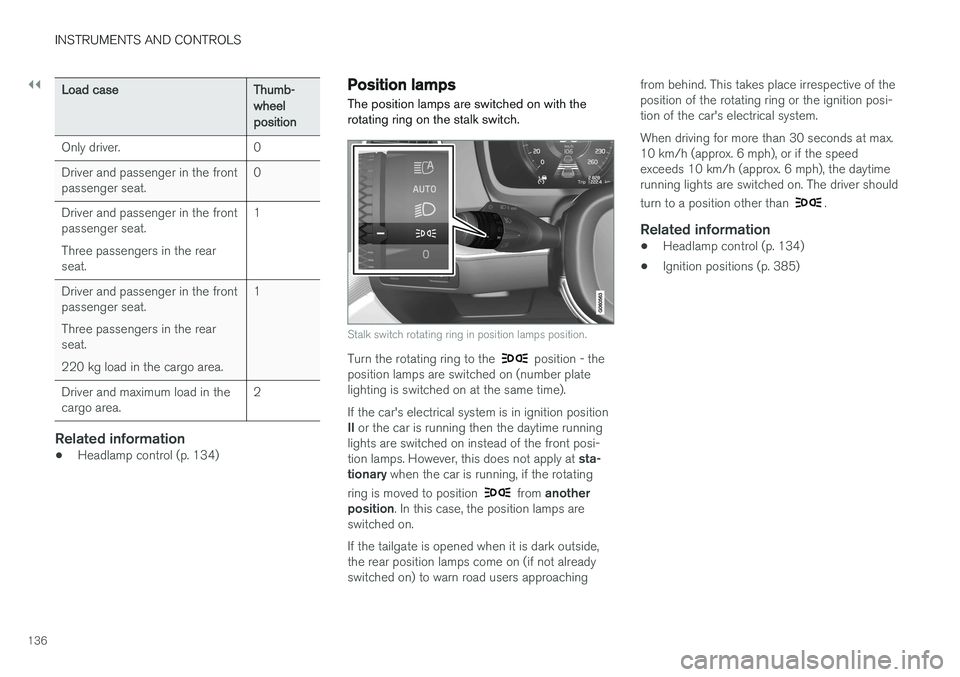
Stalk switch rotating ring in position lamps position.
Turn the rotating ring to the position - the
position lamps are switched on (number plate lighting is switched on at the same time). If the car's electrical system is in ignition position II or the car is running then the daytime running
lights are switched on instead of the front posi-tion lamps. However, this does not apply at sta-
tionary when the car is running, if the rotating
ring is moved to position
from another
position . In this case, the position lamps are
switched on. If the tailgate is opened when it is dark outside, the rear position lamps come on (if not alreadyswitched on) to warn road users approaching from behind. This takes place irrespective of theposition of the rotating ring or the ignition posi-tion of the car's electrical system. When driving for more than 30 seconds at max. 10 km/h (approx. 6 mph), or if the speedexceeds 10 km/h (approx. 6 mph), the daytimerunning lights are switched on. The driver should turn to a position other than
.
Related information
•
Headlamp control (p. 134)
• Ignition positions (p. 385)
Page 139 of 594
INSTRUMENTS AND CONTROLS
}}
* Option/accessory.137
Daytime running lights The daytime running lights are switched on when the rotating ring on the stalk switch is in position
, or as well as when
the car's electrical system is in ignition position II
or when the car is running. For the
posi-
tion, this only applies in daylight. In weak daylight or darkness, dipped beam is switched oninstead.
Daytime running lights during the day.
DRL
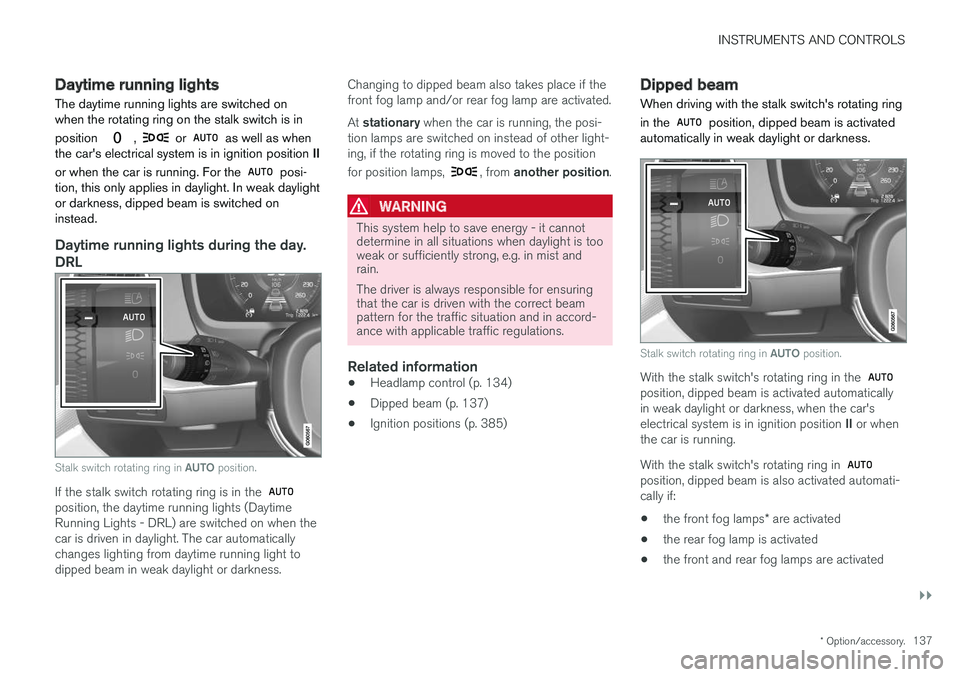
Stalk switch rotating ring in AUTO position.
If the stalk switch rotating ring is in the position, the daytime running lights (Daytime Running Lights - DRL) are switched on when thecar is driven in daylight. The car automaticallychanges lighting from daytime running light todipped beam in weak daylight or darkness. Changing to dipped beam also takes place if thefront fog lamp and/or rear fog lamp are activated. At
stationary when the car is running, the posi-
tion lamps are switched on instead of other light- ing, if the rotating ring is moved to the position for position lamps,
, from another position .
WARNING
This system help to save energy - it cannot determine in all situations when daylight is tooweak or sufficiently strong, e.g. in mist andrain. The driver is always responsible for ensuring that the car is driven with the correct beampattern for the traffic situation and in accord-ance with applicable traffic regulations.
Related information
•Headlamp control (p. 134)
• Dipped beam (p. 137)
• Ignition positions (p. 385)
Dipped beam
When driving with the stalk switch's rotating ring in the
position, dipped beam is activated
automatically in weak daylight or darkness.
Stalk switch rotating ring in AUTO position.
With the stalk switch's rotating ring in the position, dipped beam is activated automatically in weak daylight or darkness, when the car's electrical system is in ignition position II or when
the car is running. With the stalk switch's rotating ring in
position, dipped beam is also activated automati- cally if:
• the front fog lamps
* are activated
• the rear fog lamp is activated
• the front and rear fog lamps are activated
Page 140 of 594
||
INSTRUMENTS AND CONTROLS
138Dipped beam is always switched on when the rotating ring on the stalk switch is in position
when the car's electrical system is in igni-
tion position II or when the car is running.
Tunnel detection
The car detects when it is driven into a tunnel and switches from daytime running lights todipped beam. Note that the rotating ring in the left-hand stalk switch must be in
mode for tunnel detec-
tion to work.
Related information
• Daytime running lights (p. 137)
• Headlamp control (p. 134)
• Ignition positions (p. 385)
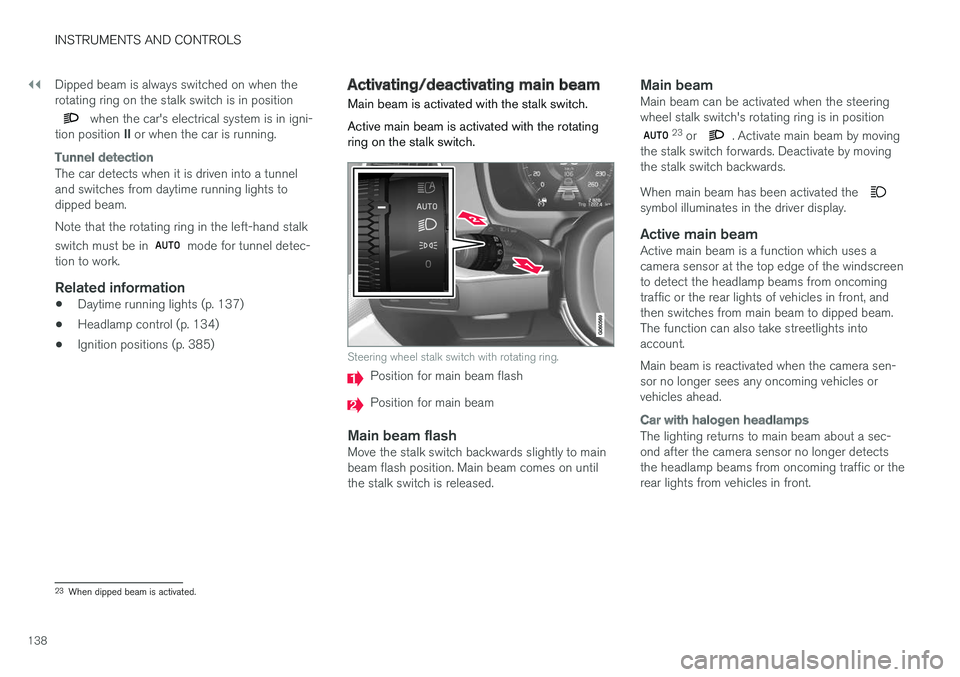
Activating/deactivating main beam Main beam is activated with the stalk switch. Active main beam is activated with the rotating ring on the stalk switch.
Steering wheel stalk switch with rotating ring.
Position for main beam flash
Position for main beam
Main beam flashMove the stalk switch backwards slightly to main beam flash position. Main beam comes on untilthe stalk switch is released.
Main beamMain beam can be activated when the steeringwheel stalk switch's rotating ring is in position
23
or . Activate main beam by moving
the stalk switch forwards. Deactivate by moving the stalk switch backwards. When main beam has been activated the
symbol illuminates in the driver display.
Active main beamActive main beam is a function which uses a camera sensor at the top edge of the windscreento detect the headlamp beams from oncomingtraffic or the rear lights of vehicles in front, andthen switches from main beam to dipped beam.The function can also take streetlights intoaccount. Main beam is reactivated when the camera sen- sor no longer sees any oncoming vehicles orvehicles ahead.
Car with halogen headlamps
The lighting returns to main beam about a sec- ond after the camera sensor no longer detectsthe headlamp beams from oncoming traffic or therear lights from vehicles in front.
23 When dipped beam is activated.
Page 141 of 594
INSTRUMENTS AND CONTROLS
}}
* Option/accessory.139
Car with LED24
headlamps *
If the active main beam has the on/off functional- ity25
then the lighting returns to main beam about
a second after the camera sensor no longer detects the headlamp beams from oncomingtraffic or the rear lights from vehicles in front. If the active main beam has adaptive functional- ity 25
then, unlike what happens during conven-
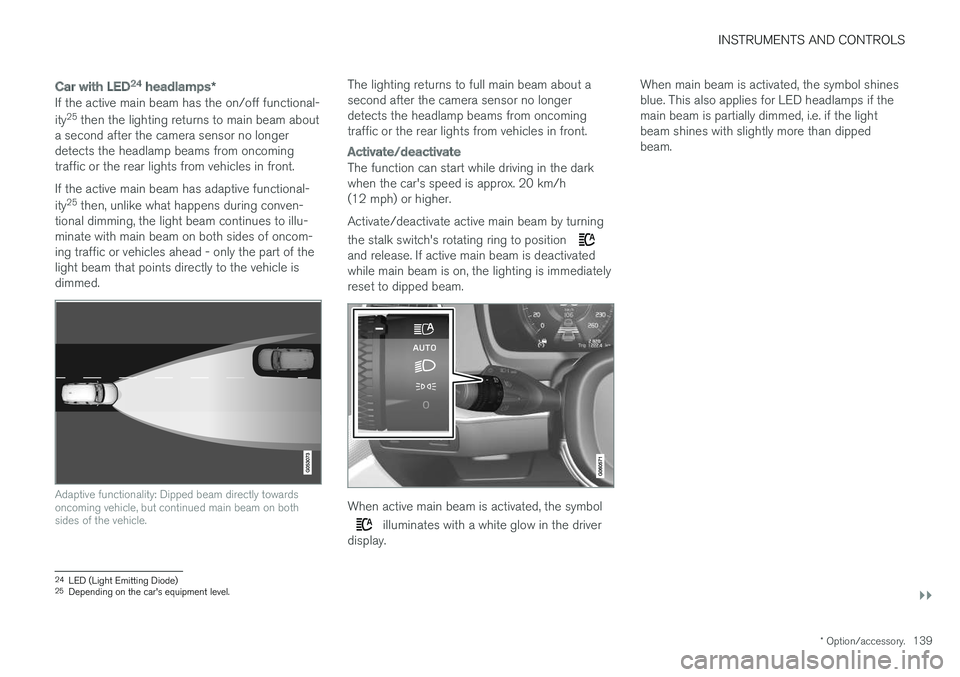
tional dimming, the light beam continues to illu- minate with main beam on both sides of oncom-ing traffic or vehicles ahead - only the part of thelight beam that points directly to the vehicle isdimmed.
Adaptive functionality: Dipped beam directly towards oncoming vehicle, but continued main beam on bothsides of the vehicle.
The lighting returns to full main beam about a second after the camera sensor no longerdetects the headlamp beams from oncomingtraffic or the rear lights from vehicles in front.
Activate/deactivate
The function can start while driving in the dark when the car's speed is approx. 20 km/h(12 mph) or higher. Activate/deactivate active main beam by turning the stalk switch's rotating ring to position
and release. If active main beam is deactivated while main beam is on, the lighting is immediatelyreset to dipped beam.
When active main beam is activated, the symbol
illuminates with a white glow in the driver
display. When main beam is activated, the symbol shines blue. This also applies for LED headlamps if themain beam is partially dimmed, i.e. if the lightbeam shines with slightly more than dippedbeam.
24
LED (Light Emitting Diode)25
Depending on the car's equipment level.