navigation system VOLVO V90 2017 User Guide
[x] Cancel search | Manufacturer: VOLVO, Model Year: 2017, Model line: V90, Model: VOLVO V90 2017Pages: 594, PDF Size: 15.07 MB
Page 387 of 594
STARTING AND DRIVING
}}
385
Ignition positions The car's electrical system can be set in different levels/positions and in this way make the differ-ent functions available.
In order to facilitate the use of a limited number of functions with the engine switched off, thecar's electrical system can be set in 3 different levels - 0, I and II. These levels are described
with the denomination "ignition position" throughout the owner's manual. The following table shows the functions available in each ignition position/level:
Level Functions
0 •Odometer, clock and temperature gauge are illuminated.
• Power seats can be adjusted.
• The power windows can be used.
• The centre display is started andcan be used.
• It is possible to start the audio.
The functions are time-controlled inthis ignition position and are switchedoff automatically after a period of time.
I •Panorama roof, power windows,12V socket in the passenger com-partment, navigation, phone, venti-lation fan and windscreen wiperscan be used.
• Power seats can be adjusted.
• 12 V sockets in the cargo areacan be used.
• The audio is started automaticallyif it was running when the car wasleft.
Power is taken from the battery inthis ignition position.Level Functions
II •The headlamps come on.
• Warning/indicator lamps illuminate for 5 seconds.
• Several other systems are acti-vated. However, heating in seatcushions and the rear window canonly be activated after the car hasbeen started.
This ignition position consumes alot of current from the battery andshould therefore be avoided!
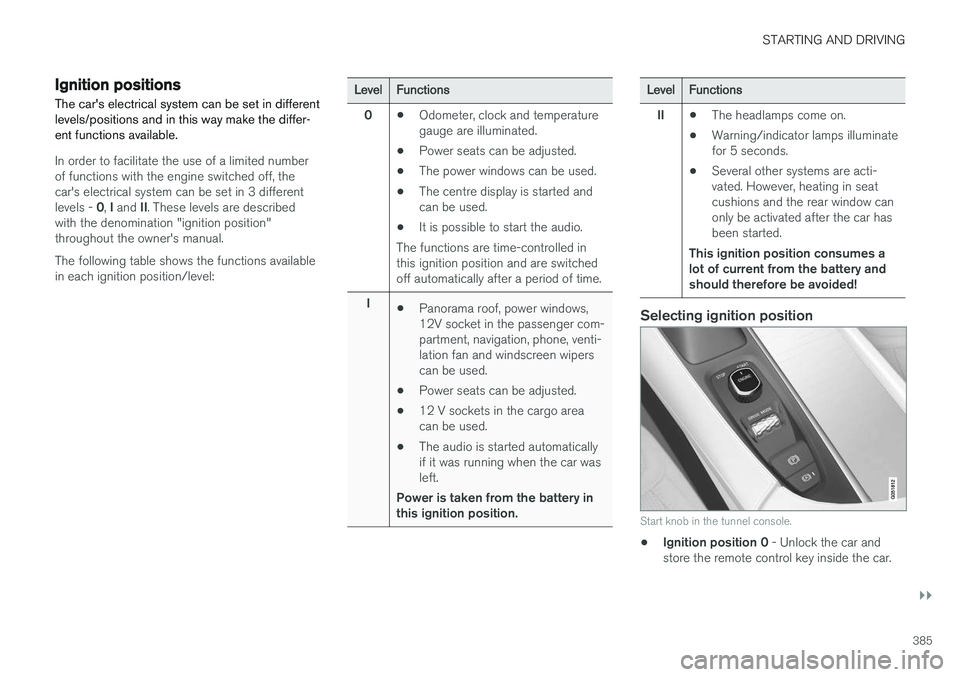
Selecting ignition position
Start knob in the tunnel console.
• Ignition position 0
- Unlock the car and
store the remote control key inside the car.
Page 508 of 594
MAINTENANCE AND SERVICE
* Option/accessory.
506
Volvo service programme
To keep the car as safe and reliable as possible, follow the Volvo service programme as specifiedin the Service and Warranty Booklet.
Volvo recommends engaging an authorised Volvo workshop to perform the service and mainte-nance work. Volvo workshops have the personnel,special tools and service literature to guaranteethe highest quality of service.
IMPORTANT
For the Volvo warranty to apply, check and follow the instructions in the Service andWarranty Booklet.
Related information
• Servicing the climate control system (p. 520)
• Book service and repair (p. 506)
Car status The car's general status can be shown in the centre display along with the opportunity to bookservice.
The Car status app is started
from app view in the centre dis- play and has three tabs:
•Messages - saved status messages
•
Status - check of tyre pressure and engine
oil level
•
Appointments - booking of service and
repair work.
Related information
• Managing messages saved from the driver display and centre display (p. 110)
• Checking tyre pressure with the tyre monitor- ing system
* (p. 487)
• Checking and filling with engine oil (p. 517)
• Book service and repair (p. 506)
Book service and repair 1
Manage service, repair and booking information directly from your online car. The information is handled in the
Car statusapp, which is opened from the app view in the centre display.
This service provides, for certain markets, a con- venient way to book service and workshop visitsdirectly from your car. Vehicle data is sent to yourdealer, who can prepare the workshop visit. Thedealer will get back to you with a booking sug-gestion. For certain markets, the system willremind you of a scheduled appointment time as it approaches and the navigation system 2
can also
guide you to the workshop when the time comes. You also have information on your dealer availa-ble in the car and can contact your workshop atany time.
Before the service can be used
Volvo ID
• Create a Volvo ID, see section "Volvo ID".
• Register the Volvo ID for your car, see sec- tion "Volvo ID". If a Volvo ID already exists,use the same e-mail address that was usedwhen the Volvo ID was created.
1
Applies to certain markets.
2 Applies to Sensus Navigation *.
Page 511 of 594
MAINTENANCE AND SERVICE
* Option/accessory.509
Related information
•Volvo ID (p. 23)
• Online car
* (p. 463)
• Car status (p. 506)
Inspection and service of the system for vehicle gas
*5
The system for vehicle gas must be inspected regularly by an authorised workshop - an author-ised Volvo workshop is recommended.
WARNING
The gas is compressed to high pressure. This system must only be serviced and repaired byan authorised workshop. Never attempt to disassemble or adjust the gas system or its component parts yourself-risk of serious personal injury.
Remote updates Several of the car's systems can be updated from the centre display with an online car.
The Download Centre app is
started from app view in the centre display and enables:
• searching for and updating system software
• updating map data for Sensus Navigation
*
• downloading, updating and uninstalling apps.
Related information
•
System updates (p. 510)
• Downloading, updating and uninstalling apps (p. 468)
5
Applies to the Bi-Fuel model variant.
Page 590 of 594
ALPHABETICAL INDEX
588Tyre monitoring 485
Tyre pressure label 484Tyre pressure monitoring
Calibrate 489
low tyre pressure 488
Tyres 482 direction of rotation 483
installation 497
pressure 484, 574
puncture repair 490
removal 495
specifications 574
storage 482
tread depth 499
tread wear indicators 484
tyre pressure monitoring 485
winter tyres 499
U
Unit standardTrip computer 166
Unlocking from the outside 241
with key blade 251
USB connect car to Internet 464
jack for connecting media 448
V
Vanity mirror lighting 146
Vehicle gas 509
Ventilation 197, 198, 199 seats 204
Vibration damper 422
Video 447, 448 settings 443
Voice control Climate control 119
map navigation 120
phone 118
radio and media 118
settings 117
Voice recognition 115
VOL marking 482
Volvo ID 23
W
Warning lamp Adaptive Cruise Control 290
stability and traction control system 273
Warning lamps Airbags – SRS 97
alternator not charging 97
Fault in brake system 97
Low oil pressure 97
Parking brake applied 97
seatbelt reminder 97
starter battery not charging 97
Warning 97
Warning sound Parking brake 411
Warning symbols 97 Safety 56
Warning triangle 500
Washer fluid 529
Washer nozzles, heated 150Washers rear window 151
washer fluid, filling 529
windscreen 150
Waxing 551 Weights kerb weight 563