remote control VOLVO V90 2017 User Guide
[x] Cancel search | Manufacturer: VOLVO, Model Year: 2017, Model line: V90, Model: VOLVO V90 2017Pages: 594, PDF Size: 15.07 MB
Page 156 of 594
||
INSTRUMENTS AND CONTROLS
* Option/accessory.
154
Memory function in power front seat *Door mirror positions can be saved in the mem- ory function of the power front seat.
Angling the door mirror when parking 28The door mirror can be angled down for thedriver to view the side of the road when parkingfor example.
–Engage reverse gear and press the
L or R
button.
When reverse gear is disengaged the mirror automatically returns to its original position afterapprox. 10 seconds, or earlier by pressing the button labelled L or R respectively.
Automatic angling of the door mirror
when parking 28
When reverse gear is engaged the door mirror is automatically angled down so that the driver cansee the side of the road when parking for exam-ple. When reverse gear is disengaged the mirrorautomatically returns to its original position aftera short time. Settings for this function are set via the centre display: 1.
Press
Settings in the top view.
2. Press
My CarMirrors and Easy Entry. 3.
Under
Exterior Mirror Tilt at Reverse,
select Off, Driver, Passenger or Both to
activate/deactivate and to select which review mirror should be angled.
Automatic retraction when locking *When the car is locked/unlocked with the remotecontrol key the door mirrors are automaticallyretracted/extended. The function can be activated/deactivated via the centre display: 1.
Press
Settings in the top view.
2. Press
My CarMirrors and Easy Entry.
3. Select
Fold Mirror When Locked to acti-
vate/deactivate.
Resetting to neutralMirrors that have been moved out of position by an external force must be reset electrically to theneutral position for electric retracting/extendingto work correctly: 1. Retract the mirrors with the L and R buttons.
2. Fold them out again with the L and R but-
tons.
3. Repeat the above procedure as necessary.The mirrors are now reset in neutral position.
Automatic dimming *Bright light from behind is automatically dimmed by the interior rearview and door mirrors. For the door mirrors to be fitted with this function requires that the interior rearview mirror also hasautomatic dimming, see the section "Interior rear-view mirror". Automatic dimming is always active while driving, apart from when gearbox reverse position isselected. Dimming sensitivity can be adjusted inthree levels and will affect the interior rearviewand the door mirrors.
NOTE
When sensitivity is changed there is no imme- diately noticeable change in dimming, but thechange will be complete after a while.
Settings for this function are set via the centre display: 1.
Press
Settings in the top view.
2. Press
My CarMirrors and Easy Entry.
3. Under
Rearview Mirror Auto Dimming,
select Normal, Dark or Light.
28 Only in combination with power seat with memory.
Page 160 of 594
INSTRUMENTS AND CONTROLS
* Option/accessory.
158
Panorama roof *
The panorama roof is divided into two glass sec- tions. The front section can be opened verticallyat the rear edge (ventilation position) or horizon-tally (open position). The rear section is fixedroof glass. The panoramic roof has a wind deflector.
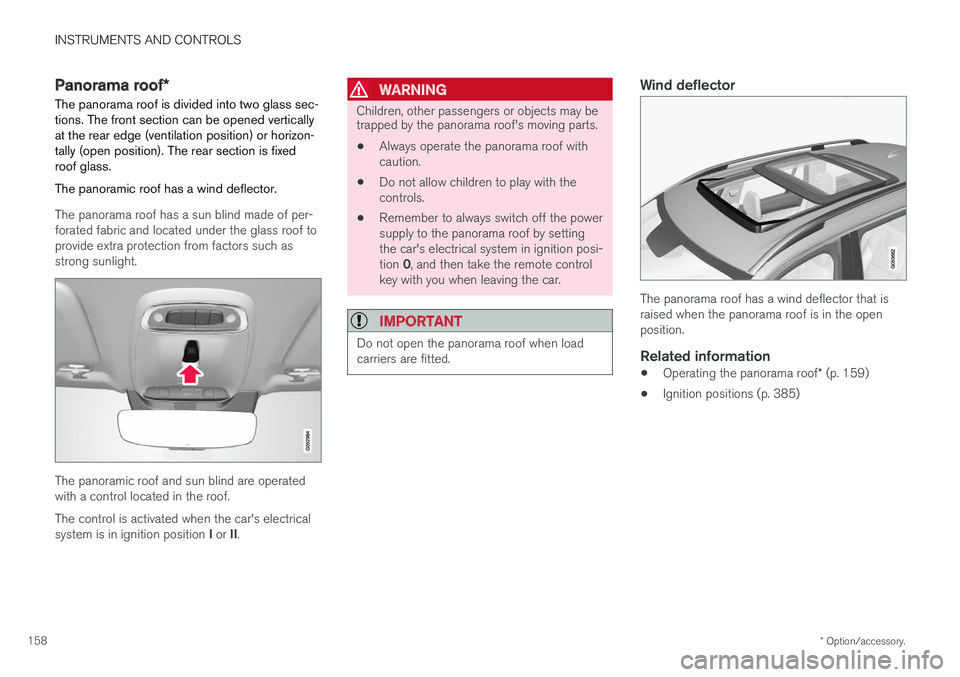
The panorama roof has a sun blind made of per- forated fabric and located under the glass roof toprovide extra protection from factors such asstrong sunlight.
The panoramic roof and sun blind are operated with a control located in the roof. The control is activated when the car's electrical system is in ignition position I or II.
WARNING
Children, other passengers or objects may be trapped by the panorama roof's moving parts.
• Always operate the panorama roof with caution.
• Do not allow children to play with thecontrols.
• Remember to always switch off the powersupply to the panorama roof by settingthe car's electrical system in ignition posi- tion
0, and then take the remote control
key with you when leaving the car.
IMPORTANT
Do not open the panorama roof when load carriers are fitted.
Wind deflector
The panorama roof has a wind deflector that is raised when the panorama roof is in the openposition.
Related information
• Operating the panorama roof
* (p. 159)
• Ignition positions (p. 385)
Page 161 of 594
INSTRUMENTS AND CONTROLS
}}
* Option/accessory.159
Operating the panorama roof *
When operating with the control in the roof, the panoramic roof is first opened horizontally to acomfort position. In ventilation position, the front glass cover in the roof is raised at the rear.
WARNING
Children, other passengers or objects may be trapped by the panorama roof's moving parts.
• Always operate the panorama roof with caution.
• Do not allow children to play with thecontrols.
• Remember to always switch off the powersupply to the panorama roof by settingthe car's electrical system in ignition posi- tion
0, and then take the remote control
key with you when leaving the car.
IMPORTANT
Do not open the panorama roof when load carriers are fitted.
In order that the panoramic roof and sun blind can be operated, the car's electrical system must be in at least ignition position I.
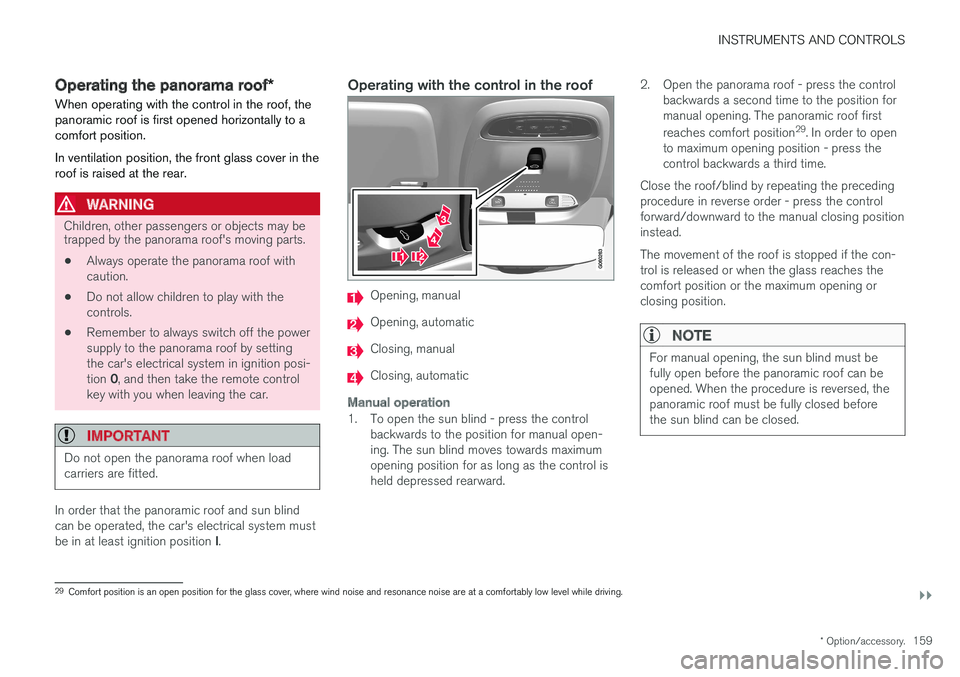
Operating with the control in the roof
Opening, manual
Opening, automatic
Closing, manual
Closing, automatic
Manual operation
1. To open the sun blind - press the control
backwards to the position for manual open- ing. The sun blind moves towards maximumopening position for as long as the control isheld depressed rearward. 2. Open the panorama roof - press the control
backwards a second time to the position formanual opening. The panoramic roof first reaches comfort position 29
. In order to open
to maximum opening position - press the control backwards a third time.
Close the roof/blind by repeating the precedingprocedure in reverse order - press the controlforward/downward to the manual closing positioninstead. The movement of the roof is stopped if the con- trol is released or when the glass reaches thecomfort position or the maximum opening orclosing position.
NOTE
For manual opening, the sun blind must be fully open before the panoramic roof can beopened. When the procedure is reversed, thepanoramic roof must be fully closed beforethe sun blind can be closed.
29 Comfort position is an open position for the glass cover, where wind noise and resonance noise are at a comfortably low level while driving.
Page 163 of 594
INSTRUMENTS AND CONTROLS
}}
* Option/accessory.161
The function is deactivated when the car is sup- plied from the factory and can be activated/deac-tivated: 1.
Press
Settings in the top view in the centre
display.
2. Press
My CarLocking.
Select
Auto Close Sunroof Curtain to
activate/deactivate.
Closing using the remote control key, central locking button or door handles
Remote control key
–Give a long press on the remote control key's lock button
until the panorama roof and
sun blind start moving towards the closed position. Then release the lock button.
Movement stops if the remote control key's lockbutton is pressed again or when the roof/blindhas reached the closed position.
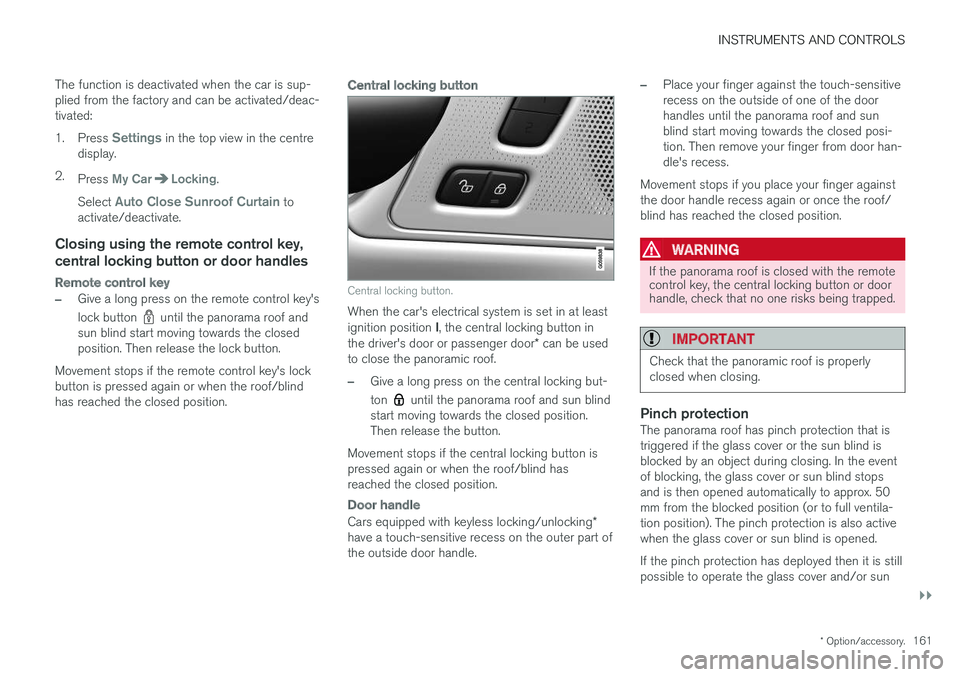
Central locking button
Central locking button.
When the car's electrical system is set in at least ignition position I, the central locking button in
the driver's door or passenger door * can be used
to close the panoramic roof.
–Give a long press on the central locking but- ton
until the panorama roof and sun blind
start moving towards the closed position. Then release the button.
Movement stops if the central locking button ispressed again or when the roof/blind hasreached the closed position.
Door handle
Cars equipped with keyless locking/unlocking *
have a touch-sensitive recess on the outer part of the outside door handle.
–Place your finger against the touch-sensitive recess on the outside of one of the doorhandles until the panorama roof and sunblind start moving towards the closed posi-tion. Then remove your finger from door han-dle's recess.
Movement stops if you place your finger againstthe door handle recess again or once the roof/blind has reached the closed position.
WARNING
If the panorama roof is closed with the remote control key, the central locking button or doorhandle, check that no one risks being trapped.
IMPORTANT
Check that the panoramic roof is properly closed when closing.
Pinch protectionThe panorama roof has pinch protection that is triggered if the glass cover or the sun blind isblocked by an object during closing. In the eventof blocking, the glass cover or sun blind stopsand is then opened automatically to approx. 50mm from the blocked position (or to full ventila-tion position). The pinch protection is also activewhen the glass cover or sun blind is opened. If the pinch protection has deployed then it is still possible to operate the glass cover and/or sun
Page 164 of 594
||
INSTRUMENTS AND CONTROLS
* Option/accessory.
162 blind once more in the same direction without pinch protection, if this is done within 10 secondsafter pinch protection deployment. It is thereforepossible to override the pinch protection whenclosing has been interrupted e.g. if ice hasformed around the glass cover, by continuallypressing the control forward/downward until theglass cover and/or sun blind is closed.
Related information
•
Panorama roof
* (p. 158)
• Ignition positions (p. 385)
• Remote control key (p. 236)
• Locking/unlocking from the inside (p. 245)
• Locking/unlocking from the outside (p. 241)
HomeLink ®
*30
HomeLink ®
is a programmable remote control
that is integrated into the car's electrical system.
General
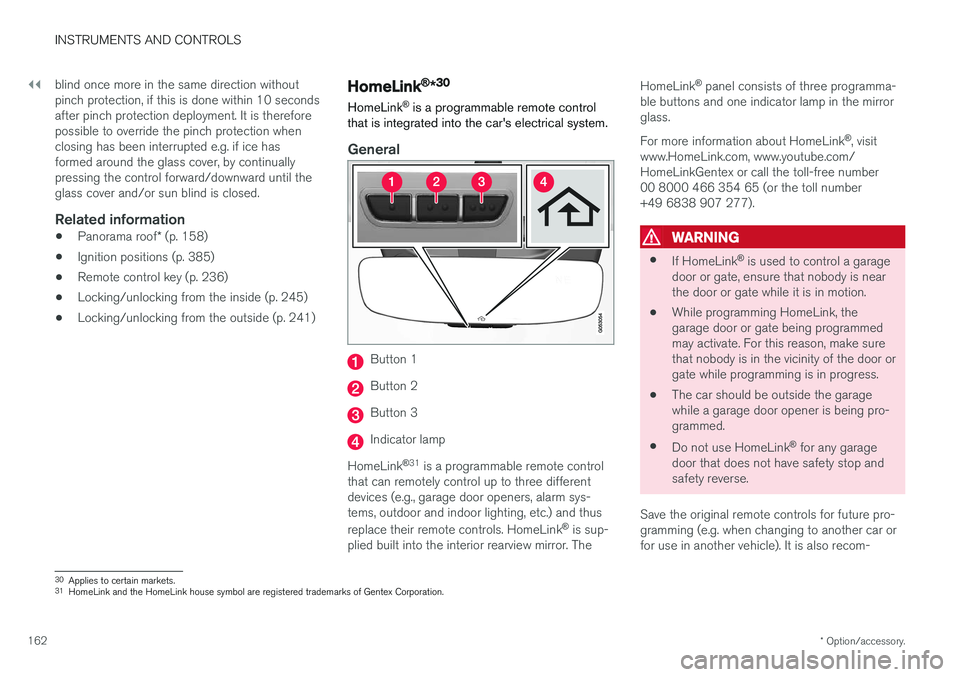
Button 1
Button 2
Button 3
Indicator lamp
HomeLink ®
31
is a programmable remote control
that can remotely control up to three different devices (e.g., garage door openers, alarm sys-tems, outdoor and indoor lighting, etc.) and thus replace their remote controls. HomeLink ®
is sup-
plied built into the interior rearview mirror. The HomeLink
®
panel consists of three programma-
ble buttons and one indicator lamp in the mirror glass. For more information about HomeLink ®
, visit
www.HomeLink.com, www.youtube.com/ HomeLinkGentex or call the toll-free number00 8000 466 354 65 (or the toll number+49 6838 907 277).
WARNING
• If HomeLink ®
is used to control a garage
door or gate, ensure that nobody is near the door or gate while it is in motion.
• While programming HomeLink, thegarage door or gate being programmedmay activate. For this reason, make surethat nobody is in the vicinity of the door orgate while programming is in progress.
• The car should be outside the garagewhile a garage door opener is being pro-
grammed.
• Do not use HomeLink ®
for any garage
door that does not have safety stop andsafety reverse.
Save the original remote controls for future pro-gramming (e.g. when changing to another car orfor use in another vehicle). It is also recom-
30 Applies to certain markets.
31 HomeLink and the HomeLink house symbol are registered trademarks of Gentex Corporation.
Page 165 of 594
INSTRUMENTS AND CONTROLS
}}
* Option/accessory.163
mended that the programming for the buttons is deleted when the car is sold; see the section "Programming HomeLink
®
".
Related information
• Programming HomeLink ®
* (p. 163)
Programming HomeLink ®
*32
Instructions for programming HomeLink ®
.
Programming HomeLink ®
NOTE
In certain vehicles the ignition must be switched on or in "accessory position" before HomeLink
®
can be programmed or used.
Preferably fit new batteries in the remote con-trol that will be replaced by HomeLink ®
for
faster programming and improved transmis-sion of the radio signal. The HomeLink ®
but-
tons should be reset before programming,see the heading "Resetting the HomeLink ®
buttons". When the reset is complete,HomeLink ®
is set in "learn mode" and ready
for programming.
1. Press the 33
button on HomeLink ®
you want
to program. The indicator lamp 33
on
HomeLink ®
should flash yellow once per
second. It is not necessary to hold the button depressed. 2. Aim the remote control towards the
HomeLink ®
button to be programmed and
hold it 2-8 cm from the button. Do not obstruct the indicator lamp on HomeLink ®
.
Note: Some remote controls can program
HomeLink ®
better at a distance of
15-20 cm. Bear this in mind if you encounter problems during programming.
3. Press and hold the button on the original remote control to be programmed on HomeLink ®
and keep an eye on the indicator
lamp. Do not release the button until the indicator lamp has switched from flashingyellow once per second to either flashinggreen 10 times per second or illuminating ina constant green glow. The button on theremote control can be released once theindicator lamp flashes or illuminates in green. Note: For some receivers, programming step
3 may need to be replaced with the instruc- tions in step 4.
4. Press and release the button on the original remote control every other second until theindicator lamp has changed from flashingyellow once per second to either flashinggreen 10 times per second or illuminating ina constant green glow.
32Applies to certain markets.
33 See section "HomeLink ®
*" for the location of buttons and indicator lamp.
Page 166 of 594
||
INSTRUMENTS AND CONTROLS
1645.
Depress the programmed HomeLink ®
button
and check the indicator lamp. > Constant green glow: If the indicator
lamp illuminates in a constant green glow, programming is complete . The garage
door, gate or similar should now be acti- vated when the programmed button isdepressed. Flashes green 10 times per second: Depress the button being programmed, hold it depressed for 2 seconds and then release it . Repeat the sequence of
pressing/holding/releasing a second timeand, depending on the receiver model,even a third time. Programming shouldnow be complete and the garage door,gate or similar should now be activatedwhen the programmed button isdepressed. If the receiver is still not activated: Continue with programming steps 6-8 to complete programming.
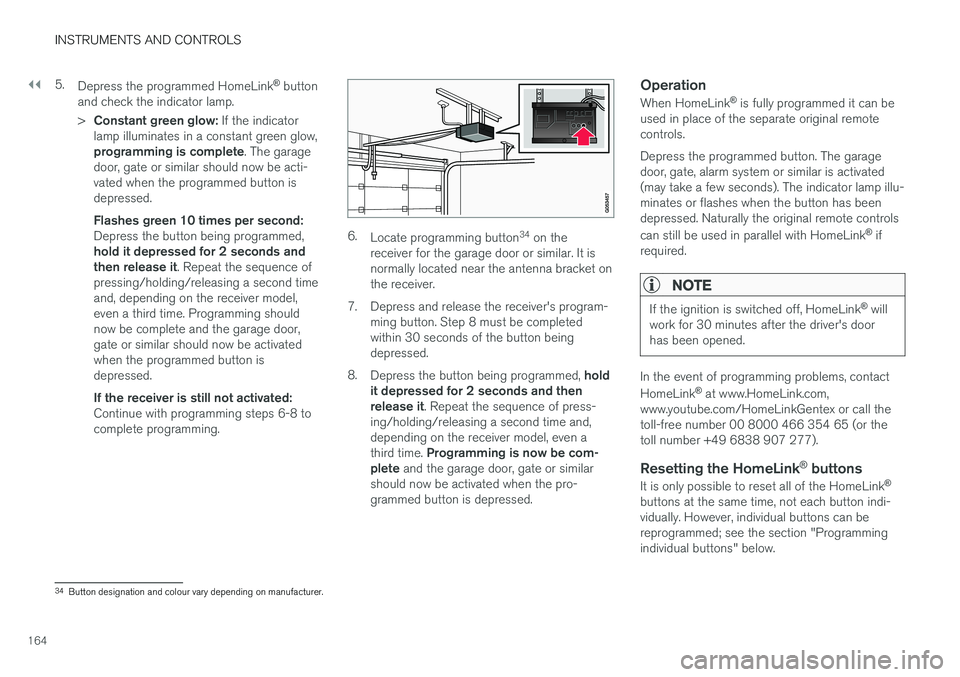
6. Locate programming button 34
on the
receiver for the garage door or similar. It is normally located near the antenna bracket onthe receiver.
7. Depress and release the receiver's program- ming button. Step 8 must be completedwithin 30 seconds of the button beingdepressed.
8. Depress the button being programmed, hold
it depressed for 2 seconds and thenrelease it . Repeat the sequence of press-
ing/holding/releasing a second time and,depending on the receiver model, even a third time. Programming is now be com-
plete and the garage door, gate or similar
should now be activated when the pro- grammed button is depressed.
Operation
When HomeLink ®
is fully programmed it can be
used in place of the separate original remotecontrols. Depress the programmed button. The garage door, gate, alarm system or similar is activated(may take a few seconds). The indicator lamp illu-minates or flashes when the button has beendepressed. Naturally the original remote controls can still be used in parallel with HomeLink ®
if
required.
NOTE
If the ignition is switched off, HomeLink ®
will
work for 30 minutes after the driver's door has been opened.
In the event of programming problems, contact HomeLink ®
at www.HomeLink.com,
www.youtube.com/HomeLinkGentex or call the toll-free number 00 8000 466 354 65 (or thetoll number +49 6838 907 277).
Resetting the HomeLink ®
buttons
It is only possible to reset all of the HomeLink ®
buttons at the same time, not each button indi-vidually. However, individual buttons can bereprogrammed; see the section "Programmingindividual buttons" below.
34 Button designation and colour vary depending on manufacturer.
Page 176 of 594
INSTRUMENTS AND CONTROLS
174
Driver profiles
Many of the settings made in the car can be adapted according to the driver's personal pref-erences and can be saved in one or more driverprofiles.
The personal settings are automatically saved in the active driver profile. Each key can be linked toa driver profile. When the linked key is used, thecar is adapted to the settings of that specificdriver profile.
What settings are saved in the driver profiles?
Many of the settings made in the car will be auto-matically saved in the active driver profile if theprofile is not locked; see the section "Editing adriver profile". Settings made in the car are eitherpersonal or global. Only personal settings aresaved in driver profiles. Settings that can be saved in a driver profile include, amongst other things, screens, mirrors,front seats, navigation, audio and media system,language and voice control. Some settings, referred to as global settings, can be changed but are not saved to a specific driverprofile. Changes to global settings affect all pro-files.
Global settings
The global settings and parameters are not changed when changing between driver profiles. They remain the same regardless of which driverprofile is active. Keyboard layout settings are an example of global settings. If driver profile X is used to addadditional languages to the keyboard, theseremain available for use even if driver profile Y isused. The keyboard layout settings are not savedto a specific driver profile - the settings areglobal.
Personal preferences
If driver profile X was used to e.g. set centre dis- play brightness, driver profile Y is not affected bythis setting. It has been saved to driver profile X -the brightness setting is a personal setting. Refer to the section "Categories in the settings view" for more information on which settings arepersonal and which are global.
Related information
•
Editing a driver profile (p. 175)
• Categories in the settings view (p. 170)
• Selecting driver profile (p. 174)
Selecting driver profile
The last used driver profile is the one selected when the car is unlocked. It is possible tochange to another driver profile after the car hasbeen unlocked.
When the centre display has been started, the selected driver profile is shown at the top of thescreen. The driver profile last used is the one thatwill be active next time the car is unlocked. How-ever, if the remote control key has been linked toa driver profile then this is what is selected whenthe car is started. See "Linking remote controlkey to driver profile". There are two options for changing to another driver profile. Option 1:
1. Tap on the name of the driver profile shown in the top of the centre display when the dis- play has been started.
> A list of selectable driver profiles is shown.
2. Select the driver profile required. 3. Press
Confirm.
> The driver profile is selected and the sys- tem loads the settings for the new driver profile.
Option 2:
1. Drag down the top view in the centre display.
Page 177 of 594
INSTRUMENTS AND CONTROLS
}}
175
2.
Press
Profile.
> The same list as for Option 1 is shown.
3. Select the driver profile required. 4. Press
Confirm.
> The driver profile is selected and the sys- tem loads the settings for the new driver profile.
Related information
• Driver profiles (p. 174)
• Editing a driver profile (p. 175)
• Linking remote control key to driver profile(p. 176)
Editing a driver profile
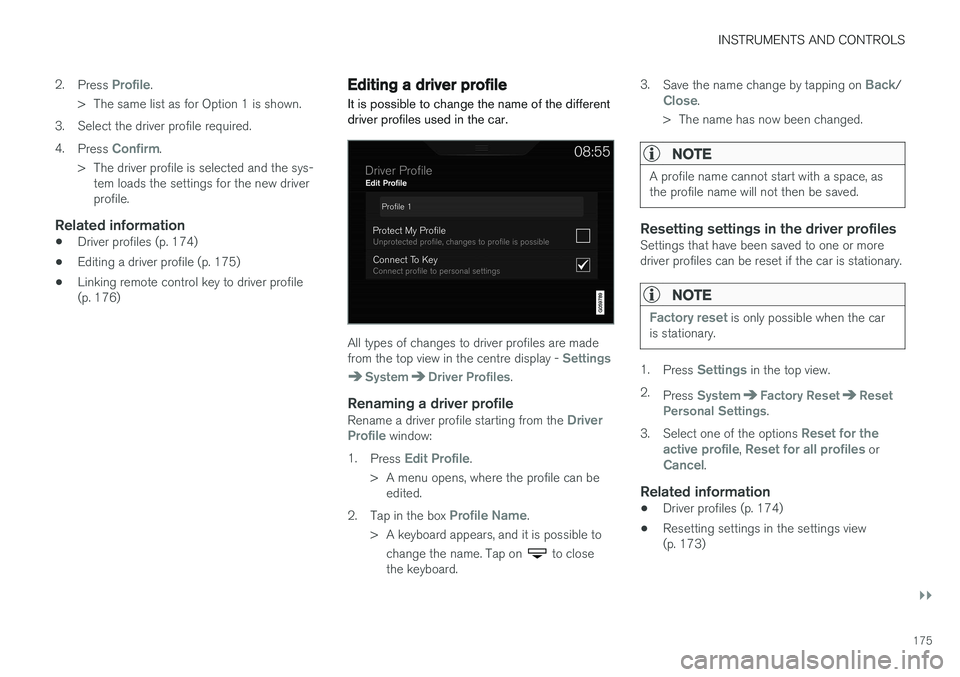
It is possible to change the name of the different driver profiles used in the car.
All types of changes to driver profiles are made from the top view in the centre display - Settings
SystemDriver Profiles.
Renaming a driver profileRename a driver profile starting from the Driver
Profile window:
1. Press
Edit Profile.
> A menu opens, where the profile can be edited.
2. Tap in the box
Profile Name.
> A keyboard appears, and it is possible to change the name. Tap on
to close
the keyboard. 3.
Save the name change by tapping on
Back/Close.
> The name has now been changed.
NOTE
A profile name cannot start with a space, as the profile name will not then be saved.
Resetting settings in the driver profilesSettings that have been saved to one or more driver profiles can be reset if the car is stationary.
NOTE
Factory reset is only possible when the car
is stationary.
1. Press Settings in the top view.
2. Press
SystemFactory ResetReset
Personal Settings.
3. Select one of the options
Reset for the
active profile, Reset for all profiles orCancel.
Related information
• Driver profiles (p. 174)
• Resetting settings in the settings view (p. 173)
Page 178 of 594
INSTRUMENTS AND CONTROLS
176•
Using the keyboard in the centre display (p. 49)
• Selecting driver profile (p. 174)
Linking remote control key to driver profile It is possible to link your key to a driver profile. The driver profile along with all of its settings willthen be automatically selected every time the caris used with that specific remote control key.
The first time the remote control key is used, it is not linked to any specific driver profile. When the car is started, the
Guest profile will automatically
be activated. A driver profile can be selected manually without linking it to the key. When the car is unlocked,the last active driver profile is activated. Once thekey has been linked to a driver profile, a driverprofile does not need to be selected when thatspecific key is used.
Linking a remote control key to a driver
profile
First select the profile to be linked to the key, ifthe profile to be linked is not already active. Theactive profile can then be linked to the key. 1. Press
Settings in the top view in the centre
display.
2. Press
SystemDriver Profiles.
3. Select the desired profile. The
Guest profile
cannot be linked to a key. 4.
Drag down the top view and tap on
Settings
SystemDriver ProfilesEdit
Profile.
5. Select
Connect key to link the profile with
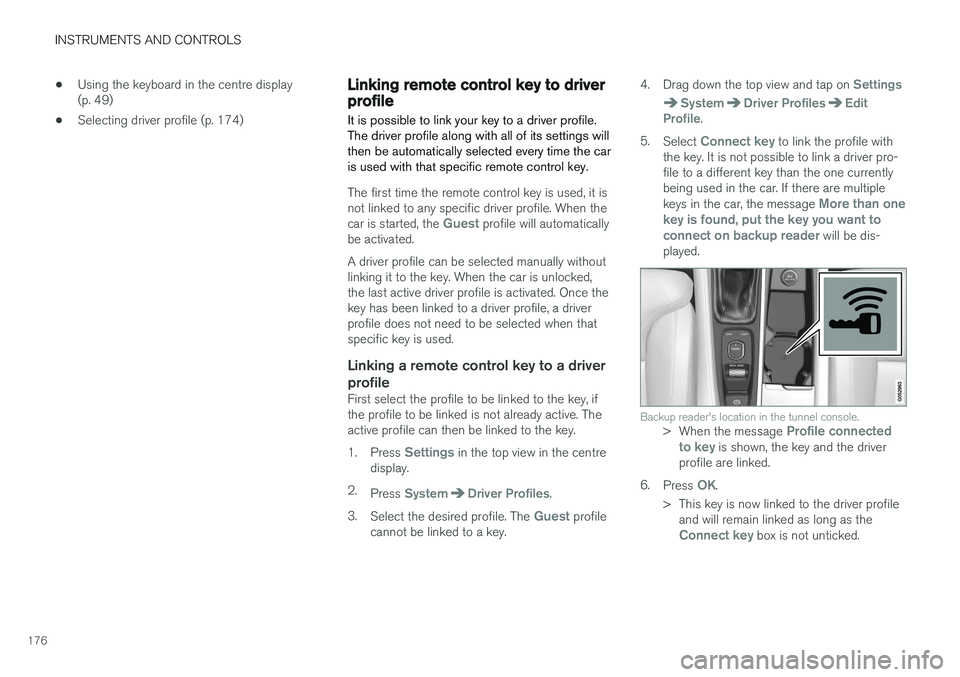
the key. It is not possible to link a driver pro- file to a different key than the one currentlybeing used in the car. If there are multiple keys in the car, the message
More than one
key is found, put the key you want to connect on backup reader
will be dis-
played.
Backup reader's location in the tunnel console.> When the message Profile connected
to key is shown, the key and the driver
profile are linked.
6. Press
OK.
> This key is now linked to the driver profile and will remain linked as long as the
Connect key box is not unticked.