tow VOLVO V90 2017 User Guide
[x] Cancel search | Manufacturer: VOLVO, Model Year: 2017, Model line: V90, Model: VOLVO V90 2017Pages: 594, PDF Size: 15.07 MB
Page 157 of 594
INSTRUMENTS AND CONTROLS
}}
* Option/accessory.155
Retractable power door mirrors *The mirrors can be retracted for parking/driving in narrow spaces: 1.
Depress the L and R buttons simultaneously
(ignition position must be at least I).
2. Release them after approximately 1 second. The mirrors automatically stop in the fully retracted position.
Fold out the mirrors by pressing down the L and
R buttons simultaneously. The mirrors automati-
cally stop in the fully extended position.
Related information
• Interior rearview mirror (p. 155)
• Settings view (p. 169)
• Using the memory function in the power front seat
* (p. 122)
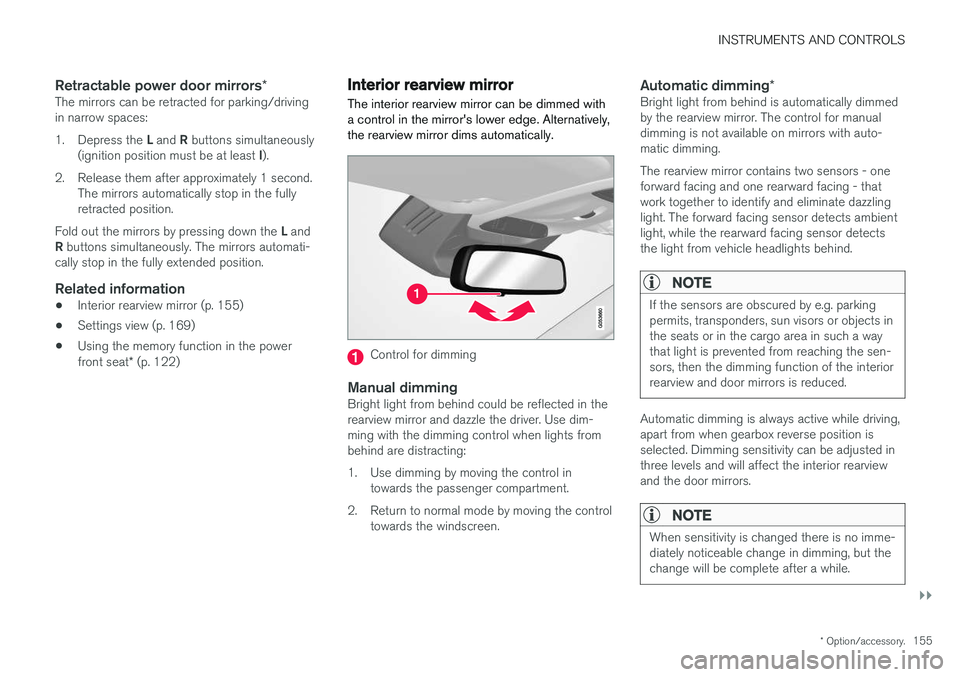
Interior rearview mirror The interior rearview mirror can be dimmed with a control in the mirror's lower edge. Alternatively,the rearview mirror dims automatically.
Control for dimming
Manual dimmingBright light from behind could be reflected in the rearview mirror and dazzle the driver. Use dim-ming with the dimming control when lights frombehind are distracting:
1. Use dimming by moving the control in
towards the passenger compartment.
2. Return to normal mode by moving the control towards the windscreen.
Automatic dimming *Bright light from behind is automatically dimmed by the rearview mirror. The control for manualdimming is not available on mirrors with auto-matic dimming. The rearview mirror contains two sensors - one forward facing and one rearward facing - thatwork together to identify and eliminate dazzlinglight. The forward facing sensor detects ambientlight, while the rearward facing sensor detectsthe light from vehicle headlights behind.
NOTE
If the sensors are obscured by e.g. parking permits, transponders, sun visors or objects inthe seats or in the cargo area in such a waythat light is prevented from reaching the sen-sors, then the dimming function of the interiorrearview and door mirrors is reduced.
Automatic dimming is always active while driving, apart from when gearbox reverse position isselected. Dimming sensitivity can be adjusted inthree levels and will affect the interior rearviewand the door mirrors.
NOTE
When sensitivity is changed there is no imme- diately noticeable change in dimming, but thechange will be complete after a while.
Page 161 of 594
INSTRUMENTS AND CONTROLS
}}
* Option/accessory.159
Operating the panorama roof *
When operating with the control in the roof, the panoramic roof is first opened horizontally to acomfort position. In ventilation position, the front glass cover in the roof is raised at the rear.
WARNING
Children, other passengers or objects may be trapped by the panorama roof's moving parts.
• Always operate the panorama roof with caution.
• Do not allow children to play with thecontrols.
• Remember to always switch off the powersupply to the panorama roof by settingthe car's electrical system in ignition posi- tion
0, and then take the remote control
key with you when leaving the car.
IMPORTANT
Do not open the panorama roof when load carriers are fitted.
In order that the panoramic roof and sun blind can be operated, the car's electrical system must be in at least ignition position I.
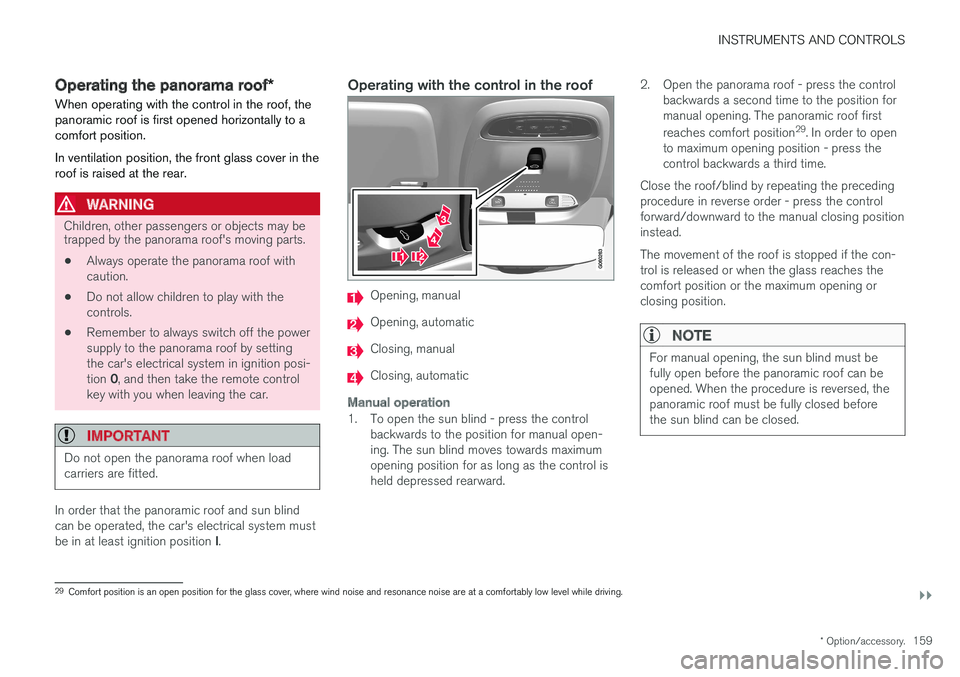
Operating with the control in the roof
Opening, manual
Opening, automatic
Closing, manual
Closing, automatic
Manual operation
1. To open the sun blind - press the control
backwards to the position for manual open- ing. The sun blind moves towards maximumopening position for as long as the control isheld depressed rearward. 2. Open the panorama roof - press the control
backwards a second time to the position formanual opening. The panoramic roof first reaches comfort position 29
. In order to open
to maximum opening position - press the control backwards a third time.
Close the roof/blind by repeating the precedingprocedure in reverse order - press the controlforward/downward to the manual closing positioninstead. The movement of the roof is stopped if the con- trol is released or when the glass reaches thecomfort position or the maximum opening orclosing position.
NOTE
For manual opening, the sun blind must be fully open before the panoramic roof can beopened. When the procedure is reversed, thepanoramic roof must be fully closed beforethe sun blind can be closed.
29 Comfort position is an open position for the glass cover, where wind noise and resonance noise are at a comfortably low level while driving.
Page 163 of 594
INSTRUMENTS AND CONTROLS
}}
* Option/accessory.161
The function is deactivated when the car is sup- plied from the factory and can be activated/deac-tivated: 1.
Press
Settings in the top view in the centre
display.
2. Press
My CarLocking.
Select
Auto Close Sunroof Curtain to
activate/deactivate.
Closing using the remote control key, central locking button or door handles
Remote control key
–Give a long press on the remote control key's lock button
until the panorama roof and
sun blind start moving towards the closed position. Then release the lock button.
Movement stops if the remote control key's lockbutton is pressed again or when the roof/blindhas reached the closed position.
Central locking button
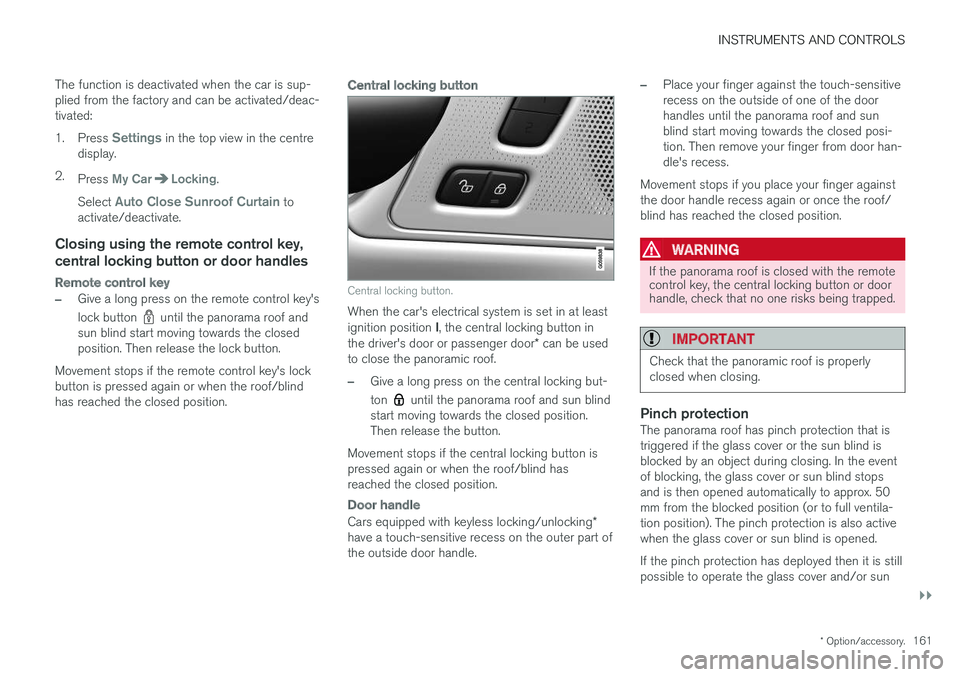
Central locking button.
When the car's electrical system is set in at least ignition position I, the central locking button in
the driver's door or passenger door * can be used
to close the panoramic roof.
–Give a long press on the central locking but- ton
until the panorama roof and sun blind
start moving towards the closed position. Then release the button.
Movement stops if the central locking button ispressed again or when the roof/blind hasreached the closed position.
Door handle
Cars equipped with keyless locking/unlocking *
have a touch-sensitive recess on the outer part of the outside door handle.
–Place your finger against the touch-sensitive recess on the outside of one of the doorhandles until the panorama roof and sunblind start moving towards the closed posi-tion. Then remove your finger from door han-dle's recess.
Movement stops if you place your finger againstthe door handle recess again or once the roof/blind has reached the closed position.
WARNING
If the panorama roof is closed with the remote control key, the central locking button or doorhandle, check that no one risks being trapped.
IMPORTANT
Check that the panoramic roof is properly closed when closing.
Pinch protectionThe panorama roof has pinch protection that is triggered if the glass cover or the sun blind isblocked by an object during closing. In the eventof blocking, the glass cover or sun blind stopsand is then opened automatically to approx. 50mm from the blocked position (or to full ventila-tion position). The pinch protection is also activewhen the glass cover or sun blind is opened. If the pinch protection has deployed then it is still possible to operate the glass cover and/or sun
Page 165 of 594
INSTRUMENTS AND CONTROLS
}}
* Option/accessory.163
mended that the programming for the buttons is deleted when the car is sold; see the section "Programming HomeLink
®
".
Related information
• Programming HomeLink ®
* (p. 163)
Programming HomeLink ®
*32
Instructions for programming HomeLink ®
.
Programming HomeLink ®
NOTE
In certain vehicles the ignition must be switched on or in "accessory position" before HomeLink
®
can be programmed or used.
Preferably fit new batteries in the remote con-trol that will be replaced by HomeLink ®
for
faster programming and improved transmis-sion of the radio signal. The HomeLink ®
but-
tons should be reset before programming,see the heading "Resetting the HomeLink ®
buttons". When the reset is complete,HomeLink ®
is set in "learn mode" and ready
for programming.
1. Press the 33
button on HomeLink ®
you want
to program. The indicator lamp 33
on
HomeLink ®
should flash yellow once per
second. It is not necessary to hold the button depressed. 2. Aim the remote control towards the
HomeLink ®
button to be programmed and
hold it 2-8 cm from the button. Do not obstruct the indicator lamp on HomeLink ®
.
Note: Some remote controls can program
HomeLink ®
better at a distance of
15-20 cm. Bear this in mind if you encounter problems during programming.
3. Press and hold the button on the original remote control to be programmed on HomeLink ®
and keep an eye on the indicator
lamp. Do not release the button until the indicator lamp has switched from flashingyellow once per second to either flashinggreen 10 times per second or illuminating ina constant green glow. The button on theremote control can be released once theindicator lamp flashes or illuminates in green. Note: For some receivers, programming step
3 may need to be replaced with the instruc- tions in step 4.
4. Press and release the button on the original remote control every other second until theindicator lamp has changed from flashingyellow once per second to either flashinggreen 10 times per second or illuminating ina constant green glow.
32Applies to certain markets.
33 See section "HomeLink ®
*" for the location of buttons and indicator lamp.
Page 201 of 594
CLIMATE CONTROL
}}
199
Opening/closing and aiming the air vents Some air vents in the passenger compartment can be opened, closed and aimed individually.
If the door pillar vents and instrument panel outer vents are aimed toward the side windows, thenmisting can be removed. If the door pillar vents are aimed inwards then, in a hot climate, a comfortable environment isobtained in the passenger compartment.
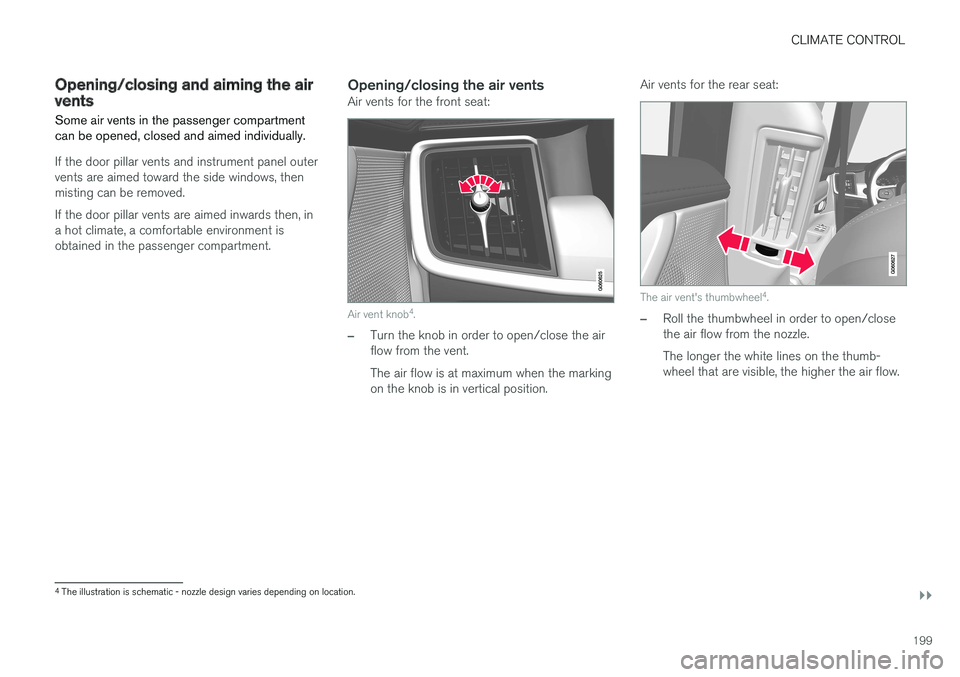
Opening/closing the air ventsAir vents for the front seat:
Air vent knob4
.
–Turn the knob in order to open/close the air flow from the vent. The air flow is at maximum when the marking on the knob is in vertical position. Air vents for the rear seat:
The air vent's thumbwheel
4
.
–Roll the thumbwheel in order to open/close the air flow from the nozzle. The longer the white lines on the thumb- wheel that are visible, the higher the air flow.
4 The illustration is schematic - nozzle design varies depending on location.
Page 228 of 594
||
LOADING AND STORAGE
* Option/accessory.
226
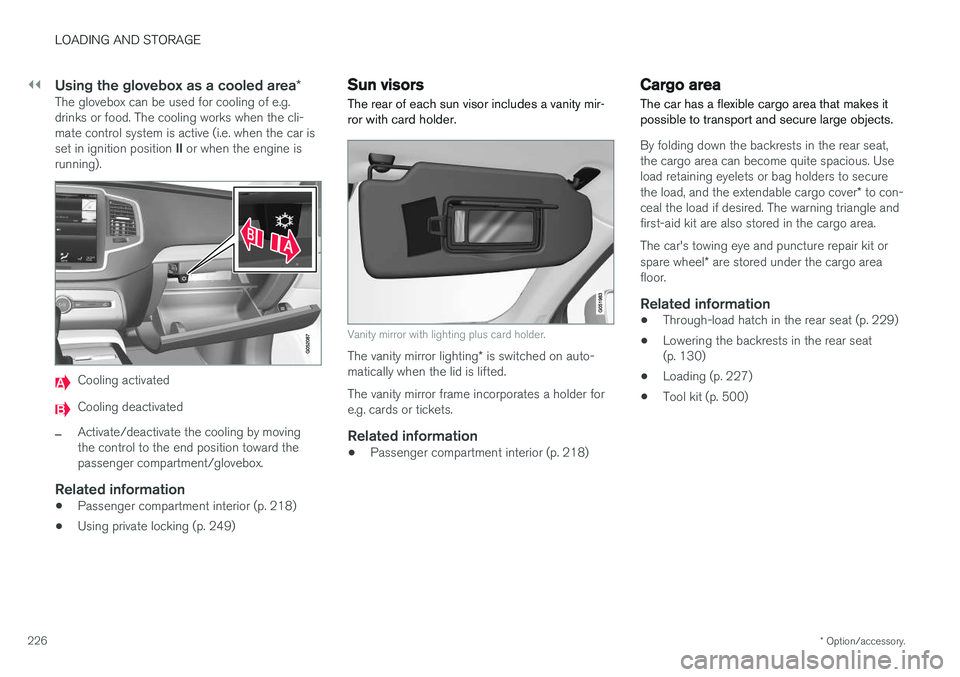
Using the glovebox as a cooled area *The glovebox can be used for cooling of e.g. drinks or food. The cooling works when the cli-mate control system is active (i.e. when the car is set in ignition position II or when the engine is
running).
Cooling activated
Cooling deactivated
–Activate/deactivate the cooling by moving the control to the end position toward thepassenger compartment/glovebox.
Related information
• Passenger compartment interior (p. 218)
• Using private locking (p. 249)
Sun visors The rear of each sun visor includes a vanity mir- ror with card holder.
Vanity mirror with lighting plus card holder.
The vanity mirror lighting
* is switched on auto-
matically when the lid is lifted. The vanity mirror frame incorporates a holder for e.g. cards or tickets.
Related information
• Passenger compartment interior (p. 218)
Cargo area
The car has a flexible cargo area that makes it possible to transport and secure large objects.
By folding down the backrests in the rear seat, the cargo area can become quite spacious. Useload retaining eyelets or bag holders to secure the load, and the extendable cargo cover * to con-
ceal the load if desired. The warning triangle and first-aid kit are also stored in the cargo area. The car's towing eye and puncture repair kit or spare wheel * are stored under the cargo area
floor.
Related information
• Through-load hatch in the rear seat (p. 229)
• Lowering the backrests in the rear seat (p. 130)
• Loading (p. 227)
• Tool kit (p. 500)
Page 244 of 594
||
LOCKS AND ALARM
* Option/accessory.
242
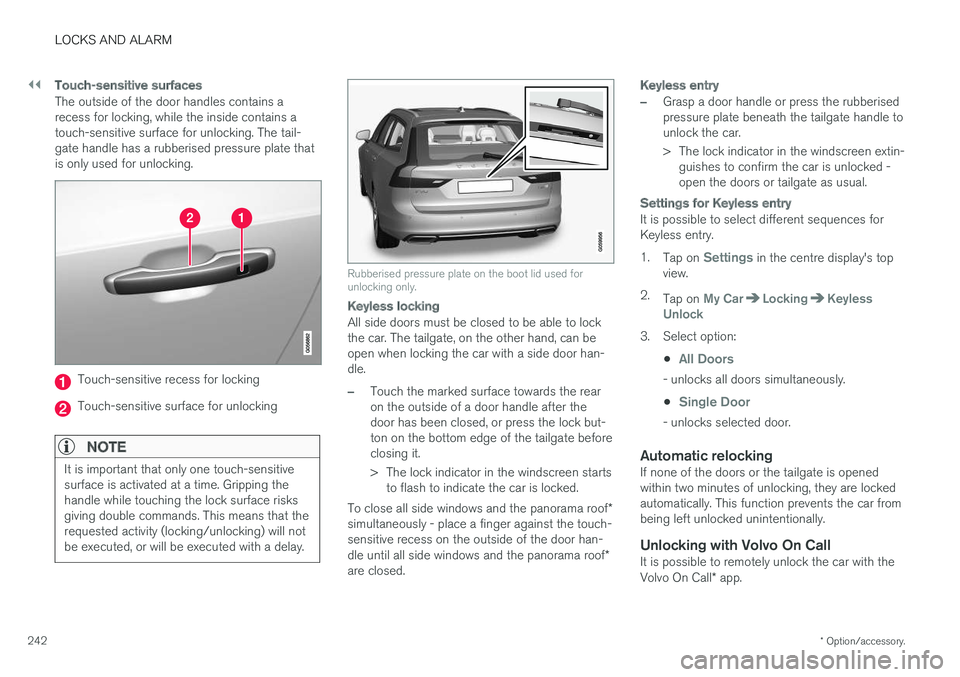
Touch-sensitive surfaces
The outside of the door handles contains a recess for locking, while the inside contains atouch-sensitive surface for unlocking. The tail-gate handle has a rubberised pressure plate thatis only used for unlocking.
Touch-sensitive recess for locking
Touch-sensitive surface for unlocking
NOTE
It is important that only one touch-sensitive surface is activated at a time. Gripping thehandle while touching the lock surface risksgiving double commands. This means that therequested activity (locking/unlocking) will notbe executed, or will be executed with a delay.
Rubberised pressure plate on the boot lid used for unlocking only.
Keyless locking
All side doors must be closed to be able to lock the car. The tailgate, on the other hand, can beopen when locking the car with a side door han-dle.
–Touch the marked surface towards the rear on the outside of a door handle after thedoor has been closed, or press the lock but-ton on the bottom edge of the tailgate beforeclosing it.
> The lock indicator in the windscreen starts
to flash to indicate the car is locked.
To close all side windows and the panorama roof *
simultaneously - place a finger against the touch- sensitive recess on the outside of the door han- dle until all side windows and the panorama roof *
are closed.
Keyless entry
–Grasp a door handle or press the rubberised pressure plate beneath the tailgate handle tounlock the car.
> The lock indicator in the windscreen extin- guishes to confirm the car is unlocked - open the doors or tailgate as usual.
Settings for Keyless entry
It is possible to select different sequences for Keyless entry. 1. Tap on
Settings in the centre display's top
view.
2. Tap on
My CarLockingKeyless
Unlock
3. Select option:
•
All Doors
- unlocks all doors simultaneously.
•
Single Door
- unlocks selected door.
Automatic relockingIf none of the doors or the tailgate is opened within two minutes of unlocking, they are lockedautomatically. This function prevents the car frombeing left unlocked unintentionally.
Unlocking with Volvo On CallIt is possible to remotely unlock the car with the Volvo On Call * app.
Page 258 of 594
LOCKS AND ALARM
* Option/accessory.
256
Opening/closing the tailgate with foot movement *
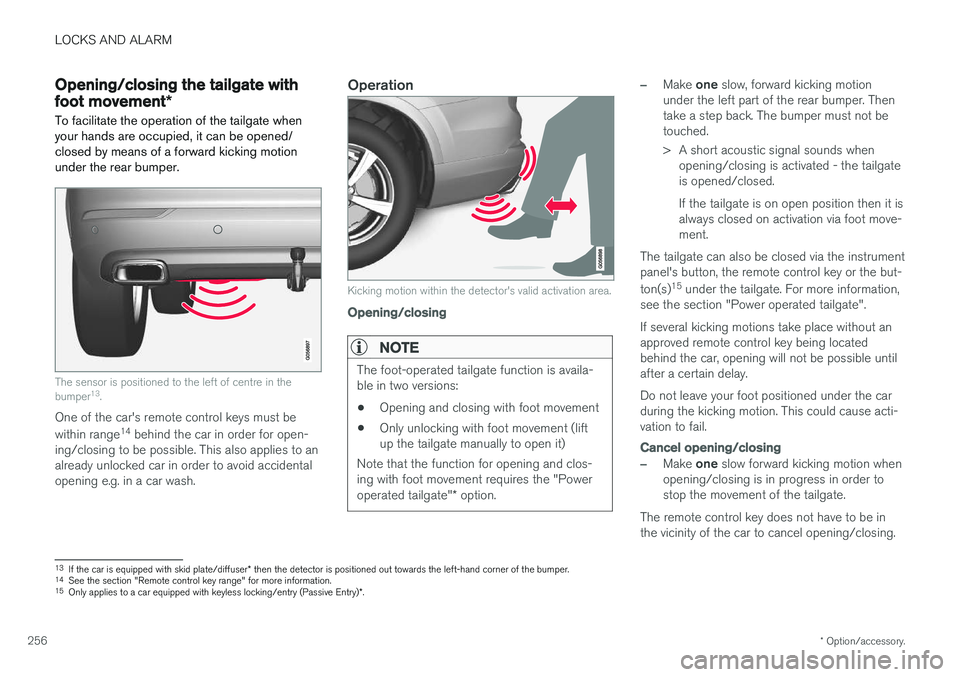
To facilitate the operation of the tailgate when your hands are occupied, it can be opened/closed by means of a forward kicking motionunder the rear bumper.
The sensor is positioned to the left of centre in the bumper 13
.
One of the car's remote control keys must be within range 14
behind the car in order for open-
ing/closing to be possible. This also applies to an already unlocked car in order to avoid accidentalopening e.g. in a car wash.
Operation
Kicking motion within the detector's valid activation area.
Opening/closing
NOTE
The foot-operated tailgate function is availa- ble in two versions:
• Opening and closing with foot movement
• Only unlocking with foot movement (liftup the tailgate manually to open it)
Note that the function for opening and clos-ing with foot movement requires the "Power operated tailgate" * option.
–Make one slow, forward kicking motion
under the left part of the rear bumper. Then take a step back. The bumper must not betouched.
> A short acoustic signal sounds when opening/closing is activated - the tailgate is opened/closed. If the tailgate is on open position then it is always closed on activation via foot move-ment.
The tailgate can also be closed via the instrumentpanel's button, the remote control key or the but- ton(s) 15
under the tailgate. For more information,
see the section "Power operated tailgate". If several kicking motions take place without an approved remote control key being locatedbehind the car, opening will not be possible untilafter a certain delay. Do not leave your foot positioned under the car during the kicking motion. This could cause acti-vation to fail.
Cancel opening/closing
–Make one slow forward kicking motion when
opening/closing is in progress in order to stop the movement of the tailgate.
The remote control key does not have to be inthe vicinity of the car to cancel opening/closing.
13 If the car is equipped with skid plate/diffuser * then the detector is positioned out towards the left-hand corner of the bumper.
14 See the section "Remote control key range" for more information.
15 Only applies to a car equipped with keyless locking/entry (Passive Entry) *.
Page 264 of 594
||
LOCKS AND ALARM
* Option/accessory.
262
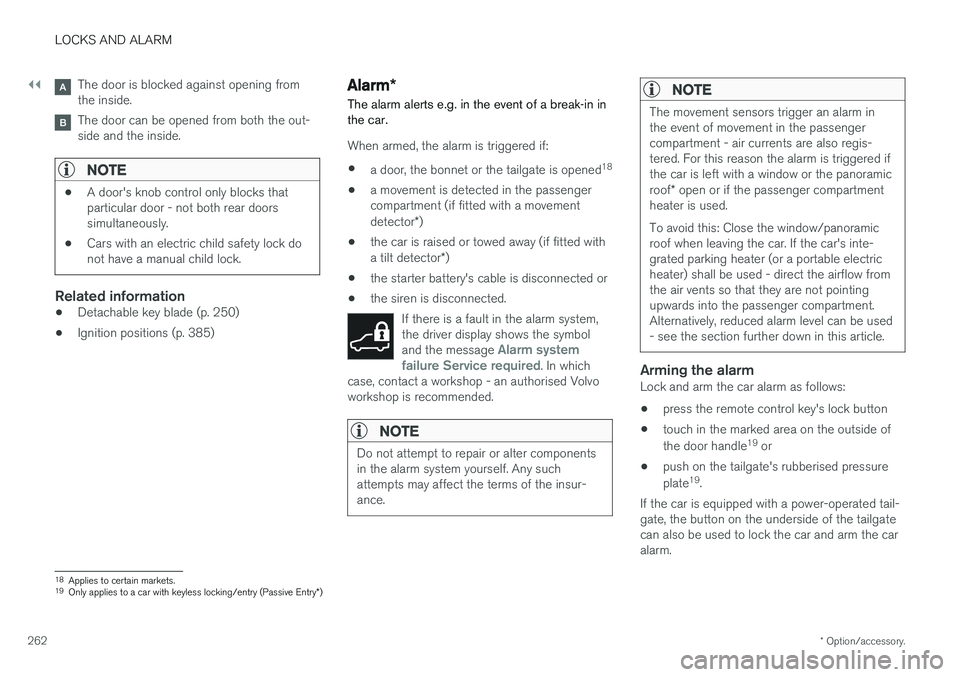
The door is blocked against opening from the inside.
The door can be opened from both the out- side and the inside.
NOTE
• A door's knob control only blocks that particular door - not both rear doorssimultaneously.
• Cars with an electric child safety lock donot have a manual child lock.
Related information
• Detachable key blade (p. 250)
• Ignition positions (p. 385)
Alarm
*
The alarm alerts e.g. in the event of a break-in in the car.
When armed, the alarm is triggered if:
• a door, the bonnet or the tailgate is opened 18
• a movement is detected in the passenger compartment (if fitted with a movement detector
*)
• the car is raised or towed away (if fitted witha tilt detector
*)
• the starter battery's cable is disconnected or
• the siren is disconnected.
If there is a fault in the alarm system, the driver display shows the symbol and the message
Alarm system
failure Service required. In which
case, contact a workshop - an authorised Volvo workshop is recommended.
NOTE
Do not attempt to repair or alter components in the alarm system yourself. Any suchattempts may affect the terms of the insur-ance.
NOTE
The movement sensors trigger an alarm in the event of movement in the passengercompartment - air currents are also regis-tered. For this reason the alarm is triggered ifthe car is left with a window or the panoramic roof * open or if the passenger compartment
heater is used. To avoid this: Close the window/panoramic roof when leaving the car. If the car's inte-grated parking heater (or a portable electricheater) shall be used - direct the airflow fromthe air vents so that they are not pointingupwards into the passenger compartment.Alternatively, reduced alarm level can be used- see the section further down in this article.
Arming the alarmLock and arm the car alarm as follows:
• press the remote control key's lock button
• touch in the marked area on the outside of the door handle 19
or
• push on the tailgate's rubberised pressureplate 19
.
If the car is equipped with a power-operated tail- gate, the button on the underside of the tailgatecan also be used to lock the car and arm the caralarm.
18 Applies to certain markets.
19 Only applies to a car with keyless locking/entry (Passive Entry *)
Page 300 of 594
||
DRIVER SUPPORT
* Option/accessory.
298
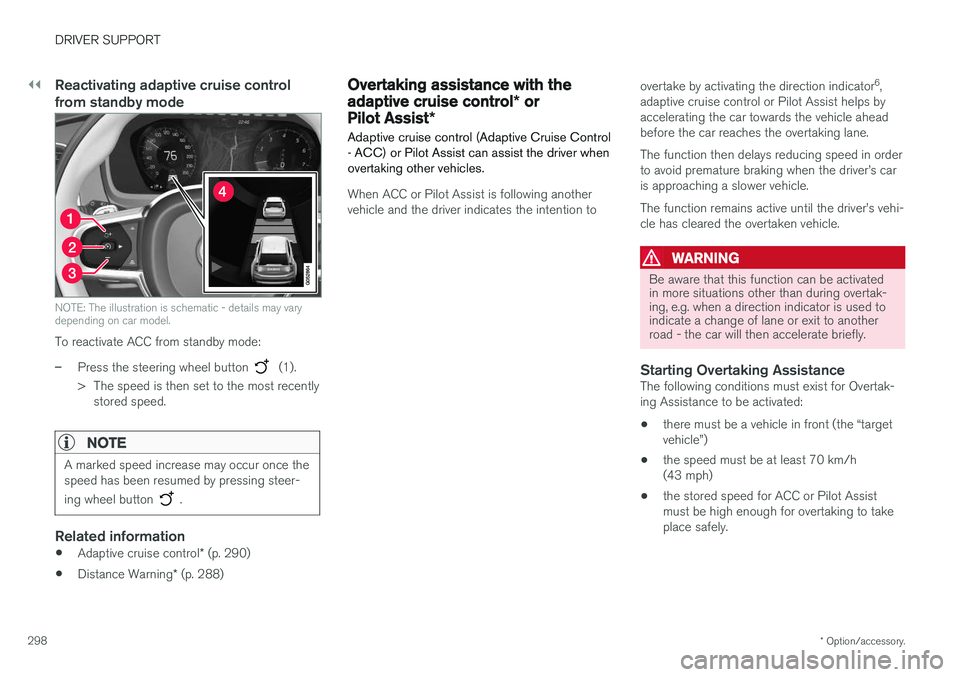
Reactivating adaptive cruise control from standby mode
NOTE: The illustration is schematic - details may vary depending on car model.
To reactivate ACC from standby mode:
–Press the steering wheel button (1).
> The speed is then set to the most recently stored speed.
NOTE
A marked speed increase may occur once the speed has been resumed by pressing steer- ing wheel button
.
Related information
• Adaptive cruise control
* (p. 290)
• Distance Warning
* (p. 288)
Overtaking assistance with the adaptive cruise control * or
Pilot Assist *
Adaptive cruise control (Adaptive Cruise Control - ACC) or Pilot Assist can assist the driver whenovertaking other vehicles.
When ACC or Pilot Assist is following another vehicle and the driver indicates the intention to overtake by activating the direction indicator
6
,
adaptive cruise control or Pilot Assist helps byaccelerating the car towards the vehicle aheadbefore the car reaches the overtaking lane. The function then delays reducing speed in order to avoid premature braking when the driver