lock VOLVO V90 2017 Owner's Manual
[x] Cancel search | Manufacturer: VOLVO, Model Year: 2017, Model line: V90, Model: VOLVO V90 2017Pages: 594, PDF Size: 15.07 MB
Page 131 of 594

INSTRUMENTS AND CONTROLS
* Option/accessory.129
To lower the head restraint, the button (see illus- tration) must be depressed while the restraint iscarefully moved down.
WARNING
The centre seat head restraint must be in its lowest position when the centre seat is notused. When the centre seat is used, the headrestraint must be correctly adjusted to theheight of the passenger so that it covers thewhole of the back of the head if possible.
Electrical lowering of the rear seat's outer head restraints *
The outer head restraints can be lowered in two ways via the centre display:
Via the function view
Press the Headrest fold but-
ton to activate/deactivate low- ering.
Via settings
The car's electrical system must be in the ignition position II.
1. Press
Settings in the top view.
2. Press
My CarSeats. 3.
Select
Fold Headrest On Second Row
Seats to lower the rear outer head
restraints.
WARNING
Do not lower the outer head restraints if there are passengers in any of the outer seats.
Move the head restraint back manually until a click is heard.
WARNING
The head restraints must be in locked posi- tion after being raised.
Related information
• Rear seat (p. 128)
• Lowering the backrests in the rear seat (p. 130)
Page 132 of 594

INSTRUMENTS AND CONTROLS
* Option/accessory.
130
Lowering the backrests in the rear seat
The rear seat's backrest is divided into two parts. The two parts can be lowered forwardindividually.
WARNING
Adjust the seat and fix it before driving away. Take care when adjusting the seat. Uncontrol-led or careless adjustment can lead to trap-ping injuries.
IMPORTANT
There must be no objects on the rear seat when the backrest is to be folded down. Theseat belts must not be connected either. Oth-erwise there is a risk of damaging the rearseat upholstery.
IMPORTANT
The integrated booster cushions * on the
outer seats must be lowered before lowering the seat. The armrest * for the centre seat must be
raised before lowering the seat. If the car has private locking, the tailgate must be closed before lowering the seat.
NOTE
The front seats may need to be pushed for- wards, and/or the backrests adjustedupwards, in order that the rear backrests canbe fully folded forward.
Lowering the backrest
Car with electronic folding
If the car is equipped with electronic folding of the rear seat * there are buttons located in the
cargo area. The backrests can also be lowered manually.
WARNING
Pay attention that people are not at risk of being trapped during the automatic folding ofthe rear seat. Since this takes place automati-cally on the press of a button, no one must beon or too close to the rear seat.
For electronically controlled folding of backrests:
1. Ensure that there are no occupants or objects in the rear seat.
2. Lower the centre seat's head restraint man- ually.
3. Hold the button for folding depressed. The buttons are marked L and R for left and right backrest section respectively.
4. The backrests are lowered automatically to horizontal position. The head restraints arealso lowered automatically.
To facilitate folding of the rear seat, the car mustbe stationary and the tailgate open. To lower the backrest manually:
Page 133 of 594
INSTRUMENTS AND CONTROLS
}}
* Option/accessory.131
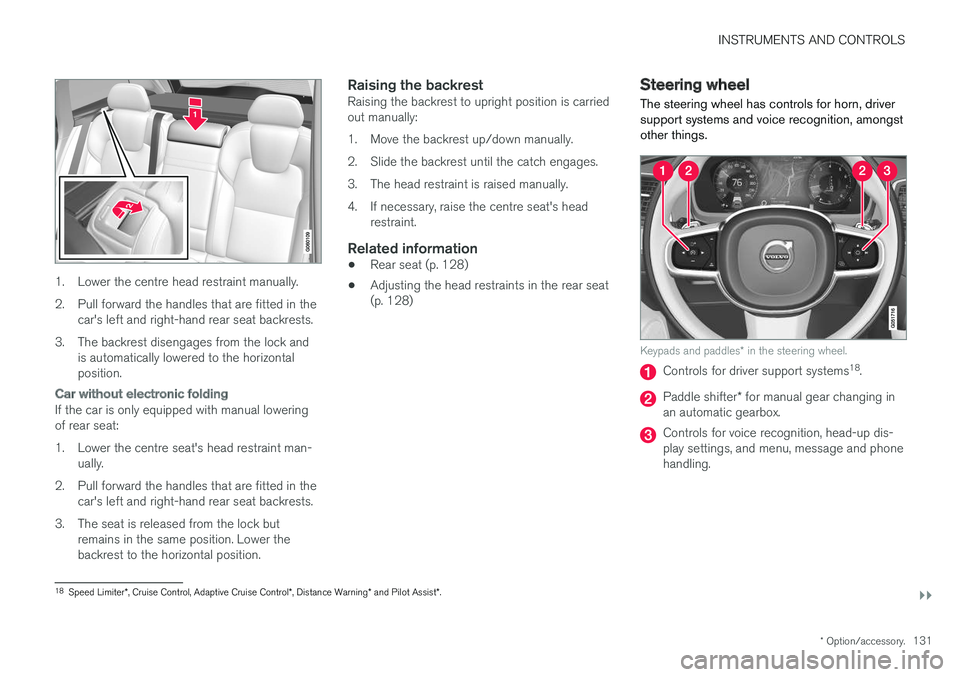
1. Lower the centre head restraint manually.
2. Pull forward the handles that are fitted in the
car's left and right-hand rear seat backrests.
3. The backrest disengages from the lock and is automatically lowered to the horizontal position.
Car without electronic folding
If the car is only equipped with manual lowering of rear seat:
1. Lower the centre seat's head restraint man-ually.
2. Pull forward the handles that are fitted in the car's left and right-hand rear seat backrests.
3. The seat is released from the lock but remains in the same position. Lower the backrest to the horizontal position.
Raising the backrestRaising the backrest to upright position is carriedout manually:
1. Move the backrest up/down manually.
2. Slide the backrest until the catch engages.
3. The head restraint is raised manually.
4. If necessary, raise the centre seat's headrestraint.
Related information
• Rear seat (p. 128)
• Adjusting the head restraints in the rear seat (p. 128)
Steering wheel The steering wheel has controls for horn, driver support systems and voice recognition, amongstother things.
Keypads and paddles
* in the steering wheel.
Controls for driver support systems 18
.
Paddle shifter * for manual gear changing in
an automatic gearbox.
Controls for voice recognition, head-up dis- play settings, and menu, message and phonehandling.
18 Speed Limiter *, Cruise Control, Adaptive Cruise Control *, Distance Warning * and Pilot Assist *.
Page 142 of 594
||
INSTRUMENTS AND CONTROLS
140
Manual operation
NOTE
Keep the windscreen surface in front of the camera sensor free from ice, snow, mist anddirt. Do not stick or attach anything to the wind- screen in front of the camera sensor as thismay reduce effectiveness or cause one ormore of the systems dependent on the cam-era to stop working.
If this symbol is shown in the driver dis- play, together with the message Active
High Beam Temporarily
unavailable, then switching between
main and dipped beam must be performed man- ually. The rotating ring on the stalk switch can still be in the
position. The symbol extin-
guishes when these message are shown.
The same applies if this symbol is shown together with the message
Windscreen sensor Sensor
blocked, see Owner's manual.
Active main beam may be temporarily unavailable e.g. in situations with dense fog or heavy rain.When active main beam becomes available again,or the windscreen sensors are no longer blocked, the message goes out and the
symbol illu-
minates.
WARNING
Active main beam is an aid for using the opti- mum beam pattern when conditions arefavourable. The driver always bears responsibility for man- ually switching between main and dippedbeam when traffic situations or weather con-ditions so require.
IMPORTANT
Examples of when manual switching between main and dipped beam may be required:
• In heavy rain or dense fog
• In freezing rain
• In snow flurries or slush
• In moonlight
• When driving in poorly lit built-up areas
• When the traffic ahead has weak lighting
• If there are pedestrians on or beside theroad
• If there are highly reflective objects suchas signs in the vicinity of the road
• When the lighting from oncoming trafficis obscured by e.g. a crash barrier
• When there is traffic on connecting roads
• On the brow of a hill or in a hollow
• In sharp bends.
Read more about the camera sensor's limitations in the section "Limitations for City Safety".
Related information
• Headlamp control (p. 134)
• Limitations of City Safety (p. 337)
Page 147 of 594
INSTRUMENTS AND CONTROLS
}}
145
Passenger compartment lighting
The passenger compartment lighting is acti- vated/deactivated with the buttons in the over-head controls above the front seats and the rearseat.
All lighting in the passenger compartment can be switched on and off manually within 30 minutesfrom when:
• the car has been switched off and its electri- cal system is in ignition position
0
• the car has been unlocked but it has not been started.
Front lighting
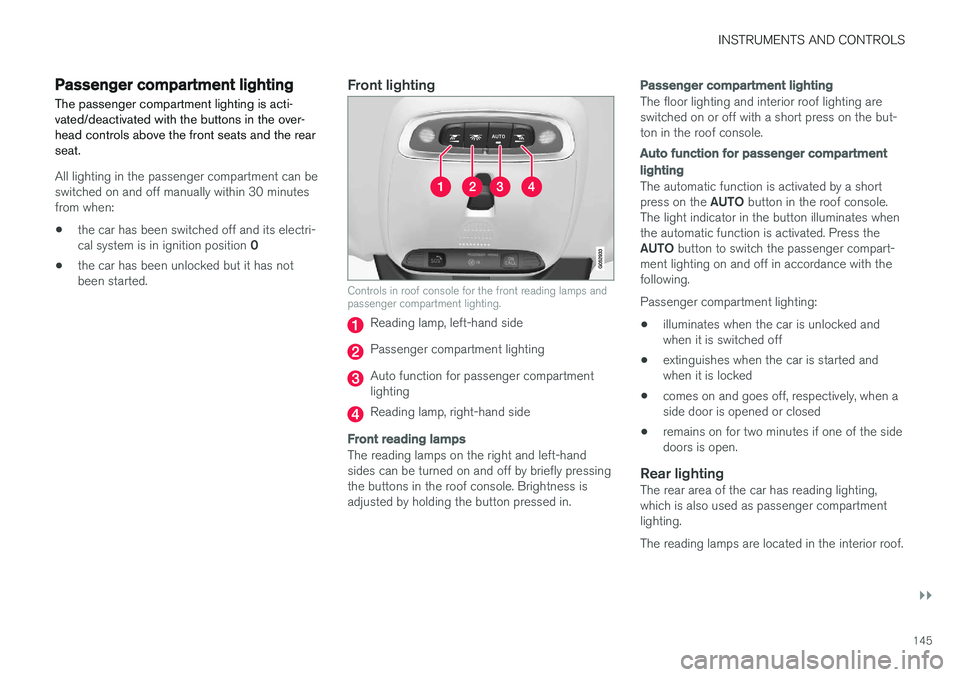
Controls in roof console for the front reading lamps and passenger compartment lighting.
Reading lamp, left-hand side
Passenger compartment lighting
Auto function for passenger compartment lighting
Reading lamp, right-hand side
Front reading lamps
The reading lamps on the right and left-hand sides can be turned on and off by briefly pressingthe buttons in the roof console. Brightness isadjusted by holding the button pressed in.
Passenger compartment lighting
The floor lighting and interior roof lighting are switched on or off with a short press on the but-ton in the roof console.
Auto function for passenger compartment lighting
The automatic function is activated by a short press on the
AUTO button in the roof console.
The light indicator in the button illuminates when the automatic function is activated. Press the AUTO button to switch the passenger compart-
ment lighting on and off in accordance with the following. Passenger compartment lighting: • illuminates when the car is unlocked and when it is switched off
• extinguishes when the car is started andwhen it is locked
• comes on and goes off, respectively, when aside door is opened or closed
• remains on for two minutes if one of the sidedoors is open.
Rear lightingThe rear area of the car has reading lighting,which is also used as passenger compartmentlighting. The reading lamps are located in the interior roof.
Page 149 of 594

INSTRUMENTS AND CONTROLS
147
The ambience lights can be changed via the cen- tre display:
Changing the brightness of the lights
1.
Press Settings in the top view in the centre
display.
2. Press
My CarLights and Lighting
Interior LightingInterior Mood Lighting.
3. Under
Interior Mood Light Intensity, select
from Off, Low and High.
Changing the colour of the light
1. Press Settings in the top view in the centre
display.
2. Press
My CarLights and Lighting
Interior LightingInterior Mood Lighting.
3. Choose between
By Temperature, By
Colour and Theme Colours in order to
change the colour of the light. With colour option
By Temperature, the
colour of the light changes according to the set passenger compartment temperature.
Controls located next to the steering wheel.
The intensity of the ambience light can be adjusted using the controls in the instrumentpanel:
–Turn the thumbwheel to adjust the intensity.
Lighting in storage compartments in doors
The lighting in storage compartments in doors is switched on when the car is running. The bright-ness can be finely adjusted using the control inthe instrument panel.
Lighting in front cup holders in tunnel
console
The lighting in the front cup holders is switchedon when the car is unlocked and is switched offwhen the car is locked. The brightness can befinely adjusted using the control in the instrumentpanel.
Related information
• Headlamp control (p. 134)
• Ignition positions (p. 385)
• Settings view (p. 169)
Page 150 of 594
INSTRUMENTS AND CONTROLS
* Option/accessory.
148
Home safe light duration
Some of the exterior lighting can be kept switched on to work as home safe lighting afterthe car has been locked.
To activate the function:
1. Switch off the car.
2. Move the left-hand stalk switch forward toward the instrument panel and release.
3. Get out of the car and lock the door.When the function is activated, dipped beam, position lamps, lighting in the outside handles *
and number plate lighting are switched on. The length of time that home safe lighting remains on can be set via the centre display.
Related information
• Approach light duration (p. 148)
• Settings view (p. 169)
Approach light duration
Approach lighting is switched on when the car is unlocked and is used to switch on the car'slighting at a distance.
When the function is activated with the remote control key during unlocking, the position lamps, lighting in outer handles *, number plate lighting,
interior roof lighting and floor lighting will switch on. If a door is opened within the activation time, the time for the lighting in the outside handles *
and the interior lighting will be extended. The function can be deactivated/activated via the centre display.
Related information
• Home safe light duration (p. 148)
• Remote control key (p. 236)
• Settings view (p. 169)
Using windscreen wipers
The windscreen wiper cleans the windscreen. Different settings for the windscreen wiper aremade with the right-hand steering wheel stalkswitch.
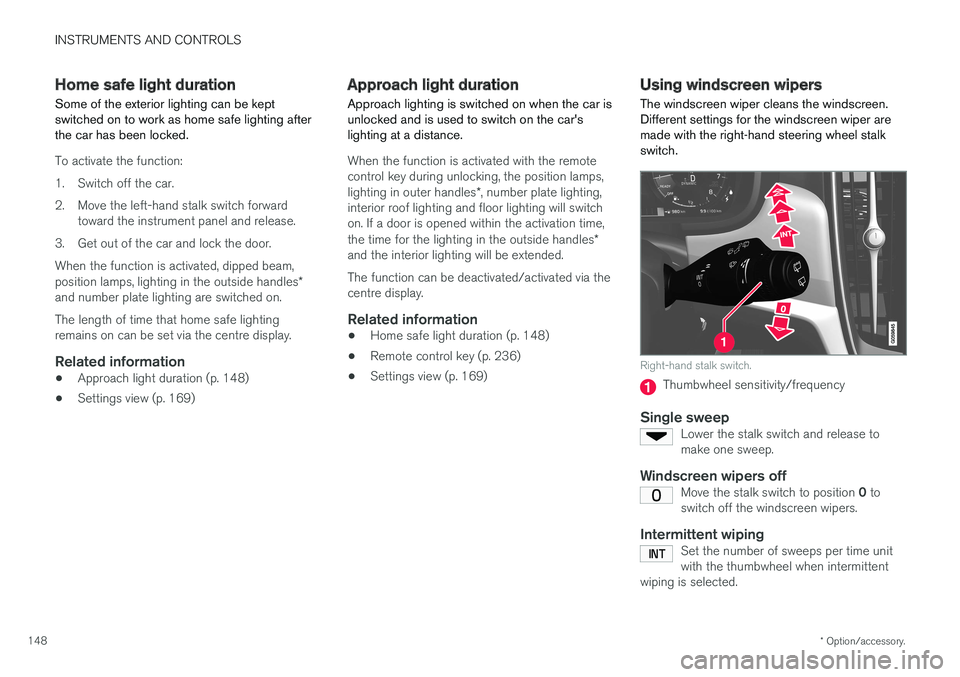
Right-hand stalk switch.
Thumbwheel sensitivity/frequency
Single sweepLower the stalk switch and release to make one sweep.
Windscreen wipers offMove the stalk switch to position 0 to
switch off the windscreen wipers.
Intermittent wipingSet the number of sweeps per time unit with the thumbwheel when intermittent
wiping is selected.
Page 153 of 594
INSTRUMENTS AND CONTROLS
* Option/accessory.151
Rear window wiper and washer
Rear window wiper and washer clean the rear window. Washing/wiping is started and settingsare changed by means of the right-hand steeringwheel stalk switch.
NOTE
The rear window wiper is equipped with over- heating protection which means that themotor is switched off if it overheats. The rearwindow wiper works again after a cooling-down period.
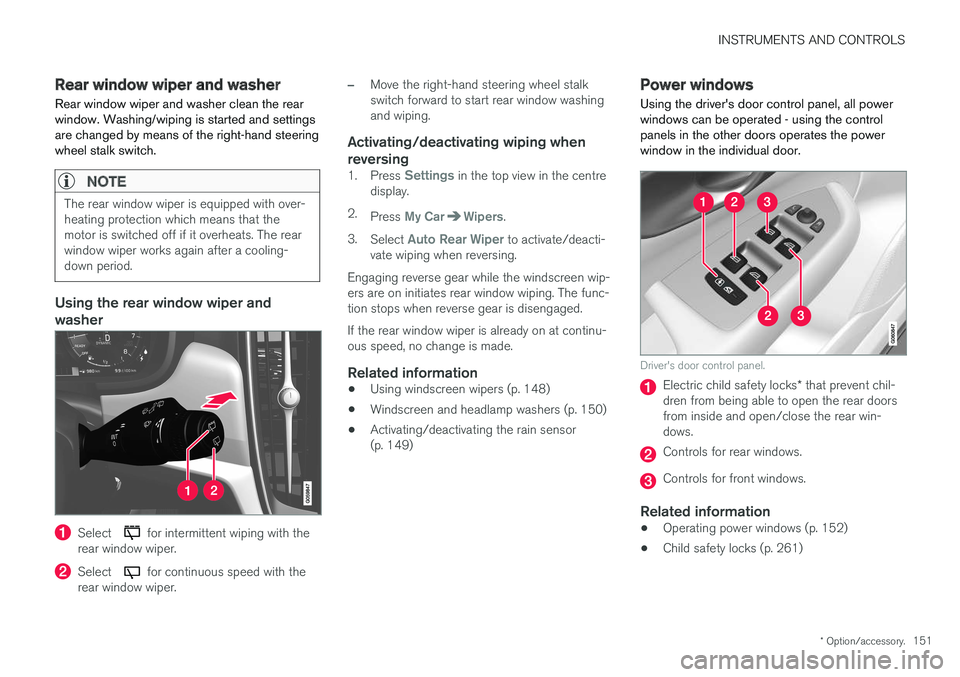
Using the rear window wiper and washer
Select for intermittent wiping with the
rear window wiper.
Select for continuous speed with the
rear window wiper.
–Move the right-hand steering wheel stalk switch forward to start rear window washingand wiping.
Activating/deactivating wiping when reversing
1. Press Settings in the top view in the centre
display.
2. Press
My CarWipers.
3. Select
Auto Rear Wiper to activate/deacti-
vate wiping when reversing.
Engaging reverse gear while the windscreen wip- ers are on initiates rear window wiping. The func- tion stops when reverse gear is disengaged. If the rear window wiper is already on at continu- ous speed, no change is made.
Related information
• Using windscreen wipers (p. 148)
• Windscreen and headlamp washers (p. 150)
• Activating/deactivating the rain sensor(p. 149)
Power windows
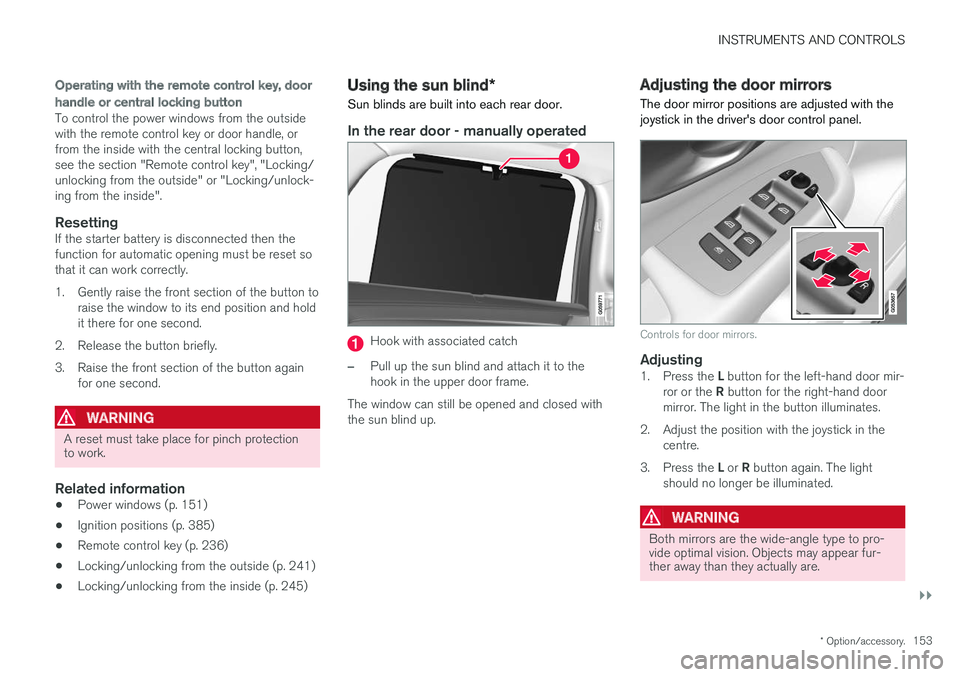
Using the driver's door control panel, all power windows can be operated - using the controlpanels in the other doors operates the powerwindow in the individual door.
Driver's door control panel.
Electric child safety locks * that prevent chil-
dren from being able to open the rear doors from inside and open/close the rear win-dows.
Controls for rear windows.
Controls for front windows.
Related information
• Operating power windows (p. 152)
• Child safety locks (p. 261)
Page 155 of 594
INSTRUMENTS AND CONTROLS
}}
* Option/accessory.153
Operating with the remote control key, door handle or central locking button
To control the power windows from the outside with the remote control key or door handle, orfrom the inside with the central locking button,see the section "Remote control key", "Locking/unlocking from the outside" or "Locking/unlock-ing from the inside".
ResettingIf the starter battery is disconnected then thefunction for automatic opening must be reset sothat it can work correctly.
1. Gently raise the front section of the button to
raise the window to its end position and hold it there for one second.
2. Release the button briefly.
3. Raise the front section of the button again for one second.
WARNING
A reset must take place for pinch protection to work.
Related information
• Power windows (p. 151)
• Ignition positions (p. 385)
• Remote control key (p. 236)
• Locking/unlocking from the outside (p. 241)
• Locking/unlocking from the inside (p. 245)
Using the sun blind
*
Sun blinds are built into each rear door.
In the rear door - manually operated
Hook with associated catch
–Pull up the sun blind and attach it to the hook in the upper door frame.
The window can still be opened and closed withthe sun blind up.
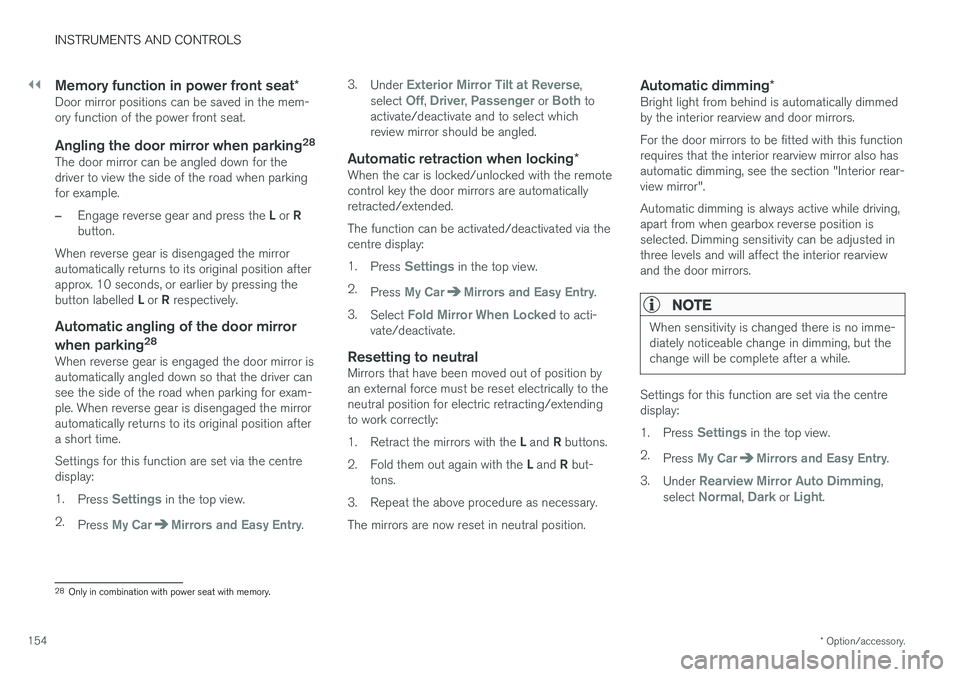
Adjusting the door mirrors
The door mirror positions are adjusted with the joystick in the driver's door control panel.
Controls for door mirrors.
Adjusting1. Press the L button for the left-hand door mir-
ror or the R button for the right-hand door
mirror. The light in the button illuminates.
2. Adjust the position with the joystick in the centre.
3. Press the L or R button again. The light
should no longer be illuminated.
WARNING
Both mirrors are the wide-angle type to pro- vide optimal vision. Objects may appear fur-ther away than they actually are.
Page 156 of 594
||
INSTRUMENTS AND CONTROLS
* Option/accessory.
154
Memory function in power front seat *Door mirror positions can be saved in the mem- ory function of the power front seat.
Angling the door mirror when parking 28The door mirror can be angled down for thedriver to view the side of the road when parkingfor example.
–Engage reverse gear and press the
L or R
button.
When reverse gear is disengaged the mirror automatically returns to its original position afterapprox. 10 seconds, or earlier by pressing the button labelled L or R respectively.
Automatic angling of the door mirror
when parking 28
When reverse gear is engaged the door mirror is automatically angled down so that the driver cansee the side of the road when parking for exam-ple. When reverse gear is disengaged the mirrorautomatically returns to its original position aftera short time. Settings for this function are set via the centre display: 1.
Press
Settings in the top view.
2. Press
My CarMirrors and Easy Entry. 3.
Under
Exterior Mirror Tilt at Reverse,
select Off, Driver, Passenger or Both to
activate/deactivate and to select which review mirror should be angled.
Automatic retraction when locking *When the car is locked/unlocked with the remotecontrol key the door mirrors are automaticallyretracted/extended. The function can be activated/deactivated via the centre display: 1.
Press
Settings in the top view.
2. Press
My CarMirrors and Easy Entry.
3. Select
Fold Mirror When Locked to acti-
vate/deactivate.
Resetting to neutralMirrors that have been moved out of position by an external force must be reset electrically to theneutral position for electric retracting/extendingto work correctly: 1. Retract the mirrors with the L and R buttons.
2. Fold them out again with the L and R but-
tons.
3. Repeat the above procedure as necessary.The mirrors are now reset in neutral position.
Automatic dimming *Bright light from behind is automatically dimmed by the interior rearview and door mirrors. For the door mirrors to be fitted with this function requires that the interior rearview mirror also hasautomatic dimming, see the section "Interior rear-view mirror". Automatic dimming is always active while driving, apart from when gearbox reverse position isselected. Dimming sensitivity can be adjusted inthree levels and will affect the interior rearviewand the door mirrors.
NOTE
When sensitivity is changed there is no imme- diately noticeable change in dimming, but thechange will be complete after a while.
Settings for this function are set via the centre display: 1.
Press
Settings in the top view.
2. Press
My CarMirrors and Easy Entry.
3. Under
Rearview Mirror Auto Dimming,
select Normal, Dark or Light.
28 Only in combination with power seat with memory.