lock VOLVO V90 2017 User Guide
[x] Cancel search | Manufacturer: VOLVO, Model Year: 2017, Model line: V90, Model: VOLVO V90 2017Pages: 594, PDF Size: 15.07 MB
Page 86 of 594
SAFETY
* Option/accessory.
84
Folding down the integrated booster cushion *
The integrated booster cushions on the outer seats in the rear seat can be folded down whennot in use.
NOTE
It is not possible to adjust the booster seat from the upper position to the lower position.From the upper position, the booster seatmust first be fully lowered into the seat cush-ion, and then folded up to the lower position.
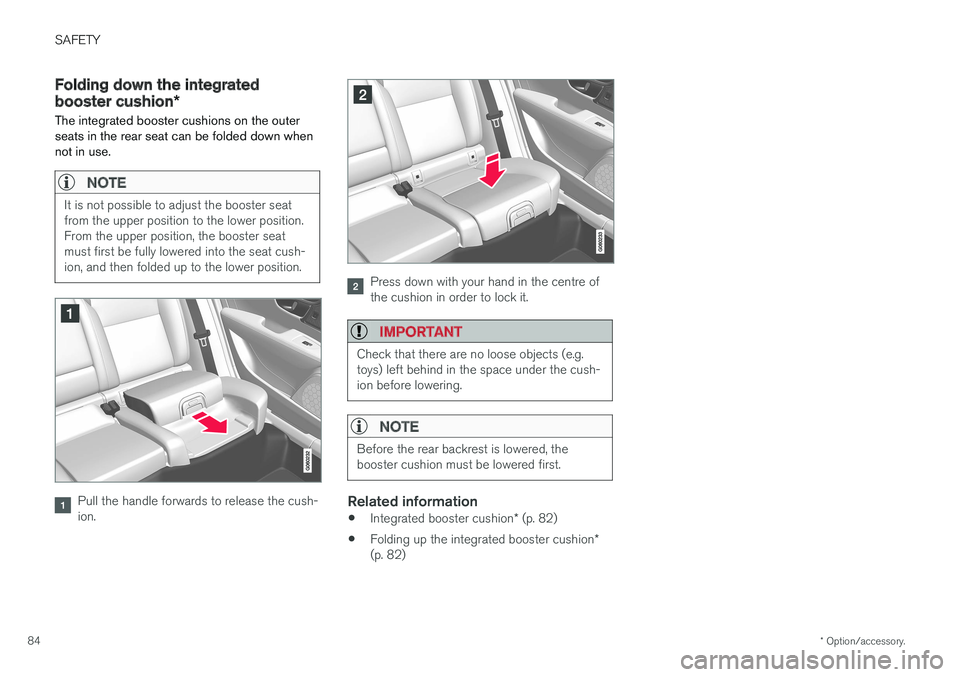
Pull the handle forwards to release the cush- ion.
Press down with your hand in the centre of the cushion in order to lock it.
IMPORTANT
Check that there are no loose objects (e.g. toys) left behind in the space under the cush-ion before lowering.
NOTE
Before the rear backrest is lowered, the booster cushion must be lowered first.
Related information
• Integrated booster cushion
* (p. 82)
• Folding up the integrated booster cushion
*
(p. 82)
Page 88 of 594
INSTRUMENTS AND CONTROLS
* Option/accessory.
86
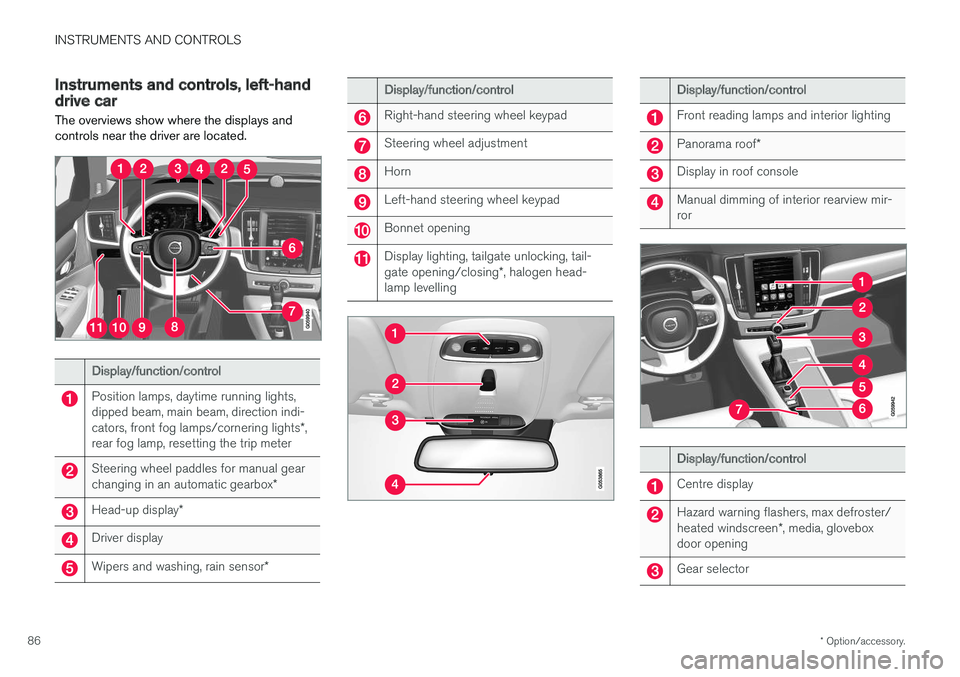
Instruments and controls, left-hand drive car The overviews show where the displays and controls near the driver are located.
Display/function/control
Position lamps, daytime running lights, dipped beam, main beam, direction indi- cators, front fog lamps/cornering lights *,
rear fog lamp, resetting the trip meter
Steering wheel paddles for manual gear changing in an automatic gearbox *
Head-up display*
Driver display
Wipers and washing, rain sensor *
Display/function/control
Right-hand steering wheel keypad
Steering wheel adjustment
Horn
Left-hand steering wheel keypad
Bonnet opening
Display lighting, tailgate unlocking, tail- gate opening/closing*, halogen head-
lamp levelling
Display/function/control
Front reading lamps and interior lighting
Panorama roof *
Display in roof console
Manual dimming of interior rearview mir- ror
Display/function/control
Centre display
Hazard warning flashers, max defroster/ heated windscreen *, media, glovebox
door opening
Gear selector
Page 89 of 594
INSTRUMENTS AND CONTROLS
}}
* Option/accessory.87
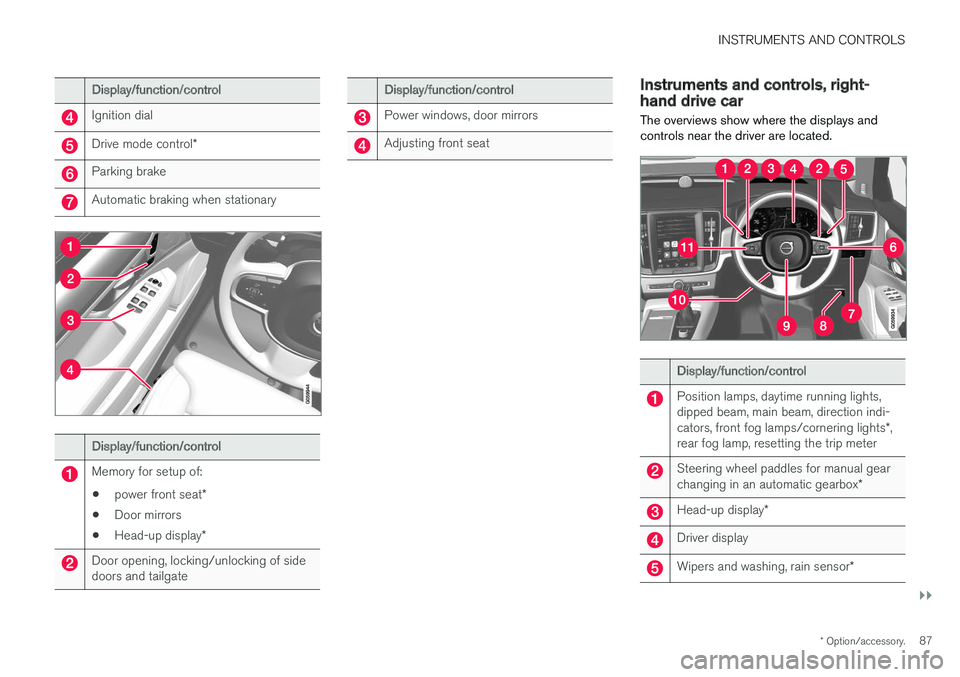
Display/function/control
Ignition dial
Drive mode control *
Parking brake
Automatic braking when stationary
Display/function/control
Memory for setup of:
• power front seat
*
• Door mirrors
• Head-up display
*
Door opening, locking/unlocking of side doors and tailgate
Display/function/control
Power windows, door mirrors
Adjusting front seat
Instruments and controls, right- hand drive car
The overviews show where the displays and controls near the driver are located.
Display/function/control
Position lamps, daytime running lights, dipped beam, main beam, direction indi- cators, front fog lamps/cornering lights *,
rear fog lamp, resetting the trip meter
Steering wheel paddles for manual gear changing in an automatic gearbox *
Head-up display*
Driver display
Wipers and washing, rain sensor *
Page 90 of 594
||
INSTRUMENTS AND CONTROLS
* Option/accessory.
88
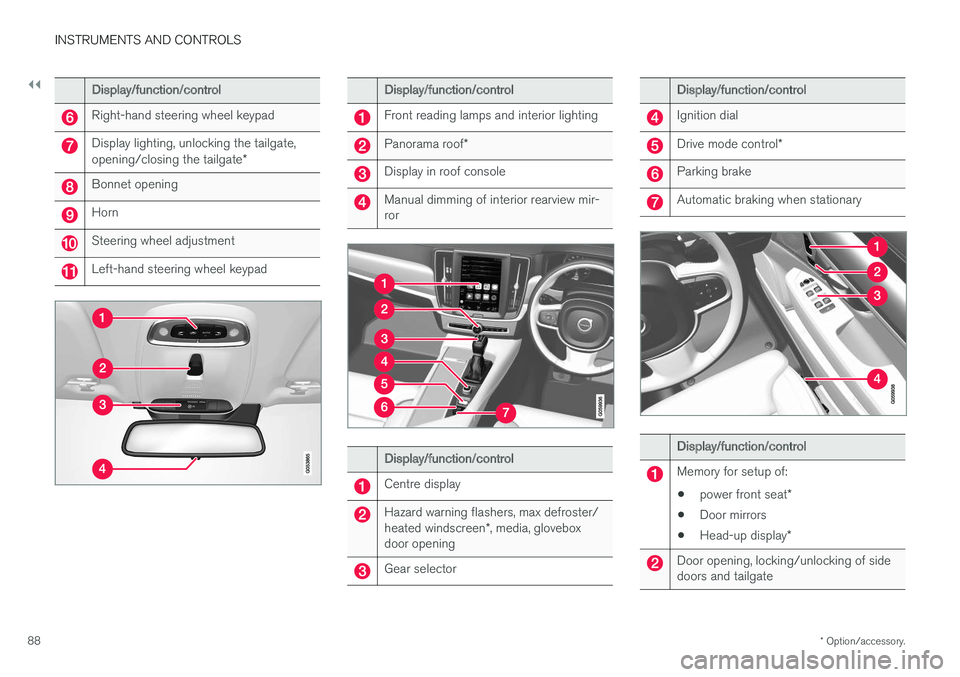
Display/function/control
Right-hand steering wheel keypad
Display lighting, unlocking the tailgate, opening/closing the tailgate *
Bonnet opening
Horn
Steering wheel adjustment
Left-hand steering wheel keypad
Display/function/control
Front reading lamps and interior lighting
Panorama roof*
Display in roof console
Manual dimming of interior rearview mir- ror
Display/function/control
Centre display
Hazard warning flashers, max defroster/ heated windscreen *, media, glovebox
door opening
Gear selector
Display/function/control
Ignition dial
Drive mode control *
Parking brake
Automatic braking when stationary
Display/function/control
Memory for setup of:
• power front seat
*
• Door mirrors
• Head-up display
*
Door opening, locking/unlocking of side doors and tailgate
Page 92 of 594
INSTRUMENTS AND CONTROLS
* Option/accessory.
90
Driver display
The driver display shows information about the car and driving.
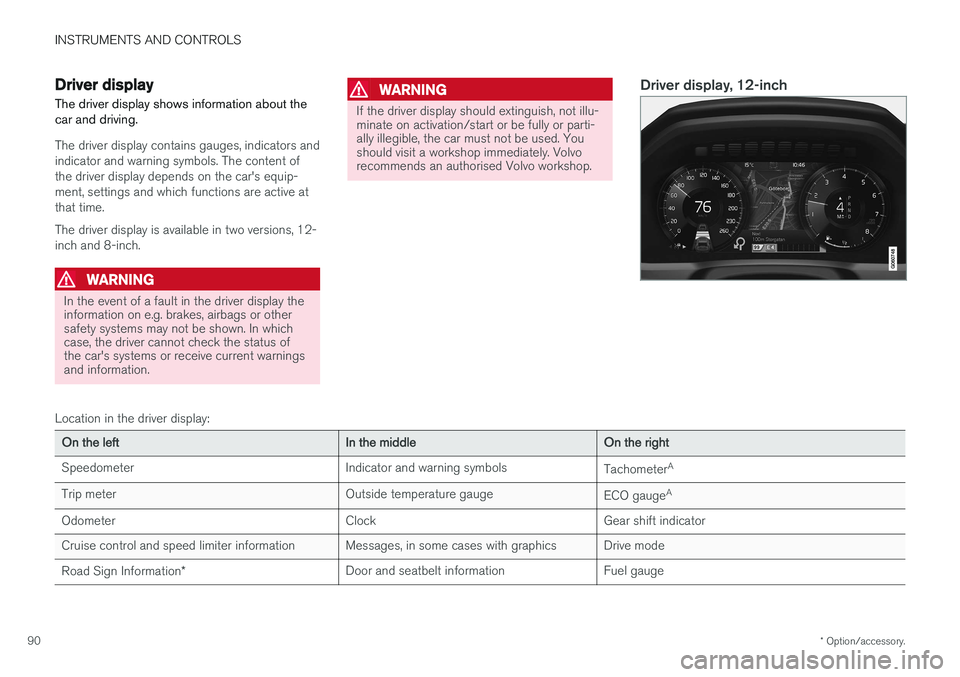
The driver display contains gauges, indicators and indicator and warning symbols. The content ofthe driver display depends on the car's equip-ment, settings and which functions are active atthat time. The driver display is available in two versions, 12- inch and 8-inch.
WARNING
In the event of a fault in the driver display the information on e.g. brakes, airbags or othersafety systems may not be shown. In whichcase, the driver cannot check the status ofthe car's systems or receive current warningsand information.
WARNING
If the driver display should extinguish, not illu- minate on activation/start or be fully or parti-ally illegible, the car must not be used. Youshould visit a workshop immediately. Volvorecommends an authorised Volvo workshop.
Driver display, 12-inch
Location in the driver display:
On the left In the middleOn the right
Speedometer Indicator and warning symbols
TachometerA
Trip meter Outside temperature gauge
ECO gaugeA
Odometer ClockGear shift indicator
Cruise control and speed limiter information Messages, in some cases with graphics Drive mode Road Sign Information * Door and seatbelt information Fuel gauge
Page 94 of 594
||
INSTRUMENTS AND CONTROLS
* Option/accessory.
92
On the left In the middle On the right
Gear shift indicator Cruise control and speed limiter information Navigation information*
Tachometer A
Door and seatbelt information Clock
ECO gauge A
Status of the Start/Stop function App menu (activated via steering wheel keypad)
Distance to empty tank – Instantaneous fuel consumption
Outside temperature gauge – Odometer
Indicator and warning symbols – Trip meter
– – Indicator and warning symbols
– – Voice recognition
– – Engine temperature gauge
– – Messages, in some cases with graphics
A
Depending on selected drive mode.
Page 98 of 594
||
INSTRUMENTS AND CONTROLS
96
SymbolSpecification
Main beam On The symbol illuminates when main beam is on and with main beamflash.
Active main beam on The symbol lights up blue when active main beam is on. Positionlamps are switched on.
Active main beam off The symbol lights up white when active main beam is off. Positionlamps are switched on.
Main beam On The symbol lights up when main beam and the position lamps areswitched on.
Front fog lamps on This symbol illuminates when the front fog lamp is switched on.
Rear fog lamp on This symbol illuminates when the rear fog lamp is switched on.
SymbolSpecification
Rain sensor on This symbol illuminates when the rain sensor is on.
Preconditioning on The symbol illuminates when the engine block and passenger com-partment heater/air conditioningare preconditioning the car.
Stability system A flashing symbol indicates that the stability system is operating. Ifthe symbol illuminates with con-stant glow then there is a fault inthe system.
Stability system, sport mode The symbol illuminates when the sport mode is activated. Sportmode allows for a more active driv-ing experience. The system thendetects whether the acceleratorpedal, steering wheel movementsand cornering are more active thanin normal driving and then allowscontrolled skidding of the rear sec-tion up to a certain level before itintervenes and stabilises the car.
Symbol Specification
Lane assistance White symbol: Lane assistance is on and road lines are detected. Grey symbol: Lane assistance is on but road lines are not detected. Yellow symbol: Lane assistance warns/intervenes.
Lane assistance and rain sensor White symbol: Lane assistance is on and road lines are detected.Rain sensor is on. Grey symbol: Lane assistance is on but road lines are not detected.Rain sensor is on.
Reminder for doors, bonnet, tailgate and fuel filler flap
If the bonnet, tailgate, fuel filler flap or door is not closed properly then the information or warningsymbol and graphics illuminate in the driver dis-play.
Related information
•Driver display (p. 90)
• Warning symbols in the driver display(p. 97)
• Door and seatbelt reminder (p. 62)
Page 101 of 594
INSTRUMENTS AND CONTROLS
}}
99
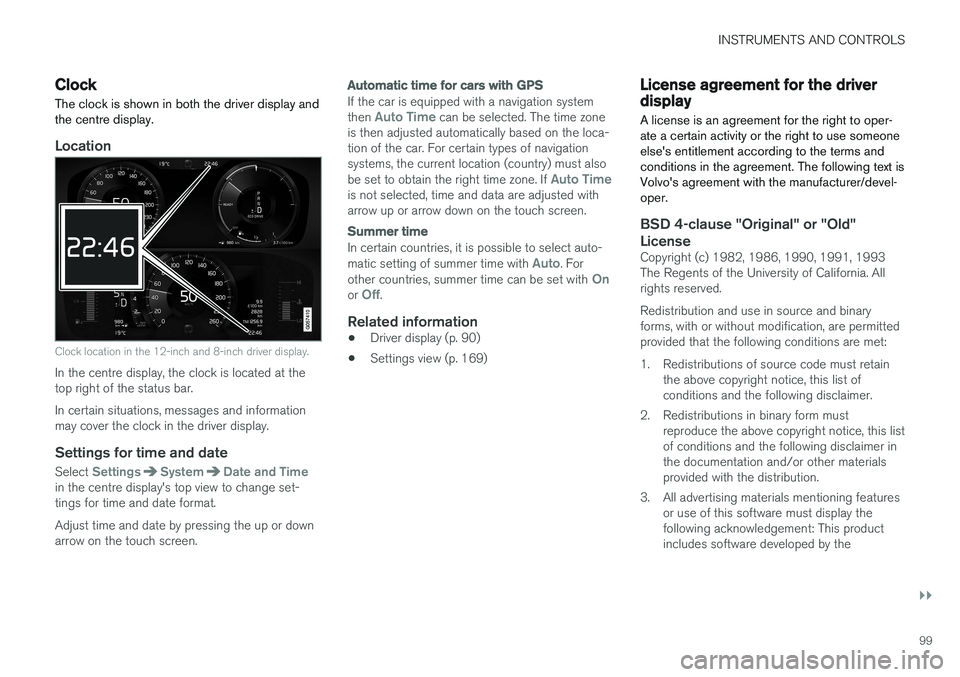
Clock The clock is shown in both the driver display and the centre display.
Location
Clock location in the 12-inch and 8-inch driver display.
In the centre display, the clock is located at the top right of the status bar. In certain situations, messages and information may cover the clock in the driver display.
Settings for time and date
Select SettingsSystemDate and Timein the centre display's top view to change set- tings for time and date format. Adjust time and date by pressing the up or down arrow on the touch screen.
Automatic time for cars with GPS
If the car is equipped with a navigation system then Auto Time can be selected. The time zone
is then adjusted automatically based on the loca- tion of the car. For certain types of navigationsystems, the current location (country) must also be set to obtain the right time zone. If
Auto Timeis not selected, time and data are adjusted with arrow up or arrow down on the touch screen.
Summer time
In certain countries, it is possible to select auto- matic setting of summer time with Auto. For
other countries, summer time can be set with Onor Off.
Related information
• Driver display (p. 90)
• Settings view (p. 169)
License agreement for the driver display A license is an agreement for the right to oper- ate a certain activity or the right to use someoneelse's entitlement according to the terms andconditions in the agreement. The following text isVolvo's agreement with the manufacturer/devel-oper.
BSD 4-clause "Original" or "Old"
License
Copyright (c) 1982, 1986, 1990, 1991, 1993 The Regents of the University of California. Allrights reserved. Redistribution and use in source and binary forms, with or without modification, are permittedprovided that the following conditions are met:
1. Redistributions of source code must retain the above copyright notice, this list of conditions and the following disclaimer.
2. Redistributions in binary form must reproduce the above copyright notice, this listof conditions and the following disclaimer inthe documentation and/or other materialsprovided with the distribution.
3. All advertising materials mentioning features or use of this software must display thefollowing acknowledgement: This productincludes software developed by the
Page 116 of 594
||
INSTRUMENTS AND CONTROLS
* Option/accessory.
114
Adjusting brightness and vertical position
1.
Press the Head-up display adjustmentsbutton in the function view in the centre dis- play.
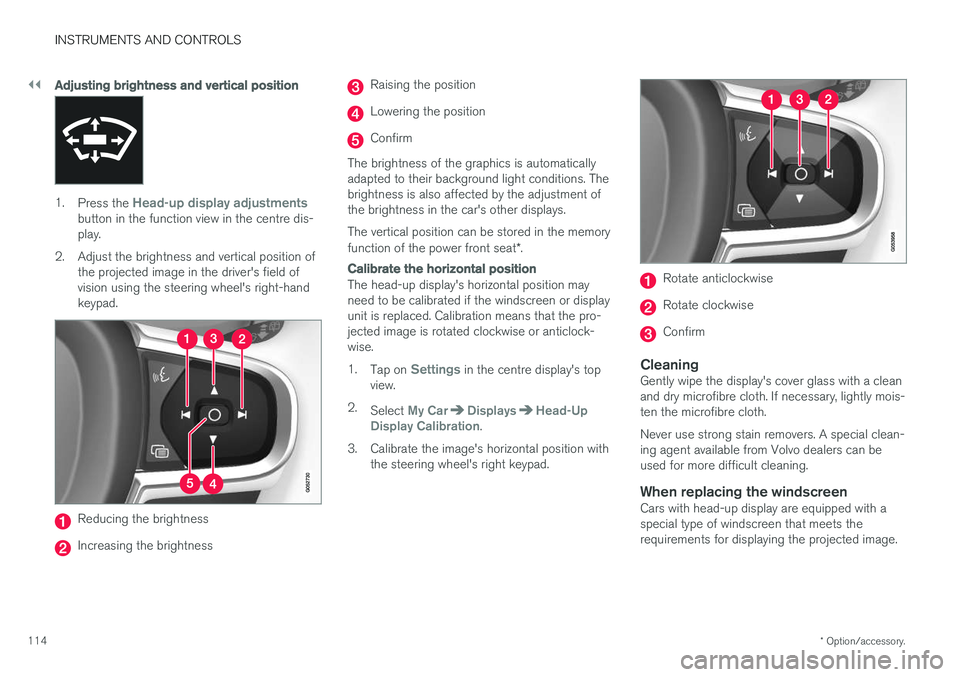
2. Adjust the brightness and vertical position of the projected image in the driver's field ofvision using the steering wheel's right-handkeypad.
Reducing the brightness
Increasing the brightness
Raising the position
Lowering the position
Confirm
The brightness of the graphics is automatically adapted to their background light conditions. Thebrightness is also affected by the adjustment ofthe brightness in the car's other displays. The vertical position can be stored in the memory function of the power front seat *.
Calibrate the horizontal position
The head-up display's horizontal position may need to be calibrated if the windscreen or displayunit is replaced. Calibration means that the pro-jected image is rotated clockwise or anticlock-wise. 1.
Tap on
Settings in the centre display's top
view.
2. Select
My CarDisplaysHead-Up
Display Calibration.
3. Calibrate the image's horizontal position with the steering wheel's right keypad.
Rotate anticlockwise
Rotate clockwise
Confirm
CleaningGently wipe the display's cover glass with a clean and dry microfibre cloth. If necessary, lightly mois-ten the microfibre cloth. Never use strong stain removers. A special clean- ing agent available from Volvo dealers can beused for more difficult cleaning.
When replacing the windscreenCars with head-up display are equipped with aspecial type of windscreen that meets therequirements for displaying the projected image.
Page 123 of 594
INSTRUMENTS AND CONTROLS
* Option/accessory.121
Manual front seat
The car's front seats have different setting options for optimum seating comfort.
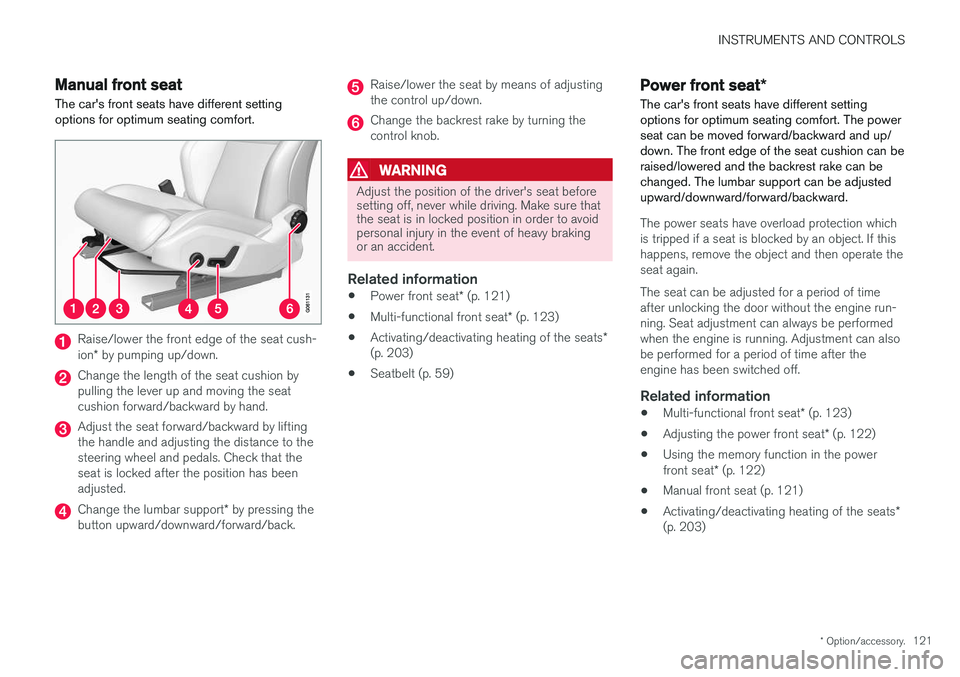
Raise/lower the front edge of the seat cush- ion * by pumping up/down.
Change the length of the seat cushion by pulling the lever up and moving the seatcushion forward/backward by hand.
Adjust the seat forward/backward by lifting the handle and adjusting the distance to thesteering wheel and pedals. Check that theseat is locked after the position has beenadjusted.
Change the lumbar support * by pressing the
button upward/downward/forward/back.
Raise/lower the seat by means of adjusting the control up/down.
Change the backrest rake by turning the control knob.
WARNING
Adjust the position of the driver's seat before setting off, never while driving. Make sure thatthe seat is in locked position in order to avoidpersonal injury in the event of heavy brakingor an accident.
Related information
• Power front seat
* (p. 121)
• Multi-functional front seat
* (p. 123)
• Activating/deactivating heating of the seats
*
(p. 203)
• Seatbelt (p. 59)
Power front seat
*
The car's front seats have different setting options for optimum seating comfort. The powerseat can be moved forward/backward and up/down. The front edge of the seat cushion can beraised/lowered and the backrest rake can bechanged. The lumbar support can be adjustedupward/downward/forward/backward.
The power seats have overload protection which is tripped if a seat is blocked by an object. If thishappens, remove the object and then operate theseat again. The seat can be adjusted for a period of time after unlocking the door without the engine run-ning. Seat adjustment can always be performedwhen the engine is running. Adjustment can alsobe performed for a period of time after theengine has been switched off.
Related information
• Multi-functional front seat
* (p. 123)
• Adjusting the power front seat
* (p. 122)
• Using the memory function in the power front seat
* (p. 122)
• Manual front seat (p. 121)
• Activating/deactivating heating of the seats
*
(p. 203)