seats VOLVO V90 2017 Owner's Manual
[x] Cancel search | Manufacturer: VOLVO, Model Year: 2017, Model line: V90, Model: VOLVO V90 2017Pages: 594, PDF Size: 15.07 MB
Page 83 of 594
SAFETY
81
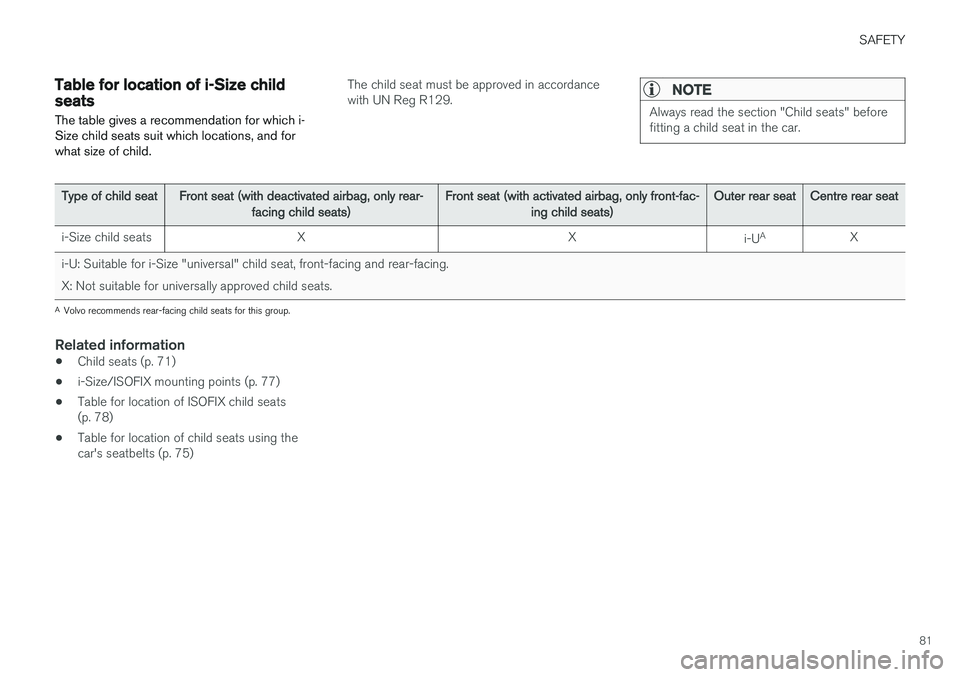
Table for location of i-Size child seats
The table gives a recommendation for which i- Size child seats suit which locations, and forwhat size of child.The child seat must be approved in accordance with UN Reg R129.NOTE
Always read the section "Child seats" before fitting a child seat in the car.
Type of child seat Front seat (with deactivated airbag, only rear-
facing child seats) Front seat (with activated airbag, only front-fac-
ing child seats) Outer rear seat
Centre rear seat
i-Size child seats X X
i-UA
X
i-U: Suitable for i-Size "universal" child seat, front-facing and rear-facing.
X: Not suitable for universally approved child seats.
A Volvo recommends rear-facing child seats for this group.
Related information
• Child seats (p. 71)
• i-Size/ISOFIX mounting points (p. 77)
• Table for location of ISOFIX child seats (p. 78)
• Table for location of child seats using thecar's seatbelts (p. 75)
Page 84 of 594
SAFETY
* Option/accessory.
82
Integrated booster cushion *
The integrated booster cushions on the outer seats in the rear seat allow children to sit com-fortably and safely.
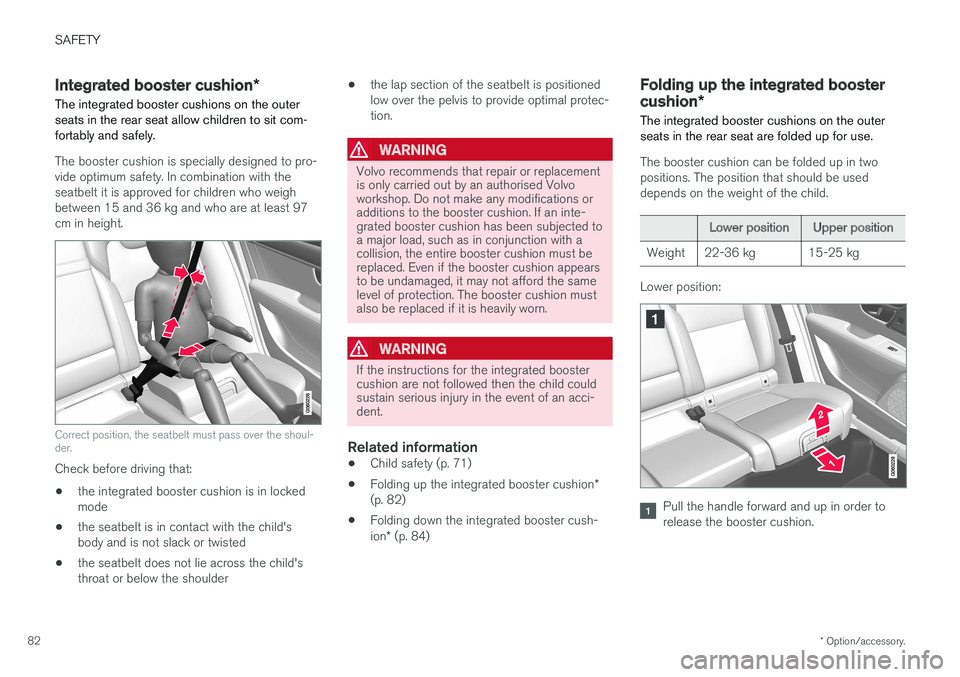
The booster cushion is specially designed to pro- vide optimum safety. In combination with theseatbelt it is approved for children who weighbetween 15 and 36 kg and who are at least 97cm in height.
Correct position, the seatbelt must pass over the shoul- der.
Check before driving that: • the integrated booster cushion is in locked mode
• the seatbelt is in contact with the child'sbody and is not slack or twisted
• the seatbelt does not lie across the child'sthroat or below the shoulder •
the lap section of the seatbelt is positionedlow over the pelvis to provide optimal protec-tion.
WARNING
Volvo recommends that repair or replacement is only carried out by an authorised Volvoworkshop. Do not make any modifications oradditions to the booster cushion. If an inte-grated booster cushion has been subjected toa major load, such as in conjunction with acollision, the entire booster cushion must bereplaced. Even if the booster cushion appearsto be undamaged, it may not afford the samelevel of protection. The booster cushion mustalso be replaced if it is heavily worn.
WARNING
If the instructions for the integrated booster cushion are not followed then the child couldsustain serious injury in the event of an acci-dent.
Related information
•Child safety (p. 71)
• Folding up the integrated booster cushion
*
(p. 82)
• Folding down the integrated booster cush- ion
* (p. 84)
Folding up the integrated booster cushion *
The integrated booster cushions on the outer seats in the rear seat are folded up for use.
The booster cushion can be folded up in two positions. The position that should be useddepends on the weight of the child.
Lower position Upper position
Weight 22-36 kg 15-25 kg
Lower position:
Pull the handle forward and up in order to release the booster cushion.
Page 86 of 594
SAFETY
* Option/accessory.
84
Folding down the integrated booster cushion *
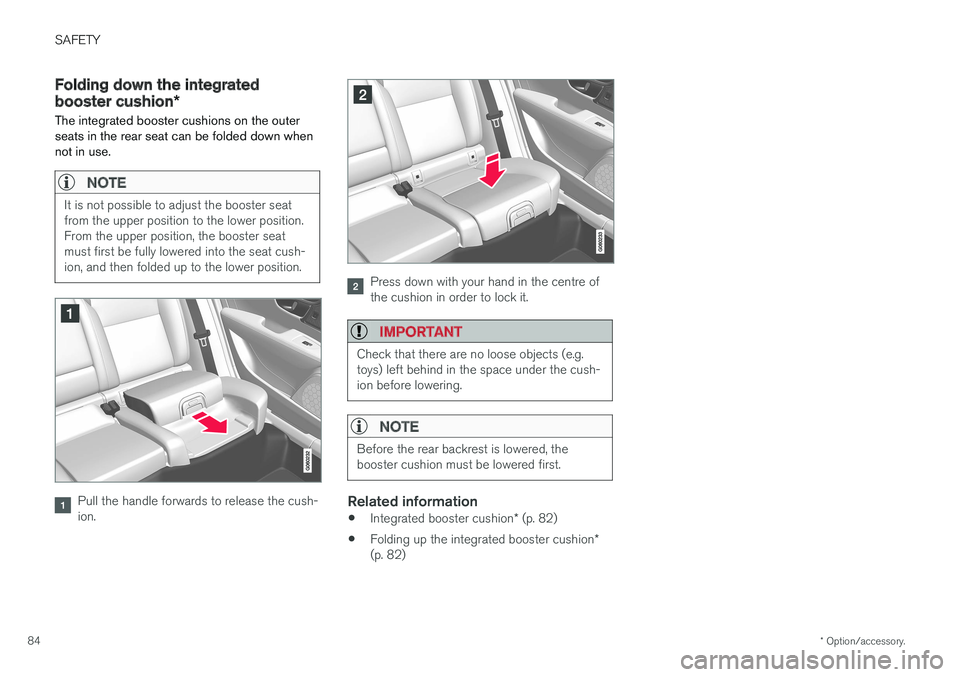
The integrated booster cushions on the outer seats in the rear seat can be folded down whennot in use.
NOTE
It is not possible to adjust the booster seat from the upper position to the lower position.From the upper position, the booster seatmust first be fully lowered into the seat cush-ion, and then folded up to the lower position.
Pull the handle forwards to release the cush- ion.
Press down with your hand in the centre of the cushion in order to lock it.
IMPORTANT
Check that there are no loose objects (e.g. toys) left behind in the space under the cush-ion before lowering.
NOTE
Before the rear backrest is lowered, the booster cushion must be lowered first.
Related information
• Integrated booster cushion
* (p. 82)
• Folding up the integrated booster cushion
*
(p. 82)
Page 123 of 594
INSTRUMENTS AND CONTROLS
* Option/accessory.121
Manual front seat
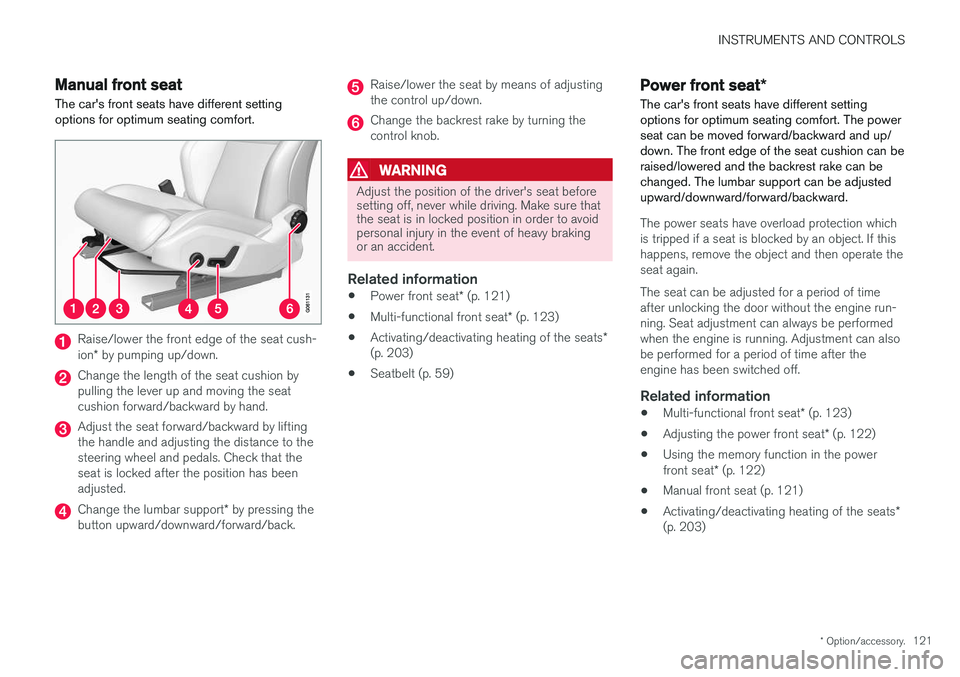
The car's front seats have different setting options for optimum seating comfort.
Raise/lower the front edge of the seat cush- ion * by pumping up/down.
Change the length of the seat cushion by pulling the lever up and moving the seatcushion forward/backward by hand.
Adjust the seat forward/backward by lifting the handle and adjusting the distance to thesteering wheel and pedals. Check that theseat is locked after the position has beenadjusted.
Change the lumbar support * by pressing the
button upward/downward/forward/back.
Raise/lower the seat by means of adjusting the control up/down.
Change the backrest rake by turning the control knob.
WARNING
Adjust the position of the driver's seat before setting off, never while driving. Make sure thatthe seat is in locked position in order to avoidpersonal injury in the event of heavy brakingor an accident.
Related information
• Power front seat
* (p. 121)
• Multi-functional front seat
* (p. 123)
• Activating/deactivating heating of the seats
*
(p. 203)
• Seatbelt (p. 59)
Power front seat
*
The car's front seats have different setting options for optimum seating comfort. The powerseat can be moved forward/backward and up/down. The front edge of the seat cushion can beraised/lowered and the backrest rake can bechanged. The lumbar support can be adjustedupward/downward/forward/backward.
The power seats have overload protection which is tripped if a seat is blocked by an object. If thishappens, remove the object and then operate theseat again. The seat can be adjusted for a period of time after unlocking the door without the engine run-ning. Seat adjustment can always be performedwhen the engine is running. Adjustment can alsobe performed for a period of time after theengine has been switched off.
Related information
• Multi-functional front seat
* (p. 123)
• Adjusting the power front seat
* (p. 122)
• Using the memory function in the power front seat
* (p. 122)
• Manual front seat (p. 121)
• Activating/deactivating heating of the seats
*
(p. 203)
Page 124 of 594
INSTRUMENTS AND CONTROLS
* Option/accessory.
122
Adjusting the power front seat *
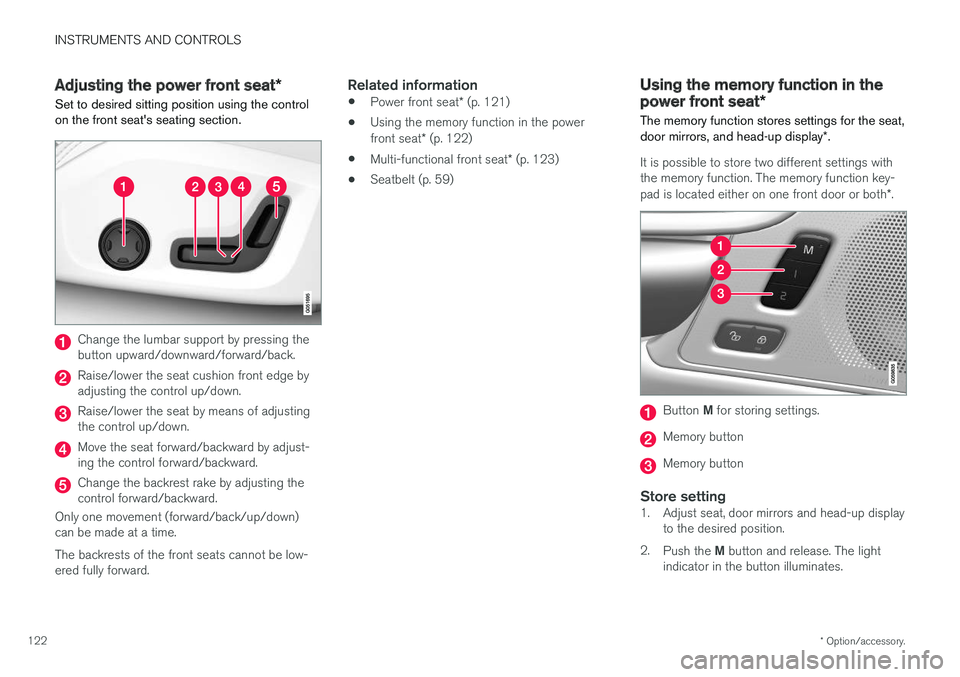
Set to desired sitting position using the control on the front seat's seating section.
Change the lumbar support by pressing the button upward/downward/forward/back.
Raise/lower the seat cushion front edge by adjusting the control up/down.
Raise/lower the seat by means of adjusting the control up/down.
Move the seat forward/backward by adjust- ing the control forward/backward.
Change the backrest rake by adjusting the control forward/backward.
Only one movement (forward/back/up/down)can be made at a time. The backrests of the front seats cannot be low- ered fully forward.
Related information
• Power front seat
* (p. 121)
• Using the memory function in the power front seat
* (p. 122)
• Multi-functional front seat
* (p. 123)
• Seatbelt (p. 59)
Using the memory function in the power front seat
*
The memory function stores settings for the seat, door mirrors, and head-up display *.
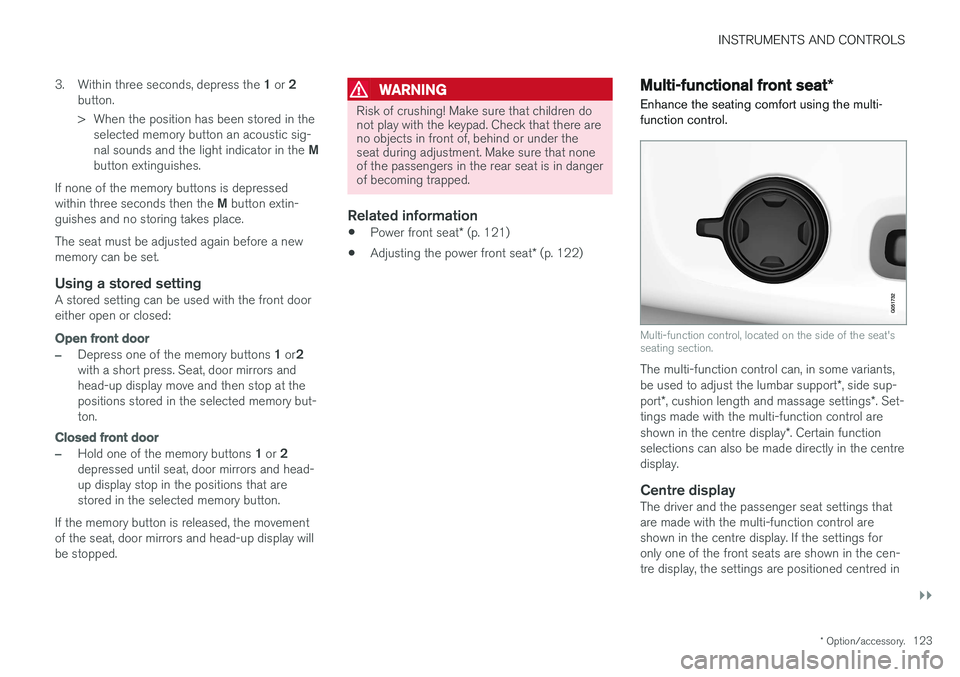
It is possible to store two different settings with the memory function. The memory function key- pad is located either on one front door or both *.
Button M for storing settings.
Memory button
Memory button
Store setting1. Adjust seat, door mirrors and head-up display
to the desired position.
2. Push the M button and release. The light
indicator in the button illuminates.
Page 125 of 594
INSTRUMENTS AND CONTROLS
}}
* Option/accessory.123
3.
Within three seconds, depress the 1 or 2
button.
> When the position has been stored in the selected memory button an acoustic sig- nal sounds and the light indicator in the M
button extinguishes.
If none of the memory buttons is depressedwithin three seconds then the M button extin-
guishes and no storing takes place. The seat must be adjusted again before a new memory can be set.
Using a stored settingA stored setting can be used with the front dooreither open or closed:
Open front door
–Depress one of the memory buttons 1 or 2
with a short press. Seat, door mirrors and head-up display move and then stop at thepositions stored in the selected memory but-ton.
Closed front door
–Hold one of the memory buttons 1 or 2
depressed until seat, door mirrors and head- up display stop in the positions that arestored in the selected memory button.
If the memory button is released, the movementof the seat, door mirrors and head-up display willbe stopped.
WARNING
Risk of crushing! Make sure that children do not play with the keypad. Check that there areno objects in front of, behind or under theseat during adjustment. Make sure that noneof the passengers in the rear seat is in dangerof becoming trapped.
Related information
• Power front seat
* (p. 121)
• Adjusting the power front seat
* (p. 122)
Multi-functional front seat *
Enhance the seating comfort using the multi- function control.
Multi-function control, located on the side of the seat's seating section.
The multi-function control can, in some variants, be used to adjust the lumbar support *, side sup-
port *, cushion length and massage settings *. Set-
tings made with the multi-function control areshown in the centre display *. Certain function
selections can also be made directly in the centre display.
Centre displayThe driver and the passenger seat settings thatare made with the multi-function control areshown in the centre display. If the settings foronly one of the front seats are shown in the cen-tre display, the settings are positioned centred in
Page 126 of 594
||
INSTRUMENTS AND CONTROLS
* Option/accessory.
124 the screen. When it is possible to show setting options for both the front seats, the driver's set-ting options are shown in the upper half and thepassenger's in the lower half. To stop showing the seat settings view in the centre display, press the home button, which islocated under the centre display.
Related information
•
Power front seat
* (p. 121)
• Adjusting functions in the multi-functional front seat
* (p. 124)
• Activating/deactivating heating of the seats
*
(p. 203)
Adjusting functions in the multi- functional front seat *
Both the multi-function control on the seat and the centre display can be used in order tochange the settings. The range of settings is shown in the centre display *.
Multi-function control, located on the side of the seat's seating section.
To activate the multi-function control, turn the control upwards/downward.
Adjusting massage settings * in the
front seat
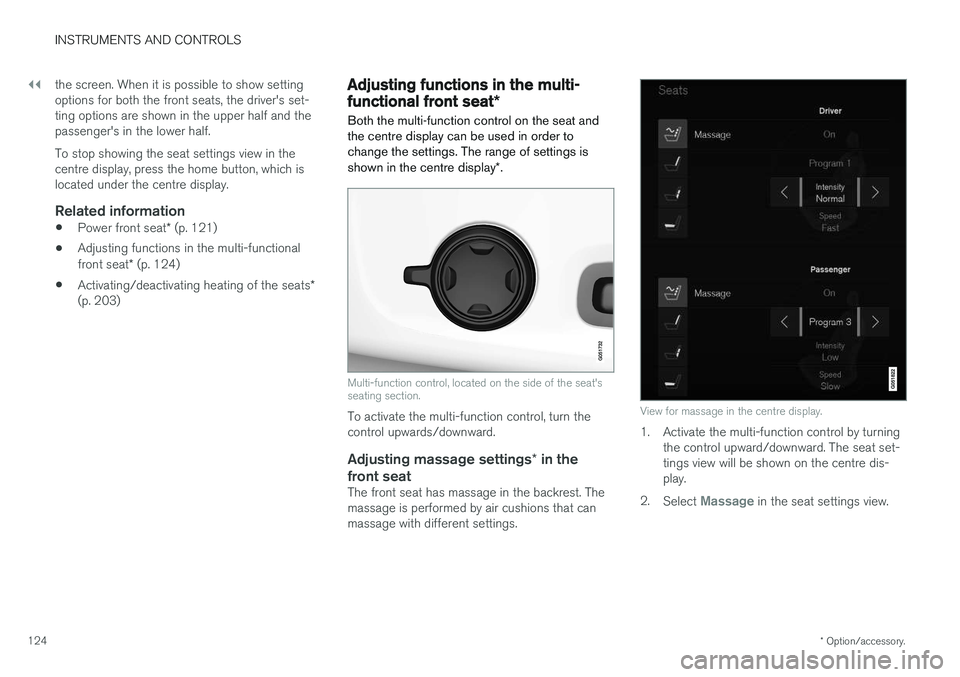
The front seat has massage in the backrest. Themassage is performed by air cushions that canmassage with different settings.
View for massage in the centre display.
1. Activate the multi-function control by turning the control upward/downward. The seat set- tings view will be shown on the centre dis-play.
2. Select
Massage in the seat settings view.
Page 129 of 594
INSTRUMENTS AND CONTROLS
}}
* Option/accessory.127
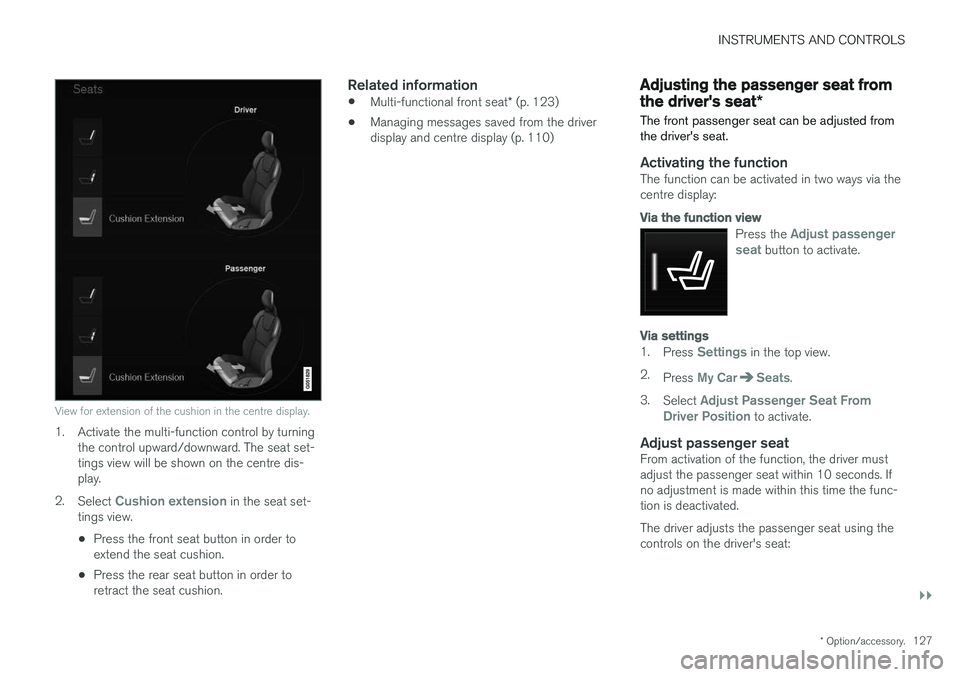
View for extension of the cushion in the centre display.
1. Activate the multi-function control by turning
the control upward/downward. The seat set- tings view will be shown on the centre dis-play.
2. Select
Cushion extension in the seat set-
tings view.
• Press the front seat button in order to extend the seat cushion.
• Press the rear seat button in order toretract the seat cushion.
Related information
•
Multi-functional front seat
* (p. 123)
• Managing messages saved from the driverdisplay and centre display (p. 110)
Adjusting the passenger seat from the driver's seat
*
The front passenger seat can be adjusted from the driver's seat.
Activating the functionThe function can be activated in two ways via the centre display:
Via the function view
Press the Adjust passenger
seat button to activate.
Via settings
1. Press Settings in the top view.
2. Press
My CarSeats.
3. Select
Adjust Passenger Seat From
Driver Position to activate.
Adjust passenger seatFrom activation of the function, the driver must adjust the passenger seat within 10 seconds. Ifno adjustment is made within this time the func-tion is deactivated. The driver adjusts the passenger seat using the controls on the driver's seat:
Page 130 of 594
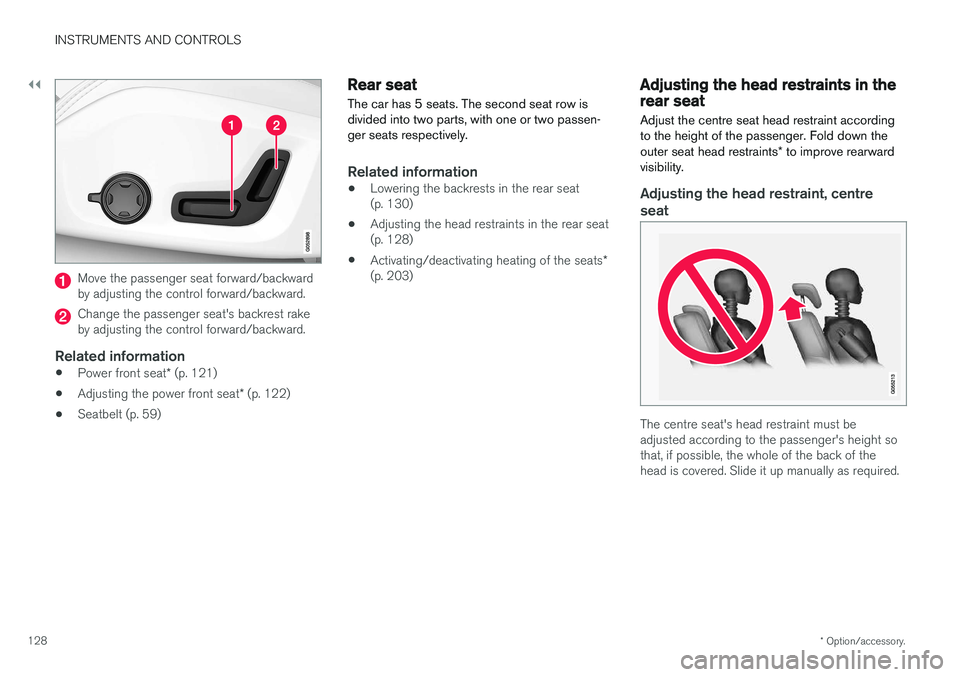
||
INSTRUMENTS AND CONTROLS
* Option/accessory.
128
Move the passenger seat forward/backward by adjusting the control forward/backward.
Change the passenger seat's backrest rake by adjusting the control forward/backward.
Related information
• Power front seat
* (p. 121)
• Adjusting the power front seat
* (p. 122)
• Seatbelt (p. 59)
Rear seat
The car has 5 seats. The second seat row is divided into two parts, with one or two passen-ger seats respectively.
Related information
• Lowering the backrests in the rear seat (p. 130)
• Adjusting the head restraints in the rear seat(p. 128)
• Activating/deactivating heating of the seats
*
(p. 203)
Adjusting the head restraints in the rear seat Adjust the centre seat head restraint according to the height of the passenger. Fold down the outer seat head restraints * to improve rearward
visibility.
Adjusting the head restraint, centre
seat
The centre seat's head restraint must be adjusted according to the passenger's height sothat, if possible, the whole of the back of thehead is covered. Slide it up manually as required.
Page 131 of 594

INSTRUMENTS AND CONTROLS
* Option/accessory.129
To lower the head restraint, the button (see illus- tration) must be depressed while the restraint iscarefully moved down.
WARNING
The centre seat head restraint must be in its lowest position when the centre seat is notused. When the centre seat is used, the headrestraint must be correctly adjusted to theheight of the passenger so that it covers thewhole of the back of the head if possible.
Electrical lowering of the rear seat's outer head restraints *
The outer head restraints can be lowered in two ways via the centre display:
Via the function view
Press the Headrest fold but-
ton to activate/deactivate low- ering.
Via settings
The car's electrical system must be in the ignition position II.
1. Press
Settings in the top view.
2. Press
My CarSeats. 3.
Select
Fold Headrest On Second Row
Seats to lower the rear outer head
restraints.
WARNING
Do not lower the outer head restraints if there are passengers in any of the outer seats.
Move the head restraint back manually until a click is heard.
WARNING
The head restraints must be in locked posi- tion after being raised.
Related information
• Rear seat (p. 128)
• Lowering the backrests in the rear seat (p. 130)