ignition VOLVO V90 2017 Service Manual
[x] Cancel search | Manufacturer: VOLVO, Model Year: 2017, Model line: V90, Model: VOLVO V90 2017Pages: 594, PDF Size: 15.07 MB
Page 390 of 594
STARTING AND DRIVING
388
Steering lock
The steering lock makes steering difficult if the car is e.g. taken unlawfully. A mechanical noisecan be perceived when the steering lock locksor unlocks.
Activating the steering lockThe steering lock is activated when the car is locked from the outside and the engine isswitched off. If the car is left unlocked then thesteering lock will lock automatically after a while.
Deactivating the steering lockThe steering lock is deactivated when the car isunlocked from outside. If the car is not locked, itis sufficient that the remote control key is insidethe passenger compartment and the engine is started by turning the start knob towards START
in order to unlock the steering lock.
Related information
• Starting the car (p. 386)
• Switching off the car (p. 387)
• Steering wheel (p. 131)
Using jump starting with another battery
If the starter battery is discharged then the car can be started with current from another battery.
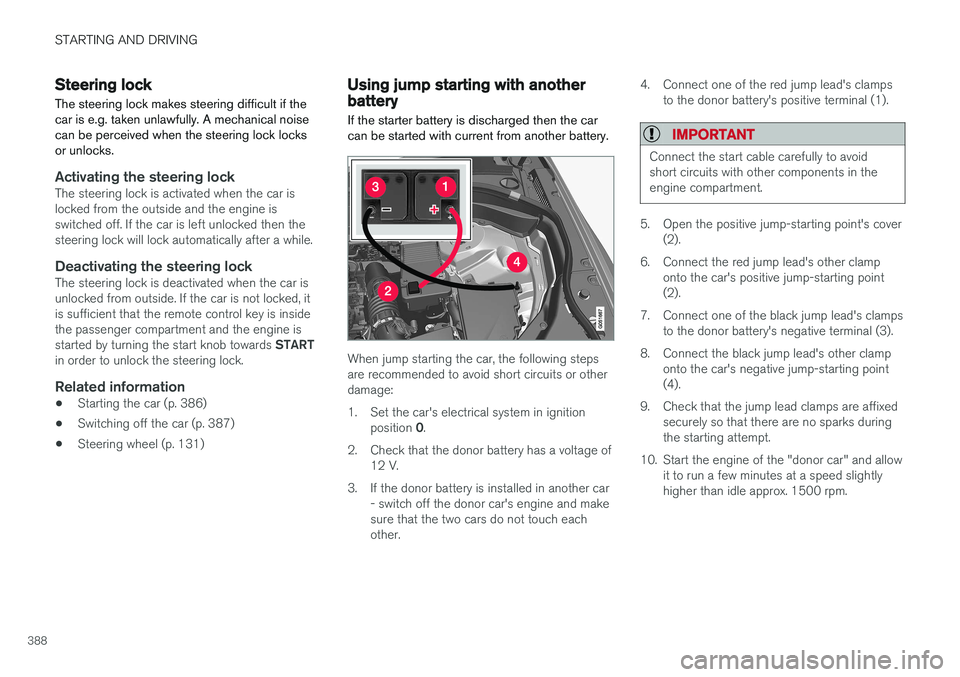
When jump starting the car, the following steps are recommended to avoid short circuits or otherdamage:
1. Set the car's electrical system in ignition position 0.
2. Check that the donor battery has a voltage of 12 V.
3. If the donor battery is installed in another car - switch off the donor car's engine and make sure that the two cars do not touch eachother. 4. Connect one of the red jump lead's clamps
to the donor battery's positive terminal (1).
IMPORTANT
Connect the start cable carefully to avoid short circuits with other components in theengine compartment.
5. Open the positive jump-starting point's cover(2).
6. Connect the red jump lead's other clamp onto the car's positive jump-starting point (2).
7. Connect one of the black jump lead's clamps to the donor battery's negative terminal (3).
8. Connect the black jump lead's other clamp onto the car's negative jump-starting point(4).
9. Check that the jump lead clamps are affixed securely so that there are no sparks duringthe starting attempt.
10. Start the engine of the "donor car" and allow it to run a few minutes at a speed slightlyhigher than idle approx. 1500 rpm.
Page 391 of 594
STARTING AND DRIVING
}}
389
11. Start the engine in the car with the dis-
charged battery.
IMPORTANT
Do not touch the connections between cable and car during the starting attempt. There is arisk of sparks forming.
12. Remove the jump leads in reverse order -first the black and then the red. Make sure that none of the black jump lead's clamps comes into contact with the car'spositive jump-starting point/donor battery'spositive terminal or the clamp connected tothe red jump lead.
WARNING
• The battery can generate oxyhydrogen gas, which is highly explosive. A spark canbe formed if a jump lead is connectedincorrectly, and this can be enough forthe battery to explode.
• The battery contains sulphuric acid, whichcan cause serious burns.
• If sulphuric acid comes into contact witheyes, skin or clothing, flush with largequantities of water. If acid splashes intothe eyes - seek medical attention imme-diately.
Related information
•Starter battery (p. 530)
• Ignition positions (p. 385)
• Starting the car (p. 386)
• Opening and closing the bonnet (p. 514)
Gearbox
The gearbox is part of the car's driveline (power transmission) between engine and drive wheels.The function of the gearbox is to change thegear ratio depending on speed and powerrequirements.
There are two main types of gearbox, manual and automatic. The manual gearbox has six gears. The automatic gearbox can have either eight gears or six gearsdepending on which engine the car is equippedwith. The number of gear changes means thatthe engine's torque and power range can beused effectively. It is also possible to select gears manually with the automatic gearbox. The driver display respec-tively shows which gear or gear position is cur-rently in use.
IMPORTANT
To prevent damage to any drive system com- ponents, the working temperature of thegearbox is checked. If there is a risk of over-heating, a warning symbol illuminates in thedriver display and a text message is shown -follow the recommendation given.
Symbols in the driver displayIf a fault should occur in the gearbox, the driver display shows a symbol and a message.
Page 392 of 594
||
STARTING AND DRIVING
* Option/accessory.
390
Symbol Specification
Information or error message for gearbox. Follow the recommenda-tion given.
Hot or overheated gearbox. Follow the recommendation given.
Related information
•Gear positions for automatic gearbox (p. 390)
• Manual gearbox (p. 392)
• Gear shift indicator
* (p. 392)
Gear positions for automatic gearbox
With an automatic gearbox, the system chooses the gear so that driving is optimal. The gearboxalso has a manual gearshift mode.
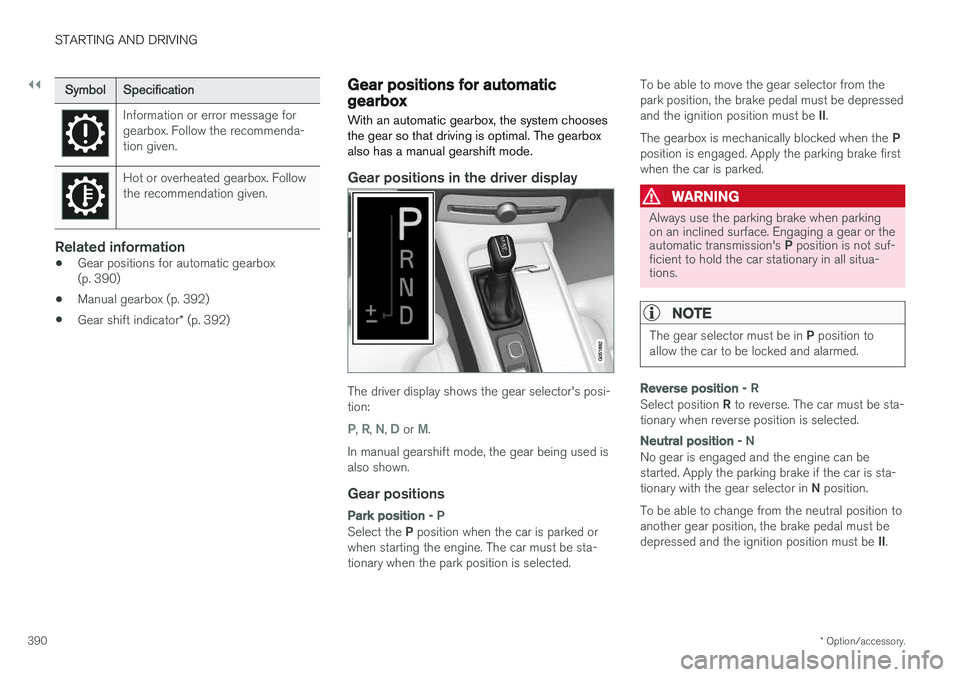
Gear positions in the driver display
The driver display shows the gear selector's posi- tion:
P, R, N, D or M.
In manual gearshift mode, the gear being used is also shown.
Gear positions
Park position - P
Select the P position when the car is parked or
when starting the engine. The car must be sta- tionary when the park position is selected. To be able to move the gear selector from thepark position, the brake pedal must be depressed and the ignition position must be
II.
The gearbox is mechanically blocked when the P
position is engaged. Apply the parking brake first when the car is parked.
WARNING
Always use the parking brake when parking on an inclined surface. Engaging a gear or the automatic transmission's P position is not suf-
ficient to hold the car stationary in all situa- tions.
NOTE
The gear selector must be in P position to
allow the car to be locked and alarmed.
Reverse position - R
Select position R to reverse. The car must be sta-
tionary when reverse position is selected.
Neutral position - N
No gear is engaged and the engine can be started. Apply the parking brake if the car is sta- tionary with the gear selector in N position.
To be able to change from the neutral position to another gear position, the brake pedal must be depressed and the ignition position must be II.
Page 393 of 594
STARTING AND DRIVING
* Option/accessory.391
Drive position - D
D is the normal driving position. Shifting up and
down takes place automatically based on the level of acceleration and speed. The car must be stationary when changing gear from R position to
D position.
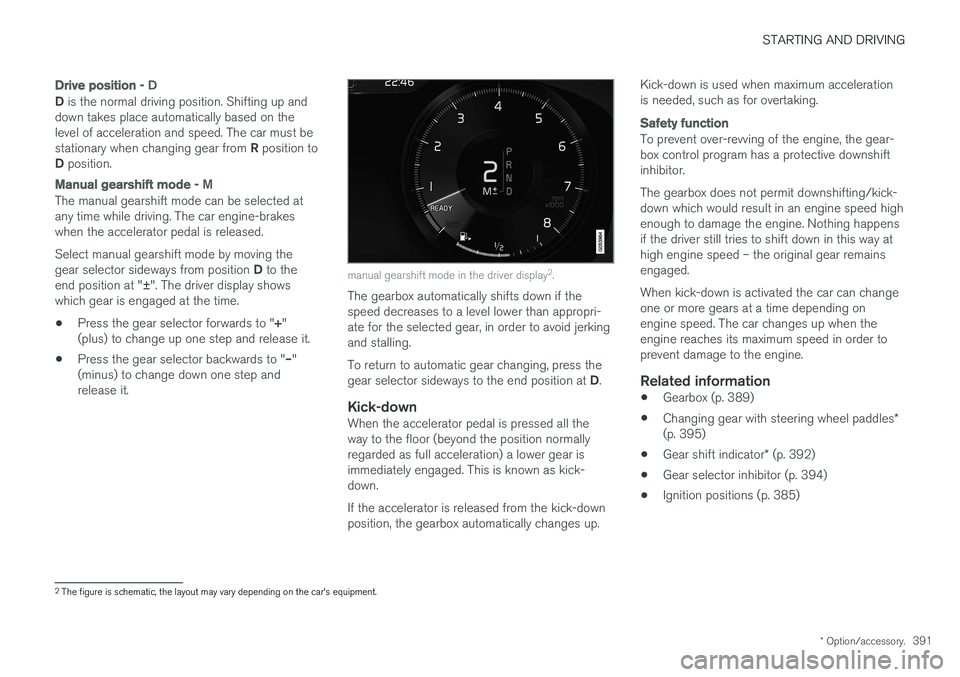
Manual gearshift mode - M
The manual gearshift mode can be selected at any time while driving. The car engine-brakeswhen the accelerator pedal is released. Select manual gearshift mode by moving the gear selector sideways from position D to the
end position at " ±". The driver display shows
which gear is engaged at the time.
• Press the gear selector forwards to "
+"
(plus) to change up one step and release it.
• Press the gear selector backwards to "
–"
(minus) to change down one step and release it.
manual gearshift mode in the driver display 2
.
The gearbox automatically shifts down if the speed decreases to a level lower than appropri-ate for the selected gear, in order to avoid jerkingand stalling. To return to automatic gear changing, press the gear selector sideways to the end position at D.
Kick-downWhen the accelerator pedal is pressed all the way to the floor (beyond the position normallyregarded as full acceleration) a lower gear isimmediately engaged. This is known as kick-down. If the accelerator is released from the kick-down position, the gearbox automatically changes up. Kick-down is used when maximum accelerationis needed, such as for overtaking.
Safety function
To prevent over-revving of the engine, the gear- box control program has a protective downshiftinhibitor. The gearbox does not permit downshifting/kick- down which would result in an engine speed highenough to damage the engine. Nothing happensif the driver still tries to shift down in this way athigh engine speed – the original gear remainsengaged. When kick-down is activated the car can change one or more gears at a time depending onengine speed. The car changes up when theengine reaches its maximum speed in order toprevent damage to the engine.
Related information
•
Gearbox (p. 389)
• Changing gear with steering wheel paddles
*
(p. 395)
• Gear shift indicator
* (p. 392)
• Gear selector inhibitor (p. 394)
• Ignition positions (p. 385)
2
The figure is schematic, the layout may vary depending on the car's equipment.
Page 396 of 594
STARTING AND DRIVING
394
Gear selector inhibitorThe gear selector inhibitor prevents accidental changing between different gear positions in anautomatic gearbox.
There are two different types of gear selector inhibitor - mechanical and automatic.
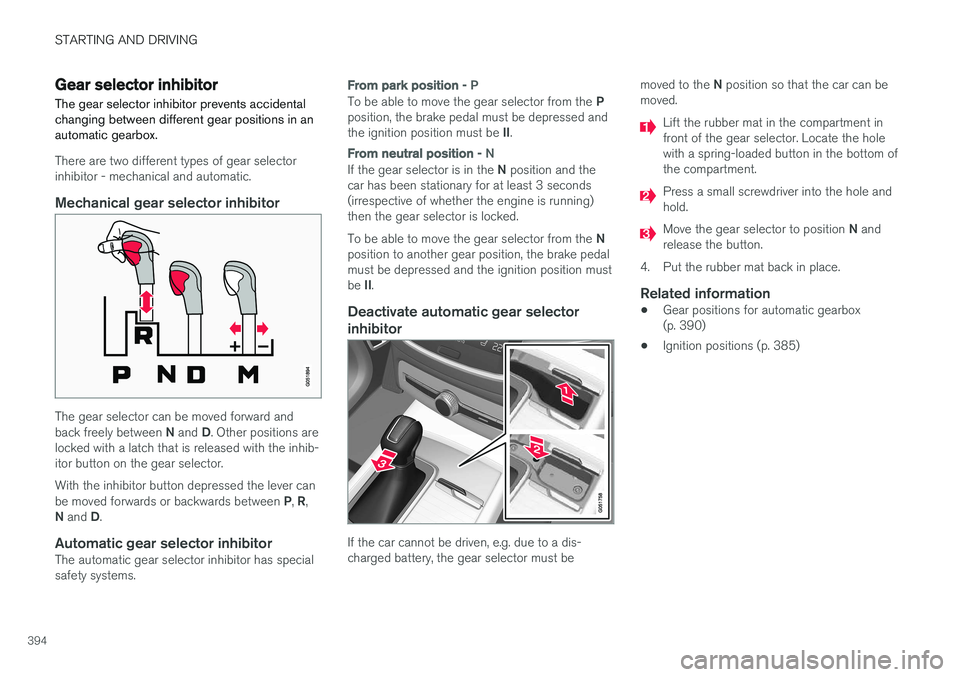
Mechanical gear selector inhibitor
The gear selector can be moved forward and back freely between N and D. Other positions are
locked with a latch that is released with the inhib- itor button on the gear selector. With the inhibitor button depressed the lever can be moved forwards or backwards between P, R ,
N and D.
Automatic gear selector inhibitorThe automatic gear selector inhibitor has special safety systems.
From park position - P
To be able to move the gear selector from the P
position, the brake pedal must be depressed and the ignition position must be II.
From neutral position - N
If the gear selector is in the N position and the
car has been stationary for at least 3 seconds (irrespective of whether the engine is running)then the gear selector is locked. To be able to move the gear selector from the N
position to another gear position, the brake pedal must be depressed and the ignition position must be II.
Deactivate automatic gear selector
inhibitor
If the car cannot be driven, e.g. due to a dis- charged battery, the gear selector must be moved to the
N position so that the car can be
moved.
Lift the rubber mat in the compartment in front of the gear selector. Locate the holewith a spring-loaded button in the bottom ofthe compartment.
Press a small screwdriver into the hole and hold.
Move the gear selector to position N and
release the button.
4. Put the rubber mat back in place.
Related information
• Gear positions for automatic gearbox (p. 390)
• Ignition positions (p. 385)
Page 417 of 594
STARTING AND DRIVING
}}
* Option/accessory.415
Related information
•Driving with a trailer under special conditions (p. 428)
• Preparations for a long trip (p. 415)
Overloading the starter battery
The electrical functions in the car load the starter battery to varying degrees. Avoid using the igni-tion position II when the car is switched off.
Instead, use ignition position I - which uses less
power.
Also, be aware of different accessories that load the electrical system. Do not use functions whichuse a lot of power when the car is switched off.Examples of such functions are:
• ventilation fan
• headlamps
• windscreen wiper
• audio system (high volume).
If the starter battery voltage is low, the message
12 V Battery Low charge, will soon enter
power save mode is shown in the driver display.
The energy-saving function then shuts down cer- tain functions or reduces certain functions suchas the ventilation fan and/or audio system.
–In which case, charge the starter battery by starting the car and then running it for atleast 15 minutes - starter battery charging ismore effective during driving than runningthe engine at idling speed while stationary.
Related information
• Ignition positions (p. 385)
• Starter battery (p. 530)
Preparations for a long trip
Before a driving holiday or some other type of long journey, it is important to check the car'sfunctions and equipment particularly carefully.
Check that:
• the engine is working normally and that fuel consumption is normal
• there are no leaks (fuel, oil or other fluid)
• all bulbs are working
• the tyres have sufficient tread depth andpressure
• a warning triangle and high-visibility vest arelocated in the car - legally required in certaincountries
• the wiper blades are in good condition.
Related information
•
Fuel consumption and CO2 emissions(p. 572)
• Checking the tyre pressures (p. 484)
• Filling washer fluid (p. 529)
• Winter driving (p. 416)
• Economical driving (p. 422)
• Settings for car modem
* (p. 468)
• Loading (p. 227)
• Pilot Assist
* (p. 304)
• Speed limiter
* (p. 277)
Page 422 of 594
STARTING AND DRIVING
420
Diesel Diesel is a type of engine fuel that is intended for cars with a diesel engine.
Only use diesel fuel from well-known producers. Never use fuel of dubious quality. Diesel fuelmust fulfil the EN 590 or SS 155435 standard.Diesel engines are sensitive to contaminants inthe fuel, such as excessively high volumes of sul-phur and metals. At low temperatures (lower than 0 °C) a paraffin precipitate may form in the diesel fuel, which maylead to ignition problems. The fuel qualities thatare sold must be adapted for season and climatezone, but for extreme weather conditions, old fuelor moving between climate zones, paraffin precip-itate may occur. The risk of condensation in the fuel tank is reduced if the tank is kept well filled. When refuelling, check that the area around the fuel filler pipe is clean. Avoid spilling fuel onto thepaintwork. Wash off any spillage with detergentand water.
IMPORTANT
Diesel fuel must: •fulfil the EN 590 and/or SS 155435 standards
• have a sulphur content not exceeding10 mg/kg
• have a maximum of 7 vol % FAME 15
(B7).
IMPORTANT
Diesel type fuels that must not be used:
• Special additives
• Marine diesel fuel
• Heating oil
• FAME 16
and vegetable oil.
These fuels do not fulfil the requirements in accordance with Volvo recommendations andgenerate increased wear and engine damagethat is not covered by the Volvo warranty.
Related information
• Empty tank and diesel engine (p. 420)
• Diesel particulate filter (p. 421)
Empty tank and diesel engine
Once the engine has stopped due to fuel starva- tion, the fuel system needs a few moments tocarry out a check.
Before starting the engine after the fuel tank has
been filled with diesel - proceed as follows:
1. The remote control key must be inside the car.
2. Set the car in ignition position II - turn the
ignition dial to START without depressing
the brake pedal and hold the knob in the START position for approx. 4 seconds. Then
release the knob, which automatically returns to its starting position.
3. Wait approx. one minute.
4. To start the engine: Depress the brake pedal and turn the ignition dial to START again.
NOTE
Before filling with fuel in the event of fuel shortage:
• Stop the car on as flat/level ground aspossible - if the car is tilting there is a riskof air pockets in the fuel supply.
15
Fatty Acid Methyl Ester
16 Diesel fuel with maximum 7 vol % FAME (B7) is permitted.
Page 433 of 594
STARTING AND DRIVING
}}
431
The towing eye may be used to pull the car up onto a recovery vehicle with a flatbed platform.The car's position and ground clearance deter-mine whether it is possible. If the slope of the recovery vehicle's ramp is too steep, or if the ground clearance under the car isinadequate, then the car may be damaged if youtry to pull it up using the towing eye. If necessary, raise the car by using the recovery vehicle's lifting device. Do not use the towing eye.
WARNING
No one/nothing is allowed to remain behind the recovery vehicle while the car pulled uponto the flatbed platform.
IMPORTANT
The towing eye is only designed for towing on roads -
not for pulling the car unstuck or out
of a ditch. Call a recovery service for recovery assistance.
Related information
• Towing (p. 431)
• Recovering the car (p. 432)
Towing
During towing, one vehicle pulls another vehicle along behind it by means of a towline.
Find out the statutory maximum speed limit for towing before the towing begins.
Preparations and towing1. Activate the car's hazard warning flashers.
2. Secure the towline in the towing eye.
3. Deactivate the steering lock by unlocking the car.
NOTE
In ignition position II the steering lock is
deactivated if the car has been unlocked. See section “Ignition position” for more informa-tion.
4. Set the car in ignition position II by turning
the ignition dial to START and holding the
ignition dial in the START position for
approx. 4 seconds. Then release the knob, which automatically returns to its startingposition.
5. Move the gear selector to neutral position N
and release the parking brake.
> The towing vehicle can now start towing. 6. Keep the towline taut when the towing vehi-
cle reduces speed by holding your foot gen- tly pressed on the brake pedal - therebyavoiding unnecessary jerking.
7. Be prepared to brake to stop.
IMPORTANT
Note that the car must always be towed with the wheels rolling forward. • Do not tow cars with automatic transmis- sion at speeds higher than 80 km/h(50 mph) or for distances in excess of 80km.
WARNING
•Check that the steering lock is unlocked before towing.
• Ignition position
II must be active - in
ignition position I all airbags are deacti-
vated.
• Always keep the remote control key in thecar when it is being towed.
WARNING
The brake servo and power steering do not work when the engine is switched off - thebrake pedal needs to be depressedabout 5 times more heavily and the steering isconsiderably heavier than normal.
Page 434 of 594
||
STARTING AND DRIVING
* Option/accessory.
432
Jump startingDo not tow the car to jump start the engine. Use a donor battery if the starter battery is dischargedand the engine does not start.
IMPORTANT
The catalytic converter may be damaged dur- ing attempts to tow-start the engine.
Related information
• Warning triangle (p. 500)
• Towing eye (p. 430)
• Recovering the car (p. 432)
• Using jump starting with another battery (p. 388)
• Ignition positions (p. 385)
Recovering the car For recovery, the car is taken away with the help of another vehicle.
Call a recovery service for recovery assistance. The towing eye can be used to pull the car up onto a recovery vehicle with a flatbed platform. Applies to cars with level control
*: If the car is
equipped with air suspension , this must be disa- bled before the car is raised. Deactivating thefunction via the centre display. 1. Press
Settings in the top view.
2. Press
My CarSuspension .
3. Select
Disable Leveling Control.
The car's position and ground clearance deter- mine whether it is possible to pull it up onto aflatbed platform. If the slope of the recovery vehi-cle's ramp is too steep, or if the ground clearanceunder the car is inadequate, then the car may bedamaged if you try to pull it up. The car shouldthen be lifted using the recovery vehicle's liftingdevice.
WARNING
No one/nothing is allowed to remain behind the recovery vehicle while the car pulled uponto the flatbed platform.
IMPORTANT
The towing eye is only designed for towing on roads - not for pulling the car unstuck or out
of a ditch. Call a recovery service for recovery assistance.
IMPORTANT
Note that the car must always be transported with the wheels rolling forward.
NOTE
If the car is equipped with a towing bracket, there is no rear mounting for a towing eye.
Related information
• Towing (p. 431)
• Towing eye (p. 430)
Page 436 of 594
AUDIO AND MEDIA
* Option/accessory.
434
Audio and media
The audio and media system consists of media
player, radio and Bluetooth phone connection. With an online car it is also possible to listen toservices via apps. Functions can be controlled by voice command or via the steering wheel keypad and the centredisplay. The number of speakers and amplifiersdepends on which audio system the car isequipped with.
Overview of audio and media.
System updating
The audio and media system is continuously improved. When the car is online there is theoption to download updates for optimal function-ality, see the section "System updates" andsupport.volvocars.com.
Related information
• Media player (p. 442)
• Radio (p. 436)
• Phone (p. 456)
• Online car
* (p. 463)
• Apps (p. 434)
• Ignition positions (p. 385)
• Symbols in the centre display's status bar(p. 45)
• Voice recognition (p. 115)
• System updates (p. 510)
• License agreement for audio and media(p. 470)
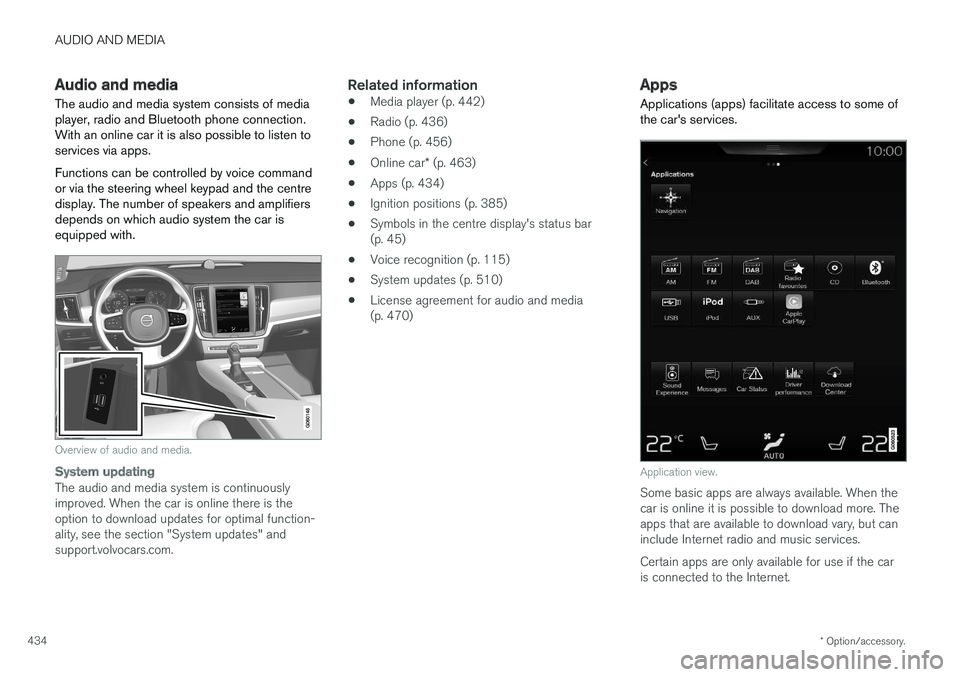
Apps
Applications (apps) facilitate access to some of the car's services.
Application view.
Some basic apps are always available. When the car is online it is possible to download more. Theapps that are available to download vary, but caninclude Internet radio and music services. Certain apps are only available for use if the car is connected to the Internet.