wheel VOLVO V90 2017 Workshop Manual
[x] Cancel search | Manufacturer: VOLVO, Model Year: 2017, Model line: V90, Model: VOLVO V90 2017Pages: 594, PDF Size: 15.07 MB
Page 208 of 594
||
CLIMATE CONTROL
* Option/accessory.
206 2. Repeatedly press the button for heated
steering wheel in order to change between the four levels:
Off, High, Medium and Low.
> The level changes and the button shows the set level.
Activating/deactivating automatic start of heated steering wheel
It is possible to set whether automatic start of heated steering wheel should be activated/deac-tivated when the engine is started. With auto-matic start activated, heating will start in theevent of low ambient temperature. 1. Press
Settings in the top view in the centre
display.
2. Press
Climate.
3. Under
Auto Steering Wheel Heating
Level, select Off,Low,Medium or High in
order to activate/deactivate the automatic starting of steering wheel heating and toselect the level.
Related information
• Climate controls (p. 186)
• Climate controls in the centre display(p. 187)
• Steering wheel (p. 131)
Parking climate
*
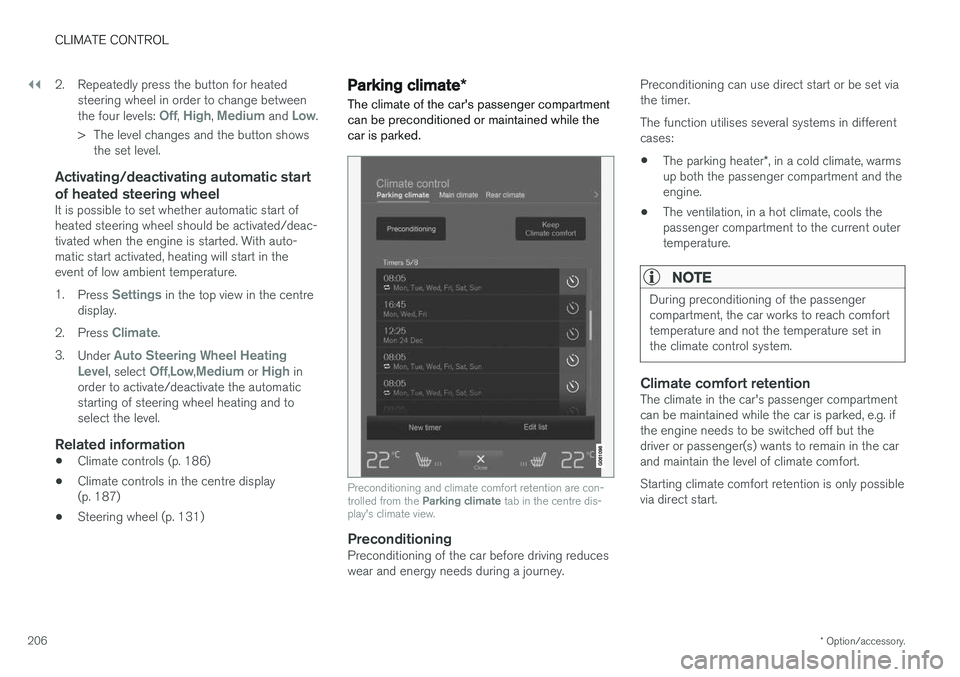
The climate of the car's passenger compartment can be preconditioned or maintained while thecar is parked.
Preconditioning and climate comfort retention are con- trolled from the Parking climate tab in the centre dis-
play's climate view.
PreconditioningPreconditioning of the car before driving reduces wear and energy needs during a journey. Preconditioning can use direct start or be set viathe timer. The function utilises several systems in different cases: •
The parking heater
*, in a cold climate, warms
up both the passenger compartment and the engine.
• The ventilation, in a hot climate, cools thepassenger compartment to the current outertemperature.
NOTE
During preconditioning of the passenger compartment, the car works to reach comforttemperature and not the temperature set inthe climate control system.
Climate comfort retentionThe climate in the car's passenger compartment can be maintained while the car is parked, e.g. ifthe engine needs to be switched off but thedriver or passenger(s) wants to remain in the carand maintain the level of climate comfort. Starting climate comfort retention is only possible via direct start.
Page 215 of 594
CLIMATE CONTROL
* Option/accessory.213
Heater*
The heater helps the engine and passenger compartment reach the correct temperaturebefore and during driving.
The heater has two subfunctions: • Parking heater - heats the engine and pas- senger compartment, if necessary, when the parking climate control's preconditioning
* is
activated.
• Additional heater - heats the passenger compartment and engine, if necessary, dur-ing driving.
The heater is fuel-driven and is fitted in the frontright-hand wheel housing.
This symbol illuminates in the driverdisplay when the heater is active.
NOTE
When the heater is running, smoke may be emitted from the right-hand front wheel hous-ing and a low hum may be heard. A tickingsound from the fuel pump may also be heardfrom the rear section of the car. This is per-fectly normal.
Battery and chargingThe heater is powered by the car's starter battery. If the charge level of the starter battery is too low,then the heater is switched off automatically andthe driver display shows a message.
NOTE
Make sure that there is enough charge in the battery if the heater needs to be used.
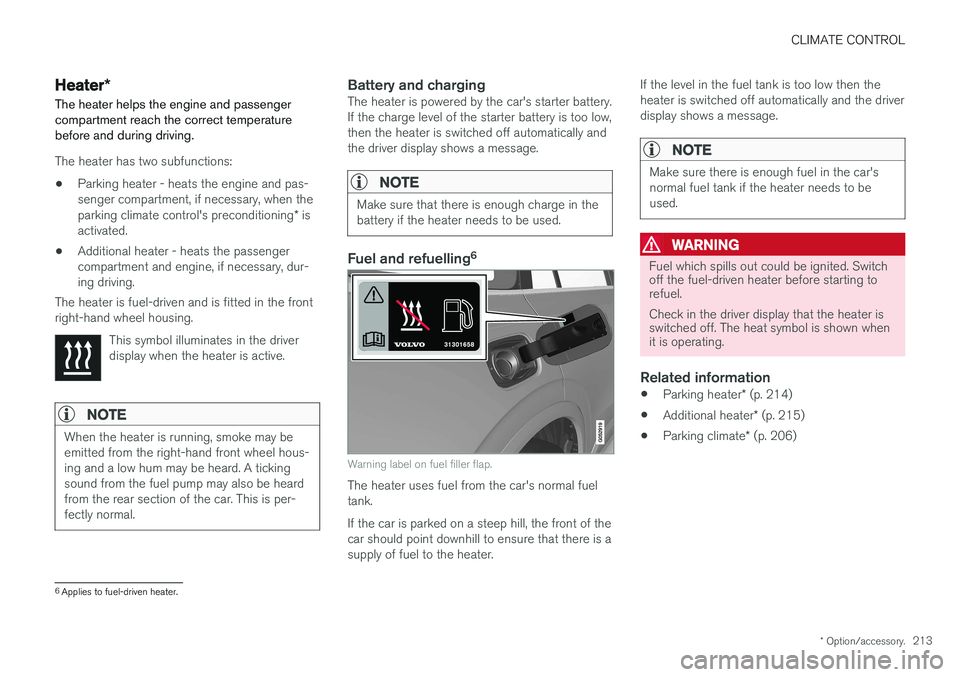
Fuel and refuelling 6
Warning label on fuel filler flap.
The heater uses fuel from the car's normal fuel tank. If the car is parked on a steep hill, the front of the car should point downhill to ensure that there is asupply of fuel to the heater. If the level in the fuel tank is too low then theheater is switched off automatically and the driverdisplay shows a message.
NOTE
Make sure there is enough fuel in the car's normal fuel tank if the heater needs to beused.
WARNING
Fuel which spills out could be ignited. Switch off the fuel-driven heater before starting torefuel. Check in the driver display that the heater is switched off. The heat symbol is shown whenit is operating.
Related information
•
Parking heater
* (p. 214)
• Additional heater
* (p. 215)
• Parking climate
* (p. 206)
6
Applies to fuel-driven heater.
Page 216 of 594
CLIMATE CONTROL
* Option/accessory.
214
Parking heater *
The parking heater helps the passenger com- partment reach the correct temperature beforedriving.
The parking heater is one of two subfunctions of the car's heater. The heater is fitted in the frontright-hand wheel housing.
NOTE
When the heater is running, smoke may be emitted from the right-hand front wheel hous-ing and a low hum may be heard. A tickingsound from the fuel pump may also be heardfrom the rear section of the car. This is per-fectly normal.
The parking heater starts automatically when extra heat is required if the parking climate con- trol's preconditioning * is activated.
It is then switched off automatically when the right temperature, the time of a set timer or theheater's maximum running time has beenreached. The heater's maximum running time is 40 minutes.
NOTE
Make sure there is enough fuel in the car's normal fuel tank if the heater needs to beused. Make sure that there is enough charge in the starter battery if the heater needs to be used.
IMPORTANT
Repeated use of the parking heater combined with short journeys may discharge the batteryand impair starting. If the heater is used on a regular basis, then the car should be driven for the same amountof time that the heater is used in order toensure that the car's battery is recharged withthe same amount of energy as consumed bythe parking heater. The parking heater is usedfor a maximum of 40 minutes each time.
WARNING
Do not use preconditioning if the car is equip- ped with a heater *:
• In unventilated spaces indoors. Exhaust gases are emitted if the heater starts.
• In locations with combustible or flamma-ble material nearby. Fuel, gas, long grass,sawdust, etc. may ignite.
• When there is a risk that the heater
Page 217 of 594
CLIMATE CONTROL
* Option/accessory.215
Additional heater *
The additional heater helps the passenger com- partment and engine reach the correct tempera-ture while driving.
The additional heater is one of two subfunctions of the car's heater. The heater is fitted in thefront right-hand wheel housing.
NOTE
When the heater is running, smoke may be emitted from the right-hand front wheel hous-ing and a low hum may be heard. A tickingsound from the fuel pump may also be heardfrom the rear section of the car. This is per-fectly normal.
The additional heater starts and is controlled automatically when heating is required while thecar is being driven. It then switches off automatically when the car is switched off.
NOTE
Make sure there is enough fuel in the car's normal fuel tank if the heater needs to beused. Make sure that there is enough charge in the starter battery if the heater needs to be used.
Activating/deactivating automatic start for the additional heater
It is possible to set whether automatic start for the additional heater should be activated/deacti-vated. 1. Press
Settings in the top view in the centre
display.
2. Press
Climate.
3. Select
Additional Heater to activate/deac-
tivate automatic start of the additional heater.
NOTE
Volvo recommends that the automatic start for the additional heater should be switchedoff for short driving distances.
Related information
• Heater
* (p. 213)
• Parking heater
* (p. 214)
Page 220 of 594
LOADING AND STORAGE
* Option/accessory.
218
Passenger compartment interior
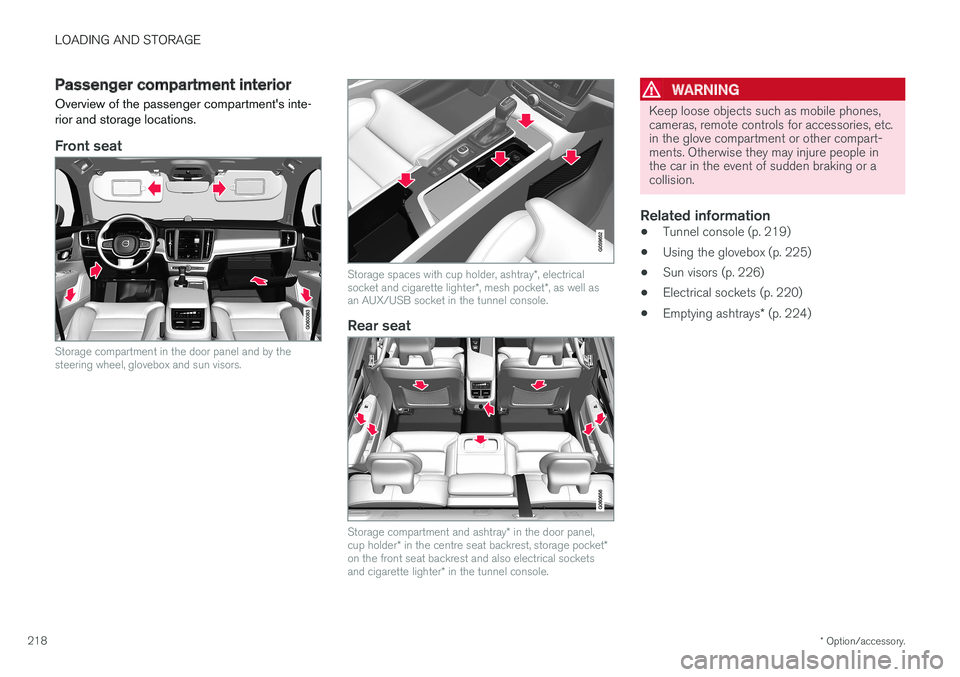
Overview of the passenger compartment's inte- rior and storage locations.
Front seat
Storage compartment in the door panel and by the steering wheel, glovebox and sun visors.
Storage spaces with cup holder, ashtray *, electrical
socket and cigarette lighter *, mesh pocket *, as well as
an AUX/USB socket in the tunnel console.
Rear seat
Storage compartment and ashtray * in the door panel,
cup holder * in the centre seat backrest, storage pocket *
on the front seat backrest and also electrical sockets and cigarette lighter * in the tunnel console.
WARNING
Keep loose objects such as mobile phones, cameras, remote controls for accessories, etc.in the glove compartment or other compart-ments. Otherwise they may injure people inthe car in the event of sudden braking or acollision.
Related information
• Tunnel console (p. 219)
• Using the glovebox (p. 225)
• Sun visors (p. 226)
• Electrical sockets (p. 220)
• Emptying ashtrays
* (p. 224)
Page 228 of 594
||
LOADING AND STORAGE
* Option/accessory.
226
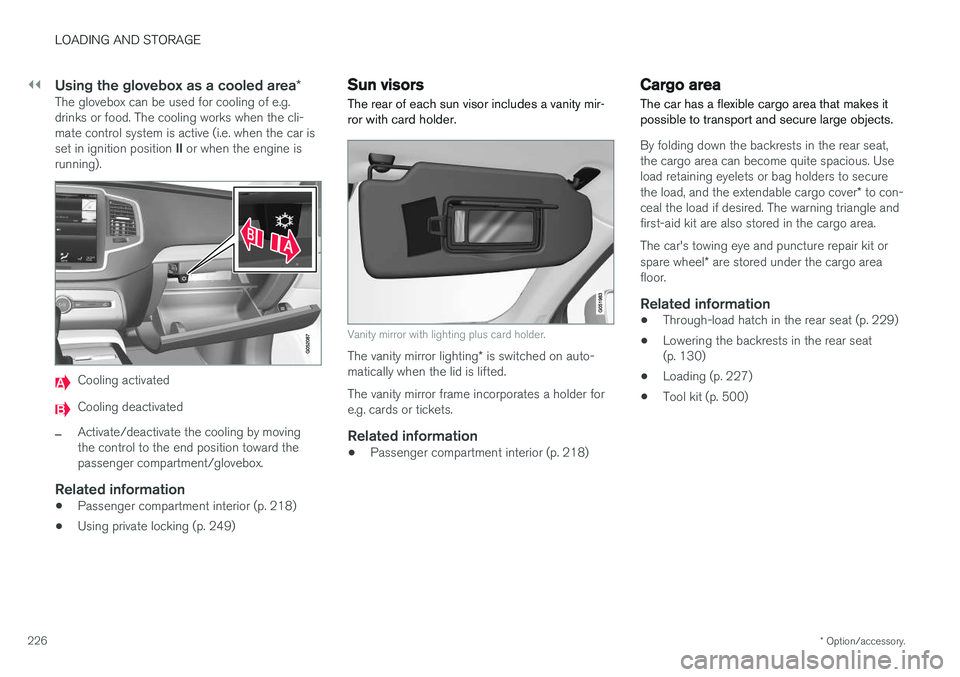
Using the glovebox as a cooled area *The glovebox can be used for cooling of e.g. drinks or food. The cooling works when the cli-mate control system is active (i.e. when the car is set in ignition position II or when the engine is
running).
Cooling activated
Cooling deactivated
–Activate/deactivate the cooling by moving the control to the end position toward thepassenger compartment/glovebox.
Related information
• Passenger compartment interior (p. 218)
• Using private locking (p. 249)
Sun visors The rear of each sun visor includes a vanity mir- ror with card holder.
Vanity mirror with lighting plus card holder.
The vanity mirror lighting
* is switched on auto-
matically when the lid is lifted. The vanity mirror frame incorporates a holder for e.g. cards or tickets.
Related information
• Passenger compartment interior (p. 218)
Cargo area
The car has a flexible cargo area that makes it possible to transport and secure large objects.
By folding down the backrests in the rear seat, the cargo area can become quite spacious. Useload retaining eyelets or bag holders to secure the load, and the extendable cargo cover * to con-
ceal the load if desired. The warning triangle and first-aid kit are also stored in the cargo area. The car's towing eye and puncture repair kit or spare wheel * are stored under the cargo area
floor.
Related information
• Through-load hatch in the rear seat (p. 229)
• Lowering the backrests in the rear seat (p. 130)
• Loading (p. 227)
• Tool kit (p. 500)
Page 274 of 594
DRIVER SUPPORT
* Option/accessory.
272
Speed-dependent steering force Speed related power steering causes the steer- ing wheel force to increase with the speed of thecar in order to give the driver enhanced sensitiv-ity.
On motorways the steering feels firmer. When parking and at low speed steering is light andrequires only a slight effort.
NOTE
In certain situations the power steering may become too hot and then needs to be tempo-rarily cooled - during this time the powersteering operates with reduced power andturning the steering wheel may then be per-ceived to be slightly heavier. In parallel with the temporarily reduced steer- ing assistance, the driver display shows amessage.
Change the steering force level *To select the steering force level, go to the "Drive modes" section and see the description at thealternative INDIVIDUAL under the heading"Selectable drive modes". For the car models without a drive mode control with its INDIVIDUAL option, the selection ofsteering force is instead made via the centre dis-play's top view and the following search path:
SettingsMy CarDrive ModesSteering force
Selection of steering force is not accessible while turning is in progress.
Related information
•Drive modes
* (p. 400)
Roll Stability Control Roll Stability Control (RSC) is a stabiliser sys- tem that minimises the risk of overturning, forexample during sudden evasive manoeuvres or ifthe car skids.
The RSC system registers if and how much the car's lateral inclination changes. This informationis used to calculate the risk of the car overturn-ing. If the car is at risk, its electronic stability con-trol system engages, the engine torque isreduced and one or more wheels are braked untilthe car has regained its stability.
WARNING
Under normal driving conditions, the RSC sys- tem improves the car's road safety, but thismust not be taken as a reason to increasespeed. Always follow the normal precautionsfor safe driving.
Related information
• Electronic stability control (p. 273)
• Safety (p. 56)
Page 280 of 594
DRIVER SUPPORT
* Option/accessory.
278
Activating and starting the speed limiter
The speed limiter function (Speed Limiter - SL) must first be selected and activated in order tobe able to regulate the speed.
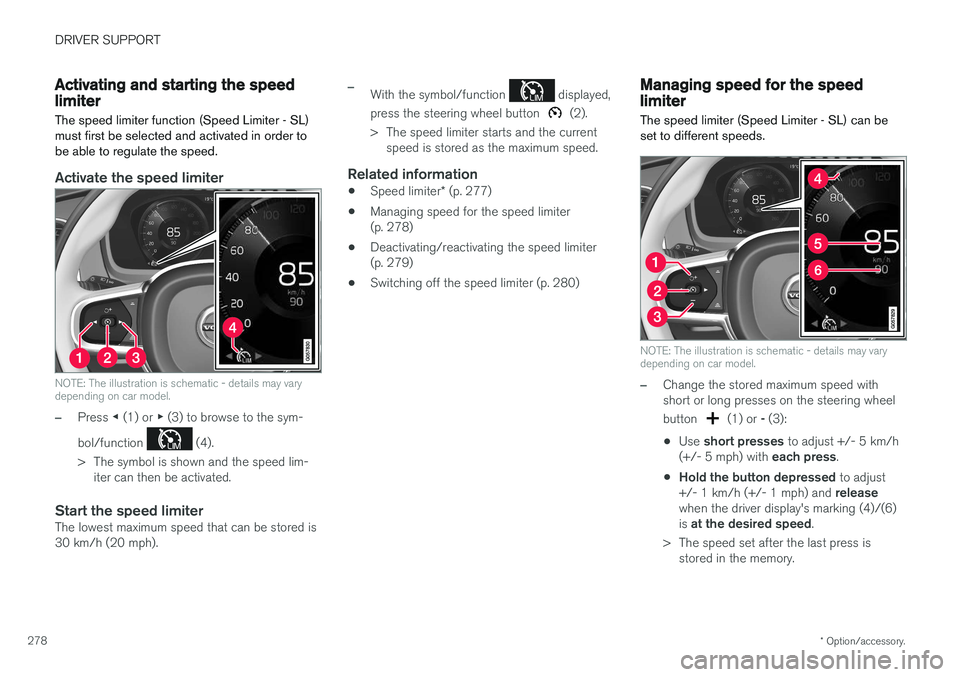
Activate the speed limiter
NOTE: The illustration is schematic - details may vary depending on car model.
–Press ◀ (1) or ▶ (3) to browse to the sym-
bol/function
(4).
> The symbol is shown and the speed lim- iter can then be activated.
Start the speed limiterThe lowest maximum speed that can be stored is 30 km/h (20 mph).
–With the symbol/function displayed,
press the steering wheel button
(2).
> The speed limiter starts and the current speed is stored as the maximum speed.
Related information
• Speed limiter
* (p. 277)
• Managing speed for the speed limiter (p. 278)
• Deactivating/reactivating the speed limiter(p. 279)
• Switching off the speed limiter (p. 280)
Managing speed for the speed limiter
The speed limiter (Speed Limiter - SL) can be set to different speeds.
NOTE: The illustration is schematic - details may vary depending on car model.
–Change the stored maximum speed with short or long presses on the steering wheel button
(1) or - (3):
• Use
short presses to adjust +/- 5 km/h
(+/- 5 mph) with each press.
• Hold the button depressed
to adjust
+/- 1 km/h (+/- 1 mph) and release
when the driver display's marking (4)/(6) is at the desired speed .
> The speed set after the last press is stored in the memory.
Page 281 of 594
DRIVER SUPPORT
}}
* Option/accessory.279
Related information
•Speed limiter
* (p. 277)
• Activating and starting the speed limiter (p. 278)
• Deactivating/reactivating the speed limiter(p. 279)
• Switching off the speed limiter (p. 280)
Deactivating/reactivating the speed limiter
The speed limiter (Speed Limiter - SL) can be temporarily deactivated so that it is set in thestandby mode and can be reactivated later.
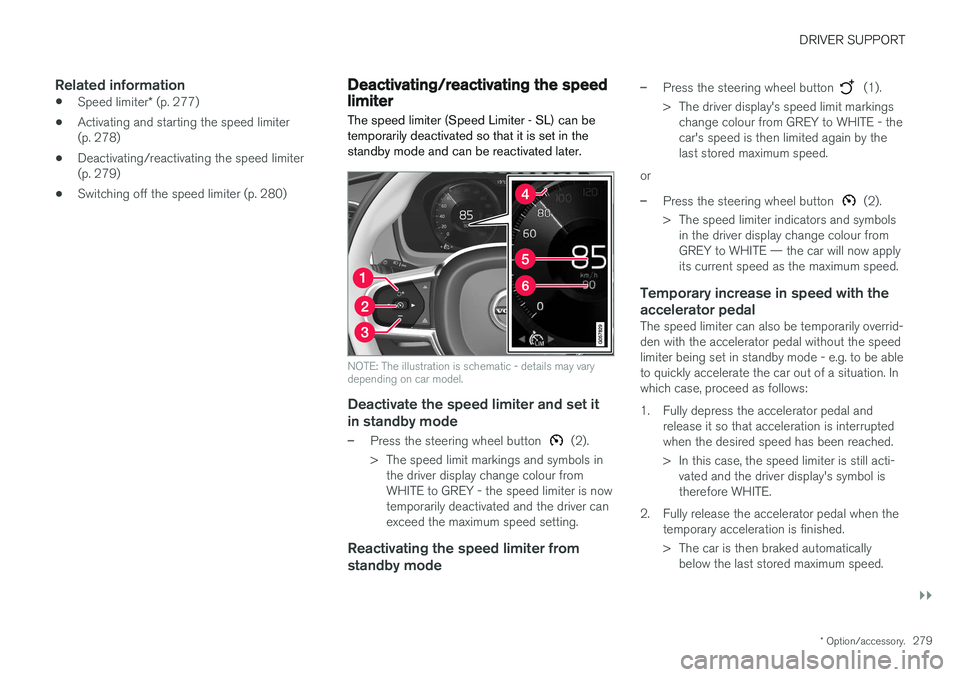
NOTE: The illustration is schematic - details may vary depending on car model.
Deactivate the speed limiter and set it
in standby mode
–Press the steering wheel button (2).
> The speed limit markings and symbols in the driver display change colour from WHITE to GREY - the speed limiter is nowtemporarily deactivated and the driver canexceed the maximum speed setting.
Reactivating the speed limiter from standby mode
–Press the steering wheel button (1).
> The driver display's speed limit markings change colour from GREY to WHITE - the car's speed is then limited again by thelast stored maximum speed.
or
–Press the steering wheel button (2).
> The speed limiter indicators and symbols in the driver display change colour from GREY to WHITE — the car will now applyits current speed as the maximum speed.
Temporary increase in speed with the accelerator pedal
The speed limiter can also be temporarily overrid- den with the accelerator pedal without the speedlimiter being set in standby mode - e.g. to be ableto quickly accelerate the car out of a situation. Inwhich case, proceed as follows:
1. Fully depress the accelerator pedal and release it so that acceleration is interrupted when the desired speed has been reached.
> In this case, the speed limiter is still acti-vated and the driver display's symbol is therefore WHITE.
2. Fully release the accelerator pedal when the temporary acceleration is finished.
> The car is then braked automaticallybelow the last stored maximum speed.
Page 282 of 594
||
DRIVER SUPPORT
* Option/accessory.
280
Related information
• Speed limiter
* (p. 277)
• Activating and starting the speed limiter (p. 278)
• Managing speed for the speed limiter(p. 278)
• Switching off the speed limiter (p. 280)
Switching off the speed limiter
The speed limiter Speed Limiter — SL can be deactivated.
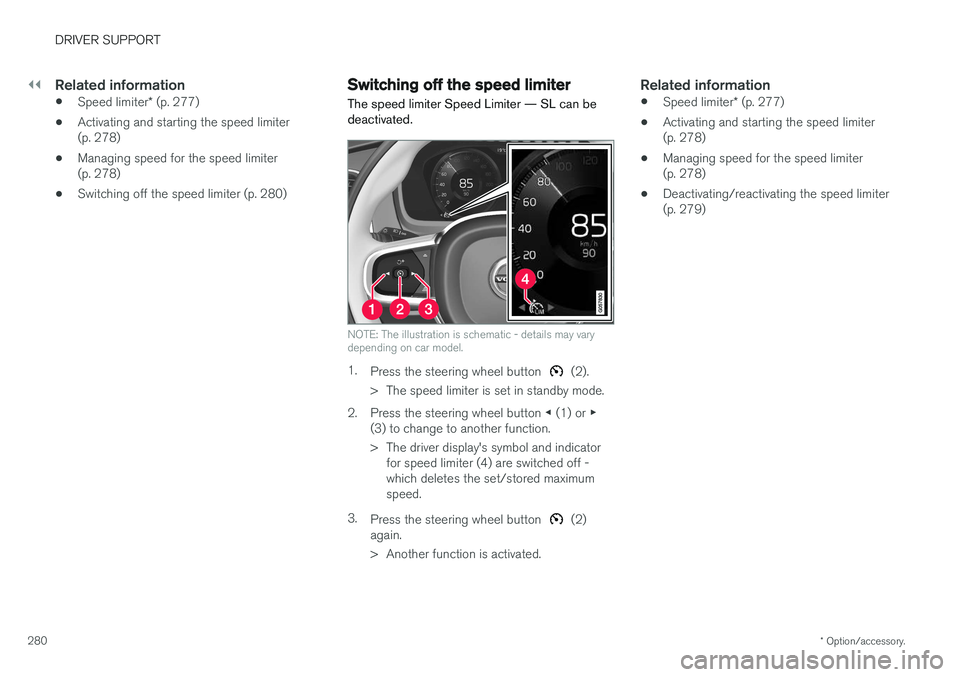
NOTE: The illustration is schematic - details may vary depending on car model.
1. Press the steering wheel button (2).
> The speed limiter is set in standby mode.
2. Press the steering wheel button ◀ (1) or ▶
(3) to change to another function.
> The driver display's symbol and indicator for speed limiter (4) are switched off - which deletes the set/stored maximumspeed.
3. Press the steering wheel button
(2)
again.
> Another function is activated.
Related information
• Speed limiter
* (p. 277)
• Activating and starting the speed limiter (p. 278)
• Managing speed for the speed limiter(p. 278)
• Deactivating/reactivating the speed limiter(p. 279)