wheel VOLVO V90 2017 Repair Manual
[x] Cancel search | Manufacturer: VOLVO, Model Year: 2017, Model line: V90, Model: VOLVO V90 2017Pages: 594, PDF Size: 15.07 MB
Page 284 of 594
||
DRIVER SUPPORT
* Option/accessory.
282
Related information
• Speed limiter
* (p. 277)
• Activating/deactivating the automatic speed limiter (p. 282)
• Changing the tolerance for the Automaticspeed limiter (p. 283)
• Road Sign Information
* (p. 348)
• Limitations of Road Sign Information
*
(p. 352)
Activating/deactivating the automatic speed limiter
The automatic speed limiter function (Automatic Speed Limiter - ASL) can be activated anddeactivated as a supplement to the speed limiter(Speed Limiter - SL).
The function is activated/deac- tivated in function view in thecentre display.
Activating the automatic speed limiter1. Tap on the Speed Sign Assist button in
function view.
> ASL is set in standby mode, a green indi- cator appears on the button, and the driver display shows a sign symbol in thecentre of the speedometer.
2. Press the steering wheel button
.
> ASL is activated with the car
Page 285 of 594
DRIVER SUPPORT
* Option/accessory.283
Changing the tolerance for the Automatic speed limiter
The speed limiter function (Automatic Speed Limiter - ASL) can be set for different tolerancelevels.
It is possible to increase/decrease the signed speed limit. If, for example, the car follows asigned speed limit of 70 km/h (43 mph) thedriver can instead choose to allow the car tomaintain 75 km/h (47 mph).
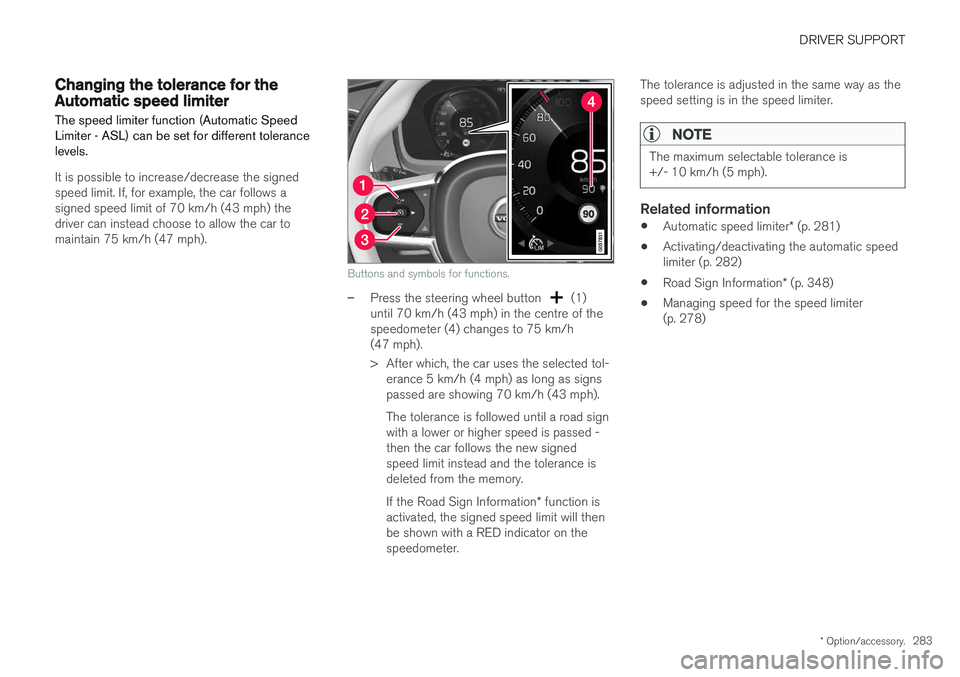
Buttons and symbols for functions.
–Press the steering wheel button (1)
until 70 km/h (43 mph) in the centre of the speedometer (4) changes to 75 km/h(47 mph).
> After which, the car uses the selected tol- erance 5 km/h (4 mph) as long as signs passed are showing 70 km/h (43 mph). The tolerance is followed until a road sign with a lower or higher speed is passed -then the car follows the new signedspeed limit instead and the tolerance isdeleted from the memory. If the Road Sign Information * function is
activated, the signed speed limit will then be shown with a RED indicator on thespeedometer. The tolerance is adjusted in the same way as thespeed setting is in the speed limiter.
NOTE
The maximum selectable tolerance is +/- 10 km/h (5 mph).
Related information
•
Automatic speed limiter
* (p. 281)
• Activating/deactivating the automatic speed limiter (p. 282)
• Road Sign Information
* (p. 348)
• Managing speed for the speed limiter(p. 278)
Page 287 of 594
DRIVER SUPPORT
}}
285
–With the symbol/function displayed,
press the steering wheel button
(2).
> Cruise Control starts and the current speed becomes the stored speed.
NOTE
Cruise Control cannot be enabled at speeds below 30 km/h (20 mph).
Related information
• Cruise control (p. 284)
• Managing speed for the Cruise control (p. 285)
• Deactivating/reactivating the cruise control(p. 286)
• Deactivating Cruise Control (p. 287)
Managing speed for the Cruise control The cruise control (Cruise Control - CC) can be set to different speeds.
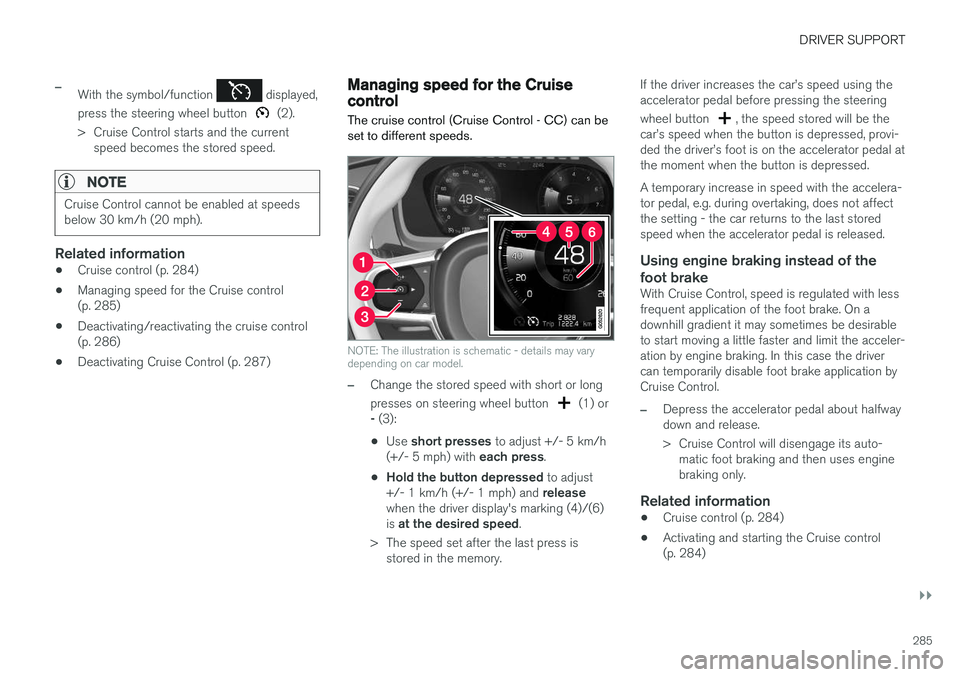
NOTE: The illustration is schematic - details may vary depending on car model.
–Change the stored speed with short or long presses on steering wheel button
(1) or
- (3):
• Use
short presses to adjust +/- 5 km/h
(+/- 5 mph) with each press.
• Hold the button depressed
to adjust
+/- 1 km/h (+/- 1 mph) and release
when the driver display's marking (4)/(6) is at the desired speed .
> The speed set after the last press is stored in the memory. If the driver increases the car
Page 288 of 594
DRIVER SUPPORT
286•
Deactivating/reactivating the cruise control (p. 286)
• Deactivating Cruise Control (p. 287)
Deactivating/reactivating the cruise control The cruise control (Cruise Control - CC) can be temporarily deactivated so that it is set in thestandby mode and can be reactivated later.
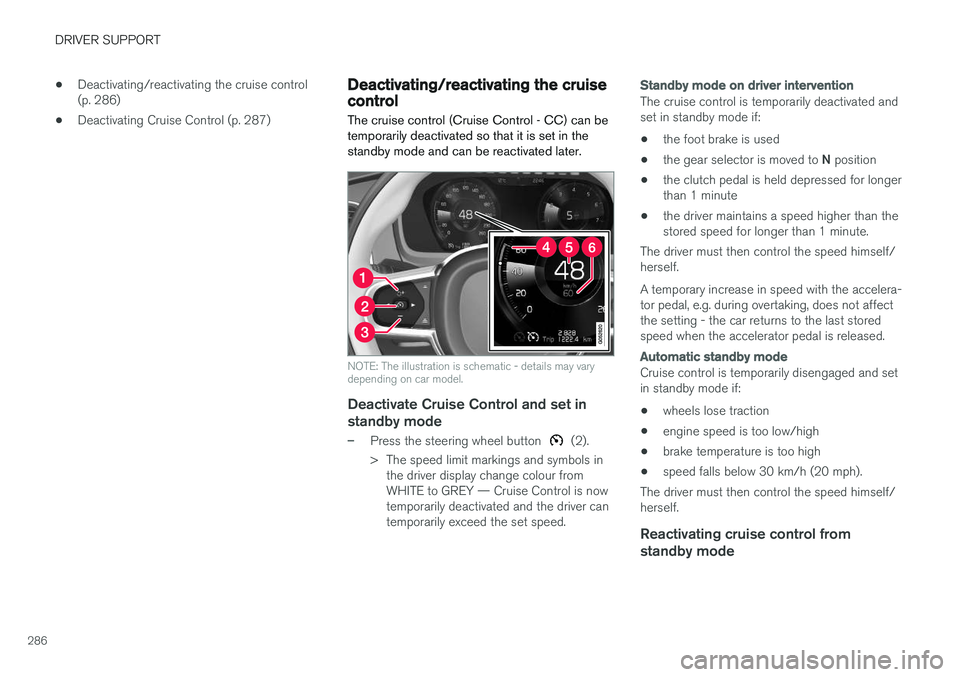
NOTE: The illustration is schematic - details may vary depending on car model.
Deactivate Cruise Control and set in
standby mode
–Press the steering wheel button (2).
> The speed limit markings and symbols in the driver display change colour from WHITE to GREY — Cruise Control is nowtemporarily deactivated and the driver cantemporarily exceed the set speed.
Standby mode on driver intervention
The cruise control is temporarily deactivated and set in standby mode if:
• the foot brake is used
• the gear selector is moved to
N position
• the clutch pedal is held depressed for longerthan 1 minute
• the driver maintains a speed higher than thestored speed for longer than 1 minute.
The driver must then control the speed himself/herself. A temporary increase in speed with the accelera- tor pedal, e.g. during overtaking, does not affectthe setting - the car returns to the last storedspeed when the accelerator pedal is released.
Automatic standby mode
Cruise control is temporarily disengaged and set in standby mode if:
• wheels lose traction
• engine speed is too low/high
• brake temperature is too high
• speed falls below 30 km/h (20 mph).
The driver must then control the speed himself/herself.
Reactivating cruise control from standby mode
Page 289 of 594
DRIVER SUPPORT
* Option/accessory.287
–Press the steering wheel button (1).
> The cruise control markings and symbols in the driver display change colour from GREY to WHITE — the car will now followthe most recently stored speed again.
or
–Press the steering wheel button (2).
> The cruise control markings and symbols in the driver display change colour from GREY to WHITE — the car will now followthe current speed.
NOTE
A marked speed increase may occur once the speed has been resumed by pressing steer- ing wheel button
.
Related information
• Cruise control (p. 284)
• Activating and starting the Cruise control (p. 284)
• Managing speed for the Cruise control(p. 285)
• Deactivating Cruise Control (p. 287)
Deactivating Cruise Control Cruise control Cruise Control — CC can be deactivated.
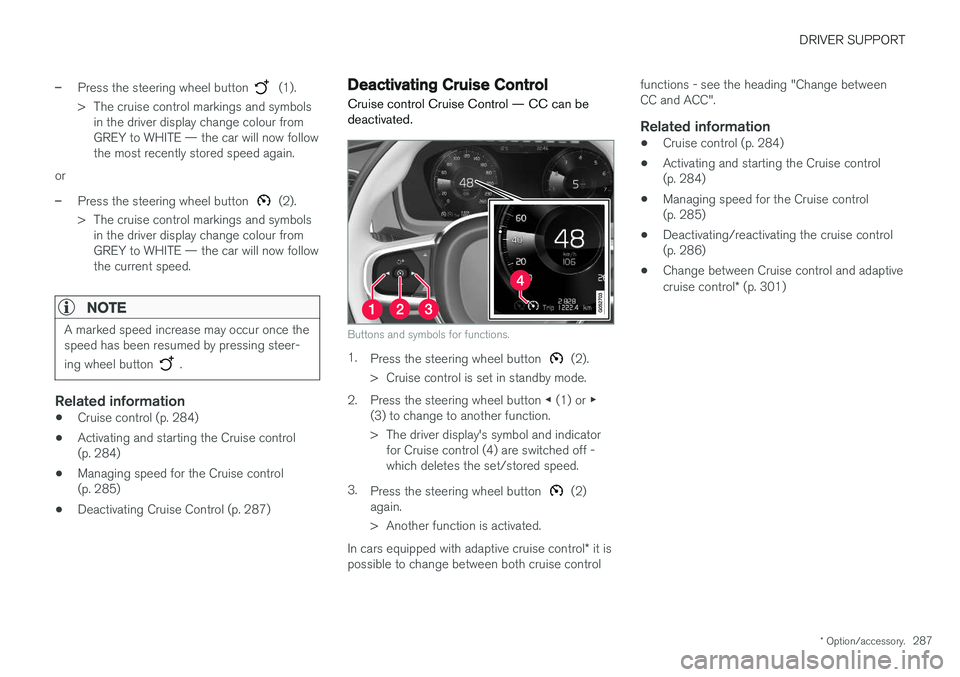
Buttons and symbols for functions.
1.
Press the steering wheel button (2).
> Cruise control is set in standby mode.
2. Press the steering wheel button ◀ (1) or ▶
(3) to change to another function.
> The driver display's symbol and indicator for Cruise control (4) are switched off - which deletes the set/stored speed.
3. Press the steering wheel button
(2)
again.
> Another function is activated.
In cars equipped with adaptive cruise control * it is
possible to change between both cruise control functions - see the heading "Change between CC and ACC".
Related information
•
Cruise control (p. 284)
• Activating and starting the Cruise control(p. 284)
• Managing speed for the Cruise control(p. 285)
• Deactivating/reactivating the cruise control(p. 286)
• Change between Cruise control and adaptive cruise control
* (p. 301)
Page 291 of 594
DRIVER SUPPORT
* Option/accessory.289
Activating and setting the time interval for Distance warning *
The Distance warning (Distance Alert) function can be activated/deactivated and a time intervalcan be set.
Activating/deactivating Distance
warning
The function is activated/deac- tivated in function view in thecentre display.
–Tap on the Distance Alert button in func-
tion view.
> Distance warning is activated/deactivated, a green/grey indicator is displayed in the button.
Setting the time interval for Distance warning
Different time intervals to the vehicle in front can be selectedand shown in the driver displayas 1-5 horizontal lines - themore lines the longer the timeinterval. One line representsabout 1 second to the vehicle
in front, 5 lines represents about 3 seconds.
The same symbol is also shown when the adap- tive cruise control function is activated.
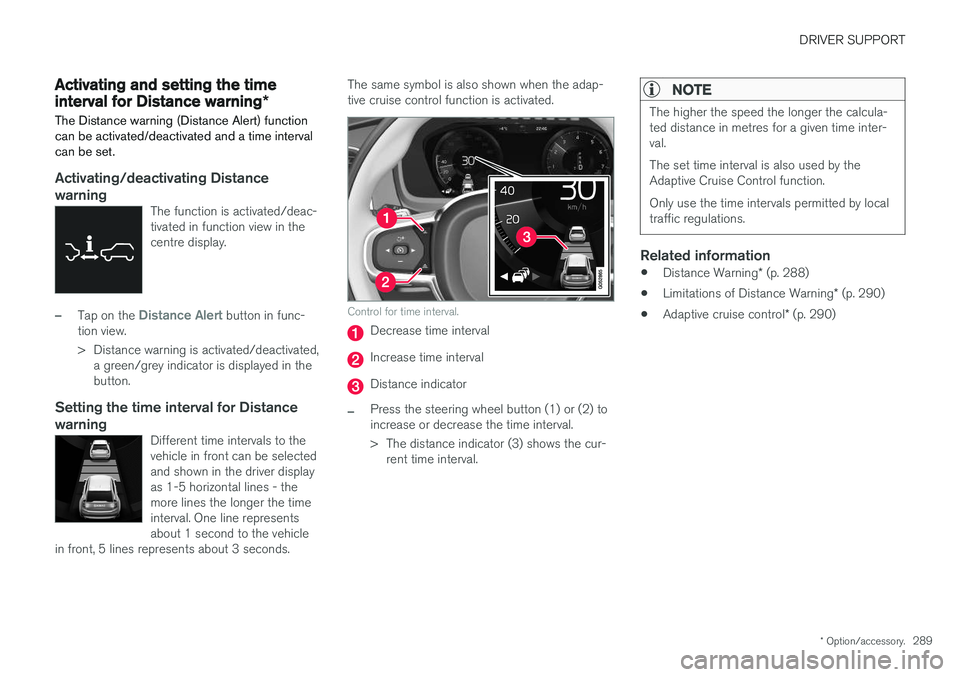
Control for time interval.
Decrease time interval
Increase time interval
Distance indicator
–Press the steering wheel button (1) or (2) to increase or decrease the time interval.
> The distance indicator (3) shows the cur- rent time interval.
NOTE
The higher the speed the longer the calcula- ted distance in metres for a given time inter-val. The set time interval is also used by the Adaptive Cruise Control function. Only use the time intervals permitted by local traffic regulations.
Related information
• Distance Warning
* (p. 288)
• Limitations of Distance Warning
* (p. 290)
• Adaptive cruise control
* (p. 290)
Page 296 of 594
DRIVER SUPPORT
* Option/accessory.
294
Activating and starting the adaptive cruise control *
The adaptive cruise control (Adaptive Cruise Control - ACC) must first be activated and thenstarted if it is to control the speed and distance.
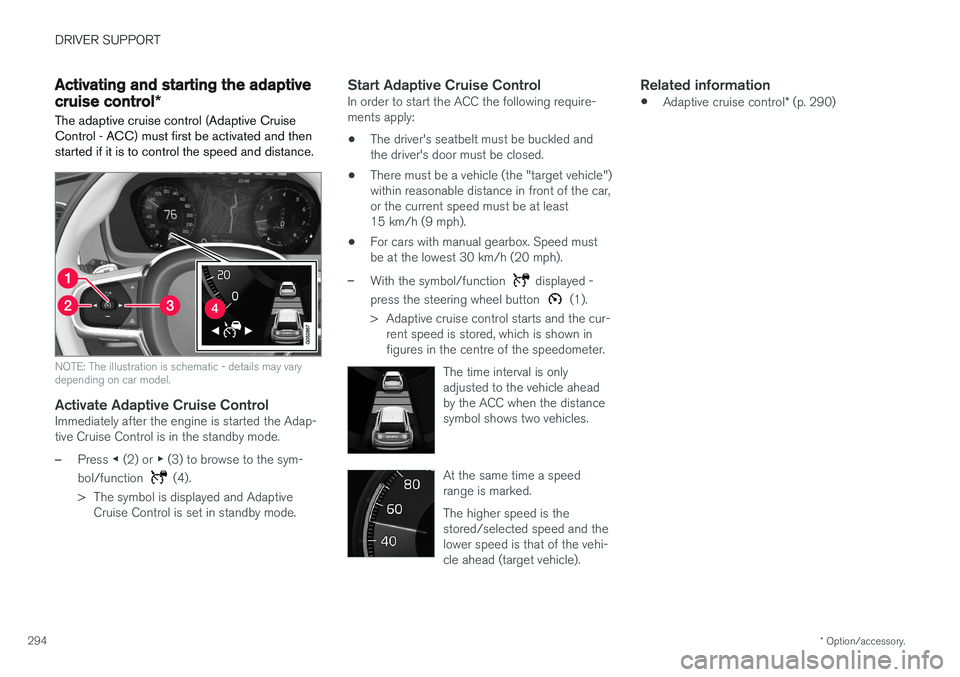
NOTE: The illustration is schematic - details may vary depending on car model.
Activate Adaptive Cruise ControlImmediately after the engine is started the Adap- tive Cruise Control is in the standby mode.
–Press ◀ (2) or ▶ (3) to browse to the sym-
bol/function
(4).
> The symbol is displayed and Adaptive Cruise Control is set in standby mode.
Start Adaptive Cruise ControlIn order to start the ACC the following require- ments apply:
• The driver's seatbelt must be buckled andthe driver's door must be closed.
• There must be a vehicle (the "target vehicle")within reasonable distance in front of the car,or the current speed must be at least15 km/h (9 mph).
• For cars with manual gearbox. Speed mustbe at the lowest 30 km/h (20 mph).
–With the symbol/function displayed -
press the steering wheel button
(1).
> Adaptive cruise control starts and the cur- rent speed is stored, which is shown in figures in the centre of the speedometer.
The time interval is onlyadjusted to the vehicle aheadby the ACC when the distancesymbol shows two vehicles.
At the same time a speed range is marked. The higher speed is the stored/selected speed and thelower speed is that of the vehi-cle ahead (target vehicle).
Related information
•Adaptive cruise control
* (p. 290)
Page 297 of 594
DRIVER SUPPORT
* Option/accessory.295
Managing the speed of the adaptive cruise control *
The adaptive cruise control (Adaptive Cruise Control -ACC) can be set to different speeds.
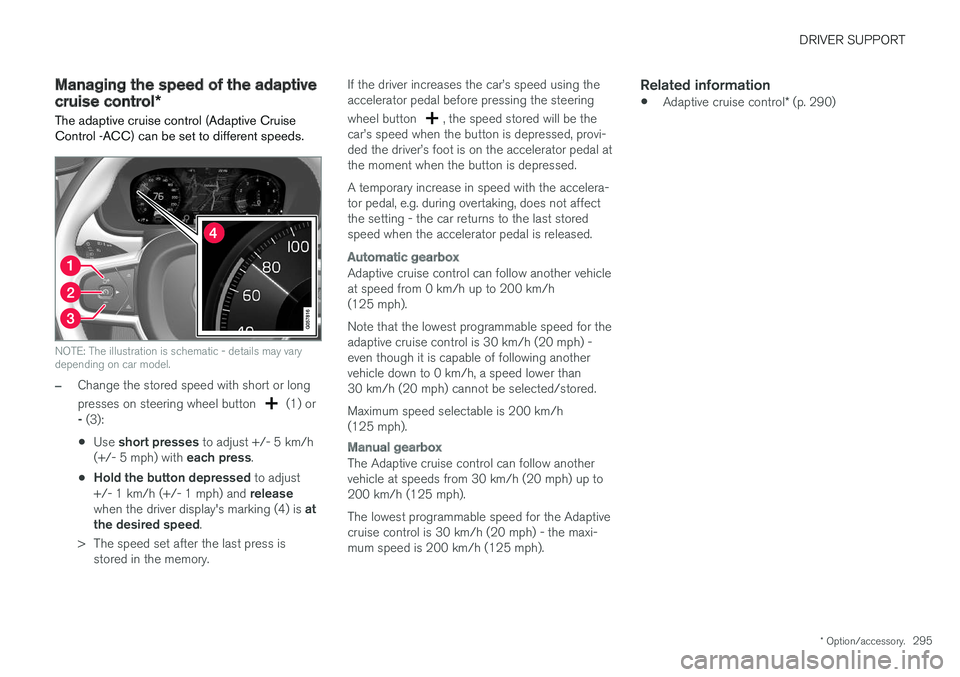
NOTE: The illustration is schematic - details may vary depending on car model.
–Change the stored speed with short or long presses on steering wheel button
(1) or
- (3):
• Use
short presses to adjust +/- 5 km/h
(+/- 5 mph) with each press.
• Hold the button depressed
to adjust
+/- 1 km/h (+/- 1 mph) and release
when the driver display's marking (4) is at
the desired speed .
> The speed set after the last press is stored in the memory. If the driver increases the car
Page 298 of 594
DRIVER SUPPORT
* Option/accessory.
296
Setting the time interval for the adaptive cruise control *
The adaptive cruise control (Adaptive Cruise Control -ACC) can be set to different time inter-vals.
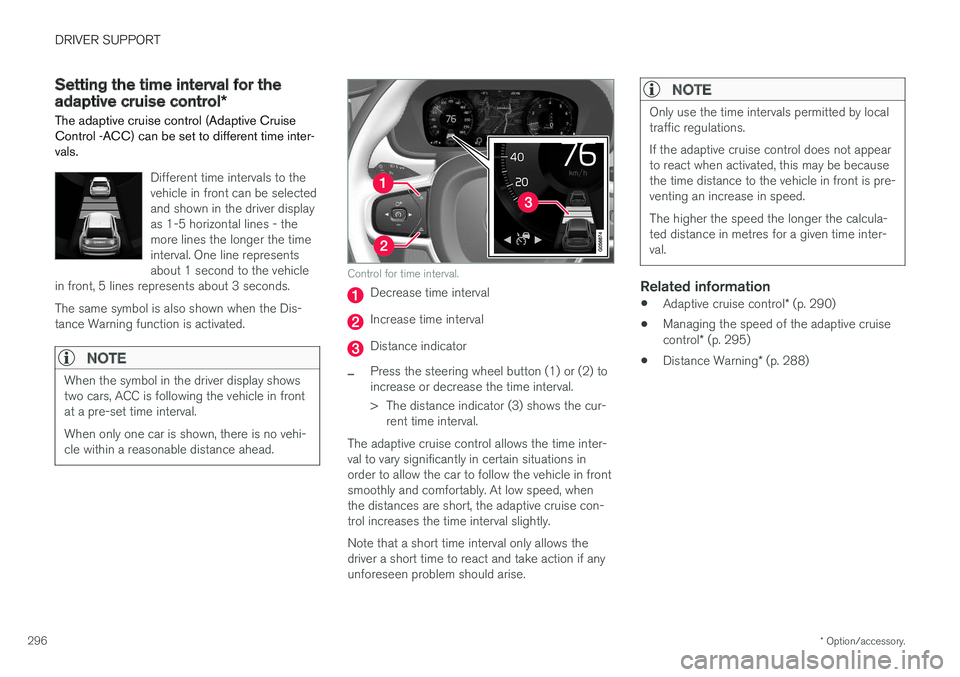
Different time intervals to the vehicle in front can be selectedand shown in the driver displayas 1-5 horizontal lines - themore lines the longer the timeinterval. One line representsabout 1 second to the vehicle
in front, 5 lines represents about 3 seconds. The same symbol is also shown when the Dis- tance Warning function is activated.
NOTE
When the symbol in the driver display shows two cars, ACC is following the vehicle in frontat a pre-set time interval. When only one car is shown, there is no vehi- cle within a reasonable distance ahead.
Control for time interval.
Decrease time interval
Increase time interval
Distance indicator
–Press the steering wheel button (1) or (2) to increase or decrease the time interval.
> The distance indicator (3) shows the cur- rent time interval.
The adaptive cruise control allows the time inter- val to vary significantly in certain situations inorder to allow the car to follow the vehicle in frontsmoothly and comfortably. At low speed, whenthe distances are short, the adaptive cruise con-trol increases the time interval slightly. Note that a short time interval only allows the driver a short time to react and take action if anyunforeseen problem should arise.
NOTE
Only use the time intervals permitted by local traffic regulations. If the adaptive cruise control does not appear to react when activated, this may be becausethe time distance to the vehicle in front is pre-venting an increase in speed. The higher the speed the longer the calcula- ted distance in metres for a given time inter-val.
Related information
• Adaptive cruise control
* (p. 290)
• Managing the speed of the adaptive cruise control
* (p. 295)
• Distance Warning
* (p. 288)
Page 299 of 594
DRIVER SUPPORT
}}
* Option/accessory.297
Deactivating/activating the adaptive cruise control *
The adaptive cruise control (Adaptive Cruise Control - ACC) can be temporarily deactivatedso that it is set in the standby mode and canlater be reactivated.
Deactivate Adaptive Cruise Control and set it in standby mode
NOTE: The illustration is schematic - details may vary depending on car model.
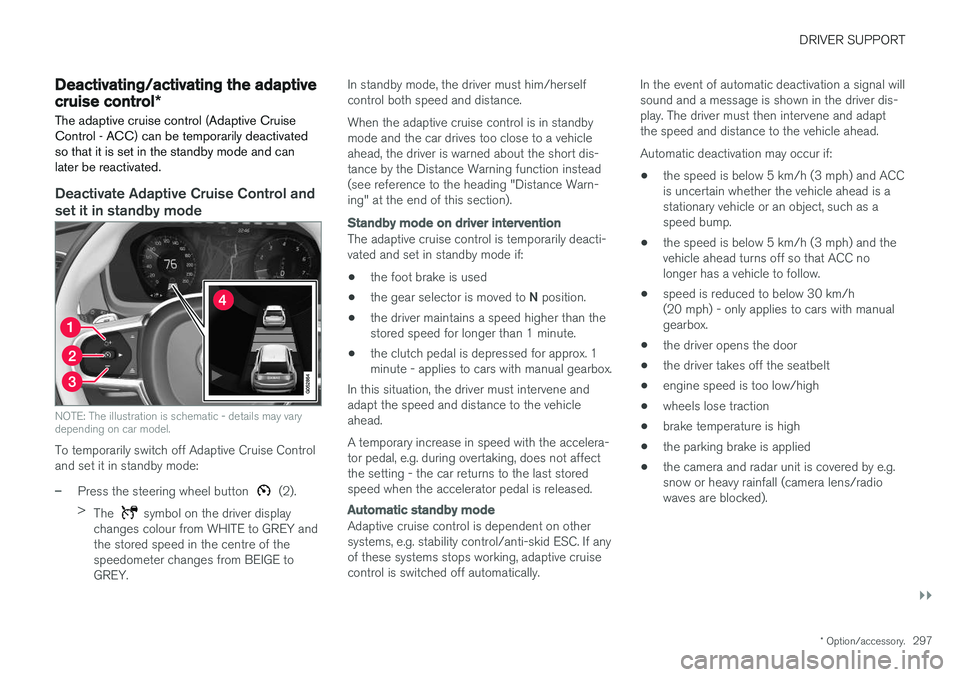
To temporarily switch off Adaptive Cruise Control and set it in standby mode:
–Press the steering wheel button (2).
> The
symbol on the driver display
changes colour from WHITE to GREY and the stored speed in the centre of thespeedometer changes from BEIGE toGREY. In standby mode, the driver must him/herselfcontrol both speed and distance. When the adaptive cruise control is in standby mode and the car drives too close to a vehicleahead, the driver is warned about the short dis-tance by the Distance Warning function instead(see reference to the heading "Distance Warn-ing" at the end of this section).
Standby mode on driver intervention
The adaptive cruise control is temporarily deacti- vated and set in standby mode if:
• the foot brake is used
• the gear selector is moved to
N position.
• the driver maintains a speed higher than thestored speed for longer than 1 minute.
• the clutch pedal is depressed for approx. 1minute - applies to cars with manual gearbox.
In this situation, the driver must intervene andadapt the speed and distance to the vehicleahead. A temporary increase in speed with the accelera- tor pedal, e.g. during overtaking, does not affectthe setting - the car returns to the last storedspeed when the accelerator pedal is released.
Automatic standby mode
Adaptive cruise control is dependent on other systems, e.g. stability control/anti-skid ESC. If anyof these systems stops working, adaptive cruisecontrol is switched off automatically. In the event of automatic deactivation a signal willsound and a message is shown in the driver dis-play. The driver must then intervene and adaptthe speed and distance to the vehicle ahead. Automatic deactivation may occur if:
• the speed is below 5 km/h (3 mph) and ACC is uncertain whether the vehicle ahead is astationary vehicle or an object, such as aspeed bump.
• the speed is below 5 km/h (3 mph) and thevehicle ahead turns off so that ACC nolonger has a vehicle to follow.
• speed is reduced to below 30 km/h(20 mph) - only applies to cars with manualgearbox.
• the driver opens the door
• the driver takes off the seatbelt
• engine speed is too low/high
• wheels lose traction
• brake temperature is high
• the parking brake is applied
• the camera and radar unit is covered by e.g.snow or heavy rainfall (camera lens/radiowaves are blocked).