wheel VOLVO V90 2017 User Guide
[x] Cancel search | Manufacturer: VOLVO, Model Year: 2017, Model line: V90, Model: VOLVO V90 2017Pages: 594, PDF Size: 15.07 MB
Page 64 of 594
SAFETY
62
Door and seatbelt reminderThe system reminds unbelted occupants to wear a seatbelt, and also warns about an open door,bonnet, tailgate or fuel filler flap.
Driver display graphics
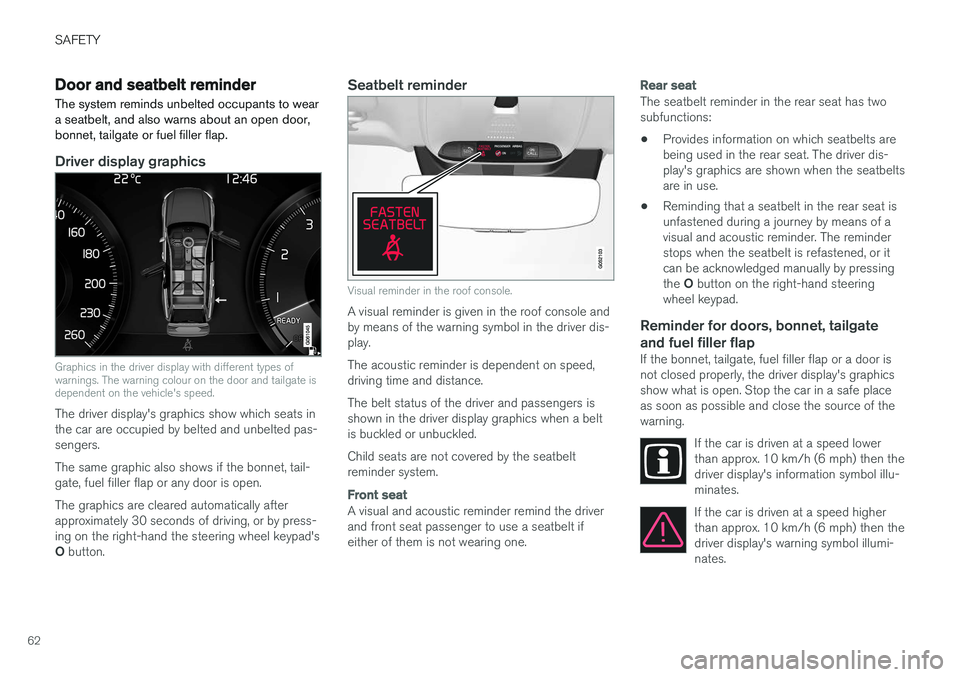
Graphics in the driver display with different types of warnings. The warning colour on the door and tailgate isdependent on the vehicle's speed.
The driver display's graphics show which seats in the car are occupied by belted and unbelted pas-sengers. The same graphic also shows if the bonnet, tail- gate, fuel filler flap or any door is open. The graphics are cleared automatically after approximately 30 seconds of driving, or by press-ing on the right-hand the steering wheel keypad's O button.
Seatbelt reminder
Visual reminder in the roof console.
A visual reminder is given in the roof console and by means of the warning symbol in the driver dis-play. The acoustic reminder is dependent on speed, driving time and distance. The belt status of the driver and passengers is shown in the driver display graphics when a beltis buckled or unbuckled. Child seats are not covered by the seatbelt reminder system.
Front seat
A visual and acoustic reminder remind the driver and front seat passenger to use a seatbelt ifeither of them is not wearing one.
Rear seat
The seatbelt reminder in the rear seat has two subfunctions: • Provides information on which seatbelts are being used in the rear seat. The driver dis-play's graphics are shown when the seatbeltsare in use.
• Reminding that a seatbelt in the rear seat isunfastened during a journey by means of avisual and acoustic reminder. The reminderstops when the seatbelt is refastened, or itcan be acknowledged manually by pressing the
O button on the right-hand steering
wheel keypad.
Reminder for doors, bonnet, tailgate
and fuel filler flap
If the bonnet, tailgate, fuel filler flap or a door is not closed properly, the driver display's graphicsshow what is open. Stop the car in a safe placeas soon as possible and close the source of thewarning.
If the car is driven at a speed lowerthan approx. 10 km/h (6 mph) then thedriver display's information symbol illu-minates.
If the car is driven at a speed higher than approx. 10 km/h (6 mph) then thedriver display's warning symbol illumi-nates.
Page 66 of 594
SAFETY
64
Driver and passenger airbags As a supplement to the seatbelts, the vehicle is equipped with airbags on the driver and passen-ger sides in the front seat.
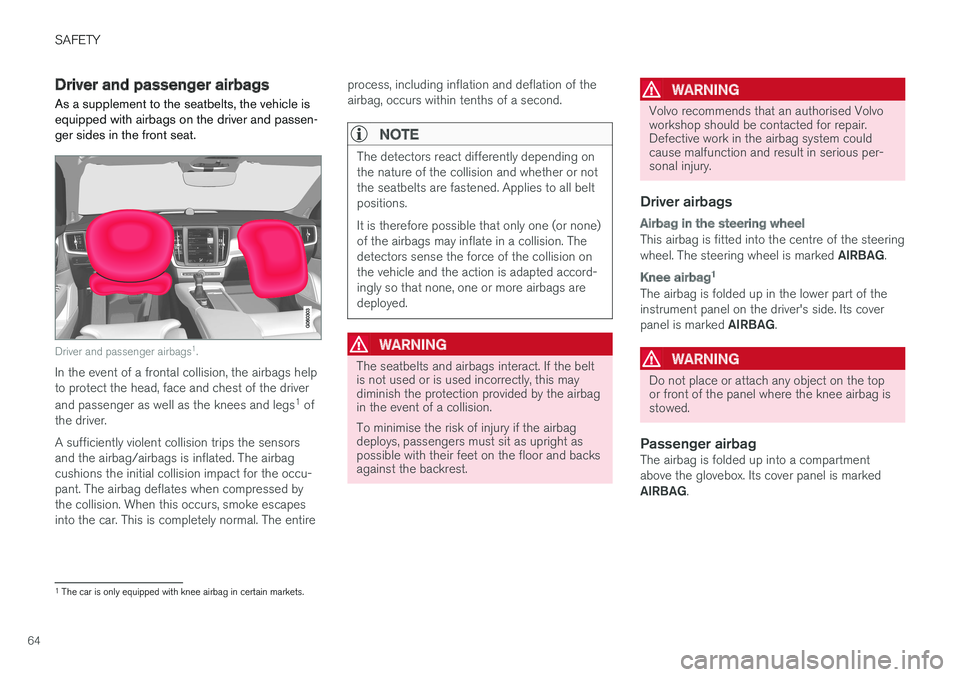
Driver and passenger airbags1
.
In the event of a frontal collision, the airbags help to protect the head, face and chest of the driver and passenger as well as the knees and legs 1
of
the driver. A sufficiently violent collision trips the sensors and the airbag/airbags is inflated. The airbagcushions the initial collision impact for the occu-pant. The airbag deflates when compressed bythe collision. When this occurs, smoke escapesinto the car. This is completely normal. The entire process, including inflation and deflation of theairbag, occurs within tenths of a second.
NOTE
The detectors react differently depending on the nature of the collision and whether or notthe seatbelts are fastened. Applies to all beltpositions. It is therefore possible that only one (or none) of the airbags may inflate in a collision. Thedetectors sense the force of the collision onthe vehicle and the action is adapted accord-ingly so that none, one or more airbags aredeployed.
WARNING
The seatbelts and airbags interact. If the belt is not used or is used incorrectly, this maydiminish the protection provided by the airbagin the event of a collision. To minimise the risk of injury if the airbag deploys, passengers must sit as upright aspossible with their feet on the floor and backsagainst the backrest.
WARNING
Volvo recommends that an authorised Volvo workshop should be contacted for repair.Defective work in the airbag system couldcause malfunction and result in serious per-sonal injury.
Driver airbags
Airbag in the steering wheel
This airbag is fitted into the centre of the steering wheel. The steering wheel is marked
AIRBAG.
Knee airbag 1
The airbag is folded up in the lower part of the instrument panel on the driver's side. Its cover panel is marked
AIRBAG.
WARNING
Do not place or attach any object on the top or front of the panel where the knee airbag isstowed.
Passenger airbagThe airbag is folded up into a compartment above the glovebox. Its cover panel is marked AIRBAG.
1
The car is only equipped with knee airbag in certain markets.
Page 69 of 594
SAFETY
}}
67
2. Confirm the message by pressing the right-
hand steering wheel keypad's O button.
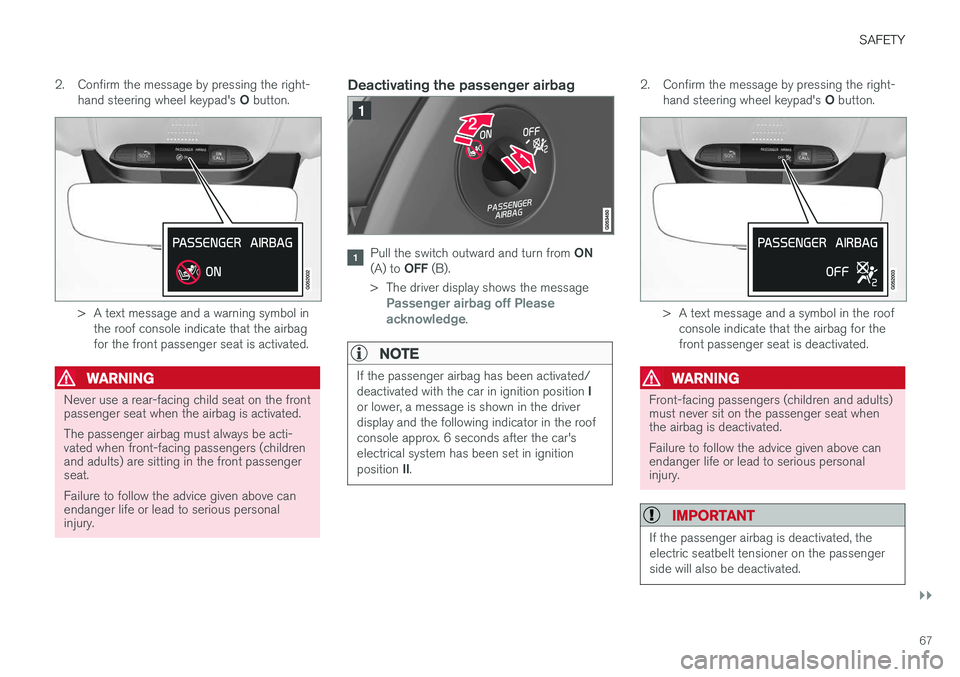
> A text message and a warning symbol in
the roof console indicate that the airbag for the front passenger seat is activated.
WARNING
Never use a rear-facing child seat on the front passenger seat when the airbag is activated. The passenger airbag must always be acti- vated when front-facing passengers (childrenand adults) are sitting in the front passengerseat. Failure to follow the advice given above can endanger life or lead to serious personalinjury.
Deactivating the passenger airbag
Pull the switch outward and turn from ON
(A) to OFF (B).
> The driver display shows the message
Passenger airbag off Please
acknowledge.
NOTE
If the passenger airbag has been activated/ deactivated with the car in ignition position I
or lower, a message is shown in the driver display and the following indicator in the roofconsole approx. 6 seconds after the car'selectrical system has been set in ignition position II.
2. Confirm the message by pressing the right-
hand steering wheel keypad's O button.
> A text message and a symbol in the roof
console indicate that the airbag for the front passenger seat is deactivated.
WARNING
Front-facing passengers (children and adults) must never sit on the passenger seat whenthe airbag is deactivated. Failure to follow the advice given above can endanger life or lead to serious personalinjury.
IMPORTANT
If the passenger airbag is deactivated, the electric seatbelt tensioner on the passengerside will also be deactivated.
Page 88 of 594
INSTRUMENTS AND CONTROLS
* Option/accessory.
86
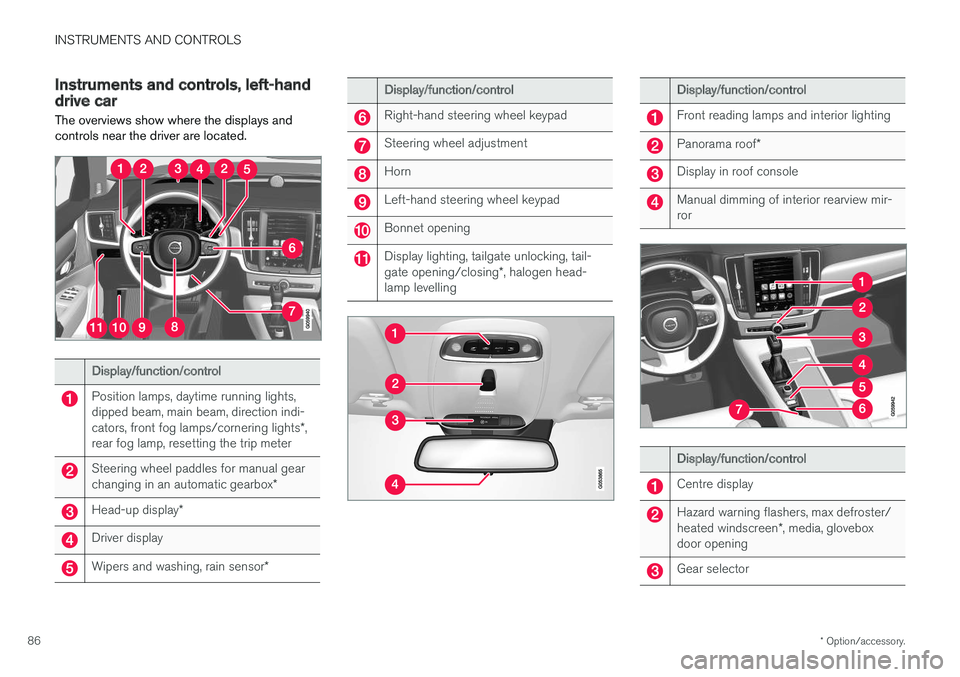
Instruments and controls, left-hand drive car The overviews show where the displays and controls near the driver are located.
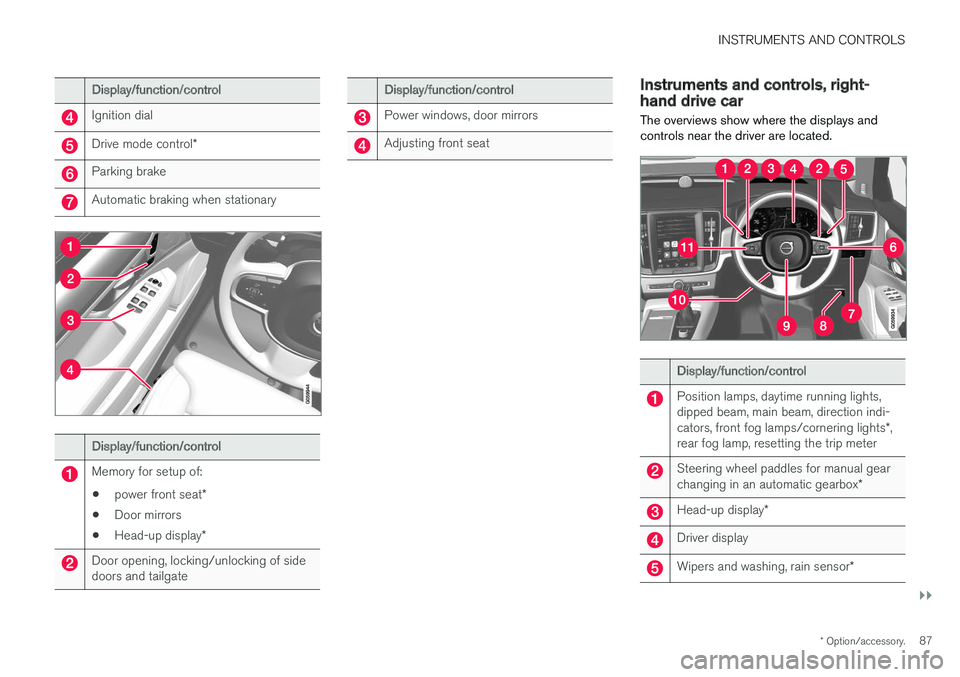
Display/function/control
Position lamps, daytime running lights, dipped beam, main beam, direction indi- cators, front fog lamps/cornering lights *,
rear fog lamp, resetting the trip meter
Steering wheel paddles for manual gear changing in an automatic gearbox *
Head-up display*
Driver display
Wipers and washing, rain sensor *
Display/function/control
Right-hand steering wheel keypad
Steering wheel adjustment
Horn
Left-hand steering wheel keypad
Bonnet opening
Display lighting, tailgate unlocking, tail- gate opening/closing*, halogen head-
lamp levelling
Display/function/control
Front reading lamps and interior lighting
Panorama roof *
Display in roof console
Manual dimming of interior rearview mir- ror
Display/function/control
Centre display
Hazard warning flashers, max defroster/ heated windscreen *, media, glovebox
door opening
Gear selector
Page 89 of 594
INSTRUMENTS AND CONTROLS
}}
* Option/accessory.87
Display/function/control
Ignition dial
Drive mode control *
Parking brake
Automatic braking when stationary
Display/function/control
Memory for setup of:
• power front seat
*
• Door mirrors
• Head-up display
*
Door opening, locking/unlocking of side doors and tailgate
Display/function/control
Power windows, door mirrors
Adjusting front seat
Instruments and controls, right- hand drive car
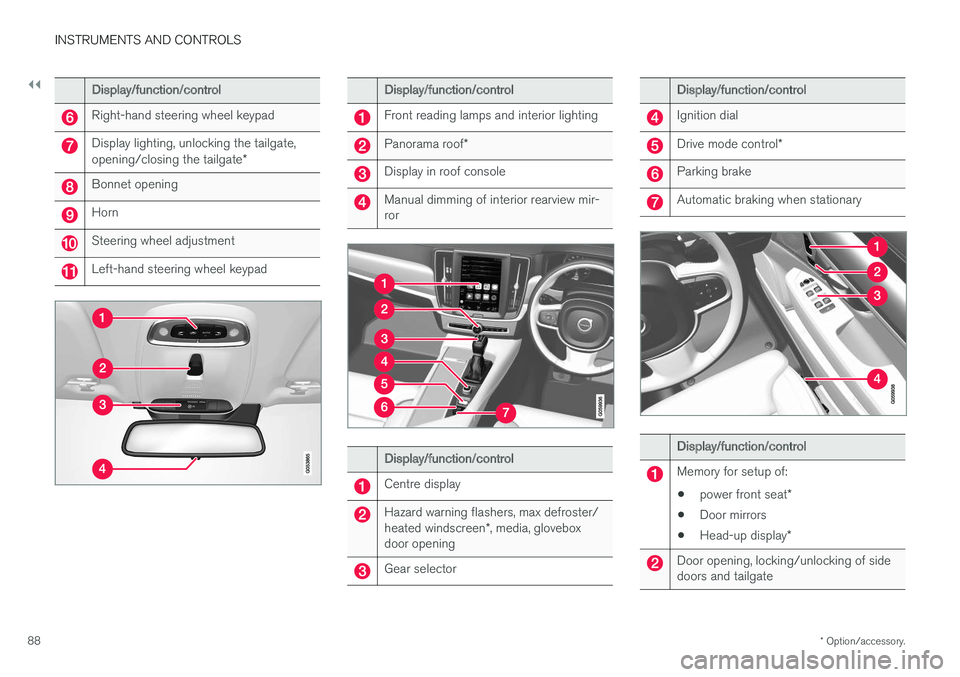
The overviews show where the displays and controls near the driver are located.
Display/function/control
Position lamps, daytime running lights, dipped beam, main beam, direction indi- cators, front fog lamps/cornering lights *,
rear fog lamp, resetting the trip meter
Steering wheel paddles for manual gear changing in an automatic gearbox *
Head-up display*
Driver display
Wipers and washing, rain sensor *
Page 90 of 594
||
INSTRUMENTS AND CONTROLS
* Option/accessory.
88
Display/function/control
Right-hand steering wheel keypad
Display lighting, unlocking the tailgate, opening/closing the tailgate *
Bonnet opening
Horn
Steering wheel adjustment
Left-hand steering wheel keypad
Display/function/control
Front reading lamps and interior lighting
Panorama roof*
Display in roof console
Manual dimming of interior rearview mir- ror
Display/function/control
Centre display
Hazard warning flashers, max defroster/ heated windscreen *, media, glovebox
door opening
Gear selector
Display/function/control
Ignition dial
Drive mode control *
Parking brake
Automatic braking when stationary
Display/function/control
Memory for setup of:
• power front seat
*
• Door mirrors
• Head-up display
*
Door opening, locking/unlocking of side doors and tailgate
Page 93 of 594
INSTRUMENTS AND CONTROLS
}}
* Option/accessory.91
On the left In the middleOn the right
– Media player Status of the Start/Stop function
– Navigation map* Distance to empty tank
– PhoneInstantaneous fuel consumption
– Voice recognition App menu (activated via steering wheel keypad)
A
Depending on selected drive mode.
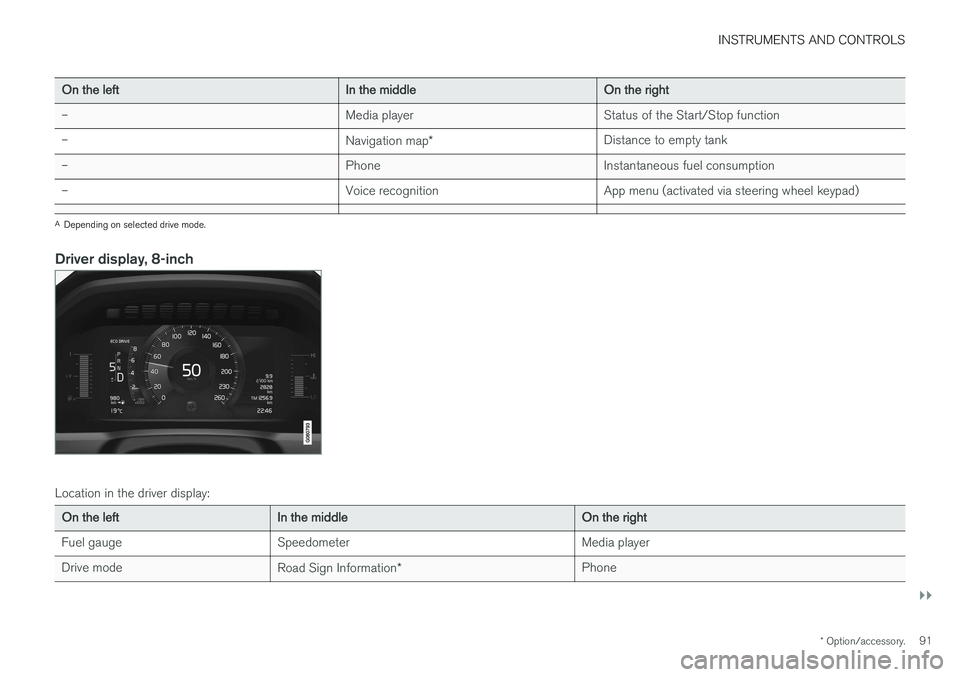
Driver display, 8-inch
Location in the driver display:
On the left In the middle On the right
Fuel gauge Speedometer Media player
Drive mode Road Sign Information* Phone
Page 94 of 594
||
INSTRUMENTS AND CONTROLS
* Option/accessory.
92
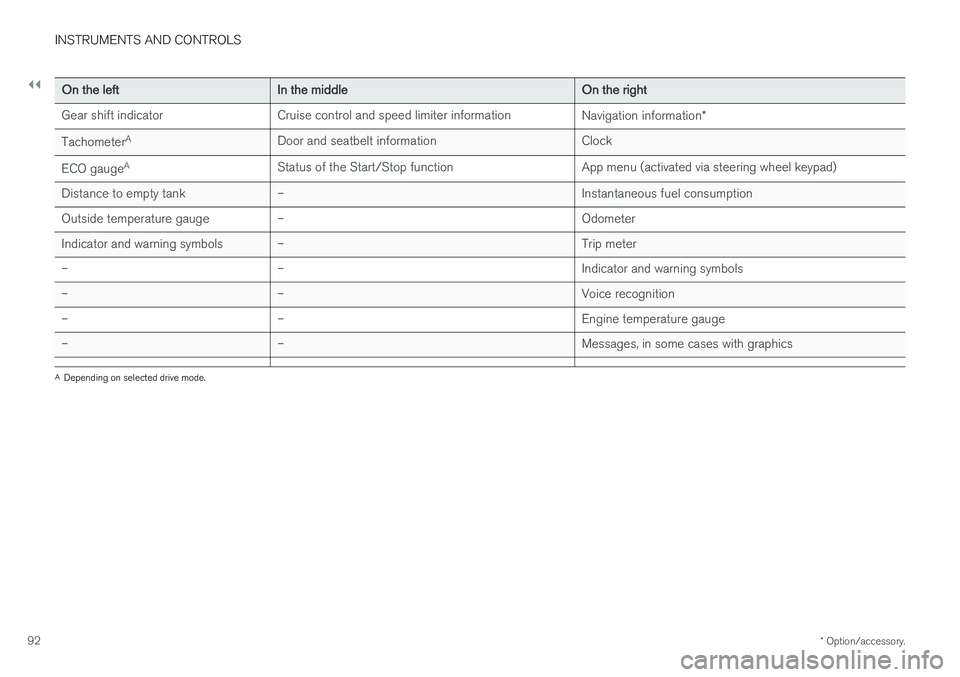
On the left In the middle On the right
Gear shift indicator Cruise control and speed limiter information Navigation information*
Tachometer A
Door and seatbelt information Clock
ECO gauge A
Status of the Start/Stop function App menu (activated via steering wheel keypad)
Distance to empty tank – Instantaneous fuel consumption
Outside temperature gauge – Odometer
Indicator and warning symbols – Trip meter
– – Indicator and warning symbols
– – Voice recognition
– – Engine temperature gauge
– – Messages, in some cases with graphics
A
Depending on selected drive mode.
Page 96 of 594
INSTRUMENTS AND CONTROLS
* Option/accessory.
94
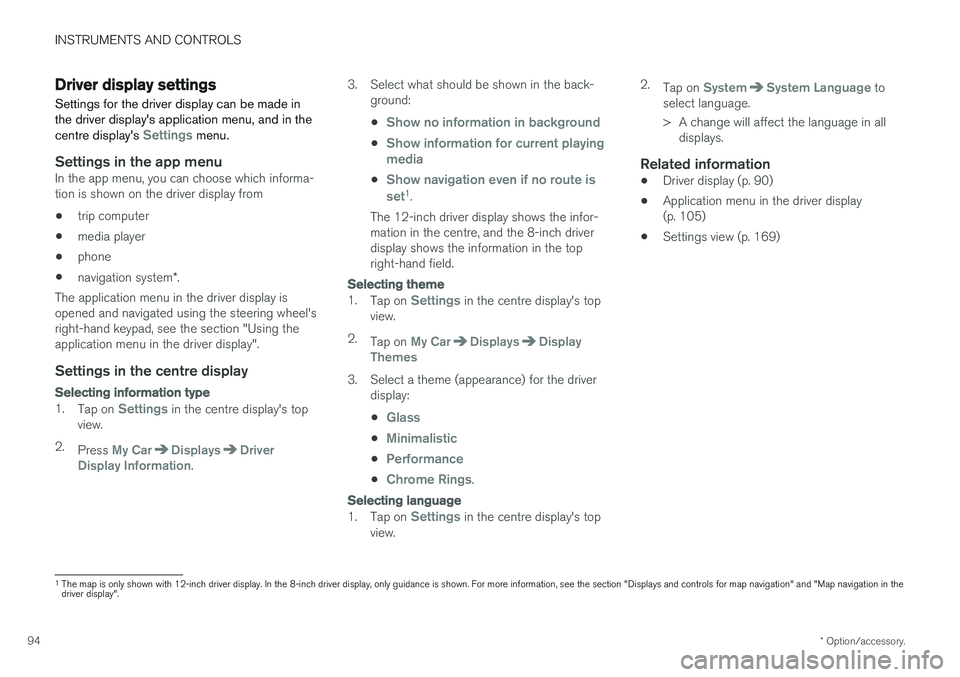
Driver display settings
Settings for the driver display can be made in the driver display's application menu, and in the centre display's
Settings menu.
Settings in the app menuIn the app menu, you can choose which informa- tion is shown on the driver display from
• trip computer
• media player
• phone
• navigation system
*.
The application menu in the driver display is
opened and navigated using the steering wheel'sright-hand keypad, see the section "Using theapplication menu in the driver display".
Settings in the centre display
Selecting information type
1. Tap on Settings in the centre display's top
view.
2. Press
My CarDisplaysDriver
Display Information. 3. Select what should be shown in the back-
ground: •
Show no information in background
•Show information for current playing media
•Show navigation even if no route is set1.
The 12-inch driver display shows the infor- mation in the centre, and the 8-inch driverdisplay shows the information in the topright-hand field.
Selecting theme
1. Tap on Settings in the centre display's top
view.
2. Tap on
My CarDisplaysDisplay
Themes
3. Select a theme (appearance) for the driver display: •
Glass
•Minimalistic
•Performance
•Chrome Rings.
Selecting language
1.Tap on Settings in the centre display's top
view. 2.
Tap on
SystemSystem Language to
select language.
> A change will affect the language in all displays.
Related information
• Driver display (p. 90)
• Application menu in the driver display (p. 105)
• Settings view (p. 169)
1
The map is only shown with 12-inch driver display. In the 8-inch driver display, only guidance is shown. For more information, see the section "Displays and controls for map navigation" and "Map navigation in the driver display".
Page 98 of 594
||
INSTRUMENTS AND CONTROLS
96
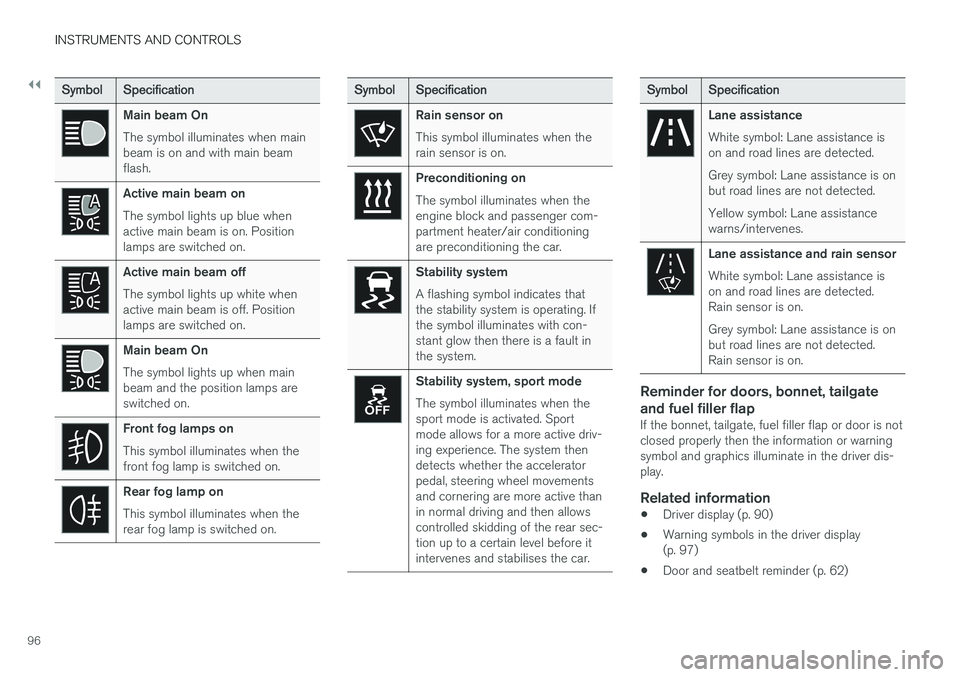
SymbolSpecification
Main beam On The symbol illuminates when main beam is on and with main beamflash.
Active main beam on The symbol lights up blue when active main beam is on. Positionlamps are switched on.
Active main beam off The symbol lights up white when active main beam is off. Positionlamps are switched on.
Main beam On The symbol lights up when main beam and the position lamps areswitched on.
Front fog lamps on This symbol illuminates when the front fog lamp is switched on.
Rear fog lamp on This symbol illuminates when the rear fog lamp is switched on.
SymbolSpecification
Rain sensor on This symbol illuminates when the rain sensor is on.
Preconditioning on The symbol illuminates when the engine block and passenger com-partment heater/air conditioningare preconditioning the car.
Stability system A flashing symbol indicates that the stability system is operating. Ifthe symbol illuminates with con-stant glow then there is a fault inthe system.
Stability system, sport mode The symbol illuminates when the sport mode is activated. Sportmode allows for a more active driv-ing experience. The system thendetects whether the acceleratorpedal, steering wheel movementsand cornering are more active thanin normal driving and then allowscontrolled skidding of the rear sec-tion up to a certain level before itintervenes and stabilises the car.
Symbol Specification
Lane assistance White symbol: Lane assistance is on and road lines are detected. Grey symbol: Lane assistance is on but road lines are not detected. Yellow symbol: Lane assistance warns/intervenes.
Lane assistance and rain sensor White symbol: Lane assistance is on and road lines are detected.Rain sensor is on. Grey symbol: Lane assistance is on but road lines are not detected.Rain sensor is on.
Reminder for doors, bonnet, tailgate and fuel filler flap
If the bonnet, tailgate, fuel filler flap or door is not closed properly then the information or warningsymbol and graphics illuminate in the driver dis-play.
Related information
•Driver display (p. 90)
• Warning symbols in the driver display(p. 97)
• Door and seatbelt reminder (p. 62)