buttons VOLVO V90 CROSS COUNTRY 2017 Owner´s Manual
[x] Cancel search | Manufacturer: VOLVO, Model Year: 2017, Model line: V90 CROSS COUNTRY, Model: VOLVO V90 CROSS COUNTRY 2017Pages: 552, PDF Size: 13.6 MB
Page 167 of 552
INSTRUMENTS AND CONTROLS
}}
* Option/accessory.165
2.
Press and release the M button. The indica-
tor light in the button will illuminate.
3. Press button 1 or 2 within 3 seconds to
store the current position of the seat/ mirrors/head-up display in the selected but-ton.
> When the position has been stored in the selected button, an audible signal will sound and the indicator light in the M but-
ton will go out.
If none of the buttons (1 or 2) are pressed within3 seconds, the indicator light in the M button will
go out and the position will not be stored.
The seat/mirrors/head-up display must be moved before new settings can be stored.
Using a stored positionA stored position can be used when one of thefront doors is opened or closed:
Front door open
–Press one of the bottons ( 1 or 2) briefly. The
seat, door mirrors and head-up display will move to the positions stored in that button.
Front door closed
–Press and hold one of the buttons ( 1 or 2)
until the seat, door mirrors and head-up dis- play have moved to the positions stored inthat button. The seat, door mirrors and head-up display willstop automatically if the button is released beforethe they have reached the stored positions.
WARNING
•
Because the driver's seat can be adjusted with the ignition off, children should neverbe left unattended in the vehicle.
• Movement of the seat can be STOPPEDat any time by pressing any button on thepower seat control panel.
• Do not adjust the seat while driving. Theseat should be adjusted so that the brakepedal can be depressed fully. In addition,position the seat as far rearward as com-fort and control allow.
• The seat rails on the floor must not beobstructed in any way when the seat is inmotion.
Related information
•
Adjusting power front seats
* (p. 163)
• Power front seats
* (p. 163)
Multifunctional front seats *
In addition to the adjustment settings offered by the power seat controls, the multifunction controlprovides additional possibilities for convenienceand comfort.
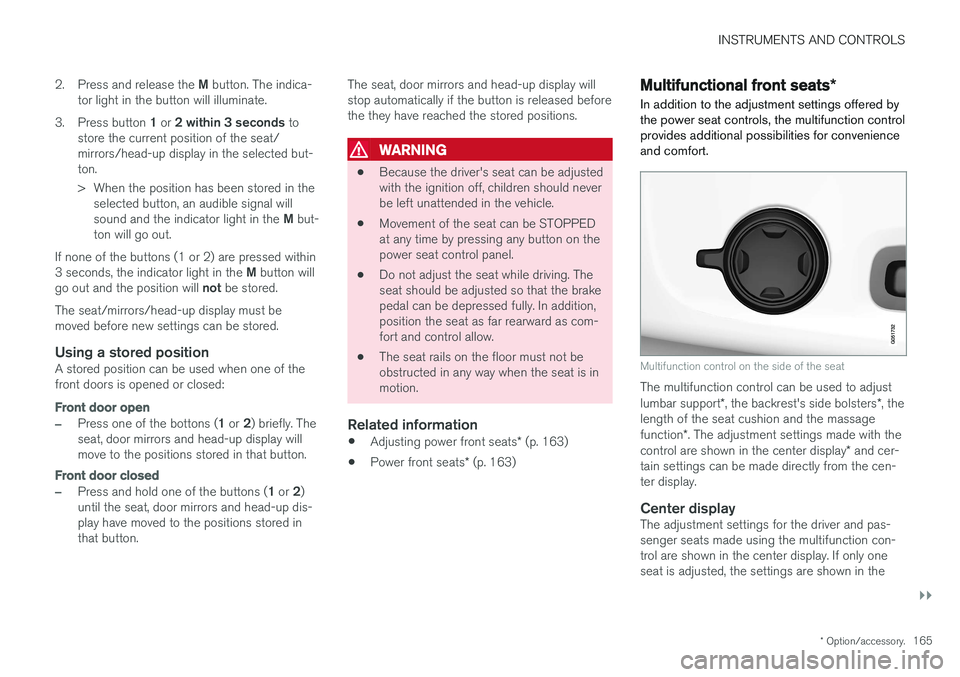
Multifunction control on the side of the seat
The multifunction control can be used to adjust lumbar support *, the backrest's side bolsters *, the
length of the seat cushion and the massagefunction *. The adjustment settings made with the
control are shown in the center display * and cer-
tain settings can be made directly from the cen- ter display.
Center displayThe adjustment settings for the driver and pas-senger seats made using the multifunction con-trol are shown in the center display. If only oneseat is adjusted, the settings are shown in the
Page 169 of 552
INSTRUMENTS AND CONTROLS
}}
* Option/accessory.167
3. Select massage settings by tapping the cen-
ter display or by moving the cursor up/down using the multifunction control's upper/lowerbuttons. Change a setting in the selectedfunction by tapping the arrows on the centerdisplay or by using the multifunction control'sfront/rear buttons.
Massage settings
The following massage settings are available:
•
On/Off.
•
Program 1-5: There are 5 preset massage
programs. Select Swell, Tread, Advanced,Lumbar or Shoulder.
•
Intensity: Select Low, Normal or High.
•
Speed: Select Slow, Normal or Fast.
Restarting the massage function
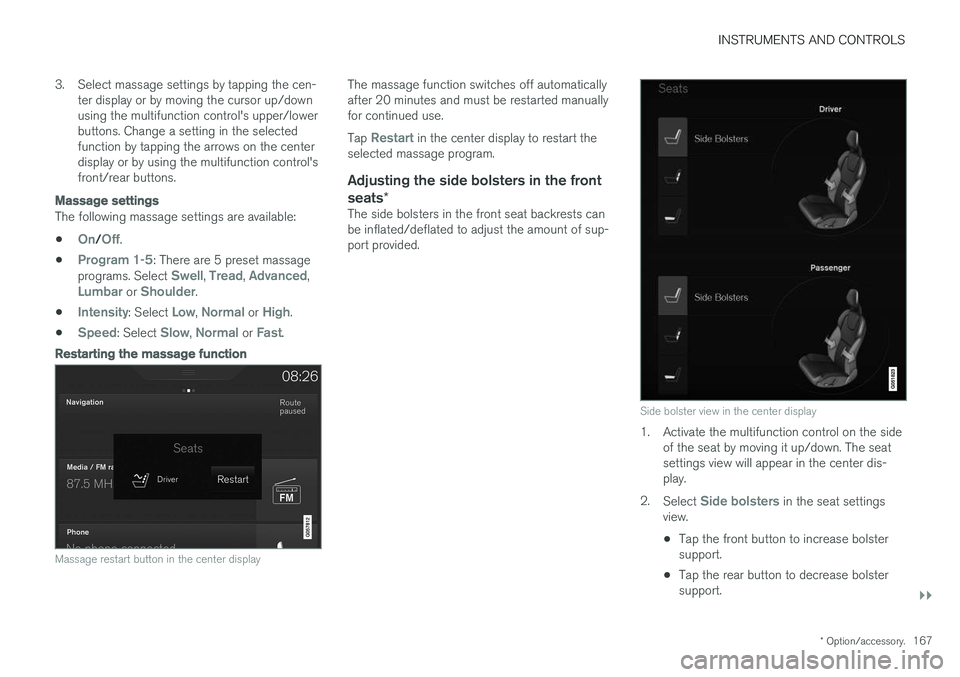
Massage restart button in the center display
The massage function switches off automatically after 20 minutes and must be restarted manuallyfor continued use. Tap
Restart in the center display to restart the
selected massage program.
Adjusting the side bolsters in the front seats *
The side bolsters in the front seat backrests can be inflated/deflated to adjust the amount of sup-port provided.
Side bolster view in the center display
1. Activate the multifunction control on the side
of the seat by moving it up/down. The seat settings view will appear in the center dis-play.
2. Select
Side bolsters in the seat settings
view.
• Tap the front button to increase bolster support.
• Tap the rear button to decrease bolstersupport.
Page 173 of 552
INSTRUMENTS AND CONTROLS
}}
* Option/accessory.171
Folding down the rear seat backrests
The rear seat backrests are divided into two sec- tions that can be folded down together or sepa-rately.
CAUTION
To help avoid damage to the upholstery, there should be no objects on the rear seat and theseat belt should not be buckled when thebackrest is folded down.
CAUTION
• The integrated booster cushions
* should
be folded down (in the stowed position) before the backrest(s) are folded down
• The center armrest
* should be folded up
into the rear seat backrest before thatsection of the backrest is folded down
• It may be necessary to move the frontseats forward before the rear seat back-rests can be folded down
WARNING
•
When one or more sections of the back- rest is returned to the upright position,check that it is properly locked in place bypushing and pulling it.
• Return the outboard head restraints tothe upright position.
• Long loads should always be securelyanchored to help avoid injury in the eventof a sudden stop.
• Always turn the engine off and apply theparking brake when loading/unloadingthe vehicle.
• Place the transmission in the Park (
P)
position to help prevent inadvertentmovement of the gear selector.
Folding down a section of the backrest
Folding down electrically *17
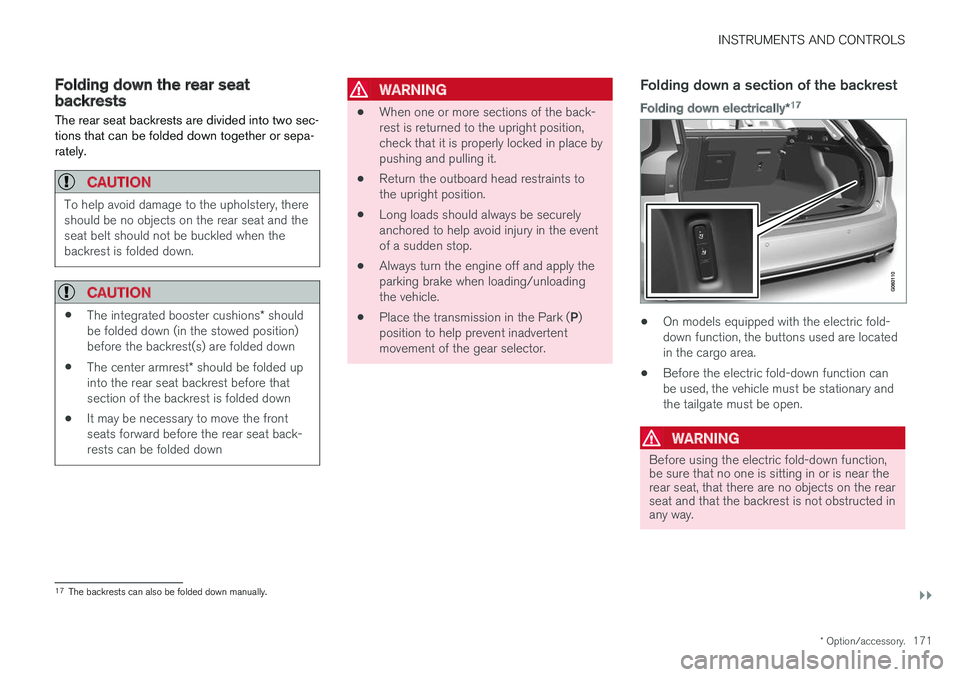
•
On models equipped with the electric fold- down function, the buttons used are locatedin the cargo area.
• Before the electric fold-down function canbe used, the vehicle must be stationary andthe tailgate must be open.
WARNING
Before using the electric fold-down function, be sure that no one is sitting in or is near therear seat, that there are no objects on the rearseat and that the backrest is not obstructed inany way.
17
The backrests can also be folded down manually.
Page 174 of 552
||
INSTRUMENTS AND CONTROLS
1721. If necessary, manually press down the center
position's head restraint.
2. Press and hold one of the buttons marked (L )eft or ( R)ight to fold down the respective
sections of the backrest.
3. The backrest will fold down automatically. The head restraint will fold down automati- cally.
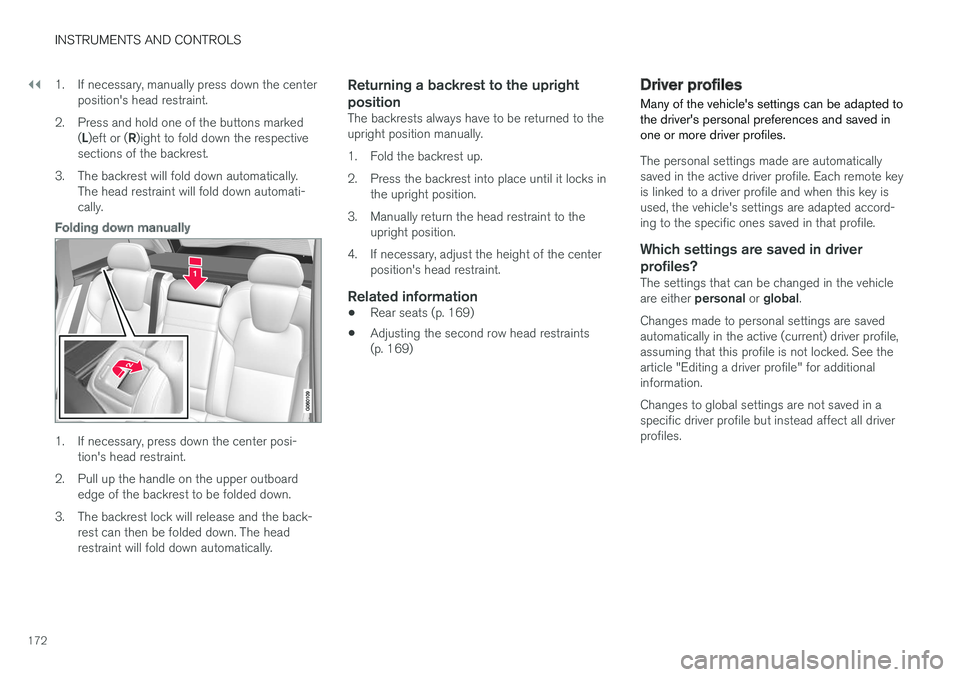
Folding down manually
1. If necessary, press down the center posi-tion's head restraint.
2. Pull up the handle on the upper outboard edge of the backrest to be folded down.
3. The backrest lock will release and the back- rest can then be folded down. The head restraint will fold down automatically.
Returning a backrest to the upright position
The backrests always have to be returned to the upright position manually.
1. Fold the backrest up.
2. Press the backrest into place until it locks inthe upright position.
3. Manually return the head restraint to the upright position.
4. If necessary, adjust the height of the center position's head restraint.
Related information
• Rear seats (p. 169)
• Adjusting the second row head restraints (p. 169)
Driver profiles
Many of the vehicle's settings can be adapted to the driver's personal preferences and saved inone or more driver profiles.
The personal settings made are automatically saved in the active driver profile. Each remote keyis linked to a driver profile and when this key isused, the vehicle's settings are adapted accord-ing to the specific ones saved in that profile.
Which settings are saved in driver
profiles?
The settings that can be changed in the vehicle are either personal or global .
Changes made to personal settings are saved automatically in the active (current) driver profile,assuming that this profile is not locked. See thearticle "Editing a driver profile" for additionalinformation. Changes to global settings are not saved in a specific driver profile but instead affect all driverprofiles.
Page 180 of 552
CLIMATE
* Option/accessory.
178
Climate control system
The vehicle is equipped with Electronic Climate Control (ECC) that cools, heats, dehumidifiesand filters the air in the passenger compartment.
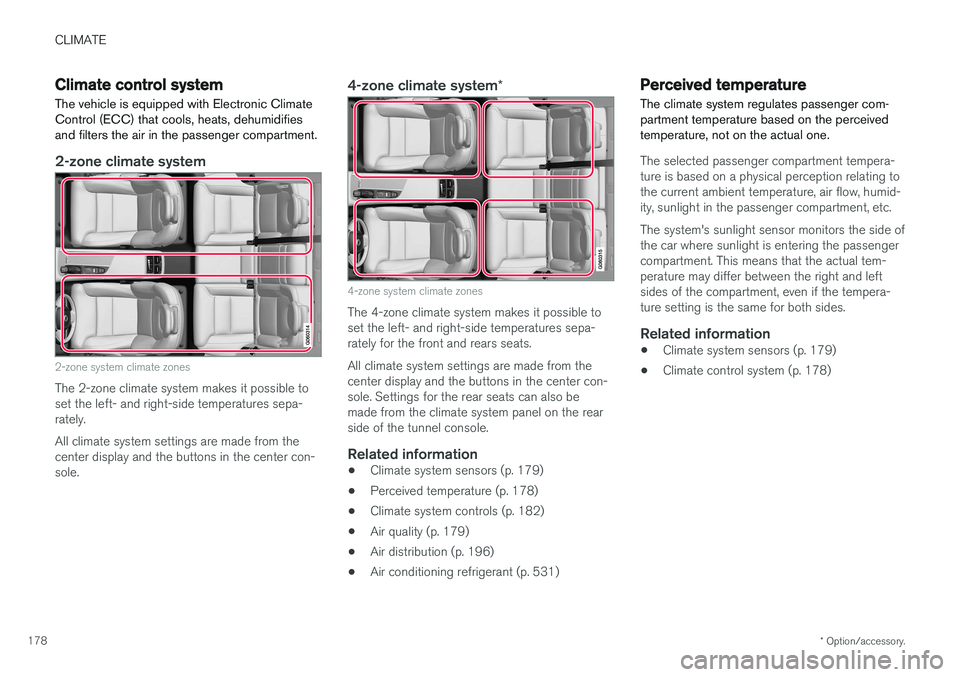
2-zone climate system
2-zone system climate zones
The 2-zone climate system makes it possible to set the left- and right-side temperatures sepa-rately. All climate system settings are made from the center display and the buttons in the center con-sole.
4-zone climate system *
4-zone system climate zones
The 4-zone climate system makes it possible to set the left- and right-side temperatures sepa-rately for the front and rears seats. All climate system settings are made from the center display and the buttons in the center con-sole. Settings for the rear seats can also bemade from the climate system panel on the rearside of the tunnel console.
Related information
•Climate system sensors (p. 179)
• Perceived temperature (p. 178)
• Climate system controls (p. 182)
• Air quality (p. 179)
• Air distribution (p. 196)
• Air conditioning refrigerant (p. 531)
Perceived temperature
The climate system regulates passenger com- partment temperature based on the perceivedtemperature, not on the actual one.
The selected passenger compartment tempera- ture is based on a physical perception relating tothe current ambient temperature, air flow, humid-ity, sunlight in the passenger compartment, etc. The system's sunlight sensor monitors the side of the car where sunlight is entering the passengercompartment. This means that the actual tem-perature may differ between the right and leftsides of the compartment, even if the tempera-ture setting is the same for both sides.
Related information
• Climate system sensors (p. 179)
• Climate control system (p. 178)
Page 181 of 552
CLIMATE
}}
* Option/accessory.179
Climate system sensors The climate system's sensors help regulate the passenger compartment temperature, humiditylevel, etc.
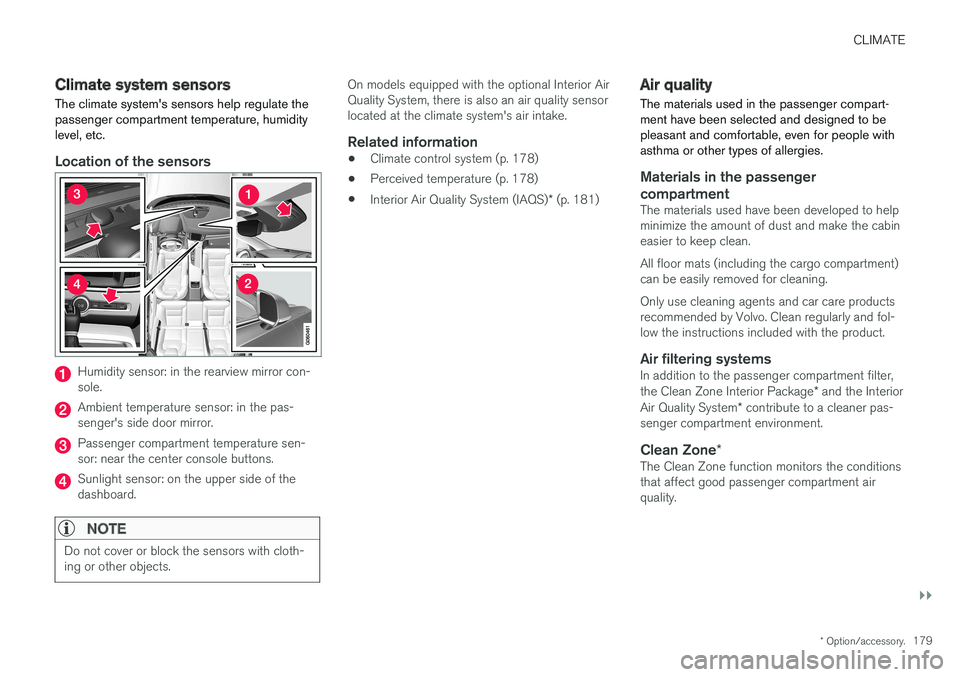
Location of the sensors
Humidity sensor: in the rearview mirror con- sole.
Ambient temperature sensor: in the pas- senger's side door mirror.
Passenger compartment temperature sen- sor: near the center console buttons.
Sunlight sensor: on the upper side of the dashboard.
NOTE
Do not cover or block the sensors with cloth- ing or other objects.
On models equipped with the optional Interior Air Quality System, there is also an air quality sensorlocated at the climate system's air intake.
Related information
•Climate control system (p. 178)
• Perceived temperature (p. 178)
• Interior Air Quality System (IAQS)
* (p. 181)
Air quality
The materials used in the passenger compart- ment have been selected and designed to bepleasant and comfortable, even for people withasthma or other types of allergies.
Materials in the passenger compartment
The materials used have been developed to help minimize the amount of dust and make the cabineasier to keep clean. All floor mats (including the cargo compartment) can be easily removed for cleaning. Only use cleaning agents and car care products recommended by Volvo. Clean regularly and fol-low the instructions included with the product.
Air filtering systemsIn addition to the passenger compartment filter, the Clean Zone Interior Package * and the Interior
Air Quality System * contribute to a cleaner pas-
senger compartment environment.
Clean Zone *The Clean Zone function monitors the conditions that affect good passenger compartment airquality.
Page 184 of 552
CLIMATE
* Option/accessory.
182
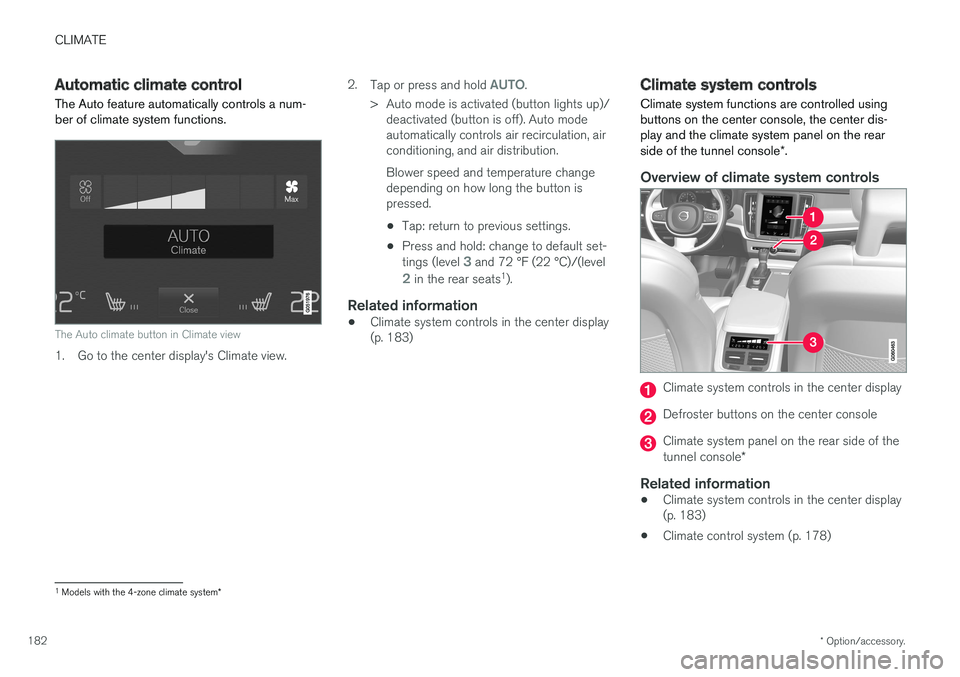
Automatic climate control The Auto feature automatically controls a num- ber of climate system functions.
The Auto climate button in Climate view
1. Go to the center display's Climate view. 2.
Tap or press and hold
AUTO.
> Auto mode is activated (button lights up)/ deactivated (button is off). Auto mode automatically controls air recirculation, airconditioning, and air distribution. Blower speed and temperature change depending on how long the button ispressed.
• Tap: return to previous settings.
• Press and hold: change to default set- tings (level
3 and 72 °F (22 °C)/(level
2 in the rear seats 1
).
Related information
• Climate system controls in the center display (p. 183)
Climate system controls
Climate system functions are controlled using buttons on the center console, the center dis-play and the climate system panel on the rear side of the tunnel console *.
Overview of climate system controls
Climate system controls in the center display
Defroster buttons on the center console
Climate system panel on the rear side of the tunnel console *
Related information
•Climate system controls in the center display (p. 183)
• Climate control system (p. 178)
1
Models with the 4-zone climate system *
Page 187 of 552
CLIMATE
}}
* Option/accessory.185
Related information
•Climate system controls (p. 182)
• Defrosting windows and mirrors (p. 190)
• Air conditioning (p. 193)
• Adjusting air distribution (p. 198)
• Setting the temperature (p. 187)
• Setting the blower speed (p. 185)
• Automatic climate control (p. 182)
• Turning steering wheel heating
* on and off
(p. 192)
• Turning seat heating
* on and off (p. 194)
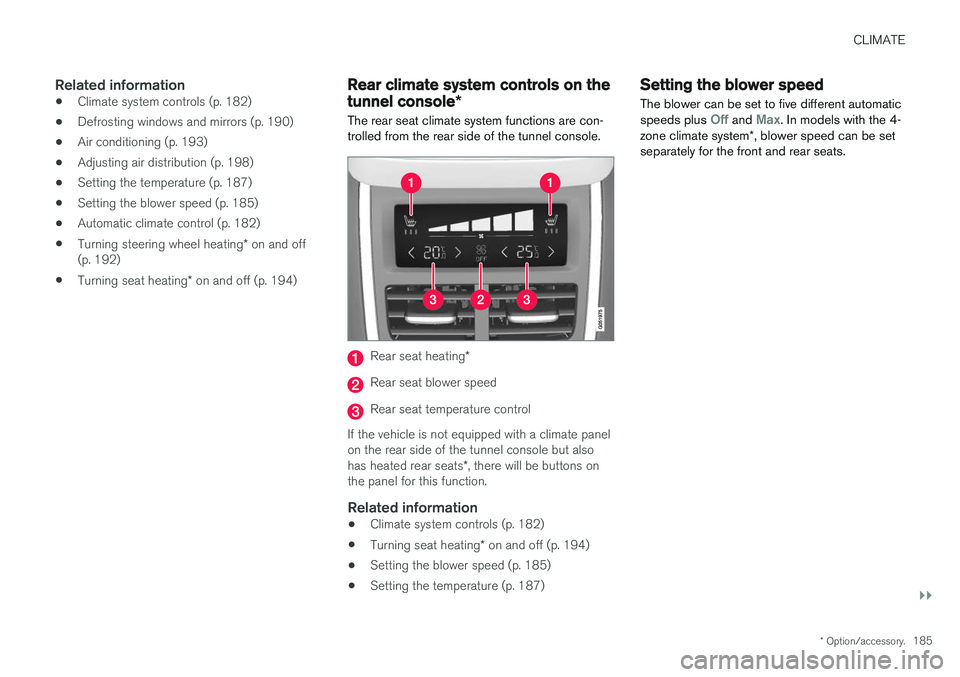
Rear climate system controls on the tunnel console *
The rear seat climate system functions are con- trolled from the rear side of the tunnel console.
Rear seat heating *
Rear seat blower speed
Rear seat temperature control
If the vehicle is not equipped with a climate panel on the rear side of the tunnel console but also has heated rear seats *, there will be buttons on
the panel for this function.
Related information
• Climate system controls (p. 182)
• Turning seat heating
* on and off (p. 194)
• Setting the blower speed (p. 185)
• Setting the temperature (p. 187)
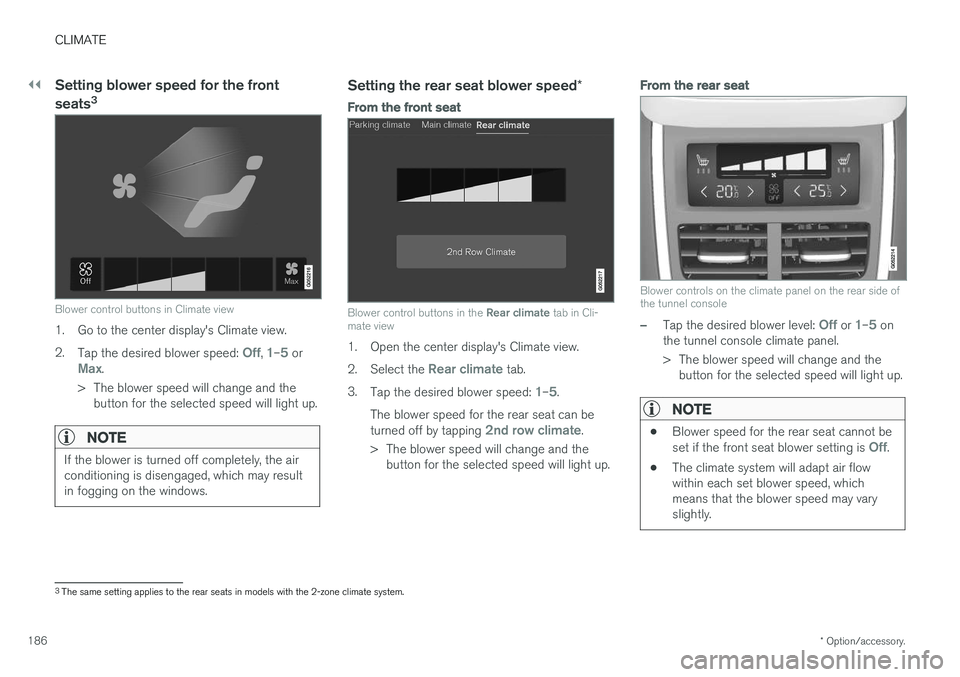
Setting the blower speed The blower can be set to five different automatic speeds plus
Off and Max. In models with the 4-
zone climate system *, blower speed can be set
separately for the front and rear seats.
Page 188 of 552
||
CLIMATE
* Option/accessory.
186
Setting blower speed for the front seats 3
Blower control buttons in Climate view
1. Go to the center display's Climate view. 2.
Tap the desired blower speed:
Off, 1–5 orMax.
> The blower speed will change and the button for the selected speed will light up.
NOTE
If the blower is turned off completely, the air conditioning is disengaged, which may resultin fogging on the windows.
Setting the rear seat blower speed *
From the front seat
Blower control buttons in the Rear climate tab in Cli-
mate view
1. Open the center display's Climate view. 2. Select the
Rear climate tab.
3. Tap the desired blower speed:
1–5.
The blower speed for the rear seat can be turned off by tapping
2nd row climate.
> The blower speed will change and the button for the selected speed will light up.
From the rear seat
Blower controls on the climate panel on the rear side of the tunnel console
–Tap the desired blower level: Off or 1–5 on
the tunnel console climate panel.
> The blower speed will change and the button for the selected speed will light up.
NOTE
• Blower speed for the rear seat cannot be set if the front seat blower setting is Off.
• The climate system will adapt air flow within each set blower speed, whichmeans that the blower speed may varyslightly.
3
The same setting applies to the rear seats in models with the 2-zone climate system.
Page 189 of 552
CLIMATE
}}
* Option/accessory.187
Related information
•Climate system controls in the center display (p. 183)
• Rear climate system controls on the tunnel console
* (p. 185)Setting the temperature 4
The temperature can be set separately for the left and right sides of the passenger compart- ment. In models with the 4-zone climate system *,
it can also be set for the front and rear seats separately.
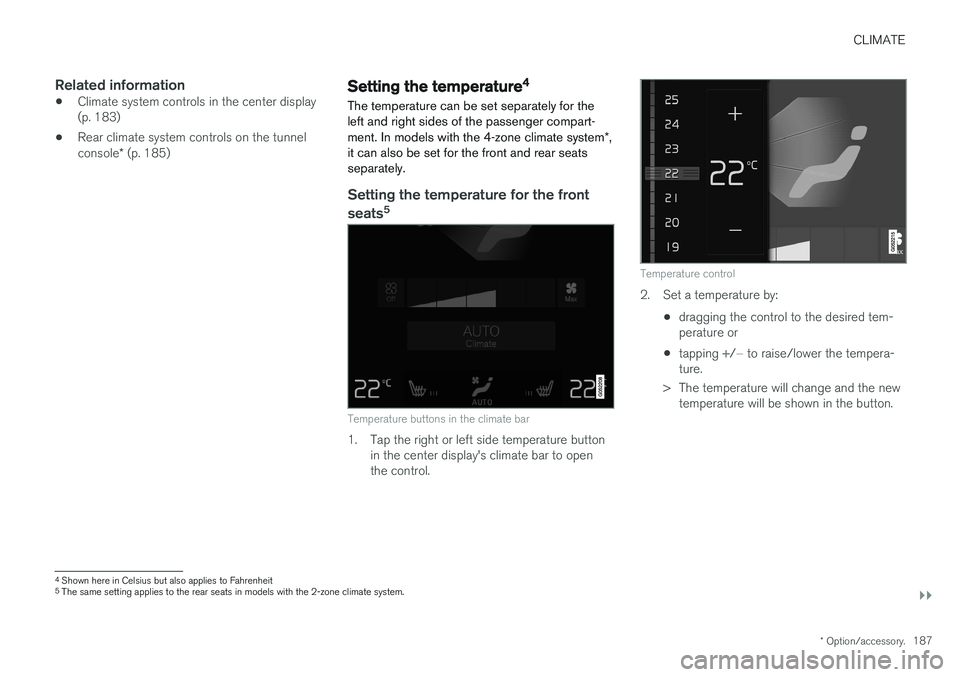
Setting the temperature for the front
seats 5
Temperature buttons in the climate bar
1. Tap the right or left side temperature button
in the center display's climate bar to open the control.
Temperature control
2. Set a temperature by:
•dragging the control to the desired tem- perature or
• tapping
+/− to raise/lower the tempera-
ture.
> The temperature will change and the new temperature will be shown in the button.
4Shown here in Celsius but also applies to Fahrenheit5
The same setting applies to the rear seats in models with the 2-zone climate system.