warning light VOLVO XC60 2009 Owner´s Manual
[x] Cancel search | Manufacturer: VOLVO, Model Year: 2009, Model line: XC60, Model: VOLVO XC60 2009Pages: 297, PDF Size: 21.16 MB
Page 104 of 297
03 Your driving environmentHomeLink® Wireless Control System* 03
102
* Option/accessory, for more information, see Introduction.
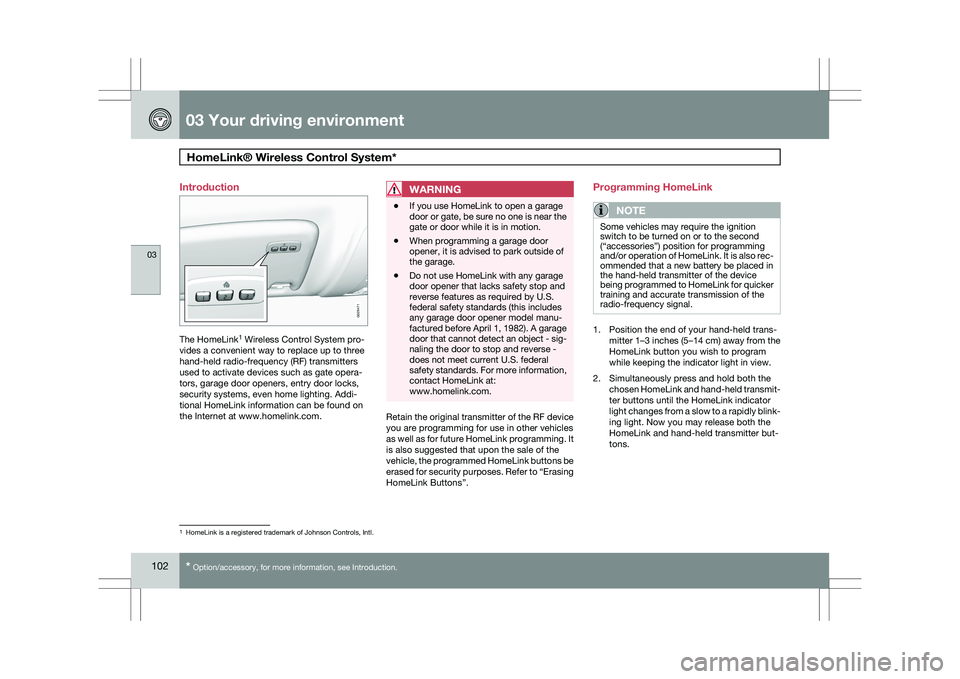
Introduction
The HomeLink
1
Wireless Control System pro-
vides a convenient way to replace up to three
hand-held radio-frequency (RF) transmitters
used to activate devices such as gate opera-
tors, garage door openers, entry door locks,
security systems, even home lighting. Addi-
tional HomeLink information can be found on
the Internet at www.homelink.com.
WARNING \b
If you use HomeLink to open a garage
door or gate, be sure no one is near the
gate or door while it is in motion.
\b When programming a garage door
opener, it is advised to park outside of
the garage.
\b Do not use HomeLink with any garage
door opener that lacks safety stop and
reverse features as required by U.S.
federal safety standards (this includes
any garage door opener model manu-
factured before April 1, 1982). A garage
door that cannot detect an object - sig-
naling the door to stop and reverse -
does not meet current U.S. federal
safety standards. For more information,
contact HomeLink at:
www.homelink.com. Retain the original transmitter of the RF device
you are programming for use in other vehicles
as well as for future HomeLink programming. It
is also suggested that upon the sale of the
vehicle, the programmed HomeLink buttons be
erased for security purposes. Refer to “Erasing
HomeLink Buttons”.Programming HomeLink
NOTE Some vehicles may require the ignition
switch to be turned on or to the second
(“accessories”) position for programming
and/or operation of HomeLink. It is also rec-
ommended that a new battery be placed in
the hand-held transmitter of the device
being programmed to HomeLink for quicker
training and accurate transmission of the
radio-frequency signal.
1. Position the end of your hand-held trans-
mitter 1–3 inches (5–14 cm) away from the
HomeLink button you wish to program
while keeping the indicator light in view.
2. Simultaneously press and hold both the chosen HomeLink and hand-held transmit-
ter buttons until the HomeLink indicator
light changes from a slow to a rapidly blink-
ing light. Now you may release both the
HomeLink and hand-held transmitter but-
tons. 1
HomeLink is a registered trademark of Johnson Controls, Intl. G029471
Page 107 of 297
03 Your driving environment
Starting the engine03
}}
105
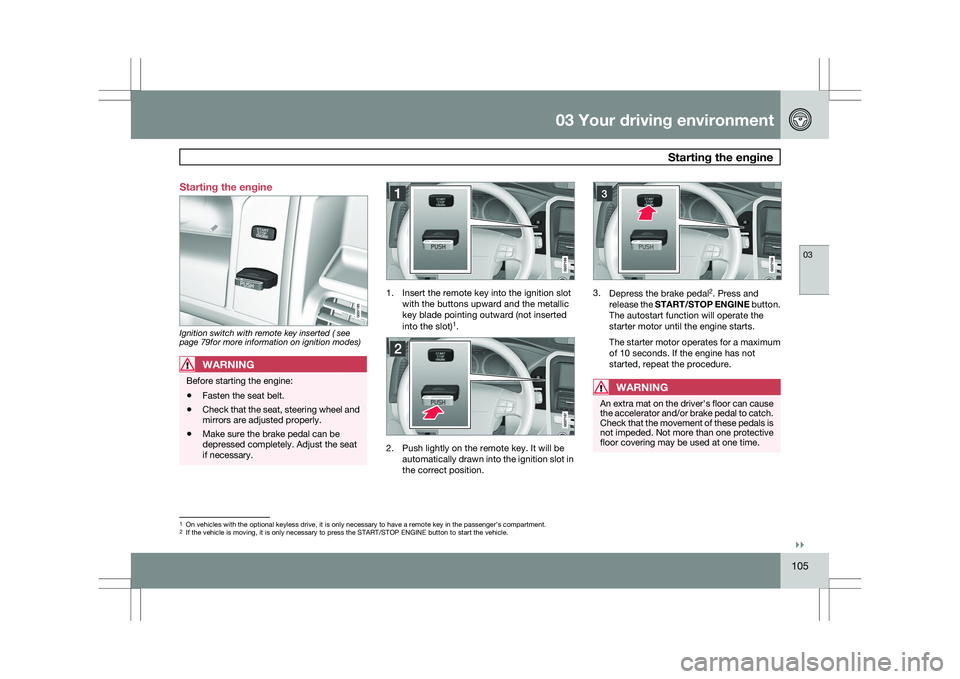
Starting the engine
Ignition switch with remote key inserted ( see
page 79for more information on ignition modes)
WARNING
Before starting the engine:
\b
Fasten the seat belt.
\b Check that the seat, steering wheel and
mirrors are adjusted properly.
\b Make sure the brake pedal can be
depressed completely. Adjust the seat
if necessary. 1. Insert the remote key into the ignition slot
with the buttons upward and the metallic
key blade pointing outward (not inserted
into the slot) 1
. 2. Push lightly on the remote key. It will be
automatically drawn into the ignition slot in
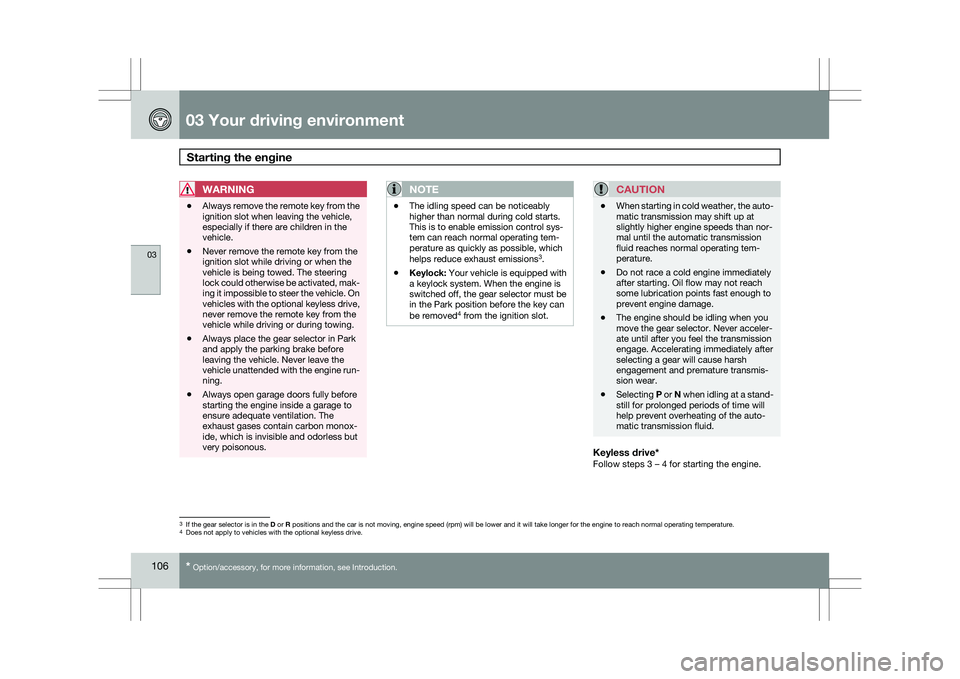
the correct position. 3.
Depress the brake pedal 2
. Press and
release the START/STOP ENGINE button.
The autostart function will operate the
starter motor until the engine starts.
The starter motor operates for a maximum
of 10 seconds. If the engine has not
started, repeat the procedure.
WARNING An extra mat on the driver\fs floor can cause
the accelerator and/or brake pedal to catch.
Check that the movement of these pedals is
not impeded. Not more than one protective
floor covering may be used at one time.
1
On vehicles with the optional keyless drive, it is only necessary to hav\
e a remote key in the passenger’s compartment.
2 If the vehicle is moving, it is only necessary to press the START/STOP E\
NGINE button to start the vehicle.
Page 108 of 297
03 Your driving environmentStarting the engine 03
106
* Option/accessory, for more information, see Introduction.
WARNING \b
Always remove the remote key from the
ignition slot when leaving the vehicle,
especially if there are children in the
vehicle.
\b Never remove the remote key from the
ignition slot while driving or when the
vehicle is being towed. The steering
lock could otherwise be activated, mak-
ing it impossible to steer the vehicle. On
vehicles with the optional keyless drive,
never remove the remote key from the
vehicle while driving or during towing.
\b Always place the gear selector in Park
and apply the parking brake before
leaving the vehicle. Never leave the
vehicle unattended with the engine run-
ning.
\b Always open garage doors fully before
starting the engine inside a garage to
ensure adequate ventilation. The
exhaust gases contain carbon monox-
ide, which is invisible and odorless but
very poisonous.NOTE \b
The idling speed can be noticeably
higher than normal during cold starts.
This is to enable emission control sys-
tem can reach normal operating tem-
perature as quickly as possible, which
helps reduce exhaust emissions 3
.
\b Keylock: Your vehicle is equipped with
a keylock system. When the engine is
switched off, the gear selector must be
in the Park position before the key can
be removed 4
from the ignition slot.CAUTION \b
When starting in cold weather, the auto-
matic transmission may shift up at
slightly higher engine speeds than nor-
mal until the automatic transmission
fluid reaches normal operating tem-
perature.
\b Do not race a cold engine immediately
after starting. Oil flow may not reach
some lubrication points fast enough to
prevent engine damage.
\b The engine should be idling when you
move the gear selector. Never acceler-
ate until after you feel the transmission
engage. Accelerating immediately after
selecting a gear will cause harsh
engagement and premature transmis-
sion wear.
\b Selecting
P or N when idling at a stand-
still for prolonged periods of time will
help prevent overheating of the auto-
matic transmission fluid.
Keyless drive*Follow steps 3 – 4 for starting the engine. 3
If the gear selector is in the D or R positions and the car is not moving, engine speed (rpm) will be lower\
and it will take longer for the engine to reach normal operating temper\
ature.
4 Does not apply to vehicles with the optional keyless drive.
Page 113 of 297
03 Your driving environment
Transmission03
111
All Wheel Drive – AWD
4Your Volvo can be equipped with permanent
All Wheel Drive, which means that power is
distributed automatically between the front
and rear wheels. Under normal driving condi-
tions, most of the engine\fs power is directed to
the front wheels. However, if there is any ten-
dency for the front wheels to spin, an electron-
ically controlled coupling distributes power to
the wheels that have the best traction.
NOTEThe message
AWD disabled Service
required will be appear in the information
display if an electrical fault should occur in
the AWD system. A warning light will also
illuminate in the instrument panel. If this
occurs, have the system checked by a
trained and qualified Volvo service techni-
cian.
4 Standard on certain models.
Page 114 of 297
03 Your driving environmentBrakes 03
112 Brake system
The brake system is a hydraulic system con-
sisting of two separate brake circuits. If a prob-
lem should occur in one of these circuits, it is
still possible to stop the vehicle with the other
brake circuit.
If the brake pedal must be depressed farther
than normal and requires greater foot pressure,
the stopping distance will be longer.
A warning light in the instrument panel will light
up to warn the driver that a fault has occurred.
If this light comes on while driving or braking,
stop immediately and check the brake fluid
level in the reservoir.
NOTE
Press the brake pedal hard and maintain
pressure on the pedal – do not pump the
brakes.
WARNING
If the fluid level is below the MIN mark in the
reservoir or if a brake system message is
shown in the information display:
DO NOT
DRIVE. Have the vehicle towed to a trained
and qualified Volvo service technician and
have the brake system inspected.
Power brakes function only when the
engine is running
The power brakes utilize vacuum pressure
which is only created when the engine is run-
ning. Never let the vehicle roll to a stop with the
engine switched off.
If the power brakes are not working, the brake
pedal must be pressed approximately five
times harder than usual to make up for the lack
of power assistance. This can happen for
example when towing your vehicle or if the
engine is switched off when the vehicle is roll-
ing. The brake pedal feels harder than usual.
Water on brake discs and brake pads
affects braking
Driving in rain and slush or passing through an
automatic car wash can cause water to collect
on the brake discs and pads. This will cause a
delay in braking effect when the pedal is
depressed. To avoid such a delay when the
brakes are needed, depress the pedal occa-
sionally when driving through rain, slush, etc.
This will remove the water from the brakes.
Check that brake application feels normal. This
should also be done after washing or starting
in very damp or cold weather.
Severe strain on the brake systemThe brakes will be subject to severe strain
when driving in mountains or hilly areas, or
when towing a trailer. Vehicle speed is usually slower, which means that the cooling of the
brakes is less efficient than when driving on
level roads. To reduce the strain on the brakes,
shift into a lower gear and let the engine help
with the braking. Do not forget that if you are
towing a trailer, the brakes will be subjected to
a greater than normal load.
Anti-lock braking systemThe Anti-lock Braking System (ABS) helps to
improve vehicle control (stopping and steering)
during severe braking conditions by limiting
brake lockup. When the system "senses"
impending lockup, braking pressure is auto-
matically modulated in order to help prevent
lockup that could lead to a skid.
The system performs a brief self-diagnostic
test when the engine has been started and
driver releases the brake pedal. Another auto-
matic test may be performed when the vehicle
first reaches a speed of approximately 25 mph
(40 km/h
). The brake pedal will pulsate several
times and a sound may be audible from the
ABS control module. This is normal.
Cleaning the brake discsCoatings of dirt and water on the brake discs
may result in delayed brake function. This delay
is minimized by cleaning the brake linings.
Cleaning the brake pads is advisable in wet
weather, prior to long-term parking, and after
the vehicle has been washed. Do this by brak-
Page 116 of 297
03 Your driving environmentHill Descent Control (HDC) 03
114 Introduction
Normally, when the accelerator pedal is
released while driving down hills, the vehicle\fs
speed slows as the engine runs at lower rpm
(the normal engine braking effect). However, if
the downhill gradient becomes steeper and if
the vehicle is carrying a load, speed increases
despite the engine braking effect. In this situa-
tion, the brakes must be applied to reduce the
vehicle\fs speed.
HDC is a type of automatic engine brake and
makes it possible to increase or decrease the
vehicle\fs speed on downhill gradients using
only the accelerator pedal, without applying
the brakes. The brake system functions auto-
matically to maintain a low and steady speed.
HDC is particularly useful when driving down
steep hills with rough surfaces, and where the
road may have slippery patches.
WARNING
HDC does not function in all situations, and
is a supplementary braking aid. The driver
has full responsibility for driving in a safe
manner. Function
\b
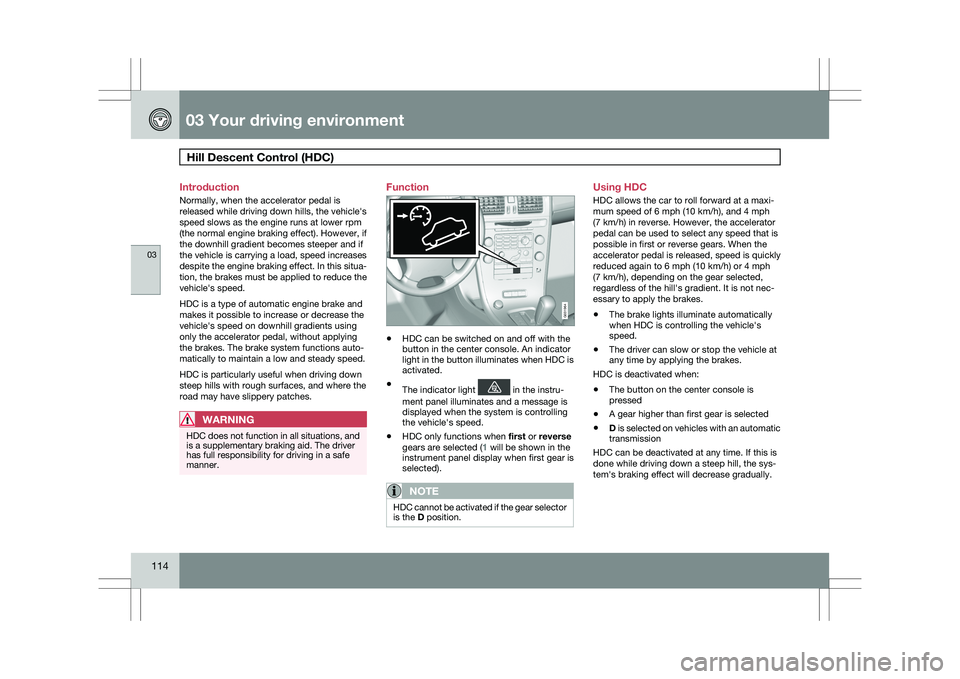
HDC can be switched on and off with the
button in the center console. An indicator
light in the button illuminates when HDC is
activated.
\b The indicator light in the instru-
ment panel illuminates and a message is
displayed when the system is controlling
the vehicle\fs speed.
\b HDC only functions when
first or reverse
gears are selected (1 will be shown in the
instrument panel display when first gear is
selected).
NOTE HDC cannot be activated if the gear selector
is the D position. Using HDC
HDC allows the car to roll forward at a maxi-
mum speed of 6 mph (10 km/h), and 4 mph
(7 km/h) in reverse. However, the accelerator
pedal can be used to select any speed that is
possible in first or reverse gears. When the
accelerator pedal is released, speed is quickly
reduced again to 6 mph (10 km/h) or 4 mph
(7 km/h), depending on the gear selected,
regardless of the hill\fs gradient. It is not nec-
essary to apply the brakes.
\b
The brake lights illuminate automatically
when HDC is controlling the vehicle\fs
speed.
\b The driver can slow or stop the vehicle at
any time by applying the brakes.
HDC is deactivated when:
\b The button on the center console is
pressed
\b A gear higher than first gear is selected
\b D is selected on vehicles with an automatic
transmission
HDC can be deactivated at any time. If this is
done while driving down a steep hill, the sys-
tem\fs braking effect will decrease gradually. G031964
Page 162 of 297
04 Comfort and driving pleasureCollision warning with Auto-brake* 04
160
* Option/accessory, for more information, see Introduction.
Introduction
Collision Warning with Auto-brake is designed
to assist the driver if there is a risk of a collision
with the vehicle ahead, if that vehicle is at a
standstill or moving in the same direction as
your vehicle. Auto-brake helps reduce the col-
lision speed.
Collision Warning consists of the following
three functions:
1. Collision warningThe driver is warned of the imminent risk of a
collision.
2. Brake supportThis helps the driver brake efficiently in a criti-
cal situation.
3. Auto-brakeThis function brakes the vehicle automatically
if a collision cannot be avoided.
WARNING
The auto-brake function connot prevent a
collision but instead is intended to reduce
speed at the moment of impact. For full
braking effect, driver must apply the brakes.
WARNING \b
The collision warning system does not
work in all driving situations, and traffic,
weather and road conditions.
\b The collision warning system is not
designed to detect pedestrians.
\b Warnings are only provided when the
risk of collision is high. The Function
section provides information about lim-
itations that the driver must be aware of
before use.
\b Never wait for a collision warning. This
system is designed to be a supplemen-
tary driving aid. It is not, however,
intended to replace the driver\fs atten-
tion and judgement. The driver is
responsible for maintaining a safe dis-
tance and speed, even when the colli-
sion warning system is in use.
\b Maintenance of the collision warning
system components must only be per-
formed by a trained and qualified Volvo
technician. Function
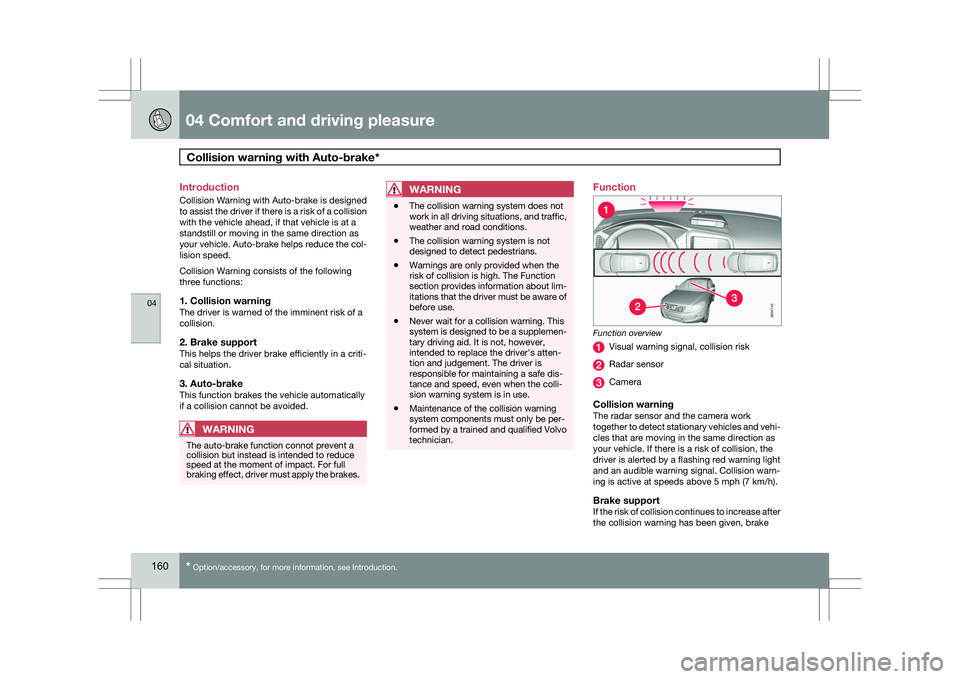
Function overview
Visual warning signal, collision risk
Radar sensor
Camera
Collision warningThe radar sensor and the camera work
together to detect stationary vehicles and vehi-
cles that are moving in the same direction as
your vehicle. If there is a risk of collision, the
driver is alerted by a flashing red warning light
and an audible warning signal. Collision warn-
ing is active at speeds above 5 mph (7 km/h).
Brake supportIf the risk of collision continues to increase after
the collision warning has been given, brake G032740
Page 163 of 297
04 Comfort and driving pleasure
Collision warning with Auto-brake*04
}}
* Option/accessory, for more information, see Introduction. 161
support is activated. Brake support prepares
the brake system to react quickly, and the
brakes are applied slightly. This may be expe-
rienced as a light tug.
If the brakes are applied quickly, full braking
effect will be provided, even if pressure on the
brake pedal is light.
Auto-brakeIf a collision is imminent and the driver has not
applied the brakes, the auto-brake function is
activated without the driver pressing the brake
pedal. Limited brake force is applied to reduce
the vehicle’s speed when the collision occurs.
WARNING
The auto-brake function connot prevent a
collision but instead is intended to reduce
speed at the moment of impact. For full
braking effect, driver must apply the brakes.
NOTE
The auto-brake function is always on and
cannot be turned off.
Operation
Some settings are controlled from the center
console via a menu system. For information on
how the menu system is used, see page 122.
On and offTo switch Collision Warning on or off, go into
the menu Car settings Collision warning
settings and select On or Off. When the engine
is started, the setting that was selected when
it was switched off will be used.
Activating/deactivating warning signalsThe collision warning system’s audible and vis-
ual signals are activated automatically when
the engine is started if the collision warning
system is activated.
The audible warning signal can be activated/
deactivated by selecting the alternative On or
Off in Car settings Collision warning
settings Warning sound.
Setting a warning distanceThis setting determines the distance at which
the visual and audible warnings are triggered.
Select Long, Normal or Short under Car
settings Collision warning settings
Warning distance
The warning distance determines the level of
sensitivity used by the system. The warning
distance Long provides an earlier warning.
Begin by using Long and if the system gives
too many warnings, try changing to
Normal.
WARNING \b
The setting
Short should only be used
in situations where traffic is light and
moving at low speeds.
\b Collision Warning alerts the driver to the
risk of a collision but this function can-
not reduce the driver’s reaction time.
\b For Collision Warning to be as effective
as possible, it is recommended that Dis-
tance Alert be set to 4 or 5, see
page 179.
NOTE \b
When adaptive cruise control is used,
the warning light and signal will be used
by cruise control, even if they have been
deactivated by the driver.
\b In situations where traffic is moving at
considerably different speeds, or if the
vehicle ahead brakes suddenly, warn-
ings may be considered to be late, even
if the setting Long has been selected.
Checking settingsThe current Collision Warning settings can be
checked by going into the menu system at
Car
settings Collision warning settings. See
page 122 for more information on the menu
system.
Page 164 of 297
04 Comfort and driving pleasureCollision warning with Auto-brake* 04
162
* Option/accessory, for more information, see Introduction.
LimitationsStrong sunlight, reflections, extreme light con-
trasts, the use of sunglasses, or if the driver is
not looking straight ahead may make the visual
warning signal in the windshield difficult to see.
For this reason, always activate the audible
warning signal in such conditions.
NOTE The visual warning signal may be temporar-
ily disengaged in the event of high passen-
ger compartment temperature due to strong
sunlight, etc. If this occurs, the audible
warning signal will be used, even if it has
been deactivated in the menu system.
Warnings may not appear if the distance to the
vehicle ahead is very small or if steering wheel
and pedal movements are great, for example,
due to a very active driving style.
WARNING \b
In certain situations, the system cannot
provide warnings or warning may be
delayed if traffic conditions or other
external factors make it impossible for
the radar sensor or camera to detect the
vehicle ahead.
\b Warnings may not be provided if the
distance to the vehicle ahead is short,
or if movements of the steering wheel/
brake pedal are great, such as during
active driving.
\b The sensor system has a limited range
for stationary or slow-moving vehicles
and may therefore give delayed or no
warnings if your vehicle’s speed is
above approximately 45 mph
(70 km/h).
\b Warnings for stationary or slow-moving
vehicles may not be provided in dark
conditions. The Collision Warning system uses the same
radar sensors as Adaptive Cruise Control. For
more information on the radar sensor and its
limitations, see page 175
.
If no warning is given, or if a warning is delayed,
Auto-brake will also not be provided or will be
delayed.
NOTE If warnings are given too frequently, the
warning distance can be reduced (see
page 161). This causes the system to pro-
vide later warnings, which decreases the
total number of warnings provided.
The camera’s limitationsThe camera is used by Collision Warning with
Auto-brake, Driver Alert Control (see
page 182), and Lane Departure Warning (see
page 185).
NOTE
\b
To help protect the camera in very hot
conditions, it may be temporarily
switched off for approximately 15
minutes after the engine has been
started.
\b Keep the section of the windshield in
front of the camera clean and free of ice,
snow, or condensation.
Page 165 of 297
04 Comfort and driving pleasure
Collision warning with Auto-brake*04
}}
* Option/accessory, for more information, see Introduction. 163
WARNING\b
The camera has the same limitations as
the human eye. In other words, its
“vision is impaired” by adverse weather
conditions such as heavy snowfall,
dense fog, etc. These conditions may
reduce the function of systems that
depend on the camera or cause these
systems to temporarily stop function-
ing.
\b Never place any objects, decals, etc.,
on the windshield in front of the camera.
This could reduce or block the camera’s
function, and could cause one or more
of the systems that utilize the camera to
stop functioning.
\b Strong sunlight, reflections from the
road surface, ice or snow covering the
road, a dirty road surface, or unclear
lane marker lines may drastically reduce
the camera’s capacity to detect the side
of a lane or another vehicle.Fault tracing and actions
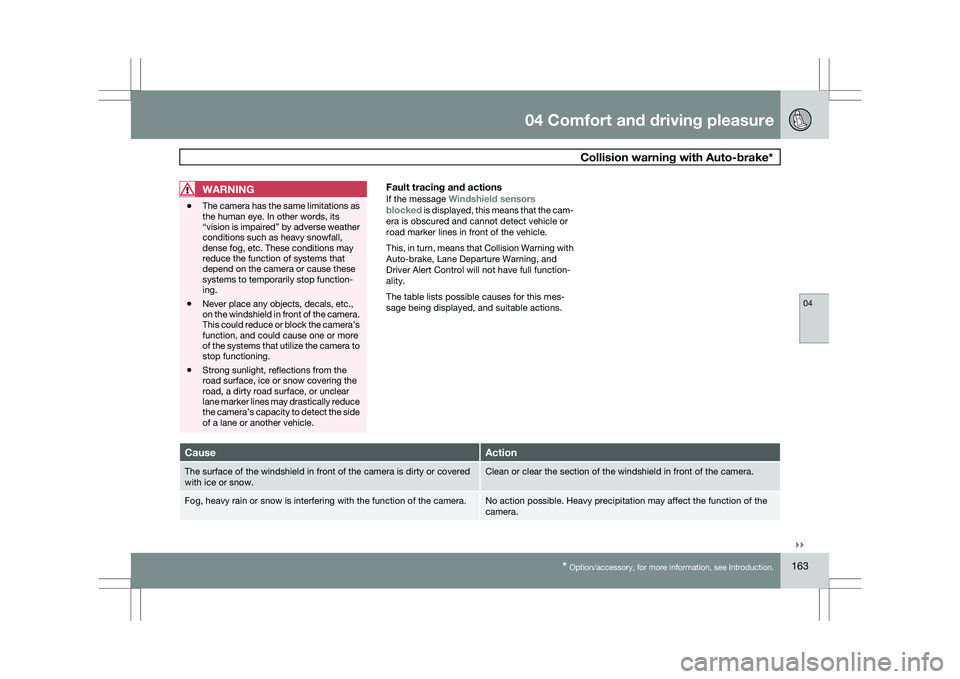
If the message Windshield sensors
blocked is displayed, this means that the cam-
era is obscured and cannot detect vehicle or
road marker lines in front of the vehicle.
This, in turn, means that Collision Warning with
Auto-brake, Lane Departure Warning, and
Driver Alert Control will not have full function-
ality.
The table lists possible causes for this mes-
sage being displayed, and suitable actions. Cause Action
The surface of the windshield in front of the camera is dirty or covered\
with ice or snow. Clean or clear the section of the windshield in front of the camera.
Fog, heavy rain or snow is interfering with the function of the camera. No action possible. Heavy precipitation may affect the function of the
camera.