warning light VOLVO XC60 2009 Owner´s Manual
[x] Cancel search | Manufacturer: VOLVO, Model Year: 2009, Model line: XC60, Model: VOLVO XC60 2009Pages: 297, PDF Size: 21.16 MB
Page 170 of 297
04 Comfort and driving pleasureCity Safety™ 04
168 1.
Use the thumb wheel to scroll until City
Safety is displayed.
2. Press the RESET button for approximately
1 second until Off is displayed.
WARNINGThe laser sensor emits light when the igni-
tion is in mode II or higher, even if City
Safety™ has been switched off.
To switch City Safety™ on again:
\b
Follow the same procedure as for switch-
ing City Safety™ off but select On by
pressing RESET.
or
\b Vehicles not equipped with keyless
drive: Press lightly on the remote key to
release it partially from the ignition slot.
Press the remote key into the ignition slot
again. Depress the brake pedal and press
the START/STOP ENGINE button to start
the engine. This restarts City Safety™
.
\b Vehicles equipped with the optional
keyless drive: Press the START/STOP
ENGINE button to switch off the engine.
Depress the brake pedal and press the
START/STOP ENGINE button to start the
engine. This restarts City Safety™.
See page 79 for information on ignition modes. City Safety™ will be automatically switched on
the next time the engine is started, even if it was
off when the engine was switched off.
Limitations
The sensor used by City Safety™ is designed
to detect cars and other larger motor vehicles
ahead of your vehicle in both daylight and dark-
ness.
However, there are certain limitations and the
laser sensor’s function may be reduced by, for
example, heavy rain or snowfall, or by dense
fog or thick, blowing dust or snow. Condensa-
tion, dirt, ice or snow on the windshield may
also interfere with the sensor’s function.
Objects such as warning flags hanging from
long objects on the roof or accessories such as
auxiliary lights or protective arches on the front
of the vehicle that are higher than the hood may
also impede the sensor’s function.
Braking distance to the vehicle ahead increa-
ses on slippery road surfaces, which may
reduce City Safety’s capacity to avoid a colli-
sion. In situations like this, the DSTC system
(see page 155) will help provide the best pos-
sible braking capacity and stability.
City Safety™ emits infrared light and measures
the way in which the light is reflected. There-
fore, vehicles or objects with low-reflective sur-faces may not be detected. Normally, the
license plate and taillight reflectors give the
rear section of a vehicle ahead sufficient reflec-
tive surfaces to be detected.
NOTE
\b
Keep the windshield in front of the laser
sensor free of ice, snow, dirt, etc. See
the illustration on page
167
\b Snow or ice on the hood deeper than
2 inches (5 cm) may obstruct the sen-
sor. Keep the hood free of ice and snow.
\b Do not mount or in any way attach any-
thing on the windshield that could
obstruct the laser sensor. Troubleshooting
If Windshield sensors blocked appears in
the information display, this indicates that the
City Safety™ laser sensor is obstructed in
some way and cannot detect vehicles ahead of
you, which means that the system is not func-
tioning.
However, this message will not be displayed in
all situations in which the sensor is obstructed.
For this reason, the driver must ensure that the
area of the windshield in front of the sensor is
always kept clean.
Page 172 of 297
04 Comfort and driving pleasureCity Safety™ 04
170 Maximum pulse energy 2.64 μJ
Maximum average output 45 mW
Pulse length 33 ns
Divergence (horizontal × verti-
cal) 28° × 12°
NOTE
The function of aftermarket laser detectors
may be affected by City Safety\fs laser sen-
sor.
WARNING
The laser sensor emits light when the igni-
tion is in mode II or higher, even if City
Safety™ has been switched off.
WARNING Eye injury may occur if any of the following
points are not followed:
\b
It is essential that all pertinent instruc-
tions be followed when handling laser
instruments. Testing, repairing, remov-
ing, adjusting and/or replacing any
components in the laser sensor may
only be done by a trained and qualified
Volvo service technician.
\b Do not remove the laser sensor (includ-
ing removal of the lenses). A laser sen-
sor that has been removed belongs to
laser class 3B according to standard
IEC 60825-1. Devices in laser class 3B
present a risk of injury to the eyes.
\b The laser sensor’s connector must be
disconnected before the sensor is
removed from the windshield.
\b The laser sensor must be mounted in
place on the windshield before con-
necting the sensor’s connector.
\b Do not view the laser sensor (which
emits spreading, invisible laser beams)
with optical instruments from a distance
of less than 4 inches (100 mm). Symbols and messages in the display
When City Safety™ automatically applies the
brakes, one or more of the symbols in the main
instrument panel may illuminate and its asso-
ciated message will be displayed.
A text message can be erased by pressing
briefly on the READ button on the turn signal
lever.
Page 174 of 297
04 Comfort and driving pleasureAdaptive Cruise Control (ACC)* 04
172
* Option/accessory, for more information, see Introduction.
Introduction
Adaptive Cruise Control (ACC) is an optional
system designed to assist the driver by main-
taining a set speed or a set distance to the
vehicle ahead. It is primarily intended for use
on long straight roads in steady traffic, such as
on highways and other main roads.
WARNING
\b
Do not use the adaptive cruise control
system in demanding driving conditions
such as city traffic, winding roads, at
intersections, on slippery surfaces, in
poor visibility, heavy rain, etc.
\b Maintenance of cruise control compo-
nents must only be performed by an
authorized Volvo workshop.
WARNING \b
Adaptive cruise control cannot cover all
driving situations and traffic, weather
and road conditions. The Function sec-
tion provides information about limita-
tions that the driver must be aware of
before using the adaptive cruise con-
trol.
\b This system is designed to be a supple-
mentary driving aid. It is not, however,
intended to replace the driver\fs atten-
tion and judgement. The driver is
responsible for maintaining a safe dis-
tance and speed and must intervene if
adaptive cruise control does not main-
tain a suitable speed or suitable dis-
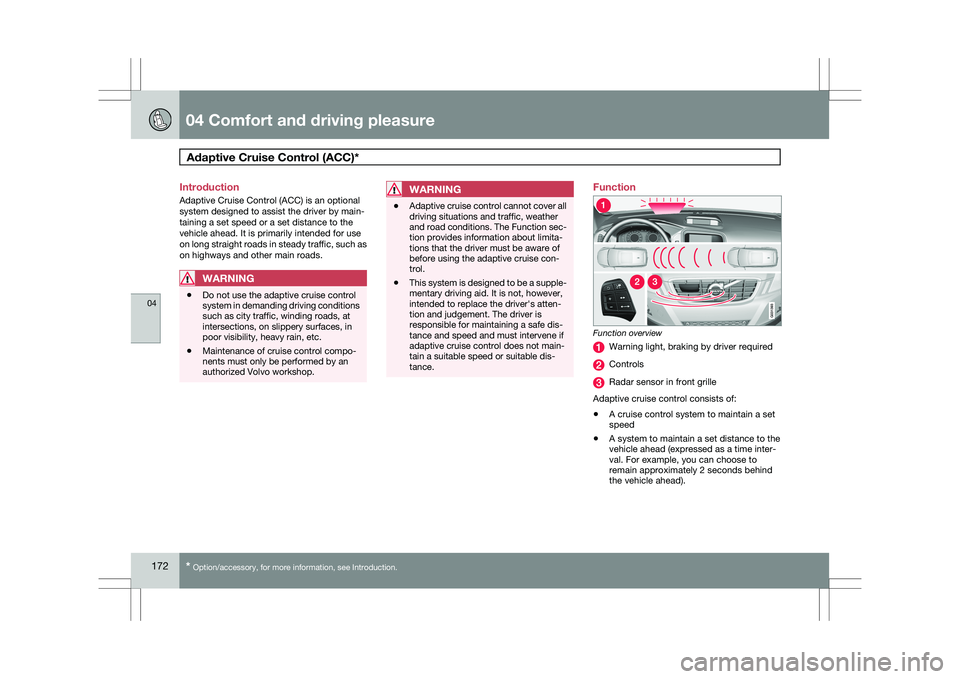
tance. Function
Function overview
Warning light, braking by driver required
Controls
Radar sensor in front grille
Adaptive cruise control consists of:
\b A cruise control system to maintain a set
speed
\b A system to maintain a set distance to the
vehicle ahead (expressed as a time inter-
val. For example, you can choose to
remain approximately 2 seconds behind
the vehicle ahead).
Page 175 of 297
04 Comfort and driving pleasure
Adaptive Cruise Control (ACC)*04
}}
* Option/accessory, for more information, see Introduction. 173
WARNING\b
Adaptive cruise control is not a collision
avoidance system. The driver is always
responsible for applying the brakes if
the system does not detect another
vehicle.
\b Adaptive cruise control does not react
to slow moving or stationary vehicles. The distance to the vehicle ahead (in the same
lane) is measured by a radar sensor. Your vehi-
cle\fs speed is regulated by acceleration and
braking. The brakes may emit a sound when
they are being modulated by the adaptive
cruise control system. This is normal.
WARNING
The brake pedal moves when the adaptive
cruise control system modulates the
brakes. Do not rest your foot under the
brake pedal.
The adaptive cruise control system is designed
to follow the vehicle ahead of you in the same
lane, at a set time interval.
If the radar sensor has not detected a vehicle
ahead, the system will then attempt to maintain
the set speed. This is also the case if the speed of the vehicle ahead exceeds the speed that
you have set.
The adaptive cruise control system is designed
to smoothly regulate speed. However, the
driver must apply the brakes in situations that
require immediate braking. This applies when
there are great differences in speed between
vehicles, or if the vehicle ahead brakes sud-
denly.
WARNING
Due to limitations in the radar sensor, brak-
ing may occur unexpectedly or not at all,
see page 175.
Adaptive cruise control can only be activated
at speeds above 20mph (30 km/h). If speed
falls below 20 mph (30 km/h) or if engine speed
(rpm) becomes too low, adaptive cruise control
disengages and will no longer modulate the
brakes. In situations when adaptive cruise con-
trol cannot be activated Cruise Control
Unavailable is shown in the display.
WARNING
When adaptive cruise control disengages,
the brakes will not be modulated automati-
cally. The driver must assume full control
over the vehicle.
Warning light-driver braking requiredAdaptive cruise control has a braking capacity
that is equivalent to approximately 30% of the
vehicle\fs total braking capacity. In situations
requiring more brake force than ACC can pro-
vide, if the driver does not apply the brakes, an
audible signal will sound and a red warning
light will illuminate in the windshield to alert the
driver to react.
NOTE Strong sunlight, reflections, extreme light
contrasts, the use of sunglasses, or if the
driver is not looking straight ahead may
make the visual warning signal in the wind-
shield difficult to see.
WARNING
Cruise control only warns of vehicles
detected by the radar sensor, see
page 172. In some cases there may be no
warning or the warning may be delayed. The
driver should always apply the brakes when
necessary.
Page 177 of 297
04 Comfort and driving pleasure
Adaptive Cruise Control (ACC)*04
}}
* Option/accessory, for more information, see Introduction. 175
WARNING\b
Only use a time interval that is suitable
in current traffic conditions.
\b A short time interval gives the driver lim-
ited reaction time if an unexpected sit-
uation occurs in traffic. The number of bars indicating the selected
time interval are shown while the setting is
being made and for several seconds afterward.
A smaller version of the symbol is then shown
to the right in the display. The same symbol is
also displayed when Distance Alert is acti-
vated, see page 179 .
Deactivating and resuming settingsCruise control is deactivated, either with a
short press on
, or by action taken by the
driver, such as braking, etc. The set speed, for
example 55 mph, is then shown in parenthe-
ses. Speed and time interval are resumed by
pressing .
WARNING
There may be a significant increase in speed
after the
button has been pressed.
A short press on in standby mode or a long
press in active mode deactivates cruise con- trol. The set speed is then cleared and cannot
be resumed.
When ACC is activated, the vehicle’s speed
increases by approximately 1 mph (1 km/h)
each additional time is pressed.
Deactivation due to action by the driverACC is deactivated:
\b
when the brakes are applied
\b if the gear selector is moved to
N
\b if the accelerator pedal is depressed for an
extended period.
NOTE If the accelerator pedal is only depressed for
a short time, such as when passing another
vehicle, ACC is deactivated temporarily and
is reactivated when the pedal is released.
Automatic deactivationAdaptive cruise control is linked to other sys-
tems such as ABS, the stability and traction
control system (DSTC), and the Distance Alert
System. If any of these systems are not func-
tioning properly, adaptive cruise control is
automatically deactivated.
In the event of automatic deactivation a signal
will sound and the message
Cruise Control
Canceled is shown in the display. The driver must then intervene and adapt the vehicle\fs
speed to the surrounding traffic.
Automatic deactivation may be caused if:
\b
the vehicle\fs speed falls below 20 mph
(30 km/h)
\b the wheels lose traction or if the anti-lock
brake system (ABS) is activated
\b brake temperature is high
\b engine speed (rpm) is too low
\b the radar sensor is obstructed by, for
example, wet snow or rain.
The radar sensor and its limitations
The radar sensor is used by both Adaptive
Cruise Control and the Collision Warning Sys-
tem with Auto-brake. It is designed to detect
cars or larger vehicles driving in the same
direction as your vehicle.WARNING Accessories or other objects, such as extra
headlights, must not be installed in front of
the grille.
Modification of the radar sensor could make
its use illegal.
The radar sensor\fs capacity to detect vehicles
ahead is impeded:
Page 181 of 297
04 Comfort and driving pleasure
Distance alert04
}}
179
Introduction
Distance Alert is part of Adaptive Cruise Con-
trol and is a function that provides information
about the time interval to the vehicle ahead.
Time interval information is only given for a
vehicle that is driving ahead of your vehicle, in
the same lane, and in the same direction. No
information is provided for vehicles driving
toward you, moving very slowly, or at a stand-
still.
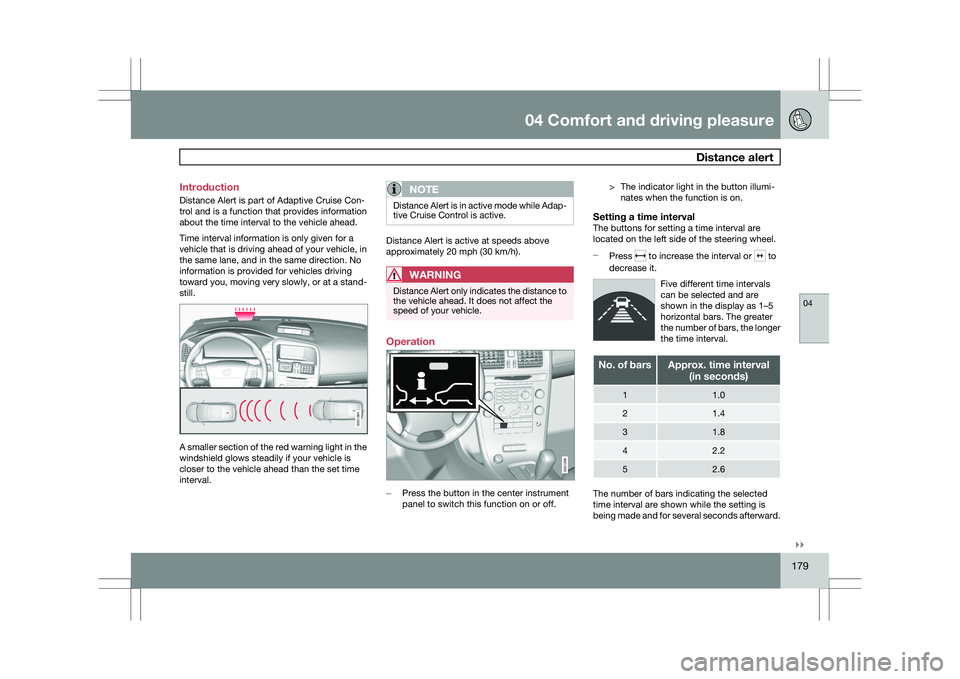
A smaller section of the red warning light in the
windshield glows steadily if your vehicle is
closer to the vehicle ahead than the set time
interval.
NOTE Distance Alert is in active mode while Adap-
tive Cruise Control is active.
Distance Alert is active at speeds above
approximately 20 mph (30 km/h).
WARNING
Distance Alert only indicates the distance to
the vehicle ahead. It does not affect the
speed of your vehicle.
Operation
–
Press the button in the center instrument
panel to switch this function on or off. > The indicator light in the button illumi-
nates when the function is on.
Setting a time intervalThe buttons for setting a time interval are
located on the left side of the steering wheel.
– Press to increase the interval or to
decrease it.
Five different time intervals
can be selected and are
shown in the display as 1–5
horizontal bars. The greater
the number of bars, the longer
the time interval. No. of bars Approx. time interval
(in seconds) 1 1.0
2 1.4
3 1.8
4 2.2
5 2.6
The number of bars indicating the selected
time interval are shown while the setting is
being made and for several seconds afterward. G031394 G031396
Page 182 of 297
04 Comfort and driving pleasureDistance alert 04
180 A smaller version of the symbol is then shown
to the right in the display. The same symbol is
also displayed when Adaptive Cruise Control is
activated.
NOTE
\b
The higher your vehicle’s speed, the
greater the distance to the vehicle
ahead, measured in feet (meters), for a
given time interval.
\b The set time interval is also used by
Adaptive Cruise Control, see page
174.
WARNINGOnly use a time interval that is suitable in
current traffic conditions.
LimitationsThe Distance Alert function uses the same
radar sensor used by Adaptive Cruise Control
and the Collision Warning system. See page
175 for more information on the radar sensor’s
limitations.
NOTE Strong sunlight, reflections, extreme light
contrasts, the use of sunglasses, or if the
driver is not looking straight ahead may
make the visual warning signal in the wind-
shield difficult to see.
WARNING \b
Bad weather or winding roads may
affect the radar sensor’s capacity to
detect vehicles ahead.
\b The size of the vehicle ahead, such as a
motorcycle, may also make it difficult to
detect. This may result in the warning
light illuminating at a shorter distance
than the one that has been set, or that
the light will not come on at all. Symbol Message Description
- Time interval while it is being set.
- Time interval after it has been set.
Page 187 of 297
04 Comfort and driving pleasure
Driver Alert System*04
}}
* Option/accessory, for more information, see Introduction. 185
Lane Departure Warning (LDW)–
general information
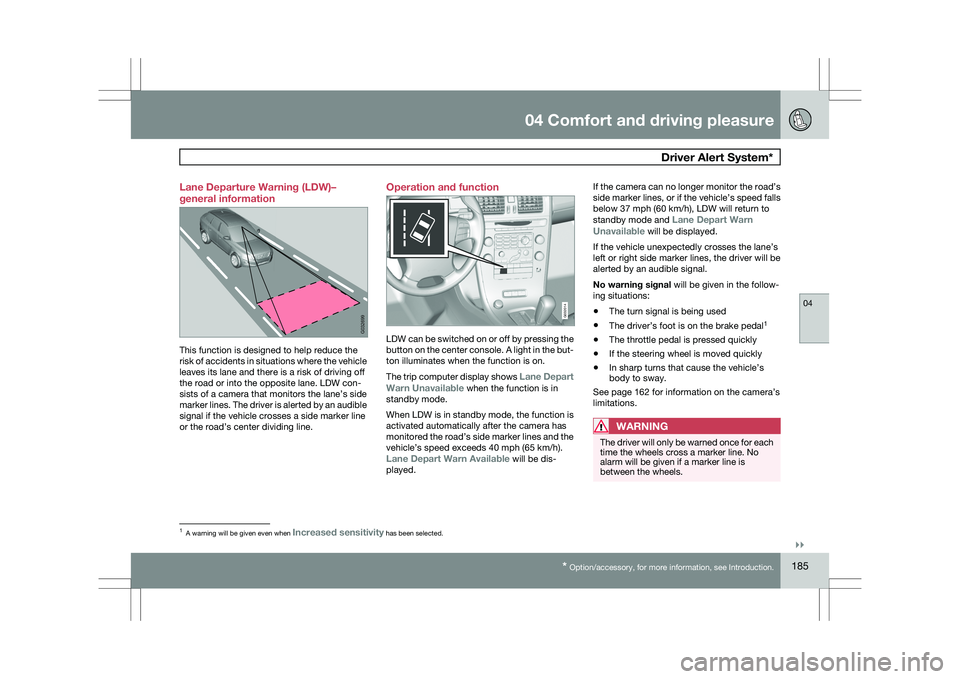
This function is designed to help reduce the
risk of accidents in situations where the vehicle
leaves its lane and there is a risk of driving off
the road or into the opposite lane. LDW con-
sists of a camera that monitors the lane’s side
marker lines. The driver is alerted by an audible
signal if the vehicle crosses a side marker line
or the road’s center dividing line. Operation and function
LDW can be switched on or off by pressing the
button on the center console. A light in the but-
ton illuminates when the function is on.
The trip computer display shows Lane Depart
Warn Unavailable when the function is in
standby mode.
When LDW is in standby mode, the function is
activated automatically after the camera has
monitored the road’s side marker lines and the
vehicle’s speed exceeds 40 mph (65 km/h).
Lane Depart Warn Available will be dis-
played.If the camera can no longer monitor the road’s
side marker lines, or if the vehicle’s speed falls
below 37 mph (60 km/h), LDW will return to
standby mode and
Lane Depart Warn
Unavailable will be displayed.
If the vehicle unexpectedly crosses the lane’s
left or right side marker lines, the driver will be
alerted by an audible signal.
No warning signal will be given in the follow-
ing situations:
\b The turn signal is being used
\b The driver’s foot is on the brake pedal 1
\b The throttle pedal is pressed quickly
\b If the steering wheel is moved quickly
\b In sharp turns that cause the vehicle’s
body to sway.
See page 162 for information on the camera’s
limitations.
WARNING The driver will only be warned once for each
time the wheels cross a marker line. No
alarm will be given if a marker line is
between the wheels.
1
A warning will be given even when Increased sensitivity has been selected. G032699 G032014
Page 189 of 297
04 Comfort and driving pleasure
Park assist*04
}}
* Option/accessory, for more information, see Introduction. 187
Introduction
The park assist system is designed to assist
you when driving into parking spaces, garages,
etc. It utilizes four ultrasound sensors located
in one or both bumpers to measure the dis-
tance to a vehicle, object, or a person who may
be close to the front or rear of your vehicle.
This system is available in the rear bumper
only, or in both the front and rear bumpers.
Park assist utilizes four ultrasound sensors in
the bumper(s) to measure the distance to a
vehicle, object, or a person who may be close
to the front or rear of your vehicle. An audible
signal and symbols in the audio system’s dis-
play indicate the distance to the object
WARNING
Park Assist is an information system, NOT a
safety system. This system is designed to
be a supplementary aid when parking the
vehicle. It is not, however, intended to
replace the driver\fs attention and judge-
ment. Function
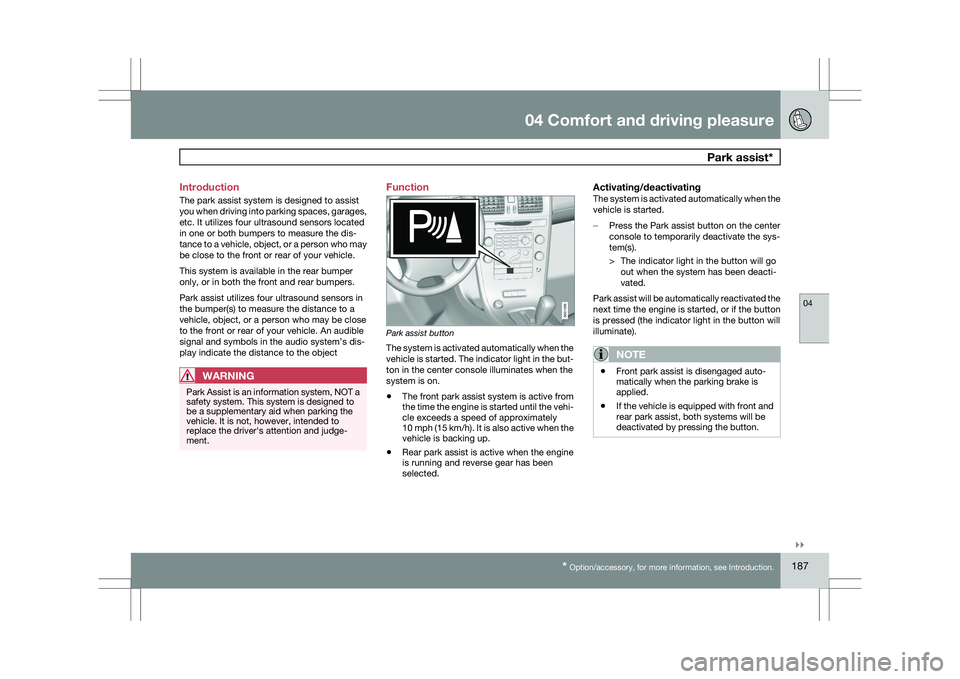
Park assist button
The system is activated automatically when the
vehicle is started. The indicator light in the but-
ton in the center console illuminates when the
system is on.
\b
The front park assist system is active from
the time the engine is started until the vehi-
cle exceeds a speed of approximately
10 mph (15 km/h). It is also active when the
vehicle is backing up.
\b Rear park assist is active when the engine
is running and reverse gear has been
selected.
Activating/deactivatingThe system is activated automatically when the
vehicle is started.
–
Press the Park assist button on the center
console to temporarily deactivate the sys-
tem(s).
> The indicator light in the button will go
out when the system has been deacti-
vated.
Park assist will be automatically reactivated the
next time the engine is started, or if the button
is pressed (the indicator light in the button will
illuminate).
NOTE \b
Front park assist is disengaged auto-
matically when the parking brake is
applied.
\b If the vehicle is equipped with front and
rear park assist, both systems will be
deactivated by pressing the button. G031399
Page 191 of 297
04 Comfort and driving pleasure
Park assist*04
* Option/accessory, for more information, see Introduction. 189
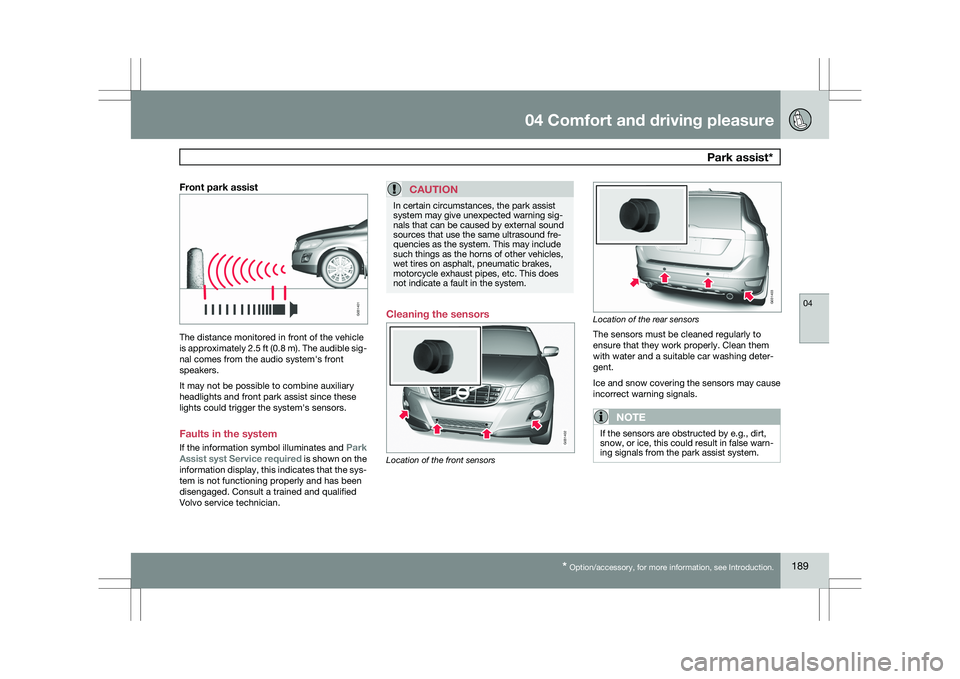
Front park assistThe distance monitored in front of the vehicle
is approximately 2.5 ft (0.8 m). The audible sig-
nal comes from the audio system\fs front
speakers.
It may not be possible to combine auxiliary
headlights and front park assist since these
lights could trigger the system\fs sensors.
Faults in the system
If the information symbol illuminates and
Park
Assist syst Service required is shown on the
information display, this indicates that the sys-
tem is not functioning properly and has been
disengaged. Consult a trained and qualified
Volvo service technician.CAUTION In certain circumstances, the park assist
system may give unexpected warning sig-
nals that can be caused by external sound
sources that use the same ultrasound fre-
quencies as the system. This may include
such things as the horns of other vehicles,
wet tires on asphalt, pneumatic brakes,
motorcycle exhaust pipes, etc. This does
not indicate a fault in the system.
Cleaning the sensors
Location of the front sensors Location of the rear sensors
The sensors must be cleaned regularly to
ensure that they work properly. Clean them
with water and a suitable car washing deter-
gent.
Ice and snow covering the sensors may cause
incorrect warning signals.
NOTE
If the sensors are obstructed by e.g., dirt,
snow, or ice, this could result in false warn-
ing signals from the park assist system. G031401 G031402 G031403