roof VOLVO XC60 2015 Owner´s Manual
[x] Cancel search | Manufacturer: VOLVO, Model Year: 2015, Model line: XC60, Model: VOLVO XC60 2015Pages: 406, PDF Size: 11.03 MB
Page 121 of 406
03 Your driving environment
Laminated panoramic roof*
03
* Option/accessory, for more information, see Introduction.119
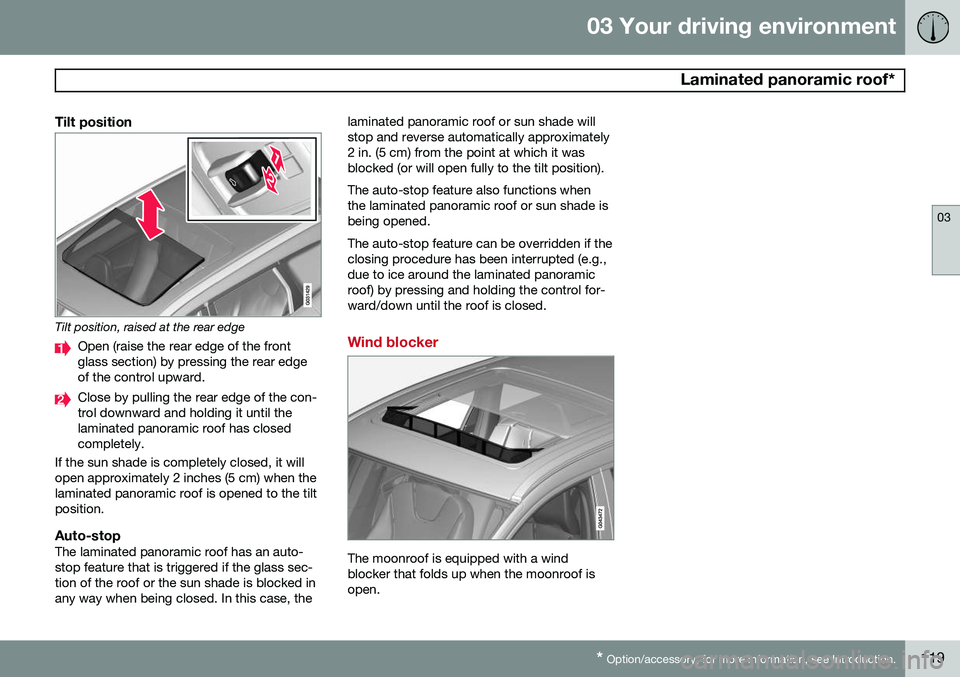
Tilt position
Tilt position, raised at the rear edge
Open (raise the rear edge of the front glass section) by pressing the rear edgeof the control upward.
Close by pulling the rear edge of the con- trol downward and holding it until thelaminated panoramic roof has closedcompletely.
If the sun shade is completely closed, it willopen approximately 2 inches (5 cm) when thelaminated panoramic roof is opened to the tiltposition.
Auto-stopThe laminated panoramic roof has an auto-stop feature that is triggered if the glass sec-tion of the roof or the sun shade is blocked inany way when being closed. In this case, the laminated panoramic roof or sun shade willstop and reverse automatically approximately2 in. (5 cm) from the point at which it wasblocked (or will open fully to the tilt position). The auto-stop feature also functions when the laminated panoramic roof or sun shade isbeing opened. The auto-stop feature can be overridden if the closing procedure has been interrupted (e.g.,due to ice around the laminated panoramicroof) by pressing and holding the control for-ward/down until the roof is closed.
Wind blocker
The moonroof is equipped with a wind blocker that folds up when the moonroof isopen.
Page 175 of 406
04 Driver support
City Safety™
04
}}
173
Press
My Car in the center console control
panel and go to
SettingsCar settings
Driver support systemsCity Safety.
Select
Off.
If the engine is switched off, City Safety™ will reactivate when the engine is restarted.
WARNING
The laser sensor emits light when the igni- tion is in mode II or higher, even if City
Safety™ has been switched off.
To switch City Safety™ on again:
• Follow the same procedure as for switch- ing City Safety™ off but select
On.
Limitations
The sensor used by City Safety™ is designed to detect cars and other larger motor vehiclesahead of your vehicle in both daylight anddarkness.
WARNING
The laser sensor has certain limitations and its function may be reduced (or it maynot function at all) in conditions such asheavy rain or snowfall, or by dense fog orthick, blowing dust or snow. Condensa-tion, dirt, ice or snow on the windshieldmay also interfere with the sensor’s func-tion.
Objects such as warning flags hanging from long objects on the roof or accessories suchas auxiliary lights or protective arches on thefront of the vehicle that are higher than thehood may also impede the sensor’s function. Braking distance to the vehicle ahead increa- ses on slippery road surfaces, which mayreduce City Safety’s capacity to avoid a colli-sion. In situations like this, the DSTC system(see page 150) will help provide the best pos-sible braking capacity and stability. City Safety™ emits a laser beam and meas- ures the way in which the light is reflected.Therefore, vehicles or objects with low-reflec-tive surfaces may not be detected. Normally,the license plate and taillight reflectors givethe rear section of a vehicle ahead sufficientreflective surfaces to be detected.
NOTE
•Keep the windshield in front of the laser sensor free of ice, snow, dirt, etc.See page 172.
• Snow or ice on the hood deeper than2 inches (5 cm) may obstruct the sen-sor. Keep the hood free of ice andsnow.
• Do not mount or in any way attachanything on the windshield that couldobstruct the laser sensor.
Troubleshooting
If Windscreen Sensors blocked appears in
the information display, this indicates that the City Safety™ laser sensor is obstructed insome way and cannot detect vehicles aheadof you, which means that the system is notfunctioning. However, this message will not be displayed in all situations in which the sensor isobstructed. For this reason, the driver mustensure that the area of the windshield in frontof the sensor is always kept clean. The following table shows some of the situa- tions that can cause the message to be dis-played and suggested actions.
Page 217 of 406
05 Comfort and driving pleasure
Climate system
05
}}
* Option/accessory, for more information, see Introduction.215
Introduction
Air conditioningThe vehicle is equipped with Electronic Cli- mate Control (ECC). The climate control sys-tem cools, heats or dehumidifies the air in thepassenger compartment.
NOTE
• The air conditioning can be switched off, but to ensure the best possible cli-mate comfort in the passenger com-partment and to prevent the windowsfrom misting, it should always be on.
• In warm weather, a small amount ofwater may accumulate under the carwhen it has been parked. This water iscondensation from the A/C systemand is normal.
Sensor location
•
The sunlight sensor is located on the top side of the dashboard.
NOTE
The sunlight sensor monitors which side of the car that is most exposed to sunlight.This can mean that the temperature maydiffer between the right and left-side airvents, even if the temperatures set for bothsides of the passenger compartment arethe same.
•The temperature sensor for the passen- ger compartment is located below the cli-mate control panel.
• The outside (ambient) temperature sensoris located on the door mirror.
• The humidity sensor* is located in theinterior rearview mirror.
NOTE
Do not cover or block the sensors with clothing or other objects.
Side windows and laminated panoramic roof
To ensure that the air conditioning works optimally, the side windows, and the lamina-ted panoramic roof should be closed.
Fog on the inside of the windowsThe defroster function should be used toremove fog or mist from the inside of the win-dows. Keeping the windows clean with a commercially available window washingspray will also help prevent fogging or mist-ing.
Temporary shut-off of the air
conditioning
The air conditioning is momentarily disen-gaged during full acceleration or when drivinguphill with a trailer. This may result in a tem-porary increase in cabin temperature.
Ice and snowAlways keep the air intake grille at the base ofthe windshield free of snow.
Climate system maintenanceSpecial tools and equipment are required tomaintain and carry out repairs on the climatesystem. Work of this type should only bedone by a trained and qualified Volvo servicetechnician.
RefrigerantVolvo cares about the environment. The airconditioning system in your car contains aCFC-free refrigerant – R134a. This substancewill not deplete the ozone layer. See page386 for the amount of refrigerant in the A/Csystem. The system uses PAG oil.
Page 254 of 406
06 Infotainment
Radio
06
252* Option/accessory, for more information, see Introduction.
Sub-channels
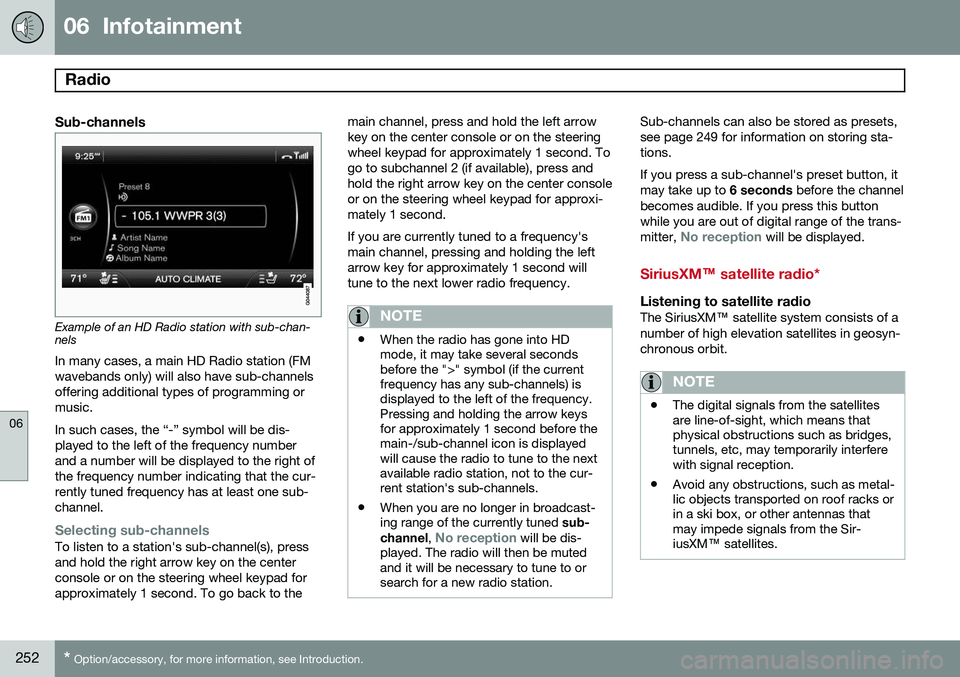
Example of an HD Radio station with sub-chan- nels
In many cases, a main HD Radio station (FM wavebands only) will also have sub-channelsoffering additional types of programming ormusic. In such cases, the “-” symbol will be dis- played to the left of the frequency numberand a number will be displayed to the right ofthe frequency number indicating that the cur-rently tuned frequency has at least one sub-channel.
Selecting sub-channelsTo listen to a station's sub-channel(s), press and hold the right arrow key on the centerconsole or on the steering wheel keypad forapproximately 1 second. To go back to the main channel, press and hold the left arrowkey on the center console or on the steeringwheel keypad for approximately 1 second. Togo to subchannel 2 (if available), press andhold the right arrow key on the center consoleor on the steering wheel keypad for approxi-mately 1 second. If you are currently tuned to a frequency's main channel, pressing and holding the leftarrow key for approximately 1 second willtune to the next lower radio frequency.
NOTE
•
When the radio has gone into HD mode, it may take several secondsbefore the ">" symbol (if the currentfrequency has any sub-channels) isdisplayed to the left of the frequency.Pressing and holding the arrow keysfor approximately 1 second before themain-/sub-channel icon is displayedwill cause the radio to tune to the nextavailable radio station, not to the cur-rent station's sub-channels.
• When you are no longer in broadcast-ing range of the currently tuned
sub-
channel ,
No reception will be dis-
played. The radio will then be muted and it will be necessary to tune to orsearch for a new radio station.
Sub-channels can also be stored as presets, see page 249 for information on storing sta-tions. If you press a sub-channel's preset button, it may take up to 6 seconds before the channel
becomes audible. If you press this buttonwhile you are out of digital range of the trans- mitter,
No reception will be displayed.
SiriusXM™ satellite radio*
Listening to satellite radioThe SiriusXM ™ satellite system consists of a
number of high elevation satellites in geosyn- chronous orbit.
NOTE
• The digital signals from the satellites are line-of-sight, which means thatphysical obstructions such as bridges,tunnels, etc, may temporarily interferewith signal reception.
• Avoid any obstructions, such as metal-lic objects transported on roof racks orin a ski box, or other antennas thatmay impede signals from the Sir-iusXM
™ satellites.
Page 279 of 406
06 Infotainment
Cell phone voice control*
06
}}
* Option/accessory, for more information, see Introduction.277
Getting started
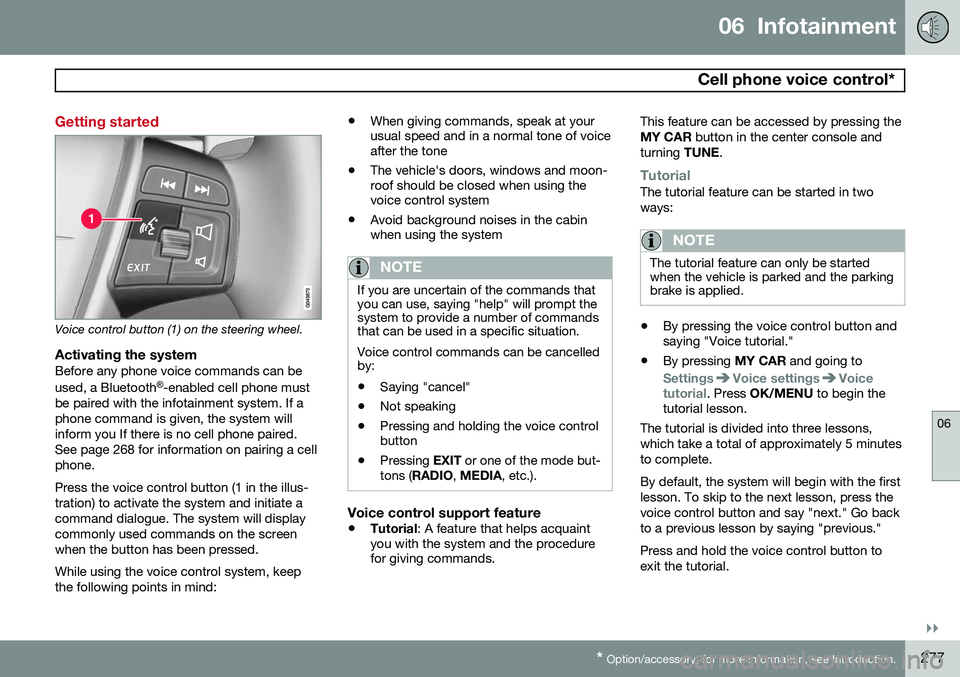
Voice control button (1) on the steering wheel.
Activating the systemBefore any phone voice commands can be used, a Bluetooth ®
-enabled cell phone must
be paired with the infotainment system. If a phone command is given, the system willinform you If there is no cell phone paired.See page 268 for information on pairing a cellphone. Press the voice control button (1 in the illus- tration) to activate the system and initiate acommand dialogue. The system will displaycommonly used commands on the screenwhen the button has been pressed. While using the voice control system, keep the following points in mind: •
When giving commands, speak at your usual speed and in a normal tone of voiceafter the tone
• The vehicle's doors, windows and moon-roof should be closed when using thevoice control system
• Avoid background noises in the cabinwhen using the system
NOTE
If you are uncertain of the commands that you can use, saying "help" will prompt thesystem to provide a number of commandsthat can be used in a specific situation. Voice control commands can be cancelled by:
• Saying "cancel"
• Not speaking
• Pressing and holding the voice control button
• Pressing
EXIT or one of the mode but-
tons ( RADIO , MEDIA , etc.).
Voice control support feature
•Tutorial
: A feature that helps acquaint
you with the system and the procedure for giving commands. This feature can be accessed by pressing the MY CAR
button in the center console and
turning TUNE.
TutorialThe tutorial feature can be started in two ways:
NOTE
The tutorial feature can only be started when the vehicle is parked and the parkingbrake is applied.
•By pressing the voice control button and saying "Voice tutorial."
• By pressing
MY CAR and going to
SettingsVoice settingsVoice
tutorial. Press OK/MENU to begin the
tutorial lesson.
The tutorial is divided into three lessons, which take a total of approximately 5 minutesto complete. By default, the system will begin with the first lesson. To skip to the next lesson, press thevoice control button and say "next." Go backto a previous lesson by saying "previous." Press and hold the voice control button to exit the tutorial.
Page 284 of 406
07 During your trip
Driving recommendations
07
282
General information
Economical driving conserves natural
resources
Better driving economy may be obtained by thinking ahead, avoiding rapid starts andstops and adjusting the speed of your vehicleto immediate traffic conditions. Observe the following rules:
• Bring the engine to normal operating tem- perature as soon as possible by drivingwith a light foot on the accelerator pedalfor the first few minutes of operation. Acold engine uses more fuel and is subjectto increased wear.
• Whenever possible, avoid using the vehi-cle for driving short distances. This doesnot allow the engine to reach normaloperating temperature.
• Drive carefully and avoid rapid accelera-tion and hard braking.
• Use the transmission's Drive (
D) position
as often as possible and avoid using kick-down.
• Using the engine's optional Eco function 1
can help improve fuel economy. Seepage 135 for additional information. •
Using the transmission's Sport mode 2
may increase fuel consumption some-what. Use the transmission's Drive ( D)
position as often as possible. See page130 for additional information about Sportmode.
• Do not exceed posted speed limits.
• Avoid carrying unnecessary items (extraload) in the vehicle.
• Maintain correct tire pressure. Check tirepressure regularly (when tires are cold).
• Remove snow tires when threat of snowor ice has ended.
• Note that roof racks, ski racks, etc,increase air resistance and also fuel con-sumption.
• At highway driving speeds, fuel consump-tion will be lower with the air conditioningon and the windows closed than with theair conditioning off and the windowsopen.
• Using the onboard trip computer's fuelconsumption modes can help you learnhow to drive more economically.
Other factors that decrease gas mileage are: •
Dirty air cleaner
• Dirty engine oil and clogged oil filter
• Dragging brakes
• Incorrect front end alignment
Some of the above mentioned items and oth-ers are checked at the standard maintenanceintervals.
WARNING
Driving with the tailgate open: Driving
with the tailgate open could lead to poi- sonous exhaust gases entering the pas-senger compartment. If the tailgate mustbe kept open for any reason, proceed asfollows: • Close the windows
• Set the ventilation system control to air flow to floor, windshield and side win-dows and the blower control to itshighest setting.
Weight distribution affects handlingAt the specified curb weight your vehicle has a tendency to understeer, which means thatthe steering wheel has to be turned morethan might seem appropriate for the curva-ture of a bend. This ensures good stabilityand reduces the risk of rear wheel skid.
1
Available on certain 4-cyl. engines
2 Models with the T6 turbo engine only.
Page 296 of 406
07 During your trip
Loading
07
294
Roof loads
Using load carriersLoad carriers are available as Volvo accesso- ries. Observe the following points when inuse:
• To avoid damaging your vehicle and to achieve maximum safety when driving,we recommend using the load carriersthat Volvo has developed especially foryour vehicle.
• Volvo-approved removable roof racks aredesigned to carry the maximum allowableroof load for this vehicle: 220 lbs (100 kg).For non-Volvo roof racks, check the man-ufacturer's weight limits for the rack.
• Never exceed the rack manufacturer'sweigh limits and never exceed the maxi-mum rated roof load of 220 lbs (100 kg).
• Avoid single-point loads. Distribute loadsevenly.
• Place heavier cargo at the bottom of theload.
• Secure the cargo correctly with appropri-ate tie-down equipment.
• Check periodically that the load carriersand load are properly secured.
• Remember that the vehicle's center ofgravity and handling change when youcarry a load on the roof. •
The vehicle's wind resistance and fuelconsumption will increase with the size ofthe load.
• Drive smoothly. Avoid rapid starts, fastcornering and hard braking.
Page 299 of 406
07 During your trip
Cargo area
07
}}
297
3. Insert the other end of the rod in the
opposite bracket. – Be sure to press the end hooks on the rod as far forward as possible in thebrackets.
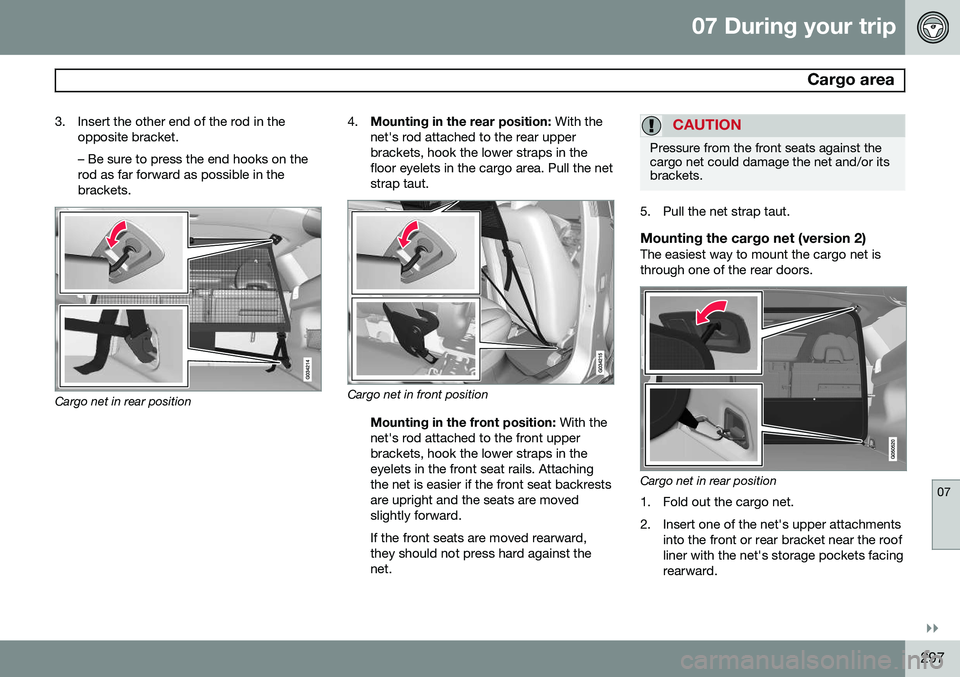
Cargo net in rear position 4.
Mounting in the rear position: With the
net's rod attached to the rear upper brackets, hook the lower straps in thefloor eyelets in the cargo area. Pull the netstrap taut.Cargo net in front position
Mounting in the front position: With the
net's rod attached to the front upper brackets, hook the lower straps in theeyelets in the front seat rails. Attachingthe net is easier if the front seat backrestsare upright and the seats are movedslightly forward. If the front seats are moved rearward, they should not press hard against thenet.
CAUTION
Pressure from the front seats against the cargo net could damage the net and/or itsbrackets.
5. Pull the net strap taut.
Mounting the cargo net (version 2)The easiest way to mount the cargo net is through one of the rear doors.
Cargo net in rear position
1. Fold out the cargo net.
2. Insert one of the net's upper attachments into the front or rear bracket near the roof liner with the net's storage pockets facingrearward.
Page 370 of 406
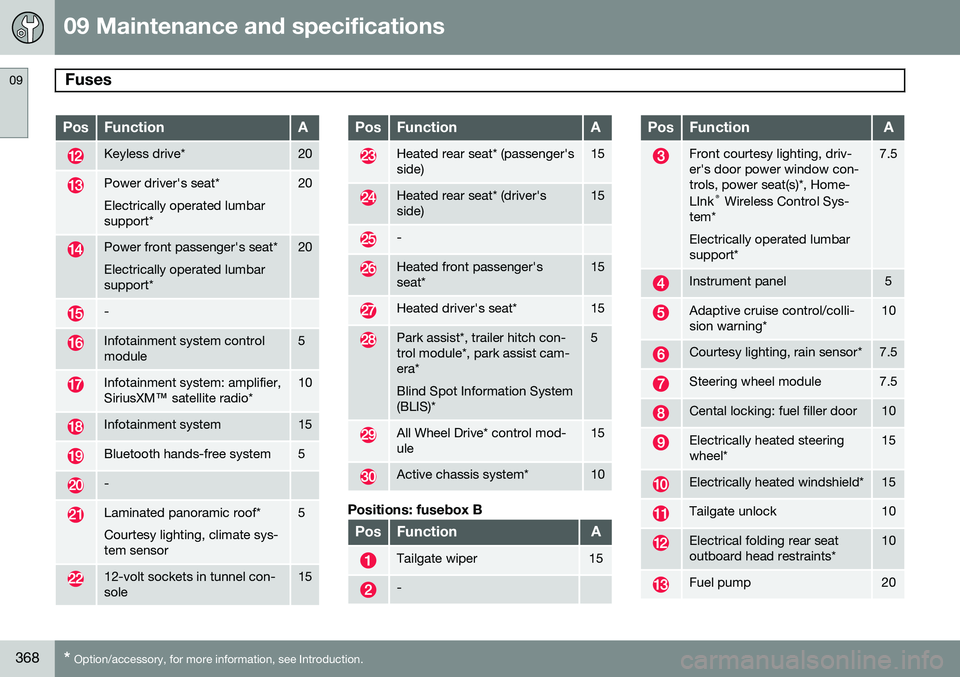
09 Maintenance and specifications
Fuses 09
368* Option/accessory, for more information, see Introduction.
PosFunctionA
Keyless drive*20
Power driver's seat* Electrically operated lumbar support*20
Power front passenger's seat* Electrically operated lumbar support*20
-
Infotainment system control module5
Infotainment system: amplifier, SiriusXM ™ satellite radio*10
Infotainment system15
Bluetooth hands-free system5
-
Laminated panoramic roof* Courtesy lighting, climate sys- tem sensor5
12-volt sockets in tunnel con- sole15
PosFunctionA
Heated rear seat* (passenger's side)15
Heated rear seat* (driver's side)15
-
Heated front passenger's seat*15
Heated driver's seat*15
Park assist*, trailer hitch con- trol module*, park assist cam-era* Blind Spot Information System (BLIS)*5
All Wheel Drive* control mod- ule15
Active chassis system*10
Positions: fusebox B
PosFunctionA
Tailgate wiper15
-
PosFunctionA
Front courtesy lighting, driv- er's door power window con-trols, power seat(s)*, Home- LInk ®
Wireless Control Sys-
tem* Electrically operated lumbar support*7.5
Instrument panel5
Adaptive cruise control/colli- sion warning*10
Courtesy lighting, rain sensor*7.5
Steering wheel module7.5
Cental locking: fuel filler door10
Electrically heated steering wheel*15
Electrically heated windshield*15
Tailgate unlock10
Electrical folding rear seat outboard head restraints*10
Fuel pump20
Page 371 of 406
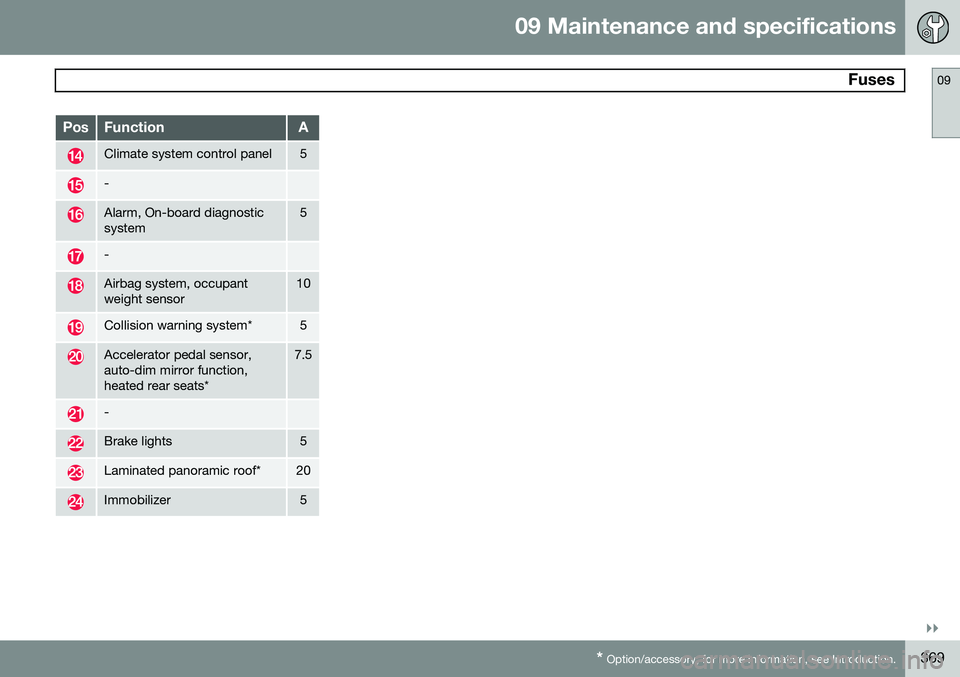
09 Maintenance and specifications
Fuses09
}}
* Option/accessory, for more information, see Introduction.369
PosFunctionA
Climate system control panel5
-
Alarm, On-board diagnostic system5
-
Airbag system, occupant weight sensor10
Collision warning system*5
Accelerator pedal sensor, auto-dim mirror function,heated rear seats*7.5
-
Brake lights5
Laminated panoramic roof*20
Immobilizer5