roof VOLVO XC60 2015 Owner´s Manual
[x] Cancel search | Manufacturer: VOLVO, Model Year: 2015, Model line: XC60, Model: VOLVO XC60 2015Pages: 406, PDF Size: 11.03 MB
Page 5 of 406
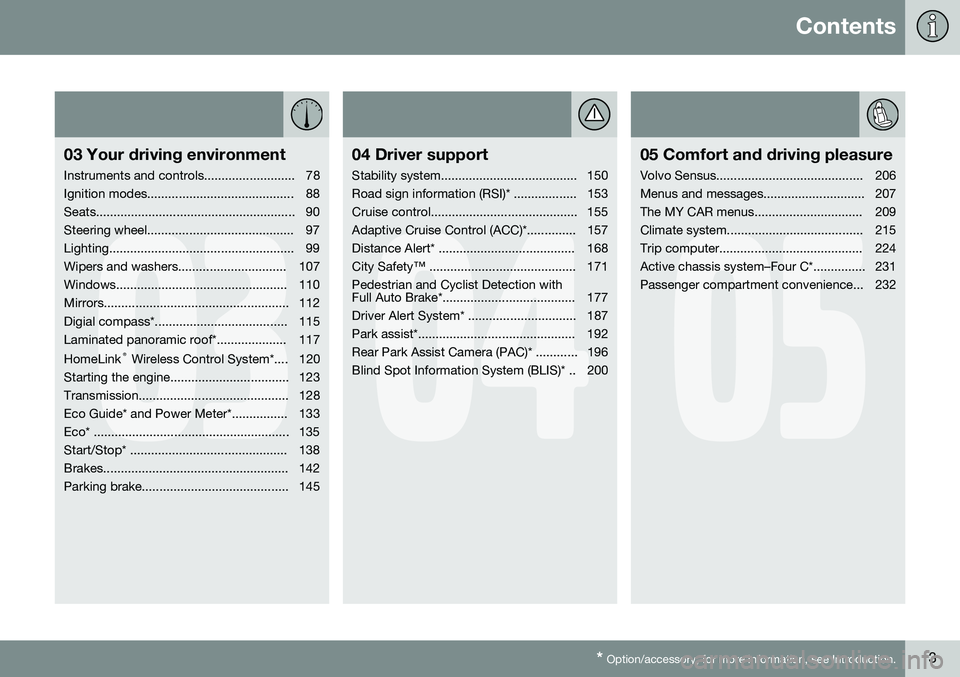
Contents
* Option/accessory, for more information, see Introduction.3
03
03 Your driving environment
Instruments and controls.......................... 78
Ignition modes.......................................... 88
Seats......................................................... 90
Steering wheel.......................................... 97
Lighting..................................................... 99
Wipers and washers............................... 107
Windows................................................. 110
Mirrors..................................................... 112
Digial compass*...................................... 115
Laminated panoramic roof*.................... 117 HomeLink ®
Wireless Control System*.... 120
Starting the engine.................................. 123
Transmission........................................... 128
Eco Guide* and Power Meter*................ 133
Eco* ........................................................ 135
Start/Stop* ............................................. 138
Brakes..................................................... 142
Parking brake.......................................... 145
04
04 Driver support
Stability system....................................... 150
Road sign information (RSI)* .................. 153
Cruise control.......................................... 155
Adaptive Cruise Control (ACC)*.............. 157
Distance Alert* ....................................... 168
City Safety™ .......................................... 171Pedestrian and Cyclist Detection with
Full Auto Brake*...................................... 177
Driver Alert System* ............................... 187
Park assist*............................................. 192
Rear Park Assist Camera (PAC)* ............ 196
Blind Spot Information System (BLIS)* .. 200
05
05 Comfort and driving pleasure
Volvo Sensus.......................................... 206
Menus and messages............................. 207
The MY CAR menus............................... 209
Climate system....................................... 215
Trip computer......................................... 224
Active chassis system–Four C*............... 231
Passenger compartment convenience... 232
Page 34 of 406
01 Safety
Inflatable Curtain (IC) 01
32
General information
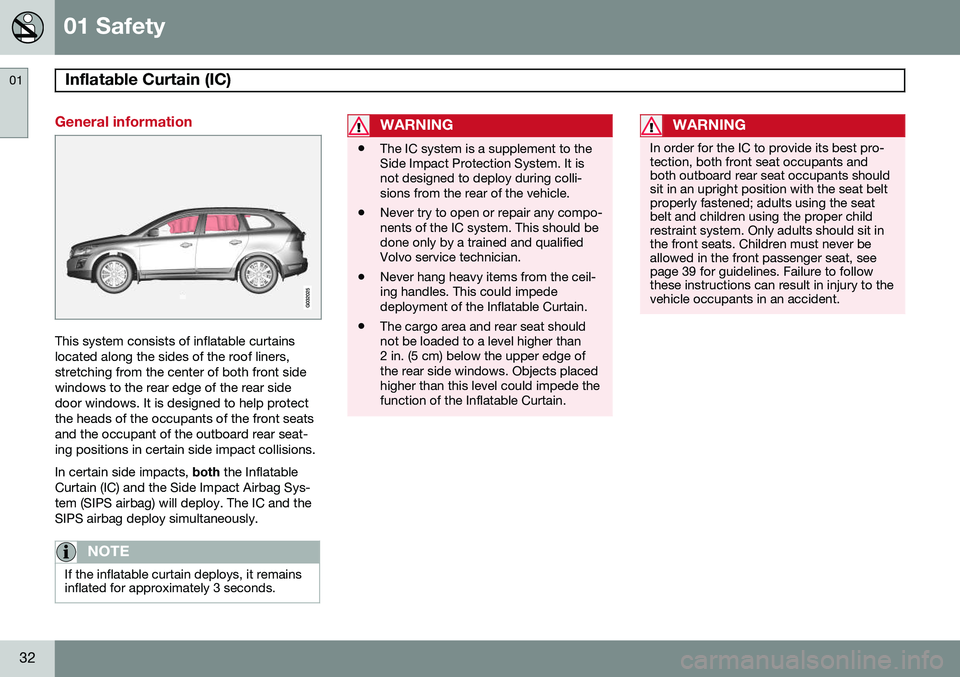
This system consists of inflatable curtains located along the sides of the roof liners,stretching from the center of both front sidewindows to the rear edge of the rear sidedoor windows. It is designed to help protectthe heads of the occupants of the front seatsand the occupant of the outboard rear seat-ing positions in certain side impact collisions. In certain side impacts, both the Inflatable
Curtain (IC) and the Side Impact Airbag Sys- tem (SIPS airbag) will deploy. The IC and theSIPS airbag deploy simultaneously.
NOTE
If the inflatable curtain deploys, it remains inflated for approximately 3 seconds.
WARNING
• The IC system is a supplement to the Side Impact Protection System. It isnot designed to deploy during colli-sions from the rear of the vehicle.
• Never try to open or repair any compo-nents of the IC system. This should bedone only by a trained and qualifiedVolvo service technician.
• Never hang heavy items from the ceil-ing handles. This could impededeployment of the Inflatable Curtain.
• The cargo area and rear seat shouldnot be loaded to a level higher than2 in. (5 cm) below the upper edge ofthe rear side windows. Objects placedhigher than this level could impede thefunction of the Inflatable Curtain.
WARNING
In order for the IC to provide its best pro- tection, both front seat occupants andboth outboard rear seat occupants shouldsit in an upright position with the seat beltproperly fastened; adults using the seatbelt and children using the proper childrestraint system. Only adults should sit inthe front seats. Children must never beallowed in the front passenger seat, seepage 39 for guidelines. Failure to followthese instructions can result in injury to thevehicle occupants in an accident.
Page 78 of 406
76* Option/accessory, for more information, see Introduction. Instruments and controls........................................................................ 78 Ignition modes........................................................................................ 88Seats....................................................................................................... 90Steering wheel........................................................................................ 97Lighting................................................................................................... 99
Wipers and washers.............................................................................. 107Windows............................................................................................... 110Mirrors................................................................................................... 112
Digial compass*.................................................................................... 115
Laminated panoramic roof*................................................................... 117 HomeLink
®
Wireless Control System*.................................................. 120
Starting the engine................................................................................ 123 Transmission......................................................................................... 128
Eco Guide* and Power Meter*.............................................................. 133Eco* ...................................................................................................... 135Start/Stop* ........................................................................................... 138Brakes................................................................................................... 142Parking brake........................................................................................ 145
Page 90 of 406
03 Your driving environment
Ignition modes
03
88* Option/accessory, for more information, see Introduction.
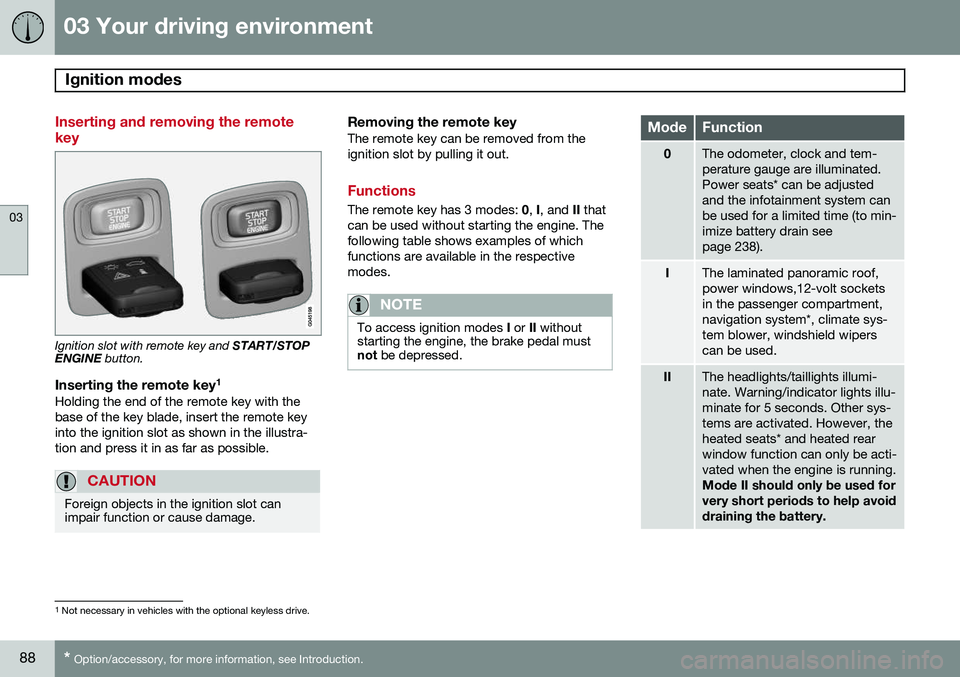
Inserting and removing the remote key
Ignition slot with remote key and START/STOP
ENGINE button.
Inserting the remote key 1Holding the end of the remote key with the base of the key blade, insert the remote keyinto the ignition slot as shown in the illustra-tion and press it in as far as possible.
CAUTION
Foreign objects in the ignition slot can impair function or cause damage.
Removing the remote keyThe remote key can be removed from the ignition slot by pulling it out.
Functions
The remote key has 3 modes:
0, I, and II that
can be used without starting the engine. The following table shows examples of whichfunctions are available in the respectivemodes.
NOTE
To access ignition modes I or II without
starting the engine, the brake pedal must not be depressed.
ModeFunction
0The odometer, clock and tem- perature gauge are illuminated.Power seats* can be adjustedand the infotainment system canbe used for a limited time (to min-imize battery drain seepage 238).
IThe laminated panoramic roof, power windows,12-volt socketsin the passenger compartment,navigation system*, climate sys-tem blower, windshield wiperscan be used.
IIThe headlights/taillights illumi- nate. Warning/indicator lights illu-minate for 5 seconds. Other sys-tems are activated. However, theheated seats* and heated rearwindow function can only be acti-vated when the engine is running. Mode II should only be used for very short periods to help avoiddraining the battery.
1
Not necessary in vehicles with the optional keyless drive.
Page 105 of 406
03 Your driving environment
Lighting
03
}}
103
The intensity of the instrument lighting is adjusted with the thumb wheel.
"Theater" lightingWhen the overhead courtesy lighting hasgone out and the engine is running, severalLEDs located near the roof console illuminateto provide faint lighting for the occupants ofthe front seats. This lighting goes out justafter the overhead courtesy lighting when thevehicle is locked.
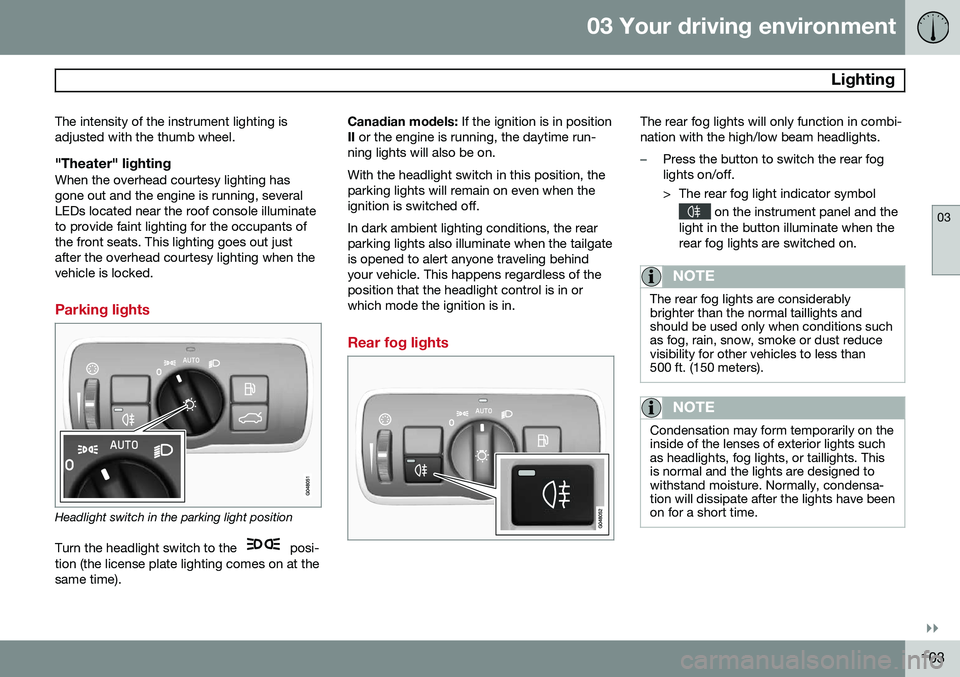
Parking lights
Headlight switch in the parking light position
Turn the headlight switch to the
posi-
tion (the license plate lighting comes on at the same time). Canadian models:
If the ignition is in position
II or the engine is running, the daytime run-
ning lights will also be on. With the headlight switch in this position, the parking lights will remain on even when theignition is switched off. In dark ambient lighting conditions, the rear parking lights also illuminate when the tailgateis opened to alert anyone traveling behindyour vehicle. This happens regardless of theposition that the headlight control is in orwhich mode the ignition is in.
Rear fog lights
The rear fog lights will only function in combi- nation with the high/low beam headlights.
–Press the button to switch the rear fog lights on/off.
> The rear fog light indicator symbol
on the instrument panel and the
light in the button illuminate when the rear fog lights are switched on.
NOTE
The rear fog lights are considerably brighter than the normal taillights andshould be used only when conditions suchas fog, rain, snow, smoke or dust reducevisibility for other vehicles to less than500 ft. (150 meters).
NOTE
Condensation may form temporarily on the inside of the lenses of exterior lights suchas headlights, fog lights, or taillights. Thisis normal and the lights are designed towithstand moisture. Normally, condensa-tion will dissipate after the lights have beenon for a short time.
Page 106 of 406
03 Your driving environment
Lighting
03
104
Hazard warning flashers
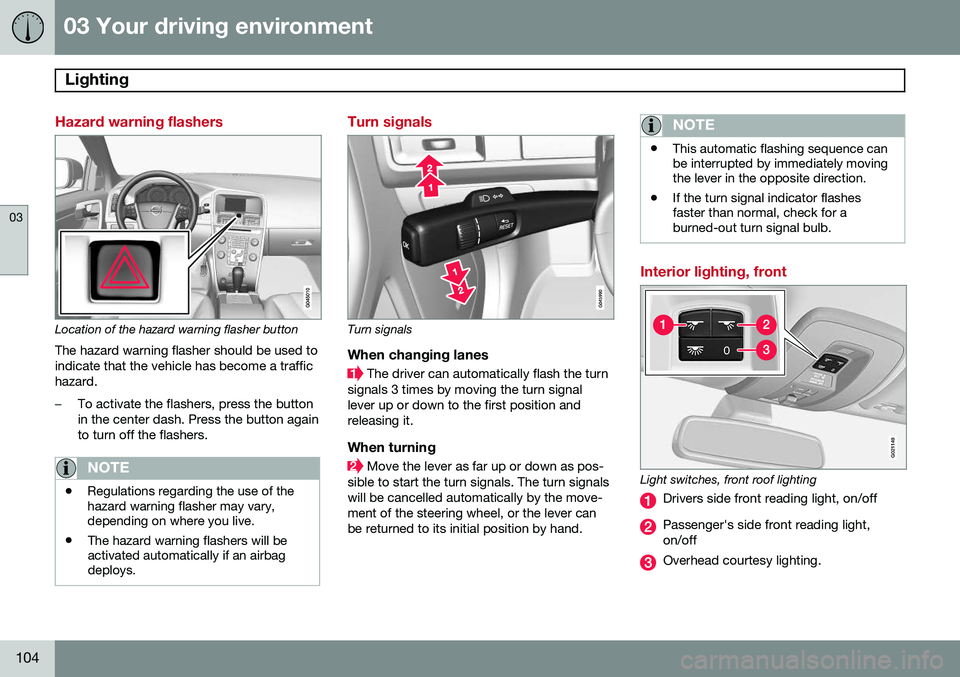
Location of the hazard warning flasher button
The hazard warning flasher should be used to indicate that the vehicle has become a traffichazard.
–To activate the flashers, press the button in the center dash. Press the button againto turn off the flashers.
NOTE
• Regulations regarding the use of the hazard warning flasher may vary,depending on where you live.
• The hazard warning flashers will beactivated automatically if an airbagdeploys.
Turn signals
Turn signals
When changing lanes
The driver can automatically flash the turn
signals 3 times by moving the turn signal lever up or down to the first position andreleasing it.
When turning
Move the lever as far up or down as pos-
sible to start the turn signals. The turn signals will be cancelled automatically by the move-ment of the steering wheel, or the lever canbe returned to its initial position by hand.
NOTE
• This automatic flashing sequence can be interrupted by immediately movingthe lever in the opposite direction.
• If the turn signal indicator flashesfaster than normal, check for aburned-out turn signal bulb.
Interior lighting, front
G021149
Light switches, front roof lighting
Drivers side front reading light, on/off
Passenger's side front reading light, on/off
Overhead courtesy lighting.
Page 107 of 406
03 Your driving environment
Lighting
03
}}
* Option/accessory, for more information, see Introduction.105
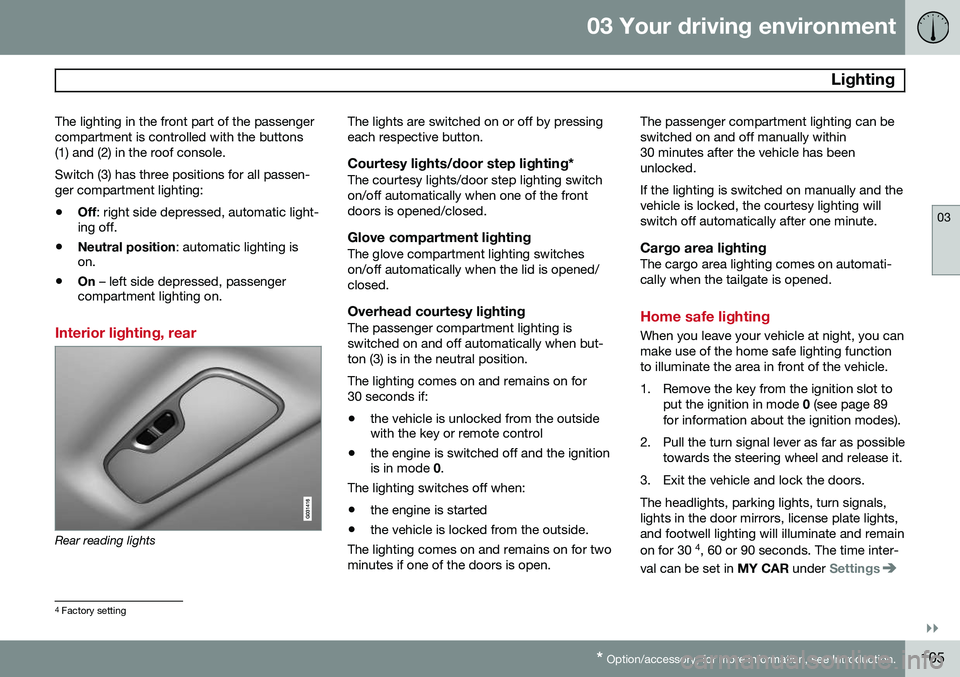
The lighting in the front part of the passenger compartment is controlled with the buttons(1) and (2) in the roof console. Switch (3) has three positions for all passen- ger compartment lighting:
• Off
: right side depressed, automatic light-
ing off.
• Neutral position
: automatic lighting is
on.
• On
– left side depressed, passenger
compartment lighting on.
Interior lighting, rear
Rear reading lights The lights are switched on or off by pressing each respective button.
Courtesy lights/door step lighting*The courtesy lights/door step lighting switchon/off automatically when one of the frontdoors is opened/closed.
Glove compartment lightingThe glove compartment lighting switcheson/off automatically when the lid is opened/closed.
Overhead courtesy lightingThe passenger compartment lighting isswitched on and off automatically when but-ton (3) is in the neutral position. The lighting comes on and remains on for 30 seconds if:
• the vehicle is unlocked from the outside with the key or remote control
• the engine is switched off and the ignitionis in mode
0.
The lighting switches off when:
• the engine is started
• the vehicle is locked from the outside.
The lighting comes on and remains on for two minutes if one of the doors is open. The passenger compartment lighting can beswitched on and off manually within30 minutes after the vehicle has beenunlocked. If the lighting is switched on manually and the vehicle is locked, the courtesy lighting willswitch off automatically after one minute.
Cargo area lightingThe cargo area lighting comes on automati-cally when the tailgate is opened.
Home safe lighting
When you leave your vehicle at night, you can make use of the home safe lighting functionto illuminate the area in front of the vehicle.
1. Remove the key from the ignition slot to
put the ignition in mode 0 (see page 89
for information about the ignition modes).
2. Pull the turn signal lever as far as possible towards the steering wheel and release it.
3. Exit the vehicle and lock the doors.The headlights, parking lights, turn signals, lights in the door mirrors, license plate lights,and footwell lighting will illuminate and remain on for 30 4
, 60 or 90 seconds. The time inter-
val can be set in MY CAR under
Settings
4
Factory setting
Page 113 of 406
03 Your driving environment
Windows
03
* Option/accessory, for more information, see Introduction.111
ResettingIf the battery has been disconnected, the auto open function must be reset so that itwill work properly.
1. Gently raise the front section of the but-
ton to close the window and hold it for one second.
2. Release the button briefly.
3. Raise the front section of the button again for one second.
Laminated glass*This glass is reinforced to help pro- vide protection against break-insand improved sound insulation inthe passenger compartment.
The windshield, laminated panoramic roofand other windows have laminated glass.
Page 119 of 406
03 Your driving environment
Laminated panoramic roof*
03
}}
* Option/accessory, for more information, see Introduction.117
Introduction
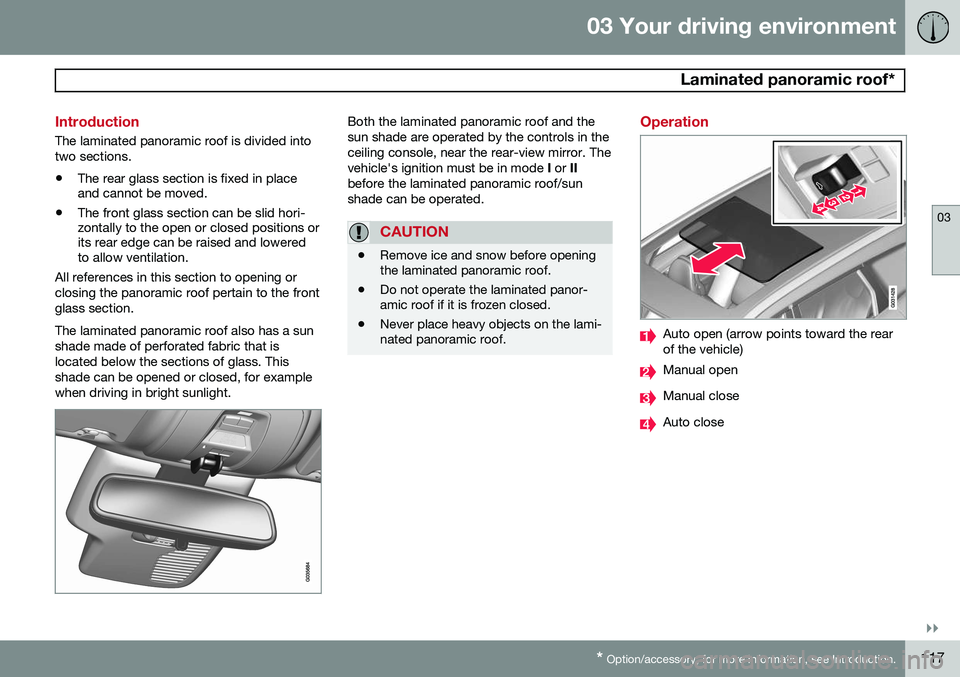
The laminated panoramic roof is divided into two sections.
• The rear glass section is fixed in place and cannot be moved.
• The front glass section can be slid hori-zontally to the open or closed positions orits rear edge can be raised and loweredto allow ventilation.
All references in this section to opening or closing the panoramic roof pertain to the frontglass section. The laminated panoramic roof also has a sun shade made of perforated fabric that islocated below the sections of glass. Thisshade can be opened or closed, for examplewhen driving in bright sunlight.
Both the laminated panoramic roof and the sun shade are operated by the controls in theceiling console, near the rear-view mirror. Thevehicle's ignition must be in mode I or II
before the laminated panoramic roof/sunshade can be operated.
CAUTION
• Remove ice and snow before opening the laminated panoramic roof.
• Do not operate the laminated panor-amic roof if it is frozen closed.
• Never place heavy objects on the lami-nated panoramic roof.
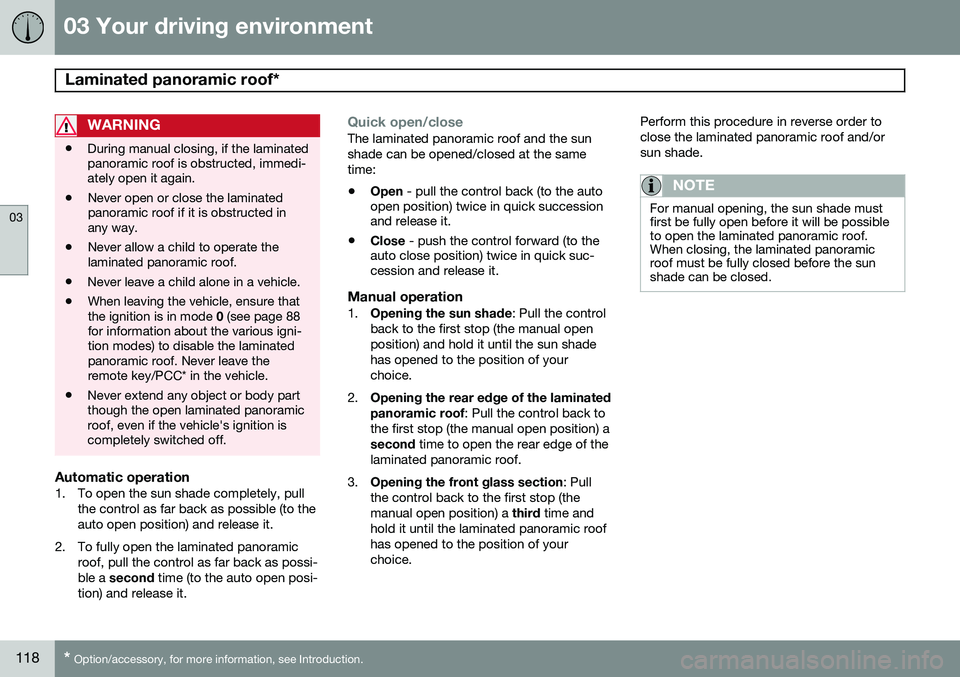
Operation
Auto open (arrow points toward the rear of the vehicle)
Manual open
Manual close
Auto close
Page 120 of 406
03 Your driving environment
Laminated panoramic roof*
03
118* Option/accessory, for more information, see Introduction.
WARNING
• During manual closing, if the laminated panoramic roof is obstructed, immedi-ately open it again.
• Never open or close the laminatedpanoramic roof if it is obstructed inany way.
• Never allow a child to operate thelaminated panoramic roof.
• Never leave a child alone in a vehicle.
• When leaving the vehicle, ensure thatthe ignition is in mode
0 (see page 88
for information about the various igni-tion modes) to disable the laminatedpanoramic roof. Never leave theremote key/PCC* in the vehicle.
• Never extend any object or body partthough the open laminated panoramicroof, even if the vehicle's ignition iscompletely switched off.
Automatic operation1. To open the sun shade completely, pull
the control as far back as possible (to the auto open position) and release it.
2. To fully open the laminated panoramic roof, pull the control as far back as possi-ble a second time (to the auto open posi-
tion) and release it.
Quick open/closeThe laminated panoramic roof and the sun shade can be opened/closed at the sametime: • Open
- pull the control back (to the auto
open position) twice in quick succession and release it.
• Close
- push the control forward (to the
auto close position) twice in quick suc-cession and release it.
Manual operation1. Opening the sun shade : Pull the control
back to the first stop (the manual open position) and hold it until the sun shadehas opened to the position of yourchoice.
2. Opening the rear edge of the laminated panoramic roof
: Pull the control back to
the first stop (the manual open position) a second time to open the rear edge of the
laminated panoramic roof.
3. Opening the front glass section : Pull
the control back to the first stop (themanual open position) a third time and
hold it until the laminated panoramic roofhas opened to the position of yourchoice. Perform this procedure in reverse order toclose the laminated panoramic roof and/orsun shade.
NOTE
For manual opening, the sun shade must first be fully open before it will be possibleto open the laminated panoramic roof.When closing, the laminated panoramicroof must be fully closed before the sunshade can be closed.