ESP VOLVO XC60 2015 Owner´s Manual
[x] Cancel search | Manufacturer: VOLVO, Model Year: 2015, Model line: XC60, Model: VOLVO XC60 2015Pages: 406, PDF Size: 11.03 MB
Page 224 of 406
05 Comfort and driving pleasure
Climate system
05
222* Option/accessory, for more information, see Introduction.
NOTE
• Triangular areas at the far sides of the windshield are not heated electricallyand will take slightly longer todefrost/de-ice.
• The heated windshield may affect theperformance/range of e.g., transpond-ers used to automatically pay highwaytolls or other communication equip-ment.
The following occurs when the defroster/ windshield heating functions have been acti-vated: •
Blower speed increases automatically and the air conditioning will switch on (ifnot already on and if the passenger com-partment blower is not turned off) todehumidify the air in the passenger com-partment. Air conditioning can beswitched off by pressing the
AC button.
• Recirculation will not function whiledefrost is engaged.
The climate system will return to its previous settings when the defroster/windshield heat-ing function is switched off. See also page 113 for additional information.
Recirculation/air quality system
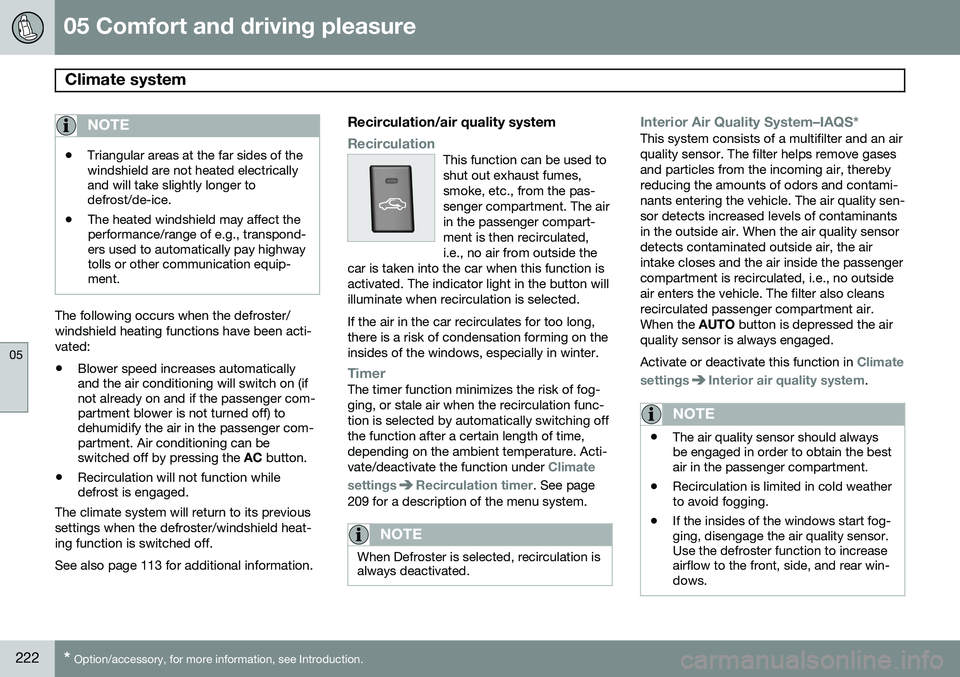
RecirculationThis function can be used to shut out exhaust fumes,smoke, etc., from the pas-senger compartment. The airin the passenger compart-ment is then recirculated,i.e., no air from outside the
car is taken into the car when this function isactivated. The indicator light in the button willilluminate when recirculation is selected. If the air in the car recirculates for too long, there is a risk of condensation forming on theinsides of the windows, especially in winter.
TimerThe timer function minimizes the risk of fog- ging, or stale air when the recirculation func-tion is selected by automatically switching offthe function after a certain length of time,depending on the ambient temperature. Acti-vate/deactivate the function under
Climate
settings
Recirculation timer. See page
209 for a description of the menu system.
NOTE
When Defroster is selected, recirculation is always deactivated.
Interior Air Quality System–IAQS*This system consists of a multifilter and an air quality sensor. The filter helps remove gasesand particles from the incoming air, therebyreducing the amounts of odors and contami-nants entering the vehicle. The air quality sen-sor detects increased levels of contaminantsin the outside air. When the air quality sensordetects contaminated outside air, the airintake closes and the air inside the passengercompartment is recirculated, i.e., no outsideair enters the vehicle. The filter also cleansrecirculated passenger compartment air.When the AUTO button is depressed the air
quality sensor is always engaged. Activate or deactivate this function in
Climate
settings
Interior air quality system.
NOTE
• The air quality sensor should always be engaged in order to obtain the bestair in the passenger compartment.
• Recirculation is limited in cold weatherto avoid fogging.
• If the insides of the windows start fog-ging, disengage the air quality sensor.Use the defroster function to increaseairflow to the front, side, and rear win-dows.
Page 233 of 406
05 Comfort and driving pleasure
Active chassis system–Four C*
05
* Option/accessory, for more information, see Introduction.231
Active chassis (Four C)
Active chassis, Four-C (Continuously Con- trolled Chassis Concept), regulates the cha-racteristics of the shock absorbers so that thevehicle's driving characteristics can beadjusted. There are three settings: Comfort,Sport and Advanced.
NOTE
This system is available on Canadian mod- els only.
ComfortComfort mode offers a somewhat softer ride and the transmission shifts gears at lowerrpm. This mode is particularly suitable forlong-distance highway driving. The indicatorlight in the button will be on when this modeis selected.
SportIn this mode, the vehicle's body sway isreduced during cornering and steeringresponse is more immediate. The transmis-sion shifts up at higher rpm for sportier driv-ing. The indicator light in the button will be onto indicate that Sport mode has beenselected.
AdvancedIn this mode, body sway in curves is minimaland steering response is very direct. Gearshifting is done at high rpm in each gear fordynamic and active driving.
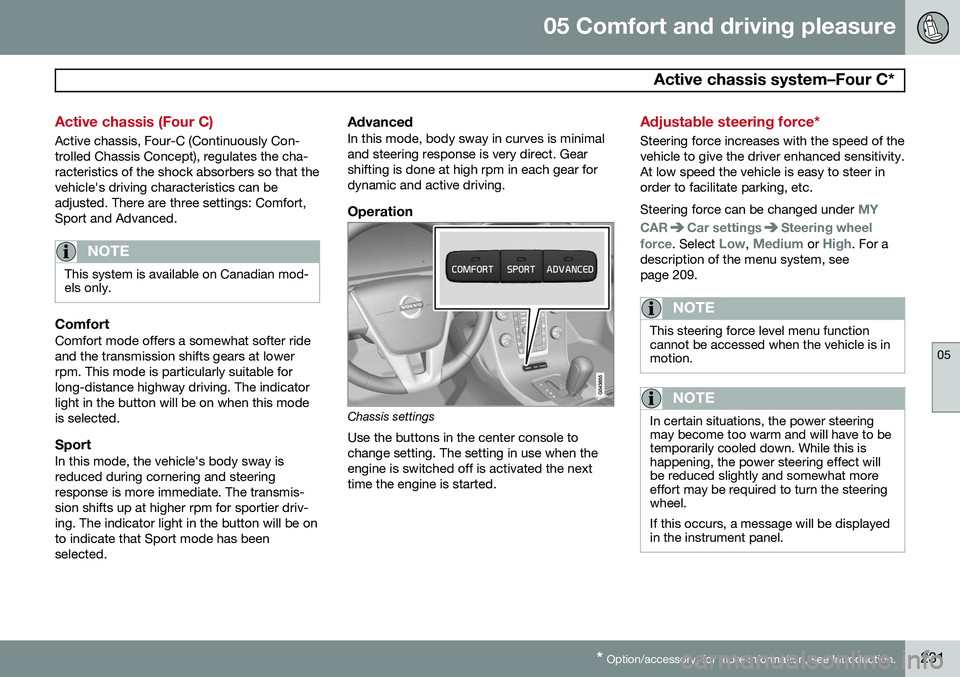
Operation
Chassis settings
Use the buttons in the center console to change setting. The setting in use when theengine is switched off is activated the nexttime the engine is started.
Adjustable steering force*
Steering force increases with the speed of the vehicle to give the driver enhanced sensitivity.At low speed the vehicle is easy to steer inorder to facilitate parking, etc. Steering force can be changed under
MY
CAR
Car settingsSteering wheel
force
. Select Low, Medium or High. For a
description of the menu system, see page 209.
NOTE
This steering force level menu function cannot be accessed when the vehicle is inmotion.
NOTE
In certain situations, the power steering may become too warm and will have to betemporarily cooled down. While this ishappening, the power steering effect willbe reduced slightly and somewhat moreeffort may be required to turn the steeringwheel. If this occurs, a message will be displayed in the instrument panel.
Page 241 of 406
06 Infotainment
Introduction
06
}}
* Option/accessory, for more information, see Introduction.239
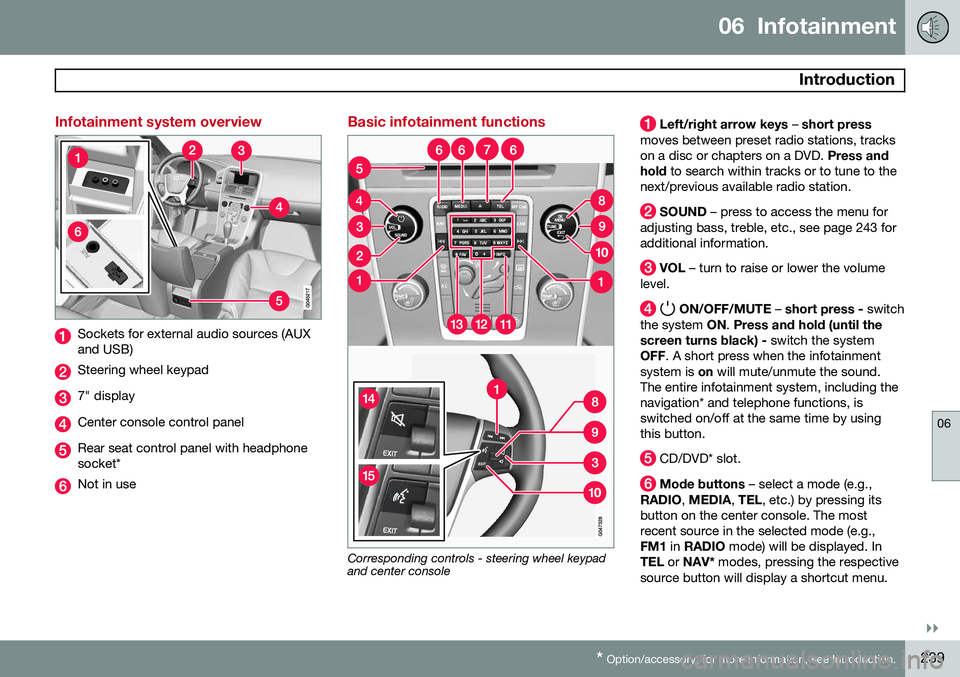
Infotainment system overview
Sockets for external audio sources (AUX and USB)
Steering wheel keypad
7" display
Center console control panel
Rear seat control panel with headphone socket*
Not in use
Basic infotainment functions
Corresponding controls - steering wheel keypad and center console
Left/right arrow keys – short press
moves between preset radio stations, tracks on a disc or chapters on a DVD. Press and
hold to search within tracks or to tune to the
next/previous available radio station.
SOUND – press to access the menu for
adjusting bass, treble, etc., see page 243 for additional information.
VOL – turn to raise or lower the volume
level.
ON/OFF/MUTE – short press - switch
the system ON. Press and hold (until the
screen turns black) - switch the system
OFF . A short press when the infotainment
system is on will mute/unmute the sound.
The entire infotainment system, including the navigation* and telephone functions, isswitched on/off at the same time by usingthis button.
CD/DVD* slot.
Mode buttons – select a mode (e.g.,
RADIO , MEDIA , TEL , etc.) by pressing its
button on the center console. The most recent source in the selected mode (e.g.,FM1 in RADIO mode) will be displayed. In
TEL or NAV* modes, pressing the respective
source button will display a shortcut menu.
Page 242 of 406
06 Infotainment
Introduction
06
240* Option/accessory, for more information, see Introduction.
Eject a disc.
OK/MENU – press the thumb wheel on
the steering wheel keypad or this button on the center console to confirm a menu selec-tion or accept an incoming phone call. FromRADIO or MEDIA mode's main view, press-
ing this button displays a menu for theselected source. Arrows at the right of thescreen indicate submenus.
TUNE – turn the thumb wheel on the
steering wheel keypad or this button on the center console to scroll among tracks/folders,radio stations, phone contacts or to navigateamong the alternatives shown on the screen.
EXIT – short press - go upward in the
menu system, cancel a current function, reject an incoming phone call or erase char-acters that have been entered on the screen.Press and hold - to go to the mode's main
view. From a mode’s main view, pressing andholding EXIT takes you to the infotainment
system's main view, which enables you toaccess the same modes as by pressing therespective mode keys on the center console.
# INFO – if more information is available
than is currently displayed on the screen, press # INFO to display the remaining infor-
mation.
Keypad for entering text/numbers, storing
radio stations, etc.
* FAV – this button can be used to store a
shortcut to a commonly used function in AM/FM/SIRIUS/DISC, etc. See the section " *
FAV —storing a shortcut" on page 243 for
information on using this button.
MUTE (models without the navigation sys-
tem*) – press to mute/unmute infotainment system sound.
Voice control (models with the navigation
system*) – press to activate voice commands (for Bluetooth ®
-connected cell phones and
the navigation system*).
Page 269 of 406
06 Infotainment
Bluetooth® hands-free connection
06
}}
267
Introduction
This feature makes it possible to set up a wireless connection between a Bluetooth ®
-
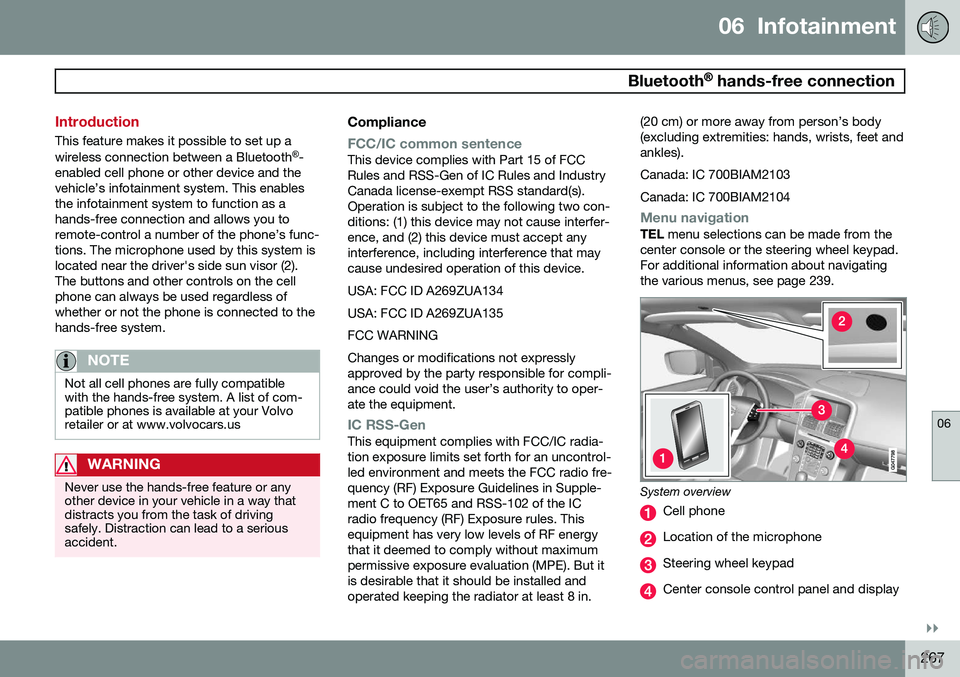
enabled cell phone or other device and the vehicle’s infotainment system. This enablesthe infotainment system to function as ahands-free connection and allows you toremote-control a number of the phone’s func-tions. The microphone used by this system islocated near the driver's side sun visor (2).The buttons and other controls on the cellphone can always be used regardless ofwhether or not the phone is connected to thehands-free system.
NOTE
Not all cell phones are fully compatible with the hands-free system. A list of com-patible phones is available at your Volvoretailer or at www.volvocars.us
WARNING
Never use the hands-free feature or any other device in your vehicle in a way thatdistracts you from the task of drivingsafely. Distraction can lead to a seriousaccident.
Compliance
FCC/IC common sentenceThis device complies with Part 15 of FCC Rules and RSS-Gen of IC Rules and IndustryCanada license-exempt RSS standard(s).Operation is subject to the following two con-ditions: (1) this device may not cause interfer-ence, and (2) this device must accept anyinterference, including interference that maycause undesired operation of this device. USA: FCC ID A269ZUA134USA: FCC ID A269ZUA135FCC WARNINGChanges or modifications not expressly approved by the party responsible for compli-ance could void the user’s authority to oper-ate the equipment.
IC RSS-GenThis equipment complies with FCC/IC radia- tion exposure limits set forth for an uncontrol-led environment and meets the FCC radio fre-quency (RF) Exposure Guidelines in Supple-ment C to OET65 and RSS-102 of the ICradio frequency (RF) Exposure rules. Thisequipment has very low levels of RF energythat it deemed to comply without maximumpermissive exposure evaluation (MPE). But itis desirable that it should be installed andoperated keeping the radiator at least 8 in. (20 cm) or more away from person’s body(excluding extremities: hands, wrists, feet andankles). Canada: IC 700BIAM2103Canada: IC 700BIAM2104
Menu navigationTEL
menu selections can be made from the
center console or the steering wheel keypad. For additional information about navigatingthe various menus, see page 239.
System overview
Cell phone
Location of the microphone
Steering wheel keypad
Center console control panel and display
Page 278 of 406
06 Infotainment
Cell phone voice control*
06
276* Option/accessory, for more information, see Introduction.
Introduction
The infotainment system's voice control fea- ture 1
enables the driver to voice-activate cer-
tain functions in a Bluetooth ®
-connected cell
phone or the navigation system.
NOTE
• The information in this section applies to using voice commands to operate a Bluetooth
®
-connected cell phone .
See also the section "Bluetooth ®
hands-free connection" beginning on page 267 for detailed informationabout using a cell phone with the vehi-cle's infotainment system.
• The navigation system has a separateuser's guide containing informationabout voice commands for operatingthat system.
Voice commands offer convenience and help avoid distractions so that you can concen-trate on driving and focus your attention onroad and traffic conditions.
WARNING
As the driver, you have full responsibility for operating the vehicle safely and adher-ing to all applicable traffic regulations.
The voice control feature provides access to a number of functions in the Bluetooth ®
hands-free and navigation systems while allowing you to keep your hands on the steer-ing wheel. Input is in dialogue form usingspoken commands from the user and verbalprompts from the system. Voice control uses the same microphone as the Bluetooth ®
hands-free system (see the illustration on page 267) and system prompts are providedthrough the infotainment system's frontspeakers.
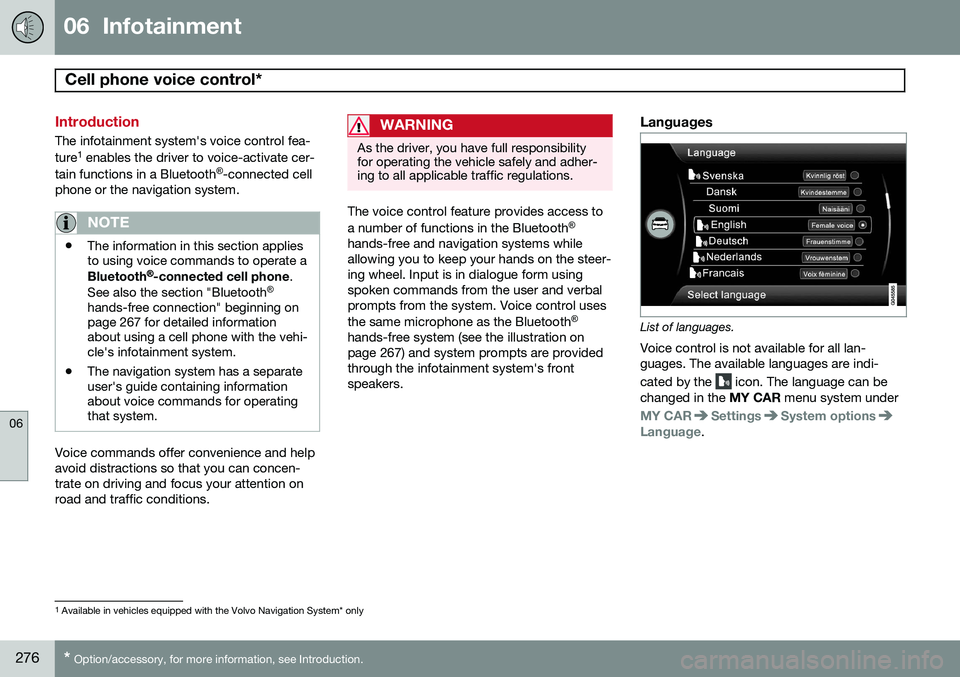
Languages
List of languages.
Voice control is not available for all lan- guages. The available languages are indi- cated by the
icon. The language can be
changed in the MY CAR menu system under
MY CARSettingsSystem optionsLanguage.
1
Available in vehicles equipped with the Volvo Navigation System* only
Page 280 of 406
06 Infotainment
Cell phone voice control*
06
278* Option/accessory, for more information, see Introduction.
Voice output volume
Press MY CAR and go to SettingsVoice
settings
Voice output volume. Press OK/
MENU and turn TUNE to raise or lower the
volume. Press EXIT to save the change and
exit the menu.
Using voice commands
The driver initiates a voice command dialogue by pressing the voice control button (see theillustration on page 277). When a dialogue has been initiated, com- monly used commands will be shown in thedisplay. Grayed-out texts or texts in paren-theses are not part of the spoken command. Once you become familiar with the system, you can speed up the command dialogue bybriefly pressing the voice control button toskip prompts from the system. Commands can be given in several ways .
For example, the command "Phone call con- tact" can be spoken as:
• "Phone > Call contact"—say "Phone," wait for a system response, and thencontinue by saying "Call contact."
• "Phone call contact"—give the entirecommand at one time The following is a list of features that can be voice-controlled with a Bluetooth
®
-connected
cell phone.
ShortcutsShortcut commands for using the phone can be found in the MY CAR menu system, under
SettingsVoice settingsVoice
command list
Phone commands and
General commands. See page 209 for more
information on the menu system.
Dialing a numberThe system understands the digits zero to nine. These numbers can be spoken individu-ally, in groups of several digits at a time, orthe entire number can be given at once.Numbers above nine will not be recognized. The following is an example of a voice com- mand dialogue. The system's response mayvary depending on the situation.
The user initiates the dialogue by
saying:
Phone > dial number orPhone dial number
System responseNumber please
User actionBegin saying the digits in the phone number. If you say several digits and pause, the sys-tem will repeat them and prompt you by say-ing "Continue." Continue saying the digits. When you have finished, complete the command by saying"Dial." • You can also change the number by using the commands "Correction" (whichdeletes the last group of digits spoken) or"Delete" (which will erase the entirephone number).
Dialing from a call listThe dialogue below enables you make a call from one of your cell phone's call lists.
The user initiates the dialogue by saying:
Phone > dial from call list orPhone dial from call listContinue by responding to the system's prompts.
Calling a contactThe dialogue below enables you to call thepre-defined contacts in your cell phone. Seethe phone's user's guide if necessary.
Page 281 of 406
06 Infotainment
Cell phone voice control*
06
* Option/accessory, for more information, see Introduction.279
The user initiates the dialogue by saying:
Phone > call contact orPhone call contactContinue by responding to the system's prompts. When calling contacts, keep the following in mind:
• If there are several contacts with similar names, they will be presented in the dis-play in numbered lines and the systemwill prompt you to pick a line number
• If there are more lines in the list than canbe displayed at one time, saying "Down"will enable you to scroll downward in thelist (and saying "up" will take you back upthrough the list).
Dialing voice mailThe dialogue below enables you to call your voice mail to check any messages that youmay have received. Your voice mail phone number must be registered in the Bluetooth ®
function, see page 271.
The user initiates the dialogue by
saying:
Phone > dial voice mail or Phone dial voice mailContinue by responding to the system's prompts.
Page 296 of 406
07 During your trip
Loading
07
294
Roof loads
Using load carriersLoad carriers are available as Volvo accesso- ries. Observe the following points when inuse:
• To avoid damaging your vehicle and to achieve maximum safety when driving,we recommend using the load carriersthat Volvo has developed especially foryour vehicle.
• Volvo-approved removable roof racks aredesigned to carry the maximum allowableroof load for this vehicle: 220 lbs (100 kg).For non-Volvo roof racks, check the man-ufacturer's weight limits for the rack.
• Never exceed the rack manufacturer'sweigh limits and never exceed the maxi-mum rated roof load of 220 lbs (100 kg).
• Avoid single-point loads. Distribute loadsevenly.
• Place heavier cargo at the bottom of theload.
• Secure the cargo correctly with appropri-ate tie-down equipment.
• Check periodically that the load carriersand load are properly secured.
• Remember that the vehicle's center ofgravity and handling change when youcarry a load on the roof. •
The vehicle's wind resistance and fuelconsumption will increase with the size ofthe load.
• Drive smoothly. Avoid rapid starts, fastcornering and hard braking.
Page 310 of 406
08 Wheels and tires
General information
08
308
•The tires with the most tread should always be at the rear (to reduce the risk ofskidding).
• Contact a Volvo workshop if you areunsure about the tread depth.
Storing wheels and tiresWhen storing complete wheels (tires mounted on rims), they should be suspended off thefloor or placed on their sides on the floor. Tires not mounted on rims should be stored on their sides or standing upright, but shouldnot be suspended.
CAUTION
Tires should preferably be stored in a cool, dry, dark place, and should never bestored in close proximity to solvents, gaso-line, oils, etc.
WARNING
•The wheel and tire sizes for your Volvo are specified to meet stringent stabilityand handling requirements. Unap-proved wheel/tire size combinationscan negatively affect your vehicle'sstability and handling.
• Any damage caused by installation ofunapproved wheel/tire size combina-tions will not be covered by your newvehicle warranty. Volvo assumes noresponsibility for death, injury, orexpenses that may result from suchinstallations.