ESP VOLVO XC60 2015 Owner´s Manual
[x] Cancel search | Manufacturer: VOLVO, Model Year: 2015, Model line: XC60, Model: VOLVO XC60 2015Pages: 406, PDF Size: 11.03 MB
Page 180 of 406
04 Driver support
Pedestrian and Cyclist Detection with Full Auto Brake*
04
178* Option/accessory, for more information, see Introduction.
WARNING
• Pedestrian and Cyclist Detection with Full Auto Brake will not provide awarning or brake the vehicle forpedestrians in darkness or in tunnels,even if there is street lighting in thearea.
• The auto-brake function can help pre-vent a collision or reduce the speed atimpact but the driver should alwaysapply the brakes for the best possiblebraking effect, even if auto-brake isactively applying the brakes.
• Never wait for a collision warning. Thissystem is designed to be a supple-mentary driving aid. It is not, however,intended to replace the driver's atten-tion and judgement. The driver isresponsible for maintaining a safe dis-tance and speed, even when the colli-sion warning system is in use.
• Maintenance of the Pedestrian andCyclist Detection with Full Auto Brakesystem's components must only beperformed by a trained and qualifiedVolvo technician.
Function
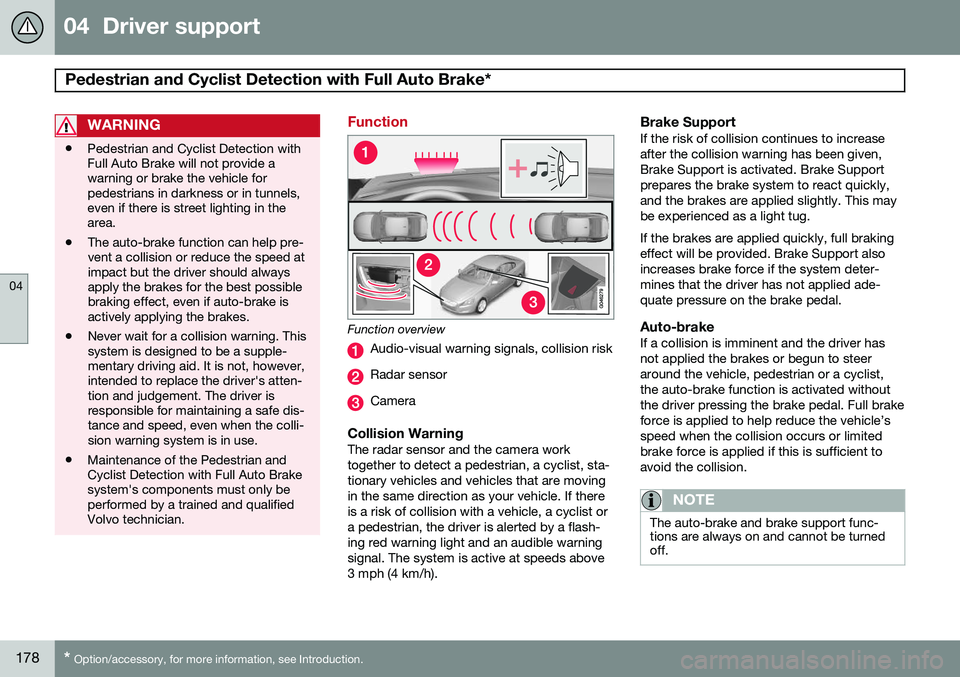
Function overview
Audio-visual warning signals, collision risk
Radar sensor
Camera
Collision WarningThe radar sensor and the camera work together to detect a pedestrian, a cyclist, sta-tionary vehicles and vehicles that are movingin the same direction as your vehicle. If thereis a risk of collision with a vehicle, a cyclist ora pedestrian, the driver is alerted by a flash-ing red warning light and an audible warningsignal. The system is active at speeds above3 mph (4 km/h).
Brake SupportIf the risk of collision continues to increaseafter the collision warning has been given,Brake Support is activated. Brake Supportprepares the brake system to react quickly,and the brakes are applied slightly. This maybe experienced as a light tug. If the brakes are applied quickly, full braking effect will be provided. Brake Support alsoincreases brake force if the system deter-mines that the driver has not applied ade-quate pressure on the brake pedal.
Auto-brakeIf a collision is imminent and the driver hasnot applied the brakes or begun to steeraround the vehicle, pedestrian or a cyclist,the auto-brake function is activated withoutthe driver pressing the brake pedal. Full brakeforce is applied to help reduce the vehicle’sspeed when the collision occurs or limitedbrake force is applied if this is sufficient toavoid the collision.
NOTE
The auto-brake and brake support func- tions are always on and cannot be turnedoff.
Page 184 of 406
04 Driver support
Pedestrian and Cyclist Detection with Full Auto Brake*
04
182* Option/accessory, for more information, see Introduction.
WARNING
• The camera has the same limitations as the human eye. In other words, its“vision is impaired” by adverseweather conditions such as heavysnowfall, dense fog, etc. These condi-tions may reduce the function of sys-tems that depend on the camera orcause these systems to temporarilystop functioning.
• Never place any objects, decals, etc.,on the windshield in front of the cam-era. This could reduce or block thecamera’s function, and could causeone or more of the systems that utilizethe camera to stop functioning.
• Strong sunlight, reflections from theroad surface, ice or snow covering theroad, a dirty road surface, or unclearlane marker lines may drasticallyreduce the camera’s capacity todetect the side of a lane, a pedestrian,a cyclist or another vehicle.
Pedestrian detection
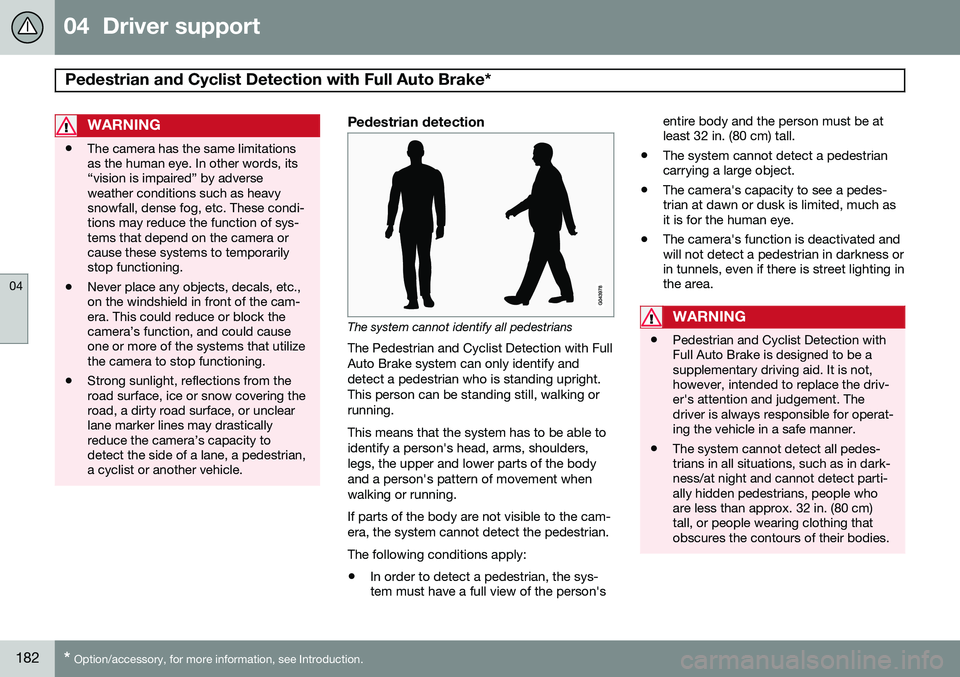
The system cannot identify all pedestrians
The Pedestrian and Cyclist Detection with Full Auto Brake system can only identify anddetect a pedestrian who is standing upright.This person can be standing still, walking orrunning. This means that the system has to be able to identify a person's head, arms, shoulders,legs, the upper and lower parts of the bodyand a person's pattern of movement whenwalking or running. If parts of the body are not visible to the cam- era, the system cannot detect the pedestrian. The following conditions apply:
• In order to detect a pedestrian, the sys- tem must have a full view of the person's entire body and the person must be atleast 32 in. (80 cm) tall.
• The system cannot detect a pedestriancarrying a large object.
• The camera's capacity to see a pedes-trian at dawn or dusk is limited, much asit is for the human eye.
• The camera's function is deactivated andwill not detect a pedestrian in darkness orin tunnels, even if there is street lighting inthe area.WARNING
• Pedestrian and Cyclist Detection with Full Auto Brake is designed to be asupplementary driving aid. It is not,however, intended to replace the driv-er's attention and judgement. Thedriver is always responsible for operat-ing the vehicle in a safe manner.
• The system cannot detect all pedes-trians in all situations, such as in dark-ness/at night and cannot detect parti-ally hidden pedestrians, people whoare less than approx. 32 in. (80 cm)tall, or people wearing clothing thatobscures the contours of their bodies.
Page 186 of 406
04 Driver support
Pedestrian and Cyclist Detection with Full Auto Brake*
04
184* Option/accessory, for more information, see Introduction.
WARNING
Pedestrian and Cyclist Detection with Full Auto Brake is designed to be a supple-mentary driving aid. It is not, however,intended to replace the driver's attentionand judgement. The driver is alwaysresponsible for operating the vehicle in asafe manner. The system cannot detect a bike/cyclist if: • He/she is wearing loose-fitting clothing that may obscure body contours
• The bike is approaching your vehiclefrom the side
• The bike is not equipped with a rear-facing red reflector
• The bike is carrying large objects
• Most of the cyclist's body or the bikeitself cannot be "seen" by the system'scameraFault tracing and actions
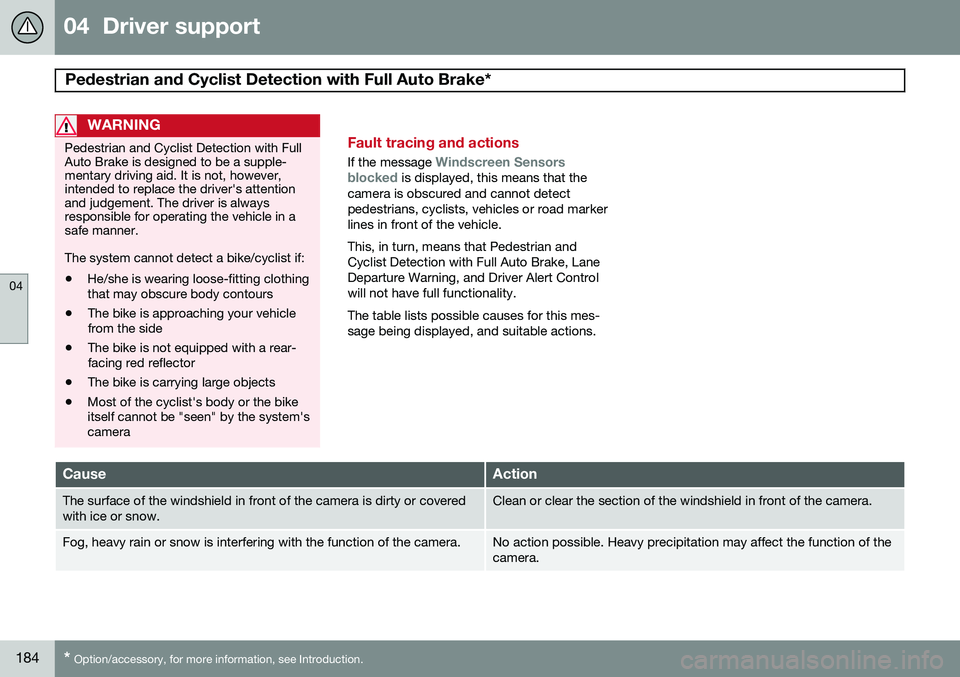
If the message Windscreen Sensors
blocked is displayed, this means that the
camera is obscured and cannot detect pedestrians, cyclists, vehicles or road markerlines in front of the vehicle. This, in turn, means that Pedestrian and Cyclist Detection with Full Auto Brake, LaneDeparture Warning, and Driver Alert Controlwill not have full functionality. The table lists possible causes for this mes- sage being displayed, and suitable actions.
CauseAction
The surface of the windshield in front of the camera is dirty or covered with ice or snow.Clean or clear the section of the windshield in front of the camera.
Fog, heavy rain or snow is interfering with the function of the camera.No action possible. Heavy precipitation may affect the function of the camera.
Page 191 of 406
04 Driver support
Driver Alert System*
04
}}
* Option/accessory, for more information, see Introduction.189
Center console display
SymbolMessageDescription
-Driver Alert OFFThe function is not switched on.
-Driver Alert AvailableThe function is active.
-Driver Alert Standby <65 km/hThe function has gone into standby mode because the vehicle's speed is below 40 mph (65 km/h).
-Driver Alert UnavailableThe camera is temporarily not functioning, due to snow, ice, or dirt on the windshield. Clean the area of the windshield in front of the camera. See page 181 for information on the camera’s limita-tions.
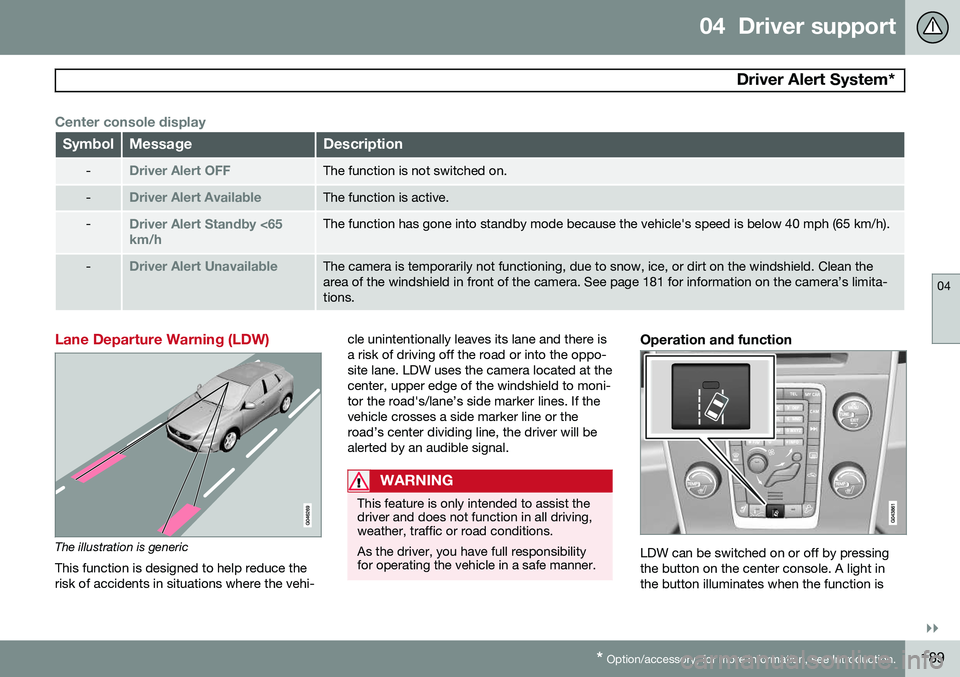
Lane Departure Warning (LDW)
The illustration is generic
This function is designed to help reduce the risk of accidents in situations where the vehi- cle unintentionally leaves its lane and there isa risk of driving off the road or into the oppo-site lane. LDW uses the camera located at thecenter, upper edge of the windshield to moni-tor the road's/lane’s side marker lines. If thevehicle crosses a side marker line or theroad’s center dividing line, the driver will bealerted by an audible signal.
WARNING
This feature is only intended to assist the driver and does not function in all driving,weather, traffic or road conditions. As the driver, you have full responsibility for operating the vehicle in a safe manner.
Operation and function
LDW can be switched on or off by pressing the button on the center console. A light inthe button illuminates when the function is
Page 202 of 406
04 Driver support
Blind Spot Information System (BLIS)*
04
200* Option/accessory, for more information, see Introduction.
Introduction
BLIS is an information system that indicates the presence of another vehicle moving in thesame direction as your vehicle on roads withseveral lanes. The system helps provide infor-mation about:
• Other vehicles in your door mirrors' "blind area"
• Vehicles that are about to pass your vehi-cle in the left and/or right lanes
• Cross Traffic Alert (CTA) is a supple- mentary BLIS function
intended to
detect vehicles crossing behind your vehicle while you are backing up.WARNING
• BLIS and CTA are information sys- tems, NOT warning or safety systemsand do not function in all situations.
• BLIS and CTA do not eliminate theneed for you to visually confirm theconditions around you, and the needfor you to turn your head and should-ers to make sure that you can safelychange lanes or back up.
• As the driver, you have full responsibil-ity for changing lanes/backing up in asafe manner.
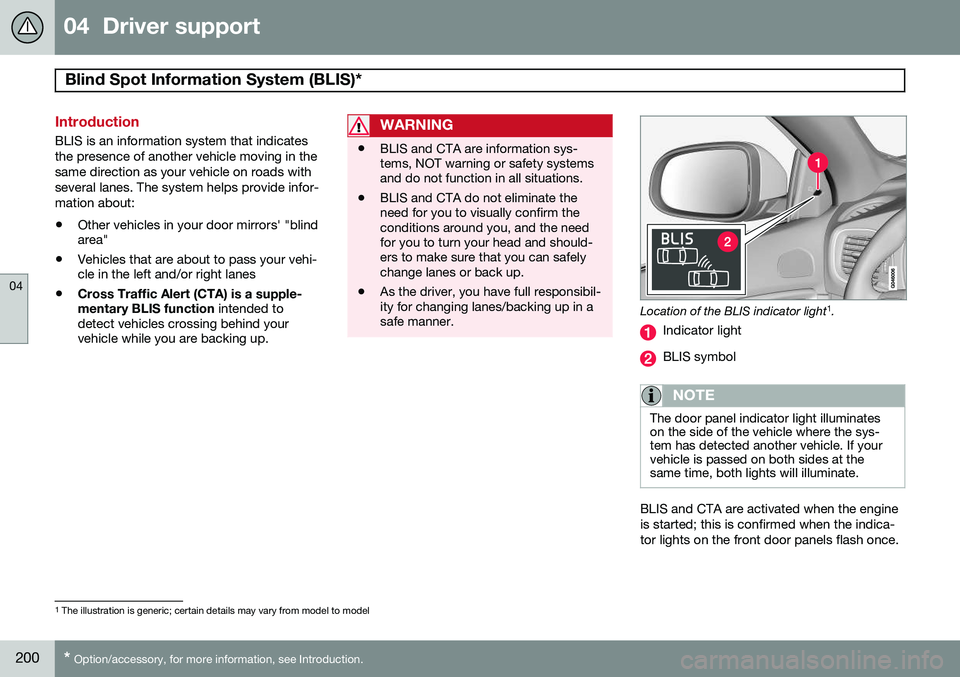
Location of the BLIS indicator light 1
.
Indicator light
BLIS symbol
NOTE
The door panel indicator light illuminates on the side of the vehicle where the sys-tem has detected another vehicle. If yourvehicle is passed on both sides at thesame time, both lights will illuminate.
BLIS and CTA are activated when the engine is started; this is confirmed when the indica-tor lights on the front door panels flash once.
1 The illustration is generic; certain details may vary from model to model
Page 208 of 406
05 Comfort and driving pleasure
Volvo Sensus
05
206* Option/accessory, for more information, see Introduction.
Introduction
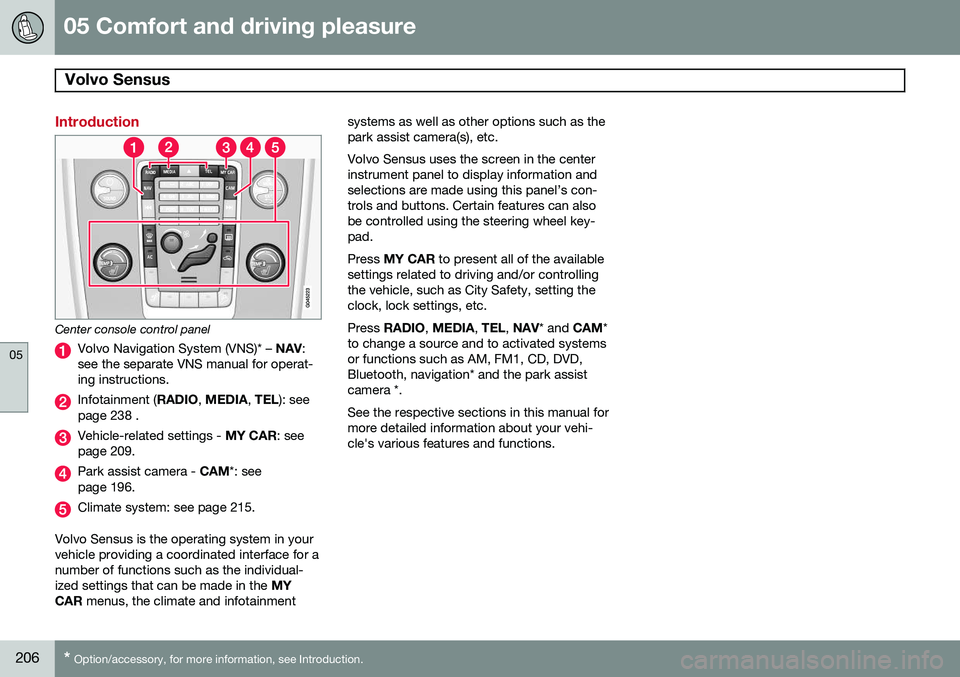
Center console control panel
Volvo Navigation System (VNS)* – NAV:
see the separate VNS manual for operat- ing instructions.
Infotainment ( RADIO, MEDIA , TEL ): see
page 238 .
Vehicle-related settings - MY CAR: see
page 209.
Park assist camera - CAM*: see
page 196.
Climate system: see page 215.
Volvo Sensus is the operating system in your vehicle providing a coordinated interface for anumber of functions such as the individual-ized settings that can be made in the MY
CAR menus, the climate and infotainment systems as well as other options such as thepark assist camera(s), etc. Volvo Sensus uses the screen in the center instrument panel to display information andselections are made using this panel’s con-trols and buttons. Certain features can alsobe controlled using the steering wheel key-pad. Press
MY CAR to present all of the available
settings related to driving and/or controlling the vehicle, such as City Safety, setting theclock, lock settings, etc. Press RADIO , MEDIA , TEL , NAV * and CAM*
to change a source and to activated systems or functions such as AM, FM1, CD, DVD,Bluetooth, navigation* and the park assistcamera *. See the respective sections in this manual for more detailed information about your vehi-cle's various features and functions.
Page 209 of 406
05 Comfort and driving pleasure
Menus and messages
05
}}
* Option/accessory, for more information, see Introduction.207
Main instrument panel
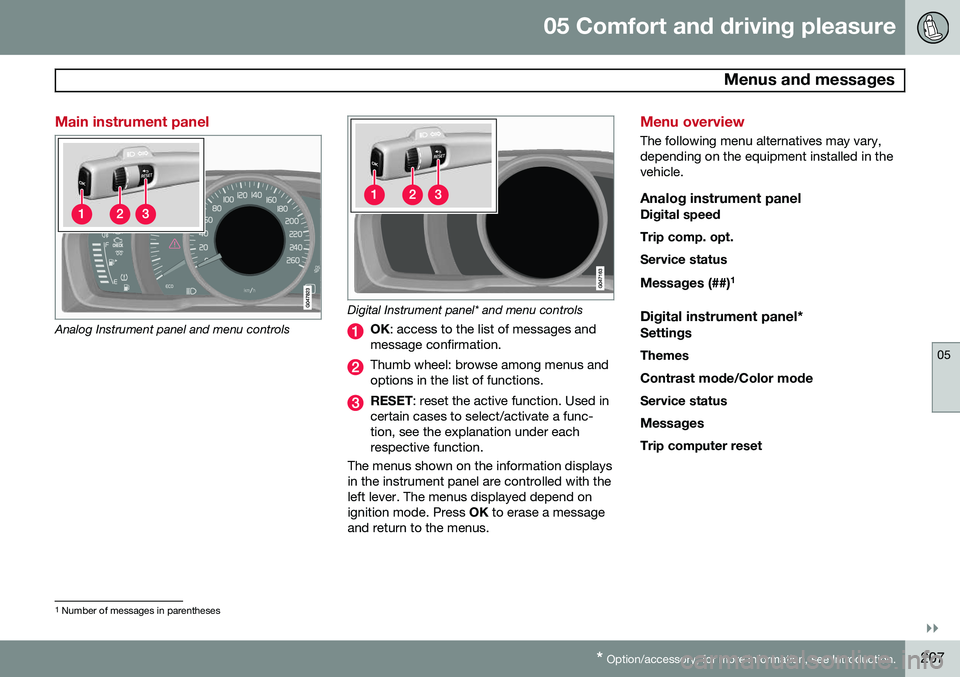
Analog Instrument panel and menu controls
Digital Instrument panel* and menu controls
OK : access to the list of messages and
message confirmation.
Thumb wheel: browse among menus and options in the list of functions.
RESET : reset the active function. Used in
certain cases to select/activate a func- tion, see the explanation under eachrespective function.
The menus shown on the information displaysin the instrument panel are controlled with theleft lever. The menus displayed depend onignition mode. Press OK to erase a message
and return to the menus.
Menu overview
The following menu alternatives may vary, depending on the equipment installed in thevehicle.
Analog instrument panelDigital speed Trip comp. opt.Service status
Messages (##) 1
Digital instrument panel*
Settings
Themes
Contrast mode /Color mode
Service status
Messages Trip computer reset
1 Number of messages in parentheses
Page 210 of 406
05 Comfort and driving pleasure
Menus and messages
05
208
Messages
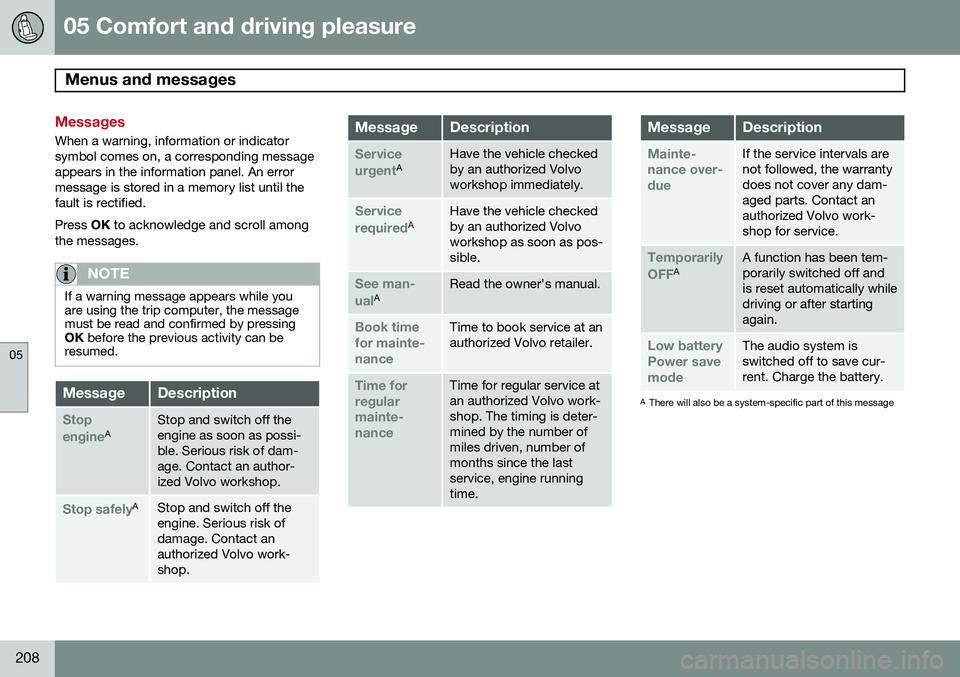
When a warning, information or indicator symbol comes on, a corresponding messageappears in the information panel. An errormessage is stored in a memory list until thefault is rectified. Press OK to acknowledge and scroll among
the messages.
NOTE
If a warning message appears while you are using the trip computer, the messagemust be read and confirmed by pressingOK before the previous activity can be
resumed.
MessageDescription
Stop engineAStop and switch off the engine as soon as possi-ble. Serious risk of dam-age. Contact an author-ized Volvo workshop.
Stop safelyAStop and switch off the engine. Serious risk ofdamage. Contact anauthorized Volvo work-shop.
MessageDescription
Service urgentAHave the vehicle checked by an authorized Volvoworkshop immediately.
Service requiredAHave the vehicle checked by an authorized Volvoworkshop as soon as pos-sible.
See man- ualARead the owner's manual.
Book time for mainte-nanceTime to book service at an authorized Volvo retailer.
Time for regularmainte-nanceTime for regular service at an authorized Volvo work-shop. The timing is deter-mined by the number ofmiles driven, number ofmonths since the lastservice, engine runningtime.
MessageDescription
Mainte- nance over-dueIf the service intervals are not followed, the warrantydoes not cover any dam-aged parts. Contact anauthorized Volvo work-shop for service.
Temporarily OFFAA function has been tem- porarily switched off andis reset automatically whiledriving or after startingagain.
Low battery Power savemodeThe audio system is switched off to save cur-rent. Charge the battery.
A There will also be a system-specific part of this message
Page 217 of 406
05 Comfort and driving pleasure
Climate system
05
}}
* Option/accessory, for more information, see Introduction.215
Introduction
Air conditioningThe vehicle is equipped with Electronic Cli- mate Control (ECC). The climate control sys-tem cools, heats or dehumidifies the air in thepassenger compartment.
NOTE
• The air conditioning can be switched off, but to ensure the best possible cli-mate comfort in the passenger com-partment and to prevent the windowsfrom misting, it should always be on.
• In warm weather, a small amount ofwater may accumulate under the carwhen it has been parked. This water iscondensation from the A/C systemand is normal.
Sensor location
•
The sunlight sensor is located on the top side of the dashboard.
NOTE
The sunlight sensor monitors which side of the car that is most exposed to sunlight.This can mean that the temperature maydiffer between the right and left-side airvents, even if the temperatures set for bothsides of the passenger compartment arethe same.
•The temperature sensor for the passen- ger compartment is located below the cli-mate control panel.
• The outside (ambient) temperature sensoris located on the door mirror.
• The humidity sensor* is located in theinterior rearview mirror.
NOTE
Do not cover or block the sensors with clothing or other objects.
Side windows and laminated panoramic roof
To ensure that the air conditioning works optimally, the side windows, and the lamina-ted panoramic roof should be closed.
Fog on the inside of the windowsThe defroster function should be used toremove fog or mist from the inside of the win-dows. Keeping the windows clean with a commercially available window washingspray will also help prevent fogging or mist-ing.
Temporary shut-off of the air
conditioning
The air conditioning is momentarily disen-gaged during full acceleration or when drivinguphill with a trailer. This may result in a tem-porary increase in cabin temperature.
Ice and snowAlways keep the air intake grille at the base ofthe windshield free of snow.
Climate system maintenanceSpecial tools and equipment are required tomaintain and carry out repairs on the climatesystem. Work of this type should only bedone by a trained and qualified Volvo servicetechnician.
RefrigerantVolvo cares about the environment. The airconditioning system in your car contains aCFC-free refrigerant – R134a. This substancewill not deplete the ozone layer. See page386 for the amount of refrigerant in the A/Csystem. The system uses PAG oil.
Page 222 of 406
05 Comfort and driving pleasure
Climate system
05
220
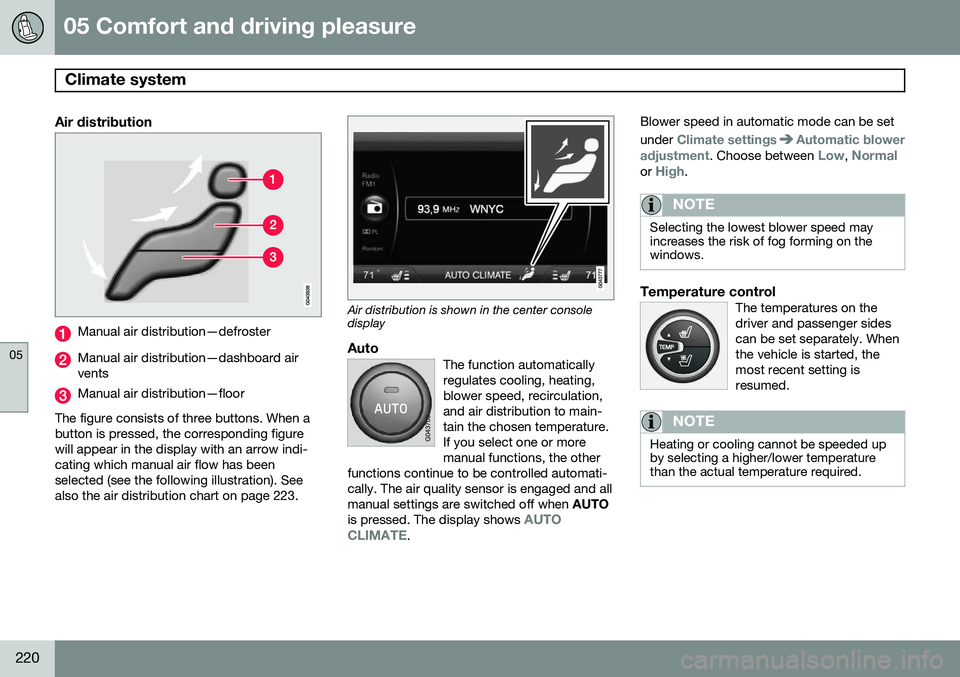
Air distribution
Manual air distribution—defroster
Manual air distribution—dashboard air vents
Manual air distribution—floor
The figure consists of three buttons. When a button is pressed, the corresponding figurewill appear in the display with an arrow indi-cating which manual air flow has beenselected (see the following illustration). Seealso the air distribution chart on page 223.
Air distribution is shown in the center console display
AutoThe function automatically regulates cooling, heating,blower speed, recirculation,and air distribution to main-tain the chosen temperature.If you select one or moremanual functions, the other
functions continue to be controlled automati-cally. The air quality sensor is engaged and allmanual settings are switched off when AUTO
is pressed. The display shows
AUTO
CLIMATE.
Blower speed in automatic mode can be set under
Climate settingsAutomatic blower
adjustment
. Choose between Low, Normalor High.
NOTE
Selecting the lowest blower speed may increases the risk of fog forming on thewindows.
Temperature controlThe temperatures on the driver and passenger sidescan be set separately. Whenthe vehicle is started, themost recent setting isresumed.
NOTE
Heating or cooling cannot be speeded up by selecting a higher/lower temperaturethan the actual temperature required.