USB VOLVO XC60 2015 Owner´s Manual
[x] Cancel search | Manufacturer: VOLVO, Model Year: 2015, Model line: XC60, Model: VOLVO XC60 2015Pages: 406, PDF Size: 11.03 MB
Page 6 of 406
Contents
4* Option/accessory, for more information, see Introduction.
06
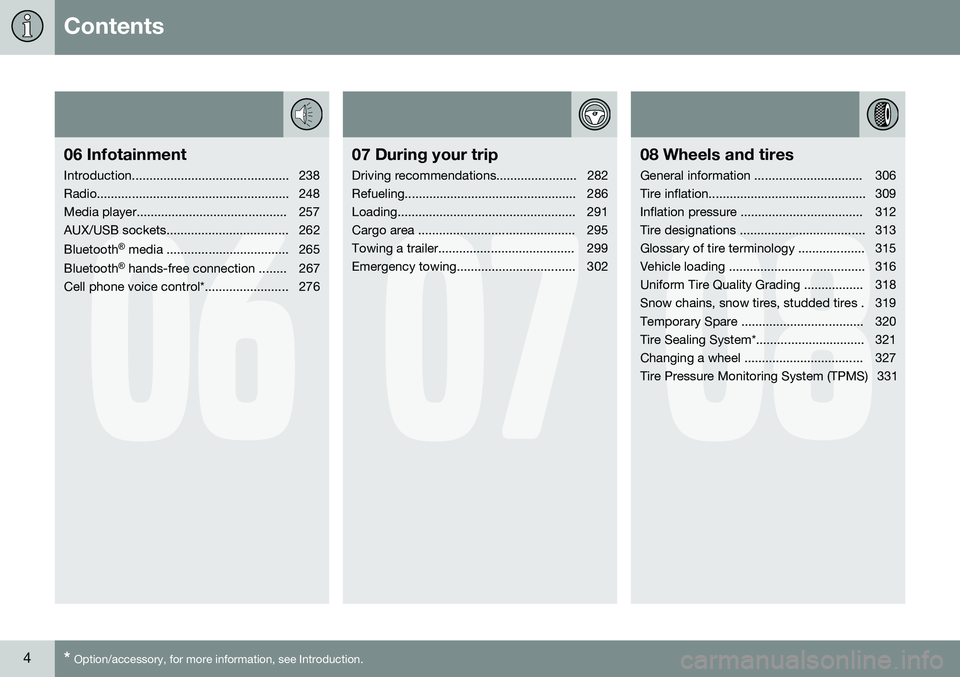
06 Infotainment
Introduction............................................. 238
Radio....................................................... 248
Media player........................................... 257
AUX/USB sockets................................... 262 Bluetooth ®
media ................................... 265
Bluetooth ®
hands-free connection ........ 267
Cell phone voice control*........................ 276
07
07 During your trip
Driving recommendations....................... 282
Refueling................................................. 286
Loading................................................... 291
Cargo area ............................................. 295
Towing a trailer....................................... 299
Emergency towing.................................. 302
08
08 Wheels and tires
General information ............................... 306
Tire inflation............................................. 309
Inflation pressure ................................... 312
Tire designations .................................... 313
Glossary of tire terminology ................... 315
Vehicle loading ....................................... 316
Uniform Tire Quality Grading ................. 318
Snow chains, snow tires, studded tires . 319
Temporary Spare ................................... 320
Tire Sealing System*............................... 321
Changing a wheel .................................. 327
Tire Pressure Monitoring System (TPMS) 331
Page 235 of 406
05 Comfort and driving pleasure
Passenger compartment convenience
05
}}
* Option/accessory, for more information, see Introduction.233
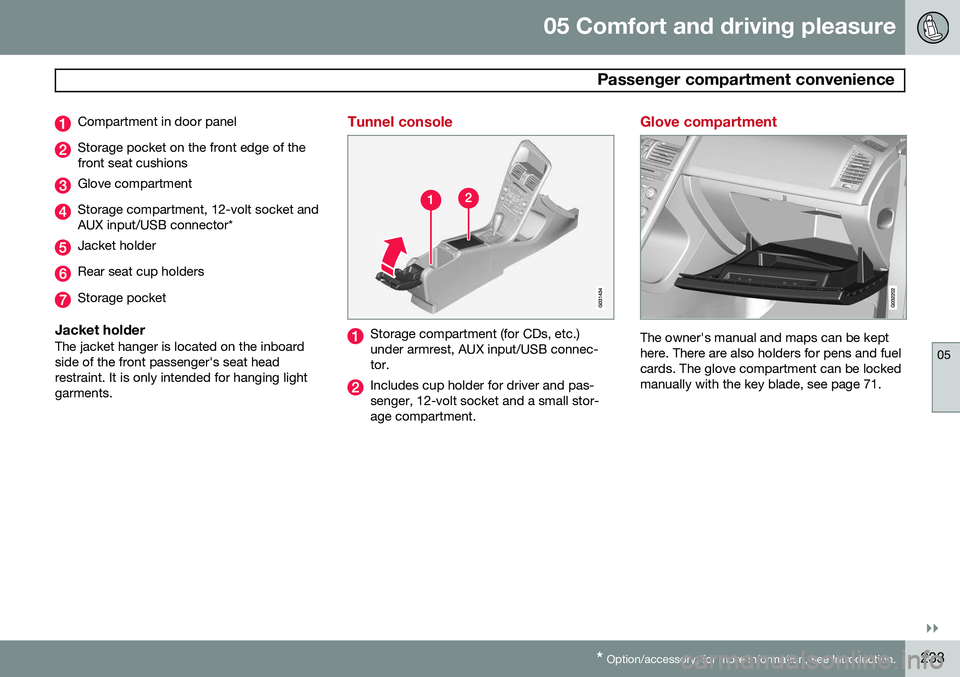
Compartment in door panel
Storage pocket on the front edge of the front seat cushions
Glove compartment
Storage compartment, 12-volt socket and AUX input/USB connector*
Jacket holder
Rear seat cup holders
Storage pocket
Jacket holderThe jacket hanger is located on the inboard side of the front passenger's seat headrestraint. It is only intended for hanging lightgarments.
Tunnel console
Storage compartment (for CDs, etc.) under armrest, AUX input/USB connec-tor.
Includes cup holder for driver and pas- senger, 12-volt socket and a small stor-age compartment.
Glove compartment
The owner's manual and maps can be kept here. There are also holders for pens and fuelcards. The glove compartment can be lockedmanually with the key blade, see page 71.
Page 238 of 406
236* Option/accessory, for more information, see Introduction. Introduction........................................................................................... 238 Radio..................................................................................................... 248Media player......................................................................................... 257
AUX/USB sockets................................................................................. 262 Bluetooth
®
media ................................................................................. 265
Bluetooth ®
hands-free connection ....................................................... 267
Cell phone voice control*...................................................................... 276
Page 241 of 406
06 Infotainment
Introduction
06
}}
* Option/accessory, for more information, see Introduction.239
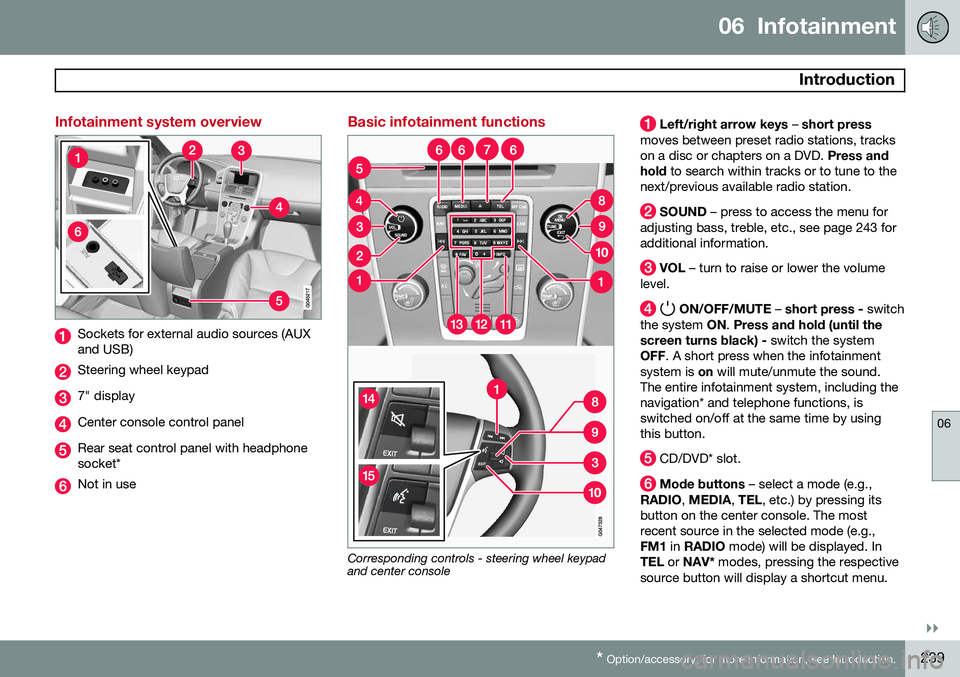
Infotainment system overview
Sockets for external audio sources (AUX and USB)
Steering wheel keypad
7" display
Center console control panel
Rear seat control panel with headphone socket*
Not in use
Basic infotainment functions
Corresponding controls - steering wheel keypad and center console
Left/right arrow keys – short press
moves between preset radio stations, tracks on a disc or chapters on a DVD. Press and
hold to search within tracks or to tune to the
next/previous available radio station.
SOUND – press to access the menu for
adjusting bass, treble, etc., see page 243 for additional information.
VOL – turn to raise or lower the volume
level.
ON/OFF/MUTE – short press - switch
the system ON. Press and hold (until the
screen turns black) - switch the system
OFF . A short press when the infotainment
system is on will mute/unmute the sound.
The entire infotainment system, including the navigation* and telephone functions, isswitched on/off at the same time by usingthis button.
CD/DVD* slot.
Mode buttons – select a mode (e.g.,
RADIO , MEDIA , TEL , etc.) by pressing its
button on the center console. The most recent source in the selected mode (e.g.,FM1 in RADIO mode) will be displayed. In
TEL or NAV* modes, pressing the respective
source button will display a shortcut menu.
Page 244 of 406
06 Infotainment
Introduction
06
242* Option/accessory, for more information, see Introduction.
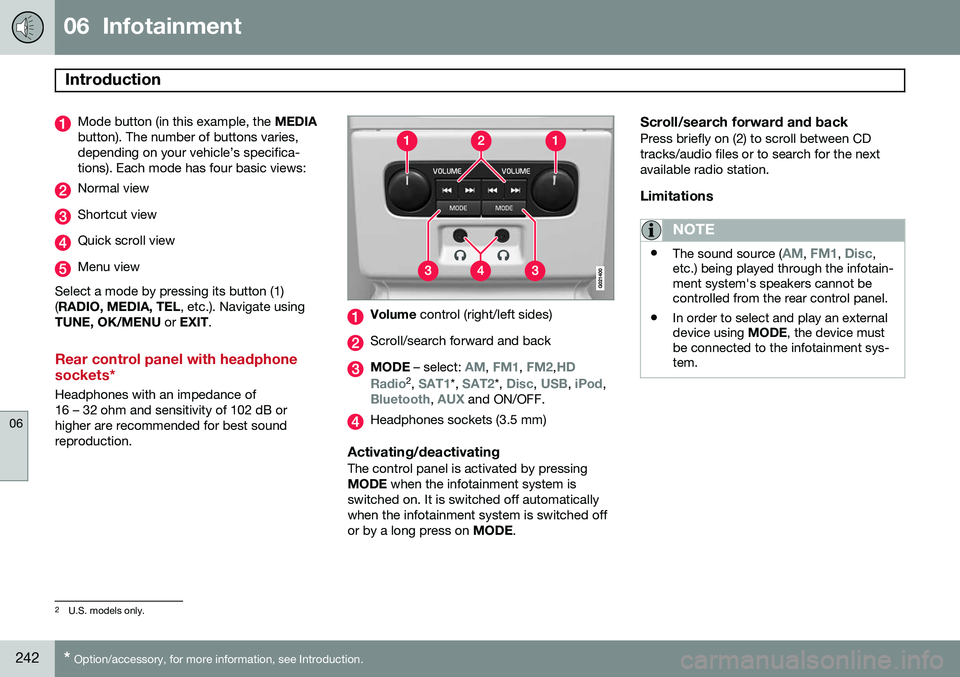
Mode button (in this example, the MEDIA
button). The number of buttons varies, depending on your vehicle’s specifica-tions). Each mode has four basic views:
Normal view
Shortcut view
Quick scroll view
Menu view
Select a mode by pressing its button (1) ( RADIO, MEDIA, TEL , etc.). Navigate using
TUNE, OK/MENU or EXIT .
Rear control panel with headphone sockets*
Headphones with an impedance of 16 – 32 ohm and sensitivity of 102 dB orhigher are recommended for best soundreproduction.
Volume control (right/left sides)
Scroll/search forward and back
MODE – select: AM, FM1, FM2,HD
Radio2 , SAT1*, SAT2*, Disc, USB, iPod,Bluetooth, AUX and ON/OFF.
Headphones sockets (3.5 mm)
Activating/deactivatingThe control panel is activated by pressing MODE when the infotainment system is
switched on. It is switched off automaticallywhen the infotainment system is switched offor by a long press on MODE.
Scroll/search forward and backPress briefly on (2) to scroll between CDtracks/audio files or to search for the nextavailable radio station.
Limitations
NOTE
•The sound source (AM, FM1, Disc,
etc.) being played through the infotain- ment system's speakers cannot becontrolled from the rear control panel.
• In order to select and play an externaldevice using
MODE, the device must
be connected to the infotainment sys-tem.
2 U.S. models only.
Page 245 of 406
06 Infotainment
Introduction
06
}}
* Option/accessory, for more information, see Introduction.243
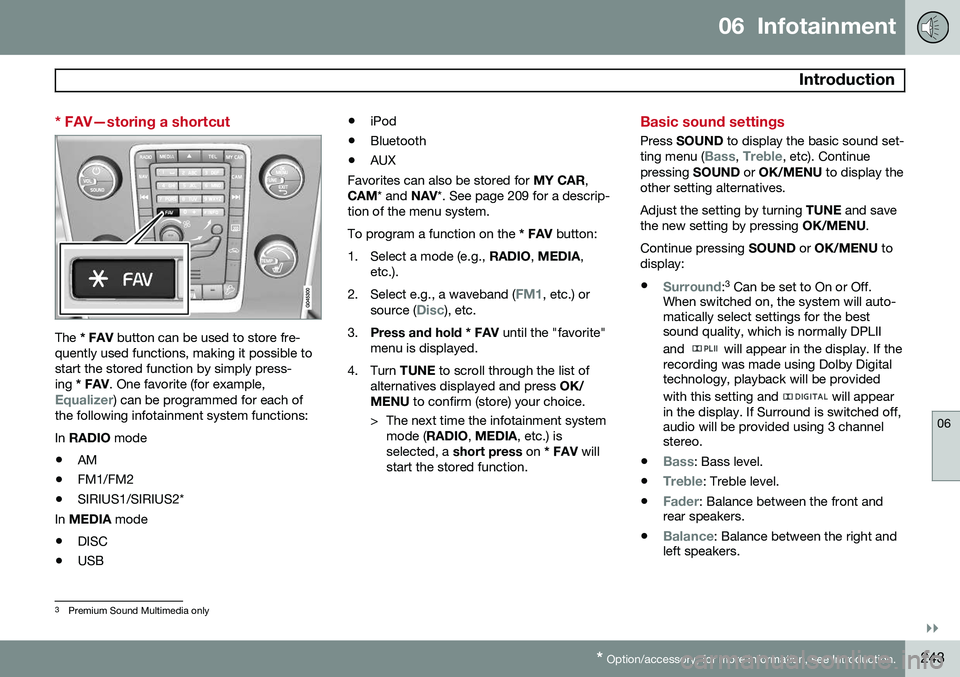
* FAV—storing a shortcut
The * FAV button can be used to store fre-
quently used functions, making it possible to start the stored function by simply press-ing * FAV . One favorite (for example,
Equalizer) can be programmed for each of
the following infotainment system functions: In RADIO mode
• AM
• FM1/FM2
• SIRIUS1/SIRIUS2*
In MEDIA mode
• DISC
• USB •
iPod
• Bluetooth
• AUX
Favorites can also be stored for MY CAR,
CAM * and NAV*. See page 209 for a descrip-
tion of the menu system.To program a function on the * FAV button:
1. Select a mode (e.g., RADIO, MEDIA ,
etc.).
2. Select e.g., a waveband (
FM1, etc.) or
source (Disc), etc.
3. Press and hold * FAV until the "favorite"
menu is displayed.
4. Turn TUNE to scroll through the list of
alternatives displayed and press OK/
MENU to confirm (store) your choice.
> The next time the infotainment system mode ( RADIO , MEDIA , etc.) is
selected, a short press on * FAV will
start the stored function.
Basic sound settings
Press SOUND to display the basic sound set-
ting menu (Bass, Treble, etc). Continue
pressing SOUND or OK/MENU to display the
other setting alternatives. Adjust the setting by turning TUNE and save
the new setting by pressing OK/MENU.
Continue pressing SOUND or OK/MENU to
display: •
Surround: 3
Can be set to On or Off.
When switched on, the system will auto- matically select settings for the bestsound quality, which is normally DPLII and
will appear in the display. If the
recording was made using Dolby Digital technology, playback will be provided with this setting and
will appear
in the display. If Surround is switched off, audio will be provided using 3 channelstereo.
•
Bass: Bass level.
•
Treble: Treble level.
•
Fader: Balance between the front and
rear speakers.
•
Balance: Balance between the right and
left speakers.
3 Premium Sound Multimedia only
Page 248 of 406
06 Infotainment
Introduction
06
246
MEDIA menus
Main CD Audio menuDisc menuRandom Scan
Audio settings 7
Main CD/DVD 10
Data menuDisc menu
Play/Pause
StopRandomRepeat folderChange subtitlesChange audio trackScan
Audio settings 7
Main DVD10
Video menuDVD Video Menu
DVD disc menuPlay/Pause/Continue StopSubtitlesAudio tracksAdvanced settings
AngleDivX® VOD code
Audio settings 7
Main iPod menuiPod menu
RandomScan
Audio settings 7
Main USB menuUSB menu
Play/Pause
StopRandomRepeat folderSelect USB deviceChange subtitles Change audio trackScan
Audio settings 7
Main AUX menuAUX menu
AUX input volume
Audio settings 7
TEL menus
Main Bluetooth media menuBluetooth menu
Random Change deviceRemove Bluetooth deviceScanBluetooth software version in car
Audio settings 7
7
The audio settings are the same for all infotainment system modes10
The media player can only play DVDs in models equipped with the optional navigation system. Images are only displayed when the vehicle is not in motion.
Page 261 of 406
06 Infotainment
Media player
06
}}
259
Random3This function plays the tracks in random order (shuffle). The random tracks/sound files canbe scrolled through in the normal way. To lis-ten to tracks in random order:
1. Press
OK/MENU ,
2. Scroll to
Random
3. Press OK/MENU to activate/deactivate
the random play function.
Press the
/ buttons on the center
console or steering wheel keypad to change tracks/audio files.
Repeat folder 4This function makes it possible to play files ina folder repeatedly. When the last file hasbeen played, the first file will begin again. Toactivate:
1. Press
OK/MENU .
2. Turn TUNE to
Repeat folder.
3. Press OK/MENU to activate/deactivate
the function.
Playing video DVDs
PlayWhen playing a video DVD, a disc menu may appear on the display, giving you access toextra functions and settings such as choice ofsubtitle and language, scene selection, etc.
NOTE
Video images will only be visible when the vehicle is not moving. When the vehicle istraveling faster than approximately 4 mph (6 km/h),
No visual media available
while driving will be displayed. Sound
from the film will still be audible and video images will be shown again when the vehi-cle stops.
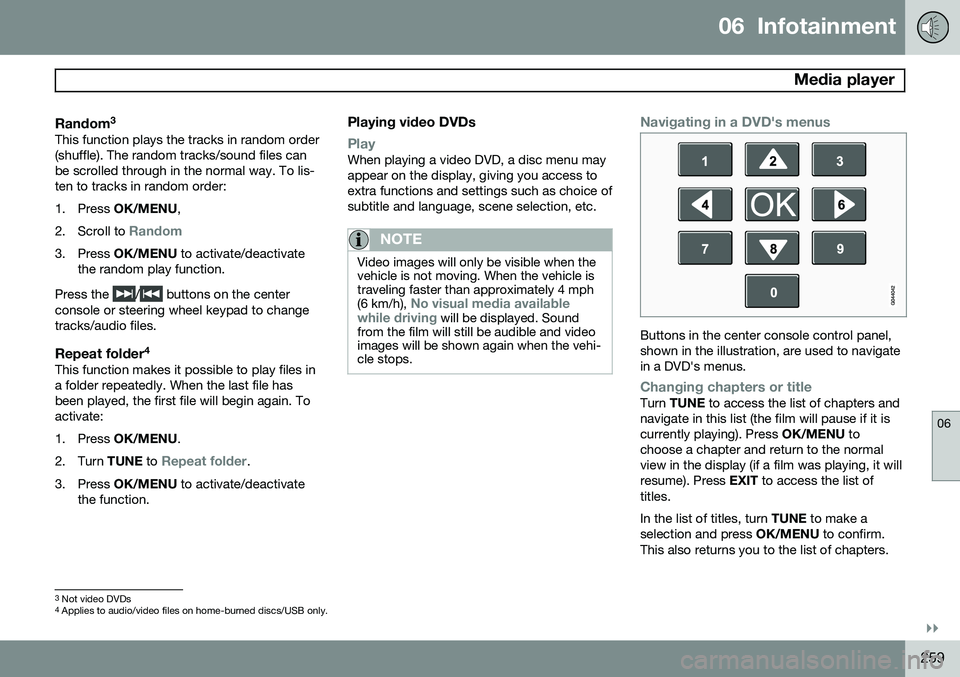
Navigating in a DVD's menus
Buttons in the center console control panel, shown in the illustration, are used to navigatein a DVD's menus.
Changing chapters or titleTurn TUNE to access the list of chapters and
navigate in this list (the film will pause if it is currently playing). Press OK/MENU to
choose a chapter and return to the normalview in the display (if a film was playing, it willresume). Press EXIT to access the list of
titles. In the list of titles, turn TUNE to make a
selection and press OK/MENU to confirm.
This also returns you to the list of chapters.
3 Not video DVDs
4 Applies to audio/video files on home-burned discs/USB only.
Page 262 of 406
06 Infotainment
Media player
06
260
Press EXIT to cancel and return to the normal
view (without having made a selection). It is also possible to change chapters by pressing
/ on the center console
control panel or on the steering wheel key- pad.
Advanced settings
AngleIf the DVD supports this function, it is possi- ble to select a camera angle for a certainscene. This can be done in DVD mode under
DVD
disc menu
Advanced settingsAngle.
DivX® Video On Demand
The media player can be registered to play DivX VOD files from home-burned discs orUSB. The registration code can be found bypressing the MY CAR button, and going to
SettingsInformationDivX® VOD
code. See page 209 for more information
about the menu system.
DivX Certified ®
to play DivX ®
video. DivX ®
,
DivX Certified ®
and associated logos are
registered trademarks of DivX, Inc. and are used under license. ABOUT DIVX VIDEO: DivX ®
is a digital video format created by
DivX, Inc. This is an official DivX Certified device that plays DivX video. Visitwww.divx.com for more information and
software tools to convert your files into DivXvideo. ABOUT DIVX VIDEO-ON-DEMAND: This DivX Certified ®
device must be registered in order
to play DivX Video-on-Demand (VOD) content. To generate the registration code,locate the DivX VOD section in the devicesetup menu. Go to http://vod.divx.com with
this code to complete the registrationprocess and learn more about DivX VOD.Covered by one or more of the following U.S.Patents: 7,295,673; 7,460,668; 7,515,710;7,519,274. See also www.divx.com/vod for more infor-mation.
Screen settingsScreen settings can be made (when the vehi-cle is not moving) for:
• Brightness
• Contrast
1. Press OK/MENU and choose
Image
settings and confirm by pressing OK/
MENU .
2. Turn TUNE to the desired setting and
press OK/MENU .
3. Change the setting by turning TUNE and
confirm the change by pressing OK/
MENU .
Press OK/MENU or EXIT to return to the
screen settings list. To return to the factory settings, select
Reset .
Compatible formatsThe media player can play a number of differ- ent types of files and disc formats, and iscompatible with the formats listed in the fol-lowing table.
Page 264 of 406
06 Infotainment
AUX/USB sockets
06
262
Connecting external devices
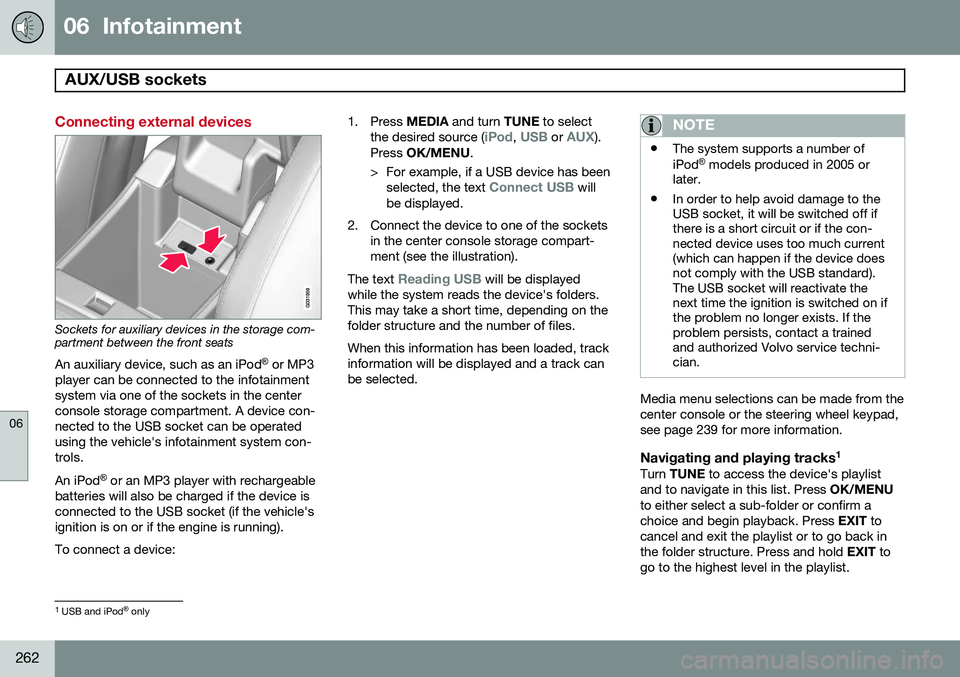
Sockets for auxiliary devices in the storage com- partment between the front seatsAn auxiliary device, such as an iPod ®
or MP3
player can be connected to the infotainment system via one of the sockets in the centerconsole storage compartment. A device con-nected to the USB socket can be operatedusing the vehicle's infotainment system con-trols. An iPod ®
or an MP3 player with rechargeable
batteries will also be charged if the device is connected to the USB socket (if the vehicle'signition is on or if the engine is running). To connect a device: 1. Press
MEDIA and turn TUNE to select
the desired source (
iPod, USB or AUX).
Press OK/MENU .
> For example, if a USB device has been selected, the text
Connect USB will
be displayed.
2. Connect the device to one of the sockets in the center console storage compart- ment (see the illustration).
The text
Reading USB will be displayed
while the system reads the device's folders. This may take a short time, depending on thefolder structure and the number of files. When this information has been loaded, track information will be displayed and a track canbe selected.
NOTE
• The system supports a number of iPod ®
models produced in 2005 or
later.
• In order to help avoid damage to the USB socket, it will be switched off ifthere is a short circuit or if the con-nected device uses too much current(which can happen if the device doesnot comply with the USB standard).The USB socket will reactivate thenext time the ignition is switched on ifthe problem no longer exists. If theproblem persists, contact a trainedand authorized Volvo service techni-cian.
Media menu selections can be made from the center console or the steering wheel keypad,see page 239 for more information.
Navigating and playing tracks 1Turn
TUNE to access the device's playlist
and to navigate in this list. Press OK/MENU
to either select a sub-folder or confirm achoice and begin playback. Press EXIT to
cancel and exit the playlist or to go back inthe folder structure. Press and hold EXIT to
go to the highest level in the playlist.
1 USB and iPod ®
only