instrument panel VOLVO XC60 2017 Owner´s Manual
[x] Cancel search | Manufacturer: VOLVO, Model Year: 2017, Model line: XC60, Model: VOLVO XC60 2017Pages: 398, PDF Size: 9.17 MB
Page 73 of 398
INSTRUMENTS AND CONTROLS
* Option/accessory, for more information, see Introduction.71
Power Meter (see Eco Guide* and Power
Meter * (p. 72)).
Gear indicator: Shows the currently selected gear
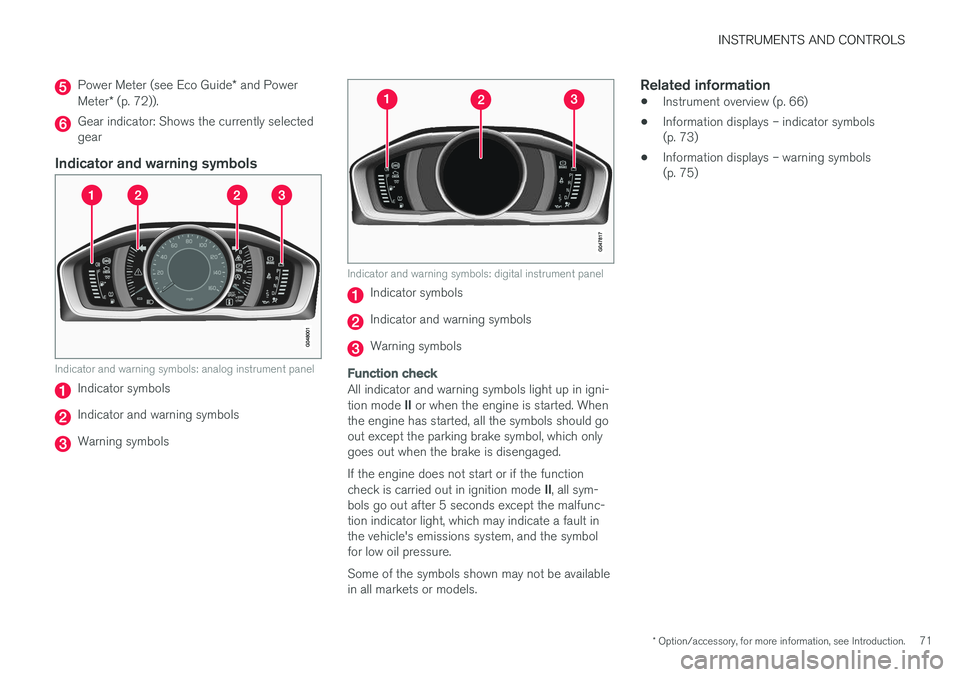
Indicator and warning symbols
Indicator and warning symbols: analog instrument panel
Indicator symbols
Indicator and warning symbols
Warning symbols
Indicator and warning symbols: digital instrument panel
Indicator symbols
Indicator and warning symbols
Warning symbols
Function check
All indicator and warning symbols light up in igni- tion mode II or when the engine is started. When
the engine has started, all the symbols should go out except the parking brake symbol, which onlygoes out when the brake is disengaged. If the engine does not start or if the function check is carried out in ignition mode II, all sym-
bols go out after 5 seconds except the malfunc- tion indicator light, which may indicate a fault inthe vehicle's emissions system, and the symbolfor low oil pressure. Some of the symbols shown may not be available in all markets or models.
Related information
• Instrument overview (p. 66)
• Information displays – indicator symbols(p. 73)
• Information displays – warning symbols(p. 75)
Page 74 of 398
INSTRUMENTS AND CONTROLS
* Option/accessory, for more information, see Introduction.
72
Eco Guide * and Power Meter *
Eco guide and Power guide are two gauges in the instrument panel that help improve drivingeconomy. The vehicle also stores driving-related statistics in the form of a bar graph, see Trip computer –Trip statistics (p. 124).
Introduction
To display or remove these functions from the instrument panel, select the "Eco" theme (seeInformation displays – introduction (p. 69)). Driving statistics are also stored and can be dis- played in the form of a bar chart (see Trip com-puter – Trip statistics (p. 124)).
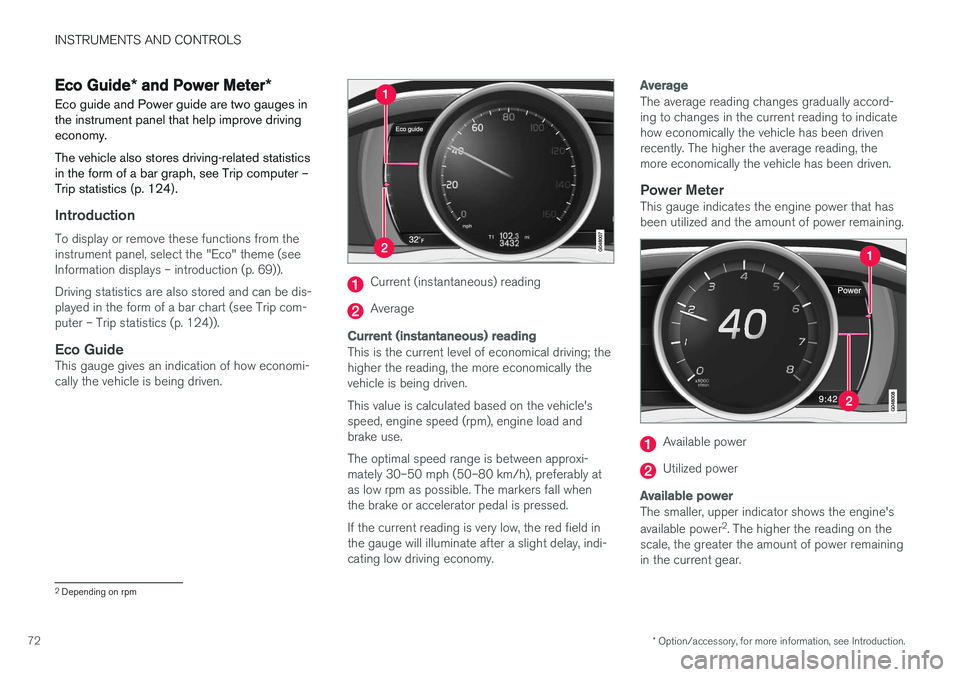
Eco GuideThis gauge gives an indication of how economi-cally the vehicle is being driven.
Current (instantaneous) reading
Average
Current (instantaneous) reading
This is the current level of economical driving; the higher the reading, the more economically thevehicle is being driven. This value is calculated based on the vehicle's speed, engine speed (rpm), engine load andbrake use. The optimal speed range is between approxi- mately 30–50 mph (50–80 km/h), preferably atas low rpm as possible. The markers fall whenthe brake or accelerator pedal is pressed. If the current reading is very low, the red field in the gauge will illuminate after a slight delay, indi-cating low driving economy.
Average
The average reading changes gradually accord- ing to changes in the current reading to indicatehow economically the vehicle has been drivenrecently. The higher the average reading, themore economically the vehicle has been driven.
Power MeterThis gauge indicates the engine power that hasbeen utilized and the amount of power remaining.
Available power
Utilized power
Available power
The smaller, upper indicator shows the engine's available power 2
. The higher the reading on the
scale, the greater the amount of power remaining in the current gear.
2 Depending on rpm
Page 75 of 398
INSTRUMENTS AND CONTROLS
}}
* Option/accessory, for more information, see Introduction.73
Utilized power
The larger, lower indicator shows the amount of engine power that has been utilized2
. The higher
the reading on the scale, the greater the amount of power that is being utilized. The larger the gap between the two indicators, the greater the amount of power remaining.Information displays – indicator symbols
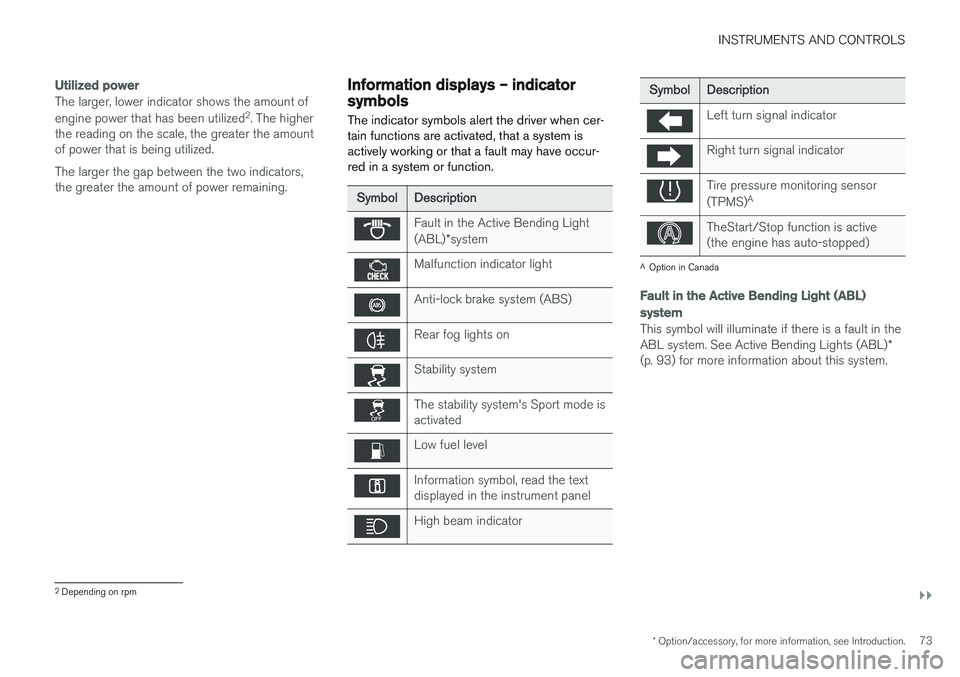
The indicator symbols alert the driver when cer- tain functions are activated, that a system isactively working or that a fault may have occur-red in a system or function.
SymbolDescription
Fault in the Active Bending Light (ABL) *system
Malfunction indicator light
Anti-lock brake system (ABS)
Rear fog lights on
Stability system
The stability system's Sport mode is activated
Low fuel level
Information symbol, read the text displayed in the instrument panel
High beam indicator
SymbolDescription
Left turn signal indicator
Right turn signal indicator
Tire pressure monitoring sensor (TPMS) A
TheStart/Stop function is active (the engine has auto-stopped)
A
Option in Canada
Fault in the Active Bending Light (ABL)
system
This symbol will illuminate if there is a fault in the ABL system. See Active Bending Lights (ABL) *
(p. 93) for more information about this system.
2 Depending on rpm
Page 77 of 398
INSTRUMENTS AND CONTROLS
}}
75
Related information
•Information displays – introduction (p. 69)
• Information displays – warning symbols (p. 75)
Information displays – warning symbols
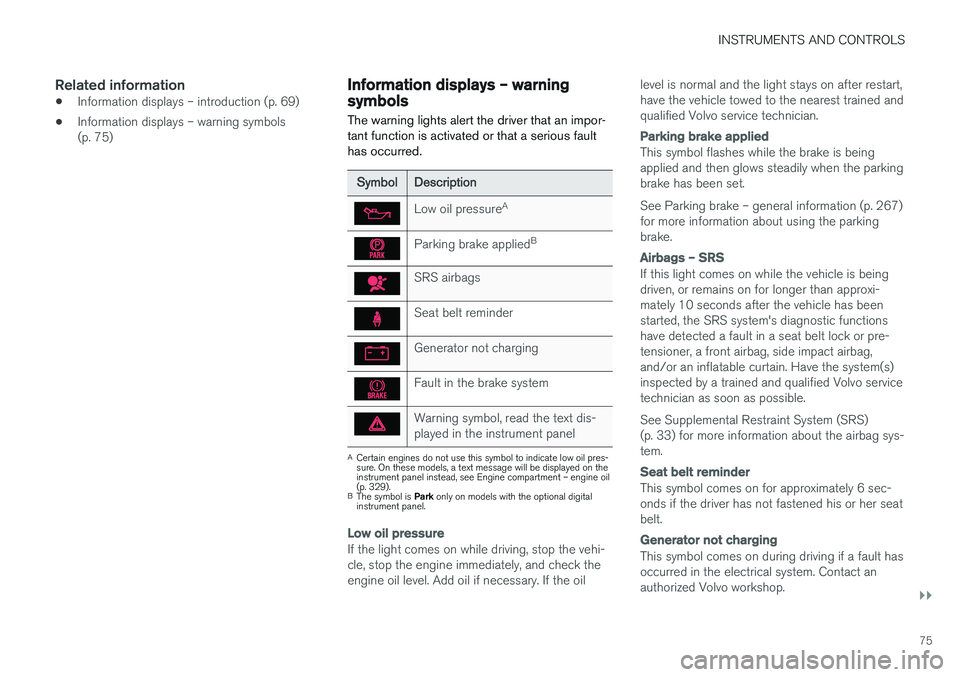
The warning lights alert the driver that an impor- tant function is activated or that a serious faulthas occurred.
SymbolDescription
Low oil pressure A
Parking brake applied B
SRS airbags
Seat belt reminder
Generator not charging
Fault in the brake system
Warning symbol, read the text dis- played in the instrument panel
A
Certain engines do not use this symbol to indicate low oil pres- sure. On these models, a text message will be displayed on theinstrument panel instead, see Engine compartment – engine oil(p. 329).
B The symbol is Park only on models with the optional digital
instrument panel.
Low oil pressure
If the light comes on while driving, stop the vehi- cle, stop the engine immediately, and check theengine oil level. Add oil if necessary. If the oil level is normal and the light stays on after restart,have the vehicle towed to the nearest trained andqualified Volvo service technician.
Parking brake applied
This symbol flashes while the brake is being applied and then glows steadily when the parkingbrake has been set. See Parking brake – general information (p. 267) for more information about using the parkingbrake.
Airbags – SRS
If this light comes on while the vehicle is being driven, or remains on for longer than approxi-mately 10 seconds after the vehicle has beenstarted, the SRS system's diagnostic functionshave detected a fault in a seat belt lock or pre-tensioner, a front airbag, side impact airbag,and/or an inflatable curtain. Have the system(s)inspected by a trained and qualified Volvo servicetechnician as soon as possible. See Supplemental Restraint System (SRS) (p. 33) for more information about the airbag sys-tem.
Seat belt reminder
This symbol comes on for approximately 6 sec- onds if the driver has not fastened his or her seatbelt.
Generator not charging
This symbol comes on during driving if a fault has occurred in the electrical system. Contact anauthorized Volvo workshop.
Page 78 of 398
||
INSTRUMENTS AND CONTROLS
76
Engine temperature
Engine overheating can result from low oil or coolant levels, towing or hard driving at high heatand altitude, or mechanical malfunction. Engineoverheating will be signaled with text and a redwarning triangle in the middle of the instrumentdisplay. The exact text will depend on the degree of overheating. It may range from
High engine
temp Reduce speed to High engine temp
Stop engine. If appropriate, other messages,
such as Coolant level low, Stop safely will
also be displayed. If your engine does overheat so that you must stop the engine, always allowthe engine to cool before attempting to check oiland coolant levels. See Engine compartment – coolant (p. 331) for more information.
Fault in brake system
If this symbol lights, the brake fluid level may be too low. Stop the vehicle in a safe place andcheck the level in the brake fluid reservoir, seeEngine compartment – brake fluid (p. 332). If the level in the reservoir is below MIN, the vehicle
should be transported to an authorized Volvo workshop to have the brake system checked. If the
and symbols come on at
the same time, there may be a fault in the brake force distribution system. 1. Stop the vehicle in a safe place and turn off
the engine.
2. Restart the engine.
• If both symbols extinguish, continue driving.
• If the symbols remain on, check the level inthe brake fluid reservoir, see Engine com-partment – brake fluid (p. 332). If the brakefluid level is normal but the symbols are stilllit, the vehicle can be driven, with great care,to an authorized Volvo workshop to have thebrake system checked.
• If the level in the reservoir is below
MIN, the
vehicle should be transported to an author-ized Volvo workshop to have the brake sys-tem checked.
WARNING
• If the fluid level is below the
MIN mark in
the reservoir or if a warning message is displayed in the text window: DO NOT
DRIVE . Have the vehicle towed to a
trained and qualified Volvo service techni- cian and have the brake system inspec-ted.
• If the
and symbols are
on at the same time, there is a risk of reduced vehicle stability.
Warning symbol
The red warning symbol lights up to indicate a problem related to safety and/or drivability. Amessage will also appear in the instrument panel.The symbol remains visible until the fault hasbeen rectified but the text message can be cleared with the OK button, see Information dis-
play – menu controls (p. 115). The warning sym- bol can also come on in conjunction with othersymbols. Action:
1. Stop in a safe place. Do not drive the vehicle further.
2. Read the information on the display. Imple- ment the action in accordance with the mes- sage in the display. Clear the message using OK.
Page 79 of 398
INSTRUMENTS AND CONTROLS
}}
77
Reminder – doors not closed
If one of the doors is not closed properly, the
information or warning symbol illuminates
(depending on the vehicle's speed), a graphic will be displayed in instrument panel and an explana- tory text message 3
will also be displayed in the
instrument panel. Stop the vehicle in a safe place as soon as possible and close the door.
If the vehicle is driven at a speed lowerthan approximately 5 mph (7 km/h),the information symbol illuminates.
If the vehicle is driven at a speed higher than approximately 5 mph(7 km/h), the warning symbol illumi-
nates.
If the hood is not closed properly, the warning
symbol illuminates, a graphic will be displayed in instrument panel and an explanatory text mes- sage 3
will also be displayed in the instrument
panel. Stop the vehicle in a safe place as soon as possible and close the hood. If the tailgate is not closed properly, the infor-
mation symbol illuminates and a graphic will be
displayed in instrument panel. Stop the vehicle in a safe place as soon as possible and close thetailgate.
Related information
• Information displays – introduction (p. 69)
• Information displays – indicator symbols(p. 73)
My Car – introduction
The MY CAR menu system provides access to menus for operating many of the vehicle's func-tions, such as setting the clock, door mirrors,lock and alarm settings, etc.
Some of the features or functions are standard; others are optional and vary according to model/market.
OperationUse the buttons on the center console or thesteering wheel keypad to navigate in the menus.
3 Text message applies only to models with the optional digital instrument panel
Page 80 of 398
||
INSTRUMENTS AND CONTROLS
* Option/accessory, for more information, see Introduction.
78
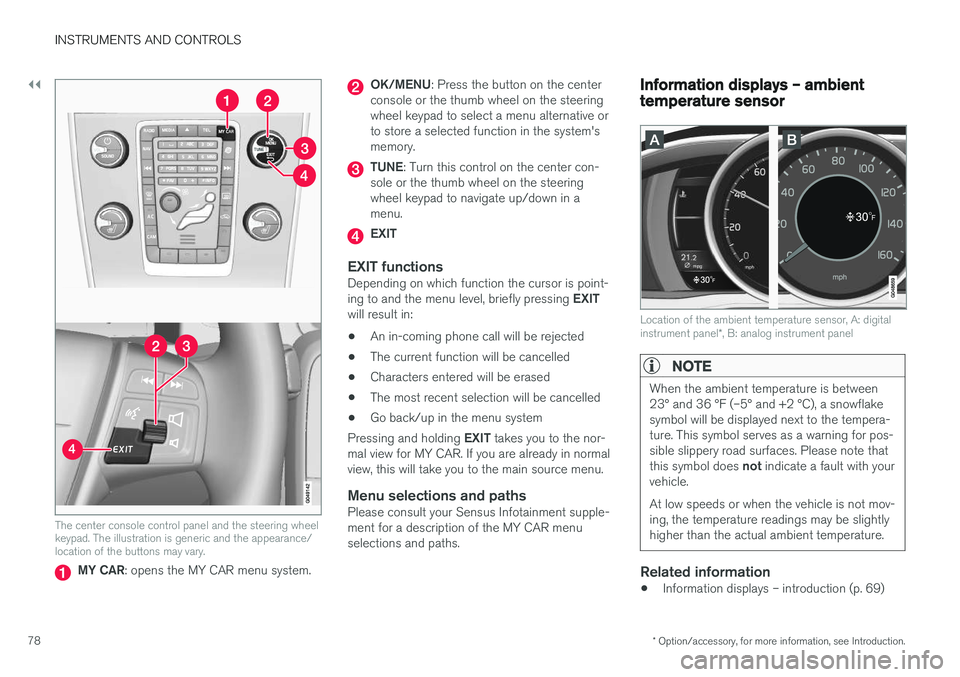
The center console control panel and the steering wheel keypad. The illustration is generic and the appearance/location of the buttons may vary.
MY CAR : opens the MY CAR menu system.
OK/MENU : Press the button on the center
console or the thumb wheel on the steering wheel keypad to select a menu alternative orto store a selected function in the system'smemory.
TUNE : Turn this control on the center con-
sole or the thumb wheel on the steering wheel keypad to navigate up/down in amenu.
EXIT
EXIT functionsDepending on which function the cursor is point- ing to and the menu level, briefly pressing EXIT
will result in:
• An in-coming phone call will be rejected
• The current function will be cancelled
• Characters entered will be erased
• The most recent selection will be cancelled
• Go back/up in the menu system
Pressing and holding EXIT takes you to the nor-
mal view for MY CAR. If you are already in normal view, this will take you to the main source menu.
Menu selections and pathsPlease consult your Sensus Infotainment supple-ment for a description of the MY CAR menuselections and paths.
Information displays – ambient temperature sensor
Location of the ambient temperature sensor, A: digital instrument panel *, B: analog instrument panel
NOTE
When the ambient temperature is between 23° and 36 °F (–5° and +2 °C), a snowflakesymbol will be displayed next to the tempera-ture. This symbol serves as a warning for pos-sible slippery road surfaces. Please note that this symbol does not indicate a fault with your
vehicle. At low speeds or when the vehicle is not mov- ing, the temperature readings may be slightlyhigher than the actual ambient temperature.
Related information
• Information displays – introduction (p. 69)
Page 81 of 398
INSTRUMENTS AND CONTROLS
}}
* Option/accessory, for more information, see Introduction.79
Information displays – trip odometer and clock The trip odometers
T1 and T2 and clock are dis-
played in the instrument panel.
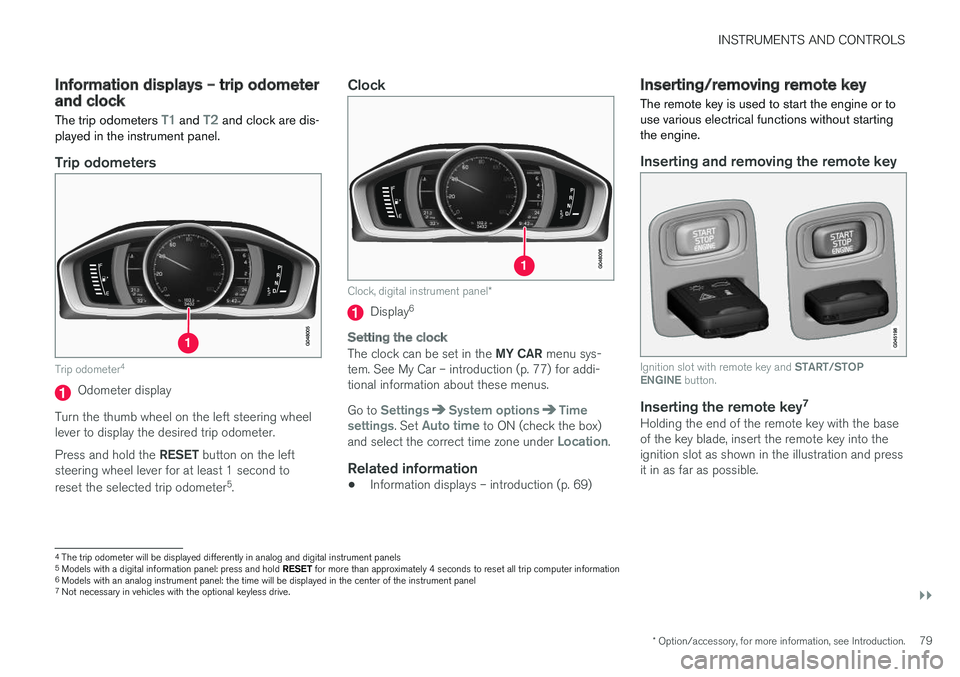
Trip odometers
Trip odometer 4
Odometer display
Turn the thumb wheel on the left steering wheel lever to display the desired trip odometer. Press and hold the RESET button on the left
steering wheel lever for at least 1 second to reset the selected trip odometer 5
.
Clock
Clock, digital instrument panel *
Display6
Setting the clock
The clock can be set in the
MY CAR menu sys-
tem. See My Car – introduction (p. 77) for addi- tional information about these menus. Go to
SettingsSystem optionsTime
settings. Set Auto time to ON (check the box)
and select the correct time zone under Location.
Related information
• Information displays – introduction (p. 69)
Inserting/removing remote key The remote key is used to start the engine or to use various electrical functions without startingthe engine.
Inserting and removing the remote key
Ignition slot with remote key and
START/STOP
ENGINE button.
Inserting the remote key 7Holding the end of the remote key with the base of the key blade, insert the remote key into theignition slot as shown in the illustration and pressit in as far as possible.
4
The trip odometer will be displayed differently in analog and digital instrument panels
5 Models with a digital information panel: press and hold RESET for more than approximately 4 seconds to reset all trip computer information
6 Models with an analog instrument panel: the time will be displayed in the center of the instrument panel
7
Not necessary in vehicles with the optional keyless drive.
Page 83 of 398
INSTRUMENTS AND CONTROLS
* Option/accessory, for more information, see Introduction.81
Ignition mode I
–With the remote key fully pressed into the ignition slot8
, press START/STOP ENGINE
briefly.
Ignition mode II
–With the remote key fully pressed into the ignition slot 8
, press START/STOP ENGINE
for approximately 2 seconds.
Returning to mode 0
To return to mode 0 from mode II or I, press
START/STOP ENGINE briefly.
Starting and stopping the engineSee Starting the engine (p. 248) and Switching off the engine (p. 249) for information on star-ting the engine and switching it off.
Emergency towingSee Towing the vehicle (p. 282) for importantinformation about the remote key when the vehi-cle is being towed.
Related information
•Inserting/removing remote key (p. 79)
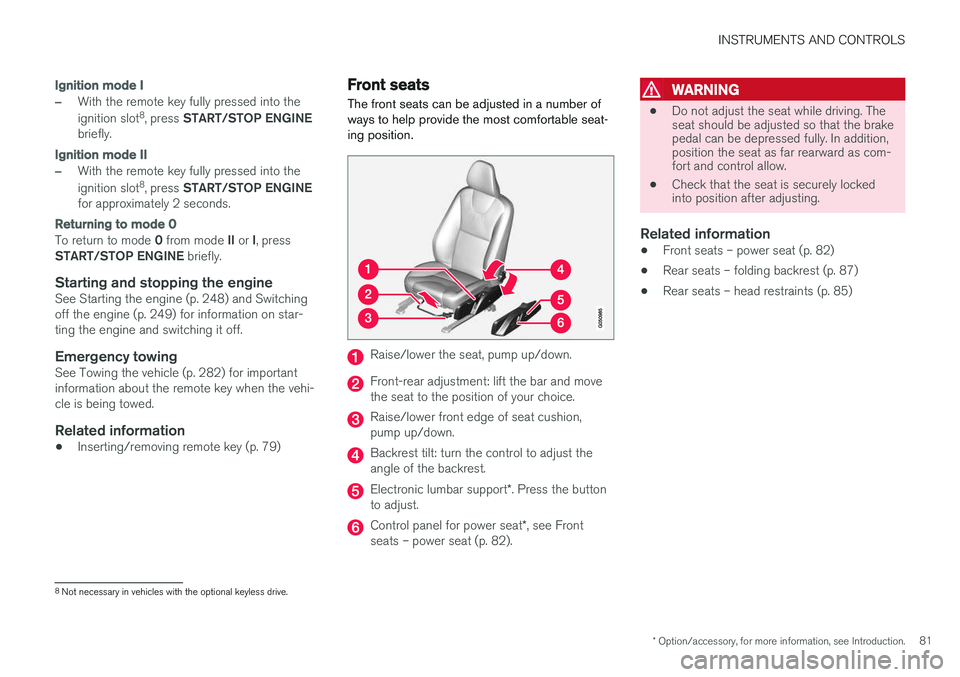
Front seats
The front seats can be adjusted in a number of ways to help provide the most comfortable seat-ing position.
Raise/lower the seat, pump up/down.
Front-rear adjustment: lift the bar and move the seat to the position of your choice.
Raise/lower front edge of seat cushion, pump up/down.
Backrest tilt: turn the control to adjust the angle of the backrest.
Electronic lumbar support *. Press the button
to adjust.
Control panel for power seat *, see Front
seats – power seat (p. 82).
WARNING
• Do not adjust the seat while driving. The seat should be adjusted so that the brakepedal can be depressed fully. In addition,position the seat as far rearward as com-fort and control allow.
• Check that the seat is securely lockedinto position after adjusting.
Related information
• Front seats – power seat (p. 82)
• Rear seats – folding backrest (p. 87)
• Rear seats – head restraints (p. 85)
8
Not necessary in vehicles with the optional keyless drive.
Page 87 of 398
INSTRUMENTS AND CONTROLS
}}
85
Returning the seat/mirrors to the stored positions
To move the seat and door mirrors to the position stored in the remote key: 1.Unlock the driver's door with the same
remote key (the one used to lock the doors). For models equipped with the optional key-less drive, you must have the same remotekey in your possession.
2. Open the driver's door within 2 minutes. The driver's seat and door mirrors will automati- cally move to the position in which you left them(if the vehicle has been unlocked with one of theother keys and new seat/mirror adjustments havebeen made).
NOTE
• The seat will move to this position even if someone else has moved it to a different position and locked the vehicle with a
dif-
ferent remote key.
• This feature will work in the same way with all of the remote keys that you usewith your vehicle.
Emergency stop
WARNING
•
Because the driver's seat can be adjusted with the ignition off, children should neverbe left unattended in the vehicle.
• Movement of the seat can be STOPPEDat any time by pressing any button on thepower seat control panel.
• Do not adjust the seat while driving. Theseat should be adjusted so that the brakepedal can be depressed fully. In addition,position the seat as far rearward as com-fort and control allow.
• The seat rails on the floor must not beobstructed in any way when the seat is inmotion.
Related information
• Remote key – functions (p. 153)
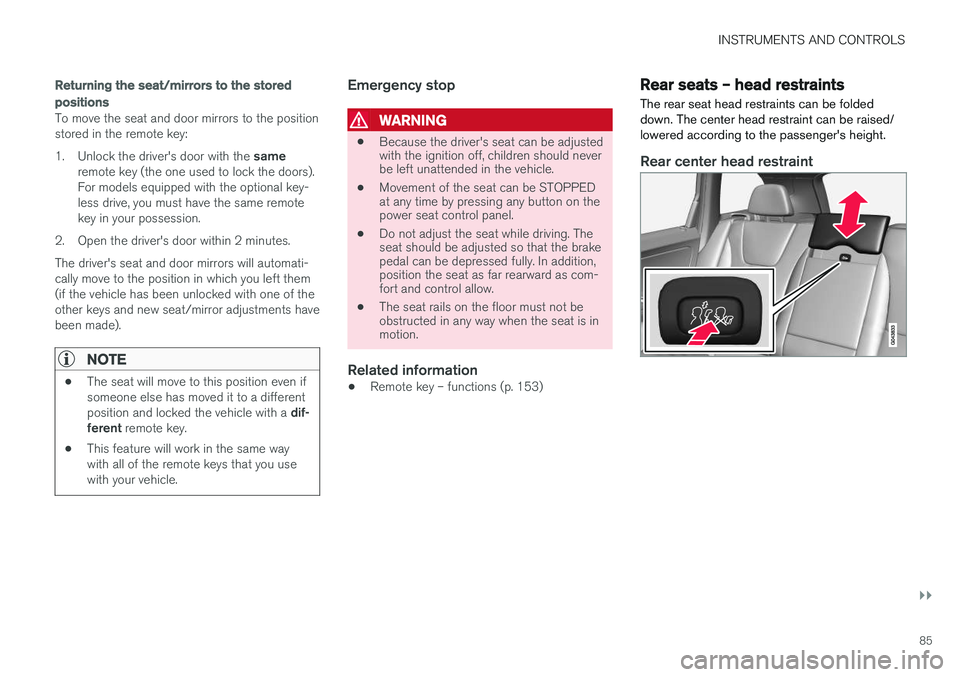
Rear seats – head restraints The rear seat head restraints can be folded down. The center head restraint can be raised/lowered according to the passenger's height.
Rear center head restraint