instrument panel VOLVO XC60 2017 Owner´s Manual
[x] Cancel search | Manufacturer: VOLVO, Model Year: 2017, Model line: XC60, Model: VOLVO XC60 2017Pages: 398, PDF Size: 9.17 MB
Page 92 of 398
INSTRUMENTS AND CONTROLS
* Option/accessory, for more information, see Introduction.
90
Electrically heated * steering wheel
The steering wheel can be heated electrically.
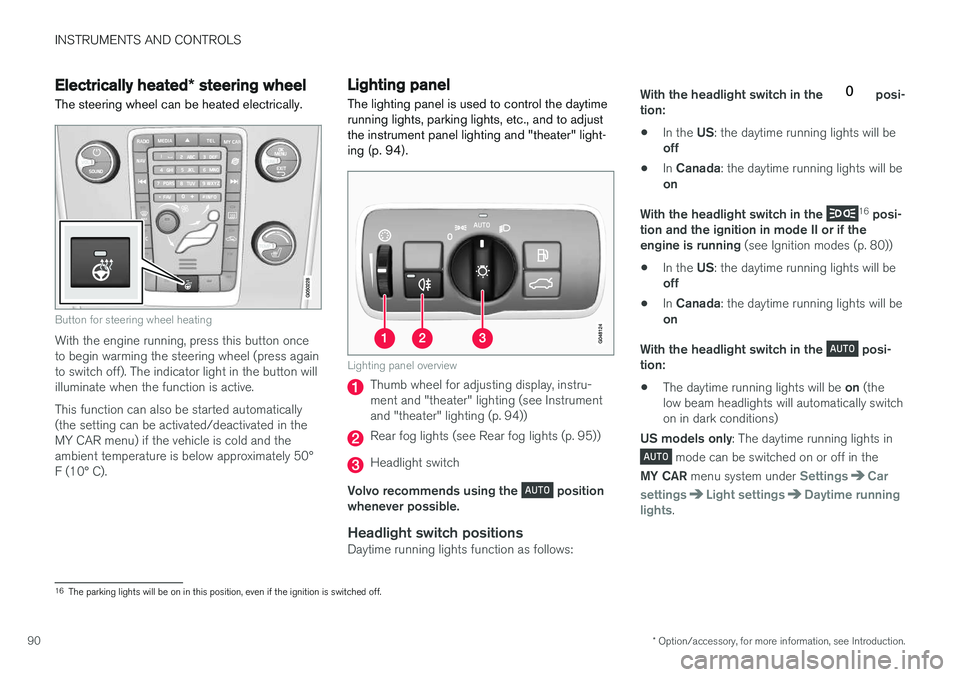
Button for steering wheel heating
With the engine running, press this button once to begin warming the steering wheel (press againto switch off). The indicator light in the button willilluminate when the function is active. This function can also be started automatically (the setting can be activated/deactivated in theMY CAR menu) if the vehicle is cold and theambient temperature is below approximately 50°F (10° C).
Lighting panel The lighting panel is used to control the daytime running lights, parking lights, etc., and to adjustthe instrument panel lighting and "theater" light-ing (p. 94).
Lighting panel overview
Thumb wheel for adjusting display, instru- ment and "theater" lighting (see Instrumentand "theater" lighting (p. 94))
Rear fog lights (see Rear fog lights (p. 95))
Headlight switch
Volvo recommends using the
position
whenever possible.
Headlight switch positionsDaytime running lights function as follows: With the headlight switch in the
posi-
tion: • In the
US: the daytime running lights will be
off
• In
Canada : the daytime running lights will be
on
With the headlight switch in the
16
posi-
tion and the ignition in mode II or if the engine is running (see Ignition modes (p. 80))
• In the
US: the daytime running lights will be
off
• In
Canada : the daytime running lights will be
on
With the headlight switch in the
posi-
tion: • The daytime running lights will be
on (the
low beam headlights will automatically switch on in dark conditions)
US models only : The daytime running lights in
mode can be switched on or off in the
MY CAR menu system under
SettingsCar
settings
Light settingsDaytime running
lights.
16 The parking lights will be on in this position, even if the ignition is switched off.
Page 93 of 398
INSTRUMENTS AND CONTROLS
* Option/accessory, for more information, see Introduction.91
NOTE
Volvo recommends the use of Daytime Run- ning Lights in the United States. The use of these lights is mandatory in Canada .
With the headlight switch in the posi-
tion: • The daytime running lights will be
off and the
low beam headlights will be on
High/low beam headlights
When the engine is started, the low beams are activated automatically if the headlight control is in position
.
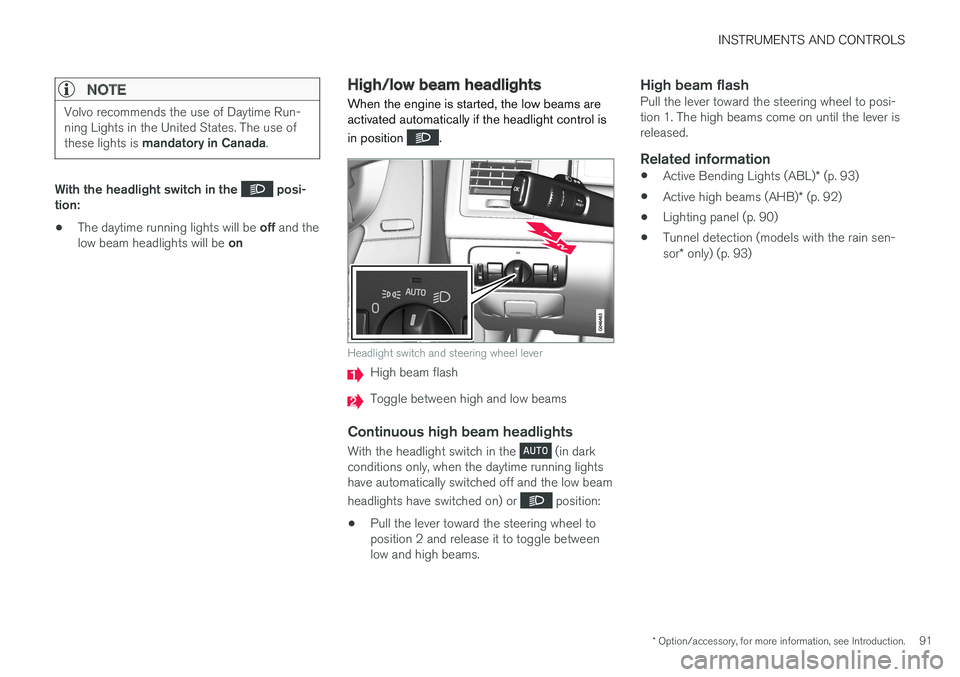
Headlight switch and steering wheel lever
High beam flash
Toggle between high and low beams
Continuous high beam headlights
With the headlight switch in the (in dark
conditions only, when the daytime running lights have automatically switched off and the low beam headlights have switched on) or
position:
• Pull the lever toward the steering wheel to position 2 and release it to toggle betweenlow and high beams.
High beam flashPull the lever toward the steering wheel to posi-tion 1. The high beams come on until the lever isreleased.
Related information
•
Active Bending Lights (ABL)
* (p. 93)
• Active high beams (AHB)
* (p. 92)
• Lighting panel (p. 90)
• Tunnel detection (models with the rain sen- sor
* only) (p. 93)
Page 94 of 398
INSTRUMENTS AND CONTROLS
* Option/accessory, for more information, see Introduction.
92
Active high beams (AHB) *
AHB uses a camera at the upper edge of the windshield to detect the headlights of oncomingvehicles or the taillights of a vehicle directlyahead. When this happens, the headlights willautomatically switch from high beams to lowbeams. When the camera no longer detects theheadlights/taillights of other vehicles, your head-lights will switch back to high beams after sev-eral seconds.
To activate AHB:
• Turn the headlight control to the
posi-
tion.
The feature will begin functioning if the engine has been running for at least 20 seconds and thevehicle's speed is at least 12 mph (20 km/h).
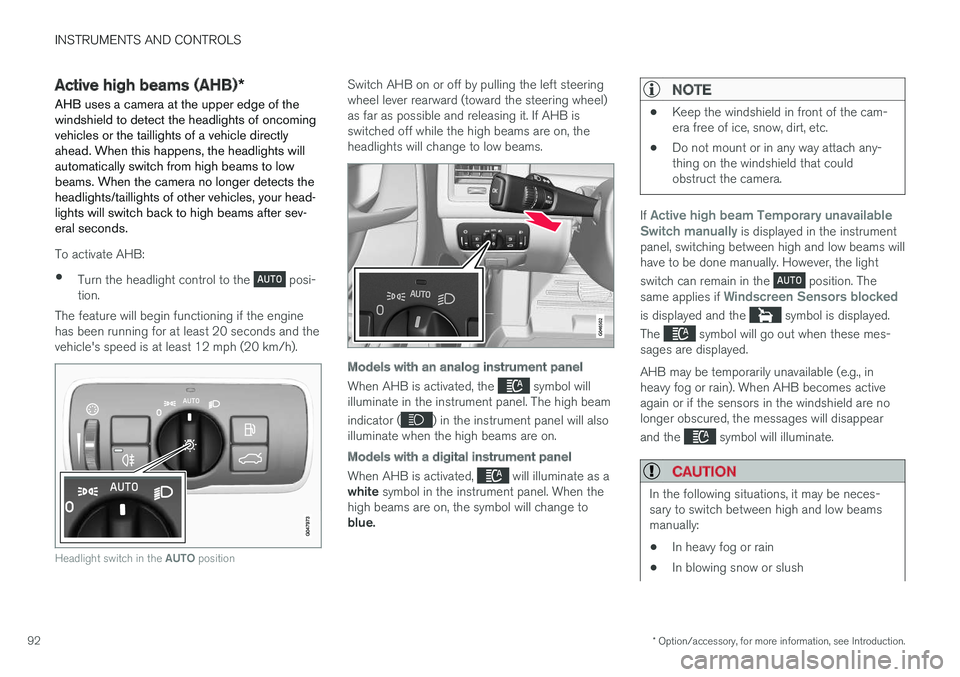
Headlight switch in the AUTO position
Switch AHB on or off by pulling the left steering wheel lever rearward (toward the steering wheel)as far as possible and releasing it. If AHB isswitched off while the high beams are on, theheadlights will change to low beams.
Models with an analog instrument panel
When AHB is activated, the symbol will
illuminate in the instrument panel. The high beam indicator (
) in the instrument panel will also
illuminate when the high beams are on.
Models with a digital instrument panel
When AHB is activated, will illuminate as a
white symbol in the instrument panel. When the
high beams are on, the symbol will change to blue.
NOTE
• Keep the windshield in front of the cam- era free of ice, snow, dirt, etc.
• Do not mount or in any way attach any-thing on the windshield that couldobstruct the camera.
If Active high beam Temporary unavailable
Switch manually is displayed in the instrument
panel, switching between high and low beams will have to be done manually. However, the light switch can remain in the
position. The
same applies if Windscreen Sensors blocked
is displayed and the symbol is displayed.
The
symbol will go out when these mes-
sages are displayed. AHB may be temporarily unavailable (e.g., in heavy fog or rain). When AHB becomes activeagain or if the sensors in the windshield are nolonger obscured, the messages will disappear and the
symbol will illuminate.
CAUTION
In the following situations, it may be neces- sary to switch between high and low beamsmanually:
• In heavy fog or rain
• In blowing snow or slush
Page 96 of 398
||
INSTRUMENTS AND CONTROLS
* Option/accessory, for more information, see Introduction.
94
NOTE
This function is only active in twilight or dark conditions, and only when the vehicle is inmotion.
If a fault should occur in the system, the symbol will illuminate and a message will be displayed asshown in the table.
SymbolDisplayExplanation
Headlamp failureServicerequiredThe system is not functioning properlyand should beinspected/repairedby a trained andqualified Volvo serv-ice technician.
Related information
• Lighting panel (p. 90)
• High/low beam headlights (p. 91)
• Active high beams (AHB)
* (p. 92)
Auxiliary lights *
If the vehicle is fitted with auxiliary lights, the driver can use the MY CAR menu system to
choose to deactivate and turn these lights onand off along with the high beam headlights.
The auxiliary lights must be connected to the vehicle's electrical system, which should only bedone by a trained and authorized Volvo servicetechnician. See My Car – introduction (p. 77) formore information about the menu system.
Instrument and "theater" lighting
Instrument lightingIllumination of the display and instrument lights will vary, depending on ignition mode. The display lighting is automatically subdued in darkness and the sensitivity is set with the thumbwheel. The intensity of the instrument lighting is adjusted with the thumb wheel.
"Theater" lightingWhen the overhead courtesy lighting has goneout and the engine is running, several LEDslocated near the roof console illuminate to pro-vide faint lighting for the occupants of the frontseats. This lighting goes out just after the over-head courtesy lighting when the vehicle is locked.
Related information
• Lighting panel (p. 90)
• Front interior lighting (p. 97)
• Rear interior lighting (p. 98)
• Ignition modes (p. 80)
Page 97 of 398
INSTRUMENTS AND CONTROLS
}}
95
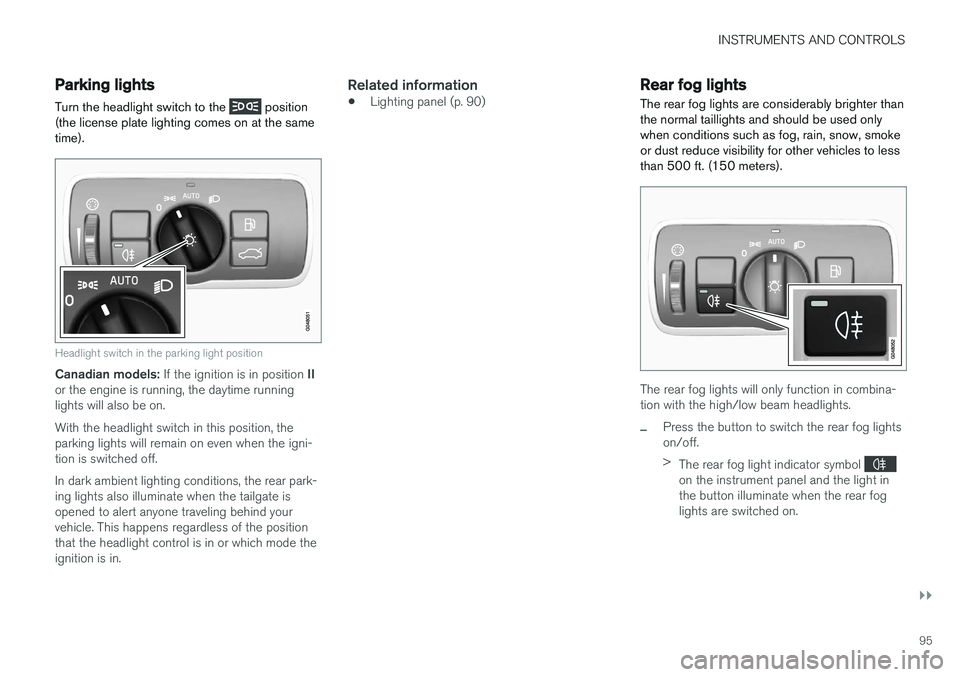
Parking lights Turn the headlight switch to the
position
(the license plate lighting comes on at the same time).
Headlight switch in the parking light position
Canadian models: If the ignition is in position II
or the engine is running, the daytime running lights will also be on. With the headlight switch in this position, the parking lights will remain on even when the igni-tion is switched off. In dark ambient lighting conditions, the rear park- ing lights also illuminate when the tailgate isopened to alert anyone traveling behind yourvehicle. This happens regardless of the positionthat the headlight control is in or which mode theignition is in.
Related information
• Lighting panel (p. 90)
Rear fog lights
The rear fog lights are considerably brighter than the normal taillights and should be used onlywhen conditions such as fog, rain, snow, smokeor dust reduce visibility for other vehicles to lessthan 500 ft. (150 meters).
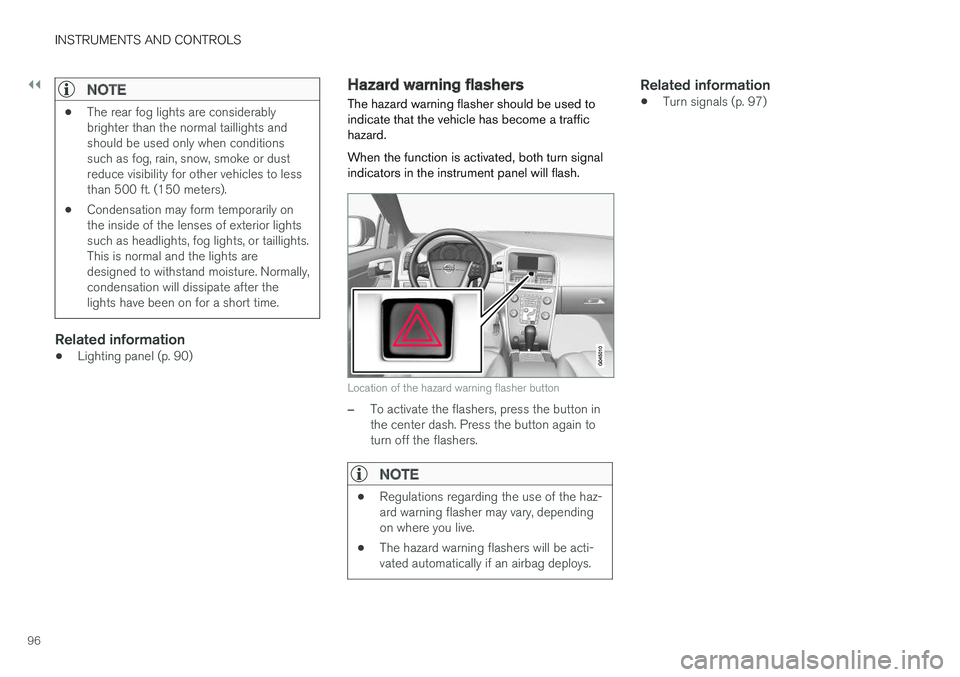
The rear fog lights will only function in combina- tion with the high/low beam headlights.
–Press the button to switch the rear fog lights on/off. > The rear fog light indicator symbol
on the instrument panel and the light in the button illuminate when the rear foglights are switched on.
Page 98 of 398
||
INSTRUMENTS AND CONTROLS
96
NOTE
•The rear fog lights are considerably brighter than the normal taillights andshould be used only when conditionssuch as fog, rain, snow, smoke or dustreduce visibility for other vehicles to lessthan 500 ft. (150 meters).
• Condensation may form temporarily onthe inside of the lenses of exterior lightssuch as headlights, fog lights, or taillights.This is normal and the lights aredesigned to withstand moisture. Normally,condensation will dissipate after thelights have been on for a short time.
Related information
•Lighting panel (p. 90)
Hazard warning flashers
The hazard warning flasher should be used to indicate that the vehicle has become a traffichazard. When the function is activated, both turn signal indicators in the instrument panel will flash.
Location of the hazard warning flasher button
–To activate the flashers, press the button in the center dash. Press the button again toturn off the flashers.
NOTE
• Regulations regarding the use of the haz- ard warning flasher may vary, dependingon where you live.
• The hazard warning flashers will be acti-vated automatically if an airbag deploys.
Related information
• Turn signals (p. 97)
Page 102 of 398
||
INSTRUMENTS AND CONTROLS
* Option/accessory, for more information, see Introduction.
100
CAUTION
• Use ample washer fluid when washing the windshield. The windshield should bethoroughly wet when the wipers are inoperation.
• Before using the wipers, ice and snowshould be removed from the windshield/rear window. Be sure the wiper bladesare not frozen in place.
Windshield wipers off
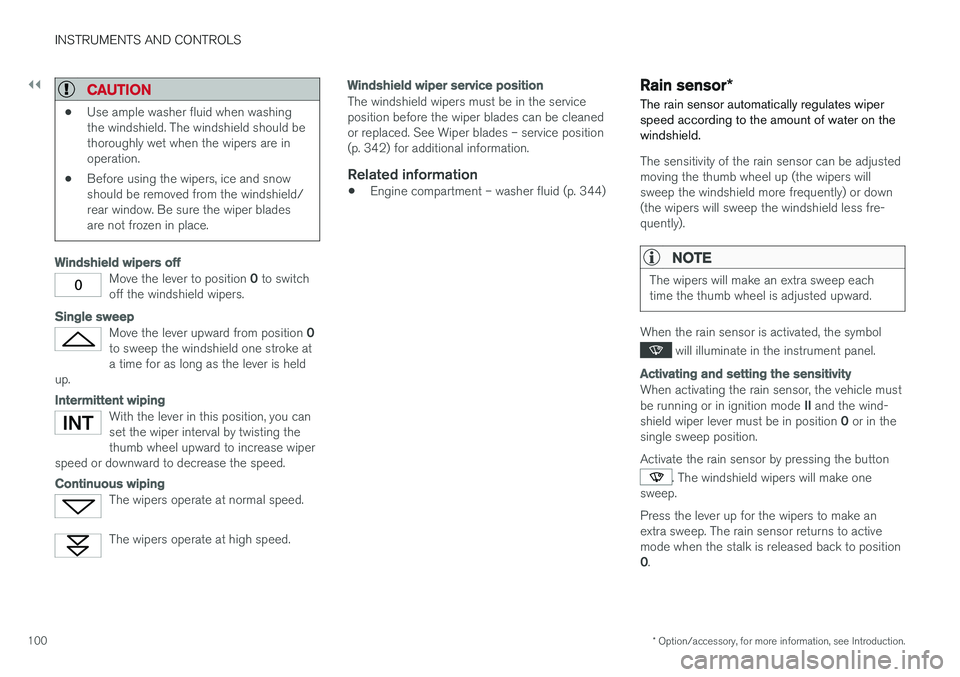
Move the lever to position
0 to switch
off the windshield wipers.
Single sweep
Move the lever upward from position 0
to sweep the windshield one stroke at a time for as long as the lever is held
up.
Intermittent wiping
With the lever in this position, you can set the wiper interval by twisting thethumb wheel upward to increase wiper
speed or downward to decrease the speed.
Continuous wiping
The wipers operate at normal speed.
The wipers operate at high speed.
Windshield wiper service position
The windshield wipers must be in the service position before the wiper blades can be cleanedor replaced. See Wiper blades – service position(p. 342) for additional information.
Related information
• Engine compartment – washer fluid (p. 344)
Rain sensor
*
The rain sensor automatically regulates wiper speed according to the amount of water on thewindshield.
The sensitivity of the rain sensor can be adjusted moving the thumb wheel up (the wipers willsweep the windshield more frequently) or down(the wipers will sweep the windshield less fre-quently).
NOTE
The wipers will make an extra sweep each time the thumb wheel is adjusted upward.
When the rain sensor is activated, the symbol
will illuminate in the instrument panel.
Activating and setting the sensitivity
When activating the rain sensor, the vehicle must be running or in ignition mode II and the wind-
shield wiper lever must be in position 0 or in the
single sweep position. Activate the rain sensor by pressing the button
. The windshield wipers will make one
sweep. Press the lever up for the wipers to make an extra sweep. The rain sensor returns to activemode when the stalk is released back to position 0 .
Page 104 of 398
INSTRUMENTS AND CONTROLS
* Option/accessory, for more information, see Introduction.
102
Tailgate wiper/washer
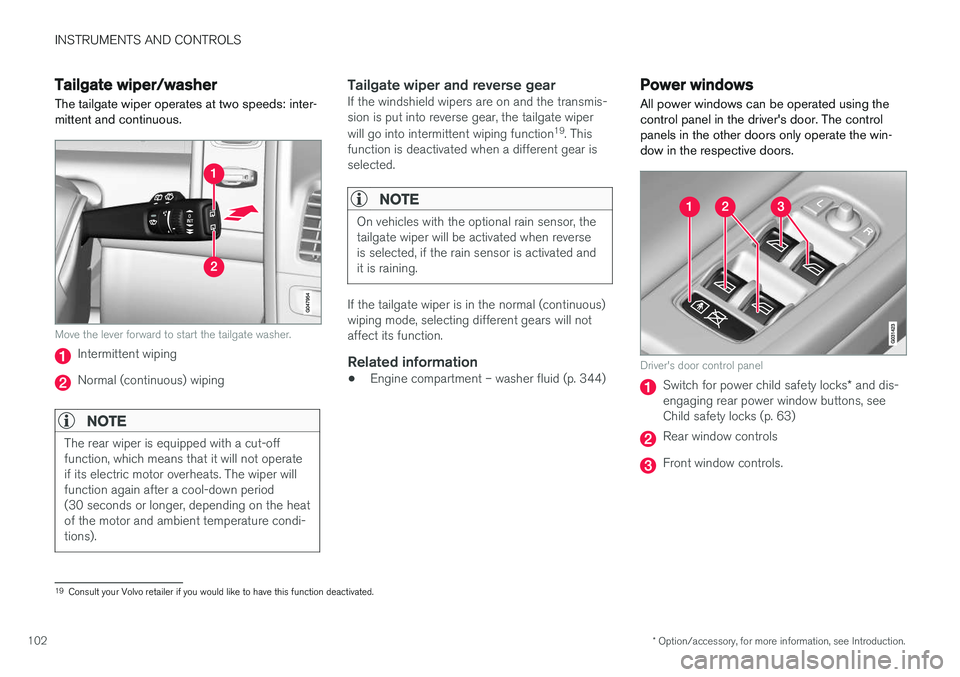
The tailgate wiper operates at two speeds: inter- mittent and continuous.
Move the lever forward to start the tailgate washer.
Intermittent wiping
Normal (continuous) wiping
NOTE
The rear wiper is equipped with a cut-off function, which means that it will not operateif its electric motor overheats. The wiper willfunction again after a cool-down period(30 seconds or longer, depending on the heatof the motor and ambient temperature condi-tions).
Tailgate wiper and reverse gearIf the windshield wipers are on and the transmis- sion is put into reverse gear, the tailgate wiper will go into intermittent wiping function 19
. This
function is deactivated when a different gear is selected.
NOTE
On vehicles with the optional rain sensor, the tailgate wiper will be activated when reverseis selected, if the rain sensor is activated andit is raining.
If the tailgate wiper is in the normal (continuous) wiping mode, selecting different gears will notaffect its function.
Related information
• Engine compartment – washer fluid (p. 344)
Power windows
All power windows can be operated using the control panel in the driver's door. The controlpanels in the other doors only operate the win-dow in the respective doors.
Driver's door control panel
Switch for power child safety locks * and dis-
engaging rear power window buttons, see Child safety locks (p. 63)
Rear window controls
Front window controls.
19 Consult your Volvo retailer if you would like to have this function deactivated.
Page 117 of 398
INSTRUMENTS AND CONTROLS
* Option/accessory, for more information, see Introduction.115
Information display – menu controls
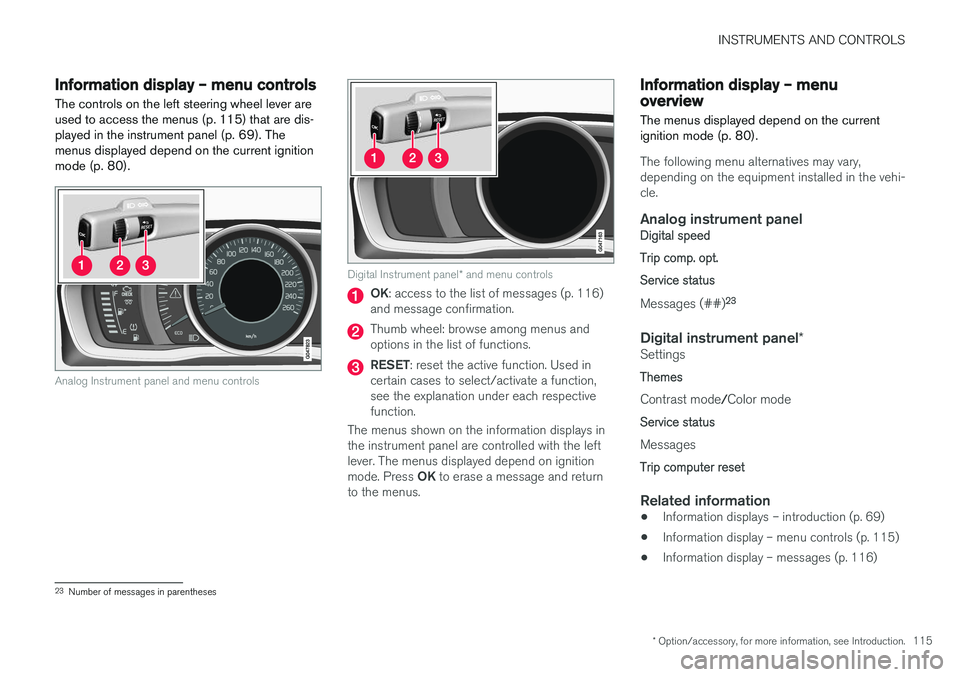
The controls on the left steering wheel lever are used to access the menus (p. 115) that are dis-played in the instrument panel (p. 69). Themenus displayed depend on the current ignitionmode (p. 80).
Analog Instrument panel and menu controls
Digital Instrument panel * and menu controls
OK : access to the list of messages (p. 116)
and message confirmation.
Thumb wheel: browse among menus and options in the list of functions.
RESET : reset the active function. Used in
certain cases to select/activate a function, see the explanation under each respectivefunction.
The menus shown on the information displays inthe instrument panel are controlled with the leftlever. The menus displayed depend on ignition mode. Press OK to erase a message and return
to the menus.
Information display – menu overview
The menus displayed depend on the current ignition mode (p. 80).
The following menu alternatives may vary, depending on the equipment installed in the vehi-cle.
Analog instrument panelDigital speed Trip comp. opt.Service status
Messages (##) 23
Digital instrument panel
*Settings
Themes
Contrast mode /Color mode
Service status
Messages
Trip computer reset
Related information
• Information displays – introduction (p. 69)
• Information display – menu controls (p. 115)
• Information display – messages (p. 116)
23
Number of messages in parentheses
Page 118 of 398
INSTRUMENTS AND CONTROLS
116
Information display – messagesThe controls on the left steering wheel lever are used to scroll among messages displayed in theinstrument panel and to confirm selections. When information, indicator or warning symbols illuminate, an explanatory message will be dis-played in the instrument panel.
When a warning (p. 75), information (p. 73) or indicator symbol (p. 73) comes on, a correspond-ing message appears in the information panel. Anerror message is stored in a memory list until thefault is rectified. Press OK to acknowledge and scroll among the
messages.
NOTE
If a warning message appears while you are using the trip computer, the message must be read and confirmed by pressing OK before
the previous activity can be resumed.
MessageDescription
Stop engineAStop and switch off the engine as soon as possible.Serious risk of damage. Con-tact an authorized Volvoworkshop.
Stop safelyAStop and switch off the engine. Serious risk of dam-age. Contact an authorizedVolvo workshop.
Service urgentAHave the vehicle checked by an authorized Volvo work-shop immediately.
Service requiredAHave the vehicle checked by an authorized Volvo work-shop as soon as possible.
See manualARead the owner's manual.
Book time for mainte-nanceTime to book service at an authorized Volvo retailer.
Time for reg- ular mainte-nanceTime for regular service at an authorized Volvo workshop.The timing is determined bythe number of miles driven,number of months since thelast service, engine runningtime.
MessageDescription
Maintenance overdueIf the service intervals are not followed, the warranty doesnot cover any damaged parts.Contact an authorized Volvoworkshop for service.
Temporarily OFFAA function has been tempo- rarily switched off and isreset automatically while driv-ing or after starting again.
Low battery Power savemodeThe audio system is switched off to save current. Chargethe battery.
A There will also be a system-specific part of this message
Related information
• Information displays – introduction (p. 69)
• Information display – menu overview (p. 115)
• Information display – menu controls (p. 115)