instrument panel VOLVO XC60 2017 Owner´s Manual
[x] Cancel search | Manufacturer: VOLVO, Model Year: 2017, Model line: XC60, Model: VOLVO XC60 2017Pages: 398, PDF Size: 9.17 MB
Page 307 of 398
WHEELS AND TIRES
305
prevent the tire pressure monitoring system from functioning properly. Always check the system's malfunction telltale after replacing one or more tires or wheels onyour vehicle to ensure that the replacement oralternate tires and wheels allow the system tocontinue to function properly.
NOTE
The system indicates low tire pressure but does not replace normal tire maintenance. Forinformation on correct tire pressure, pleaserefer to the tire inflation decal on the driver'sdoor opening or consult your Volvo retailer.
WARNING
Incorrect inflation pressure could lead to tire failure, resulting in a loss of control of thevehicle.
Related information
•
Tire Monitor - introduction (p. 305)
• Tire Pressure Monitoring System (TPMS) – general information (p. 308)
Tire Monitor - introduction Tire Monitor uses the rotational speed of the tires in combination with signal analysis of theABS sensor signals to determine if they areproperly inflated.
When a tire is under-inflated, its diameter (and consequently also its rotational speed) changes.By comparing the individual tires with each otherit is possible to determine if one or more tires areunder inflated. When low inflation pressure is detected or if the system is not functioning properly, Tire Monitorwill light up the tire pressure warning light (
) (also referred to as a telltale) in the
instrument panel and will display one of several messages in the text window, for example:
Tire
pressure low Check tires. Adjust the inflation
pressure and recalibrate if necessary.
NOTE
If a malfunction occurs in the system, the tire pressure warning light will flash for approxi-mately 1 minute and then remain illuminated.
Tire press. syst Service required will be
displayed.
NOTE
The system indicates low tire pressure but does not replace normal tire maintenance. Forinformation on correct tire pressure, pleaserefer to the tire inflation decal on the driver'sdoor opening or consult your Volvo retailer.
Related information
• Tire pressure monitoring - overview (p. 304)
• Calibrating Tire Monitor (p. 306)
Page 309 of 398
WHEELS AND TIRES
307
ment panel (
) is illuminated
: the sys-
tem is temporarily unavailable. It should become operational again shortly.
Related information
• Tire Monitor – messages (p. 307)
Tire Monitor – messages
When low tire pressure has been detected, a message will be displayed and the tire pressure warning telltale in the instrument panel (
)
will illuminate.
MessagesIf the telltale illuminates, one of the following message will also be displayed: •
Tire pressure low/Check, adjust and
calibrate
•Tire pressure system/Service required
•Tire pressure system/Currently
unavailable
Erasing warning messagesTo erase a low tire pressure message and turn off the telltale:
1. Use a tire pressure gauge to check the infla- tion pressure of all four tires.
2. Re-inflate the tires to the correct pressure (consult the tire pressure decal on the driv- er's door opening.
3. Recalibrate Tire Monitor, see Calibrating Tire Monitor (p. 306).
NOTE
To help avoid incorrect tire inflation pressure, only inflate the tires when they are cold. Thetires are considered to be cold when theyhave the same temperature as the surround-ing (ambient) air. This temperature is normallyreached after the vehicle has been parked forat least 3 hours. After driving a distance ofapproximately 1 mile (1.6 km), the tires areconsidered to be hot.
CAUTION
• After inflating the tires, always reinstall the valve cap to help avoid damage to thevalve from dirt, gravel, etc.
• Use plastic valve caps only. Metal capscould corrode and become difficult toremove.
WARNING
•
Incorrect inflation pressure could lead to tire failure, resulting in a loss of control ofthe vehicle.
• Tire monitoring systems cannot indicatesudden tire damage caused by externalfactors (e.g., a blowout) in advance.
Related information
•Tire inflation – checking pressure (p. 297)
Page 310 of 398
WHEELS AND TIRES
308
Tire Pressure Monitoring System (TPMS) – general information TPMS uses sensors mounted in the tire valves to check inflation pressure levels. When thevehicle is moving at a speed of approximately20 mph (30 km/h) or faster, these sensorstransmit inflation pressure data to a receiverlocated in the vehicle.
NOTE
USA – FCC ID: KR5S180052050 This device complies with part 15 of the FCC rules. Operation is subject to the followingconditions: (1) This device may not causeharmful interference, and (2) this device mustaccept any interference received, includinginterference that may cause undesired opera-tion.
When low inflation pressure is detected or if a sensor is not functioning properly, TPMS will light up the tire pressure warning light (
) (also
referred to as a telltale) in the instrument panel and will display one of the following messages:
Tire pressure low, Tire needs air now or Tire
press. syst Service required.
NOTE
If a malfunction occurs in the system, the tire pressure warning light will flash for approxi-mately 1 minute and then remain illuminated.
Tire press. syst Service required will be
displayed.
Related information
• Tire Pressure Monitoring System (TPMS) – recalibrating (p. 309)
• Tire Pressure Monitoring System (TPMS) –messages (p. 310)
• Tire Pressure Monitoring System (TPMS) –activating/deactivating (p. 310)
• Tire Pressure Monitoring System (TPMS) –changing wheels (p. 308)
Tire Pressure Monitoring System (TPMS) – changing wheels
Please keep the following in mind when chang- ing or replacing the factory installed TPMSwheels/tires on the vehicle:
• Not all aftermarket wheels are equipped withTPMS sensors in the valves.
• If the vehicle is equipped with a temporaryspare tire, this tire does not have a TPMSsensor.
• If wheels without TPMS sensors are moun-ted on the vehicle, a text message will dis-played in the instrument panel each time thevehicle is driven above 20 mph (30 km/h) for10 minutes or more.
• Once TPMS sensors are properly installed,the warning message should not reappear. Ifthe message is still displayed, drive the vehi-cle for several minutes at a speed of 20 mph(30 km/h) or faster to erase the message.
• Volvo recommends that TPMS sensors befitted on all wheels used on the vehicle,including winter tires. Volvo does not recom-mend moving sensors back and forthbetween sets of wheels.
Page 312 of 398
||
WHEELS AND TIRES
310After adjusting inflation pressure, repeat steps 1-5 above.
Related information
•
Tire Pressure Monitoring System (TPMS) –general information (p. 308)
• Tire Pressure Monitoring System (TPMS) –messages (p. 310)
• Tire Pressure Monitoring System (TPMS) –activating/deactivating (p. 310)
• Tire Pressure Monitoring System (TPMS) –changing wheels (p. 308)
• My Car – introduction (p. 77)
Tire Pressure Monitoring System (TPMS) – activating/deactivating
Activating/deactivating TPMS
(Canadian models only)
1. Switch off the engine. 2. Put the ignition in mode I or II (see Ignition
modes (p. 80) for additional information).
3. Press the MY CAR key in the center console
control panel and select
SettingsCar
settings
Tire pressure
4. Select Tire monitoring and press OK/
MENU to turn the system on or off.
Related information
•Tire Pressure Monitoring System (TPMS) – general information (p. 308)
Tire Pressure Monitoring System (TPMS) – messages
Erasing warning messagesWhen a low tire pressure warning message has been displayed and the tire pressure warning light in the instrument panell (
) has come
on:
1. Use a tire pressure gauge to check the infla- tion pressure of all four tires.
2. Re-inflate the tire(s) to the correct pressure (consult the tire pressure decal on the driv- er's door opening).
3. In certain cases, it may be necessary to drive the vehicle for several minutes at a speed of20 mph (30 km/h) or faster. This will erasethe warning text and the telltale will go out.
Page 313 of 398
WHEELS AND TIRES
}}
311
NOTE
•The tire monitoring systems use a tem- perature compensated pressure value.This pressure value is dependent on tiretemperature and ambient temperature,which can differ from the recommendedcold tire pressure in the tire inflation tableand on the tire pressure placard locatedon the driver's side B-pillar (the structuralmember at the side of the vehicle, at therear of the driver's door opening). Thismeans that it may sometimes be neces-sary to inflate them slightly above therecommended cold pressure value(approx. 3-4 psi or 0.2-0.3 bar) in orderto reset a low tire pressure warning.
• To help avoid incorrect tire inflation pres-sure, if possible only inflate the tireswhen they are cold. The tires are consid-ered to be cold when they have the sametemperature as the surrounding (ambi-ent) air. This temperature is normallyreached after the vehicle has beenparked for at least 3 hours. After driving adistance of approximately 1 mile (1.6 km),the tires are considered to be hot.
CAUTION
•
After inflating the tires, always reinstall the valve cap to help avoid damage to thevalve from dirt, gravel, etc.
• Use plastic valve caps only. Metal capscould corrode and become difficult toremove.
WARNING
•Incorrect inflation pressure could lead to tire failure, resulting in a loss of control ofthe vehicle.
• Tire monitoring systems cannot indicatesudden tire damage caused by externalfactors (e.g., a blowout) in advance.
Related information
•Tire Pressure Monitoring System (TPMS) – general information (p. 308)
• Tire Pressure Monitoring System (TPMS) –recalibrating (p. 309)
• Tire Pressure Monitoring System (TPMS) –activating/deactivating (p. 310)
• Tire Pressure Monitoring System (TPMS) –changing wheels (p. 308)
• Tire pressure monitoring - overview (p. 304)
Self-supporting run flat tires (SST)
Self-supporting run flat tires are available as optional equipment on certain models.
The vehicle must be equipped with one of the tire pressure monitoring systems if tires of this typeare installed. Tires of this type have specially reinforced side- walls that make it possible to continue driving toa limited extent even though the tire has lostsome or all of its inflation pressure. These tiresare mounted on special rims (normal tires canalso be mounted on these rims). If an SST tire loses inflation pressure, the yellow TPMS symbol illuminates in the instrument paneland a text message is also displayed. If this hap-pens, reduce speed to not more than 50 mph(80 km/h). The tire should be replaced as soonas possible.
Page 328 of 398
||
MAINTENANCE AND SERVICING
326
CSB menu accessOnce the prerequisites have been established, all CSB-related menus can be accessed in MY CAR
by pressing OK/MENU and then selecting
Maintenance & repair.
Booking information and data from the
vehicle
If you request an appointment from your vehicle, with your consent, booking information and data about your vehicle 1
will be transmitted to your
preferred retailer.
Using the serviceOnce the prerequisites have been established, all CSB-related menus can be accessed in MY CAR
by pressing OK/MENU and then selecting
Maintenance & repair.
If the time for the next regularly scheduled serv- ice is approaching, if the vehicle requires certaintypes of repairs or if a system needs to bechecked, a message will be displayed. You willthen by guided through the steps required tobook service or repairs.
On-screen service messages
On-screen service message
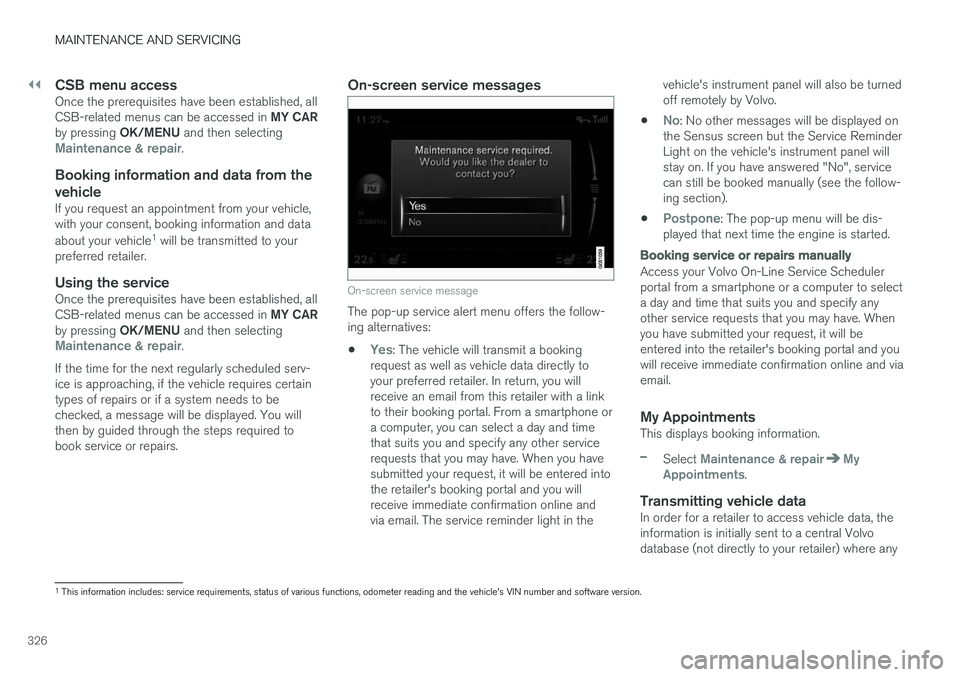
The pop-up service alert menu offers the follow- ing alternatives:
•
Yes: The vehicle will transmit a booking
request as well as vehicle data directly to your preferred retailer. In return, you willreceive an email from this retailer with a linkto their booking portal. From a smartphone ora computer, you can select a day and timethat suits you and specify any other servicerequests that you may have. When you havesubmitted your request, it will be entered intothe retailer's booking portal and you willreceive immediate confirmation online andvia email. The service reminder light in the vehicle's instrument panel will also be turnedoff remotely by Volvo.
•
No: No other messages will be displayed on
the Sensus screen but the Service Reminder Light on the vehicle's instrument panel willstay on. If you have answered "No", servicecan still be booked manually (see the follow-ing section).
•
Postpone: The pop-up menu will be dis-
played that next time the engine is started.
Booking service or repairs manually
Access your Volvo On-Line Service Scheduler portal from a smartphone or a computer to selecta day and time that suits you and specify anyother service requests that you may have. Whenyou have submitted your request, it will beentered into the retailer's booking portal and youwill receive immediate confirmation online and viaemail.
My AppointmentsThis displays booking information.
–Select Maintenance & repairMy
Appointments.
Transmitting vehicle dataIn order for a retailer to access vehicle data, the information is initially sent to a central Volvodatabase (not directly to your retailer) where any
1 This information includes: service requirements, status of various functions, odometer reading and the vehicle's VIN number and software version.
Page 332 of 398
||
MAINTENANCE AND SERVICING
* Option/accessory, for more information, see Introduction.
330
G021737
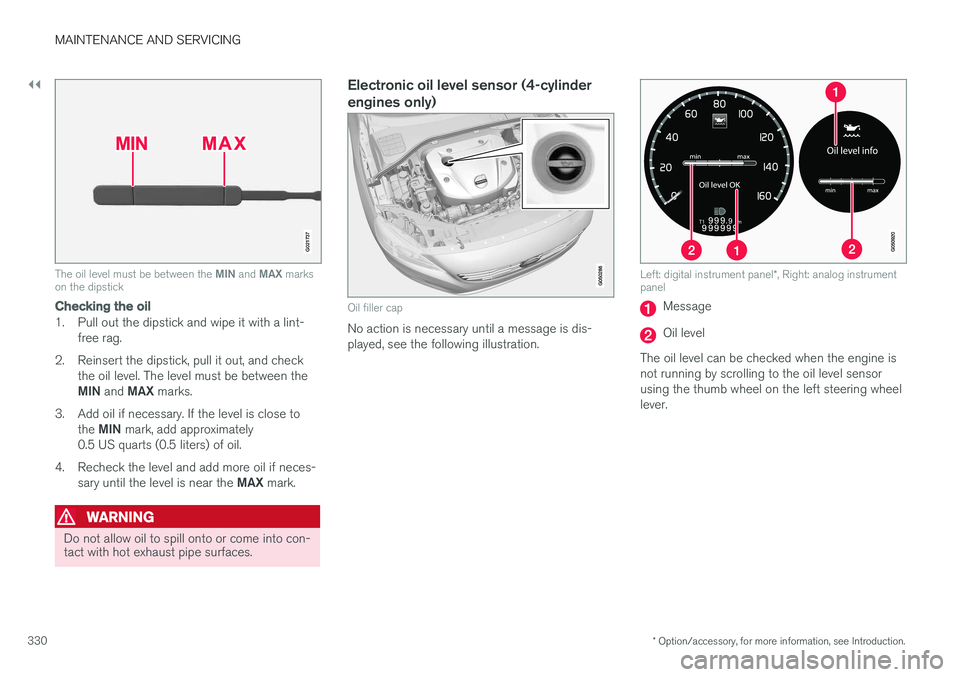
The oil level must be between the MIN and MAX marks
on the dipstick
Checking the oil
1. Pull out the dipstick and wipe it with a lint-
free rag.
2. Reinsert the dipstick, pull it out, and check the oil level. The level must be between the MIN and MAX marks.
3. Add oil if necessary. If the level is close to the MIN mark, add approximately
0.5 US quarts (0.5 liters) of oil.
4. Recheck the level and add more oil if neces- sary until the level is near the MAX mark.
WARNING
Do not allow oil to spill onto or come into con- tact with hot exhaust pipe surfaces.
Electronic oil level sensor (4-cylinder engines only)
Oil filler cap
No action is necessary until a message is dis- played, see the following illustration.
Left: digital instrument panel *, Right: analog instrument
panel
Message
Oil level
The oil level can be checked when the engine is not running by scrolling to the oil level sensorusing the thumb wheel on the left steering wheellever.
Page 356 of 398
||
MAINTENANCE AND SERVICING
* Option/accessory, for more information, see Introduction.
354
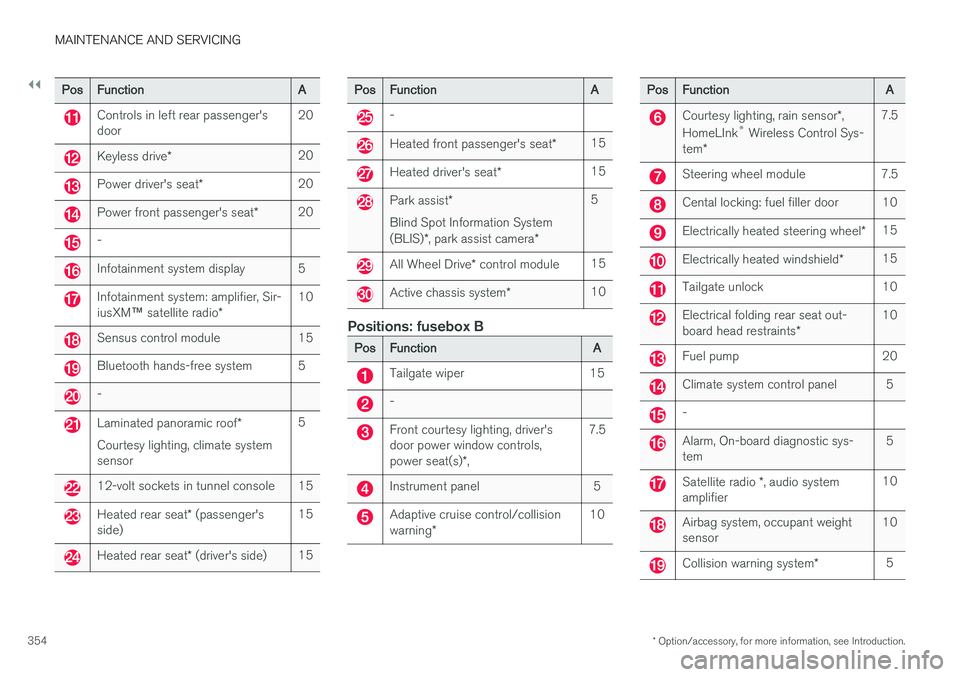
PosFunctionA
Controls in left rear passenger's door20
Keyless drive *20
Power driver's seat *20
Power front passenger's seat *20
-
Infotainment system display5
Infotainment system: amplifier, Sir- iusXM™ satellite radio *10
Sensus control module15
Bluetooth hands-free system5
-
Laminated panoramic roof *
Courtesy lighting, climate system sensor5
12-volt sockets in tunnel console15
Heated rear seat * (passenger's
side)15
Heated rear seat * (driver's side)15
PosFunctionA
-
Heated front passenger's seat *15
Heated driver's seat*15
Park assist*
Blind Spot Information System (BLIS) *, park assist camera *5
All Wheel Drive* control module15
Active chassis system *10
Positions: fusebox B
PosFunctionA
Tailgate wiper15
-
Front courtesy lighting, driver's door power window controls, power seat(s)*,7.5
Instrument panel5
Adaptive cruise control/collision warning *10
PosFunctionA
Courtesy lighting, rain sensor *,
HomeLInk ®
Wireless Control Sys-
tem *7.5
Steering wheel module7.5
Cental locking: fuel filler door10
Electrically heated steering wheel *15
Electrically heated windshield*15
Tailgate unlock10
Electrical folding rear seat out- board head restraints*10
Fuel pump20
Climate system control panel5
-
Alarm, On-board diagnostic sys- tem5
Satellite radio *, audio system
amplifier10
Airbag system, occupant weight sensor10
Collision warning system *5
Page 365 of 398
MAINTENANCE AND SERVICING
}}
363
Cleaning the seat beltsClean only with lukewarm water and a mild soap solution.
Cleaning floor matsThe floor mats should be vacuumed or brushedclean regularly, especially during winter whenthey should be taken out for drying. Spots on tex-tile mats can be removed with a mild detergent.For best protection in winter, Volvo recommendsthe use of Volvo rubber floor mats. Consult yourVolvo retailer.
Spots on interior plastic, metal, or wood
surfaces
Cleaning interior plastic components should bedone with a cleaning agent specially designed forthis purpose. Consult your Volvo retailer.
CAUTION
• Do not use cleaning agents with high alcohol content such as washer fluid toclean instrument panel glass.
• Never spray cleaning agents or waterdirectly onto components with electricalbuttons or controls. Clean components ofthis type by applying the cleaning agent/water sparingly to a cloth and wiping thecomponents so that no liquid penetratesinto these components.
Related information
•Washing the car (p. 359)
Touching up paintwork
Paint damage requires immediate attention to avoid rusting. Make it a habit to check the finishregularly, for instance washing the vehicle.Touch-up if necessary.
Paint repairs require special equipment and skill. Contact your Volvo retailer for any extensive dam-age. Minor scratches can be repaired by using Volvo touch-up paint.
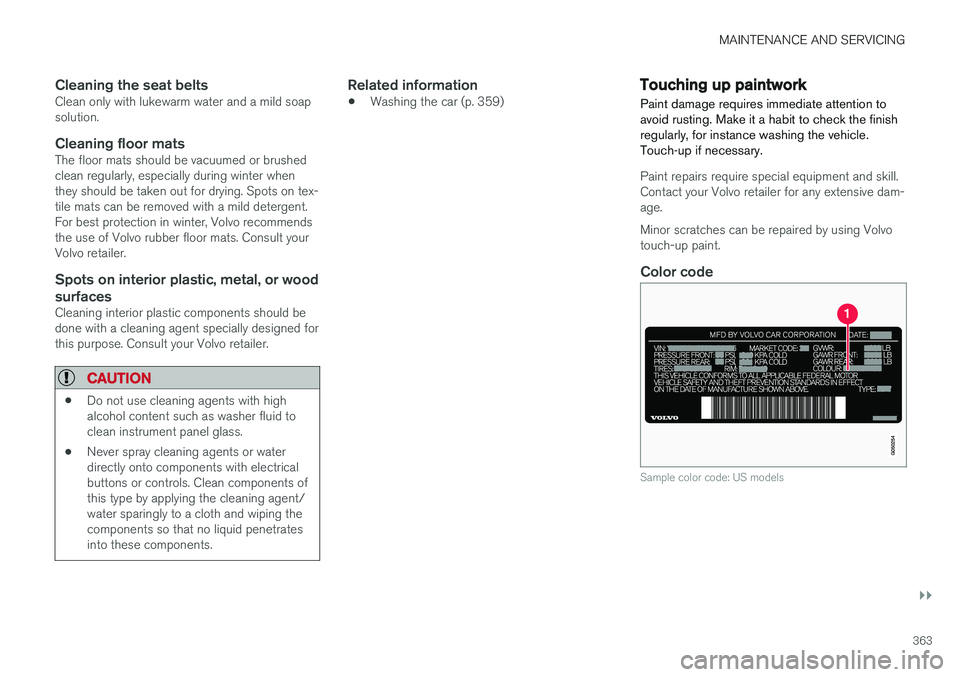
Color code
Sample color code: US models
Page 384 of 398
SPECIFICATIONS
382
Symbols – general information The following tables list the most common warn- ing and indicator lights and symbols and a refer-ence to where more detailed information can befound.
IntroductionThe symbols in the vehicle's various displays are divided into three main categories: •Warning symbols
• Indicator symbols
• Information symbols
The following tables list the most common sym- bols, their meaning and the pages in this manualthat provide more detailed information.
NOTE
Not all of the symbols shown in the related articles are available in all models or on allmarkets. Local variations may occur.
Warning symbol
: The red warning symbol illuminates to
indicate a problem related to safety and/or driva- bility. A message will also appear in the maininstruments panel's display.
Information symbol
: The information symbol illuminates and a
text message is displayed to provide the driver with necessary information about one of the vehi- cle's systems.
Related information
•
Information displays – indicator symbols(p. 73)
• Information displays – warning symbols(p. 75)
• Information display – messages (p. 116)
Warning symbols
The following tables list the most common warn- ing and indicator lights and symbols and a refer-ence to where more detailed information can befound.
: The red warning symbol illuminates to
indicate a problem related to safety and/or driva- bility. A message will also appear in the maininstruments panel's display.
: The information symbol illuminates and a
text message is displayed to provide the driver with necessary information about one of thevehicle's systems.