steering wheel controls VOLVO XC60 2018 Owner´s Manual
[x] Cancel search | Manufacturer: VOLVO, Model Year: 2018, Model line: XC60, Model: VOLVO XC60 2018Pages: 660, PDF Size: 11.77 MB
Page 164 of 660
||
LIGHTING
* Option/accessory.
162 Briefly press the button on the light to turn on or off the reading lights. To adjust the brightness,press and hold the button.
Glove compartment lightingThe glove compartment lighting comes on orgoes off when the glove compartment is openedor closed.
Vanity mirror lighting
*The vanity mirror lighting comes on or goes offwhen the cover over the mirror is opened orclosed.
Ground lighting*The ground lighting comes on or goes off when adoor is opened or closed.
Cargo compartment lightingThe cargo compartment lighting comes on orgoes off when the tailgate is opened or closed.
Ambient LightingThe ambient lighting comes on when the doorsare opened and goes out when the vehicle islocked. Ambient lighting brightness can beadjusted in the center display and also fine-tuned using the thumb wheel in the dashboard.
Mood lighting*The vehicle is equipped with several LEDs that provide faint lighting in various colors. This light-ing is on when the engine is running. Mood light-ing can be adjusted in the center display and also fine-tuned using the thumb wheel in the dash-board.
Lighting in the door storage compartments
Lighting in the door storage compartments comes on when the doors are opened and goesout when the vehicle is locked. The brightnesscan be adjusted using the thumb wheel in thedashboard.
Lighting in the front tunnel console
cupholders
The lighting in front console cupholders switcheson when the vehicle is unlocked and off when thevehicle is locked. The brightness can be adjustedusing the thumb wheel in the dashboard.
Related information
• Adjusting interior lighting (p. 162)
• Lighting panel and controls (p. 150)
• Ignition modes (p. 401)
• Passenger compartment interior (p. 554)
Adjusting interior lighting
Illumination in the vehicle varies depending on ignition mode. The interior lighting can beadjusted with a thumb wheel in the dashboardand certain light functions can also be adjustedvia the center display.
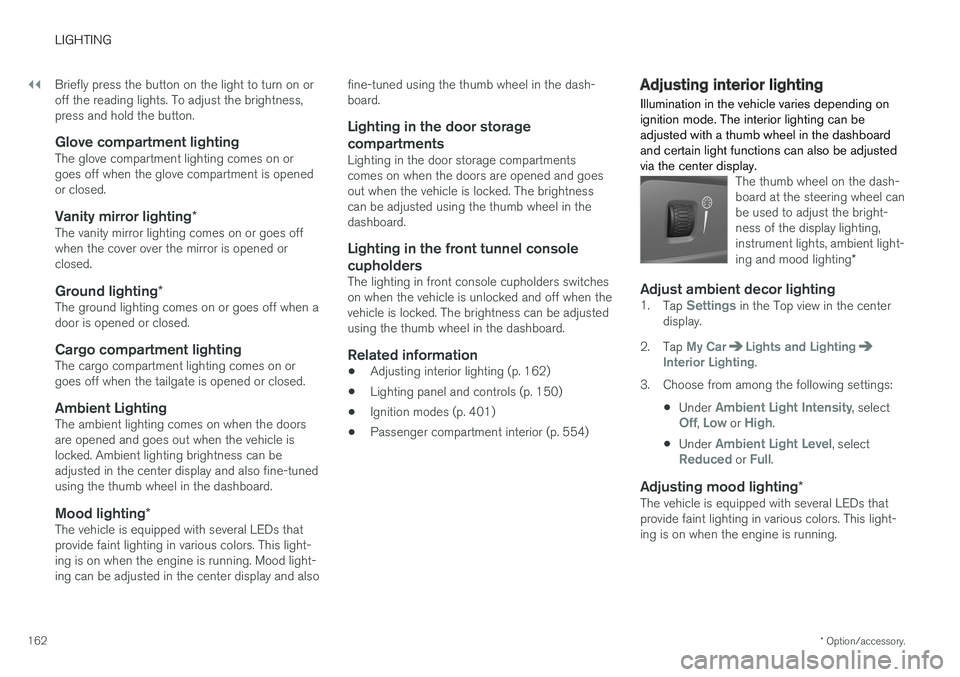
The thumb wheel on the dash- board at the steering wheel canbe used to adjust the bright-ness of the display lighting,instrument lights, ambient light- ing and mood lighting *
Adjust ambient decor lighting1.
Tap Settings in the Top view in the center
display.
2. Tap
My CarLights and LightingInterior Lighting.
3. Choose from among the following settings:
•Under
Ambient Light Intensity, selectOff, Low or High.
• Under
Ambient Light Level, selectReduced or Full.
Adjusting mood lighting
*The vehicle is equipped with several LEDs that provide faint lighting in various colors. This light-ing is on when the engine is running.
Page 188 of 660
||
SEATS AND STEERING WHEEL
* Option/accessory.
186 Only one movement (forward/rearward/up/ down) can be performed at a time. The front seat backrests cannot be folded down completely.
Related information
•
Manual front seats (p. 184)
• Power front seats
* (p. 185)
• Storing memory settings in power front seats
* (p. 186)
• Using stored memory in a powered front seat (p. 187)
• Adjusting front seat massage settings
*
(p. 188)
• Adjusting front seat cushion length (p. 189)
• Front seat massage settings
* (p. 188)
• Adjusting front seat side bolster settings
*
(p. 190)
• Adjusting front seat lumbar support
* (p. 190)
• Adjusting the passenger seat from the driv- er's seat
* (p. 191)
Storing memory settings in power
front seats *
The memory function can be used to store the settings for the seat, door mirrors and head-up display *.
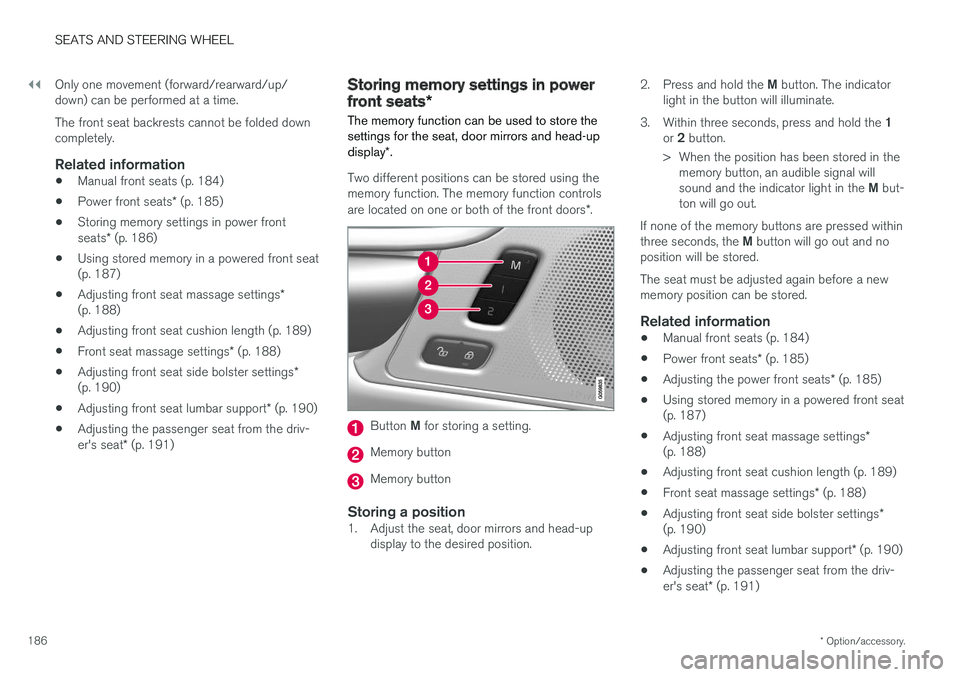
Two different positions can be stored using the memory function. The memory function controls are located on one or both of the front doors *.
Button M for storing a setting.
Memory button
Memory button
Storing a position1. Adjust the seat, door mirrors and head-up
display to the desired position. 2.
Press and hold the M button. The indicator
light in the button will illuminate.
3. Within three seconds, press and hold the 1
or 2 button.
> When the position has been stored in the memory button, an audible signal will sound and the indicator light in the M but-
ton will go out.
If none of the memory buttons are pressed withinthree seconds, the M button will go out and no
position will be stored. The seat must be adjusted again before a new memory position can be stored.
Related information
• Manual front seats (p. 184)
• Power front seats
* (p. 185)
• Adjusting the power front seats
* (p. 185)
• Using stored memory in a powered front seat(p. 187)
• Adjusting front seat massage settings
*
(p. 188)
• Adjusting front seat cushion length (p. 189)
• Front seat massage settings
* (p. 188)
• Adjusting front seat side bolster settings
*
(p. 190)
• Adjusting front seat lumbar support
* (p. 190)
• Adjusting the passenger seat from the driv- er's seat
* (p. 191)
Page 193 of 660
SEATS AND STEERING WHEEL
}}
* Option/accessory.191
2.
Select
Lumbar in the seat settings view.
• Press the four-way button (the round but- ton) up/down to move the lumbar supportupward/downward.
• Press the front part of the four-way buttonto increase lumbar support.
• Press the rear part of the four-way buttonto decrease lumbar support.
Related information
•
Manual front seats (p. 184)
• Power front seats
* (p. 185)
• Adjusting the power front seats
* (p. 185)
• Storing memory settings in power front seats
* (p. 186)
• Using stored memory in a powered front seat (p. 187)
• Adjusting front seat massage settings
*
(p. 188)
• Adjusting front seat cushion length (p. 189)
• Front seat massage settings
* (p. 188)
• Adjusting front seat side bolster settings
*
(p. 190)
• Adjusting the passenger seat from the driv- er's seat
* (p. 191)
Adjusting the passenger seat from
the driver's seat *
The front passenger seat can be adjusted from the driver's seat.
Activating the functionThe function is activated via the function view in the center display:
Tap the
Adjust Passenger
Seat button to activate.
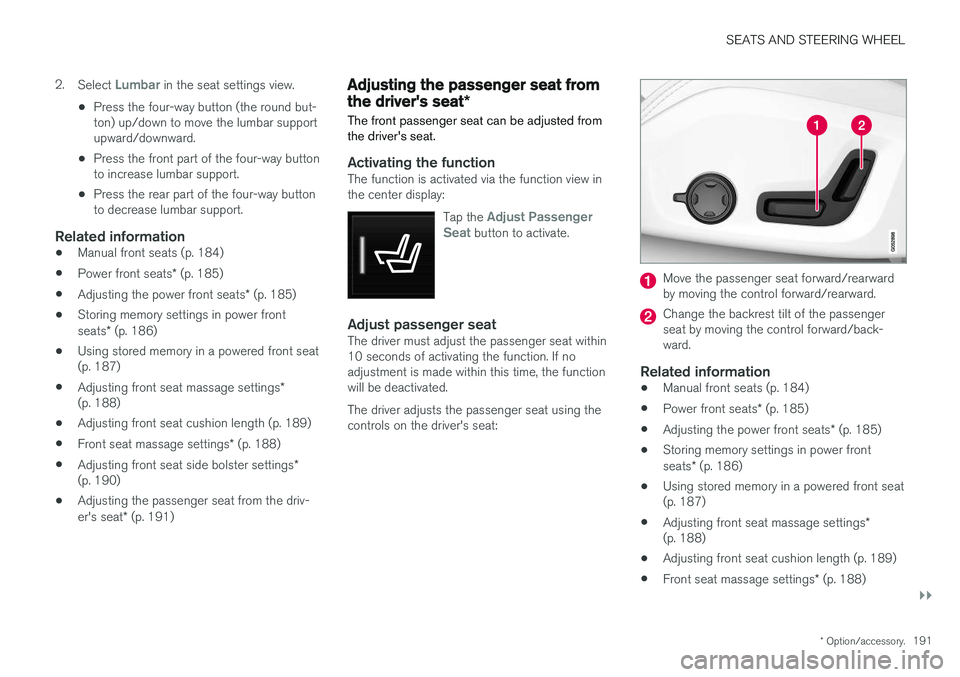
Adjust passenger seatThe driver must adjust the passenger seat within 10 seconds of activating the function. If noadjustment is made within this time, the functionwill be deactivated. The driver adjusts the passenger seat using the controls on the driver's seat:
Move the passenger seat forward/rearward by moving the control forward/rearward.
Change the backrest tilt of the passenger seat by moving the control forward/back-ward.
Related information
• Manual front seats (p. 184)
• Power front seats
* (p. 185)
• Adjusting the power front seats
* (p. 185)
• Storing memory settings in power front seats
* (p. 186)
• Using stored memory in a powered front seat (p. 187)
• Adjusting front seat massage settings
*
(p. 188)
• Adjusting front seat cushion length (p. 189)
• Front seat massage settings
* (p. 188)
Page 198 of 660
||
SEATS AND STEERING WHEEL
* Option/accessory.
196 Tap the
Headrest Fold button
to activate/deactivate folding.
Manually push the head restraint until it clicks into position.
WARNING
Do not lower the head restraint if there are passengers in any of the rear seats.
WARNING
The head restraint must be locked in the upright position after it has been folded up.
Manually folding down the rear seat's outboard head restraints
For models with electrically folding backrests *,
the outboard head restraints are folded manually using the control on the top of the seat (see illus- tration
). For vehicles without electrically fold-
ing backrests, fold down the outboard head restraints using the inner control on the top of the seat (see illustration
).
Related information
• Folding down the rear seat backrests (p. 192)
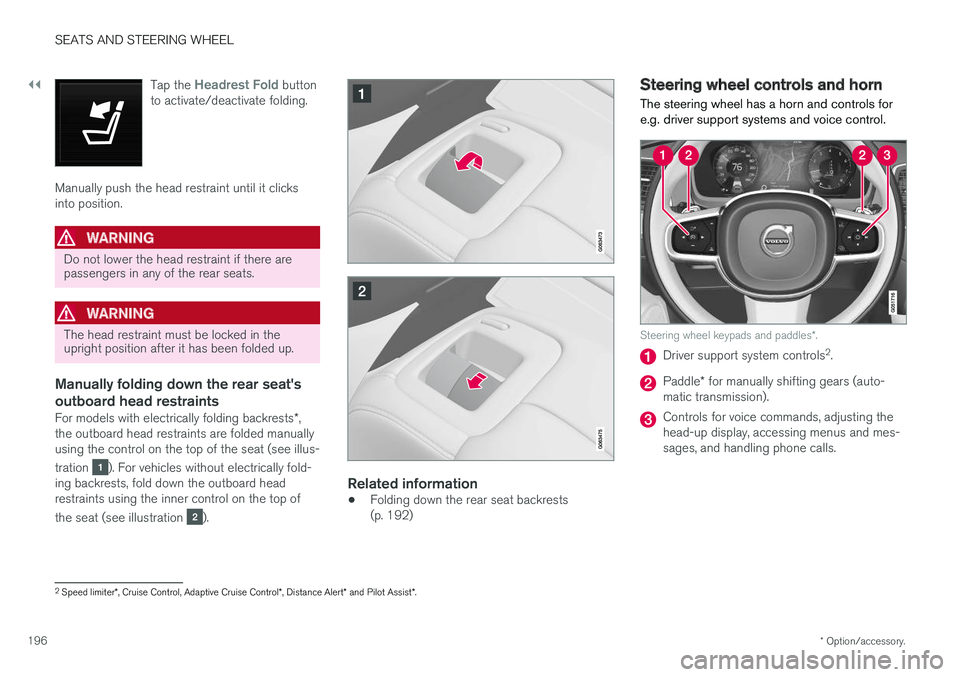
Steering wheel controls and horn The steering wheel has a horn and controls for e.g. driver support systems and voice control.
Steering wheel keypads and paddles
*.
Driver support system controls 2
.
Paddle * for manually shifting gears (auto-
matic transmission).
Controls for voice commands, adjusting the head-up display, accessing menus and mes-sages, and handling phone calls.
2 Speed limiter *, Cruise Control, Adaptive Cruise Control *, Distance Alert * and Pilot Assist *.
Page 199 of 660
SEATS AND STEERING WHEEL
197
Horn
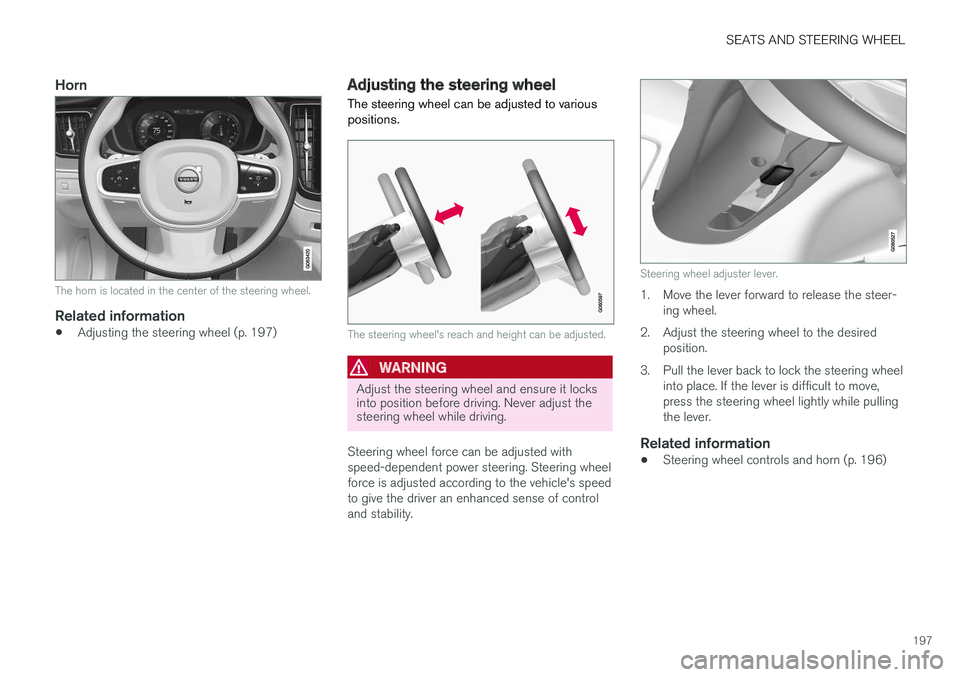
The horn is located in the center of the steering wheel.
Related information
•Adjusting the steering wheel (p. 197)
Adjusting the steering wheel
The steering wheel can be adjusted to various positions.
The steering wheel's reach and height can be adjusted.
WARNING
Adjust the steering wheel and ensure it locks into position before driving. Never adjust thesteering wheel while driving.
Steering wheel force can be adjusted with speed-dependent power steering. Steering wheelforce is adjusted according to the vehicle's speedto give the driver an enhanced sense of controland stability.
Steering wheel adjuster lever.
1. Move the lever forward to release the steer- ing wheel.
2. Adjust the steering wheel to the desired position.
3. Pull the lever back to lock the steering wheel into place. If the lever is difficult to move, press the steering wheel lightly while pullingthe lever.
Related information
• Steering wheel controls and horn (p. 196)
Page 204 of 660
CLIMATE CONTROL
* Option/accessory.
202
Climate control system voice
commands1
Voice commands can be used for the climate control system to e.g. change temperature, acti- vate seat heating * or change blower speed.
Tap and say one of the following commands:
• "
Climate" - starts a command dialog for cli-
mate controls and provides examples of commands that can be used.
• "
Set temperature to X degrees" - sets
desired temperature.
• "
Raise temperature"/"Lower
temperature" - raises/lowers the set tem-
perature.
• "
Sync temperature" - synchronizes the
temperature for all climate zones in the vehi- cle with the temperature set for the driver'sside.
• "
Air on feet"/"Air on body" - opens the
desired air vent.
• "
Air on feet off"/"Air on body off" - closes
the desired air vent.
• "
Set fan to max"/"Turn off fan" - changes
blower speed to Max/Off.
• "
Raise fan speed"/"Lower fan speed" -
raises/lowers the set blower speed. •
"
Turn on auto" - activates automatic climate
control.
• "
Air condition on"/"Air condition off" -
activates/deactivates air conditioning.
• "
Recirculation on"/"Recirculation off" -
activates/deactivates air recirculation.
• "
Turn on defroster "/"Turn off defroster"
- activates/deactivates window and door mir- ror defrosting.
• "
Turn on max defroster"/"Turn off max
defroster" - activates/deactivates max
defroster.
• "
Turn on electric defroster"/"Turn off
electric defroster" - activates/deactivates
heated windshield *.
• "
Turn on rear defroster"/"Turn off rear
defroster" - Activates/deactivates heated
rear window and door mirrors.
• "
Turn steering wheel heat on"/"Turn
steering wheel heat off" - activates/deac-
tivates heated steering wheel *.
• "
Raise steering wheel heat"/"Lower
steering wheel heat" - raises/lowers the
level of steering wheel heating *.
• "
Turn on seat heat"/"Turn off seat heat"
- activates/deactivates seat heating *.
• "
Raise seat heat"/"Lower seat heat" -
raises/lowers the level of seat heating *. •
"
Turn on seat ventilation"/"Turn off seat
ventilation" - activates/deactivates seat
ventilation *.
• "
Raise seat ventilation"/"Lower seat
ventilation" - raises/lowers the level of seat
ventilation *.
Related information
• Climate (p. 200)
• Voice control (p. 143)
• Using voice commands (p. 144)
• Voice control settings (p. 146)
1
Certain markets only.
Page 214 of 660
CLIMATE CONTROL
* Option/accessory.
212
Climate system controls
The climate system functions are controlled from physical buttons on the center console, the cen-ter display, and the climate panel on the rear side of the tunnel console *.
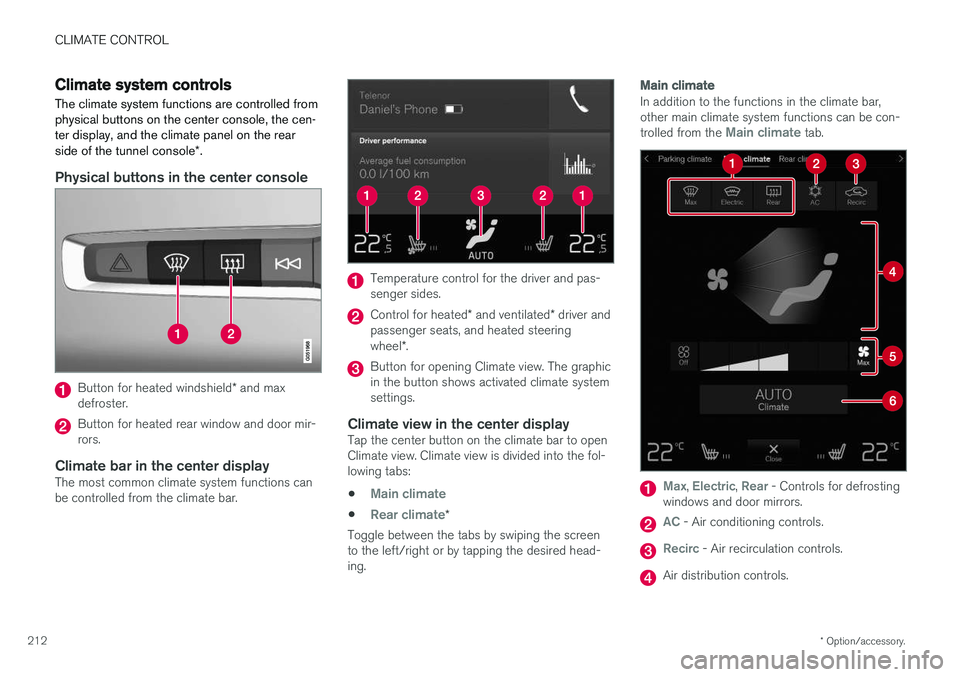
Physical buttons in the center console
Button for heated windshield * and max
defroster.
Button for heated rear window and door mir- rors.
Climate bar in the center displayThe most common climate system functions canbe controlled from the climate bar.
Temperature control for the driver and pas- senger sides.
Control for heated * and ventilated * driver and
passenger seats, and heated steering wheel *.
Button for opening Climate view. The graphic in the button shows activated climate systemsettings.
Climate view in the center displayTap the center button on the climate bar to openClimate view. Climate view is divided into the fol-lowing tabs:
•
Main climate
•Rear climate*
Toggle between the tabs by swiping the screen to the left/right or by tapping the desired head-ing.
Main climate
In addition to the functions in the climate bar, other main climate system functions can be con- trolled from the
Main climate tab.
Max, Electric, Rear - Controls for defrosting
windows and door mirrors.
AC - Air conditioning controls.
Recirc - Air recirculation controls.
Air distribution controls.
Page 216 of 660
||
CLIMATE CONTROL
* Option/accessory.
214 all selected climate settings will be displayed. The screen locks automatically after a period of inac-tivity.
Related information
•
Climate (p. 200)
• Activating and deactivating power front seats
* (p. 214)
• Activating and deactivating the heated rearseats
* (p. 215)
• Activating and deactivating front seat ventila-tion
* (p. 216)
• Activating and deactivating the heated steer-ing wheel
* (p. 217)
• Activating auto climate control (p. 218)
• Activating and deactivating recirculation (p. 219)
• Activating and deactivating max defroster(p. 220)
• Activating and deactivating the heated wind- shield
* (p. 221)
• Activating and deactivating the heated rear window and door mirrors (p. 222)
• Setting the blower speed for the front seats(p. 223)
• Setting the blower speed for the rear seats
*
(p. 224)
• Synchronize temperature (p. 227) •
Activating and deactivating air conditioning(p. 227)
Activating and deactivating power
front seats
*
The seats can be heated for added comfort for the driver and passengers in cold weather.
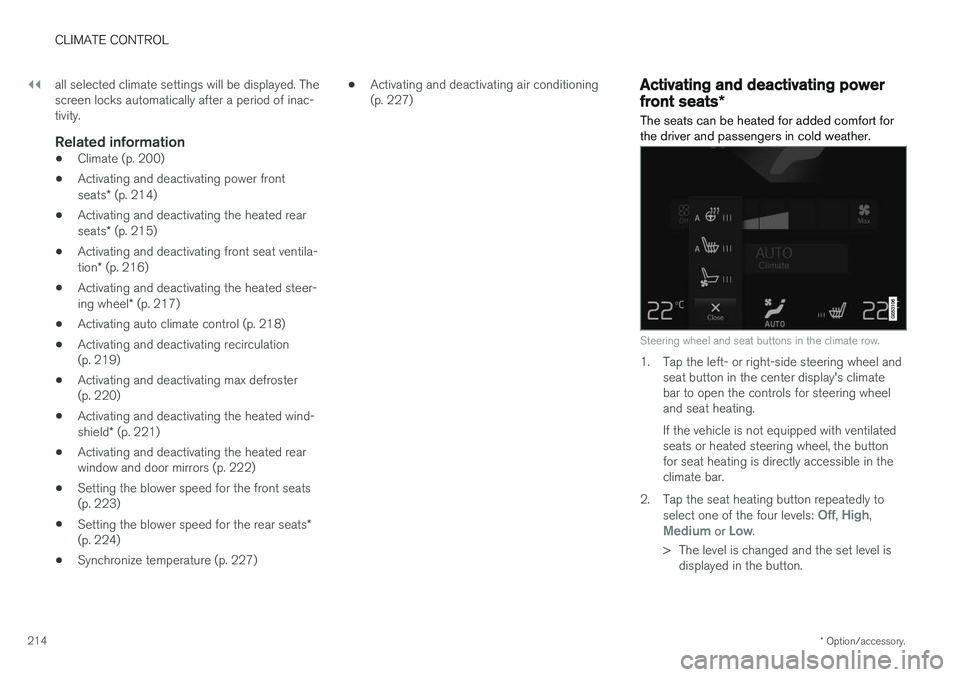
Steering wheel and seat buttons in the climate row.
1. Tap the left- or right-side steering wheel and seat button in the center display's climate bar to open the controls for steering wheeland seat heating. If the vehicle is not equipped with ventilated seats or heated steering wheel, the buttonfor seat heating is directly accessible in theclimate bar.
2. Tap the seat heating button repeatedly to select one of the four levels:
Off, High,Medium or Low.
> The level is changed and the set level is displayed in the button.
Page 218 of 660
||
CLIMATE CONTROL
* Option/accessory.
216
Activating and deactivating the heated rear seats from the rear seat
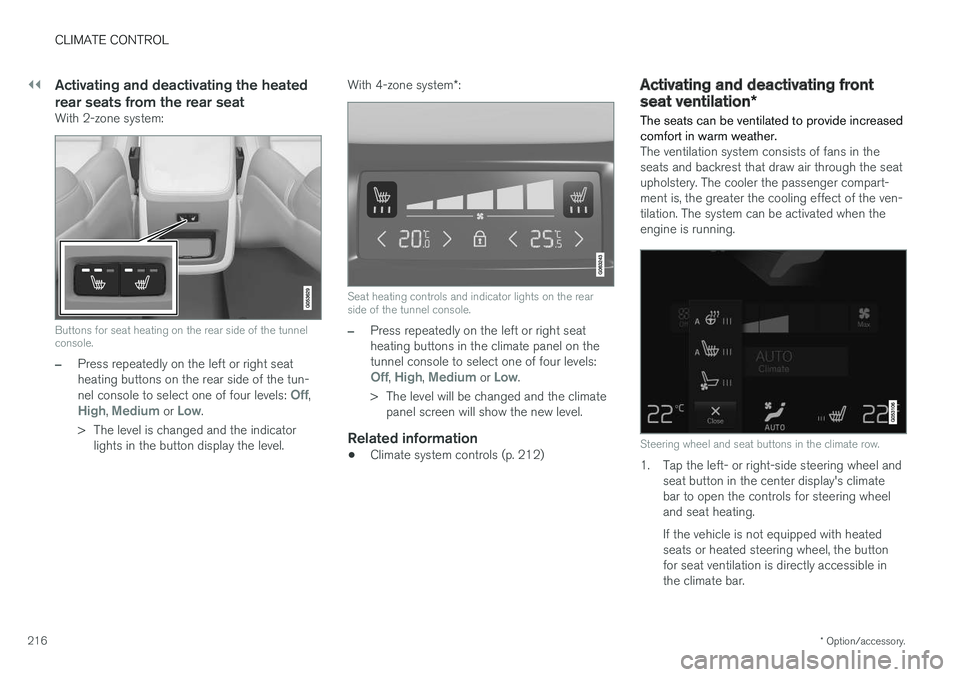
With 2-zone system:
Buttons for seat heating on the rear side of the tunnel console.
–Press repeatedly on the left or right seat heating buttons on the rear side of the tun- nel console to select one of four levels:
Off,High, Medium or Low.
> The level is changed and the indicator lights in the button display the level. With 4-zone system
*:
Seat heating controls and indicator lights on the rear side of the tunnel console.
–Press repeatedly on the left or right seat heating buttons in the climate panel on thetunnel console to select one of four levels:
Off, High, Medium or Low.
> The level will be changed and the climate panel screen will show the new level.
Related information
• Climate system controls (p. 212)
Activating and deactivating front
seat ventilation
*
The seats can be ventilated to provide increased comfort in warm weather.
The ventilation system consists of fans in the seats and backrest that draw air through the seatupholstery. The cooler the passenger compart-ment is, the greater the cooling effect of the ven-tilation. The system can be activated when theengine is running.
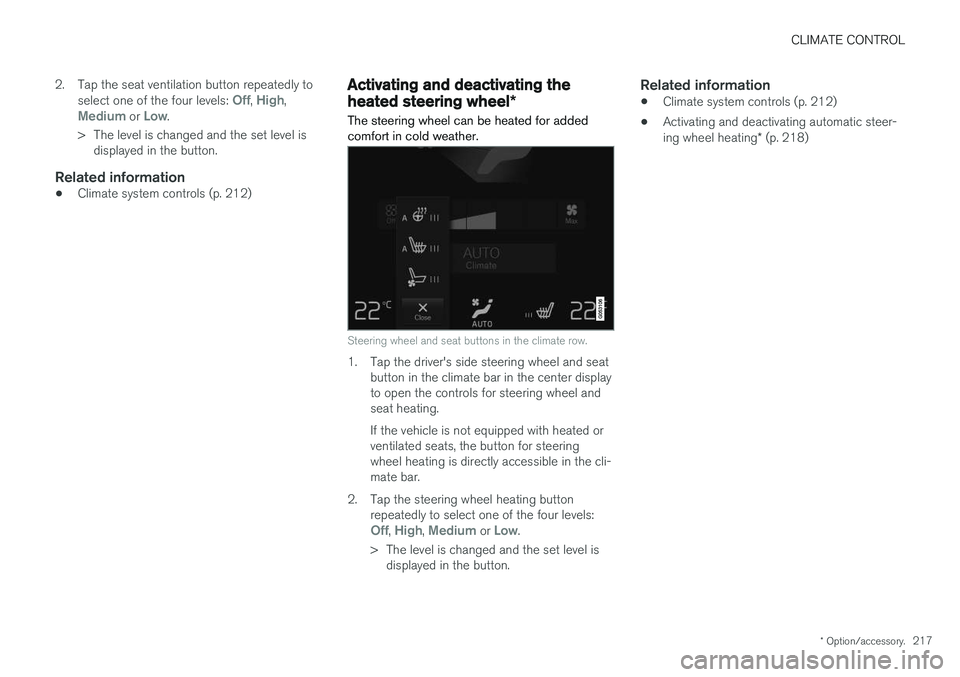
Steering wheel and seat buttons in the climate row.
1. Tap the left- or right-side steering wheel and seat button in the center display's climate bar to open the controls for steering wheeland seat heating. If the vehicle is not equipped with heated seats or heated steering wheel, the buttonfor seat ventilation is directly accessible inthe climate bar.
Page 219 of 660
CLIMATE CONTROL
* Option/accessory.217
2. Tap the seat ventilation button repeatedly to
select one of the four levels:
Off, High,Medium or Low.
> The level is changed and the set level is displayed in the button.
Related information
• Climate system controls (p. 212)
Activating and deactivating the
heated steering wheel
*
The steering wheel can be heated for added comfort in cold weather.
Steering wheel and seat buttons in the climate row.
1. Tap the driver's side steering wheel and seat button in the climate bar in the center display to open the controls for steering wheel andseat heating. If the vehicle is not equipped with heated or ventilated seats, the button for steeringwheel heating is directly accessible in the cli-mate bar.
2. Tap the steering wheel heating button repeatedly to select one of the four levels:
Off, High, Medium or Low.
> The level is changed and the set level is displayed in the button.
Related information
• Climate system controls (p. 212)
• Activating and deactivating automatic steer- ing wheel heating
* (p. 218)