steering wheel VOLVO XC60 2018 Owner´s Manual
[x] Cancel search | Manufacturer: VOLVO, Model Year: 2018, Model line: XC60, Model: VOLVO XC60 2018Pages: 660, PDF Size: 11.77 MB
Page 158 of 660
||
LIGHTING
156
Related information
•Lighting panel and controls (p. 150)
• Using high beam (p. 154)
• Camera limitations (p. 324)
Using turn signals
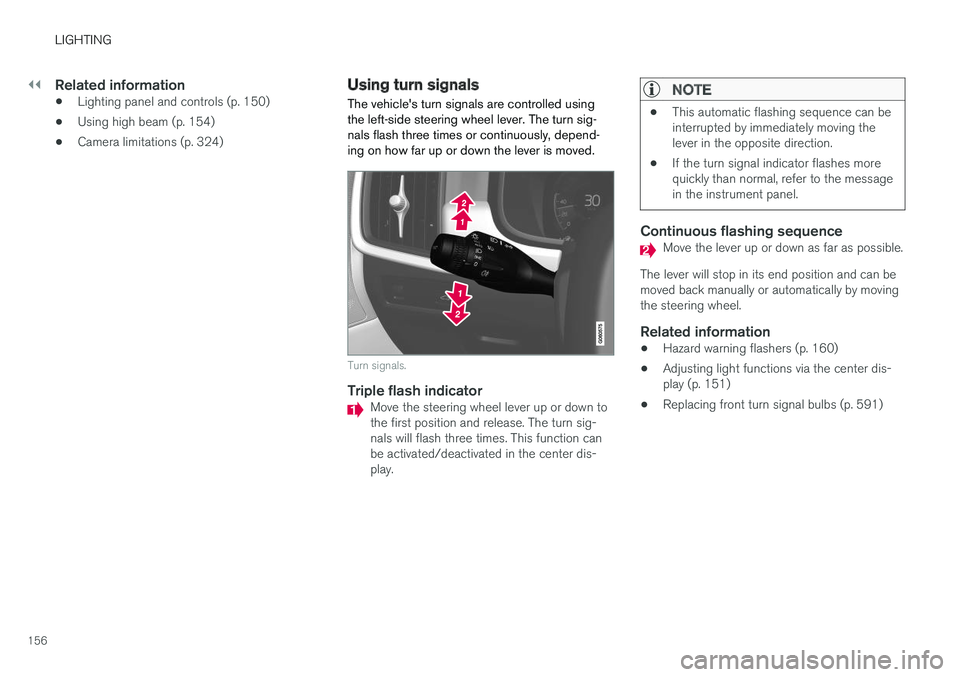
The vehicle's turn signals are controlled using the left-side steering wheel lever. The turn sig-nals flash three times or continuously, depend-ing on how far up or down the lever is moved.
Turn signals.
Triple flash indicatorMove the steering wheel lever up or down to the first position and release. The turn sig-nals will flash three times. This function canbe activated/deactivated in the center dis-play.
NOTE
• This automatic flashing sequence can be interrupted by immediately moving thelever in the opposite direction.
• If the turn signal indicator flashes morequickly than normal, refer to the messagein the instrument panel.
Continuous flashing sequenceMove the lever up or down as far as possible.
The lever will stop in its end position and can be moved back manually or automatically by movingthe steering wheel.
Related information
• Hazard warning flashers (p. 160)
• Adjusting light functions via the center dis-play (p. 151)
• Replacing front turn signal bulbs (p. 591)
Page 159 of 660
LIGHTING
}}
* Option/accessory.157
Active Bending Lights *
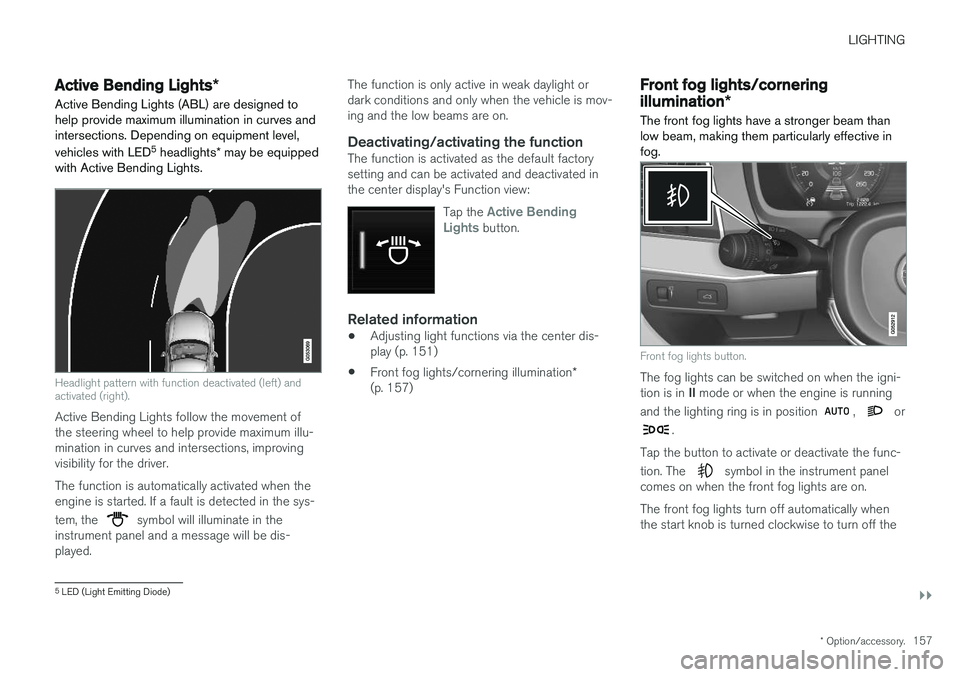
Active Bending Lights (ABL) are designed to help provide maximum illumination in curves andintersections. Depending on equipment level, vehicles with LED 5
headlights * may be equipped
with Active Bending Lights.
Headlight pattern with function deactivated (left) and activated (right).
Active Bending Lights follow the movement of the steering wheel to help provide maximum illu-mination in curves and intersections, improvingvisibility for the driver. The function is automatically activated when the engine is started. If a fault is detected in the sys- tem, the
symbol will illuminate in the
instrument panel and a message will be dis- played. The function is only active in weak daylight ordark conditions and only when the vehicle is mov-ing and the low beams are on.
Deactivating/activating the functionThe function is activated as the default factorysetting and can be activated and deactivated inthe center display's Function view:
Tap the
Active Bending
Lights button.
Related information
• Adjusting light functions via the center dis- play (p. 151)
• Front fog lights/cornering illumination
*
(p. 157)
Front fog lights/cornering
illumination *
The front fog lights have a stronger beam than low beam, making them particularly effective infog.
Front fog lights button.
The fog lights can be switched on when the igni- tion is in II mode or when the engine is running
and the lighting ring is in position
, or
.
Tap the button to activate or deactivate the func- tion. The
symbol in the instrument panel
comes on when the front fog lights are on. The front fog lights turn off automatically when the start knob is turned clockwise to turn off the
5 LED (Light Emitting Diode)
Page 160 of 660
||
LIGHTING
* Option/accessory.
158 ignition or when the lighting ring is turned to the
position.
NOTE
Regulations concerning fog light use vary from country to country.
Cornering illumination
*The front fog lamps can include the cornering lights function, which temporarily illuminates thearea diagonally in front of the car in the directionthe steering wheel is turned on a sharp bend, orin the direction shown by the direction indicators. The function is activated in weak daylight or dark conditions when the lighting ring is in
or
mode and the vehicle speed is less than
about 30 km/h (about 20 mph). Both cornering illumination are also illuminated as a complement to the taillights when reversing. The function is activated as the default factory setting and can be activated and deactivatedusing the center display.
Related information
• Lighting panel and controls (p. 150)
• Ignition modes (p. 401)
• Rear fog light (p. 158)
• Active Bending Lights
* (p. 157) •
Adjusting light functions via the center dis-play (p. 151)
Rear fog light
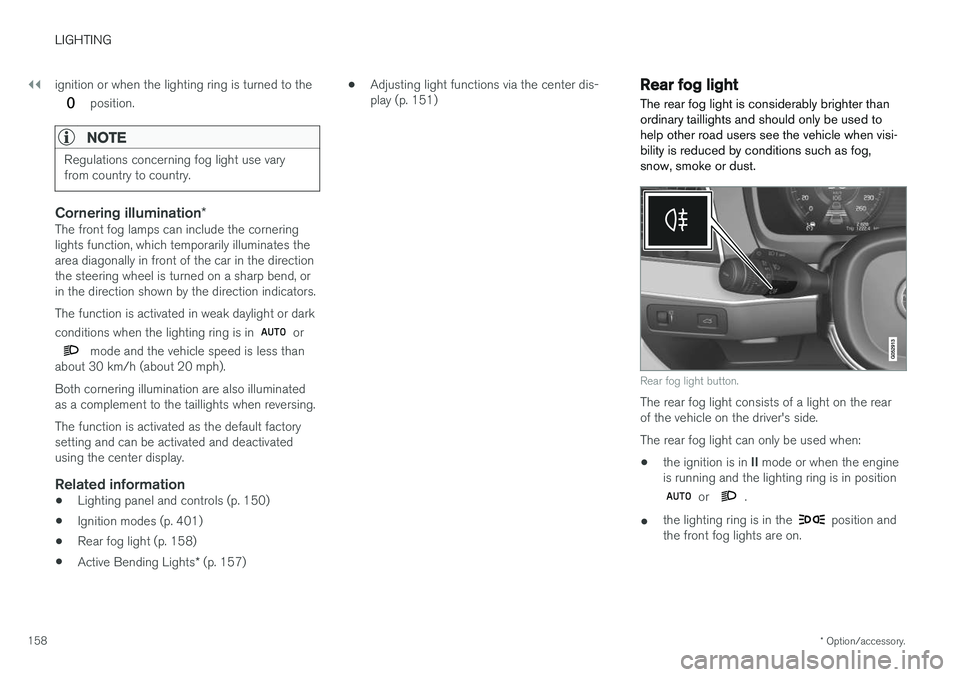
The rear fog light is considerably brighter than ordinary taillights and should only be used tohelp other road users see the vehicle when visi-bility is reduced by conditions such as fog,snow, smoke or dust.
Rear fog light button.
The rear fog light consists of a light on the rear of the vehicle on the driver's side. The rear fog light can only be used when:
• the ignition is in
II mode or when the engine
is running and the lighting ring is in position
or .
• the lighting ring is in the
position and
the front fog lights are on.
Page 162 of 660
LIGHTING
* Option/accessory.
160
Hazard warning flashers
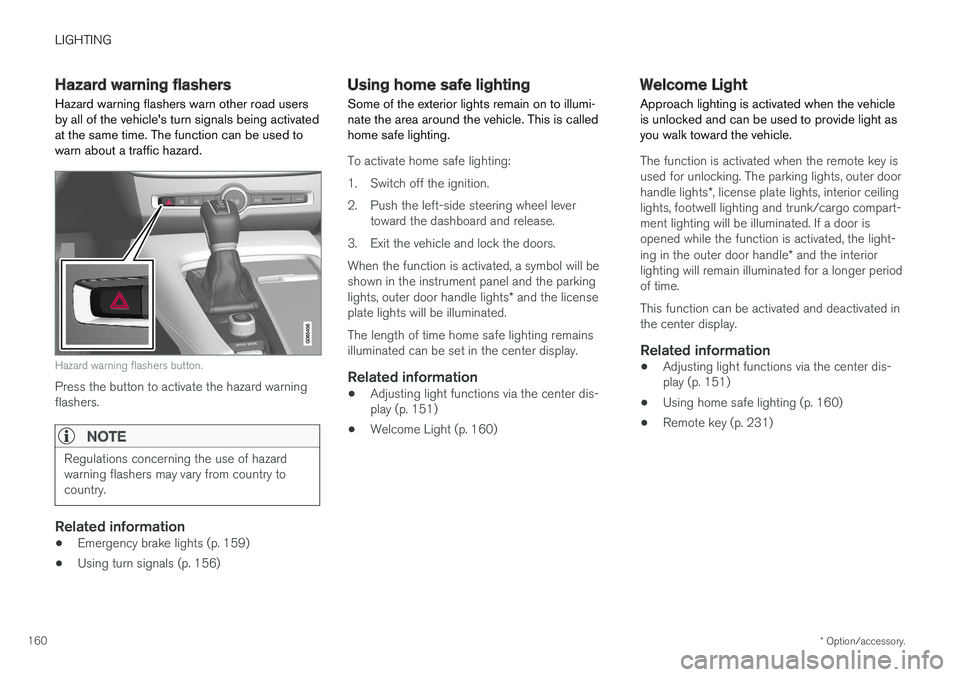
Hazard warning flashers warn other road users by all of the vehicle's turn signals being activatedat the same time. The function can be used towarn about a traffic hazard.
Hazard warning flashers button.
Press the button to activate the hazard warning flashers.
NOTE
Regulations concerning the use of hazard warning flashers may vary from country tocountry.
Related information
• Emergency brake lights (p. 159)
• Using turn signals (p. 156)
Using home safe lighting
Some of the exterior lights remain on to illumi- nate the area around the vehicle. This is calledhome safe lighting.
To activate home safe lighting:
1. Switch off the ignition.
2. Push the left-side steering wheel lever toward the dashboard and release.
3. Exit the vehicle and lock the doors.When the function is activated, a symbol will be shown in the instrument panel and the parking lights, outer door handle lights * and the license
plate lights will be illuminated. The length of time home safe lighting remains illuminated can be set in the center display.
Related information
• Adjusting light functions via the center dis-play (p. 151)
• Welcome Light (p. 160)
Welcome Light Approach lighting is activated when the vehicle is unlocked and can be used to provide light asyou walk toward the vehicle.
The function is activated when the remote key is used for unlocking. The parking lights, outer door handle lights
*, license plate lights, interior ceiling
lights, footwell lighting and trunk/cargo compart- ment lighting will be illuminated. If a door isopened while the function is activated, the light- ing in the outer door handle * and the interior
lighting will remain illuminated for a longer period of time. This function can be activated and deactivated in the center display.
Related information
• Adjusting light functions via the center dis-play (p. 151)
• Using home safe lighting (p. 160)
• Remote key (p. 231)
Page 164 of 660
||
LIGHTING
* Option/accessory.
162 Briefly press the button on the light to turn on or off the reading lights. To adjust the brightness,press and hold the button.
Glove compartment lightingThe glove compartment lighting comes on orgoes off when the glove compartment is openedor closed.
Vanity mirror lighting
*The vanity mirror lighting comes on or goes offwhen the cover over the mirror is opened orclosed.
Ground lighting*The ground lighting comes on or goes off when adoor is opened or closed.
Cargo compartment lightingThe cargo compartment lighting comes on orgoes off when the tailgate is opened or closed.
Ambient LightingThe ambient lighting comes on when the doorsare opened and goes out when the vehicle islocked. Ambient lighting brightness can beadjusted in the center display and also fine-tuned using the thumb wheel in the dashboard.
Mood lighting*The vehicle is equipped with several LEDs that provide faint lighting in various colors. This light-ing is on when the engine is running. Mood light-ing can be adjusted in the center display and also fine-tuned using the thumb wheel in the dash-board.
Lighting in the door storage compartments
Lighting in the door storage compartments comes on when the doors are opened and goesout when the vehicle is locked. The brightnesscan be adjusted using the thumb wheel in thedashboard.
Lighting in the front tunnel console
cupholders
The lighting in front console cupholders switcheson when the vehicle is unlocked and off when thevehicle is locked. The brightness can be adjustedusing the thumb wheel in the dashboard.
Related information
• Adjusting interior lighting (p. 162)
• Lighting panel and controls (p. 150)
• Ignition modes (p. 401)
• Passenger compartment interior (p. 554)
Adjusting interior lighting
Illumination in the vehicle varies depending on ignition mode. The interior lighting can beadjusted with a thumb wheel in the dashboardand certain light functions can also be adjustedvia the center display.
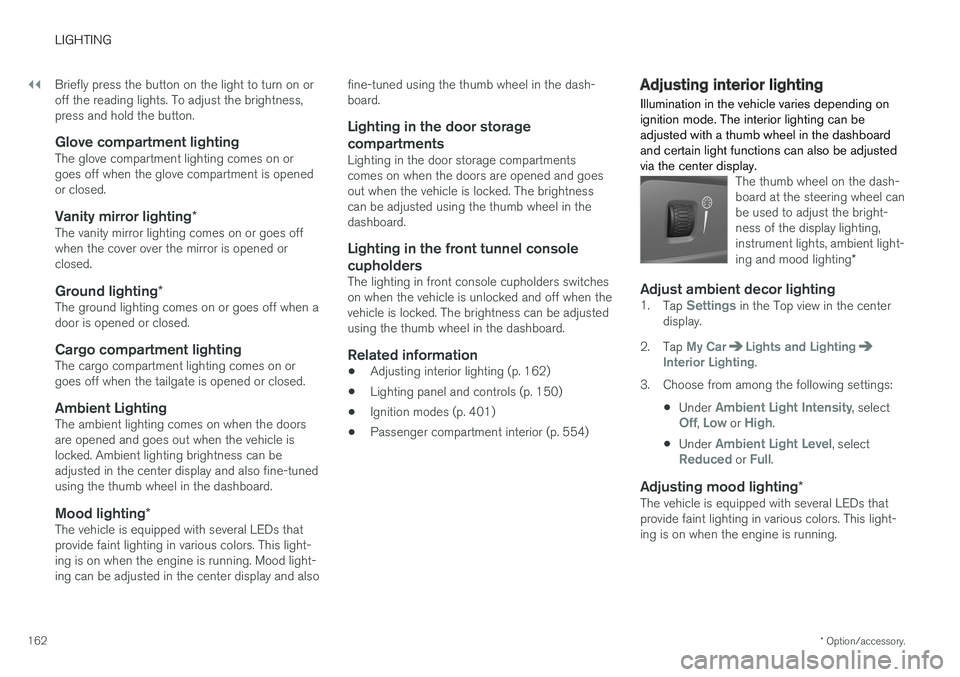
The thumb wheel on the dash- board at the steering wheel canbe used to adjust the bright-ness of the display lighting,instrument lights, ambient light- ing and mood lighting *
Adjust ambient decor lighting1.
Tap Settings in the Top view in the center
display.
2. Tap
My CarLights and LightingInterior Lighting.
3. Choose from among the following settings:
•Under
Ambient Light Intensity, selectOff, Low or High.
• Under
Ambient Light Level, selectReduced or Full.
Adjusting mood lighting
*The vehicle is equipped with several LEDs that provide faint lighting in various colors. This light-ing is on when the engine is running.
Page 178 of 660
WINDOWS, GLASS AND MIRRORS
* Option/accessory.
176
Using the windshield wipers
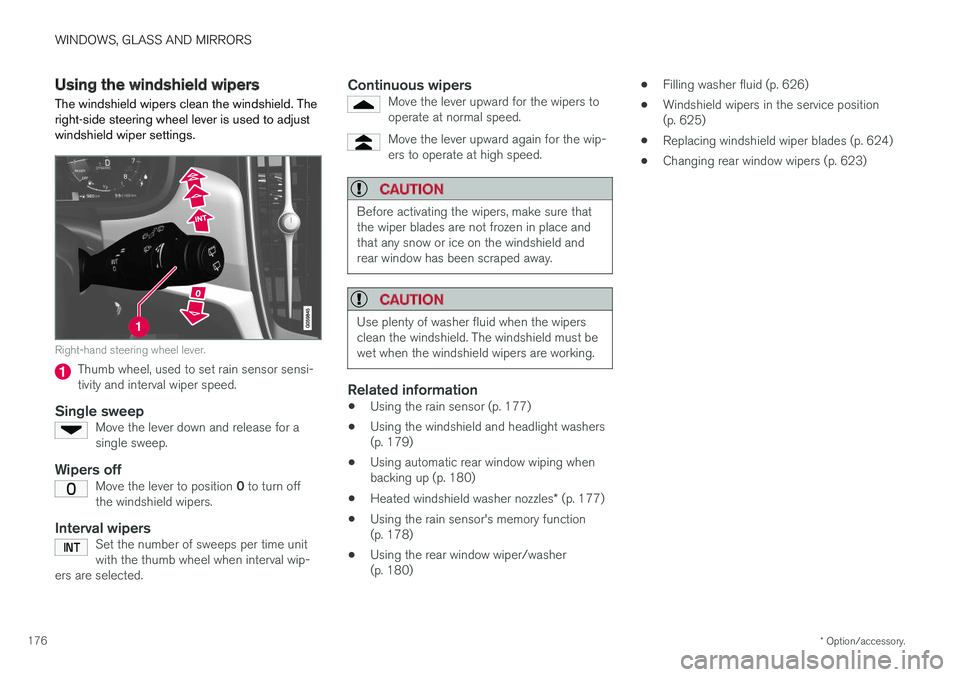
The windshield wipers clean the windshield. The right-side steering wheel lever is used to adjustwindshield wiper settings.
Right-hand steering wheel lever.
Thumb wheel, used to set rain sensor sensi- tivity and interval wiper speed.
Single sweepMove the lever down and release for asingle sweep.
Wipers offMove the lever to position 0 to turn off
the windshield wipers.
Interval wipersSet the number of sweeps per time unit with the thumb wheel when interval wip-
ers are selected.
Continuous wipersMove the lever upward for the wipers to operate at normal speed.
Move the lever upward again for the wip- ers to operate at high speed.
CAUTION
Before activating the wipers, make sure that the wiper blades are not frozen in place andthat any snow or ice on the windshield andrear window has been scraped away.
CAUTION
Use plenty of washer fluid when the wipers clean the windshield. The windshield must bewet when the windshield wipers are working.
Related information
• Using the rain sensor (p. 177)
• Using the windshield and headlight washers (p. 179)
• Using automatic rear window wiping whenbacking up (p. 180)
• Heated windshield washer nozzles
* (p. 177)
• Using the rain sensor's memory function(p. 178)
• Using the rear window wiper/washer(p. 180) •
Filling washer fluid (p. 626)
• Windshield wipers in the service position(p. 625)
• Replacing windshield wiper blades (p. 624)
• Changing rear window wipers (p. 623)
Page 179 of 660
WINDOWS, GLASS AND MIRRORS
}}
* Option/accessory.177
Heated windshield washer nozzles *
The washer nozzles are heated automatically in cold weather to prevent the washer fluid fromfreezing.
Related information
• Using the rain sensor (p. 177)
• Using the windshield and headlight washers (p. 179)
• Using automatic rear window wiping whenbacking up (p. 180)
• Using the rain sensor's memory function(p. 178)
• Using the rear window wiper/washer(p. 180)
• Filling washer fluid (p. 626)
• Windshield wipers in the service position(p. 625)
• Replacing windshield wiper blades (p. 624)
• Changing rear window wipers (p. 623)
• Using the windshield wipers (p. 176)
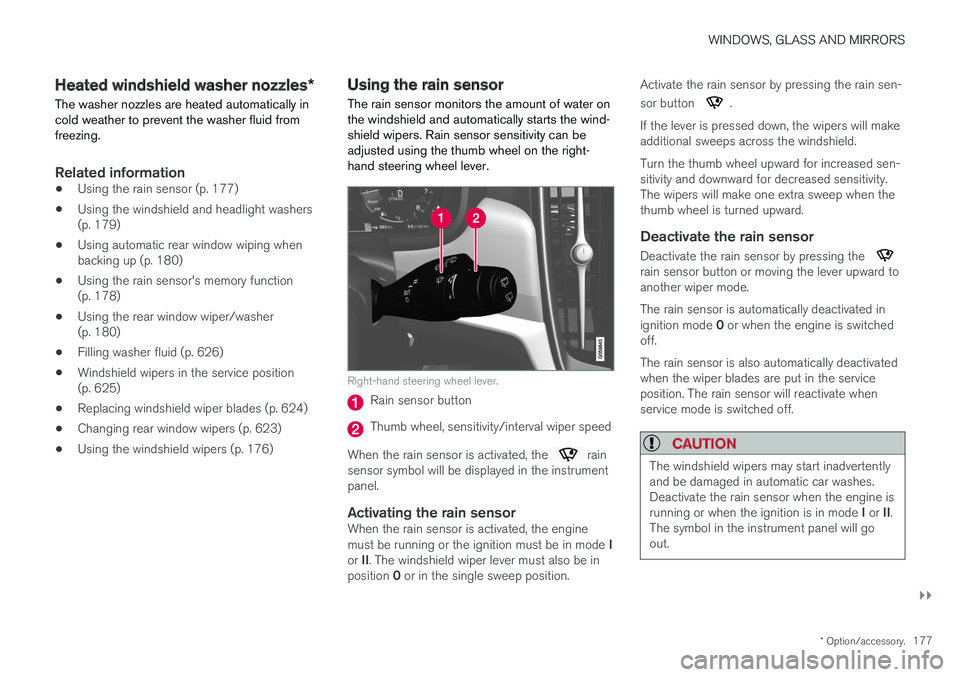
Using the rain sensor The rain sensor monitors the amount of water on the windshield and automatically starts the wind-shield wipers. Rain sensor sensitivity can beadjusted using the thumb wheel on the right-hand steering wheel lever.
Right-hand steering wheel lever.
Rain sensor button
Thumb wheel, sensitivity/interval wiper speed
When the rain sensor is activated, the
rain
sensor symbol will be displayed in the instrument panel.
Activating the rain sensorWhen the rain sensor is activated, the engine must be running or the ignition must be in mode I
or II. The windshield wiper lever must also be in
position 0 or in the single sweep position. Activate the rain sensor by pressing the rain sen- sor button
.
If the lever is pressed down, the wipers will make additional sweeps across the windshield. Turn the thumb wheel upward for increased sen- sitivity and downward for decreased sensitivity.The wipers will make one extra sweep when thethumb wheel is turned upward.
Deactivate the rain sensor
Deactivate the rain sensor by pressing the rain sensor button or moving the lever upward to another wiper mode. The rain sensor is automatically deactivated in ignition mode 0 or when the engine is switched
off. The rain sensor is also automatically deactivated when the wiper blades are put in the serviceposition. The rain sensor will reactivate whenservice mode is switched off.
CAUTION
The windshield wipers may start inadvertently and be damaged in automatic car washes.Deactivate the rain sensor when the engine is running or when the ignition is in mode I or II.
The symbol in the instrument panel will go out.
Page 181 of 660
WINDOWS, GLASS AND MIRRORS
* Option/accessory.179
Using the windshield and headlightwashers
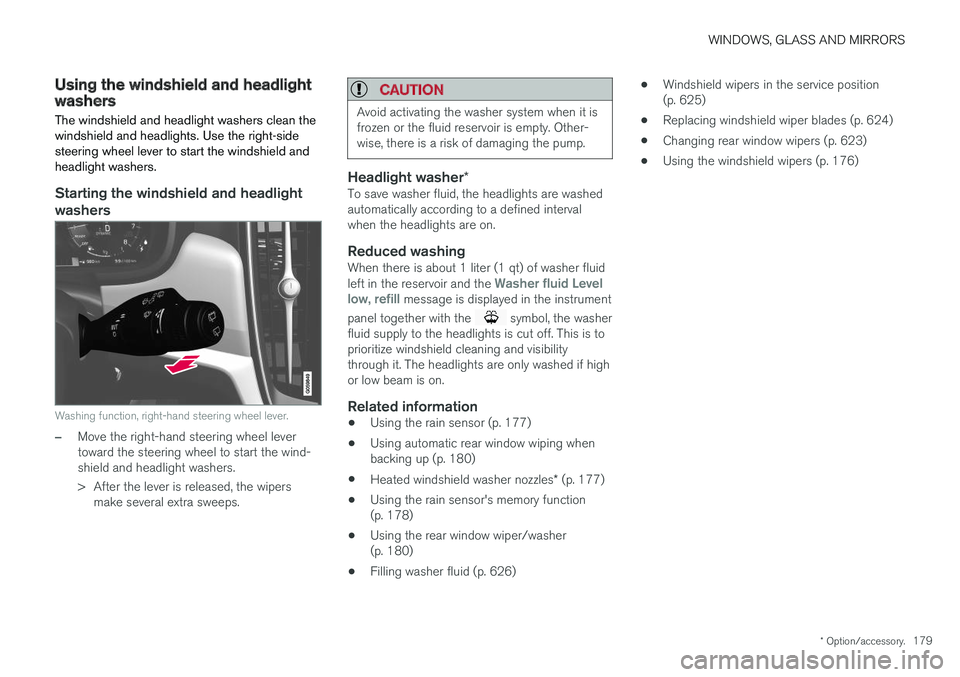
The windshield and headlight washers clean the windshield and headlights. Use the right-sidesteering wheel lever to start the windshield andheadlight washers.
Starting the windshield and headlight washers
Washing function, right-hand steering wheel lever.
–Move the right-hand steering wheel lever toward the steering wheel to start the wind-shield and headlight washers.
> After the lever is released, the wipers make several extra sweeps.
CAUTION
Avoid activating the washer system when it is frozen or the fluid reservoir is empty. Other-wise, there is a risk of damaging the pump.
Headlight washer *To save washer fluid, the headlights are washed automatically according to a defined intervalwhen the headlights are on.
Reduced washingWhen there is about 1 liter (1 qt) of washer fluid left in the reservoir and the Washer fluid Level
low, refill message is displayed in the instrument
panel together with the
symbol, the washer
fluid supply to the headlights is cut off. This is to prioritize windshield cleaning and visibilitythrough it. The headlights are only washed if highor low beam is on.
Related information
• Using the rain sensor (p. 177)
• Using automatic rear window wiping whenbacking up (p. 180)
• Heated windshield washer nozzles
* (p. 177)
• Using the rain sensor's memory function(p. 178)
• Using the rear window wiper/washer(p. 180)
• Filling washer fluid (p. 626) •
Windshield wipers in the service position(p. 625)
• Replacing windshield wiper blades (p. 624)
• Changing rear window wipers (p. 623)
• Using the windshield wipers (p. 176)
Page 182 of 660
WINDOWS, GLASS AND MIRRORS
* Option/accessory.
180
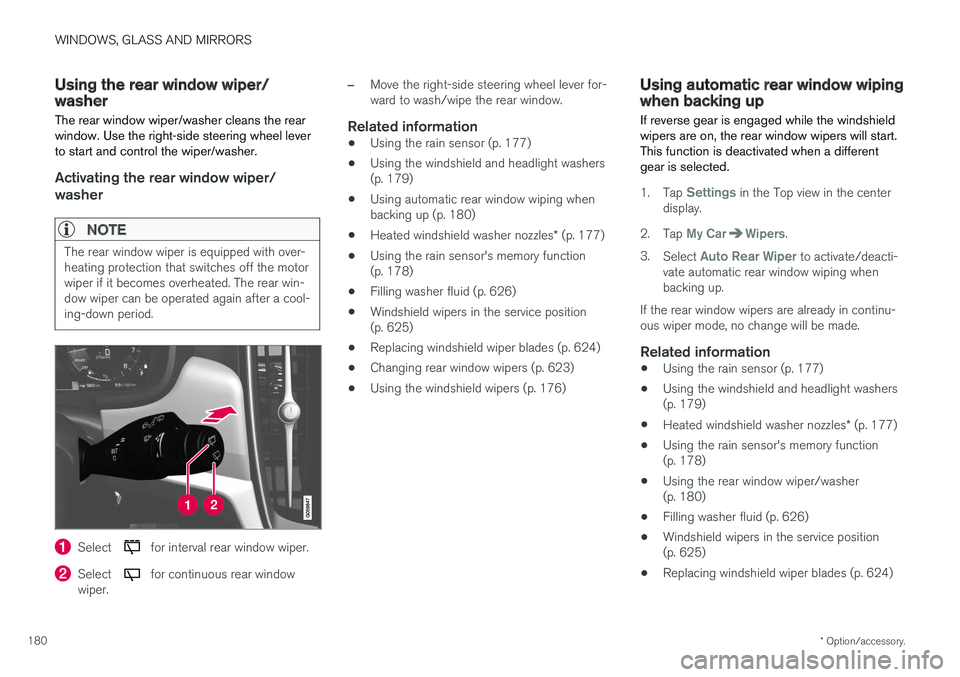
Using the rear window wiper/washer
The rear window wiper/washer cleans the rear window. Use the right-side steering wheel leverto start and control the wiper/washer.
Activating the rear window wiper/ washer
NOTE
The rear window wiper is equipped with over- heating protection that switches off the motorwiper if it becomes overheated. The rear win-dow wiper can be operated again after a cool-ing-down period.
Select for interval rear window wiper.
Select for continuous rear window
wiper.
–Move the right-side steering wheel lever for- ward to wash/wipe the rear window.
Related information
• Using the rain sensor (p. 177)
• Using the windshield and headlight washers(p. 179)
• Using automatic rear window wiping whenbacking up (p. 180)
• Heated windshield washer nozzles
* (p. 177)
• Using the rain sensor's memory function(p. 178)
• Filling washer fluid (p. 626)
• Windshield wipers in the service position(p. 625)
• Replacing windshield wiper blades (p. 624)
• Changing rear window wipers (p. 623)
• Using the windshield wipers (p. 176)
Using automatic rear window wipingwhen backing up
If reverse gear is engaged while the windshield wipers are on, the rear window wipers will start.This function is deactivated when a differentgear is selected.
1. Tap Settings in the Top view in the center
display.
2. Tap
My CarWipers.
3. Select
Auto Rear Wiper to activate/deacti-
vate automatic rear window wiping when backing up.
If the rear window wipers are already in continu-ous wiper mode, no change will be made.
Related information
• Using the rain sensor (p. 177)
• Using the windshield and headlight washers(p. 179)
• Heated windshield washer nozzles
* (p. 177)
• Using the rain sensor's memory function(p. 178)
• Using the rear window wiper/washer(p. 180)
• Filling washer fluid (p. 626)
• Windshield wipers in the service position(p. 625)
• Replacing windshield wiper blades (p. 624)
Page 186 of 660
SEATS AND STEERING WHEEL
* Option/accessory.
184
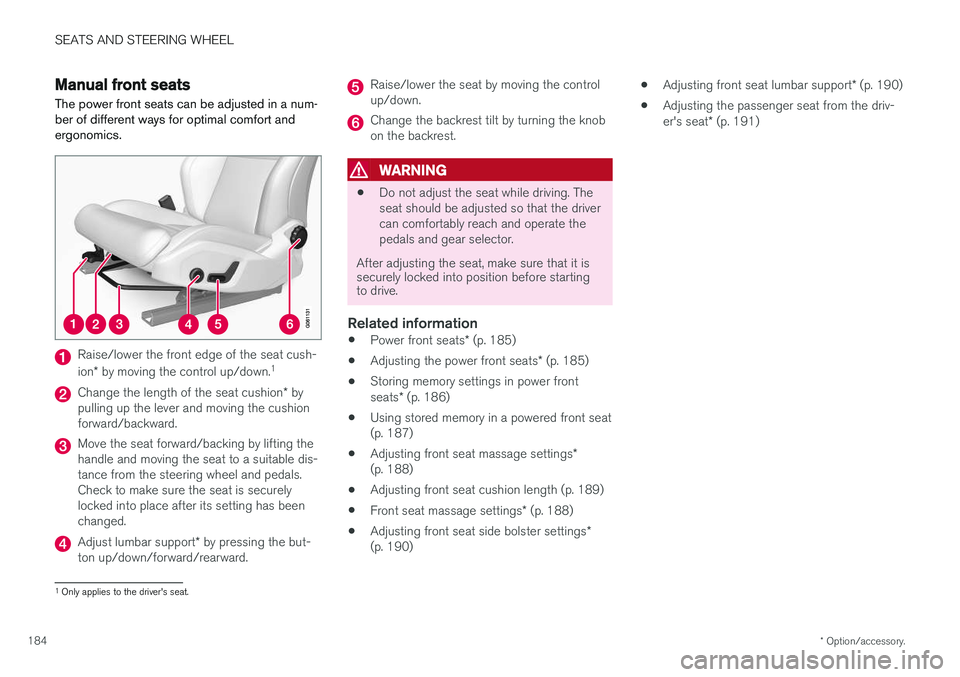
Manual front seats The power front seats can be adjusted in a num- ber of different ways for optimal comfort andergonomics.
Raise/lower the front edge of the seat cush- ion * by moving the control up/down. 1
Change the length of the seat cushion
* by
pulling up the lever and moving the cushion forward/backward.
Move the seat forward/backing by lifting the handle and moving the seat to a suitable dis-tance from the steering wheel and pedals.Check to make sure the seat is securelylocked into place after its setting has beenchanged.
Adjust lumbar support * by pressing the but-
ton up/down/forward/rearward.
Raise/lower the seat by moving the control up/down.
Change the backrest tilt by turning the knob on the backrest.
WARNING
• Do not adjust the seat while driving. The seat should be adjusted so that the drivercan comfortably reach and operate thepedals and gear selector.
After adjusting the seat, make sure that it is securely locked into position before startingto drive.
Related information
• Power front seats
* (p. 185)
• Adjusting the power front seats
* (p. 185)
• Storing memory settings in power front seats
* (p. 186)
• Using stored memory in a powered front seat (p. 187)
• Adjusting front seat massage settings
*
(p. 188)
• Adjusting front seat cushion length (p. 189)
• Front seat massage settings
* (p. 188)
• Adjusting front seat side bolster settings
*
(p. 190) •
Adjusting front seat lumbar support
* (p. 190)
• Adjusting the passenger seat from the driv- er's seat
* (p. 191)
1
Only applies to the driver's seat.