steering wheel VOLVO XC60 2018 Owner´s Manual
[x] Cancel search | Manufacturer: VOLVO, Model Year: 2018, Model line: XC60, Model: VOLVO XC60 2018Pages: 660, PDF Size: 11.77 MB
Page 197 of 660
SEATS AND STEERING WHEEL
}}
* Option/accessory.195
Adjusting the rear seat headrestraints
Adjust the center head restraint in the rear seat to the seat occupant's height. Fold down theoutboard head restraints to improve rear visibil-ity.
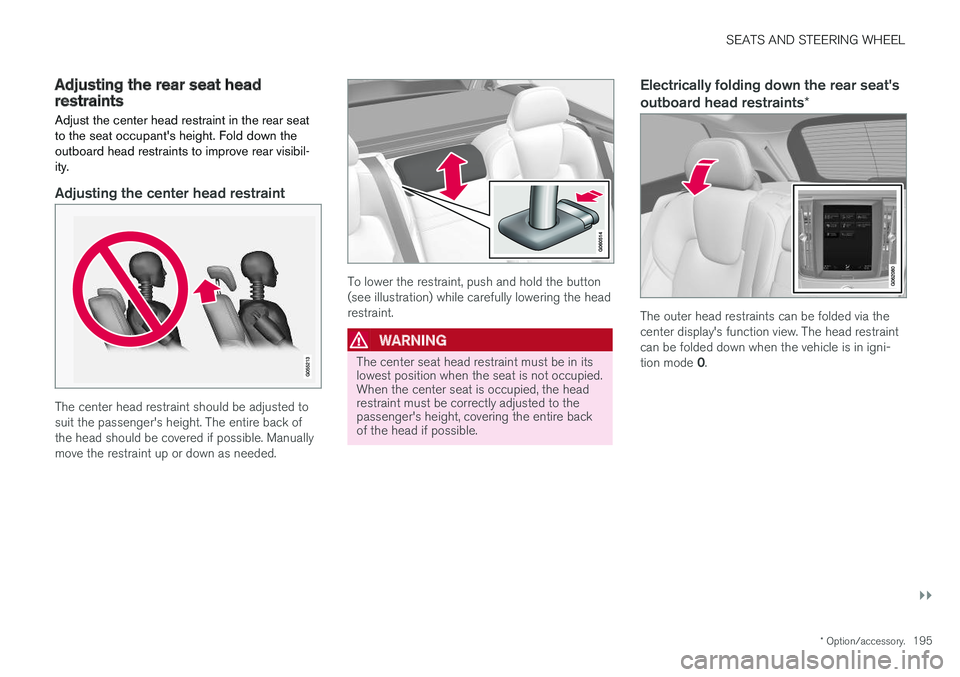
Adjusting the center head restraint
The center head restraint should be adjusted to suit the passenger's height. The entire back ofthe head should be covered if possible. Manuallymove the restraint up or down as needed.
To lower the restraint, push and hold the button (see illustration) while carefully lowering the headrestraint.
WARNING
The center seat head restraint must be in its lowest position when the seat is not occupied.When the center seat is occupied, the headrestraint must be correctly adjusted to thepassenger's height, covering the entire backof the head if possible.
Electrically folding down the rear seat's outboard head restraints *
The outer head restraints can be folded via the center display's function view. The head restraintcan be folded down when the vehicle is in igni- tion mode 0.
Page 198 of 660
||
SEATS AND STEERING WHEEL
* Option/accessory.
196 Tap the
Headrest Fold button
to activate/deactivate folding.
Manually push the head restraint until it clicks into position.
WARNING
Do not lower the head restraint if there are passengers in any of the rear seats.
WARNING
The head restraint must be locked in the upright position after it has been folded up.
Manually folding down the rear seat's outboard head restraints
For models with electrically folding backrests *,
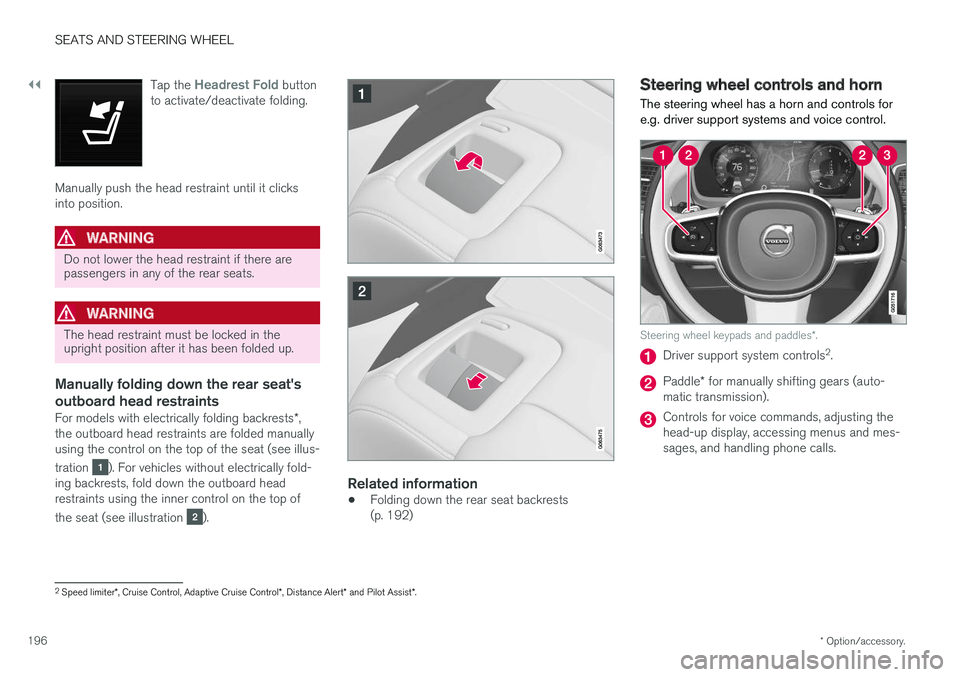
the outboard head restraints are folded manually using the control on the top of the seat (see illus- tration
). For vehicles without electrically fold-
ing backrests, fold down the outboard head restraints using the inner control on the top of the seat (see illustration
).
Related information
• Folding down the rear seat backrests (p. 192)
Steering wheel controls and horn The steering wheel has a horn and controls for e.g. driver support systems and voice control.
Steering wheel keypads and paddles
*.
Driver support system controls 2
.
Paddle * for manually shifting gears (auto-
matic transmission).
Controls for voice commands, adjusting the head-up display, accessing menus and mes-sages, and handling phone calls.
2 Speed limiter *, Cruise Control, Adaptive Cruise Control *, Distance Alert * and Pilot Assist *.
Page 199 of 660
SEATS AND STEERING WHEEL
197
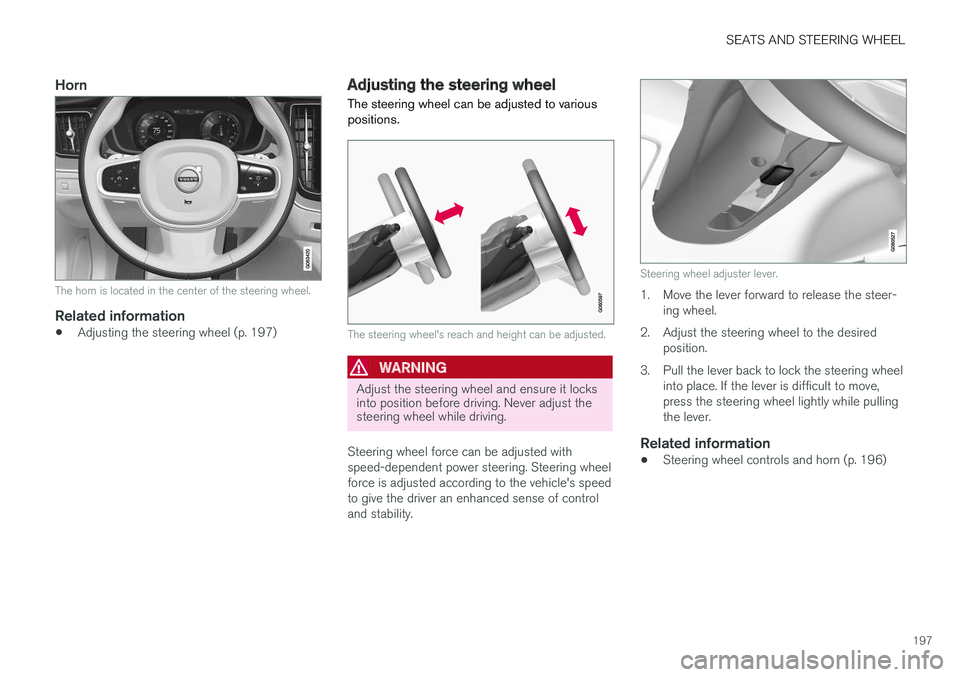
Horn
The horn is located in the center of the steering wheel.
Related information
•Adjusting the steering wheel (p. 197)
Adjusting the steering wheel
The steering wheel can be adjusted to various positions.
The steering wheel's reach and height can be adjusted.
WARNING
Adjust the steering wheel and ensure it locks into position before driving. Never adjust thesteering wheel while driving.
Steering wheel force can be adjusted with speed-dependent power steering. Steering wheelforce is adjusted according to the vehicle's speedto give the driver an enhanced sense of controland stability.
Steering wheel adjuster lever.
1. Move the lever forward to release the steer- ing wheel.
2. Adjust the steering wheel to the desired position.
3. Pull the lever back to lock the steering wheel into place. If the lever is difficult to move, press the steering wheel lightly while pullingthe lever.
Related information
• Steering wheel controls and horn (p. 196)
Page 204 of 660
CLIMATE CONTROL
* Option/accessory.
202
Climate control system voice
commands1
Voice commands can be used for the climate control system to e.g. change temperature, acti- vate seat heating * or change blower speed.
Tap and say one of the following commands:
• "
Climate" - starts a command dialog for cli-
mate controls and provides examples of commands that can be used.
• "
Set temperature to X degrees" - sets
desired temperature.
• "
Raise temperature"/"Lower
temperature" - raises/lowers the set tem-
perature.
• "
Sync temperature" - synchronizes the
temperature for all climate zones in the vehi- cle with the temperature set for the driver'sside.
• "
Air on feet"/"Air on body" - opens the
desired air vent.
• "
Air on feet off"/"Air on body off" - closes
the desired air vent.
• "
Set fan to max"/"Turn off fan" - changes
blower speed to Max/Off.
• "
Raise fan speed"/"Lower fan speed" -
raises/lowers the set blower speed. •
"
Turn on auto" - activates automatic climate
control.
• "
Air condition on"/"Air condition off" -
activates/deactivates air conditioning.
• "
Recirculation on"/"Recirculation off" -
activates/deactivates air recirculation.
• "
Turn on defroster "/"Turn off defroster"
- activates/deactivates window and door mir- ror defrosting.
• "
Turn on max defroster"/"Turn off max
defroster" - activates/deactivates max
defroster.
• "
Turn on electric defroster"/"Turn off
electric defroster" - activates/deactivates
heated windshield *.
• "
Turn on rear defroster"/"Turn off rear
defroster" - Activates/deactivates heated
rear window and door mirrors.
• "
Turn steering wheel heat on"/"Turn
steering wheel heat off" - activates/deac-
tivates heated steering wheel *.
• "
Raise steering wheel heat"/"Lower
steering wheel heat" - raises/lowers the
level of steering wheel heating *.
• "
Turn on seat heat"/"Turn off seat heat"
- activates/deactivates seat heating *.
• "
Raise seat heat"/"Lower seat heat" -
raises/lowers the level of seat heating *. •
"
Turn on seat ventilation"/"Turn off seat
ventilation" - activates/deactivates seat
ventilation *.
• "
Raise seat ventilation"/"Lower seat
ventilation" - raises/lowers the level of seat
ventilation *.
Related information
• Climate (p. 200)
• Voice control (p. 143)
• Using voice commands (p. 144)
• Voice control settings (p. 146)
1
Certain markets only.
Page 214 of 660
CLIMATE CONTROL
* Option/accessory.
212
Climate system controls
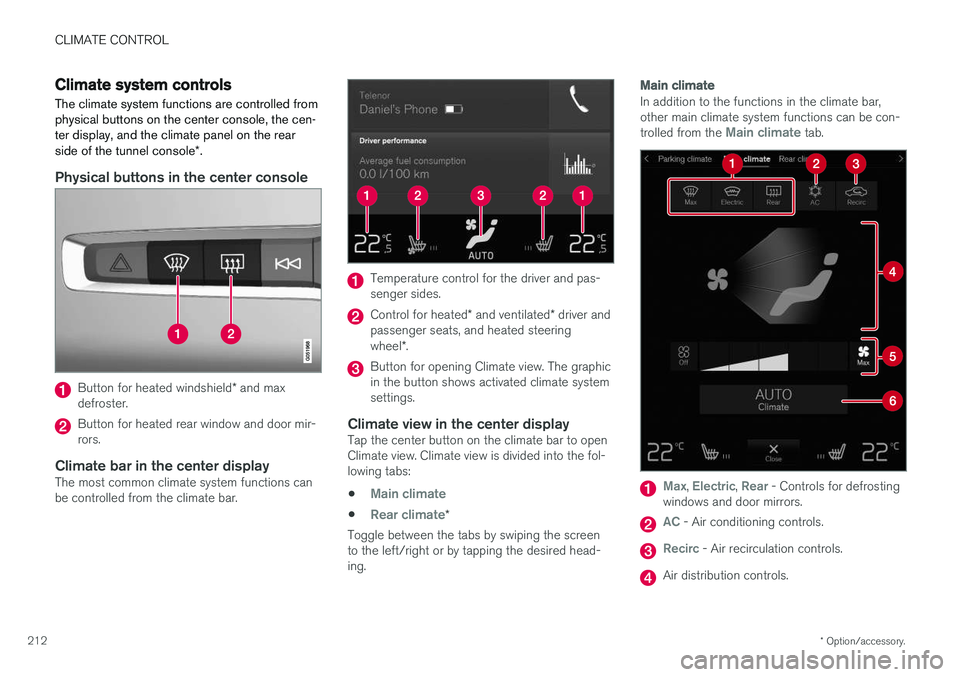
The climate system functions are controlled from physical buttons on the center console, the cen-ter display, and the climate panel on the rear side of the tunnel console *.
Physical buttons in the center console
Button for heated windshield * and max
defroster.
Button for heated rear window and door mir- rors.
Climate bar in the center displayThe most common climate system functions canbe controlled from the climate bar.
Temperature control for the driver and pas- senger sides.
Control for heated * and ventilated * driver and
passenger seats, and heated steering wheel *.
Button for opening Climate view. The graphic in the button shows activated climate systemsettings.
Climate view in the center displayTap the center button on the climate bar to openClimate view. Climate view is divided into the fol-lowing tabs:
•
Main climate
•Rear climate*
Toggle between the tabs by swiping the screen to the left/right or by tapping the desired head-ing.
Main climate
In addition to the functions in the climate bar, other main climate system functions can be con- trolled from the
Main climate tab.
Max, Electric, Rear - Controls for defrosting
windows and door mirrors.
AC - Air conditioning controls.
Recirc - Air recirculation controls.
Air distribution controls.
Page 216 of 660
||
CLIMATE CONTROL
* Option/accessory.
214 all selected climate settings will be displayed. The screen locks automatically after a period of inac-tivity.
Related information
•
Climate (p. 200)
• Activating and deactivating power front seats
* (p. 214)
• Activating and deactivating the heated rearseats
* (p. 215)
• Activating and deactivating front seat ventila-tion
* (p. 216)
• Activating and deactivating the heated steer-ing wheel
* (p. 217)
• Activating auto climate control (p. 218)
• Activating and deactivating recirculation (p. 219)
• Activating and deactivating max defroster(p. 220)
• Activating and deactivating the heated wind- shield
* (p. 221)
• Activating and deactivating the heated rear window and door mirrors (p. 222)
• Setting the blower speed for the front seats(p. 223)
• Setting the blower speed for the rear seats
*
(p. 224)
• Synchronize temperature (p. 227) •
Activating and deactivating air conditioning(p. 227)
Activating and deactivating power
front seats
*
The seats can be heated for added comfort for the driver and passengers in cold weather.
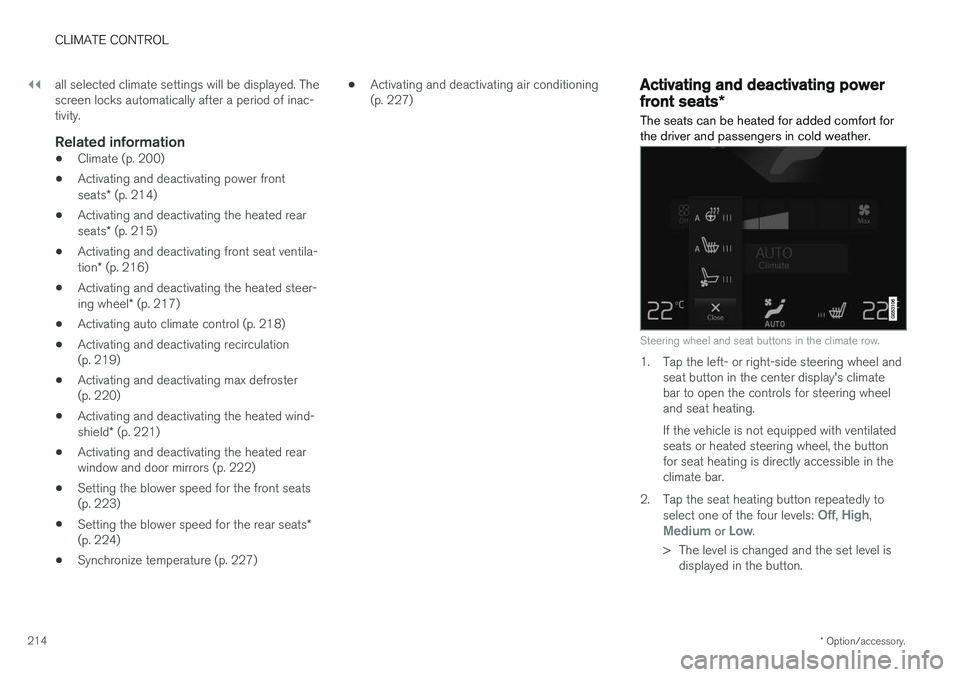
Steering wheel and seat buttons in the climate row.
1. Tap the left- or right-side steering wheel and seat button in the center display's climate bar to open the controls for steering wheeland seat heating. If the vehicle is not equipped with ventilated seats or heated steering wheel, the buttonfor seat heating is directly accessible in theclimate bar.
2. Tap the seat heating button repeatedly to select one of the four levels:
Off, High,Medium or Low.
> The level is changed and the set level is displayed in the button.
Page 218 of 660
||
CLIMATE CONTROL
* Option/accessory.
216
Activating and deactivating the heated rear seats from the rear seat
With 2-zone system:
Buttons for seat heating on the rear side of the tunnel console.
–Press repeatedly on the left or right seat heating buttons on the rear side of the tun- nel console to select one of four levels:
Off,High, Medium or Low.
> The level is changed and the indicator lights in the button display the level. With 4-zone system
*:
Seat heating controls and indicator lights on the rear side of the tunnel console.
–Press repeatedly on the left or right seat heating buttons in the climate panel on thetunnel console to select one of four levels:
Off, High, Medium or Low.
> The level will be changed and the climate panel screen will show the new level.
Related information
• Climate system controls (p. 212)
Activating and deactivating front
seat ventilation
*
The seats can be ventilated to provide increased comfort in warm weather.
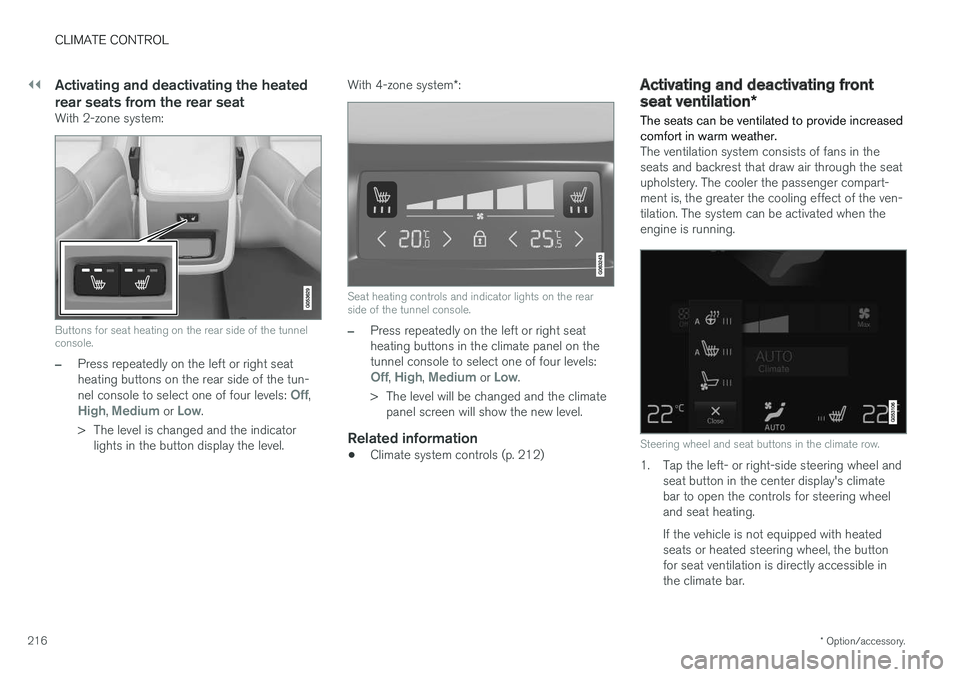
The ventilation system consists of fans in the seats and backrest that draw air through the seatupholstery. The cooler the passenger compart-ment is, the greater the cooling effect of the ven-tilation. The system can be activated when theengine is running.
Steering wheel and seat buttons in the climate row.
1. Tap the left- or right-side steering wheel and seat button in the center display's climate bar to open the controls for steering wheeland seat heating. If the vehicle is not equipped with heated seats or heated steering wheel, the buttonfor seat ventilation is directly accessible inthe climate bar.
Page 219 of 660
CLIMATE CONTROL
* Option/accessory.217
2. Tap the seat ventilation button repeatedly to
select one of the four levels:
Off, High,Medium or Low.
> The level is changed and the set level is displayed in the button.
Related information
• Climate system controls (p. 212)
Activating and deactivating the
heated steering wheel
*
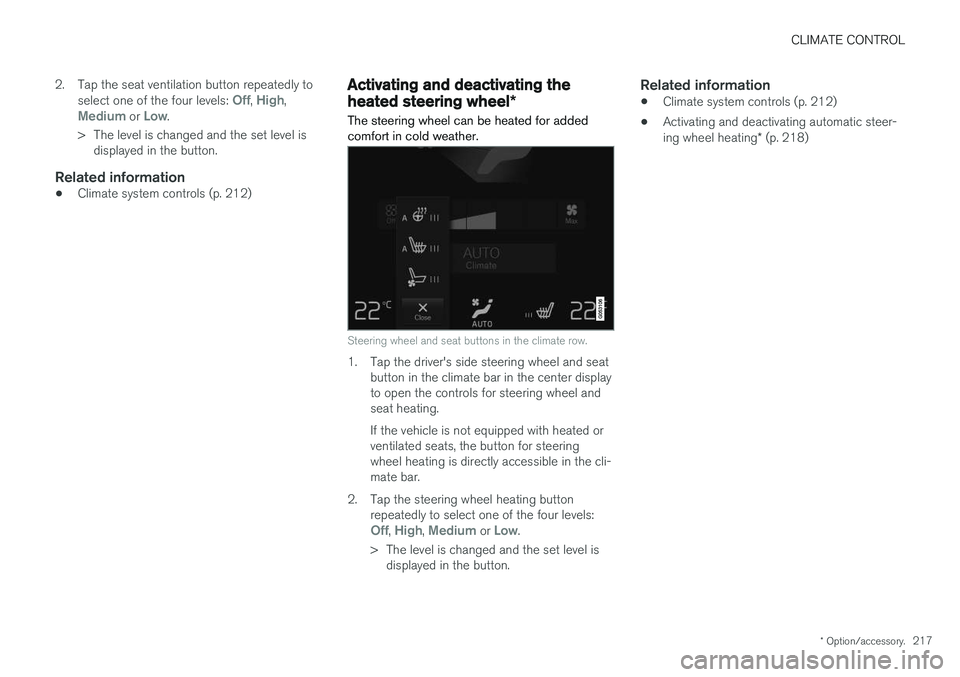
The steering wheel can be heated for added comfort in cold weather.
Steering wheel and seat buttons in the climate row.
1. Tap the driver's side steering wheel and seat button in the climate bar in the center display to open the controls for steering wheel andseat heating. If the vehicle is not equipped with heated or ventilated seats, the button for steeringwheel heating is directly accessible in the cli-mate bar.
2. Tap the steering wheel heating button repeatedly to select one of the four levels:
Off, High, Medium or Low.
> The level is changed and the set level is displayed in the button.
Related information
• Climate system controls (p. 212)
• Activating and deactivating automatic steer- ing wheel heating
* (p. 218)
Page 220 of 660
CLIMATE CONTROL
* Option/accessory.
218
Activating and deactivating
automatic steering wheel heating *
The steering wheel can be heated for added comfort in cold weather.
Steering wheel heating can be set to automati- cally activate when the engine is started. Whenset to automatically activate, heating will beturned on at low ambient temperatures. 1. Tap
Settings in the Top view in the center
display.
2. Tap
Climate.
3. Select
Auto Steering Wheel Heating
Level to activate/deactivate automatic start
of heated steering wheel.
4. Select
Low, Medium or High to select level
after the function has been activated.
Related information
• Activating and deactivating the heated steer- ing wheel
* (p. 217)
Activating auto climate control
If auto climate control is activated, several cli- mate system functions are controlled automati-cally.
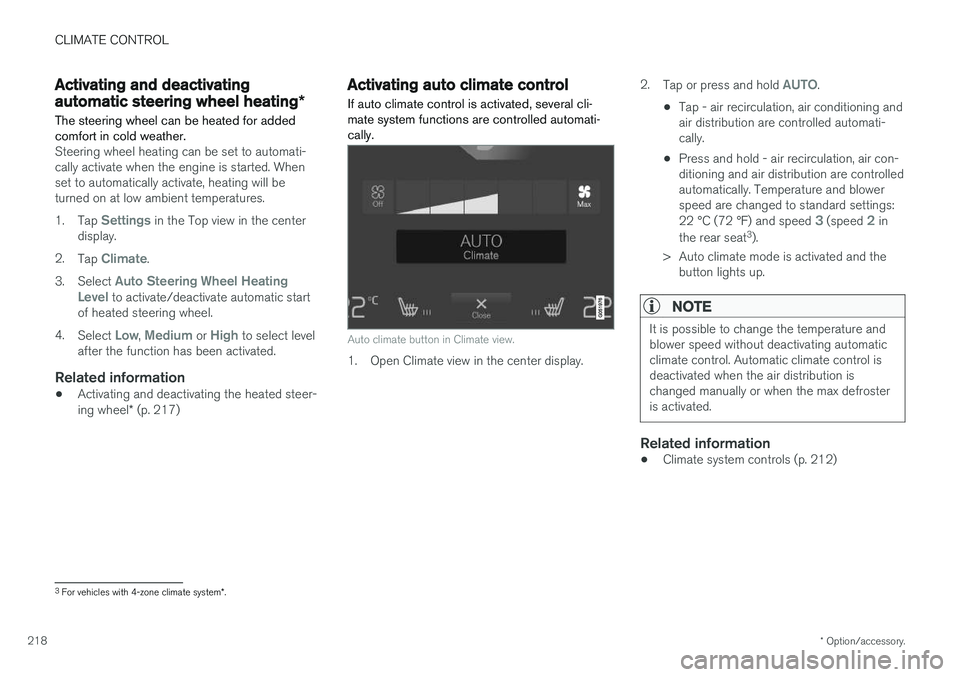
Auto climate button in Climate view.
1. Open Climate view in the center display. 2.
Tap or press and hold
AUTO.
• Tap - air recirculation, air conditioning and air distribution are controlled automati-cally.
• Press and hold - air recirculation, air con-ditioning and air distribution are controlledautomatically. Temperature and blowerspeed are changed to standard settings: 22 °C (72 °F) and speed
3 (speed 2 in
the rear seat 3
).
> Auto climate mode is activated and the button lights up.
NOTE
It is possible to change the temperature and blower speed without deactivating automaticclimate control. Automatic climate control isdeactivated when the air distribution ischanged manually or when the max defrosteris activated.
Related information
• Climate system controls (p. 212)
3
For vehicles with 4-zone climate system *.
Page 238 of 660
||
KEY, LOCKS AND ALARM
* Option/accessory.
236 For keyless use, a remote key or the Key Tag must be within the shaded areas shown in theillustration, i.e. a semicircle with a radius ofapprox. 1.5 meter (5 feet) along the sides of thevehicle or approx. 1 meter (3 feet) from the tail-gate.
NOTE
The functions of the remote control key can be disrupted by ambient radio waves, build-ings, topographical conditions, etc. The vehi-cle can always be locked/unlocked using thekey blade.
If the remote key is removed from the vehicle
If the remote key is removed from the vehicle while the engine is running, the warning message
Vehicle key not
found Removed from vehicle will be
displayed in the instrument panel and an audible signal will sound when the last door is closed.
The message will disappear when the key is returned to the vehicle and the O button on the
right-side steering wheel keypad is pressed or when the last door is closed again.
Related information
• Remote key (p. 231)
• Antenna locations for the start and lock sys-tem (p. 249) •
Keyless and touch-sensitive surfaces
*
(p. 245)
Replacing the remote key's battery
The battery in the remote key must be replaced when it is discharged.
NOTE
All batteries have a limited service life and must eventually be replaced (does not applyfor Key Tag). The battery's service life variesdepending on how often the vehicle/key isused.
The remote key battery should be replaced if:
the information symbol illuminates and the message
Vehicle key bat. low
See Owner's manual is displayed in
the instrument panel
and/or
• the locks do not react after several attempts to lock or unlock the vehicle using theremote key within approx. 20 meter (65 feet)from the vehicle.
NOTE
Move closer to the vehicle and try to unlock it again.