maintenance and service VOLVO XC60 2018 Owner´s Manual
[x] Cancel search | Manufacturer: VOLVO, Model Year: 2018, Model line: XC60, Model: VOLVO XC60 2018Pages: 660, PDF Size: 11.77 MB
Page 15 of 660
13
MAINTENANCE AND SERVICE
Volvo's service program572
Data transfer between vehicle and workshop over Wi-Fi 574
Download Center 575
Handling system updates via Down-load Center 575
Vehicle status 576
Scheduling service and repairs 576
Sending vehicle information to theworkshop 578
Hoisting the vehicle 579
Opening and closing the hood 581
Climate control system service 582
Replacing a windshield with head-up display * 582
Engine compartment overview 583
Engine oil 583
Checking and filling engine oil 584
Refilling coolant 586
Replacing bulbs 587
Location of exterior lights 588
Replacing the low beam headlight bulbs 589
Replacing the high beam headlight bulbs 590
Replacing daytime running lights/ front parking light bulbs 590
Replacing front turn signal bulbs 591
Bulb specifications591
Start battery 592
Support battery 595
Battery symbols 596
Fuses and fuseboxes 597
Replacing fuses 598
Fuses in the engine compartment 599
Fuses under the glove compartment 602
Fuses in the cargo compartment 605
Cleaning the interior 609
Cleaning the center display 609
Cleaning the head-up display *
610
Cleaning fabric upholstery and ceil- ing liner 611
Cleaning the seat belt 611
Cleaning floor mats and inlay mats 611
Cleaning leather upholstery 612
Cleaning the leather steering wheel 613
Cleaning interior plastic, metal andwood surfaces 614
Cleaning the exterior 614
Polishing and waxing 615
Hand washing 615
Automatic car washes 617
High-pressure washing 618
Cleaning the wiper blades618
Cleaning exterior plastic, rubber and trim components 619
Cleaning rims 620
Corrosion protection 620
Paintwork 621
Touching up minor paint damage 621
Color codes 622
Changing rear window wipers 623
Replacing windshield wiper blades 624
Windshield wipers in the service position 625
Filling washer fluid 626
Page 30 of 660
||
YOUR VOLVO
* Option/accessory.
28 goal. In addition to continuous environmental refinement of conventional gasoline-poweredinternal combustion engines, Volvo is activelylooking at advanced technology alternative-fuelvehicles. When you drive a Volvo, you become our partner in the work to lessen the vehicle's impact on theenvironment. To reduce your vehicle's environ-mental impact, you can:
• Maintain proper air pressure in your tires.Tests have shown decreased fuel economywith improperly inflated tires.
• Follow the recommended maintenanceschedule in your Warranty and ServiceRecords Information booklet.
• Drive at a constant speed whenever possible.
• See a trained and qualified Volvo servicetechnician as soon as possible for inspectionif the check engine (malfunction indicator)light illuminates, or stays on after the vehiclehas started.
• Properly dispose of any vehicle-related wastesuch as used motor oil, used batteries, brakepads, etc.
• When cleaning your vehicle, please use gen-uine Volvo car care products. All Volvo carcare products are formulated to be environ-mentally friendly.
Related information
•Economical driving (p. 432)
• The Owner's Manual and the environment(p. 23)
• Air quality (p. 203)
IntelliSafe - driver support
IntelliSafe is Volvo Cars' philosophy regarding vehicle safety. IntelliSafe consists of a number ofsystems, both standard and optional, that aredesigned to help make driving safer, preventaccidents and protect passengers and otherroad users.
SupportIntelliSafe includes driver support functions such as Adaptive cruise control * which helps the driver
to maintain an even speed combined with a pre- selected time interval to the vehicle ahead. Pilot Assist 4
helps the driver keep the vehicle in
the current traffic lane by providing steering assistance and maintaining an even speed and aset time interval to the vehicle ahead. Park Assist Pilot * helps the driver pull into and
out of parking spaces. Other examples of systems that can help the driver are the Active main beam, Cross Traffic Alert (CTA) * and Blind Spot Information (BLIS) *
systems.
PreventionCity Safety is a function intended to help prevent accidents. The function can help prevent or miti-gate a collision with pedestrians, cyclists, largeanimals or other vehicles. Light, sound and pulsa-tions in the brake pedal are provided to alert of a
4 Depending on market, this function can be either standard or optional.
Page 35 of 660
YOUR VOLVO
}}
33
Software Updates
So that you as a Volvo customer shall have the best possible experience from your car, Volvo iscontinuously developing the systems in the carsand the services that you are offered.
You can update the software in your Volvo to the latest version when your car is serviced at anauthorized Volvo dealer. The latest softwareupdate gives you access to new functions andimprovements, as well as previous improvementsincluded with previous software updates. For more information about released updates and answers to frequently asked questions, please go to support.volvocars.com.
NOTE
Functionality after updating may vary depend- ing on market, model, model year and options.
Related information
• Sensus - connection and entertainment (p. 30)
• Handling system updates via Download Cen-ter (p. 575)
Data recording
As part of Volvo's commitment to safety and quality, certain information is recorded regardingvehicle operation, functionality and incidents.
This vehicle is equipped with an event data recorder (EDR). The main purpose of an EDR isto record, in certain crash or near crash-like sit-uations, such as an airbag deployment or hittinga road obstacle, data that will assist in under-standing how a vehicle's systems performed. TheEDR is designed to record data related to vehicledynamics and safety systems for a short period oftime, typically 30 seconds or less. The EDR inthis vehicle is designed to record such data as:
• How various systems in your vehicle wereoperating;
• Whether or not the driver and passengersafety belts were buckled/fastened;
• How far (if at all) the driver was depressingthe accelerator and/or brake pedal; and,
• How fast the vehicle was traveling.
These data can help provide a better understand-ing of the circumstances in which crashes andinjuries occur. EDR data is only recorded by the vehicle if a more serious collision situation occurs. No data isrecorded by the EDR under normal driving condi-tions and the EDR never registers who is drivingthe vehicle or the location of a crash or a nearcrash-like situation. However, other parties, such as law enforcement, could combine the EDR datawith the type of personally identifying data rou-tinely acquired during a crash investigation. Toread data recorded by an EDR, special equipmentis required, and access to the vehicle or the EDRis needed. Furthermore, your vehicle is equipped with a number of computers whose task is to continu-ously control and monitor the vehicle's operation.They can also register some of this informationduring normal driving conditions, most importantlyif they detect a fault relating to the vehicle'soperation and functionality or upon activation ofthe vehicle's active safety systems (e.g. CitySafety and the auto-brake function). Some of theregistered information is required by technicianswhen carrying out service and maintenance toenable them to diagnose and rectify any faultsthat have occurred in the vehicle and to enableVolvo to fulfill legal and other regulatory require-ments. Information thus registered in the vehicleis registered in the vehicle's computers until thevehicle is serviced or repaired. In addition to theabove, the registered information may - on anaggregated basis - be used for research andproduct development purposes in order to contin-uously improve the safety and quality of Volvovehicles. For additional information, please contact Volvo.
Page 36 of 660
||
YOUR VOLVO
34
Related information
•Contacting Volvo (p. 26)
• Volvo Structural Parts Statement (p. 38)
Terms & Conditions for Services
Volvo offers services to help make driving your Volvo as safe and comfortable as possible.
These services comprise everything from assis- tance in emergencies to navigation and variousmaintenance services. Before using the services, it is important to read the Terms and Conditions for the services atsupport.volvocars.com.
Related information
• Customer Privacy Policy (p. 34)
Customer Privacy Policy
Volvo respects and safeguards the personal pri- vacy of everyone who visits our websites.
This policy refers to the handling of customer data and personal information. The purpose is togive current, past and potential customers a gen-eral understanding of:
• The circumstances in which we collect andprocess your personal data.
• The types of personal data we collect.
• Why we collect your personal data.
• How we process your personal data.
The policy can be read in its entirety atsupport.volvocars.com.
Related information
• Terms of use and data sharing (p. 508)
• Terms & Conditions for Services (p. 34)
• Data recording (p. 33)
Page 39 of 660
YOUR VOLVO
37
NOTE
Volvo Cars takes no responsibility for the con- sequences of connecting non-authorizedequipment to the On-board Diagnostic(OBDII) socket. This socket should only beused by a trained and qualified Volvo servicetechnician.
Type approvalUSA FCC ID: 2AGKKACUII-06 This device complies with part 15 of the FCC rules. Operation is subject to the following twoconditions: (1) This device may not cause harmful interfer- ence, and (2) this device must accept any interference received, including interference that may causeundesired operation.
WARNING
Changes or modifications not expressively approved by the party responsible for compli-ance could void the user's authority to oper-ate the equipment.
Canada IC: 20839-ACUII06 This device complies with Industry Canada license-exempt RSS standards. Operation is sub-ject to the following two conditions: (1) this device may not cause interference, and(2) This device must accept any interference received, including interference that may causeundesired operation.
Related information
•
Important information on accessories andextra equipment (p. 35)
Technician certification
In addition to Volvo factory training, Volvo sup- ports certification by the National Institute forAutomotive Service Excellence (A.S.E.).
Certified technicians have demonstrated a high degree of competence in specific areas. Besidespassing exams, each technician must also haveworked in the field for two or more years before acertificate is issued. These professional techni-cians are best able to analyze vehicle problemsand perform the necessary maintenance proce-dures to keep your Volvo at peak operating con-dition.
Page 59 of 660
SAFETY
}}
57
NOTE
When the ignition is switched on, the OWS indicator light will illuminate for several sec-onds while the system performs a self-diag-nostic test.
However, if a fault is detected in the system:
• The OWS indicator light will stay on
• The SRS warning light will come on and stay on and a text message will be displayed.
WARNING
If a fault in the system is detected and indi- cated as described, be aware that the pas-senger's side front airbag will not deploy inthe event of a collision. In this case, the SRSsystem and Occupant Weight Sensor shouldbe inspected by a trained and qualified Volvoservice technician as soon as possible.
WARNING
•Never try to open, remove or repair any components in the OWS system. Thiscould cause the system to malfunction.Maintenance or repairs should only becarried out by an a trained and qualifiedVolvo service technician.
• The front passenger's seat should not bemodified in any way. This could reducepressure on the seat cushion, whichmight interfere with the OWS system'sfunction.
Passenger'sseat occu-pancy status
OWS indi-cator lightstatus
Passenger'sside front air-bag status
Seat unoccu- pied OWS indi-cator lightlights up.Passenger'sside front air-bag disabled
Seat occu-pied by lowweight occu- pant/object AOWS indi-
cator light lights up Passenger'sside front air-
bag disabled
Seat occu-pied by heavyoccupant/object OWS indi-cator light is
not lit Passenger'sside front air-bag enabled
A
Volvo recommends that children always be properly restrained in appropriate child restraints in the rear seats. Do not assumethat the passenger's side front airbag is disabled unless thePASSENGER AIRBAG OFF indicator lamp is lit. Make sure thechild restraint is properly installed. If there is any doubt as to thestatus of the passenger's side front airbag, move the childrestraint to the rear seat.
The OWS is designed to enable (may inflate) the passenger's side front airbag in the event of acollision anytime the system senses that a per-son of adult size is sitting properly in the frontpassenger's seat. The PASSENGER AIRBAGOFF indicator lamp will be off and remain off. If a person of adult size is sitting in the front pas- senger's seat, but the PASSENGER AIRBAGOFF indicator lamp is on, it is possible that the
Page 105 of 660
DISPLAYS AND VOICE CONTROL
}}
103
Service messages
The following table lists a selection of important service messages and what they mean.
MessageMeaning
Stop safelyAStop and switch off the engine. Serious risk ofdamage - contact a work- shopB
.
Turn off engineA Stop and switch off the engine. Serious risk ofdamage - contact a work- shop
B
.
Service urgent Drive to work- shop
A Contact a workshop
B
to
have the vehicle inspected immediately.
Service requiredA Contact a workshop
B
to
have the vehicle inspected as soon as possible.
Regular main- tenance Book time for maintenanceTime for service - contact a workshop B
. Shown
before the next service date.
Regular main- tenance Time for main- tenanceTime for service - contact a workshop B
. Shown on
the next service date.
MessageMeaning
Regular main- tenance Maintenance overdueTime for service - contact a workshop B
. Shown when
the date for service has passed.
Temporarily offA A function has been tem- porarily deactivated andwill be reactivated auto-matically while driving orafter the engine is restar-ted.
A
Part of message, shown along with information on the location of the problem.
B An authorized Volvo workshop is recommended.
Related information
• Handling messages in the instrument panel (p. 103)
• Handling messages saved from the instru-ment panel (p. 105)
• Messages in the center display (p. 138)
Handling messages in theinstrument panel
Messages in the instrument panel are controlled using the right-side steering wheel keypad.
Page 406 of 660
||
STARTING AND DRIVING
404
WARNING
•If both symbols illuminate at the same time and the brake level is below the
MIN
mark in the reservoir or if a brake system- related message is shown in the instru-ment panel: DO NOT DRIVE. Have thevehicle towed to a trained and qualifiedVolvo service technician and have thebrake system inspected.
• If both symbols illuminate at the sametime and the brake level is normal (notbelow the MIN mark in the reservoir) or ifa brake system-related message isshown in the instrument panel: drive thevehicle carefully to an authorized Volvoworkshop and have the brake systeminspected by a trained and qualified Volvoservice technician.
Related information
• Brake Assist System (p. 404)
• Auto-hold brakes (p. 409)
• Hill Start Assist (p. 410)
• Braking on wet roads (p. 404)
• Braking on salted roads (p. 405)
• Maintenance of the brake system (p. 405)
• Brake lights (p. 159)
Brake Assist System
The brake enhancing system, Brake Assist
System (BAS), helps increase braking force andthereby reduce braking distance.
The system monitors the driver's braking habits and increases braking force when necessary.Braking force can be increased up to the point atwhich the ABS intervenes. The function is deacti-vated when pressure on the brake pedal isdecreased.
NOTE
When BAS is activated, the brake pedal will go down slightly more than usual. Press(hold) down the brake pedal as long as nec-essary. When the brake pedal is released, all braking ceases.
Related information
• Brakes (p. 403)
Braking on wet roads
Prolonged driving in heavy rain without braking may cause braking effect to be slightly delayedthe first time the brakes are applied.
This may also occur after washing the vehicle. It will then be necessary to apply greater pressureto the brake pedal. You should therefore maintaina greater distance to the vehicle ahead. Firmly apply the brakes after washing the vehicle or driving on wet roads. This helps warm up thebrake discs, enabling them to dry more quicklyand protecting them against corrosion. Considerthe current traffic situation when braking.
Related information
• Brakes (p. 403)
• Braking on salted roads (p. 405)
Page 407 of 660
STARTING AND DRIVING
}}
405
Braking on salted roads When driving on salted roads, a layer of salt may form on the brake discs and brake pads.
This could increase stopping distance. Maintain an extra large safety distance to the vehicleahead. Make sure to also:
• Apply the brakes from time to time to helpremove salt. Make sure braking does notpose a risk to any other road users.
• Gently apply the brakes when you have fin-ished driving and before driving again.
Related information
• Brakes (p. 403)
• Braking on wet roads (p. 404)
Maintenance of the brake system
Regularly check the brake system components for wear.
To keep the vehicle as safe and reliable as possi- ble, follow the Volvo service schedule specified inthe Warranty and Maintenance Records Informa-tion booklet. New and replaced brake pads andbrake discs do not provide optimal braking effectuntil they are "broken in" by driving a few hun-dred kilometers (miles). Compensate for thereduced braking effect by applying greater pres-sure to the brake pedal. Volvo recommends onlyusing brake pads approved for your Volvo.
CAUTION
The brake system's components should be regularly checked for wear. Contact a workshop for advice on how to do this or let a workshop perform the inspection- an authorized Volvo workshop is recom-mended.
Related information
• Brakes (p. 403)
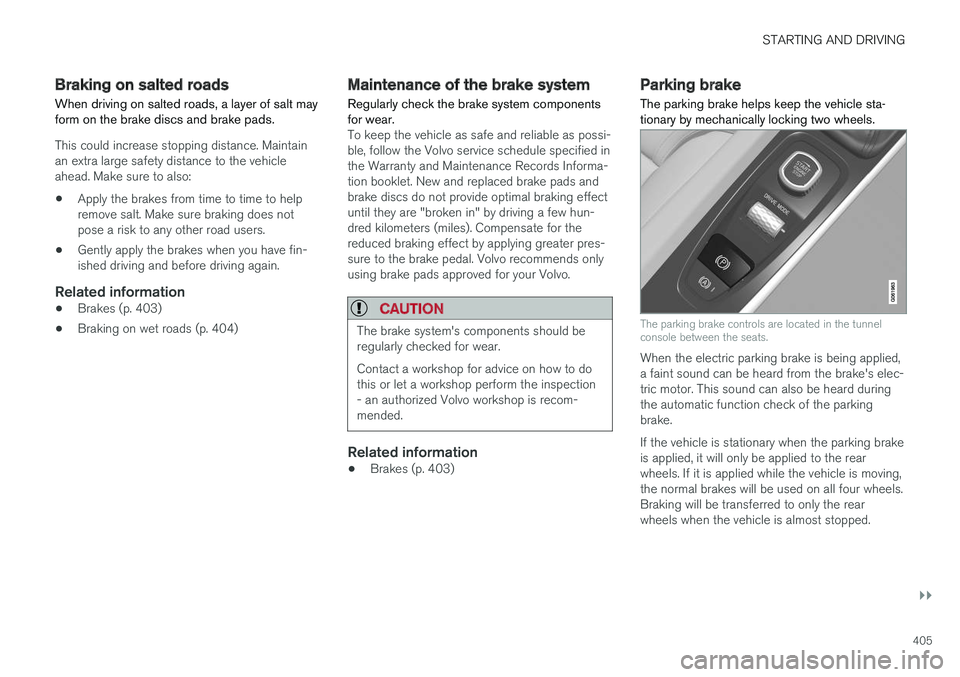
Parking brake The parking brake helps keep the vehicle sta- tionary by mechanically locking two wheels.
The parking brake controls are located in the tunnel console between the seats.
When the electric parking brake is being applied, a faint sound can be heard from the brake's elec-tric motor. This sound can also be heard duringthe automatic function check of the parkingbrake. If the vehicle is stationary when the parking brake is applied, it will only be applied to the rearwheels. If it is applied while the vehicle is moving,the normal brakes will be used on all four wheels.Braking will be transferred to only the rearwheels when the vehicle is almost stopped.
Page 534 of 660
||
WHEELS AND TIRES
* Option/accessory.
532 function, the telltale will flash for approximately one minute and then remain continuously illumi-nated. This sequence will continue upon subse-quent vehicle start-ups as long as the malfunc-tion exists. When the malfunction indicator is illu-minated, the system may not be able to detect orsignal low tire pressure as intended. TPMS malfunctions may occur for a variety of reasons, including the installation of replacementor alternate tires or wheels on the vehicle thatprevent the TPMS from functioning properly. Always check the TPMS malfunction telltale after replacing one or more tires or wheels on yourvehicle to ensure that the replacement or alter-nate tires and wheels allow the TPMS to con-tinue to function properly.
Messages in the instrument panelIf tire pressure is too low, the low tire pressurewarning symbol is shown in the instrument panelalong with a message.
•
Tire pressure low Check tires, calibrate
after fill
•Tire pressure system Temporarily
unavailable
•Tire pressure system Service required
To keep in mind
• Always calibrate the system after changing wheels or adjusting tire pressure. See the tire pressure placard on the driver's side B pillarfor Volvo-recommended tire pressures.
• If you switch to a tire of another size than thefactory-mounted tires, the system must becalibrated for these tires to avoid false warn-ings.
• If a spare wheel 7
is used, it is possible that
the tire pressure monitoring system will notwork correctly due to the differencesbetween the wheels.
• The system does not replace the need forregular tire inspection and maintenance.
• It is not possible to deactivate the tire pres-sure monitoring system.
WARNING
• Incorrect inflation pressure could lead to tire failure, which could cause the driverto lose control of the vehicle.
• The system cannot predict sudden tiredamage.
Related information
•
Recommended tire pressure (p. 531)
• Viewing tire pressure status in the center display
* (p. 534)
• Action when warned of low tire pressure (p. 535) •
Calibrating the tire pressure monitoring sys- tem
* (p. 533)
7
Not available on all models.