door lock VOLVO XC60 T8 2018 Owner´s Manual
[x] Cancel search | Manufacturer: VOLVO, Model Year: 2018, Model line: XC60 T8, Model: VOLVO XC60 T8 2018Pages: 674, PDF Size: 11.93 MB
Page 161 of 674
LIGHTING
}}
* Option/accessory.159
Briefly press the button on the light to turn on or off the reading lights. To adjust the brightness,press and hold the button.
Glove compartment lightingThe glove compartment lighting comes on orgoes off when the glove compartment is openedor closed.
Vanity mirror lighting
*The vanity mirror lighting comes on or goes offwhen the cover over the mirror is opened orclosed.
Ground lighting*The ground lighting comes on or goes off when adoor is opened or closed.
Cargo compartment lightingThe cargo compartment lighting comes on orgoes off when the tailgate is opened or closed.
Ambient LightingThe ambient lighting comes on when the doorsare opened and goes out when the vehicle islocked. Ambient lighting brightness can beadjusted in the center display and also fine-tuned using the thumb wheel in the dashboard.
Mood lighting*The vehicle is equipped with several LEDs that provide faint lighting in various colors. This light-ing is on when the engine is running. Mood light-ing can be adjusted in the center display and also fine-tuned using the thumb wheel in the dash-board.
Lighting in the door storage compartments
Lighting in the door storage compartments comes on when the doors are opened and goesout when the vehicle is locked. The brightnesscan be adjusted using the thumb wheel in thedashboard.
Lighting in the front tunnel console
cupholders
The lighting in front console cupholders switcheson when the vehicle is unlocked and off when thevehicle is locked. The brightness can be adjustedusing the thumb wheel in the dashboard.
Related information
• Adjusting interior lighting (p. 159)
• Lighting panel and controls (p. 148)
• Ignition modes (p. 417)
• Passenger compartment interior (p. 570)
Adjusting interior lighting
Illumination in the vehicle varies depending on ignition mode. The interior lighting can beadjusted with a thumb wheel in the dashboardand certain light functions can also be adjustedvia the center display.
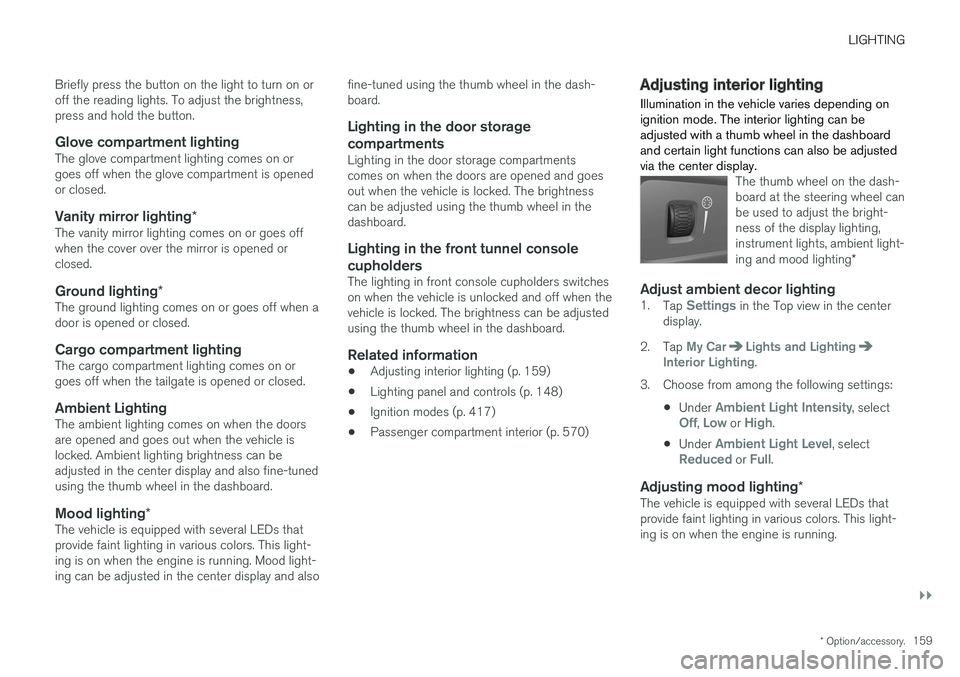
The thumb wheel on the dash- board at the steering wheel canbe used to adjust the bright-ness of the display lighting,instrument lights, ambient light- ing and mood lighting *
Adjust ambient decor lighting1.
Tap Settings in the Top view in the center
display.
2. Tap
My CarLights and LightingInterior Lighting.
3. Choose from among the following settings:
•Under
Ambient Light Intensity, selectOff, Low or High.
• Under
Ambient Light Level, selectReduced or Full.
Adjusting mood lighting
*The vehicle is equipped with several LEDs that provide faint lighting in various colors. This light-ing is on when the engine is running.
Page 164 of 674
WINDOWS, GLASS AND MIRRORS
* Option/accessory.
162
Windows, glass and mirrors
The vehicle is equipped with controls for win- dows, glass and mirrors. Some of the windowsin the car are laminated.
Laminated glass
The windshield and panoramic roof * have lamina-
ted glass. The glass is reinforced, which provides better protection against break-ins and improvedsoundproofing in the passenger compartment.Laminated glass is available as an option forsome other glass surfaces.
The symbol shows the windows containing laminated glass 1
Related information
•
Pinch protection for windows and sun cur- tains (p. 162)
• Panoramic roof
* (p. 168)
• Power windows (p. 163)
• Rearview/door mirrors (p. 165)
• Head-up display
* (p. 138)
• Using the windshield wipers (p. 172)
• Using the windshield and headlight washers(p. 175) •
Activating and deactivating the heated wind- shield
* (p. 215)
• Activating and deactivating the heated rear window and door mirrors (p. 217)
Pinch protection for windows andsun curtains
All windows and sun curtains * that are controlled
electrically have a pinch protection function that is triggered if anything blocks them while theyare opening or closing.
If pinch protection is activated, movement will stop and then retract automatically to approx.50 mm (2 inches) from the point at which it wasblocked (or to full ventilation position). If pinch protection has been triggered, it is still possible to operate the window or sun curtainonce more in the same direction without pinchprotection, if this is done within 10 seconds afterpinch protection has been triggered. It is thus stillpossible to override pinch protection when clos-ing is interrupted (e.g. due to ice) by pressing andholding down the control until the window or suncurtain is fully closed.
WARNING
If the starter battery is disconnected, the func- tion for automatic opening and closing mustbe reset to function correctly. A reset isrequired in order for the pinch protection towork.
1 Does not apply to windshield and panoramic roof *, which are always laminated and therefore do not have this symbol.
Page 165 of 674
WINDOWS, GLASS AND MIRRORS
}}
* Option/accessory.163
Related information
•Reset procedure for pinch protection (p. 163)
• Operating the power windows (p. 164)
• Panoramic roof
* (p. 168)
Reset procedure for pinchprotection
If the power windows are not operating properly, you can try a reset procedure.
WARNING
If the starter battery is disconnected, the func- tion for automatic opening and closing mustbe reset to function correctly. A reset isrequired in order for the pinch protection towork.
If the problem persists or if it affects the panor- amic roof or sunroof, contact a workshop. 2
Resetting a power window
1. Start with the window in the closed position.
2. Then operate the window in manual mode
three times upward toward the closed posi- tion.
> The system will be automatically initiated.
Related information
• Pinch protection for windows and sun cur- tains (p. 162)
• Operating the power windows (p. 164)
Power windows
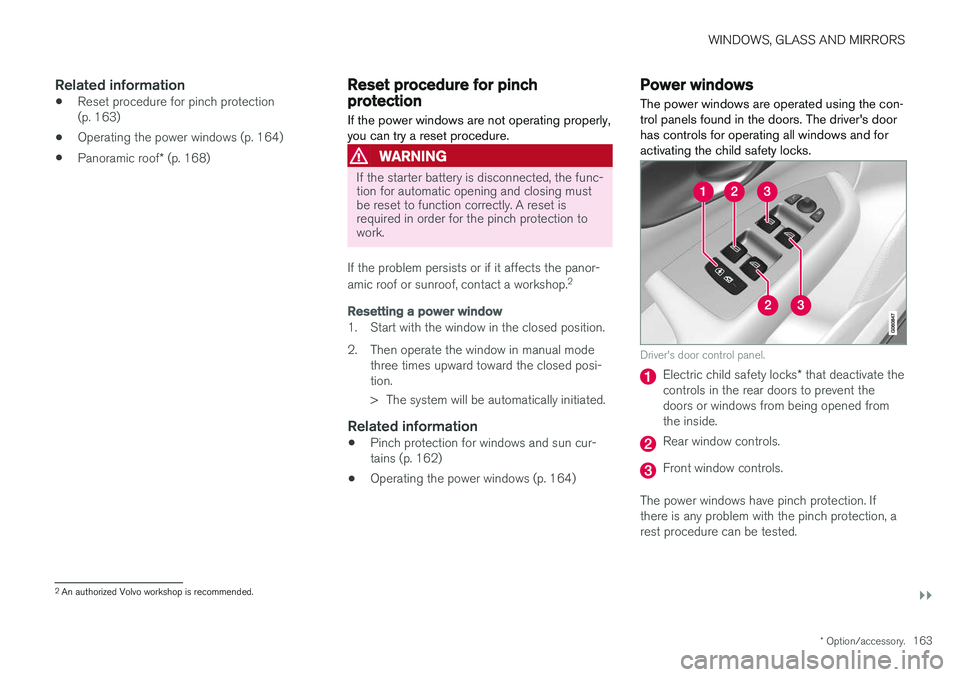
The power windows are operated using the con- trol panels found in the doors. The driver's doorhas controls for operating all windows and foractivating the child safety locks.
Driver's door control panel.
Electric child safety locks * that deactivate the
controls in the rear doors to prevent the doors or windows from being opened fromthe inside.
Rear window controls.
Front window controls.
The power windows have pinch protection. If there is any problem with the pinch protection, arest procedure can be tested.
2 An authorized Volvo workshop is recommended.
Page 167 of 674
WINDOWS, GLASS AND MIRRORS
* Option/accessory.165
WARNING
Make sure that no child or other passenger comes into contact with the windows as they are closing with keyless closing *.
NOTE
One way to reduce the pulsating wind noise heard when the rear windows are open is toalso open the front windows slightly.
NOTE
The windows cannot be opened at speeds over approx. 180 km/h (ca112 mph), but theycan be closed. The driver is always responsible for following applicable traffic regulations.
Related information
• Power windows (p. 163)
• Pinch protection for windows and sun cur- tains (p. 162)
• Reset procedure for pinch protection(p. 163)
• Keyless locking and unlocking
* (p. 244)
• Locking and unlocking using the remote key(p. 231)
• Locking and unlocking from inside the vehi-cle (p. 247)
Rearview/door mirrors
The rearview mirror and door mirrors can be used to improve the driver's visibility behind thevehicle.
Rearview mirrorThe rearview mirror can be easily adjusted man- ually. The rearview mirror can be equipped with HomeLink *, auto-dim * and compass *.
Door mirrors
WARNING
The door mirror on the passenger side is curved to improve visibility. Objects in the mir-ror may appear farther away than they actuallyare.
The joystick in the drivers' door control panel is used to adjust the position of the door mirrors.There are also several automatic settings thatcan also be connected to the memory function buttons for the power seat *.
Related information
•
HomeLink ®
* (p. 468)
• Compass (p. 471)
• Adjusting the rearview mirror dimming func- tion (p. 166)
• Adjusting the door mirrors (p. 166) •
Storing memory settings in power front seats
* (p. 182)
• Activating and deactivating the heated rear window and door mirrors (p. 217)
Page 169 of 674
WINDOWS, GLASS AND MIRRORS
* Option/accessory.167
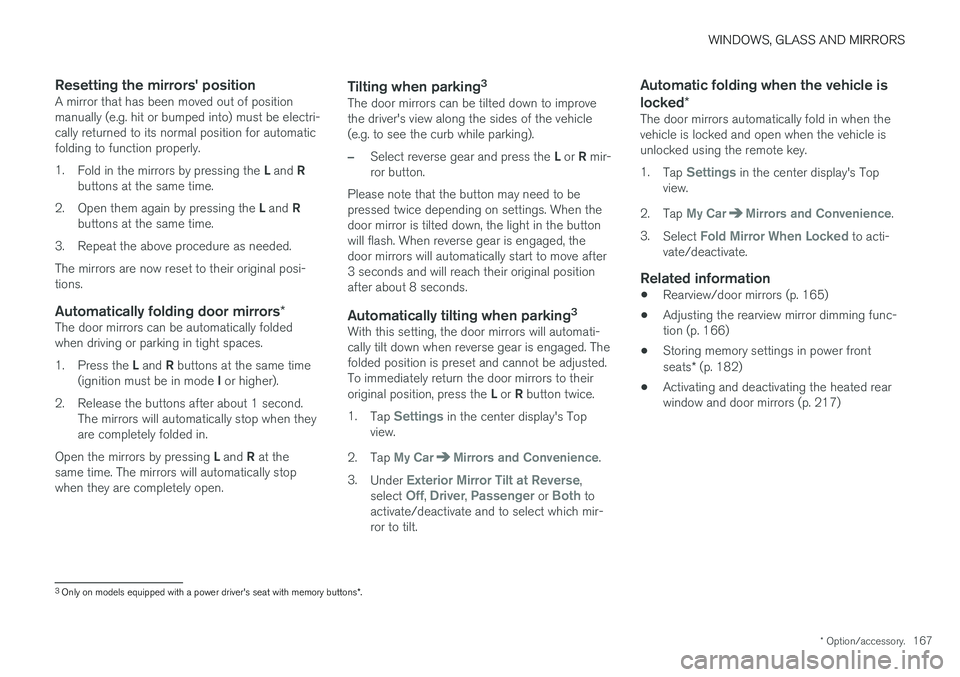
Resetting the mirrors' positionA mirror that has been moved out of position manually (e.g. hit or bumped into) must be electri-cally returned to its normal position for automaticfolding to function properly. 1.Fold in the mirrors by pressing the L and R
buttons at the same time.
2. Open them again by pressing the L and R
buttons at the same time.
3. Repeat the above procedure as needed.The mirrors are now reset to their original posi- tions.
Automatically folding door mirrors *The door mirrors can be automatically foldedwhen driving or parking in tight spaces. 1.
Press the L and R buttons at the same time
(ignition must be in mode I or higher).
2. Release the buttons after about 1 second. The mirrors will automatically stop when they are completely folded in.
Open the mirrors by pressing L and R at the
same time. The mirrors will automatically stopwhen they are completely open.
Tilting when parking 3The door mirrors can be tilted down to improvethe driver's view along the sides of the vehicle(e.g. to see the curb while parking).
–Select reverse gear and press the
L or R mir-
ror button.
Please note that the button may need to be pressed twice depending on settings. When thedoor mirror is tilted down, the light in the buttonwill flash. When reverse gear is engaged, thedoor mirrors will automatically start to move after3 seconds and will reach their original positionafter about 8 seconds.
Automatically tilting when parking 3With this setting, the door mirrors will automati-cally tilt down when reverse gear is engaged. Thefolded position is preset and cannot be adjusted.To immediately return the door mirrors to their original position, press the
L or R button twice.
1. Tap
Settings in the center display's Top
view.
2. Tap
My CarMirrors and Convenience.
3. Under
Exterior Mirror Tilt at Reverse,
select Off, Driver, Passenger or Both to
activate/deactivate and to select which mir- ror to tilt.
Automatic folding when the vehicle is locked *
The door mirrors automatically fold in when the vehicle is locked and open when the vehicle isunlocked using the remote key. 1.
Tap
Settings in the center display's Top
view.
2. Tap
My CarMirrors and Convenience.
3. Select
Fold Mirror When Locked to acti-
vate/deactivate.
Related information
• Rearview/door mirrors (p. 165)
• Adjusting the rearview mirror dimming func- tion (p. 166)
• Storing memory settings in power front seats
* (p. 182)
• Activating and deactivating the heated rear window and door mirrors (p. 217)
3
Only on models equipped with a power driver's seat with memory buttons *.
Page 170 of 674
WINDOWS, GLASS AND MIRRORS
* Option/accessory.
168
Panoramic roof *
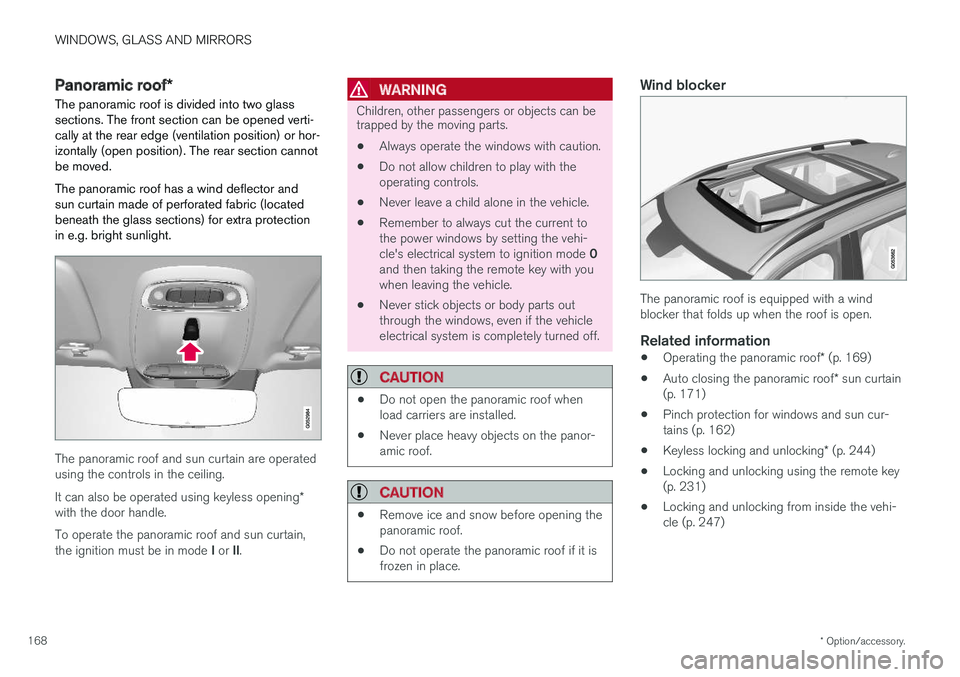
The panoramic roof is divided into two glass sections. The front section can be opened verti-cally at the rear edge (ventilation position) or hor-izontally (open position). The rear section cannotbe moved. The panoramic roof has a wind deflector and sun curtain made of perforated fabric (locatedbeneath the glass sections) for extra protectionin e.g. bright sunlight.
The panoramic roof and sun curtain are operated using the controls in the ceiling. It can also be operated using keyless opening *
with the door handle. To operate the panoramic roof and sun curtain, the ignition must be in mode I or II.
WARNING
Children, other passengers or objects can be trapped by the moving parts.
• Always operate the windows with caution.
• Do not allow children to play with the operating controls.
• Never leave a child alone in the vehicle.
• Remember to always cut the current tothe power windows by setting the vehi- cle's electrical system to ignition mode
0
and then taking the remote key with you when leaving the vehicle.
• Never stick objects or body parts outthrough the windows, even if the vehicleelectrical system is completely turned off.
CAUTION
• Do not open the panoramic roof when load carriers are installed.
• Never place heavy objects on the panor-amic roof.
CAUTION
• Remove ice and snow before opening the panoramic roof.
• Do not operate the panoramic roof if it isfrozen in place.
Wind blocker
The panoramic roof is equipped with a wind blocker that folds up when the roof is open.
Related information
•
Operating the panoramic roof
* (p. 169)
• Auto closing the panoramic roof
* sun curtain
(p. 171)
• Pinch protection for windows and sun cur-tains (p. 162)
• Keyless locking and unlocking
* (p. 244)
• Locking and unlocking using the remote key(p. 231)
• Locking and unlocking from inside the vehi-cle (p. 247)
Page 183 of 674
SEATS AND STEERING WHEEL
}}
* Option/accessory.181
Power front seats *
The power front seats can be adjusted in a num- ber of different ways for optimal comfort andergonomics. The power seats can be moved for-ward/backward and up/down. The height and length * of the seat cushion and the tilt of the
backrest can be adjusted. Lumbar support can be adjusted up, down, forward and backward.
The power seats have an overload protector that is triggered if a seat is blocked by any object. Ifthis occurs, remove the object and attempt toadjust the seat again. The power seats can be adjusted for a certain period of time after the door is unlocked withoutthe engine running. The seats can always beadjusted while the engine is running. They canalso be adjusted for a short period after theengine is turned off.
Related information
• Manual front seats (p. 180)
• Adjusting the power front seats
* (p. 181)
• Storing memory settings in power front seats
* (p. 182)
• Using stored memory in a powered front seat (p. 183)
• Adjusting front seat massage settings
*
(p. 184)
• Adjusting front seat cushion length (p. 185)
• Front seat massage settings
* (p. 184) •
Adjusting front seat side bolster settings
*
(p. 186)
• Adjusting front seat lumbar support
* (p. 186)
• Adjusting the passenger seat from the driv- er's seat
* (p. 187)
Adjusting the power front seats *
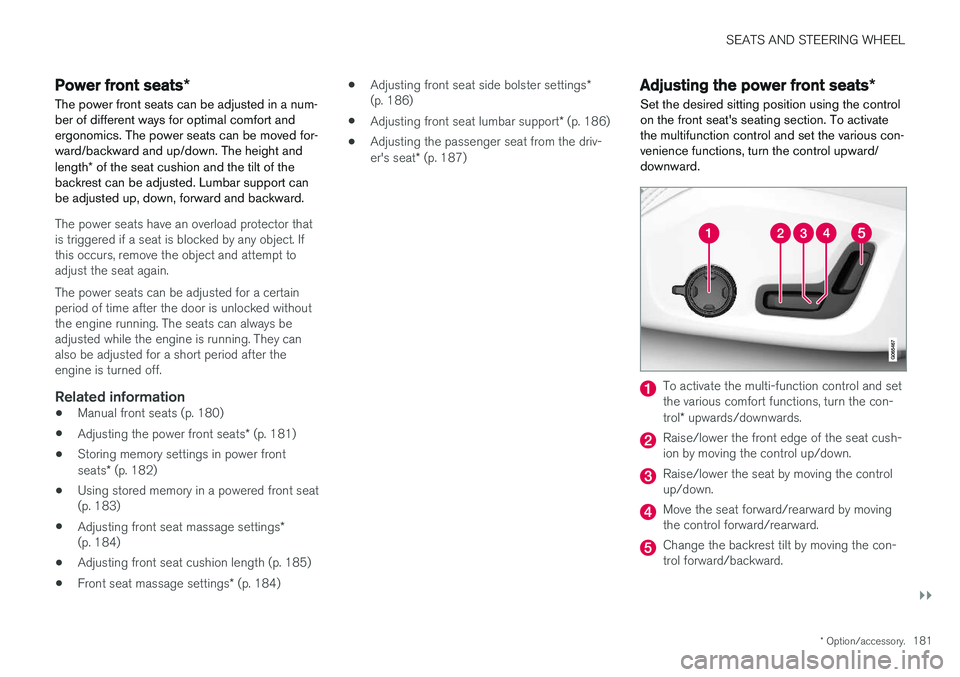
Set the desired sitting position using the control on the front seat's seating section. To activatethe multifunction control and set the various con-venience functions, turn the control upward/downward.
To activate the multi-function control and set the various comfort functions, turn the con- trol * upwards/downwards.
Raise/lower the front edge of the seat cush- ion by moving the control up/down.
Raise/lower the seat by moving the control up/down.
Move the seat forward/rearward by moving the control forward/rearward.
Change the backrest tilt by moving the con- trol forward/backward.
Page 198 of 674
CLIMATE CONTROL
* Option/accessory.
196
Climate
The vehicle is equipped with electronic climate control. The climate system cools, heats anddehumidifies the air in the passenger compart-ment.
All of the climate system functions are controlled from the center display and the buttons on thecenter console. Certain rear seat functions can also be controlled from the climate controls * on the rear of the tun-
nel console.
Related information
• Climate zones (p. 196)
• Climate control sensors (p. 196)
• Perceived temperature (p. 197)
• Climate control system voice commands (p. 197)
• Parking climate (p. 220)
• Air quality (p. 198)
• Air distribution (p. 201)
• Climate system controls (p. 208)
Climate zones
The vehicle is divided into climate zones to make it possible to set different temperatures for dif-ferent parts of the passenger compartment.
2-zone climate system
Climate zones with 2-zone climate system.
In 2-zone climate systems, the passenger com- partment temperature can be set separately forthe left and right sides of the vehicle.
Related information
• Climate (p. 196)
Climate control sensors
The climate system has a number of sensors to help regulate the climate settings in the vehicle.
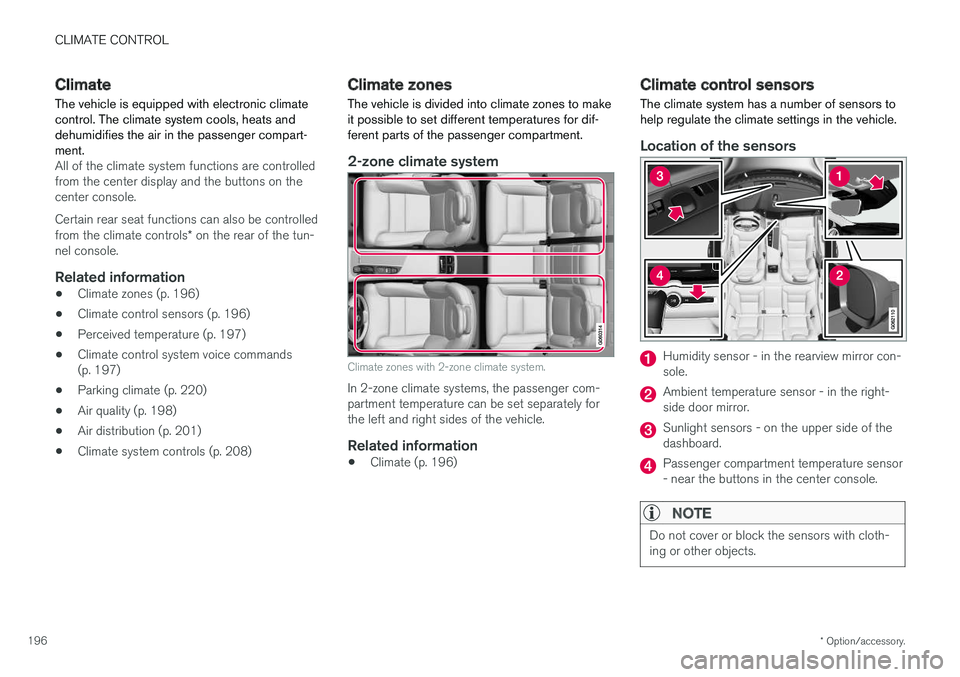
Location of the sensors
Humidity sensor - in the rearview mirror con- sole.
Ambient temperature sensor - in the right- side door mirror.
Sunlight sensors - on the upper side of the dashboard.
Passenger compartment temperature sensor - near the buttons in the center console.
NOTE
Do not cover or block the sensors with cloth- ing or other objects.
Page 202 of 674

CLIMATE CONTROL
* Option/accessory.
200
Clean Zone Interior Package *
Clean Zone Interior Package (CZIP) is a series of modifications that filters even more allergy andasthma-inducing substances from the passengercompartment.
CZIP includes the following:
• An enhanced function that starts the blower when the vehicle is unlocked using theremote key. The blower will then fill the pas-senger compartment with fresh air. The func-tion starts when required and switches offautomatically after a period of time or whenone of the passenger compartment doors isopened. The amount of time the blower runsgradually decreases due to reduced need upuntil the vehicle is 4 years old.
• The fully automatic Interior Air QualitySystem (IAQS).
Related information
•Air quality (p. 198)
• Clean Zone
* (p. 199)
• Interior Air Quality System
* (p. 200)
• Passenger compartment air filter (p. 201)
Interior Air Quality System
*
Interior Air Quality System (IAQS) is a fully auto- matic air quality system that removes gases andparticles to reduce odors and contaminants inthe passenger compartment.
IAQS is part of the Clean Zone Interior Package (CZIP) and removes air contaminants such asparticles, hydrocarbons, nitric oxides and ground-level ozone. If the system's air quality sensors detect contami- nants in the outside air, the air intake closes andair recirculation is activated.
NOTE
To ensure optimal air quality in the passenger compartment, the air quality sensor shouldalways be engaged. Recirculation is limited in cold weather to pre- vent fogging. In the event of fogging, use the defroster functions for the windshield, side windowsand rear window.
Related information
• Activating and deactivating the air quality sensor
* (p. 201)
• Air quality (p. 198)
• Clean Zone
* (p. 199)
• Clean Zone Interior Package
* (p. 200) •
Passenger compartment air filter (p. 201)
Page 230 of 674
KEY, LOCKS AND ALARM
* Option/accessory.
228
Lock indication
When the vehicle is locked or unlocked, the turn signals will flash to indicate that the vehicle hasbeen locked or unlocked correctly.
Exterior confirmationLocking
• The turn signals will flash once and the door mirrors will fold in 1
to confirm the vehicle is
locked.
Unlocking
• The turn signals will flash twice and the doormirrors will fold out 1
to confirm the vehicle is
unlocked.
All doors, tailgate and hood must be closed for confirmation to be given. If only the driver's door is closed when the vehicle is locked 2
, the vehicle
will be locked but the turn signals will only flash to indicate locking when all doors and the hoodand tailgate have been closed.
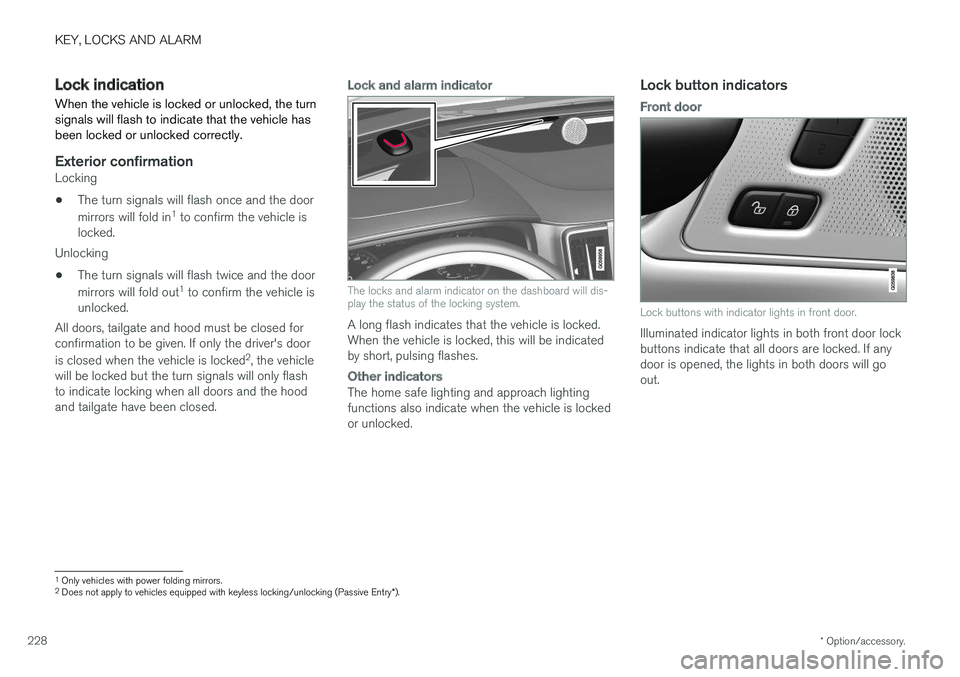
Lock and alarm indicator
The locks and alarm indicator on the dashboard will dis- play the status of the locking system.
A long flash indicates that the vehicle is locked. When the vehicle is locked, this will be indicatedby short, pulsing flashes.
Other indicators
The home safe lighting and approach lighting functions also indicate when the vehicle is lockedor unlocked.
Lock button indicators
Front door
Lock buttons with indicator lights in front door.
Illuminated indicator lights in both front door lock buttons indicate that all doors are locked. If anydoor is opened, the lights in both doors will goout.
1 Only vehicles with power folding mirrors.
2 Does not apply to vehicles equipped with keyless locking/unlocking (Passive Entry *).