buttons VOLVO XC60 T8 2018 Owner´s Manual
[x] Cancel search | Manufacturer: VOLVO, Model Year: 2018, Model line: XC60 T8, Model: VOLVO XC60 T8 2018Pages: 674, PDF Size: 11.93 MB
Page 204 of 674
||
CLIMATE CONTROL
202
Related information
•Climate (p. 196)
• Adjusting air distribution (p. 202)
• Opening, closing and directing air vents (p. 203)
• Air distribution options (p. 205)
Adjusting air distribution
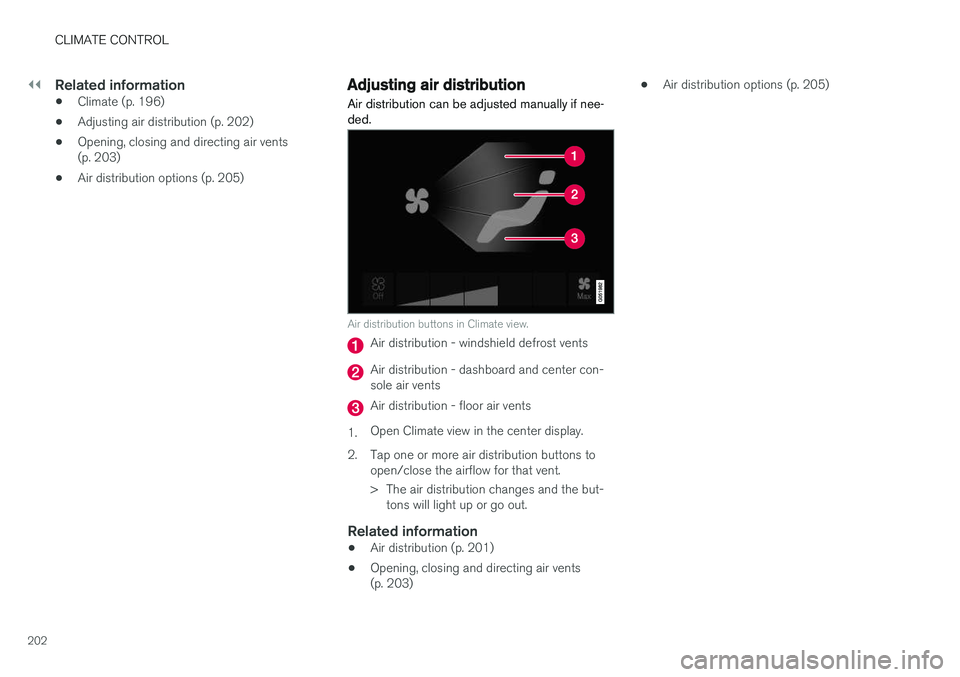
Air distribution can be adjusted manually if nee- ded.
Air distribution buttons in Climate view.
Air distribution - windshield defrost vents
Air distribution - dashboard and center con- sole air vents
Air distribution - floor air vents
1. Open Climate view in the center display.
2. Tap one or more air distribution buttons to open/close the airflow for that vent.
> The air distribution changes and the but-tons will light up or go out.
Related information
• Air distribution (p. 201)
• Opening, closing and directing air vents (p. 203) •
Air distribution options (p. 205)
Page 207 of 674
CLIMATE CONTROL
}}
205
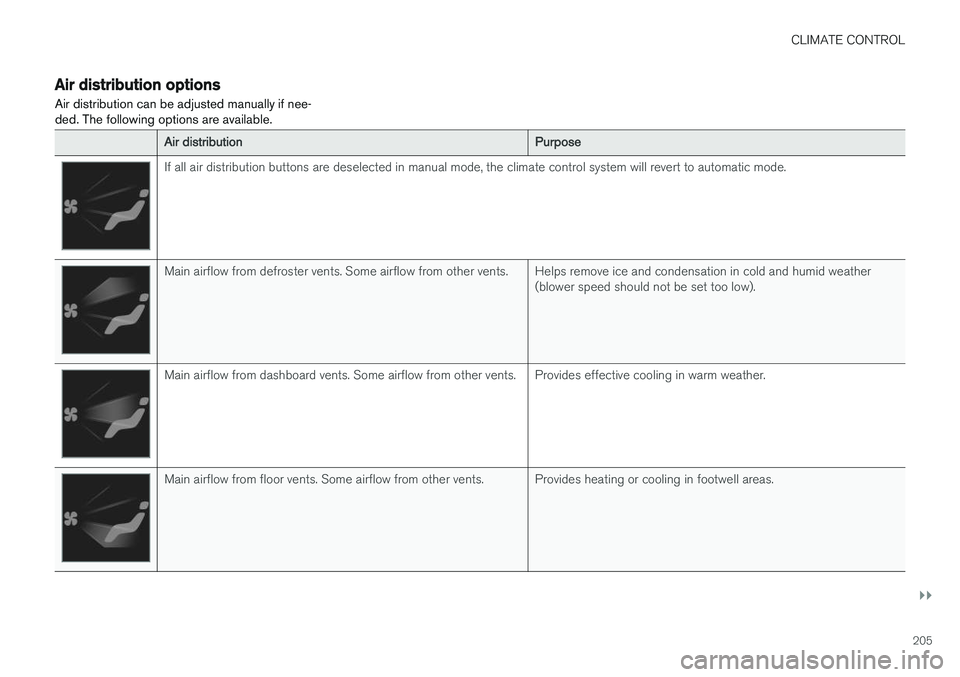
Air distribution options Air distribution can be adjusted manually if nee- ded. The following options are available.
Air distributionPurpose
If all air distribution buttons are deselected in manual mode, the climate control system will revert to automatic mode.
Main airflow from defroster vents. Some airflow from other vents. Helps remove ice and condensation in cold and humid weather(blower speed should not be set too low).
Main airflow from dashboard vents. Some airflow from other vents. Provides effective cooling in warm weather.
Main airflow from floor vents. Some airflow from other vents. Provides heating or cooling in footwell areas.
Page 210 of 674
CLIMATE CONTROL
* Option/accessory.
208
Climate system controls
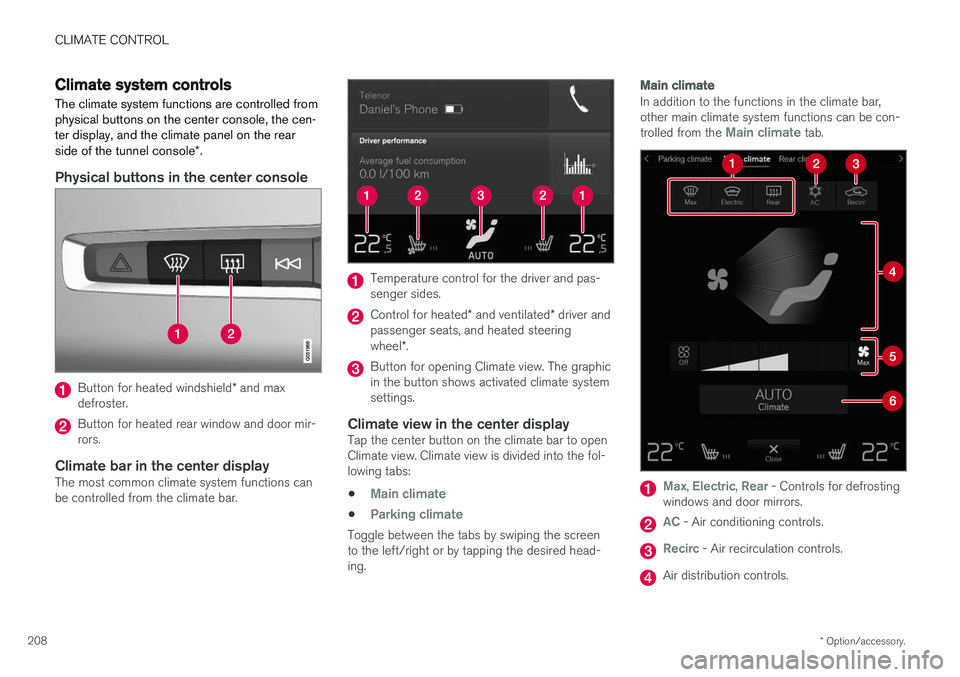
The climate system functions are controlled from physical buttons on the center console, the cen-ter display, and the climate panel on the rear side of the tunnel console *.
Physical buttons in the center console
Button for heated windshield * and max
defroster.
Button for heated rear window and door mir- rors.
Climate bar in the center displayThe most common climate system functions canbe controlled from the climate bar.
Temperature control for the driver and pas- senger sides.
Control for heated * and ventilated * driver and
passenger seats, and heated steering wheel *.
Button for opening Climate view. The graphic in the button shows activated climate systemsettings.
Climate view in the center displayTap the center button on the climate bar to openClimate view. Climate view is divided into the fol-lowing tabs:
•
Main climate
•Parking climate
Toggle between the tabs by swiping the screen to the left/right or by tapping the desired head-ing.
Main climate
In addition to the functions in the climate bar, other main climate system functions can be con- trolled from the
Main climate tab.
Max, Electric, Rear - Controls for defrosting
windows and door mirrors.
AC - Air conditioning controls.
Recirc - Air recirculation controls.
Air distribution controls.
Page 211 of 674
CLIMATE CONTROL
}}
* Option/accessory.209
Blower control.
AUTO - Automatic climate control.
Parking climate
Parking climate functions can be controlled from the Parking climate tab.
Climate controls on the rear side of the
tunnel console *
If the vehicle is equipped with heated rear seats *,
there are physical buttons on the rear side of the tunnel console to control this.
Related information
• Climate (p. 196)
• Activating and deactivating power front seats
* (p. 209)
• Activating and deactivating the heated rearseats
* (p. 210)
• Activating and deactivating front seat ventila-tion
* (p. 211)
• Activating and deactivating the heated steer-ing wheel
* (p. 211)
• Activating auto climate control (p. 212)
• Activating and deactivating recirculation (p. 213)
• Activating and deactivating max defroster(p. 214)
• Activating and deactivating the heated wind- shield
* (p. 215) •
Activating and deactivating the heated rear window and door mirrors (p. 217)
• Setting the blower speed for the front seats(p. 218)
• Synchronize temperature (p. 219)
• Activating and deactivating air conditioning(p. 220)
Activating and deactivating power
front seats
*
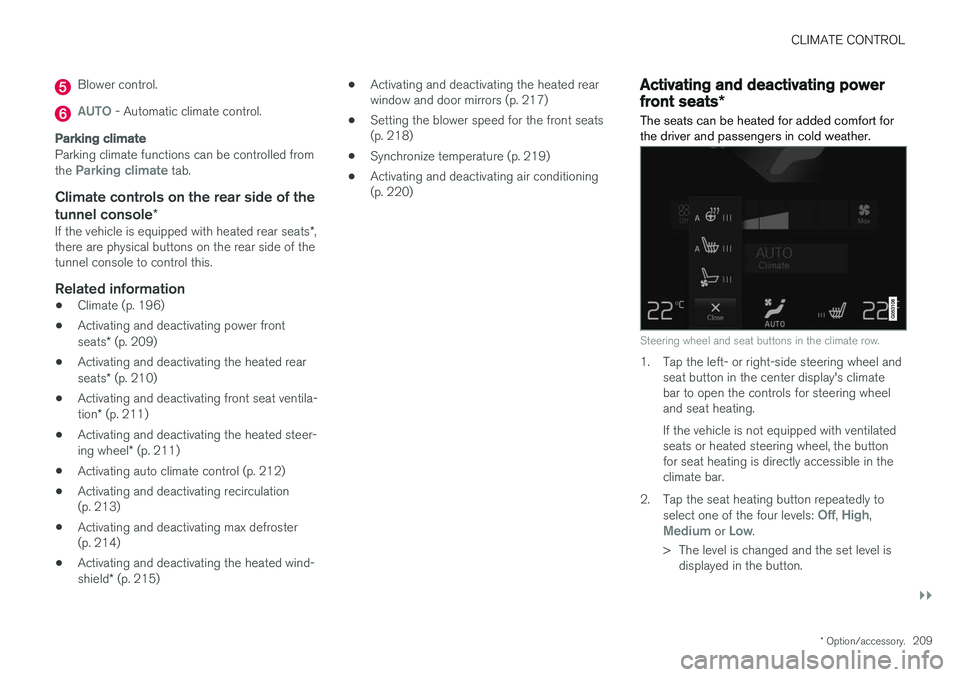
The seats can be heated for added comfort for the driver and passengers in cold weather.
Steering wheel and seat buttons in the climate row.
1. Tap the left- or right-side steering wheel and seat button in the center display's climate bar to open the controls for steering wheeland seat heating. If the vehicle is not equipped with ventilated seats or heated steering wheel, the buttonfor seat heating is directly accessible in theclimate bar.
2. Tap the seat heating button repeatedly to select one of the four levels:
Off, High,Medium or Low.
> The level is changed and the set level is displayed in the button.
Page 212 of 674
||
CLIMATE CONTROL
* Option/accessory.
210
Related information
• Climate system controls (p. 208)
• Activating and deactivating the heated front seat
* (p. 210)
Activating and deactivating the
heated front seat *
The seats can be heated for added comfort for the driver and passengers in cold weather.
Seat heating can be set to automatically activate when the engine is started. When set to automat-ically activate, heating will be turned on at lowambient temperatures. 1. Tap
Settings in the Top view in the center
display.
2. Tap
Climate.
3. Select
Auto Driver Seat Heating Leveland Auto Passenger Seat Heating Levelto activate/deactivate automatic start of heated driver's and passenger seat.
4. Select
Low, Medium or High to select level
after the function has been activated.
Related information
• Climate system controls (p. 208)
• Activating and deactivating power front seats
* (p. 209)
Activating and deactivating the
heated rear seats *
The seats can be heated for added comfort for the driver and passengers in cold weather.
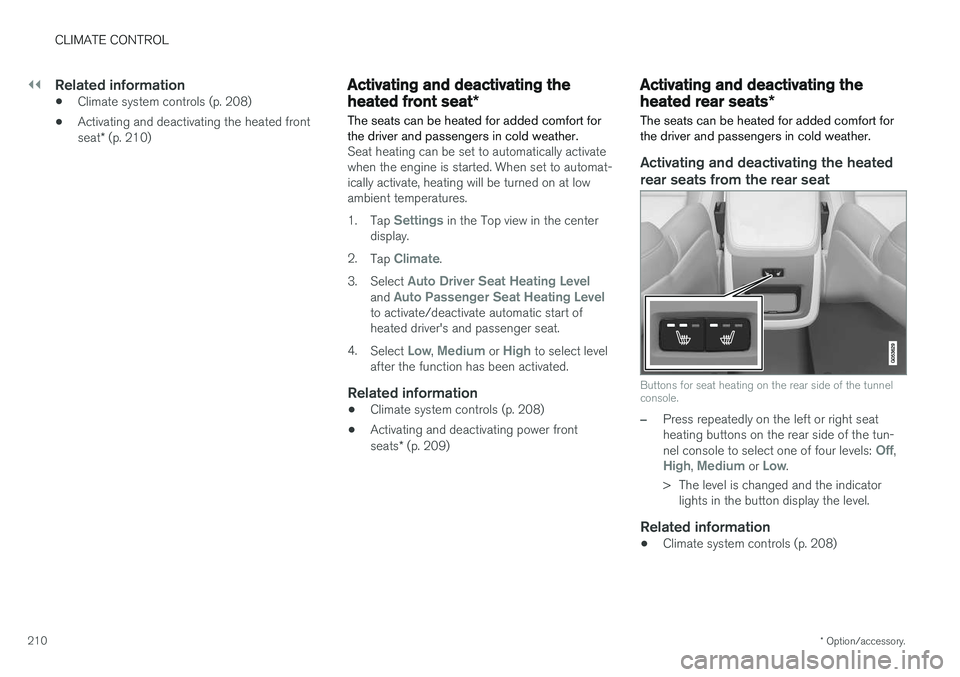
Activating and deactivating the heated rear seats from the rear seat
Buttons for seat heating on the rear side of the tunnel console.
–Press repeatedly on the left or right seat heating buttons on the rear side of the tun- nel console to select one of four levels:
Off,High, Medium or Low.
> The level is changed and the indicator lights in the button display the level.
Related information
• Climate system controls (p. 208)
Page 213 of 674
CLIMATE CONTROL
}}
* Option/accessory.211
Activating and deactivating front
seat ventilation *
The seats can be ventilated to provide increased comfort in warm weather.
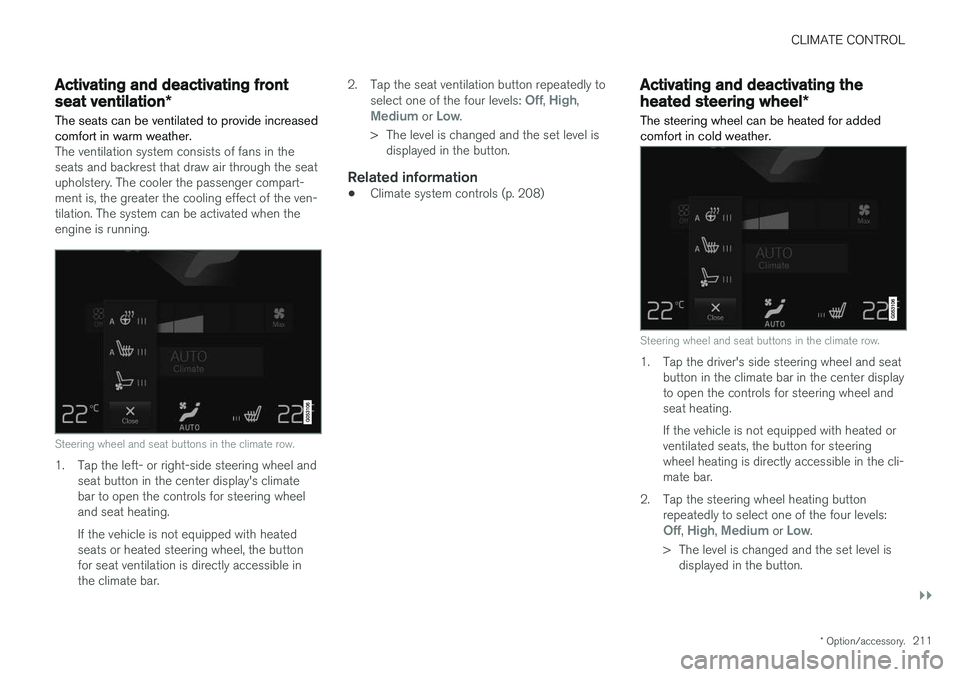
The ventilation system consists of fans in the seats and backrest that draw air through the seatupholstery. The cooler the passenger compart-ment is, the greater the cooling effect of the ven-tilation. The system can be activated when theengine is running.
Steering wheel and seat buttons in the climate row.
1. Tap the left- or right-side steering wheel and seat button in the center display's climate bar to open the controls for steering wheeland seat heating. If the vehicle is not equipped with heated seats or heated steering wheel, the buttonfor seat ventilation is directly accessible inthe climate bar. 2. Tap the seat ventilation button repeatedly to
select one of the four levels:
Off, High,Medium or Low.
> The level is changed and the set level is displayed in the button.
Related information
• Climate system controls (p. 208)
Activating and deactivating the
heated steering wheel
*
The steering wheel can be heated for added comfort in cold weather.
Steering wheel and seat buttons in the climate row.
1. Tap the driver's side steering wheel and seat button in the climate bar in the center display to open the controls for steering wheel andseat heating. If the vehicle is not equipped with heated or ventilated seats, the button for steeringwheel heating is directly accessible in the cli-mate bar.
2. Tap the steering wheel heating button repeatedly to select one of the four levels:
Off, High, Medium or Low.
> The level is changed and the set level is displayed in the button.
Page 220 of 674
CLIMATE CONTROL
218
Setting the blower speed for the
front seats3
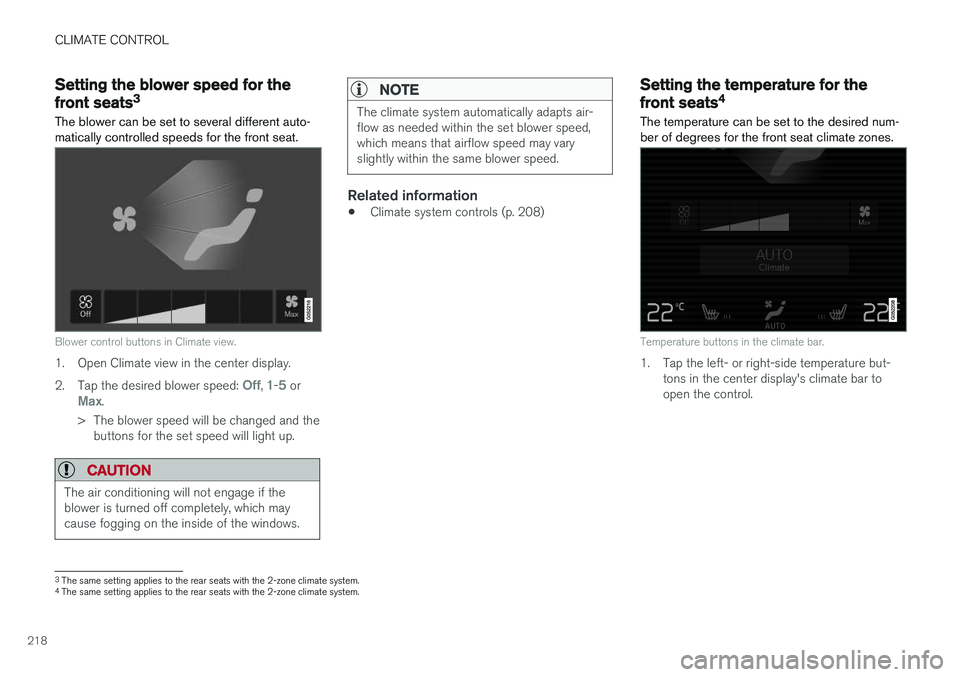
The blower can be set to several different auto- matically controlled speeds for the front seat.
Blower control buttons in Climate view.
1. Open Climate view in the center display. 2. Tap the desired blower speed:
Off, 1-5 orMax.
> The blower speed will be changed and the buttons for the set speed will light up.
CAUTION
The air conditioning will not engage if the blower is turned off completely, which maycause fogging on the inside of the windows.
NOTE
The climate system automatically adapts air- flow as needed within the set blower speed,which means that airflow speed may varyslightly within the same blower speed.
Related information
• Climate system controls (p. 208)
Setting the temperature for the
front seats4
The temperature can be set to the desired num- ber of degrees for the front seat climate zones.
Temperature buttons in the climate bar.
1. Tap the left- or right-side temperature but- tons in the center display's climate bar to open the control.
3The same setting applies to the rear seats with the 2-zone climate system.
4 The same setting applies to the rear seats with the 2-zone climate system.
Page 226 of 674
||
CLIMATE CONTROL
2244.
Tap
Date to set a time for a specific date.
Tap
Days to set a time for one or more days
of the week. With
Days: Activate/deactivate the repeat
function by selecting/deselecting the
Repeat weekly checkbox.
5. With
Date: Select a date for preconditioning
by scrolling in the date list using the arrows. With
Days: Select days of the week for pre-
conditioning by tapping the buttons for the days.
6. Set the time at which preconditioning should be completed by scrolling using the arrows inthe clock.
7. Tap
Confirm to add a timer setting.
> The timer setting will be added to the list and activated.
Editing a timer setting1. Open Climate view in the center display. 2. Select the
Parking climate tab.
3. Tap the timer setting you would like to change.
> A pop-up window will appear.
4. To edit a timer setting, follow the procedures described under the heading "Adding a timer setting" above.
Activating and deactivatingpreconditioning timer settings
Timer settings in the preconditioning timer can be activated or deactivated as needed.
Timer buttons in the Parking climate tab in Climate
view.
1. Open Climate view in the center display. 2. Select the
Parking climate tab.
3. Activate/deactivate a timer setting by tap- ping the timer button to the right of the set- ting.
> The timer setting is activated/deactivatedand the button lights up/goes out.
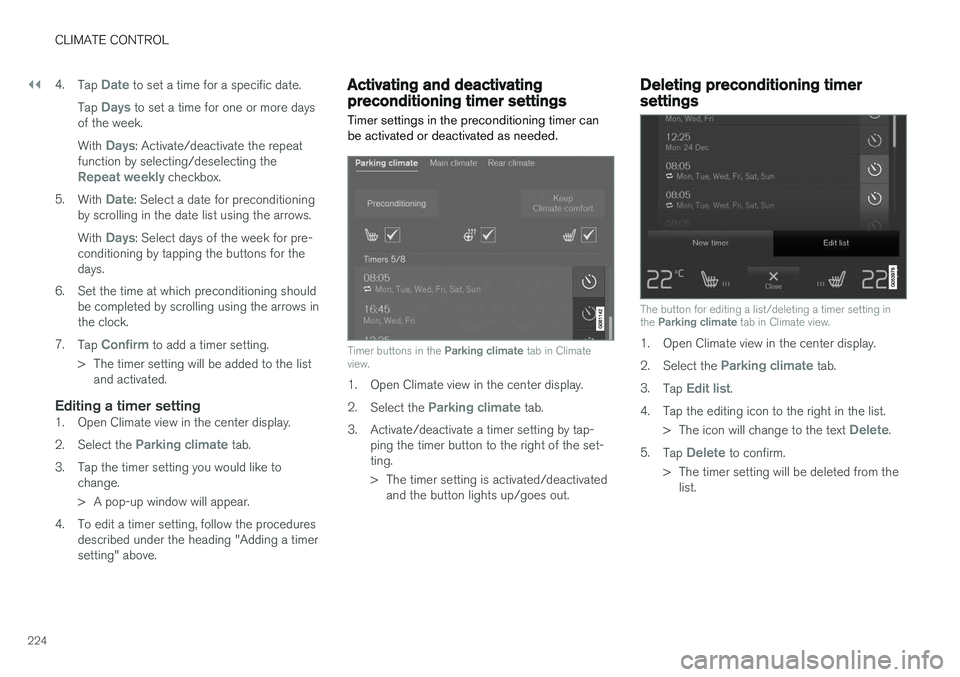
Deleting preconditioning timersettings
The button for editing a list/deleting a timer setting in the Parking climate tab in Climate view.
1. Open Climate view in the center display. 2.
Select the
Parking climate tab.
3. Tap
Edit list.
4. Tap the editing icon to the right in the list. >The icon will change to the text
Delete.
5. Tap
Delete to confirm.
> The timer setting will be deleted from the list.
Page 230 of 674
KEY, LOCKS AND ALARM
* Option/accessory.
228
Lock indication
When the vehicle is locked or unlocked, the turn signals will flash to indicate that the vehicle hasbeen locked or unlocked correctly.
Exterior confirmationLocking
• The turn signals will flash once and the door mirrors will fold in 1
to confirm the vehicle is
locked.
Unlocking
• The turn signals will flash twice and the doormirrors will fold out 1
to confirm the vehicle is
unlocked.
All doors, tailgate and hood must be closed for confirmation to be given. If only the driver's door is closed when the vehicle is locked 2
, the vehicle
will be locked but the turn signals will only flash to indicate locking when all doors and the hoodand tailgate have been closed.
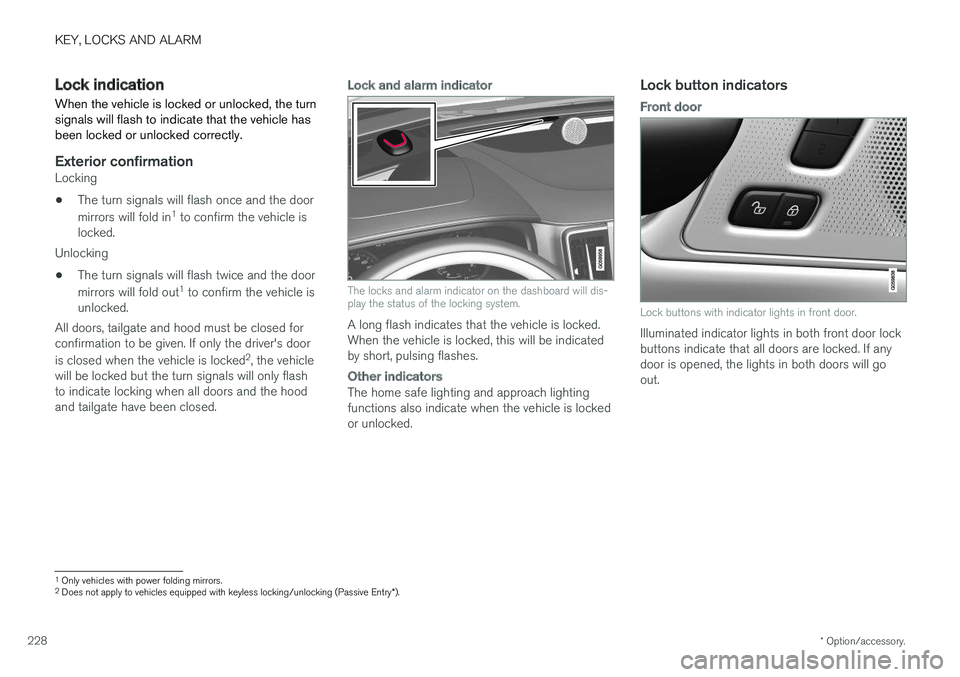
Lock and alarm indicator
The locks and alarm indicator on the dashboard will dis- play the status of the locking system.
A long flash indicates that the vehicle is locked. When the vehicle is locked, this will be indicatedby short, pulsing flashes.
Other indicators
The home safe lighting and approach lighting functions also indicate when the vehicle is lockedor unlocked.
Lock button indicators
Front door
Lock buttons with indicator lights in front door.
Illuminated indicator lights in both front door lock buttons indicate that all doors are locked. If anydoor is opened, the lights in both doors will goout.
1 Only vehicles with power folding mirrors.
2 Does not apply to vehicles equipped with keyless locking/unlocking (Passive Entry *).
Page 232 of 674
||
KEY, LOCKS AND ALARM
* Option/accessory.
230 The keyless system for locking/unlocking the doors and tailgate (Passive Entry
*) is available as
an option. This system has a range in a semicircle with a radius of approximately 1.5 meter (5 feet)out from the driver's door and approx. 1 meter(3 feet) out from the tailgate. With keyless start in combination with keyless locking and unlocking, the remote key can belocated anywhere in the passenger compartmentor cargo compartment in order to start theengine. Each remote key supplied with the vehicle can be linked to a driver profile with unique settings forthe vehicle. When a key with a specific profile isused, the vehicle settings are adjusted accordingto that profile.
Buttonless key, Key TagFor vehicles equipped with keyless locking and unlocking *, a smaller, lighter and button-less key
(Key Tag 3
) is also provided. It works the same
way as the regular remote key as regard keyless start and keyless locking and unlocking 4
. It does
not have a detachable key blade and its battery cannot be replaced.
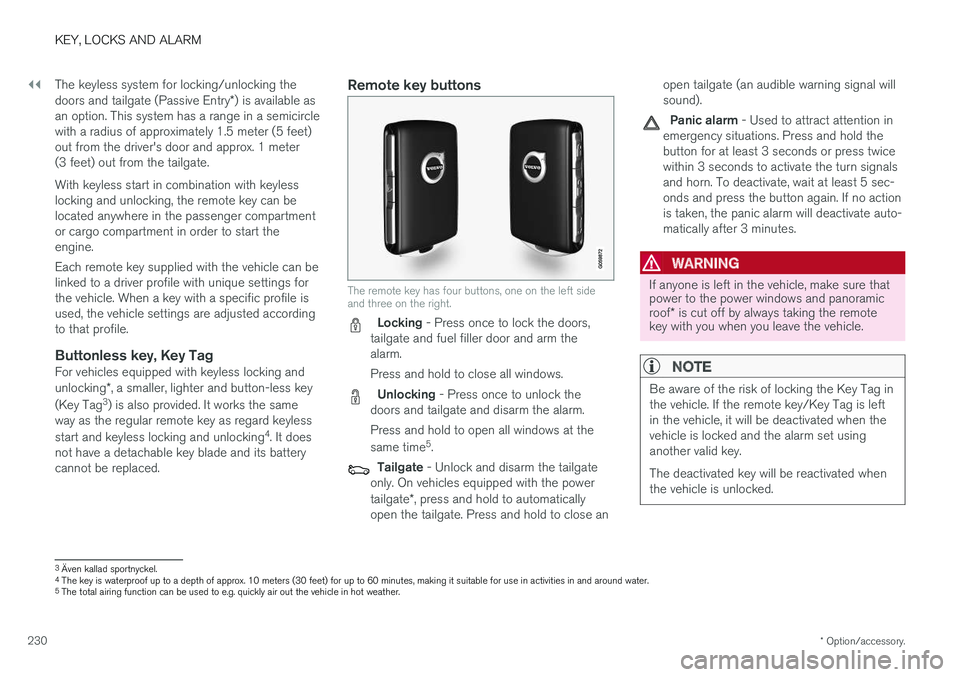
Remote key buttons
The remote key has four buttons, one on the left side and three on the right.
Locking - Press once to lock the doors,
tailgate and fuel filler door and arm the alarm. Press and hold to close all windows.
Unlocking - Press once to unlock the
doors and tailgate and disarm the alarm. Press and hold to open all windows at the same time 5
.
Tailgate - Unlock and disarm the tailgate
only. On vehicles equipped with the power tailgate *, press and hold to automatically
open the tailgate. Press and hold to close an open tailgate (an audible warning signal will sound).
Panic alarm - Used to attract attention in
emergency situations. Press and hold the button for at least 3 seconds or press twicewithin 3 seconds to activate the turn signalsand horn. To deactivate, wait at least 5 sec-onds and press the button again. If no actionis taken, the panic alarm will deactivate auto-matically after 3 minutes.
WARNING
If anyone is left in the vehicle, make sure that power to the power windows and panoramic roof * is cut off by always taking the remote
key with you when you leave the vehicle.
NOTE
Be aware of the risk of locking the Key Tag in the vehicle. If the remote key/Key Tag is leftin the vehicle, it will be deactivated when thevehicle is locked and the alarm set usinganother valid key. The deactivated key will be reactivated when the vehicle is unlocked.
3 Även kallad sportnyckel.
4 The key is waterproof up to a depth of approx. 10 meters (30 feet) for up to 60 minutes, making it suitable for use in activities in and around water.
5 The total airing function can be used to e.g. quickly air out the vehicle in hot weather.