remote start VOLVO XC60 T8 2018 Owner´s Manual
[x] Cancel search | Manufacturer: VOLVO, Model Year: 2018, Model line: XC60 T8, Model: VOLVO XC60 T8 2018Pages: 674, PDF Size: 11.93 MB
Page 470 of 674
||
STARTING AND DRIVING
* Option/accessory.
468
WARNING
No person or object should be behind the tow truck when the vehicle is lifted onto the bedof the truck.
Related information
• Attaching and removing the towing eyelet (p. 466)
HomeLink®
*10
HomeLink ®
11
is a programmable remote control,
integrated in the vehicle electrical system, that can control up to three different devices (e.g.garage door opener, alarm system, outdoor andindoor lighting, etc.) and thereby replace theremote controls for these.
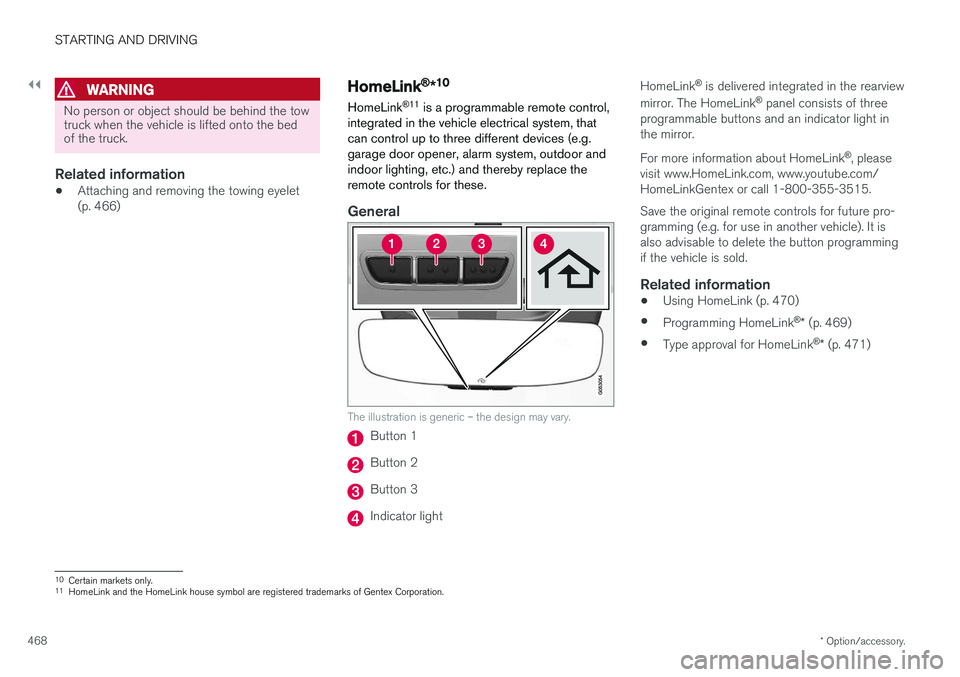
General
The illustration is generic – the design may vary.
Button 1
Button 2
Button 3
Indicator light HomeLink
®
is delivered integrated in the rearview
mirror. The HomeLink ®
panel consists of three
programmable buttons and an indicator light in the mirror. For more information about HomeLink ®
, please
visit www.HomeLink.com, www.youtube.com/ HomeLinkGentex or call 1-800-355-3515. Save the original remote controls for future pro- gramming (e.g. for use in another vehicle). It isalso advisable to delete the button programmingif the vehicle is sold.
Related information
• Using HomeLink (p. 470)
• Programming HomeLink ®
* (p. 469)
• Type approval for HomeLink ®
* (p. 471)
10
Certain markets only.
11 HomeLink and the HomeLink house symbol are registered trademarks of Gentex Corporation.
Page 471 of 674
STARTING AND DRIVING
}}
* Option/accessory.469
Programming HomeLink®
*12
Follow these instructions to program HomeLink ®
, reset all programming, or program
individual buttons.
NOTE
In some vehicles, the ignition must be on or in the "accessory position" before HomeLink ®
can be programmed or used. It can be a good idea to put new batteries in the remote con- trol being replaced by HomeLink ®
for faster
programming and better radio signal trans-mission. The HomeLink ®
buttons should be
reset before programming.
WARNING
While HomeLink ®
is being programmed, the
garage door or gate being programmed may be activated. Make sure that no one is nearthe door or gate during programming. Whenprogramming a garage door opener, it isadvised to park outside of the garage. 1.
Point the remote control at the HomeLink ®
button to be programmed and hold it about 2-8 cm (1-3 inches) from the button. Do not obstruct the HomeLink ®
indicator light.
Note: Some remote controls are more effec-
tive at programming HomeLink ®
from a dis-
tance of about 15-20 cm (6-12 inches). Try moving the remote control closer or furtheraway if you are experiencing any difficultiesprogramming.
2. Press and hold both the remote control but- ton and the HomeLink ®
button to be pro-
grammed.
3. Do not release the buttons until the indicator light has stopped flashing slowly (about oncea second) and either flashes quickly (about10 times a second) or glows steadily. >Steady glow: Indication that program-
ming is complete. Press the programmed button twice to activate. Flashing quickly: The device being pro-
grammed with HomeLink ®
may have a
security function that requires an extra step. Try pressing the programmed buttontwice to see whether the programmingworks. Otherwise, continue with the fol-lowing steps.
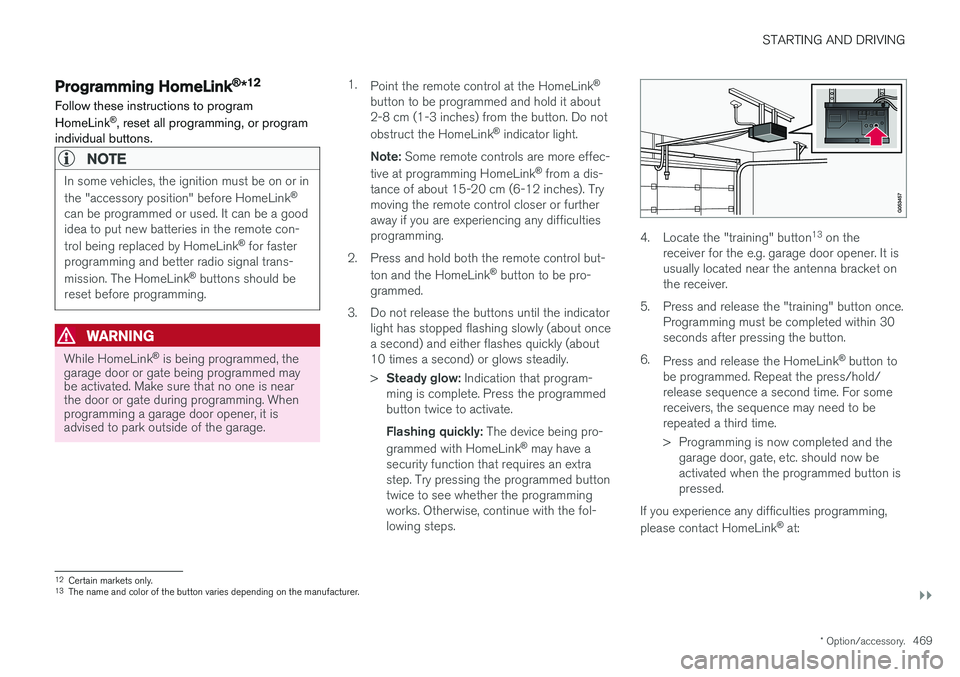
4. Locate the "training" button 13
on the
receiver for the e.g. garage door opener. It is usually located near the antenna bracket onthe receiver.
5. Press and release the "training" button once. Programming must be completed within 30seconds after pressing the button.
6. Press and release the HomeLink ®
button to
be programmed. Repeat the press/hold/release sequence a second time. For somereceivers, the sequence may need to berepeated a third time.
> Programming is now completed and the garage door, gate, etc. should now be activated when the programmed button ispressed.
If you experience any difficulties programming, please contact HomeLink ®
at:
12 Certain markets only.
13 The name and color of the button varies depending on the manufacturer.
Page 472 of 674
||
STARTING AND DRIVING
* Option/accessory.
470 www.HomeLink.com, www.youtube.com/ HomeLinkGentex or call 1-800-355-3515.
Programming individual buttons
To program an individual HomeLink
®
button:
1. Press and hold the desired button for about 20 seconds.
2. When the indicator light on HomeLink ®
starts flashing slowly, it is possible to pro-gram as usual. Note: If the button you are reprogramming
does not program with a new device, it will return to the previously saved programming.
Resetting the HomeLink ®
buttons
It is only possible to reset all HomeLink ®
buttons
at once. It is not possible to reset individual but-tons. Individual buttons can only be reprogram-med.
–Press and hold the outer buttons (1 and 3) on HomeLink ®
for about 10 seconds.
> When the indicator light goes from a steady glow to flashing, the buttons have been reset and are ready for reprogram-ming.
Related information
• Using HomeLink (p. 470)
• HomeLink ®
* (p. 468)
• Type approval for HomeLink ®
* (p. 471)
Using HomeLink
Once HomeLink ®
is programmed, it can be
used instead of the separate remote controls.
Press and hold the programming button. The garage door, gate, alarm system, etc. will be acti-vated (this may take several seconds). If the but-ton is held down for more than 20 seconds,reprogramming will begin. The indicator light willglow steadily or flash when the button has beenpressed. The original remote controls may be used concurrently with HomeLink ®
if desired.
NOTE
If the ignition is off, HomeLink ®
works for
30 minutes after the driver's door has been opened.
WARNING
• If you use HomeLink ®
to open a garage
door or gate, be sure no one is near the gate or door while it is in motion.
• Do not use HomeLink ®
with any garage
door opener that lacks safety stop andreverse features as required by US fed-eral safety standards (this includes anygarage door opener model manufacturedbefore April 1, 1982). A garage door thatcannot detect an object - signaling thedoor to stop and reverse - does not meetcurrent U.S. federal safety standards. Formore information, contact HomeLink at:www.homelink.com.
Related information
• HomeLink ®
* (p. 468)
• Programming HomeLink ®
* (p. 469)
• Type approval for HomeLink ®
* (p. 471)
Page 512 of 674
AUDIO, MEDIA AND INTERNET
* Option/accessory.
510
Tips for using Android Auto *
Here are some useful tips for when you use Android Auto.
• Ensure that your apps are updated.
• When starting the car, wait until the center display has started, connect the phone andthen open Android Auto from the app view.
• In the event of problems with Android Auto,disconnect your Android phone from theUSB port and then reconnect via USB. Oth-erwise, try closing the app on the phone andthen restarting the app.
• When a phone is connected to Android Autoit is still possible to playback media viaBluetooth to another media player. TheBluetooth function is on when Android Autois used.
Related information
•
Android Auto
* (p. 508)
Phone
A phone equipped with Bluetooth can be wire- lessly connected to the vehicle's integratedhands-free system.
The audio and media system offers hands-free functionality for remotely controlling a number ofthe phone's features. The phone's integratedcontrols can also be used, even when it is con-nected to the vehicle. When the phone has been paired and connected to the vehicle, it can be used as an Internet con-nection or to make or receive calls, send orreceive text messages or wirelessly play music.
The phone is controlled fromthe center display but the Appmenu (accessed using theright-side steering wheel key-pad) and voice commands canalso be used to control certainfunctions.
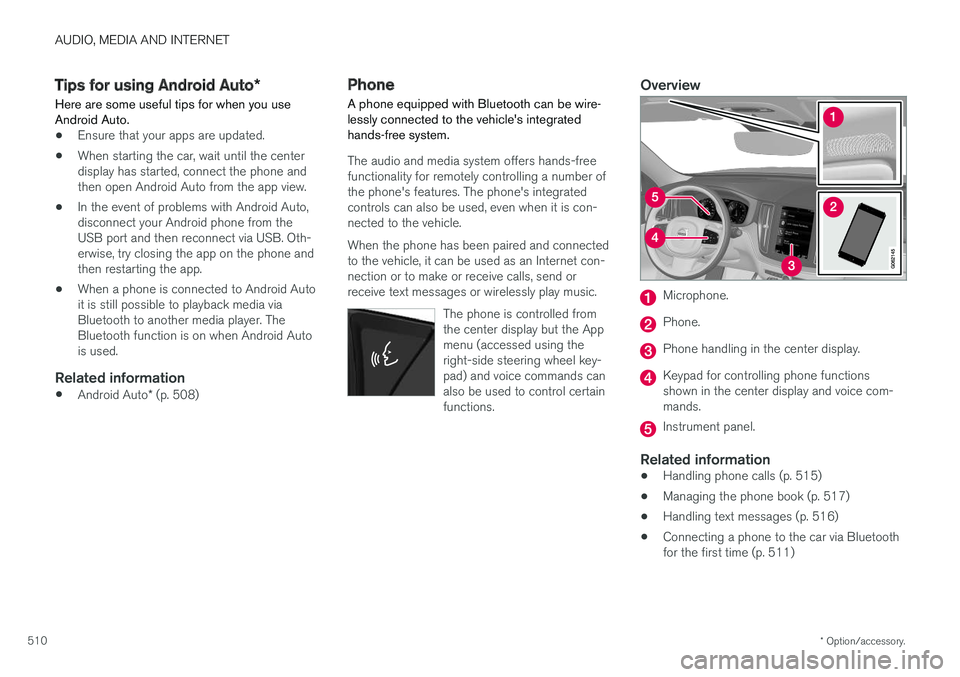
Overview
Microphone.
Phone.
Phone handling in the center display.
Keypad for controlling phone functions shown in the center display and voice com-mands.
Instrument panel.
Related information
•Handling phone calls (p. 515)
• Managing the phone book (p. 517)
• Handling text messages (p. 516)
• Connecting a phone to the car via Bluetooth for the first time (p. 511)
Page 664 of 674
INDEX
662Gear indicator 432 Gear selector positions
automatic transmission 429
Glass laminated/reinforced 162
Glove compartment 575 Gracenote ® 501
Grocery bag holders 579
Gross vehicle weight 649
GSI - Gear shift indicator 432
Guide lines for Park Assist Camera 379
H
Handbrake 422, 423
Hand wash 629 Hard disk space 528
Hazard warning flashers 157
HDC 444
HD radio 484
Head restraint 191
Head-up display 138 activate and deactivate 140
cleaning 624
replacing windshield 598
settings 140
Heated washer nozzles 173 Heating Seats 209, 210
steering wheel 211, 212
windows 215, 217
Height adjustment 440, 443
high beams 152, 153
High engine temperature 458
Hill Descent Control 444, 445 activate with function button 445
Hill Start Assist 427 Hill Start Assist (HSA) 427
Hoisting the vehicle 595 HomeLink ® 468
programming 469
use 470
HomeLink ® remote control
programmable 468
Home safe lighting 157
Honk 192
Hood, opening 597
Horn 192
Hybrid battery 609 Charging 397Hybrid battery gauge 84
Hybrid gauge 83
I
IAQS (Interior Air Quality System) 200
IC (Inflatable Curtain) 60
ID, Volvo 26
Identification number 38
Ignition mode 417, 418
Immobilizer 242Electronic immobilizer 242
Indicator symbols 90
Individual drive mode 435
Infant seats 67
Inflatable curtain 60
Inflatable Curtain 60
Inflating tires 567 Inflation pressure adjusting 548
Checking 547
recommended 549
Inflation pressure monitoring 549 action 553
Status 552
Page 668 of 674
INDEX
666Private locking 256
activation/deactivation 257
PROPOSITION 65 WARNING 459
R
Radar sensor 288, 316 limitations 317
Radar unit 316
Radio 480 changing radio waveband and radio sta-
tion 481
HD radio 484
RBDS 484
search radio station 482
settings 483 SiriusXM ® Satellite radio 488, 489, 490
start 481
voice control 144
Radio favorites 483
Rain sensor 173, 174
Rain sensor's memory function 174
Raise the rear end 578
Rear camera 377, 378, 379, 381, 382, 384, 385
Rear seatclimate 208
folding backrest 188
head restraint 191
heating 210
Rear sensors 372, 373, 374, 375, 376 Rearview/door mirrors dimming 166
heating 217
interior 165
Rearview mirror 165 dimming 166
Rear window heating 217
washers 176
wipers 176
Recalls 45
Recommendations when driving 450
Recommendations when loading 577
Recovery 467
Red Key 238 settings 239
Refrigerant 598 climate system 654
Refueling filling 453
fuel filler door, fuel flap 452Remote immobilizer 242
Remote key 229battery replacement 234
connecting to driver profile 135
detachable key blade 240
loss 238
Range 233
Remote updates 591
Reporting safety defects 44
Resetting door mirrors 166
Resetting settings 131 change of owner 130
Driver profile 135
Resetting trip odometer 87
Road Sign Information 348, 349, 350 limitations 352
operation 349, 350, 351, 352
Road trip 450
Roll Stability Control 263
Roof load, max. weight 649
RSC (Roll Stability Control) 263
Run-off Mitigation 364, 365