brake VOLVO XC60 T8 2018 Owner´s Manual
[x] Cancel search | Manufacturer: VOLVO, Model Year: 2018, Model line: XC60 T8, Model: VOLVO XC60 T8 2018Pages: 674, PDF Size: 11.93 MB
Page 6 of 674
4
Resetting user data when the vehicle changes owners130
Resetting center display settings 131
Setting types in the center display 131
Table of settings in the center display 132
Driver profiles 133
Selecting a driver profile 134
Changing a driver profile's name 135
Resetting driver profile settings 135
Linking a remote key to a driver profile 135
Messages in the center display 136
Handling messages in the center display 137
Handling messages saved from thecenter display 138
Head-up display *
138
Activating and deactivating the head- up display * 140
Head-up display settings *
140
Voice control 141
Using voice commands 142
Voice control for cellular phones 143
Voice control for radio and media 144
Voice control settings 144
LIGHTING
Lighting panel and controls148
Adjusting light functions via the cen- ter display 149
Parking lights 150
Daytime running lights 150
Low beams 151
Using high beam 152
Active high beam 153
Using turn signals 154
Active Bending Lights *
155
Rear fog light 155
Brake lights 156
Emergency brake lights 156
Hazard warning flashers 157
Using home safe lighting 157
Welcome Light 157
Interior Lighting 158
Adjusting interior lighting 159
WINDOWS, GLASS AND MIRRORS
Windows, glass and mirrors162
Pinch protection for windows and sun curtains 162
Reset procedure for pinch protection 163
Power windows 163
Operating the power windows 164
Rearview/door mirrors 165
Adjusting the rearview mirror dim-ming function 166
Adjusting the door mirrors 166
Panoramic roof *
168
Operating the panoramic roof *
169
Auto closing the panoramic roof * sun
curtain 171
Using the windshield wipers 172
Heated windshield washer nozzles *
173
Using the rain sensor 173
Using the rain sensor's memory function 174
Using the windshield and headlightwashers 175
Using the rear window wiper/washer 176
Using automatic rear window wipingwhen backing up 176
Page 12 of 674
10
STARTING AND DRIVING
Starting the vehicle414
Switching off the vehicle 416
Ignition modes 417
Selecting ignition mode 418
Brake functions 419
Brakes 419
Brake Assist System 421
Braking on wet roads 421
Braking on salted roads 421
Maintenance of the brake system 422
Parking brake 422
Activating and deactivating the park- ing brake 423
Settings for automatically activatingthe parking brake 424
Parking on a hill 424
Parking brake malfunction 425
Auto-hold brakes 426
Activating and deactivating Auto-hold at a standstill 426
Hill Start Assist 427
Braking assist after a collision 427
Transmission 428
Gear selector positions for automatictransmissions 429
Using the steering wheel paddles
* to
shift 431
Shiftlock 432
The kickdown function 432
Gear indicator *
432
All Wheel Drive (AWD) 433
Drive systems 433
Starting and stopping the combus- tion engine in Twin Engine vehicles 434
Drive modes 435
Changing drive mode 439
Leveling control * and suspension
440
Leveling control settings *
443
Low Speed Control 443
Activating and deactivating LowSpeed Control using the function button 444
Hill Descent Control 444
Activating and deactivating HillDescent Control using the functionbutton 445
Economical driving 446
Using the electric motor only 447
Factors affecting electric motor range 448
"Hold" and "Charge" functions 449
Preparing for a long trip 450
Winter driving 451
Driving through standing water452
Opening/closing the fuel filler door 452
Refueling 453
Fuel 454
Octane rating 455
Emission controls 457
Overheating of engine and transmission 458
Battery drain 459
Jump starting using another battery 459
Detachable towbar *
461
Driving with a trailer 462
Trailer Stability Assist *
464
Checking trailer lights 465
Towing using a towline 466
Attaching and removing the towing eyelet 466
Recovery 467
HomeLink ®
* 468
Programming HomeLink ®
* 469
Using HomeLink 470
Type approval for HomeLink ®
* 471
Compass 471
Activating and deactivating the compass 472
Calibrating the compass 472
Page 16 of 674
14
Touching up minor paint damage635
Color codes 636
Changing rear window wipers 637
Replacing windshield wiper blades 638
Windshield wipers in the service position 639
Filling washer fluid 640
SPECIFICATIONS
Type designations644
Dimensions 647
Weights 649
Towing capacity and tongue weight 650
Engine specifications 651
Engine oil specifications 652
Coolant specifications 653
Transmission fluid specifications 653
Brake fluid specifications 653
Fuel tank volume 654
Air conditioning specifications 654
Approved tire pressure 655
INDEX
Index 657
Page 30 of 674
||
YOUR VOLVO
* Option/accessory.
28 goal. In addition to continuous environmental refinement of conventional gasoline-poweredinternal combustion engines, Volvo is activelylooking at advanced technology alternative-fuelvehicles. When you drive a Volvo, you become our partner in the work to lessen the vehicle's impact on theenvironment. To reduce your vehicle's environ-mental impact, you can:
• Maintain proper air pressure in your tires.Tests have shown decreased fuel economywith improperly inflated tires.
• Follow the recommended maintenanceschedule in your Warranty and ServiceRecords Information booklet.
• Drive at a constant speed whenever possible.
• See a trained and qualified Volvo servicetechnician as soon as possible for inspectionif the check engine (malfunction indicator)light illuminates, or stays on after the vehiclehas started.
• Properly dispose of any vehicle-related wastesuch as used motor oil, used batteries, brakepads, etc.
• When cleaning your vehicle, please use gen-uine Volvo car care products. All Volvo carcare products are formulated to be environ-mentally friendly.
Twin Engine vehicles
•If possible, precondition the vehicle with thecharging cable before driving.
• If preconditioning is not possible in coldweather, use the seat and steering wheelheating primarily. Avoid heating the entirepassenger compartment, which reduces thehybrid battery's charge level.
• Choose the
Pure drive mode to help mini-
mize electric power consumption.
• In hilly terrain, put the gear selector in mode B
to utilize the electric motor's braking func-
tion when the accelerator pedal is released. This helps charge the hybrid battery.
Related information
• Economical driving (p. 446)
• Starting and stopping preconditioning(p. 222)
• The Owner's Manual and the environment(p. 23)
• Air quality (p. 198)
IntelliSafe - driver support
IntelliSafe is Volvo Cars' philosophy regarding vehicle safety. IntelliSafe consists of a number ofsystems, both standard and optional, that aredesigned to help make driving safer, preventaccidents and protect passengers and otherroad users.
SupportIntelliSafe includes driver support functions such as Adaptive cruise control * which helps the driver
to maintain an even speed combined with a pre- selected time interval to the vehicle ahead. Pilot Assist 4
helps the driver keep the vehicle in
the current traffic lane by providing steering assistance and maintaining an even speed and aset time interval to the vehicle ahead. Park Assist Pilot * helps the driver pull into and
out of parking spaces. Other examples of systems that can help the driver are the Active main beam, Cross Traffic Alert (CTA) * and Blind Spot Information (BLIS) *
systems.
PreventionCity Safety is a function intended to help prevent accidents. The function can help prevent or miti-gate a collision with pedestrians, cyclists, largeanimals or other vehicles. Light, sound and pulsa-tions in the brake pedal are provided to alert of a
4 Depending on market, this function can be either standard or optional.
Page 31 of 674
YOUR VOLVO
29
possible collision and help the driver act in time to prevent it. If the driver does not react to thewarning and the risk of collision is determined tobe imminent, City Safety can automatically applythe brakes. Lane assistance (LKA) is another example of a function that can help prevent accidents by help-ing the driver - on expressways and similar largerroads - to reduce the risk of the car accidentallyleaving its own lane. The function
Steering aid during increased
collision risk can help the driver reduce the risk
of the car leaving its lane unintentionally and/or colliding with another vehicle or obstacle byactively steering the car back into its lane and/orswerving.
ProtectionTo help protect the driver and passengers, thevehicle is equipped with seat belt tensioners thatpull the seat belts taut in collisions and other crit-ical situations. The vehicle also has airbags, inflat-able curtains and the Whiplash ProtectionSystem (WHIPS), which helps prevent whiplashinjuries.
Related information
• Driver support systems (p. 262)
• Active high beam (p. 153)
• Safety (p. 42)
• Seat belts (p. 47) •
Airbags (p. 52)
• Whiplash Protection System (p. 46)
Page 35 of 674
YOUR VOLVO
}}
33
Software Updates
So that you as a Volvo customer shall have the best possible experience from your car, Volvo iscontinuously developing the systems in the carsand the services that you are offered.
You can update the software in your Volvo to the latest version when your car is serviced at anauthorized Volvo dealer. The latest softwareupdate gives you access to new functions andimprovements, as well as previous improvementsincluded with previous software updates. For more information about released updates and answers to frequently asked questions, please go to support.volvocars.com.
NOTE
Functionality after updating may vary depend- ing on market, model, model year and options.
Related information
• Sensus - connection and entertainment (p. 30)
• Handling system updates via Download Cen-ter (p. 591)
Data recording
As part of Volvo's commitment to safety and quality, certain information is recorded regardingvehicle operation, functionality and incidents.
This vehicle is equipped with an event data recorder (EDR). The main purpose of an EDR isto record, in certain crash or near crash-like sit-uations, such as an airbag deployment or hittinga road obstacle, data that will assist in under-standing how a vehicle's systems performed. TheEDR is designed to record data related to vehicledynamics and safety systems for a short period oftime, typically 30 seconds or less. The EDR inthis vehicle is designed to record such data as:
• How various systems in your vehicle wereoperating;
• Whether or not the driver and passengersafety belts were buckled/fastened;
• How far (if at all) the driver was depressingthe accelerator and/or brake pedal; and,
• How fast the vehicle was traveling.
These data can help provide a better understand-ing of the circumstances in which crashes andinjuries occur. EDR data is only recorded by the vehicle if a more serious collision situation occurs. No data isrecorded by the EDR under normal driving condi-tions and the EDR never registers who is drivingthe vehicle or the location of a crash or a nearcrash-like situation. However, other parties, such as law enforcement, could combine the EDR datawith the type of personally identifying data rou-tinely acquired during a crash investigation. Toread data recorded by an EDR, special equipmentis required, and access to the vehicle or the EDRis needed. Furthermore, your vehicle is equipped with a number of computers whose task is to continu-ously control and monitor the vehicle's operation.They can also register some of this informationduring normal driving conditions, most importantlyif they detect a fault relating to the vehicle'soperation and functionality or upon activation ofthe vehicle's active safety systems (e.g. CitySafety and the auto-brake function). Some of theregistered information is required by technicianswhen carrying out service and maintenance toenable them to diagnose and rectify any faultsthat have occurred in the vehicle and to enableVolvo to fulfill legal and other regulatory require-ments. Information thus registered in the vehicleis registered in the vehicle's computers until thevehicle is serviced or repaired. In addition to theabove, the registered information may - on anaggregated basis - be used for research andproduct development purposes in order to contin-uously improve the safety and quality of Volvovehicles. For additional information, please contact Volvo.
Page 52 of 674
||
SAFETY
* Option/accessory.
50
Related information
• Seat belts (p. 47)
• Seat belt tensioners (p. 50)
• Door and seat belt reminders (p. 51)
Seat belt tensioners
The vehicle is equipped with standard and elec- tric * seat belt tensioners that can help tension
the seat belt in a critical situation or collision.
Standard seat belt tensionersAll seat belts are equipped with a standard seat belt tensioner. In a collision of sufficiently violent force, the seat belt tensioners will tension the seat belts in orderto more effectively restrain the occupants.
Electric seat belt tensioners *The driver's and front passenger's seat belts areequipped with electric seat belt tensioners. The seat belt tensioners interact and can be acti- vated in conjunction with the City Safety andRear Collision Warning driver support systems. Incritical situations, such as if the vehicle brakessuddenly, begins to skid or runs off the road (e.gif the vehicle rolls into a ditch, lifts off the groundor hits an obstacle in the road), or if there is a riskof collision, the seat belts can be pulled taut bythe seat belt tensioner's electric motor. The electric seat belt tensioner helps to position the occupant more effectively in the seat, whichreduces the risk of the occupant striking the inte-rior of the passenger compartment and improvesthe effect of other safety systems such as theairbags. When a critical situation has passed, the seat beltand the electric seat belt tensioner are resetautomatically. However, they can also be resetmanually.
WARNING
Never attempt to alter or repair the seat belt on your own. Volvo recommends contactingan authorized Volvo workshop. If the seat belt has been exposed to extreme forces, e.g. in conjunction with a collision, theentire seat belt must be replaced. Even if theseat belt appears undamaged, some of itsprotective properties may have been lost. Alsoreplace the seat belt if it is worn or damaged.The new seat belt must be type approved andintended for the same seating position as thereplaced seat belt.
Related information
•
Seat belts (p. 47)
• Buckling and unbuckling seat belts (p. 48)
• Resetting the electric seat belt tensioners
*
(p. 51)
• City Safety
™ (p. 325)
• Rear Collision Warning (p. 338)
Page 63 of 674
SAFETY
61
Related information
•Airbags (p. 52)
Safety mode Safety mode is a feature that is triggered after a collision if there is potential damage to an impor-tant function in the vehicle, such as the fuellines, sensors for one of the safety systems, thebrake system, etc.
If the vehicle has been involved in a collision, the text Safety mode See Owner's manual may
appear in the instrument panel along with the warning symbol if the panel is undamaged andthe vehicle's electrical system is intact. The mes-sage indicates that one or more of the vehicle'sfunctions may be reduced.
WARNING
Never attempt to restart the vehicle if you smell fuel fumes when the message Safety
mode See Owner's manual is displayed in
the instrument panel. Leave the vehicle imme- diately.
If safety mode has been set, it may be possible to reset the system in order to start and move thevehicle a short distance, for example, if it is block-ing traffic.
WARNING
Never attempt to perform repairs or reset electrical components on your own after thevehicle has been in safety mode. This couldresult in injury or prevent the vehicle fromfunctioning properly. Volvo recommends hav-ing the vehicle inspected and reset to normaloperating status by an authorized Volvo work- shop after
Safety mode See Owner's
manual has been displayed.
WARNING
When the vehicle is in safety mode, it should not be towed behind another vehicle. It shouldbe towed from the site on a tow truck. Volvorecommends towing the vehicle directly to anauthorized Volvo workshop.
Related information
• Safety (p. 42)
• Starting and moving the vehicle when it is in safety mode (p. 62)
• Recovery (p. 467)
Page 80 of 674
DISPLAYS AND VOICE CONTROL
* Option/accessory.
78
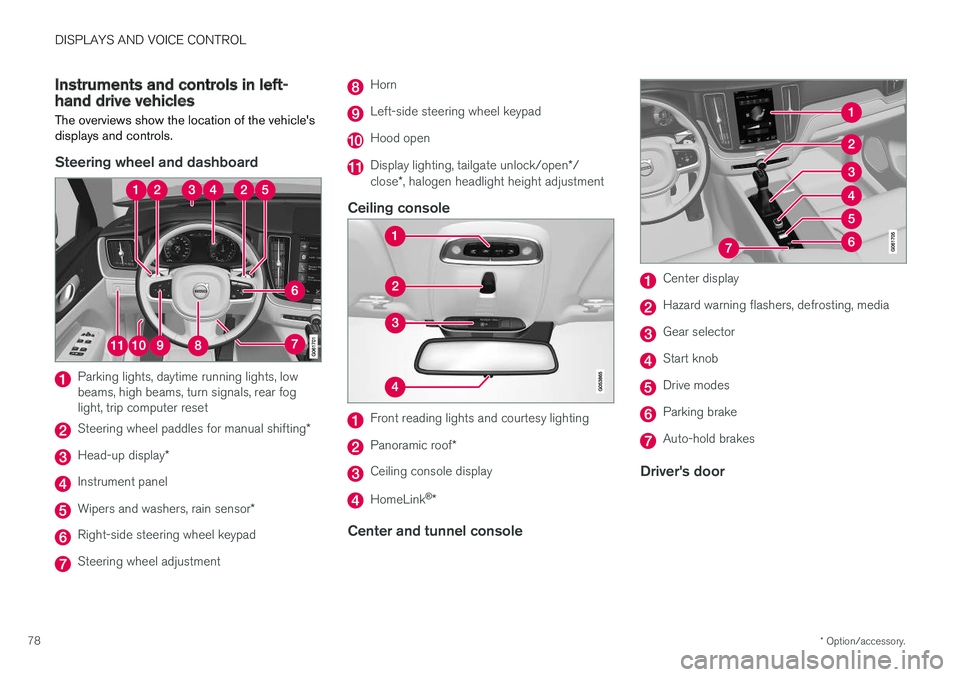
Instruments and controls in left-hand drive vehicles
The overviews show the location of the vehicle's
displays and controls.
Steering wheel and dashboard
Parking lights, daytime running lights, low beams, high beams, turn signals, rear foglight, trip computer reset
Steering wheel paddles for manual shifting *
Head-up display*
Instrument panel
Wipers and washers, rain sensor *
Right-side steering wheel keypad
Steering wheel adjustment
Horn
Left-side steering wheel keypad
Hood open
Display lighting, tailgate unlock/open */
close *, halogen headlight height adjustment
Ceiling console
Front reading lights and courtesy lighting
Panoramic roof *
Ceiling console display
HomeLink®
*
Center and tunnel console
Center display
Hazard warning flashers, defrosting, media
Gear selector
Start knob
Drive modes
Parking brake
Auto-hold brakes
Driver's door
Page 82 of 674
DISPLAYS AND VOICE CONTROL
* Option/accessory.
80
Instrument panel
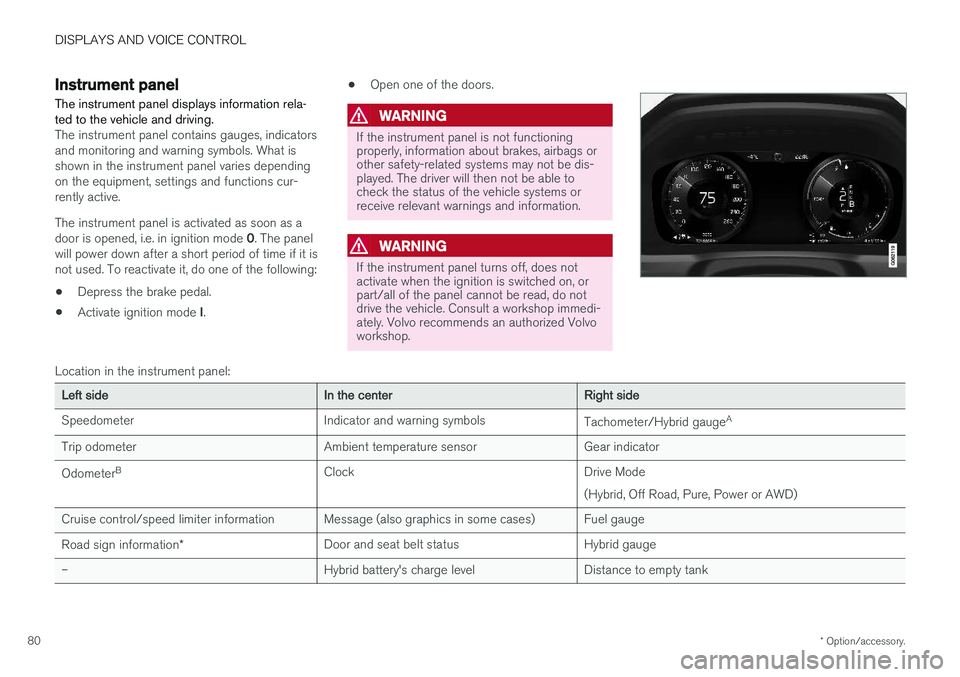
The instrument panel displays information rela- ted to the vehicle and driving.
The instrument panel contains gauges, indicators and monitoring and warning symbols. What isshown in the instrument panel varies dependingon the equipment, settings and functions cur-rently active. The instrument panel is activated as soon as a door is opened, i.e. in ignition mode 0. The panel
will power down after a short period of time if it is not used. To reactivate it, do one of the following:
• Depress the brake pedal.
• Activate ignition mode
I. •
Open one of the doors.
WARNING
If the instrument panel is not functioning properly, information about brakes, airbags orother safety-related systems may not be dis-played. The driver will then not be able tocheck the status of the vehicle systems orreceive relevant warnings and information.
WARNING
If the instrument panel turns off, does not activate when the ignition is switched on, orpart/all of the panel cannot be read, do notdrive the vehicle. Consult a workshop immedi-ately. Volvo recommends an authorized Volvoworkshop.
Location in the instrument panel:
Left sideIn the centerRight side
Speedometer Indicator and warning symbols Tachometer/Hybrid gaugeA
Trip odometer Ambient temperature sensor Gear indicator Odometer B
Clock Drive Mode
(Hybrid, Off Road, Pure, Power or AWD)
Cruise control/speed limiter information Message (also graphics in some cases) Fuel gauge Road sign information * Door and seat belt status Hybrid gauge
– Hybrid battery's charge level Distance to empty tank