seats VOLVO XC60 T8 2018 Owner´s Manual
[x] Cancel search | Manufacturer: VOLVO, Model Year: 2018, Model line: XC60 T8, Model: VOLVO XC60 T8 2018Pages: 674, PDF Size: 11.93 MB
Page 71 of 674
SAFETY
}}
69
Convertible seatsSuitable child restraints should always be used when children (depending on their age/size) areseated in the vehicle.
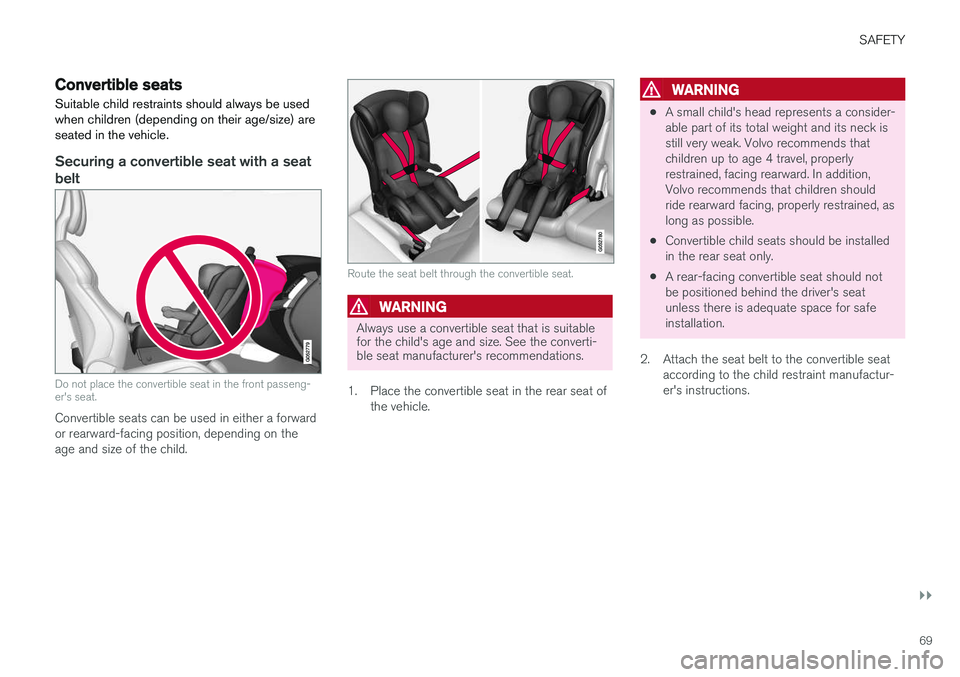
Securing a convertible seat with a seat belt
Do not place the convertible seat in the front passeng- er's seat.
Convertible seats can be used in either a forward or rearward-facing position, depending on theage and size of the child.
Route the seat belt through the convertible seat.
WARNING
Always use a convertible seat that is suitable for the child's age and size. See the converti-ble seat manufacturer's recommendations.
1. Place the convertible seat in the rear seat of the vehicle.
WARNING
•A small child's head represents a consider- able part of its total weight and its neck isstill very weak. Volvo recommends thatchildren up to age 4 travel, properlyrestrained, facing rearward. In addition,Volvo recommends that children shouldride rearward facing, properly restrained, aslong as possible.
• Convertible child seats should be installedin the rear seat only.
• A rear-facing convertible seat should notbe positioned behind the driver's seatunless there is adequate space for safeinstallation.
2. Attach the seat belt to the convertible seat according to the child restraint manufactur-er's instructions.
Page 73 of 674
SAFETY
}}
71
Related information
•Child restraints (p. 65)
• Infant seats (p. 67)
• Booster cushions (p. 71)
• Top tether anchors (p. 72)
• Lower child seat attachment points (p. 73)
• ISOFIX/LATCH lower anchors (p. 74)
Booster cushions
Suitable child restraints should always be used when children (depending on their age/size) areseated in the vehicle.
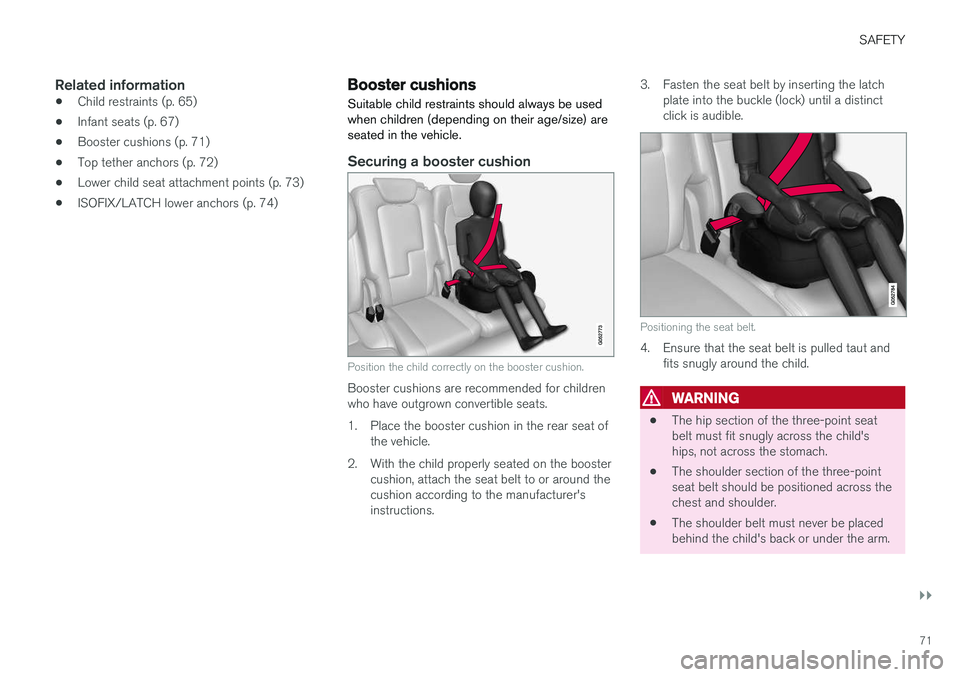
Securing a booster cushion
Position the child correctly on the booster cushion.
Booster cushions are recommended for children who have outgrown convertible seats.
1. Place the booster cushion in the rear seat of the vehicle.
2. With the child properly seated on the booster cushion, attach the seat belt to or around the cushion according to the manufacturer'sinstructions. 3. Fasten the seat belt by inserting the latch
plate into the buckle (lock) until a distinctclick is audible.
Positioning the seat belt.
4. Ensure that the seat belt is pulled taut andfits snugly around the child.
WARNING
• The hip section of the three-point seat belt must fit snugly across the child'ships, not across the stomach.
• The shoulder section of the three-pointseat belt should be positioned across thechest and shoulder.
• The shoulder belt must never be placedbehind the child's back or under the arm.
Page 74 of 674
||
SAFETY
72
Related information
•Child restraints (p. 65)
• Convertible seats (p. 69)
• Infant seats (p. 67)
• Top tether anchors (p. 72)
• Lower child seat attachment points (p. 73)
• ISOFIX/LATCH lower anchors (p. 74)
Top tether anchors
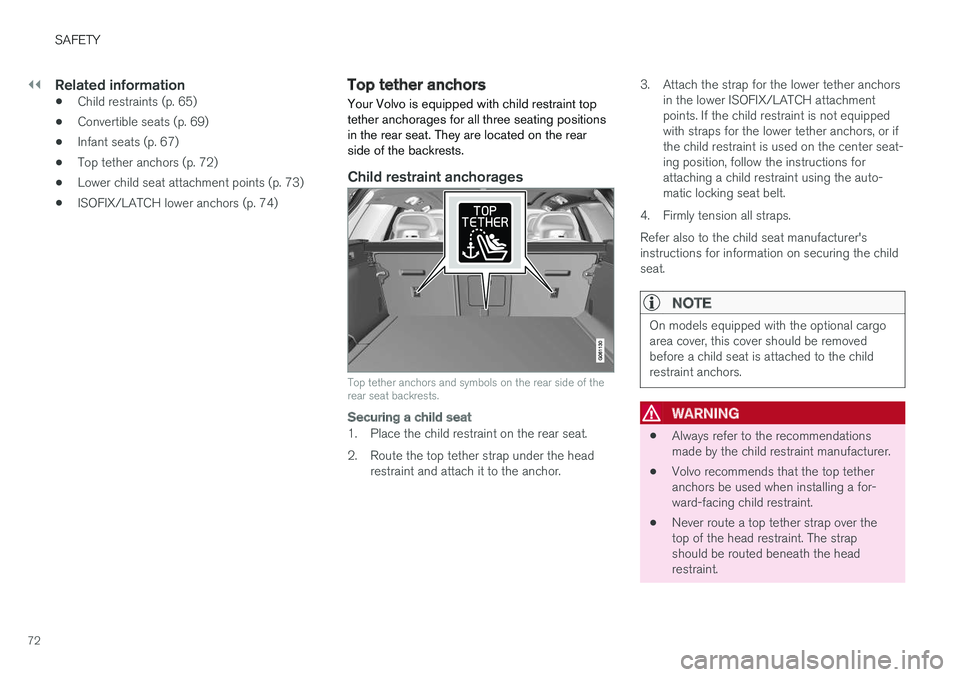
Your Volvo is equipped with child restraint top tether anchorages for all three seating positionsin the rear seat. They are located on the rearside of the backrests.
Child restraint anchorages
Top tether anchors and symbols on the rear side of the rear seat backrests.
Securing a child seat
1. Place the child restraint on the rear seat.
2. Route the top tether strap under the head restraint and attach it to the anchor. 3. Attach the strap for the lower tether anchors
in the lower ISOFIX/LATCH attachment points. If the child restraint is not equippedwith straps for the lower tether anchors, or ifthe child restraint is used on the center seat-ing position, follow the instructions forattaching a child restraint using the auto-matic locking seat belt.
4. Firmly tension all straps. Refer also to the child seat manufacturer's instructions for information on securing the childseat.
NOTE
On models equipped with the optional cargo area cover, this cover should be removedbefore a child seat is attached to the childrestraint anchors.
WARNING
• Always refer to the recommendations made by the child restraint manufacturer.
• Volvo recommends that the top tetheranchors be used when installing a for-ward-facing child restraint.
• Never route a top tether strap over thetop of the head restraint. The strapshould be routed beneath the headrestraint.
Page 75 of 674
SAFETY
73
•Child restraint anchorages are designed to withstand only those loads imposed bycorrectly fitted child restraints. Under nocircumstances are they to be used foradult seat belts or harnesses. The ancho-rages are not able to withstand excessiveforces on them in the event of collision iffull harness seat belts or adult seat beltsare installed to them. An adult who uses abelt anchored in a child restraint anchor-age runs a great risk of suffering severeinjuries should a collision occur.
• Do not install rear speakers that requirethe removal of the top tether anchors orinterfere with the proper use of the toptether strap.
Related information
•Child restraints (p. 65)
• Lower child seat attachment points (p. 73)
• ISOFIX/LATCH lower anchors (p. 74)
Lower child seat attachment points
The rear seats are equipped with lower child seat attachment points.
The lower child seat attachment points are intended for use with certain rear-facing childrestraints. Always follow the manufacturer's installation instructions when attaching a child seat to thelower child seat attachment points.
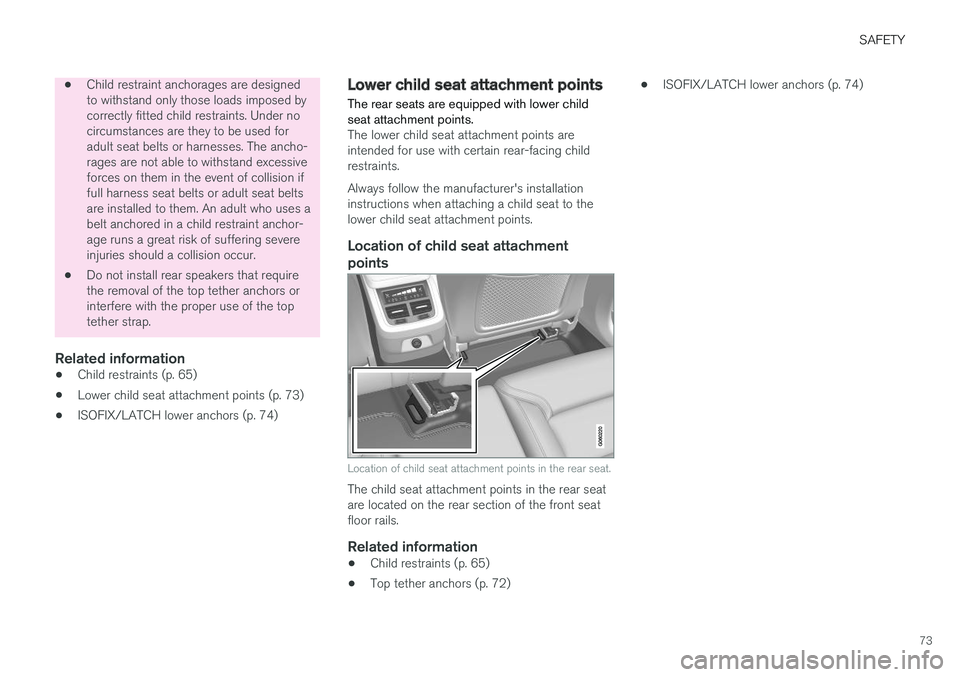
Location of child seat attachment
points
Location of child seat attachment points in the rear seat.
The child seat attachment points in the rear seat are located on the rear section of the front seatfloor rails.
Related information
• Child restraints (p. 65)
• Top tether anchors (p. 72) •
ISOFIX/LATCH lower anchors (p. 74)
Page 76 of 674
SAFETY
74
ISOFIX/LATCH lower anchors Lower anchors for ISOFIX/LATCH-equipped child seats are located in the rear, outboardseats, hidden below the backrest cushions.
Using the ISOFIX/LATCH lower child seat anchors
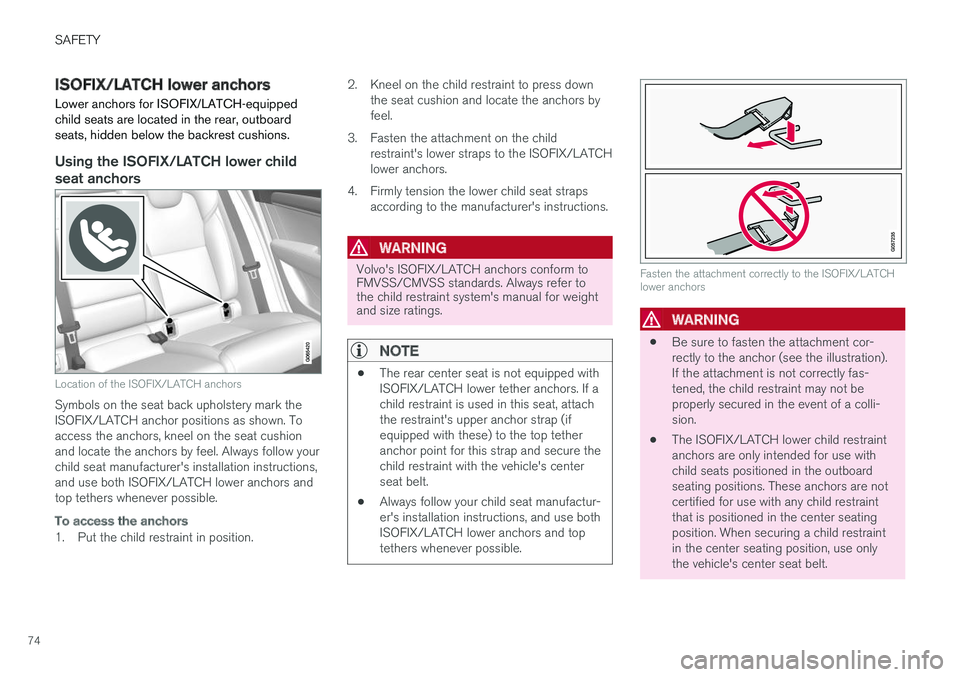
Location of the ISOFIX/LATCH anchors
Symbols on the seat back upholstery mark the ISOFIX/LATCH anchor positions as shown. Toaccess the anchors, kneel on the seat cushionand locate the anchors by feel. Always follow yourchild seat manufacturer's installation instructions,and use both ISOFIX/LATCH lower anchors andtop tethers whenever possible.
To access the anchors
1. Put the child restraint in position.2. Kneel on the child restraint to press down
the seat cushion and locate the anchors by feel.
3. Fasten the attachment on the child restraint's lower straps to the ISOFIX/LATCHlower anchors.
4. Firmly tension the lower child seat straps according to the manufacturer's instructions.
WARNING
Volvo's ISOFIX/LATCH anchors conform to FMVSS/CMVSS standards. Always refer tothe child restraint system's manual for weightand size ratings.
NOTE
• The rear center seat is not equipped with ISOFIX/LATCH lower tether anchors. If achild restraint is used in this seat, attachthe restraint's upper anchor strap (ifequipped with these) to the top tetheranchor point for this strap and secure thechild restraint with the vehicle's centerseat belt.
• Always follow your child seat manufactur-er's installation instructions, and use bothISOFIX/LATCH lower anchors and toptethers whenever possible.
Fasten the attachment correctly to the ISOFIX/LATCH lower anchors
WARNING
• Be sure to fasten the attachment cor- rectly to the anchor (see the illustration).If the attachment is not correctly fas-tened, the child restraint may not beproperly secured in the event of a colli-sion.
• The ISOFIX/LATCH lower child restraintanchors are only intended for use withchild seats positioned in the outboardseating positions. These anchors are notcertified for use with any child restraintthat is positioned in the center seatingposition. When securing a child restraintin the center seating position, use onlythe vehicle's center seat belt.
Page 81 of 674
DISPLAYS AND VOICE CONTROL
* Option/accessory.79
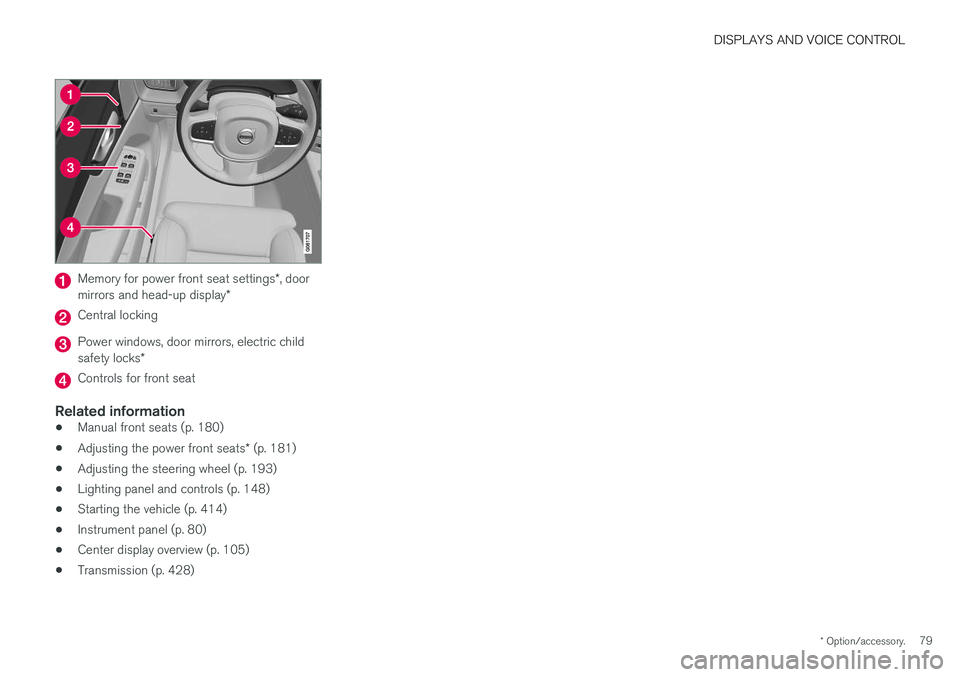
Memory for power front seat settings *, door
mirrors and head-up display *
Central locking
Power windows, door mirrors, electric child safety locks*
Controls for front seat
Related information
•Manual front seats (p. 180)
• Adjusting the power front seats
* (p. 181)
• Adjusting the steering wheel (p. 193)
• Lighting panel and controls (p. 148)
• Starting the vehicle (p. 414)
• Instrument panel (p. 80)
• Center display overview (p. 105)
• Transmission (p. 428)
Page 88 of 674
||
DISPLAYS AND VOICE CONTROL
86
NOTE
This may vary if your driving style changes.
An economical driving style will generally increase how far you can drive on a certainamount of fuel.
Starting values for fully charged hybrid
battery
Because it is difficult to predict driving style and other factors that affect the range of electricmotors, Volvo uses a starting value when thevehicle is fully charged. This starting value pro-vides an "up to" amount instead of a predictionon the range of the electric current in the motor. The difference in starting value between
Hybridand Pure is because the vehicle is permitted to
use more current from the hybrid battery in Puremode, and because the vehicle switches to ECO Climate.
Mileage when using electric motor
To achieve the longest possible mileage when using the electric motor, the driver of an electricvehicle also needs to think about conservingelectricity. The more electricity consumers(stereo, heated windows/mirrors/seats, very coldair from climate control system, etc.) that areactive, the shorter the potential mileage.
NOTE
In addition to high electrical consumption in the passenger compartment, rapid accelera-tion, sudden braking, high speeds, heavyloads, low ambient temperatures and drivingup hills can reduce possible driving distance.
Tourist - alternative speedometerThe alternative digital speedometer makes it eas- ier to drive in countries where speed limit signsare shown in a different measurement unit thanthe one shown in the vehicle's gauges. When used, the digital speed is displayed in the opposite unit to that shown in the analog speed- ometer. If mph is used in the analog speedome-
ter, the equivalent speed in km/h will be shown
in the digital speedometer.
Related information
• Displaying trip data in the instrument panel (p. 86)
• Resetting the trip odometer (p. 87)
• Displaying trip statistics in the center display (p. 88)
• Instrument panel (p. 80)
Displaying trip data in theinstrument panel
Data recorded and calculated by the trip com- puter can be displayed on the instrument panel.
This data is stored in a trip computer app. You can choose which information the instrumentpanel will display in the app menu.
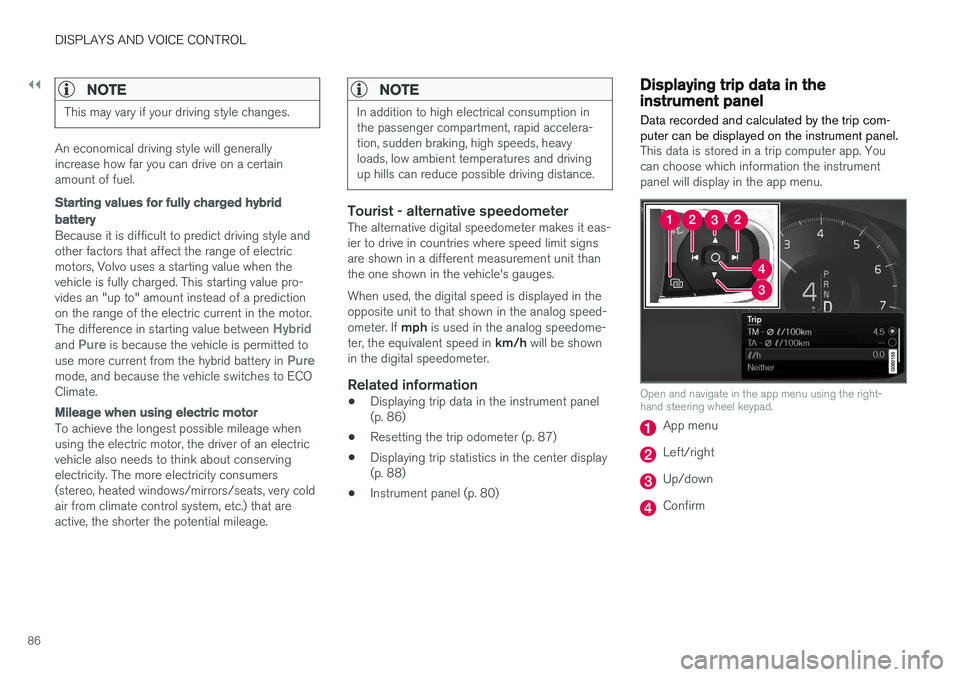
Open and navigate in the app menu using the right- hand steering wheel keypad.
App menu
Left/right
Up/down
Confirm
Page 133 of 674
DISPLAYS AND VOICE CONTROL
}}
131
Resetting center display settingsAll settings made in the center display's Settings menu can be reset to default values.
Two types of resetThere are two ways to reset the settings in the Settings menu:
•
Factory Reset- erases all data and files and
resets all settings to factory default.
•
Reset Personal Settings- erases personal
data and resets personalized settings to fac- tory default.
Resetting settingsFollow these instructions to reset the settings.
NOTE
Factory Reset is only possible when the
vehicle is stationary.
1. Tap Settings in the Top view in the center
display.
2. Proceed to
SystemFactory Reset.
3. Select the type of reset you would like to do. > A pop-up window will appear. 4.
Tap
OK to confirm the reset.
For
Reset Personal Settings, confirm the
reset by tapping Reset for the active
profile or Reset for all profiles.
> The selected settings will be reset.
Related information
• Center display overview (p. 105)
• Opening settings in the center display (p. 128)
• Changing settings in the center display(p. 130)
• Table of settings in the center display(p. 132)
Setting types in the center display
Different types of settings are changed in differ- ent ways. Refer to the table below for a descrip-tion of the different types of settings.
Types of settings
Type ofsettingDescription
Trigger function Starts an app or a separate viewfor more advanced settings. Tapthe text to e.g. connect a Bluetooth
®
device.
Radio but- ton Select one of the possible set-tings by tapping the desired radiobutton to e.g. change the systemlanguage.
Multi-selectionbutton Select a level for a particular set-ting by pressing the desired partof the button, e.g. to select sensi-tivity level for City Safety.
Checkbox Tap the checkbox to activate/ deactivate a function, e.g. toselect automatic start for heatedseats.
Page 135 of 674
DISPLAYS AND VOICE CONTROL
}}
* Option/accessory.133
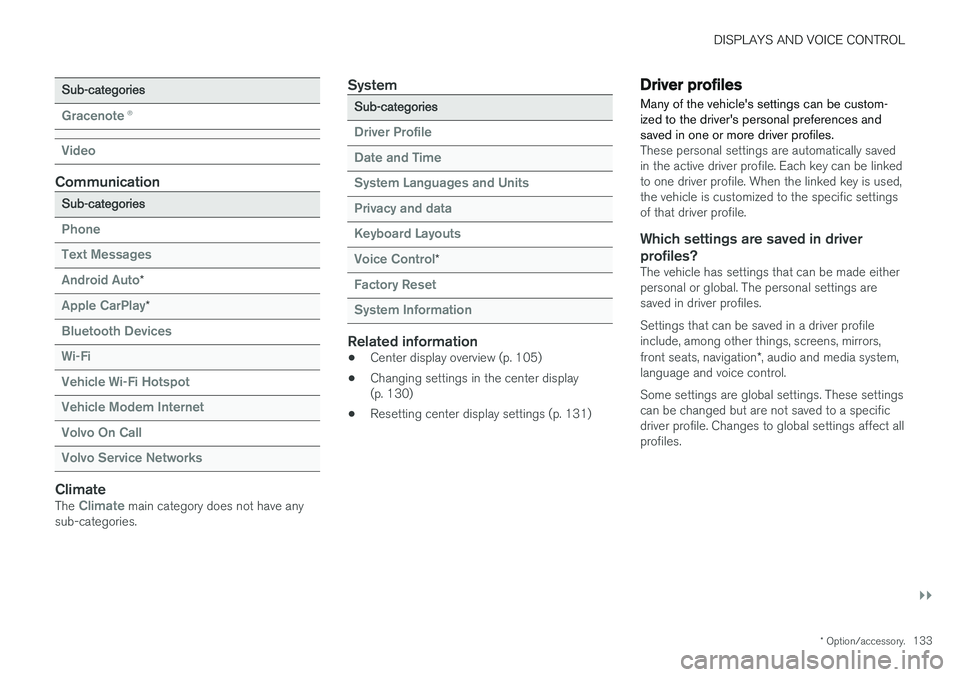
Sub-categories
Gracenote®
Video
Communication
Sub-categories
Phone Text Messages Android Auto
*
Apple CarPlay*
Bluetooth Devices Wi-FiVehicle Wi-Fi HotspotVehicle Modem Internet Volvo On Call Volvo Service Networks
ClimateThe Climate main category does not have any
sub-categories.
System
Sub-categories
Driver Profile Date and TimeSystem Languages and UnitsPrivacy and dataKeyboard Layouts Voice Control
*
Factory Reset System Information
Related information
• Center display overview (p. 105)
• Changing settings in the center display (p. 130)
• Resetting center display settings (p. 131)
Driver profiles
Many of the vehicle's settings can be custom- ized to the driver's personal preferences andsaved in one or more driver profiles.
These personal settings are automatically saved in the active driver profile. Each key can be linkedto one driver profile. When the linked key is used,the vehicle is customized to the specific settingsof that driver profile.
Which settings are saved in driver profiles?
The vehicle has settings that can be made eitherpersonal or global. The personal settings aresaved in driver profiles. Settings that can be saved in a driver profile include, among other things, screens, mirrors, front seats, navigation *, audio and media system,
language and voice control. Some settings are global settings. These settings can be changed but are not saved to a specificdriver profile. Changes to global settings affect allprofiles.
Page 167 of 674
WINDOWS, GLASS AND MIRRORS
* Option/accessory.165
WARNING
Make sure that no child or other passenger comes into contact with the windows as they are closing with keyless closing *.
NOTE
One way to reduce the pulsating wind noise heard when the rear windows are open is toalso open the front windows slightly.
NOTE
The windows cannot be opened at speeds over approx. 180 km/h (ca112 mph), but theycan be closed. The driver is always responsible for following applicable traffic regulations.
Related information
• Power windows (p. 163)
• Pinch protection for windows and sun cur- tains (p. 162)
• Reset procedure for pinch protection(p. 163)
• Keyless locking and unlocking
* (p. 244)
• Locking and unlocking using the remote key(p. 231)
• Locking and unlocking from inside the vehi-cle (p. 247)
Rearview/door mirrors
The rearview mirror and door mirrors can be used to improve the driver's visibility behind thevehicle.
Rearview mirrorThe rearview mirror can be easily adjusted man- ually. The rearview mirror can be equipped with HomeLink *, auto-dim * and compass *.
Door mirrors
WARNING
The door mirror on the passenger side is curved to improve visibility. Objects in the mir-ror may appear farther away than they actuallyare.
The joystick in the drivers' door control panel is used to adjust the position of the door mirrors.There are also several automatic settings thatcan also be connected to the memory function buttons for the power seat *.
Related information
•
HomeLink ®
* (p. 468)
• Compass (p. 471)
• Adjusting the rearview mirror dimming func- tion (p. 166)
• Adjusting the door mirrors (p. 166) •
Storing memory settings in power front seats
* (p. 182)
• Activating and deactivating the heated rear window and door mirrors (p. 217)