steering VOLVO XC60 T8 2018 Owner´s Manual
[x] Cancel search | Manufacturer: VOLVO, Model Year: 2018, Model line: XC60 T8, Model: VOLVO XC60 T8 2018Pages: 674, PDF Size: 11.93 MB
Page 224 of 674
CLIMATE CONTROL
* Option/accessory.
222
Starting and stoppingpreconditioning
Preconditioning heats or cools the passenger compartment before driving. Preconditioningcan be started in the center display or from acellular phone.
Starting/stopping from the center display
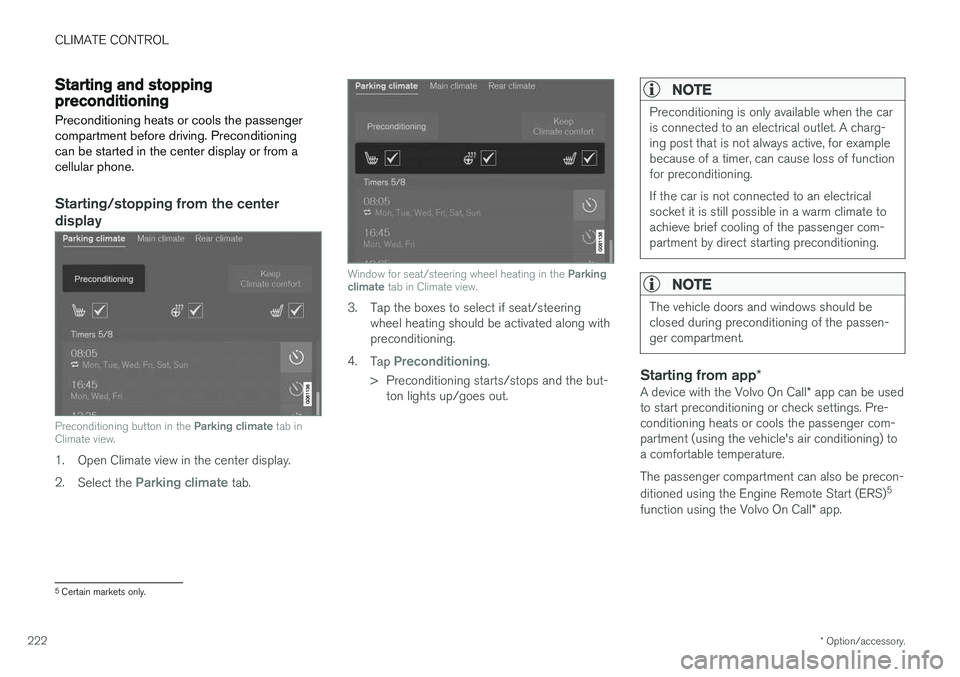
Preconditioning button in the Parking climate tab in
Climate view.
1. Open Climate view in the center display. 2. Select the
Parking climate tab.
Window for seat/steering wheel heating in the Parking
climate tab in Climate view.
3. Tap the boxes to select if seat/steering
wheel heating should be activated along with preconditioning.
4. Tap
Preconditioning.
> Preconditioning starts/stops and the but- ton lights up/goes out.
NOTE
Preconditioning is only available when the car is connected to an electrical outlet. A charg-ing post that is not always active, for examplebecause of a timer, can cause loss of functionfor preconditioning. If the car is not connected to an electrical socket it is still possible in a warm climate toachieve brief cooling of the passenger com-partment by direct starting preconditioning.
NOTE
The vehicle doors and windows should be closed during preconditioning of the passen-ger compartment.
Starting from app *
A device with the Volvo On Call * app can be used
to start preconditioning or check settings. Pre- conditioning heats or cools the passenger com-partment (using the vehicle's air conditioning) toa comfortable temperature. The passenger compartment can also be precon- ditioned using the Engine Remote Start (ERS) 5
function using the Volvo On Call * app.
5
Certain markets only.
Page 236 of 674
||
KEY, LOCKS AND ALARM
* Option/accessory.
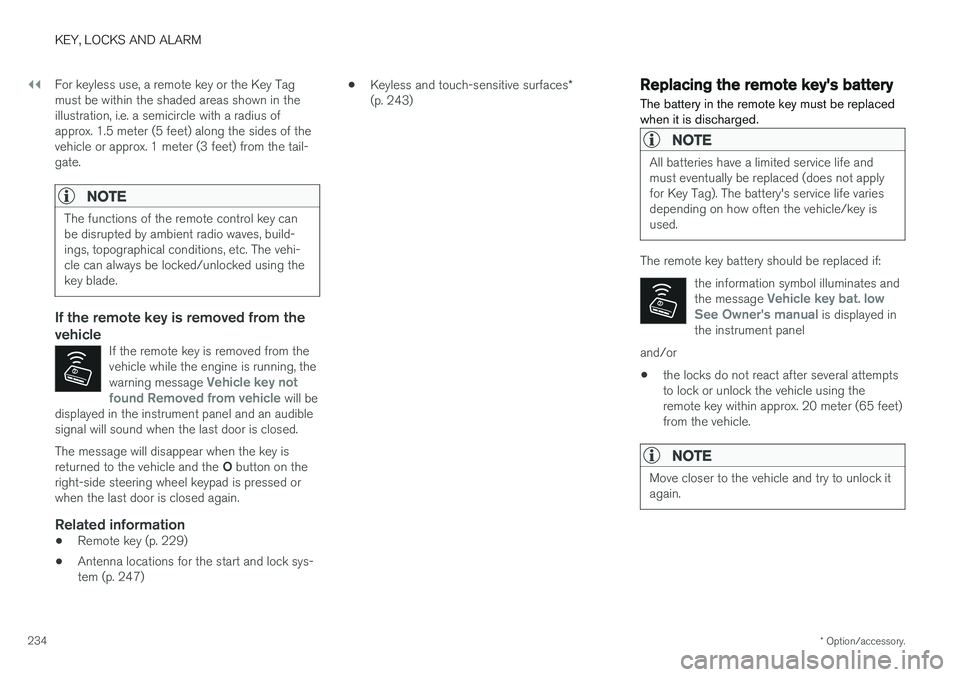
234 For keyless use, a remote key or the Key Tag must be within the shaded areas shown in theillustration, i.e. a semicircle with a radius ofapprox. 1.5 meter (5 feet) along the sides of thevehicle or approx. 1 meter (3 feet) from the tail-gate.
NOTE
The functions of the remote control key can be disrupted by ambient radio waves, build-ings, topographical conditions, etc. The vehi-cle can always be locked/unlocked using thekey blade.
If the remote key is removed from the vehicle
If the remote key is removed from the vehicle while the engine is running, the warning message
Vehicle key not
found Removed from vehicle will be
displayed in the instrument panel and an audible signal will sound when the last door is closed.
The message will disappear when the key is returned to the vehicle and the O button on the
right-side steering wheel keypad is pressed or when the last door is closed again.
Related information
• Remote key (p. 229)
• Antenna locations for the start and lock sys-tem (p. 247) •
Keyless and touch-sensitive surfaces
*
(p. 243)
Replacing the remote key's battery
The battery in the remote key must be replaced when it is discharged.
NOTE
All batteries have a limited service life and must eventually be replaced (does not applyfor Key Tag). The battery's service life variesdepending on how often the vehicle/key isused.
The remote key battery should be replaced if:
the information symbol illuminates and the message
Vehicle key bat. low
See Owner's manual is displayed in
the instrument panel
and/or
• the locks do not react after several attempts to lock or unlock the vehicle using theremote key within approx. 20 meter (65 feet)from the vehicle.
NOTE
Move closer to the vehicle and try to unlock it again.
Page 264 of 674

DRIVER SUPPORT
* Option/accessory.
262
Driver support systems
The vehicle is equipped with a number of driver support systems that can provide the driver withactive or passive assistance in various situations.
The system can, for example, help the driver maintain a set speed or a set time interval to thevehicle ahead, help prevent a collision by warningthe driver and applying the brakes, or assist thedriver while parking. Some of the systems are standard and others are options. This also varies from market to market.
Related information
• Speed-dependent steering wheel resistance(p. 262)
• Electronic Stability Control (p. 264)
• Stability system Roll Stability Control(p. 263)
• Rear Collision Warning (p. 338)
• Speed limiter (p. 268)
• Cruise control (p. 276)
• Distance Alert
* (p. 281)
• Adaptive Cruise Control
* (p. 285)
• Pilot Assist (p. 301)
• Radar sensor (p. 316)
• Camera (p. 321)
• City Safety
™ (p. 325)
• BLIS
* (p. 339) •
Cross Traffic Alert
* (p. 344)
• Road Sign Information
* (p. 348)
• Driver Alert Control (p. 353)
• Lane Keeping Aid (p. 355)
• Steering assistance at risk of collision(p. 363)
• Park Assist
* (p. 372)
• Park Assist Camera
* (p. 377)
• Park Assist Pilot
* (p. 386)
Speed-dependent steering wheelresistance
Speed-dependent power steering increases the steering wheel resistance in pace with the vehi-cle's speed to give the driver an enhanced feel-ing of control and stability.
Steering may feel stiffer on highways. When parking and at low speeds, it will be easier tomove the steering wheel.
NOTE
In some situations, the power steering may become too hot and require temporary cool-ing – during such time the power steering willwork at reduced output and the steeringwheel may feel more difficult to move. In parallel with the temporarily reduced steer- ing assistance, the driver display shows amessage as well as a STEERING WHEELsymbol.
Page 265 of 674
DRIVER SUPPORT
* Option/accessory.263
WARNING
While the power steering is working at reduced power, the driver support functionswith steering assistance are not available. In such a situation, the driver display shows the
Power steering failure or Power
Steering Assist Temporarily Reduced
message, combined with a STEERING WHEEL symbol.
Changing the level of steering wheel resistance *
To change the level of steering wheel resistance, see the description of the INDIVIDUAL optionunder "Available drive modes" in the "Drivemodes" section. On models not equipped with drive mode con- trols and the INDIVIDUAL option, steering wheelresistance can instead be set in the center dis-play's Top view under:
SettingsMy CarDrive ModesSteering force
Steering wheel resistance settings cannot be accessed when turning at speeds above10 km/h (6 mph).
Related information
•Drive modes (p. 435)
• Pilot Assist (p. 301) •
City Safety steering assistance for evasivemaneuver (p. 333)
• Lane Keeping Aid (p. 355)
• Steering assistance at risk of collision(p. 363)
• Park Assist Pilot
* (p. 386)
Stability system Roll StabilityControl
The Roll Stability Control (RSC 1
) system helps
minimize the risk of a rollover in the event of e.g. a sudden evasive maneuver or if the vehiclebegins to skid.
The RSC system monitors the lateral angle at which the vehicle is leaning and registers anychanges. Using this information, the system cal-culates the likelihood of a rollover. If there is animminent risk of a rollover, Electronic StabilityControl is activated, engine torque is reduced andbrakes are applied to one or more of the wheelsuntil the vehicle has regained stability.
WARNING
The vehicle
Page 269 of 674
DRIVER SUPPORT
267
Electronic Stability Control symbolsand messages
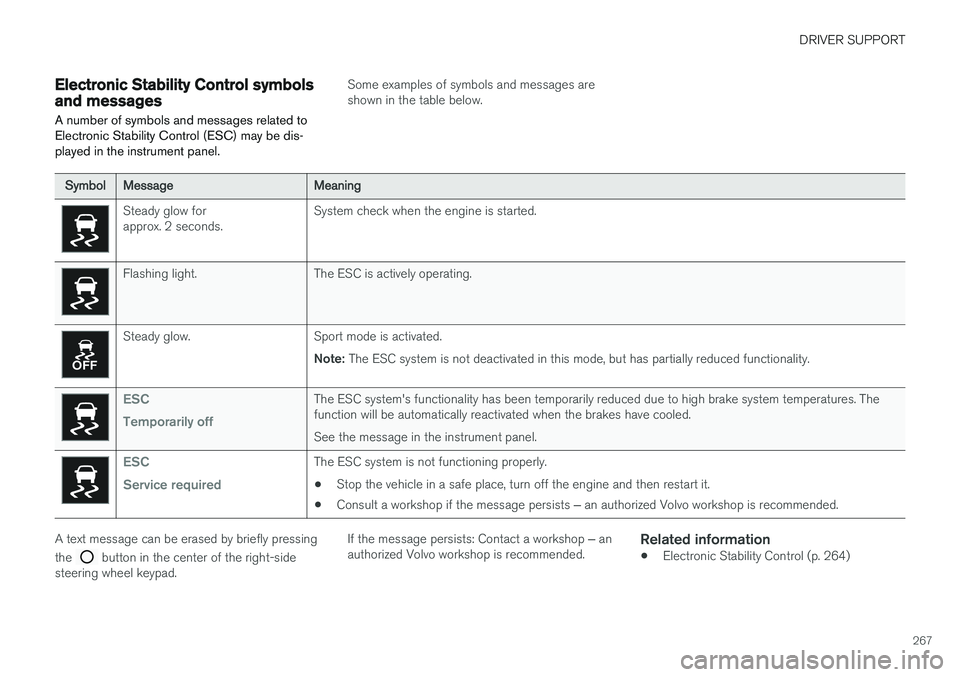
A number of symbols and messages related to Electronic Stability Control (ESC) may be dis-played in the instrument panel.
Some examples of symbols and messages are shown in the table below.
SymbolMessageMeaning
Steady glow for approx. 2 seconds. System check when the engine is started.
Flashing light. The ESC is actively operating.
Steady glow. Sport mode is activated.
Note: The ESC system is not deactivated in this mode, but has partially reduced functionality.
ESC Temporarily offThe ESC system's functionality has been temporarily reduced due to high brake system temperatures. The function will be automatically reactivated when the brakes have cooled. See the message in the instrument panel.
ESC Service requiredThe ESC system is not functioning properly.
• Stop the vehicle in a safe place, turn off the engine and then restart it.
• Consult a workshop if the message persists
‒ an authorized Volvo workshop is recommended.
A text message can be erased by briefly pressing the
button in the center of the right-side
steering wheel keypad. If the message persists: Contact a workshop
‒ an
authorized Volvo workshop is recommended.
Related information
• Electronic Stability Control (p. 264)
Page 271 of 674
DRIVER SUPPORT
}}
269
Activating and starting SpeedLimiterThe Speed Limiter (SL 13
) function must be
selected and activated in order to regulate speed.
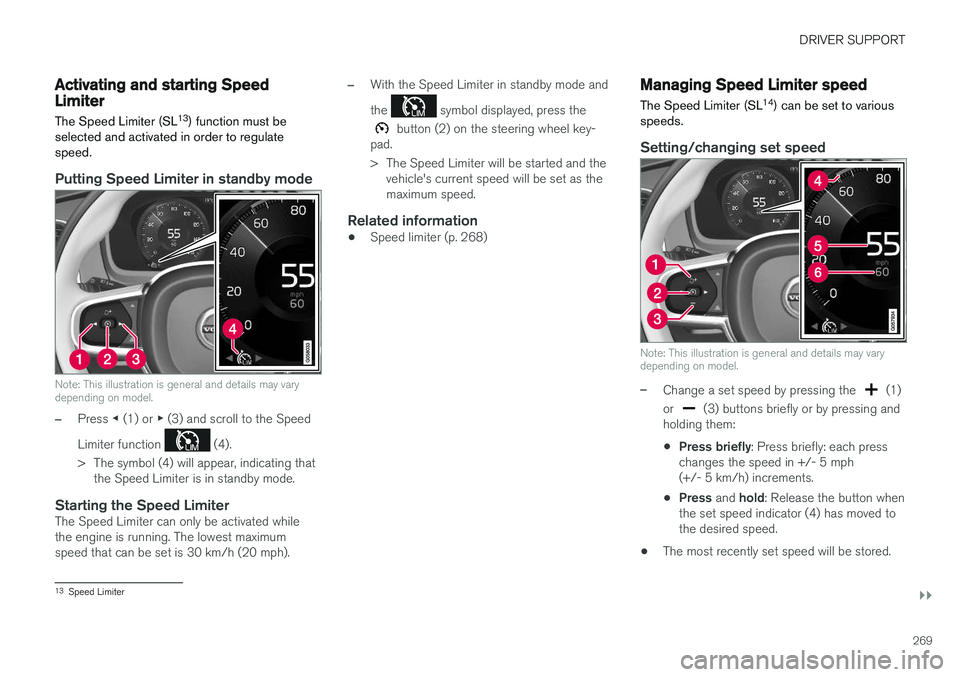
Putting Speed Limiter in standby mode
Note: This illustration is general and details may vary depending on model.
–Press ◀ (1) or ▶ (3) and scroll to the Speed
Limiter function
(4).
> The symbol (4) will appear, indicating that the Speed Limiter is in standby mode.
Starting the Speed LimiterThe Speed Limiter can only be activated while the engine is running. The lowest maximumspeed that can be set is 30 km/h (20 mph).
–With the Speed Limiter in standby mode and the
symbol displayed, press the
button (2) on the steering wheel key-
pad.
> The Speed Limiter will be started and the vehicle's current speed will be set as the maximum speed.
Related information
• Speed limiter (p. 268)
Managing Speed Limiter speed The Speed Limiter (SL 14
) can be set to various
speeds.
Setting/changing set speed
Note: This illustration is general and details may vary depending on model.
–Change a set speed by pressing the (1)
or
(3) buttons briefly or by pressing and
holding them:
• Press briefly
: Press briefly: each press
changes the speed in +/- 5 mph (+/- 5 km/h) increments.
• Press
and hold: Release the button when
the set speed indicator (4) has moved tothe desired speed.
• The most recently set speed will be stored.
13
Speed Limiter
Page 272 of 674
||
DRIVER SUPPORT
270
Related information
•Speed limiter (p. 268)
Deactivating and putting SpeedLimiter in standby mode
The Speed Limiter (SL 15
) can be temporarily
deactivated and put in standby mode.
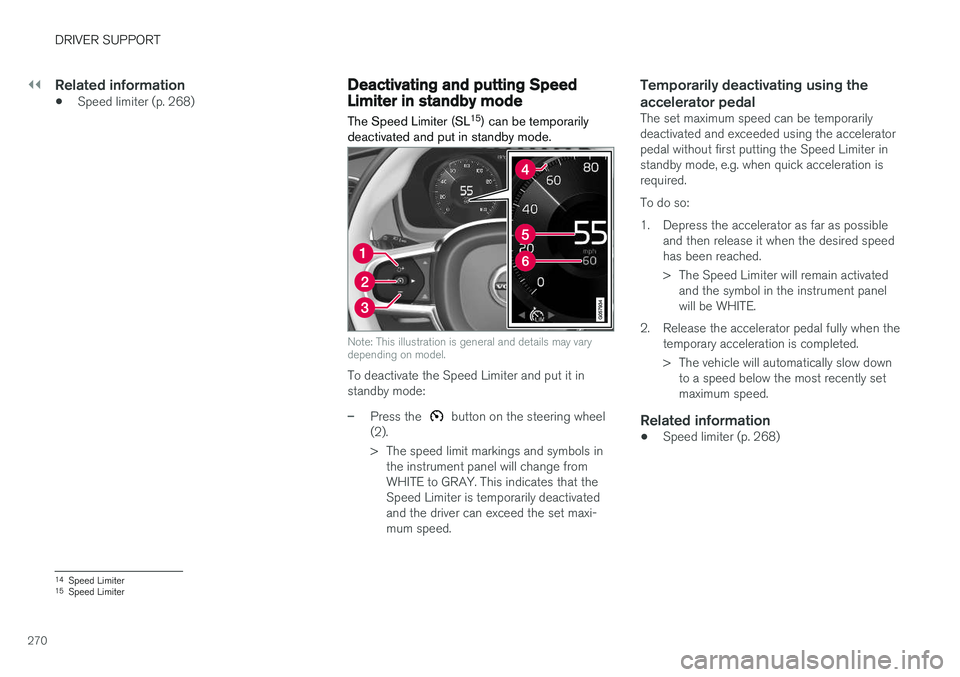
Note: This illustration is general and details may vary depending on model.
To deactivate the Speed Limiter and put it in standby mode:
–Press the button on the steering wheel
(2).
> The speed limit markings and symbols in the instrument panel will change from WHITE to GRAY. This indicates that theSpeed Limiter is temporarily deactivatedand the driver can exceed the set maxi-mum speed.
Temporarily deactivating using the accelerator pedal
The set maximum speed can be temporarily deactivated and exceeded using the acceleratorpedal without first putting the Speed Limiter instandby mode, e.g. when quick acceleration isrequired. To do so:
1. Depress the accelerator as far as possible and then release it when the desired speed has been reached.
> The Speed Limiter will remain activatedand the symbol in the instrument panel will be WHITE.
2. Release the accelerator pedal fully when the temporary acceleration is completed.
> The vehicle will automatically slow downto a speed below the most recently set maximum speed.
Related information
• Speed limiter (p. 268)
14
Speed Limiter
15 Speed Limiter
Page 273 of 674
DRIVER SUPPORT
}}
271
Reactivating Speed Limiter fromstandby modeSpeed Limiter (SL 16
) can be reactivated after
having been temporarily deactivated and put in standby mode.
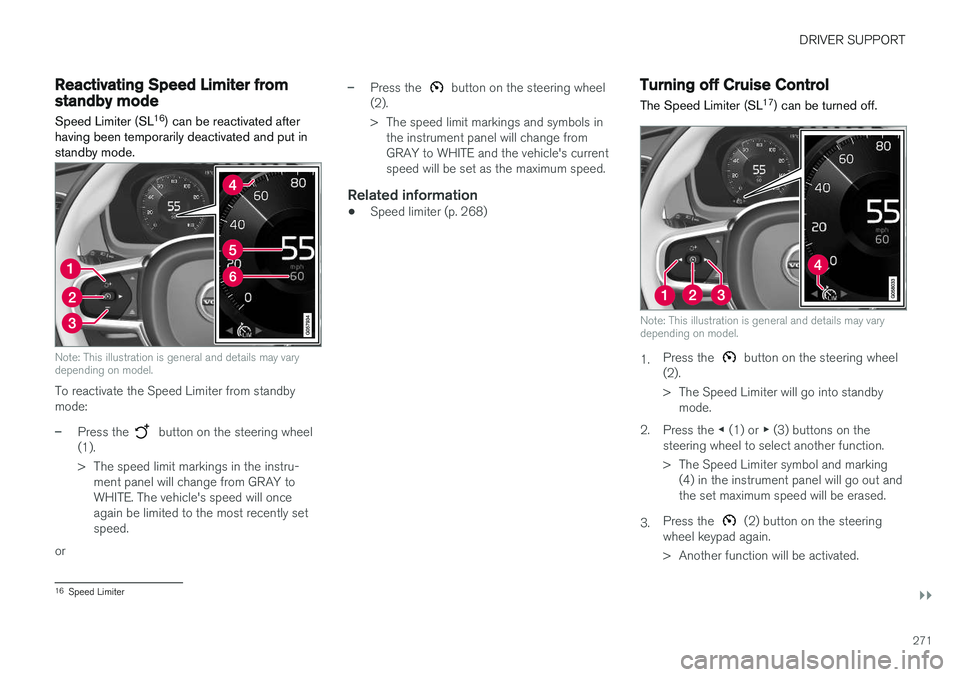
Note: This illustration is general and details may vary depending on model.
To reactivate the Speed Limiter from standby mode:
–Press the button on the steering wheel
(1).
> The speed limit markings in the instru- ment panel will change from GRAY to WHITE. The vehicle's speed will onceagain be limited to the most recently setspeed.
or
–Press the button on the steering wheel
(2).
> The speed limit markings and symbols in the instrument panel will change from GRAY to WHITE and the vehicle's currentspeed will be set as the maximum speed.
Related information
• Speed limiter (p. 268)
Turning off Cruise Control
The Speed Limiter (SL 17
) can be turned off.
Note: This illustration is general and details may vary depending on model.
1. Press the button on the steering wheel
(2).
> The Speed Limiter will go into standby mode.
2. Press the ◀ (1) or ▶ (3) buttons on the
steering wheel to select another function.
> The Speed Limiter symbol and marking (4) in the instrument panel will go out and the set maximum speed will be erased.
3. Press the
(2) button on the steering
wheel keypad again.
> Another function will be activated.
16 Speed Limiter
Page 276 of 674
DRIVER SUPPORT
274
Activating/deactivating AutomaticSpeed Limiter
The Automatic Speed Limiter (ASL 21
) is a sup-
plement to the Speed Limiter (SL 22
) and can be
activated/deactivated.
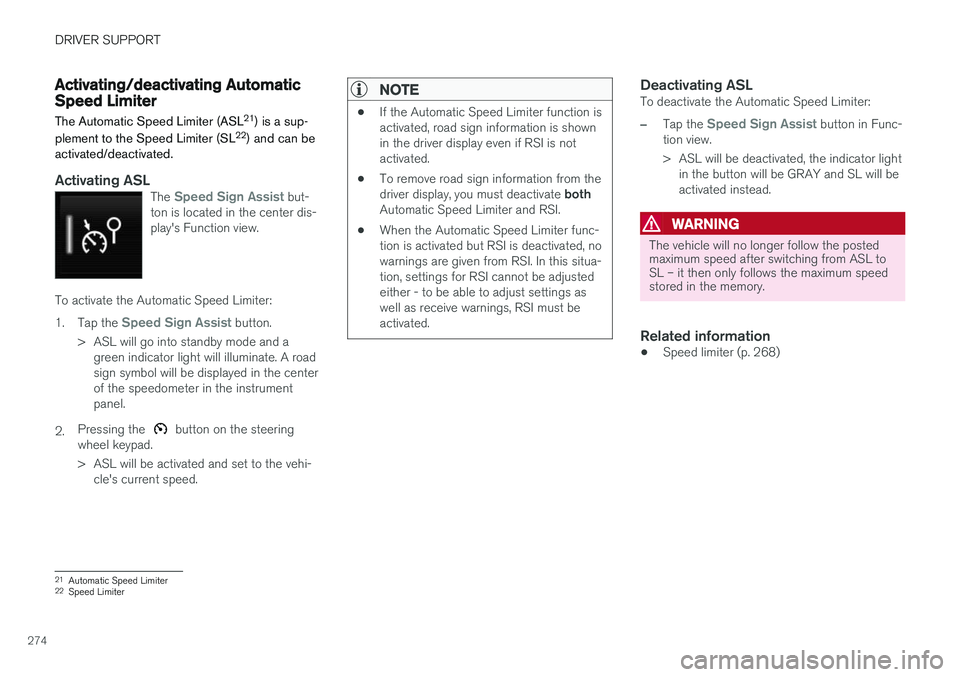
Activating ASLThe Speed Sign Assist but-
ton is located in the center dis- play's Function view.
To activate the Automatic Speed Limiter: 1. Tap the
Speed Sign Assist button.
> ASL will go into standby mode and a green indicator light will illuminate. A road sign symbol will be displayed in the centerof the speedometer in the instrumentpanel.
2. Pressing the
button on the steering
wheel keypad.
> ASL will be activated and set to the vehi- cle's current speed.
NOTE
• If the Automatic Speed Limiter function is activated, road sign information is shownin the driver display even if RSI is notactivated.
• To remove road sign information from the driver display, you must deactivate
both
Automatic Speed Limiter and RSI.
• When the Automatic Speed Limiter func- tion is activated but RSI is deactivated, nowarnings are given from RSI. In this situa-tion, settings for RSI cannot be adjustedeither - to be able to adjust settings aswell as receive warnings, RSI must beactivated.
Deactivating ASLTo deactivate the Automatic Speed Limiter:
–Tap the Speed Sign Assist button in Func-
tion view.
> ASL will be deactivated, the indicator light in the button will be GRAY and SL will be activated instead.
WARNING
The vehicle will no longer follow the posted maximum speed after switching from ASL toSL – it then only follows the maximum speedstored in the memory.
Related information
• Speed limiter (p. 268)
21
Automatic Speed Limiter
22 Speed Limiter
Page 277 of 674
DRIVER SUPPORT
* Option/accessory.275
Changing Automatic Speed Limitertolerance The Automatic Speed Limiter (ASL 23
) can be set
to different tolerance levels.
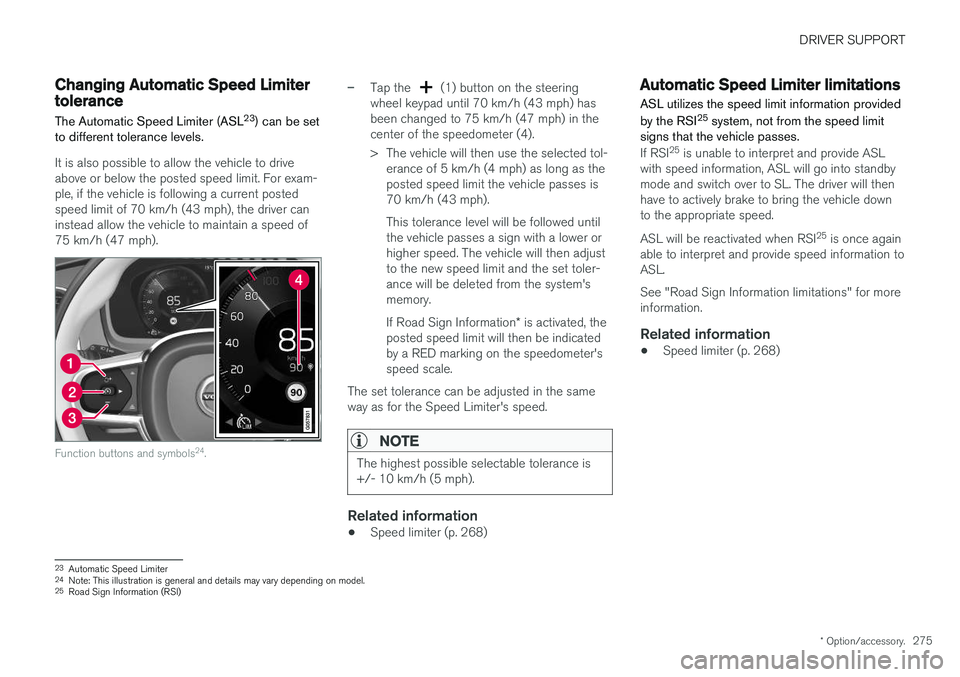
It is also possible to allow the vehicle to drive above or below the posted speed limit. For exam-ple, if the vehicle is following a current postedspeed limit of 70 km/h (43 mph), the driver caninstead allow the vehicle to maintain a speed of75 km/h (47 mph).
Function buttons and symbols 24
.
–Tap the (1) button on the steering
wheel keypad until 70 km/h (43 mph) has been changed to 75 km/h (47 mph) in thecenter of the speedometer (4).
> The vehicle will then use the selected tol- erance of 5 km/h (4 mph) as long as the posted speed limit the vehicle passes is70 km/h (43 mph). This tolerance level will be followed until the vehicle passes a sign with a lower orhigher speed. The vehicle will then adjustto the new speed limit and the set toler-ance will be deleted from the system'smemory. If Road Sign Information * is activated, the
posted speed limit will then be indicated by a RED marking on the speedometer'sspeed scale.
The set tolerance can be adjusted in the sameway as for the Speed Limiter's speed.
NOTE
The highest possible selectable tolerance is +/- 10 km/h (5 mph).
Related information
• Speed limiter (p. 268)
Automatic Speed Limiter limitations
ASL utilizes the speed limit information provided by the RSI 25
system, not from the speed limit
signs that the vehicle passes.
If RSI 25
is unable to interpret and provide ASL
with speed information, ASL will go into standby mode and switch over to SL. The driver will thenhave to actively brake to bring the vehicle downto the appropriate speed. ASL will be reactivated when RSI 25
is once again
able to interpret and provide speed information to ASL. See "Road Sign Information limitations" for more information.
Related information
• Speed limiter (p. 268)
23
Automatic Speed Limiter
24 Note: This illustration is general and details may vary depending on model.
25 Road Sign Information (RSI)