lane assist VOLVO XC60 TWIN ENGINE 2019 User Guide
[x] Cancel search | Manufacturer: VOLVO, Model Year: 2019, Model line: XC60 TWIN ENGINE, Model: VOLVO XC60 TWIN ENGINE 2019Pages: 695, PDF Size: 14.96 MB
Page 314 of 695
||
DRIVER SUPPORT
312
When the vehicle is approaching an off-rampor a fork in the road, the driver should steertoward the desired lane to indicate to PilotAssist the desired direction of travel.
Pilot Assist strives to keep the vehicle
in the center of the lane
When Pilot Assist provides steering assistance, itstrives to position the vehicle in the center of thelane between the lane markings. For the smooth-est driving experience possible, the driver shouldpermit the vehicle to find the optimal positioning.The driver should check that the vehicle is posi-tioned safely in the lane and can always adjustthe vehicle's position by applying more force tothe steering wheel.
If Pilot Assist does not position the vehicleappropriately in the lane, the driver shouldturn off Pilot Assist or switch to AdaptiveCruise Control.
Overview
Controls
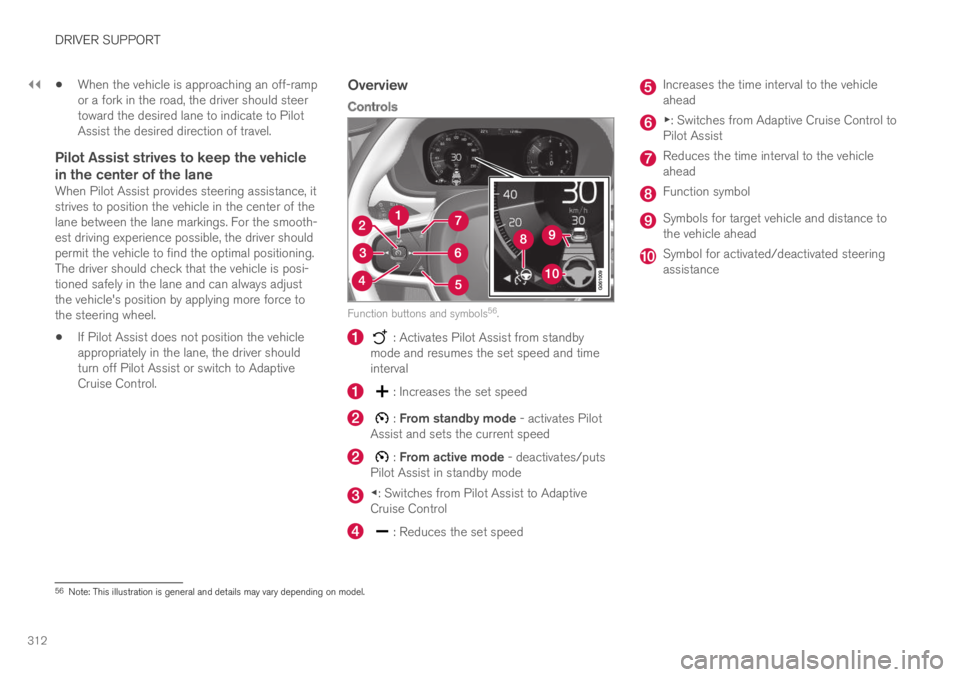
Function buttons and symbols56.
: Activates Pilot Assist from standbymode and resumes the set speed and timeinterval
: Increases the set speed
: From standby mode - activates PilotAssist and sets the current speed
: From active mode - deactivates/putsPilot Assist in standby mode
◀: Switches from Pilot Assist to AdaptiveCruise Control
: Reduces the set speed
Increases the time interval to the vehicleahead
▶: Switches from Adaptive Cruise Control toPilot Assist
Reduces the time interval to the vehicleahead
Function symbol
Symbols for target vehicle and distance tothe vehicle ahead
Symbol for activated/deactivated steeringassistance
56Note: This illustration is general and details may vary depending on model.
Page 321 of 695
DRIVER SUPPORT
}}
319
Standby mode due to action by the driver
Pilot Assist will be temporarily deactivated andput in standby mode if:
the brakes are applied.
the gear selector is moved to N
a turn signal is used for more than 1 minute.
the vehicle is driven faster than the setspeed for more than 1 minute
Temporarily increasing speed using the accelera-tor pedal, e.g. when passing another vehicle, willnot affect the setting. The vehicle will return tothe set speed when the accelerator pedal isreleased.
When the turn signals are used, Pilot Assist'ssteering assistance will be temporarily deacti-vated. When the turn signal is switched off, steer-ing assistance will be automatically reactivated ifthe traffic lane's side markings can still bedetected.
Automatic standby mode
Pilot Assist is dependent on other systems, such
as Electronic Stability Control (ESC60). If any ofthese other systems stops working, Pilot Assistwill automatically switch off.
WARNING
With automatic standby mode, the driver iswarned by an acoustic signal and a messageon the instrument panel.
The driver must then regulate vehiclespeed, apply the brakes if necessary, andmaintain a safe distance to other vehicles.
Adaptive Cruise Control may go into standbymode if, e.g.:
the driver opens the door.
the brake temperature is high.
the driver's hands are not on the steeringwheel.
the parking brake is applied.
the engine speed (rpm) is too low/high.
the driver unbuckles the seat belt.
one or more of the wheels lose traction.
the camera/radar sensor is covered by snowor heavy rain (the camera lens/radar wavesare blocked)
your vehicle's speed goes below 5 km/h(3 mph) and Pilot Assist cannot determine ifthe vehicle ahead is stationary or if it isanother object, e.g. a speed bump.
your vehicle's speed goes under 5 km/h(3 mph) and the vehicle ahead turns so thatPilot Assist no longer has a vehicle to follow.
Reactivating Pilot Assist from standby
mode
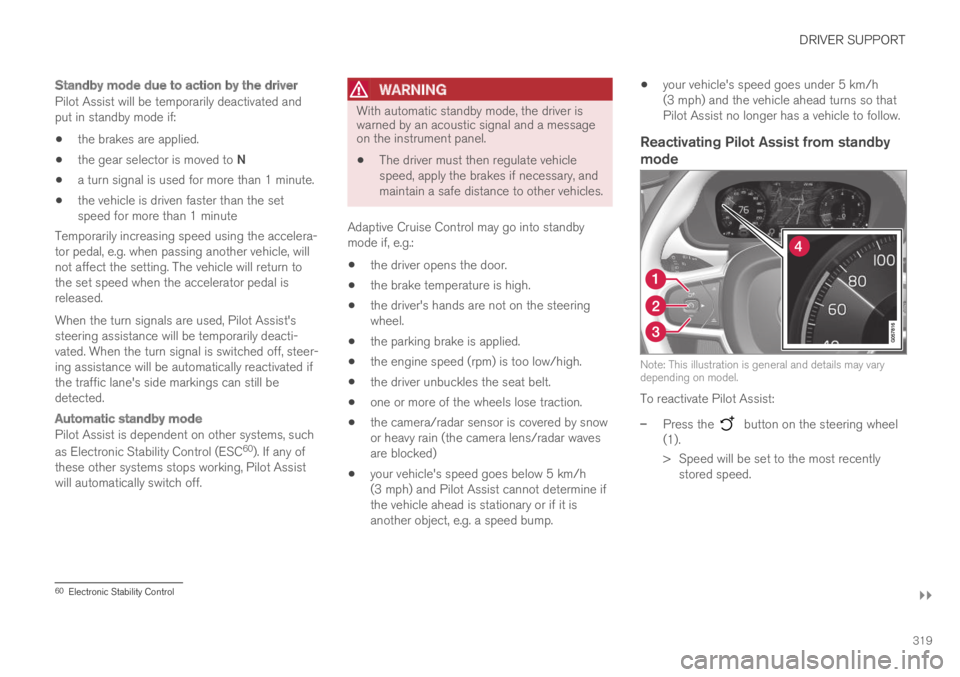
Note: This illustration is general and details may varydepending on model.
To reactivate Pilot Assist:
–Press the button on the steering wheel(1).
>Speed will be set to the most recentlystored speed.
60Electronic Stability Control
Page 322 of 695
||
DRIVER SUPPORT
320
WARNING
A noticeable increase in speed may follow
when the speed is resumed with the steering wheel button.
Related information
Pilot Assist (p. 310)
Passing assistance with Pilot Assist
Pilot Assist can assist the driver when passingother vehicles.
How passing assistance works
When Pilot Assist is following another vehicleand you indicate that you intend to pass that
vehicle by using the turn signal61, Pilot Assist willbegin accelerating toward the vehicle aheadbefore your vehicle has moved into the passinglane.
The function will then delay a speed reduction toavoid early braking as your vehicle approaches aslower-moving vehicle.
The function remains active until your vehicle haspassed the other vehicle.
WARNING
Please note that this function can be acti-vated in more situations than just passinganother vehicle, such as when a direction indi-cator is used to indicate a lane change orbefore exiting to another road – the vehiclewill then briefly accelerate.
Related information
Pilot Assist (p. 310)
Starting passing assistance with Pilot Assist(p. 321)
Passing assistance with Pilot Assist limita-tions (p. 321)
61Only the left-hand turn signal for left-hand drive vehicles, or right-hand turn signal for right-hand drive vehicles.
Page 323 of 695
DRIVER SUPPORT
}}
321
Starting passing assistance withPilot Assist
Several conditions must be met for passingassistance to be possible.
In order to activate passing assistance:
your vehicle must be following a vehicleahead (target vehicle)
your vehicle's current speed must beat least 70 km/h (43 mph)
the set speed for Pilot Assist must be highenough to safely pass another vehicle.
Starting parking assistance
To start passing assistance:
–Turn on the left turn signal.
>Passing assistance will start.
Related information
Pilot Assist (p. 310)
Passing assistance with Pilot Assist (p. 320)
Passing assistance with Pilot Assistlimitations
Passing assistance functionality may be reducedin certain situations.
WARNING
The driver should be aware that if conditionssuddenly change when using Parking Assis-tance, the function may implement an unde-sired acceleration in certain conditions.
Some situations should be avoided, e.g. if:
the vehicle is approaching an exit in thesame direction as passing would normallyoccur
the vehicle ahead slows before your vehi-cle has had time to switch to the passinglane
traffic in the passing lane slows down
a vehicle for right-hand traffic is driven ina country with left-hand traffic (or viceversa).
Situations of this type can be avoided by tempo-rarily putting Pilot Assist in standby mode.
Related information
Pilot Assist (p. 310)
Passing assistance with Pilot Assist (p. 320)
Switching target vehicles with PilotAssist
At certain speeds, models with automatic trans-missions and Pilot Assist can switch target vehi-cles.
Switching target vehicles
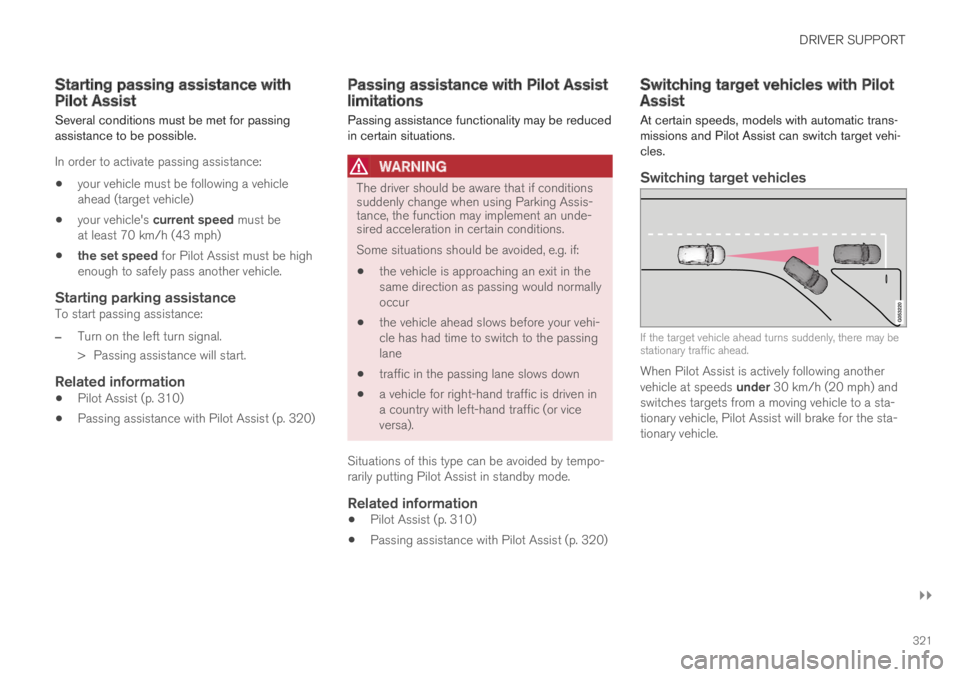
If the target vehicle ahead turns suddenly, there may bestationary traffic ahead.
When Pilot Assist is actively following anothervehicle at speeds under 30 km/h (20 mph) andswitches targets from a moving vehicle to a sta-tionary vehicle, Pilot Assist will brake for the sta-tionary vehicle.
Page 325 of 695
DRIVER SUPPORT
}}
* Option/accessory.323
Pilot Assist limitations
Pilot Assist functionality may be reduced in cer-tain situations.
Pilot Assist is a driver support function designedto simplify driving and assist the driver in manysituations. However, the driver is always responsi-ble for maintaining a suitable distance to vehiclesor objects around it and ensuring that the vehicleis correctly positioned in the traffic lane.
WARNING
In some situations, Pilot Assist may have trou-ble helping the driver properly or may bedeactivated automatically – we advise againstusing Pilot Assist in such cases. Examples ofsuch situations include:
the lane markings are worn, missing orcross each other.
lane division is unclear, for example, whenthe lanes divide or merge or at exits orwhen there are multiple sets of markings.
edges or other lines than lane markingsare present on or near the road, e.g.curbs, joints or repairs to the road sur-face, edges of barriers, roadside edges orstrong shadows.
the lane is narrow or winding.
the lane contains ridges or holes.
weather conditions are poor, e.g. rain,snow or fog or slush or reduced visibilitywith poor light conditions, backlighting,wet road surface, etc.
The driver should also note that Pilot Assisthas the following limitations:
High curbs, roadside barriers, temporaryobstacles (traffic cones, safety barriers,etc.) are not detected. Alternatively, theymay be detected incorrectly as lane mark-ings, with a subsequent risk of contactbetween the vehicle and such obstacles.
The driver is responsible for ensuring thatthe vehicle maintains a suitable distancefrom such obstacles.
The camera and radar sensors do nothave the capacity to detect all oncomingobjects and obstacles in traffic environ-ments, e.g. potholes, stationary obstaclesor objects that completely or partiallyblock the route.
Pilot Assist does not "see" pedestrians,animals, etc.
The recommended steering input is lim-ited in force, which means that it cannotalways help the driver to steer and keepthe vehicle within the lane.
In vehicles equipped with SensusNavigation*, the function is able to useinformation from map data, which couldcause variations in performance.
Pilot Assist is switched off if the powersteering is working with reduced power -e.g. during cooling due to overheating(see section "Speed-dependent steeringforce").
The driver can always correct or adjust steeringassistance provided by Pilot Assist by turning thesteering wheel to the desired position.
Page 327 of 695
DRIVER SUPPORT
}}
325
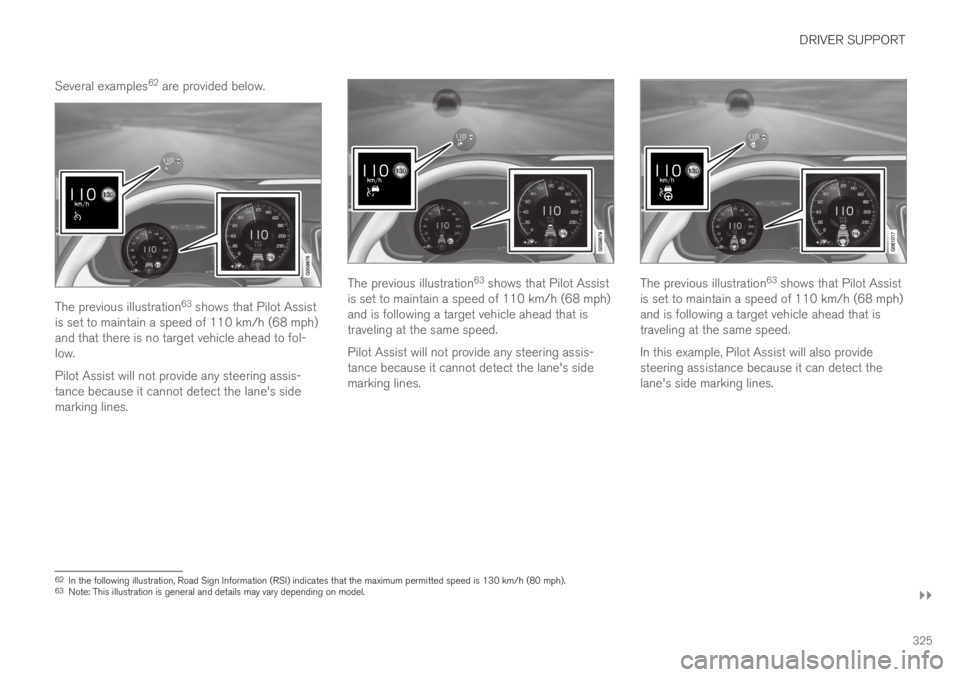
Several examples62 are provided below.
The previous illustration63 shows that Pilot Assistis set to maintain a speed of 110 km/h (68 mph)and that there is no target vehicle ahead to fol-low.
Pilot Assist will not provide any steering assis-tance because it cannot detect the lane's sidemarking lines.
The previous illustration63 shows that Pilot Assistis set to maintain a speed of 110 km/h (68 mph)and is following a target vehicle ahead that istraveling at the same speed.
Pilot Assist will not provide any steering assis-tance because it cannot detect the lane's sidemarking lines.
The previous illustration63 shows that Pilot Assistis set to maintain a speed of 110 km/h (68 mph)and is following a target vehicle ahead that istraveling at the same speed.
In this example, Pilot Assist will also providesteering assistance because it can detect thelane's side marking lines.
62In the following illustration, Road Sign Information (RSI) indicates that the maximum permitted speed is 130 km/h (80 mph).63Note: This illustration is general and details may vary depending on model.
Page 328 of 695
||
DRIVER SUPPORT
* Option/accessory.326
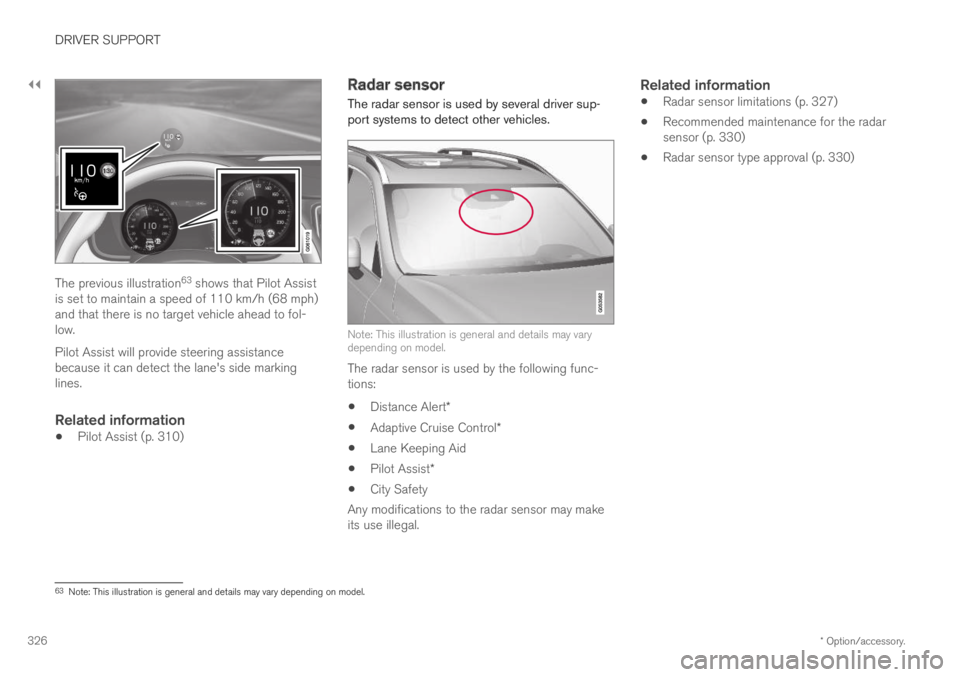
The previous illustration63 shows that Pilot Assistis set to maintain a speed of 110 km/h (68 mph)and that there is no target vehicle ahead to fol-low.
Pilot Assist will provide steering assistancebecause it can detect the lane's side markinglines.
Related information
Pilot Assist (p. 310)
Radar sensor
The radar sensor is used by several driver sup-port systems to detect other vehicles.
Note: This illustration is general and details may varydepending on model.
The radar sensor is used by the following func-tions:
Distance Alert*
Adaptive Cruise Control*
Lane Keeping Aid
Pilot Assist*
City Safety
Any modifications to the radar sensor may makeits use illegal.
Related information
Radar sensor limitations (p. 327)
Recommended maintenance for the radarsensor (p. 330)
Radar sensor type approval (p. 330)
63Note: This illustration is general and details may vary depending on model.
Page 330 of 695
||
DRIVER SUPPORT
328
CauseAction
Water or snow is spraying/swirling up and blocking the radar signals orthe camera's range of visibility.No action. Very wet or snow-covered roads may sometimes prevent the cam-era/radar sensor from functioning.
There is dirt between the inside of the windshield and the camera/radarsensor.Consult a workshop to have the area of the windshield on the inside of the cam-era's casing cleaned. An authorized Volvo workshop is recommended.
NOTE
Keep the windshield in front of the cameraand radar unit clean.
Vehicle speed
The radar sensor's ability to detect a vehicleahead is significantly reduced if:
the speed of the vehicle ahead differs greatlyfrom your vehicle's speed
Limited field of vision
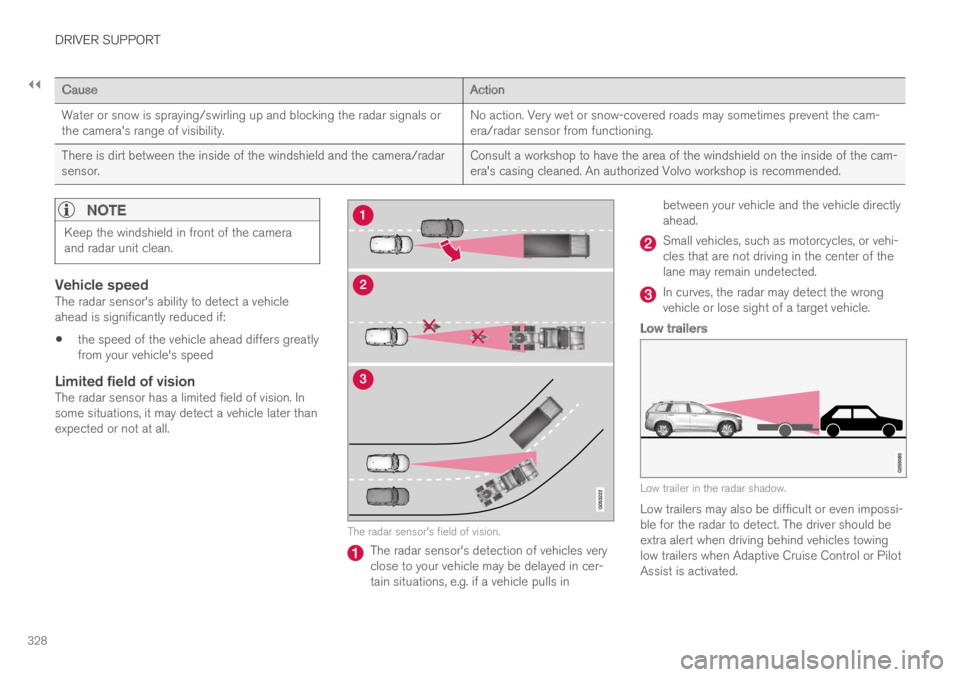
The radar sensor has a limited field of vision. Insome situations, it may detect a vehicle later thanexpected or not at all.
The radar sensor's field of vision.
The radar sensor's detection of vehicles veryclose to your vehicle may be delayed in cer-tain situations, e.g. if a vehicle pulls in
between your vehicle and the vehicle directlyahead.
Small vehicles, such as motorcycles, or vehi-cles that are not driving in the center of thelane may remain undetected.
In curves, the radar may detect the wrongvehicle or lose sight of a target vehicle.
Low trailers
Low trailer in the radar shadow.
Low trailers may also be difficult or even impossi-ble for the radar to detect. The driver should beextra alert when driving behind vehicles towinglow trailers when Adaptive Cruise Control or PilotAssist is activated.
Page 333 of 695
DRIVER SUPPORT
* Option/accessory.331
Camera
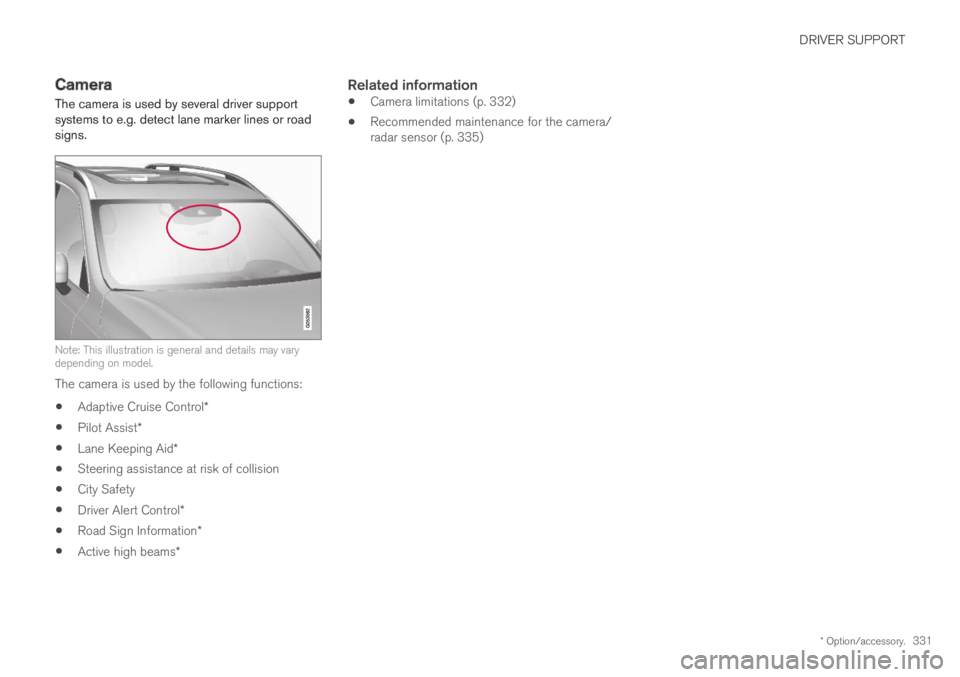
The camera is used by several driver supportsystems to e.g. detect lane marker lines or roadsigns.
Note: This illustration is general and details may varydepending on model.
The camera is used by the following functions:
Adaptive Cruise Control*
Pilot Assist*
Lane Keeping Aid*
Steering assistance at risk of collision
City Safety
Driver Alert Control*
Road Sign Information*
Active high beams*
Related information
Camera limitations (p. 332)
Recommended maintenance for the camera/radar sensor (p. 335)
Page 346 of 695
DRIVER SUPPORT
344
City Safety and delayed evasivemaneuvers
City Safety can assist the driver by automaticallybraking the vehicle when it is not possible toavoid a collision by steering alone.
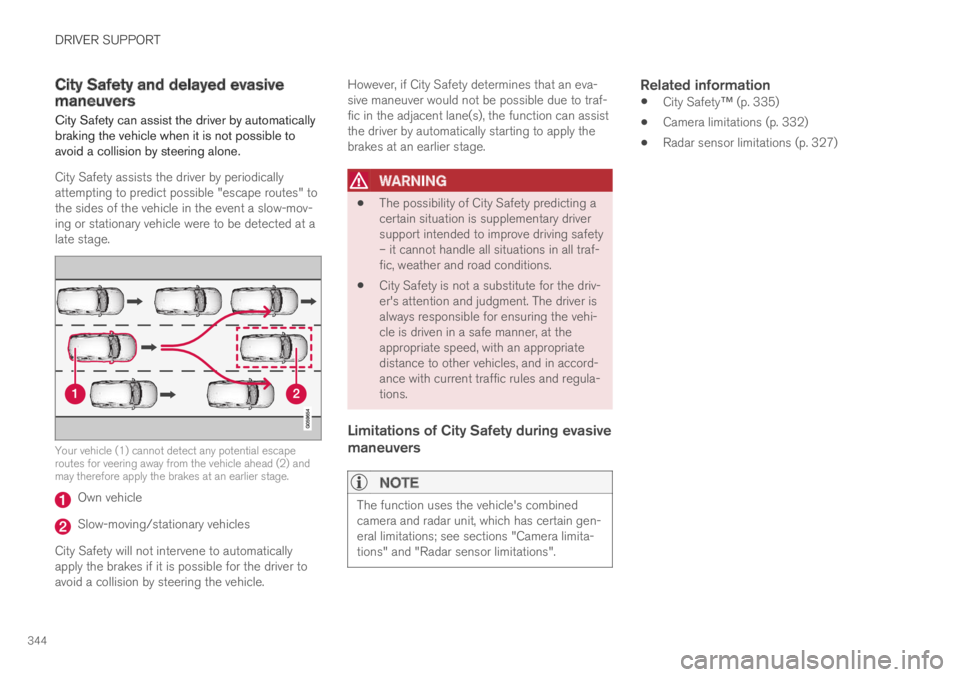
City Safety assists the driver by periodicallyattempting to predict possible "escape routes" tothe sides of the vehicle in the event a slow-mov-ing or stationary vehicle were to be detected at alate stage.
Your vehicle (1) cannot detect any potential escaperoutes for veering away from the vehicle ahead (2) andmay therefore apply the brakes at an earlier stage.
Own vehicle
Slow-moving/stationary vehicles
City Safety will not intervene to automaticallyapply the brakes if it is possible for the driver toavoid a collision by steering the vehicle.
However, if City Safety determines that an eva-sive maneuver would not be possible due to traf-fic in the adjacent lane(s), the function can assistthe driver by automatically starting to apply thebrakes at an earlier stage.
WARNING
The possibility of City Safety predicting acertain situation is supplementary driversupport intended to improve driving safety– it cannot handle all situations in all traf-fic, weather and road conditions.
City Safety is not a substitute for the driv-er's attention and judgment. The driver isalways responsible for ensuring the vehi-cle is driven in a safe manner, at theappropriate speed, with an appropriatedistance to other vehicles, and in accord-ance with current traffic rules and regula-tions.
Limitations of City Safety during evasive
maneuvers
NOTE
The function uses the vehicle's combinedcamera and radar unit, which has certain gen-eral limitations; see sections "Camera limita-tions" and "Radar sensor limitations".
Related information
City Safety™ (p. 335)
Camera limitations (p. 332)
Radar sensor limitations (p. 327)