radio VOLVO XC60 TWIN ENGINE 2019 User Guide
[x] Cancel search | Manufacturer: VOLVO, Model Year: 2019, Model line: XC60 TWIN ENGINE, Model: VOLVO XC60 TWIN ENGINE 2019Pages: 695, PDF Size: 14.96 MB
Page 149 of 695
DISPLAYS AND VOICE CONTROL
* Option/accessory.147
Numbers
Number commands can be given in differentways depending on the function to be controlled:
Phone numbers and zip codes should begiven by stating each number individually, e.g.zero three one two two four four three(03122443).
Addresses can be given by stating eachnumber individually or in a group, e.g. two twoor twenty-two (22). For English and Dutchlanguage settings, groups of numbers canalso be said in sequence, e.g. twenty-twotwenty-two (22 22). For English, double ortriple digits can also be used, e.g. doublezero (00). Numbers in the range 0-2300 canbe used.
Frequencies can be given as ninety-eightpoint eight (98.8), one hundred four pointtwo, or hundred four point two (104.2).
Related information
Voice control (p. 145)
Voice control for cellular phones (p. 147)
Voice control for radio and media (p. 148)
Climate control system voice commands(p. 201)
Voice control settings (p. 148)
Voice control for cellular phones17
Call a contact in the phone book, have a textmessage read aloud or dictate short messagesusing voice commands to a Bluetooth-con-nected phone.
To access a contact in the phone book, the voicecommand must contain the contact informationentered in the phone book. If a contact, e.g.Robyn Smith, has several phone numbers listedin the phone book, a number category such ashome or cellular can also be specified, i.e. "CallRobyn Smith cellular".
Tap and say one of the following commands:
"Call [contact]" - call the selected contactfrom the phone book.
"Call [phone number]" - call a phone num-ber.
"Recent calls" - display the list of recentcalls.
"Read message" - read a text messagealoud. If there are several messages, selectthe message to read aloud.
"Message to [contact]" - the user isprompted to dictate a short message. Themessage will then be read aloud and the
user can choose to send18 or re-dictate the
message. The vehicle must be connected tothe Internet to access this function.
Related information
Voice control (p. 145)
Using voice commands (p. 146)
Voice control for radio and media (p. 148)
Climate control system voice commands(p. 201)
Voice control settings (p. 148)
Internet-connected vehicle* (p. 537)
17Certain markets only.18Only certain phones can send messages via the vehicle. For additional information on compatibility, see support.volvocars.com.
Page 150 of 695
DISPLAYS AND VOICE CONTROL
* Option/accessory.148
Voice control for radio and media19
Voice commands for the radio and media play-ers are shown below.
Tap and say one of the following commands:
"Media" - initiates a dialog for media andradio and displays examples of commands.
"Play [artist]" - plays music by the selectedartist.
"Play [song title]" - plays the selectedsong.
"Play [song title] from [album]" - playsthe selected song from the selected album.
"Play [radio station]" - starts the selectedradio station.
"Tune to [frequency]" - tunes to theselected radio frequency in the currentlyactive waveband. If no radio source is active,the FM band will be started as default.
"Tune to [frequency] [waveband]" - tunesto the selected radio frequency on theselected waveband.
"Radio" - starts FM radio.
"Radio FM" - starts FM radio.
"SiriusXM" - starts SiriusXM radio*
"CD" - starts playback from CD*.
"USB" - starts playback from USB.
"iPod" - starts playback from iPod.
"Bluetooth" - starts playback from a Blue-tooth-connected media source.
"Similar music" - plays music from a USB-connected device with music similar to thatcurrently playing.
Related information
Voice control (p. 145)
Using voice commands (p. 146)
Voice control for cellular phones (p. 147)
Climate control system voice commands(p. 201)
Voice control settings (p. 148)
Voice control settings20
Settings for the voice control system are madehere.
SettingsSystemVoice Control
Settings can be personalized in the followingareas:
Repeat Voice Command
Gender
Speech Rate
Sound settings
Select sound settings under:
SettingsSoundSystem VolumesVoice Control
Language settings
The voice control system is not available for alllanguages. The languages available for voice
commands are indicated by the icon in thelist of languages.
Changing the language here will also change thelanguage in the menus, messages and help texts.
SettingsSystemSystem Languages
and UnitsSystem Language
19Certain markets only.
Page 151 of 695
DISPLAYS AND VOICE CONTROL
149
Related information
Voice control (p. 145)
Using voice commands (p. 146)
Voice control for cellular phones (p. 147)
Climate control system voice commands(p. 201)
Voice control for radio and media (p. 148)
Sound settings (p. 492)
Changing system language (p. 132)
20Certain markets only.
Page 244 of 695
||
KEY, LOCKS AND ALARM
* Option/accessory.242
1.Press the button on the remote key.
>The lock and alarm indicator on the dash-board will go out to indicate that the vehi-cle is no longer fully armed.
The tailgate will be unlocked but remainclosed. However, the side doors willremain locked and armed.
Press lightly on the rubberized pressureplate under the tailgate handle to openthe tailgate.
If the tailgate is not opened within2 minutes, it will be relocked and thealarm armed.
2.With the optional power tailgate* -
Hold and press (about 1.5 seconds) the button on the remote key
>The tailgate will unlock and open. How-ever, the side doors will remain locked andarmed.
Related information
Locking and unlocking using the remote key(p. 240)
Opening and closing the power tailgate*(p. 260)
Remote key range
In order to function correctly, the remote keymust be within a certain distance from the vehi-cle.
Manual use
The remote key's functions for e.g. locking and
unlocking, which are activated by pressing or
, have a range of approx. 20 meters (65 feet)from the vehicle.
If the vehicle's locks do not react, move closerand try again.
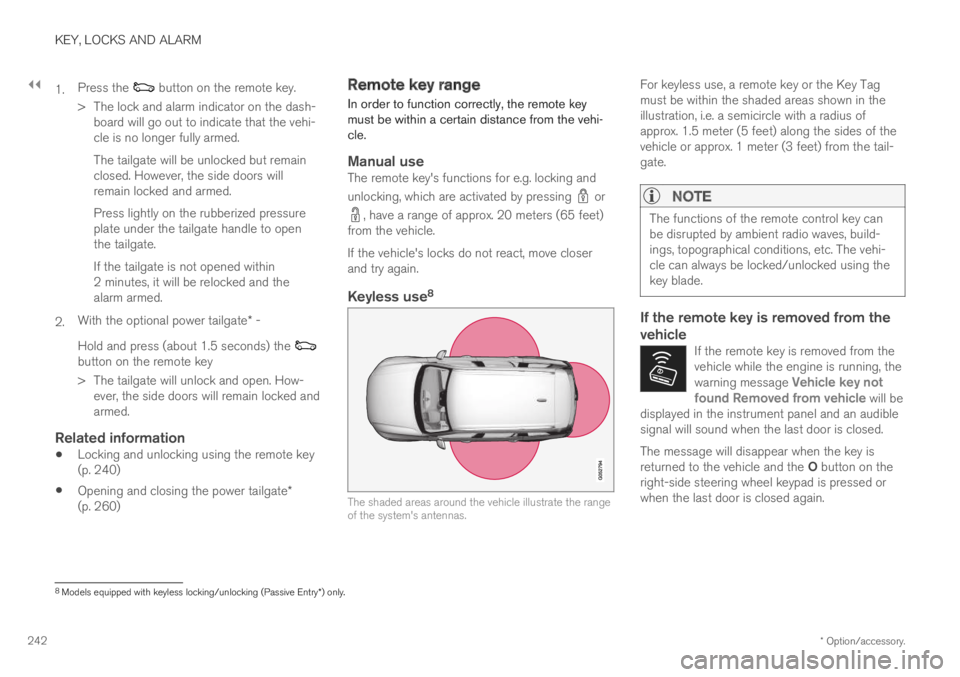
Keyless use 8
The shaded areas around the vehicle illustrate the rangeof the system's antennas.
For keyless use, a remote key or the Key Tagmust be within the shaded areas shown in theillustration, i.e. a semicircle with a radius ofapprox. 1.5 meter (5 feet) along the sides of thevehicle or approx. 1 meter (3 feet) from the tail-gate.
NOTE
The functions of the remote control key canbe disrupted by ambient radio waves, build-ings, topographical conditions, etc. The vehi-cle can always be locked/unlocked using thekey blade.
If the remote key is removed from the
vehicle
If the remote key is removed from thevehicle while the engine is running, thewarning message Vehicle key notfound Removed from vehicle will bedisplayed in the instrument panel and an audiblesignal will sound when the last door is closed.
The message will disappear when the key isreturned to the vehicle and the O button on theright-side steering wheel keypad is pressed orwhen the last door is closed again.
8
Models equipped with keyless locking/unlocking (Passive Entry * ) only.
Page 488 of 695
||
STARTING AND DRIVING
* Option/accessory.486
programmable buttons and an indicator light inthe mirror.
For more information about HomeLink®, pleasevisit www.HomeLink.com, www.youtube.com/HomeLinkGentex or call 1-800-355-3515.
Save the original remote controls for future pro-gramming (e.g. for use in another vehicle). It isalso advisable to delete the button programmingif the vehicle is sold.
Related information
Using HomeLink®* (p. 487)
Programming HomeLink®* (p. 486)
Type approval for HomeLink®* (p. 488)
Programming HomeLink®*12
Follow these instructions to program
HomeLink®, reset all programming, or programindividual buttons.
NOTE
In some vehicles, the ignition must be on or in
the "accessory position" before HomeLink®
can be programmed or used. It can be a goodidea to put new batteries in the remote con-
trol being replaced by HomeLink® for fasterprogramming and better radio signal trans-
mission. The HomeLink® buttons should bereset before programming.
WARNING
While HomeLink® is being programmed, thegarage door or gate being programmed maybe activated. Make sure that no one is nearthe door or gate during programming. Whenprogramming a garage door opener, it isadvised to park outside of the garage.
1.Point the remote control at the HomeLink®
button to be programmed and hold it about2-8 cm (1-3 inches) from the button. Do not
obstruct the HomeLink® indicator light.
Note: Some remote controls are more effec-
tive at programming HomeLink® from a dis-tance of about 15-20 cm (6-12 inches). Trymoving the remote control closer or furtheraway if you are experiencing any difficultiesprogramming.
2.Press and hold both the remote control but-
ton and the HomeLink® button to be pro-grammed.
3. Do not release the buttons until the indicatorlight has stopped flashing slowly (about oncea second) and either flashes quickly (about10 times a second) or glows steadily.
>Steady glow: Indication that program-ming is complete. Press the programmedbutton twice to activate.
Flashing quickly: The device being pro-
grammed with HomeLink® may have asecurity function that requires an extrastep. Try pressing the programmed buttontwice to see whether the programmingworks. Otherwise, continue with the fol-lowing steps.
10Certain markets only.11HomeLink and the HomeLink house symbol are registered trademarks of Gentex Corporation.12Certain markets only.
Page 490 of 695
||
STARTING AND DRIVING
* Option/accessory.488
WARNING
If you use HomeLink® to open a garagedoor or gate, be sure no one is near thegate or door while it is in motion.
Do not use HomeLink® with any garagedoor opener that lacks safety stop andreverse features as required by US fed-eral safety standards (this includes anygarage door opener model manufacturedbefore April 1, 1982). A garage door thatcannot detect an object - signaling thedoor to stop and reverse - does not meetcurrent U.S. federal safety standards. Formore information, contact HomeLink at:www.homelink.com.
Related information
HomeLink®* (p. 485)
Programming HomeLink®* (p. 486)
Type approval for HomeLink®* (p. 488)
Type approval for HomeLink®*15
FCC (USA) and IC (Canada)
This device complies with FCC rules part 15 andIndustry Canada RSS-210. Operation is subjectto the following two conditions: (1) This devicemay not cause harmful interference, and (2) Thisdevice must accept any interference that may bereceived including interference that may causeundesired operation.
WARNING
The transmitter has been tested and complieswith FCC and IC rules. Changes or modifica-tions not expressly approved by the partyresponsible for compliance could void theuser's authority to operate the device.16
Type approval for EU
Gentex Corporation hereby declares that
HomeLink® Model UAHL5 complies with theRadio equipment directive 2014/53/EU.
Wavelengths within which the radio equipmentoperates:
433.05MHz-434.79MHz <10mW E.R.P.
868.00MHz-868.60MHz <25mW E.R.P.
868.70MHz-868.20MHz <25mW E.R.P.
869.40MHz-869.65MHz <25mW E.R.P.
869.70MHz-870.00MHz <25mW E.R.P.
Certificate holder address: Gentex Corporation,600 North Centennial Street, Zeeland MI 49464,USA
For more information, see support.volvocars.com.
Related information
HomeLink®* (p. 485)
14Certain markets only.15Certain markets only.16The term "IC:" before the certification/registration number only signifies that Industry Canada technical specifications were met.
Page 494 of 695
AUDIO, MEDIA AND INTERNET
* Option/accessory.492
Audio, media and Internet
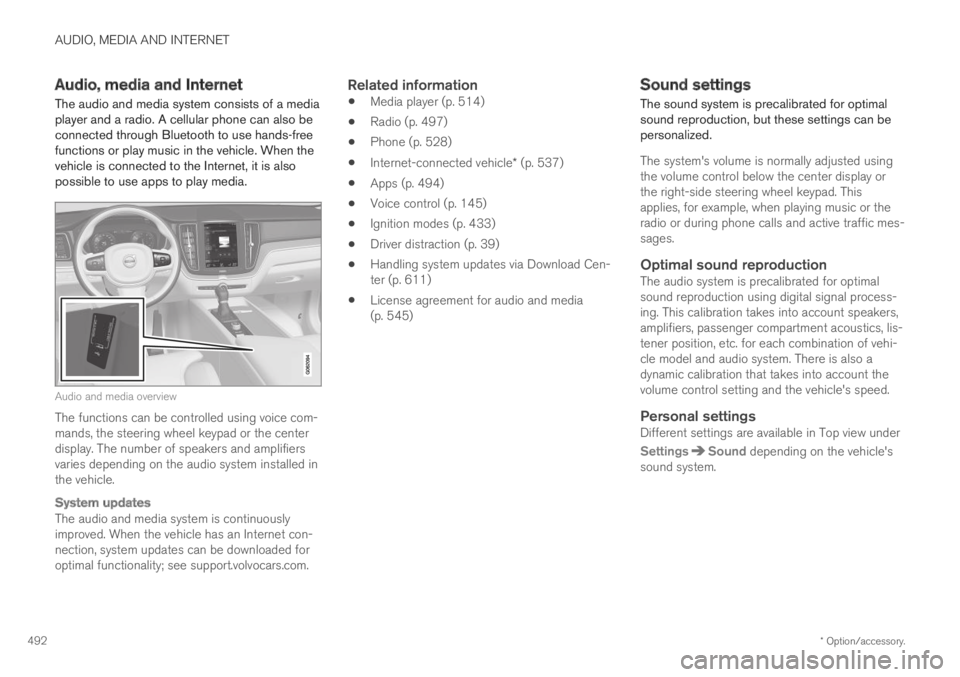
The audio and media system consists of a mediaplayer and a radio. A cellular phone can also beconnected through Bluetooth to use hands-freefunctions or play music in the vehicle. When thevehicle is connected to the Internet, it is alsopossible to use apps to play media.
Audio and media overview
The functions can be controlled using voice com-mands, the steering wheel keypad or the centerdisplay. The number of speakers and amplifiersvaries depending on the audio system installed inthe vehicle.
System updates
The audio and media system is continuouslyimproved. When the vehicle has an Internet con-nection, system updates can be downloaded foroptimal functionality; see support.volvocars.com.
Related information
Media player (p. 514)
Radio (p. 497)
Phone (p. 528)
Internet-connected vehicle* (p. 537)
Apps (p. 494)
Voice control (p. 145)
Ignition modes (p. 433)
Driver distraction (p. 39)
Handling system updates via Download Cen-ter (p. 611)
License agreement for audio and media(p. 545)
Sound settings
The sound system is precalibrated for optimalsound reproduction, but these settings can bepersonalized.
The system's volume is normally adjusted usingthe volume control below the center display orthe right-side steering wheel keypad. Thisapplies, for example, when playing music or theradio or during phone calls and active traffic mes-sages.
Optimal sound reproduction
The audio system is precalibrated for optimalsound reproduction using digital signal process-ing. This calibration takes into account speakers,amplifiers, passenger compartment acoustics, lis-tener position, etc. for each combination of vehi-cle model and audio system. There is also adynamic calibration that takes into account thevolume control setting and the vehicle's speed.
Personal settings
Different settings are available in Top view under
SettingsSound depending on the vehicle'ssound system.
Page 496 of 695
||
AUDIO, MEDIA AND INTERNET
* Option/accessory.494
High Performance Pro * (Harman
Kardon)
Seat Optimization - the sound can be opti-mized for Driver, All and Rear.
Surround - surround sound mode with levelsettings.
Tone - setting for e.g. bass, treble, equalizer,etc.
Related information
Sound settings (p. 492)
Navigating in the center display's views(p. 115)
Apps
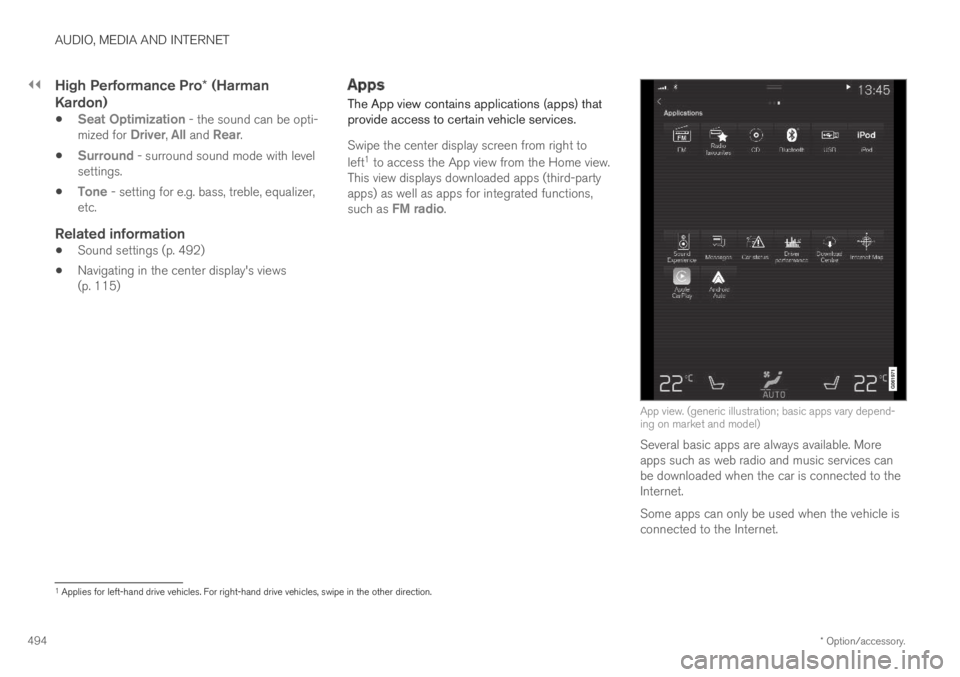
The App view contains applications (apps) thatprovide access to certain vehicle services.
Swipe the center display screen from right to
left1 to access the App view from the Home view.This view displays downloaded apps (third-partyapps) as well as apps for integrated functions,such as FM radio.
App view. (generic illustration; basic apps vary depend-ing on market and model)
Several basic apps are always available. Moreapps such as web radio and music services canbe downloaded when the car is connected to theInternet.
Some apps can only be used when the vehicle isconnected to the Internet.
1Applies for left-hand drive vehicles. For right-hand drive vehicles, swipe in the other direction.
Page 497 of 695
AUDIO, MEDIA AND INTERNET
* Option/accessory.495
Start an app by pressing the app in the centerdisplay's app view.
Related information
Download apps (p. 495)
Updating apps (p. 496)
Deleting apps (p. 496)
Apple® CarPlay®* (p. 523)
Android Auto* (p. 526)
Internet-connected vehicle* (p. 537)
Hard disk storage space (p. 544)
Terms of use and data sharing (p. 544)
Download apps
New apps can be downloaded when the vehicleis connected to the Internet.
NOTE
Data downloading can affect other servicessuch as transfer data, e.g. web radio. If theaffect on other services is experienced asproblematic, the download can be interrupted.Alternatively, it may be appropriate to switchoff or cancel other services.
NOTE
When downloading using a phone, pay extraattention to the data traffic costs.
1.Open the Download Center app in Appview.
2.Select New apps to open a list of apps thatare available but are not installed in the vehi-cle.
3.Tap on the row for an app in order to expandin the list and get more information about theapp.
4.Select Install to start the download andinstallation of the app.
>The current status of the download andinstallation will be shown.
If a download cannot be started immedi-ately, a message will be displayed. Theapp will remain in the list and it will bepossible to reattempt downloading.
Canceling a download
–Tap Abort to cancel a download in progress.
Note that only a download can be cancelled. Aninstallation cannot be cancelled once it hasbegun.
Related information
Apps (p. 494)
Updating apps (p. 496)
Deleting apps (p. 496)
Internet-connected vehicle* (p. 537)
Handling system updates via Download Cen-ter (p. 611)
Hard disk storage space (p. 544)
Page 498 of 695
AUDIO, MEDIA AND INTERNET
* Option/accessory.496
Updating apps
Apps can be updated when the vehicle is con-nected to the Internet.
NOTE
Data downloading can affect other servicessuch as transfer data, e.g. web radio. If theaffect on other services is experienced asproblematic, the download can be interrupted.Alternatively, it may be appropriate to switchoff or cancel other services.
NOTE
When downloading using a phone, pay extraattention to the data traffic costs.
If an app is being used while an update is in pro-gress, it will be restarted to complete the update.
Update all
1.Open the Download Center app in Appview.
2.Select Install all.
>The update will begin.
Update certain apps
1.Open the Download Center app in Appview.
2.Select Application updates to open a listof all available updates.
3.Find the desired app and select Install.
>The update will begin.
Related information
Apps (p. 494)
Download apps (p. 495)
Deleting apps (p. 496)
Handling system updates via Download Cen-ter (p. 611)
Internet-connected vehicle* (p. 537)
Deleting apps
When the vehicle is connected to the Internet, itis possible to uninstall apps.
If the app is being used, it must be closed beforeit can be uninstalled.
1.Open the Download Center app in Appview.
2.Select Application updates to open a listof all installed apps.
3.Find the desired app and select Uninstall tobegin uninstalling the app.
>When the app has been uninstalled, it willbe removed from the list.
Related information
Apps (p. 494)
Download apps (p. 495)
Updating apps (p. 496)
Handling system updates via Download Cen-ter (p. 611)
Internet-connected vehicle* (p. 537)