seats VOLVO XC60 TWIN ENGINE 2019 Owner's Guide
[x] Cancel search | Manufacturer: VOLVO, Model Year: 2019, Model line: XC60 TWIN ENGINE, Model: VOLVO XC60 TWIN ENGINE 2019Pages: 695, PDF Size: 14.96 MB
Page 171 of 695
WINDOWS, GLASS AND MIRRORS
* Option/accessory.169
WARNING
Make sure that no child or other passengercomes into contact with the windows as theyare closing with keyless closing*.
NOTE
One way to reduce the pulsating wind noiseheard when the rear windows are open is toalso open the front windows slightly.
NOTE
The windows cannot be opened at speedsover approx. 180 km/h (ca112 mph), but theycan be closed.
The driver is always responsible for followingapplicable traffic regulations.
Related information
Power windows (p. 167)
Pinch protection for windows and sun cur-tains (p. 166)
Reset procedure for pinch protection(p. 167)
Keyless locking and unlocking* (p. 253)
Locking and unlocking using the remote key(p. 240)
Rearview/door mirrors
The rearview mirror and door mirrors can beused to improve the driver's visibility behind thevehicle.
Rearview mirror
The rearview mirror can be easily adjusted man-ually. The rearview mirror can be equipped withHomeLink*, auto-dim* and compass*.
Door mirrors
WARNING
The door mirror on the passenger side iscurved to improve visibility. Objects in the mir-ror may appear farther away than they actuallyare.
The joystick in the drivers' door control panel isused to adjust the position of the door mirrors.There are also several automatic settings thatcan also be connected to the memory functionbuttons for the power seat*.
Related information
HomeLink®* (p. 485)
Compass* (p. 489)
Adjusting the rearview mirror dimming func-tion (p. 170)
Adjusting the door mirrors (p. 170)
Storing positions for seats, mirrors and head-up display* (p. 186)
Activating and deactivating the heated rearwindow and door mirrors (p. 221)
Page 172 of 695
WINDOWS, GLASS AND MIRRORS
* Option/accessory.170
Adjusting the rearview mirrordimming function
Bright light entering the vehicle from behind, e.g.from the headlights of following vehicles, couldreflect in the rearview mirror and door mirrorsand cause a glare. Use the dimming functionwhen light from behind is distracting.
Auto-dim
If bright light enters the vehicle from behind, thedoor mirrors will automatically dim. Auto-dim isalways active when the engine is running, exceptwhen reverse gear is engaged.
NOTE
Adjustments to the sensitivity level will not benoticeable immediately but will instead takeeffect after a short period of time.
The sensitivity level for dimming will affect boththe rearview mirror and door mirrors.
To change the dimming sensitivity level:
1.Tap Settings in the Top view in the centerdisplay.
2.Tap My CarMirrors and Convenience.
3.Under Rearview Mirror Auto Dimming,select Normal, Dark or Light.
The rearview mirror instead has two sensors -one pointing forward and one pointing rearward -
which work together to identify and eliminateglare. The forward-pointing sensor monitorsambient light, while the rearward-pointing sensormonitors light from the headlights of followingvehicles.
For the door mirrors to be equipped with auto-dim, the rearview mirror must also be equippedwith auto-dim.
NOTE
If the sensors are obstructed by e.g. a parkingpermit, transponder, sunshade or objects onthe seats or in the cargo compartment in away that prevents light from reaching the sen-sors, the auto-dim function in the door andrearview mirrors will be reduced.
Related information
Rearview/door mirrors (p. 169)
Adjusting the door mirrors (p. 170)
Adjusting the door mirrors
To improve visibility to the rear, the door mirrorsneed to be adjusted to the driver's height andseating position. There are several automaticsettings that can also be connected to the mem-ory function buttons for the power seat*.
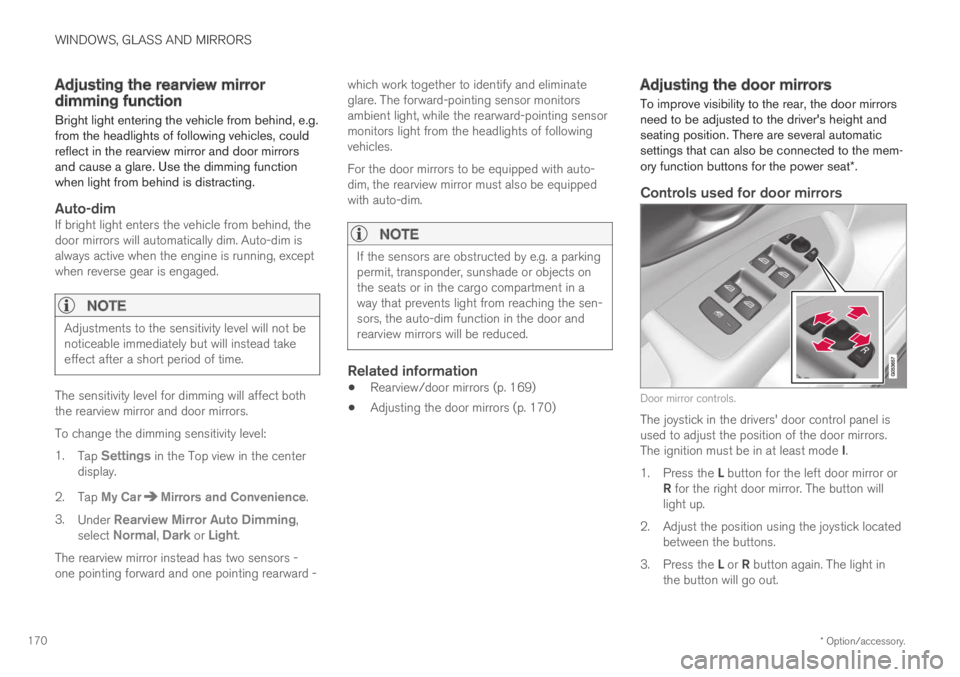
Controls used for door mirrors
Door mirror controls.
The joystick in the drivers' door control panel isused to adjust the position of the door mirrors.The ignition must be in at least mode I.
1.Press the L button for the left door mirror orR for the right door mirror. The button willlight up.
2.Adjust the position using the joystick locatedbetween the buttons.
3.Press the L or R button again. The light inthe button will go out.
Page 173 of 695
WINDOWS, GLASS AND MIRRORS
* Option/accessory.171
Automatically folding door mirrors *
The door mirrors can be automatically foldedwhen driving or parking in tight spaces.
1.Press the L and R buttons at the same time.
2. Release the buttons after about 1 second.The mirrors will automatically stop when theyare completely folded in.
Open the mirrors by pressing L and R at thesame time. The mirrors will automatically stopwhen they are completely open.
Resetting the mirrors' position
A mirror that has been moved out of positionmanually (e.g. hit or bumped into) must be electri-cally returned to its normal position for automaticfolding* to function properly.
1.Fold in the mirrors by pressing the L and Rbuttons at the same time.
2.Open them again by pressing the L and Rbuttons at the same time.
3. Repeat the above procedure as needed.
The mirrors are now reset to their original posi-tions.
Tilting when parking 3
The door mirrors can be tilted down to help givethe driver a better view along the sides of thevehicle, e.g. of the curb when parking.
–Select reverse gear and press the L or R mir-ror button.
Please note that the button may need to bepressed twice depending on settings. When thedoor mirror is tilted down, the light in the buttonwill flash. When reverse gear is engaged, thedoor mirrors will automatically start to move after3 seconds and will reach their original positionafter about 8 seconds.
Automatically tilting when parking 3
With this setting, the door mirrors will automati-cally tilt down when reverse gear is engaged. Thefolded position is preset and cannot be adjusted.To immediately return the door mirrors to theiroriginal position, press the L or R button twice.
1.Tap Settings in the center display's Topview.
2.Tap My CarMirrors and Convenience.
3.Under Exterior Mirror Tilt at Reverse,select Off, Driver, Passenger or Both toactivate/deactivate and to select which mir-ror to tilt.
Automatic folding when the vehicle is
locked *
The door mirrors can automatically fold in whenthe vehicle is locked and open when the vehicleis unlocked using the remote key.
1.Tap Settings in the center display's Topview.
2.Tap My CarMirrors and Convenience.
3.Select Fold Mirror When Locked to acti-vate/deactivate.
Related information
Rearview/door mirrors (p. 169)
Adjusting the rearview mirror dimming func-tion (p. 170)
Storing positions for seats, mirrors and head-up display* (p. 186)
Activating and deactivating the heated rearwindow and door mirrors (p. 221)
3
Only on models equipped with a power driver's seat with memory buttons * .
Page 186 of 695
SEATS AND STEERING WHEEL
* Option/accessory.184
Manual front seats
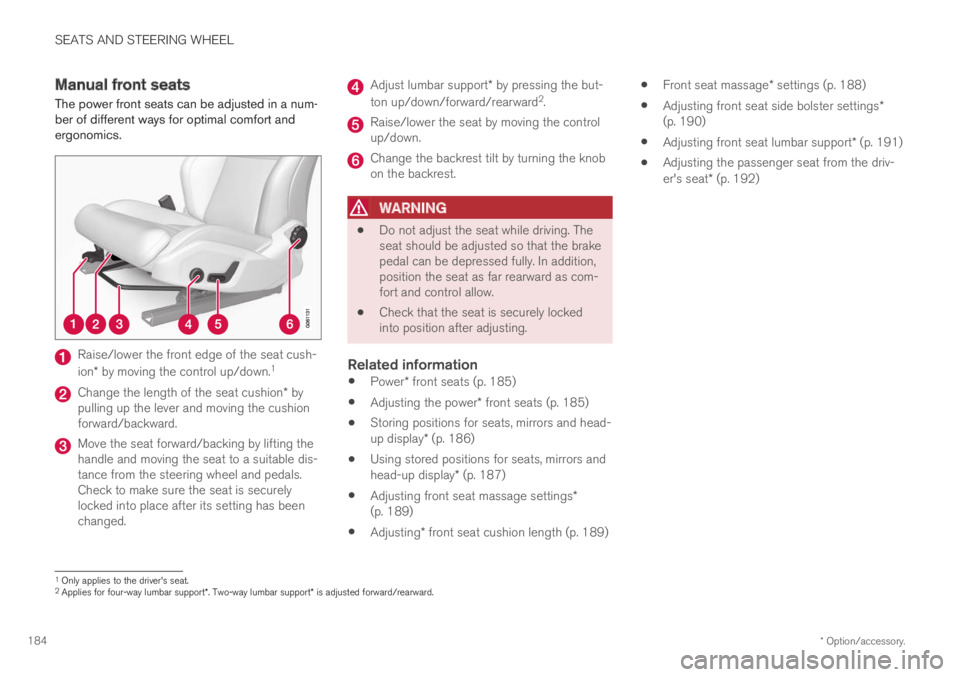
The power front seats can be adjusted in a num-ber of different ways for optimal comfort andergonomics.
Raise/lower the front edge of the seat cush-
ion* by moving the control up/down.1
Change the length of the seat cushion* bypulling up the lever and moving the cushionforward/backward.
Move the seat forward/backing by lifting thehandle and moving the seat to a suitable dis-tance from the steering wheel and pedals.Check to make sure the seat is securelylocked into place after its setting has beenchanged.
Adjust lumbar support* by pressing the but-
ton up/down/forward/rearward2.
Raise/lower the seat by moving the controlup/down.
Change the backrest tilt by turning the knobon the backrest.
WARNING
Do not adjust the seat while driving. Theseat should be adjusted so that the brakepedal can be depressed fully. In addition,position the seat as far rearward as com-fort and control allow.
Check that the seat is securely lockedinto position after adjusting.
Related information
Power* front seats (p. 185)
Adjusting the power* front seats (p. 185)
Storing positions for seats, mirrors and head-up display* (p. 186)
Using stored positions for seats, mirrors andhead-up display* (p. 187)
Adjusting front seat massage settings*(p. 189)
Adjusting* front seat cushion length (p. 189)
Front seat massage* settings (p. 188)
Adjusting front seat side bolster settings*(p. 190)
Adjusting front seat lumbar support* (p. 191)
Adjusting the passenger seat from the driv-er's seat* (p. 192)
1Only applies to the driver's seat.2Applies for four-way lumbar support*. Two-way lumbar support* is adjusted forward/rearward.
Page 187 of 695
SEATS AND STEERING WHEEL
}}
* Option/accessory.185
Power* front seats
The power front seats can be adjusted in a num-ber of different ways for optimal comfort andergonomics. The power seat can be moved for-ward/backward and up/down. The height andlength* of the seat cushion and the tilt of thebackrest can be adjusted. Lumbar support* can
be adjusted up, down, forward and backward3.
The power seats can be adjusted for a certainperiod of time after the door is unlocked withoutthe engine running. The seats can always beadjusted while the engine is running. They canalso be adjusted for a short period after theengine is turned off.
CAUTION
The power seats have an overload protectorthat is triggered if a seat is blocked by anyobject. If this occurs, remove the object andattempt to adjust the seat again.
Related information
Manual front seats (p. 184)
Adjusting the power* front seats (p. 185)
Storing positions for seats, mirrors and head-up display* (p. 186)
Using stored positions for seats, mirrors andhead-up display* (p. 187)
Adjusting front seat massage settings*(p. 189)
Adjusting* front seat cushion length (p. 189)
Front seat massage* settings (p. 188)
Adjusting front seat side bolster settings*(p. 190)
Adjusting front seat lumbar support* (p. 191)
Adjusting the passenger seat from the driv-er's seat* (p. 192)
Adjusting the power* front seats
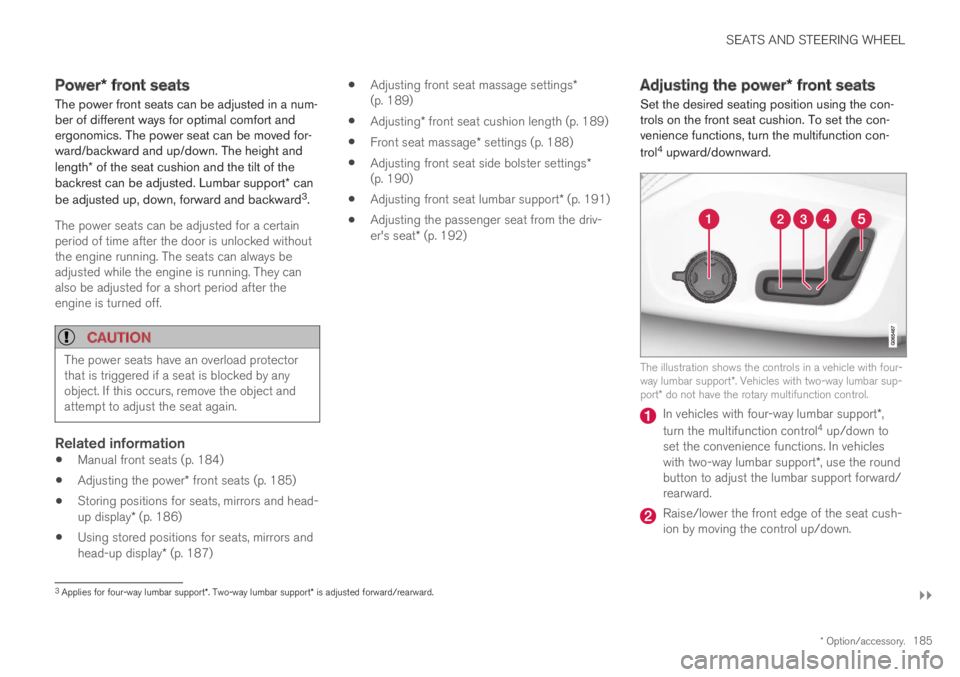
Set the desired seating position using the con-trols on the front seat cushion. To set the con-venience functions, turn the multifunction con-
trol4 upward/downward.
The illustration shows the controls in a vehicle with four-way lumbar support*. Vehicles with two-way lumbar sup-port* do not have the rotary multifunction control.
In vehicles with four-way lumbar support*,
turn the multifunction control4 up/down toset the convenience functions. In vehicleswith two-way lumbar support*, use the roundbutton to adjust the lumbar support forward/rearward.
Raise/lower the front edge of the seat cush-ion by moving the control up/down.
3Applies for four-way lumbar support*. Two-way lumbar support* is adjusted forward/rearward.
Page 188 of 695
||
SEATS AND STEERING WHEEL
* Option/accessory.186
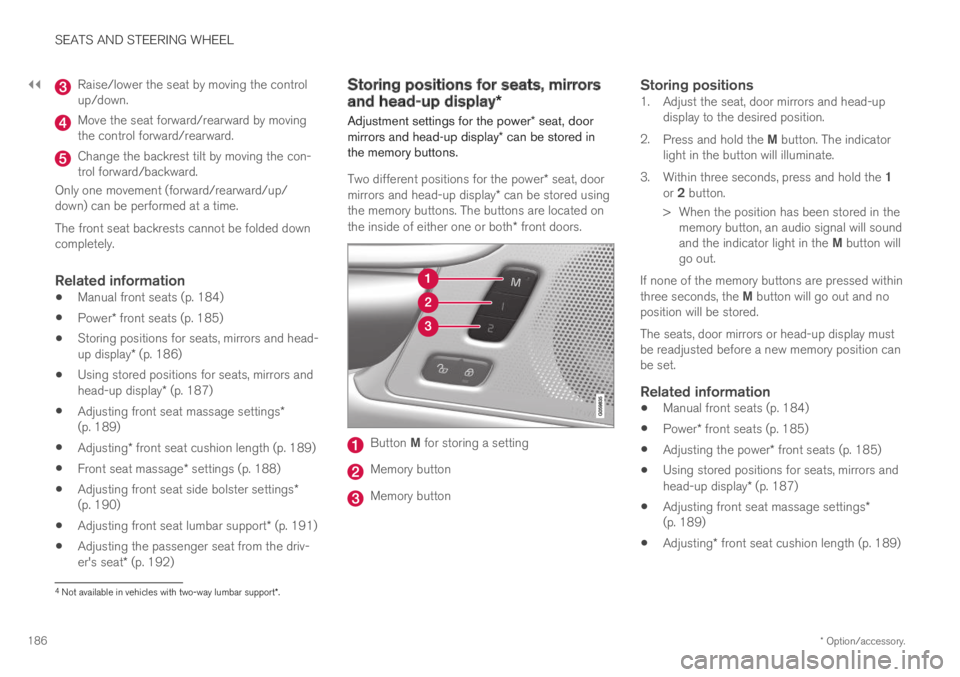
Raise/lower the seat by moving the controlup/down.
Move the seat forward/rearward by movingthe control forward/rearward.
Change the backrest tilt by moving the con-trol forward/backward.
Only one movement (forward/rearward/up/down) can be performed at a time.
The front seat backrests cannot be folded downcompletely.
Related information
Manual front seats (p. 184)
Power* front seats (p. 185)
Storing positions for seats, mirrors and head-up display* (p. 186)
Using stored positions for seats, mirrors andhead-up display* (p. 187)
Adjusting front seat massage settings*(p. 189)
Adjusting* front seat cushion length (p. 189)
Front seat massage* settings (p. 188)
Adjusting front seat side bolster settings*(p. 190)
Adjusting front seat lumbar support* (p. 191)
Adjusting the passenger seat from the driv-er's seat* (p. 192)
Storing positions for seats, mirrors
and head-up display*
Adjustment settings for the power* seat, doormirrors and head-up display* can be stored inthe memory buttons.
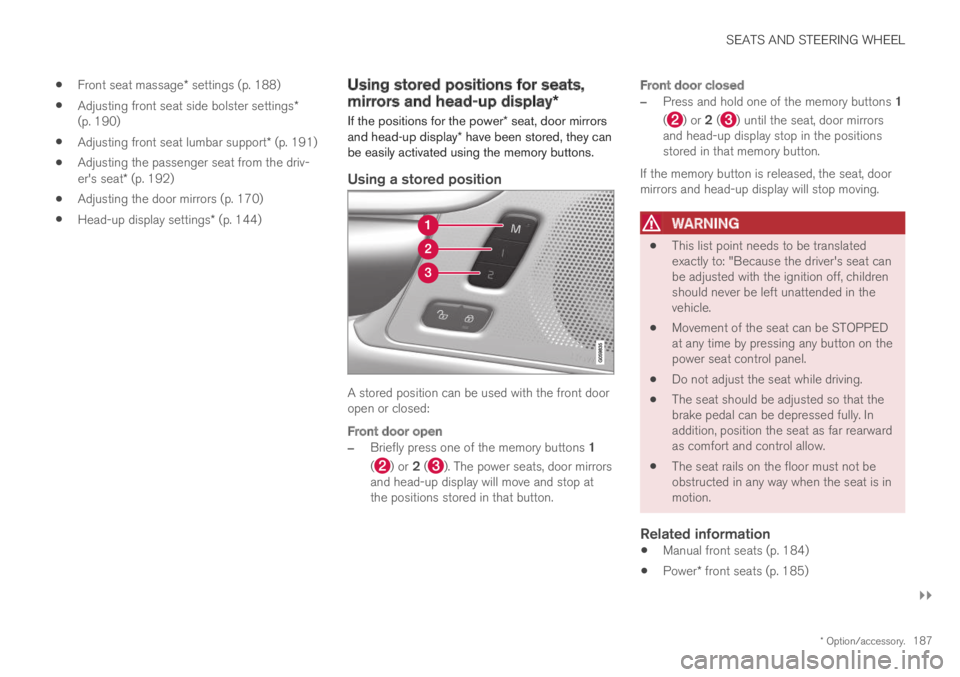
Two different positions for the power* seat, doormirrors and head-up display* can be stored usingthe memory buttons. The buttons are located onthe inside of either one or both* front doors.
Button M for storing a setting
Memory button
Memory button
Storing positions
1. Adjust the seat, door mirrors and head-updisplay to the desired position.
2.Press and hold the M button. The indicatorlight in the button will illuminate.
3.Within three seconds, press and hold the 1or 2 button.
> When the position has been stored in thememory button, an audio signal will soundand the indicator light in the M button willgo out.
If none of the memory buttons are pressed withinthree seconds, the M button will go out and noposition will be stored.
The seats, door mirrors or head-up display mustbe readjusted before a new memory position canbe set.
Related information
Manual front seats (p. 184)
Power* front seats (p. 185)
Adjusting the power* front seats (p. 185)
Using stored positions for seats, mirrors andhead-up display* (p. 187)
Adjusting front seat massage settings*(p. 189)
Adjusting* front seat cushion length (p. 189)
4Not available in vehicles with two-way lumbar support*.
Page 189 of 695
SEATS AND STEERING WHEEL
}}
* Option/accessory.187
Front seat massage* settings (p. 188)
Adjusting front seat side bolster settings*(p. 190)
Adjusting front seat lumbar support* (p. 191)
Adjusting the passenger seat from the driv-er's seat* (p. 192)
Adjusting the door mirrors (p. 170)
Head-up display settings* (p. 144)
Using stored positions for seats,
mirrors and head-up display*
If the positions for the power* seat, door mirrorsand head-up display* have been stored, they canbe easily activated using the memory buttons.
Using a stored position
A stored position can be used with the front dooropen or closed:
Front door open
–Briefly press one of the memory buttons 1
() or 2 (). The power seats, door mirrorsand head-up display will move and stop atthe positions stored in that button.
Front door closed
–Press and hold one of the memory buttons 1
() or 2 () until the seat, door mirrorsand head-up display stop in the positionsstored in that memory button.
If the memory button is released, the seat, doormirrors and head-up display will stop moving.
WARNING
This list point needs to be translatedexactly to: "Because the driver's seat canbe adjusted with the ignition off, childrenshould never be left unattended in thevehicle.
Movement of the seat can be STOPPEDat any time by pressing any button on thepower seat control panel.
Do not adjust the seat while driving.
The seat should be adjusted so that thebrake pedal can be depressed fully. Inaddition, position the seat as far rearwardas comfort and control allow.
The seat rails on the floor must not beobstructed in any way when the seat is inmotion.
Related information
Manual front seats (p. 184)
Power* front seats (p. 185)
Page 190 of 695
SEATS AND STEERING WHEEL
* Option/accessory.188
Adjusting the power* front seats (p. 185)
Storing positions for seats, mirrors and head-up display* (p. 186)
Adjusting front seat massage settings*(p. 189)
Adjusting* front seat cushion length (p. 189)
Front seat massage* settings (p. 188)
Adjusting front seat side bolster settings*(p. 190)
Adjusting front seat lumbar support* (p. 191)
Adjusting the passenger seat from the driv-er's seat* (p. 192)
Adjusting the door mirrors (p. 170)
Head-up display settings* (p. 144)
Front seat massage* settings
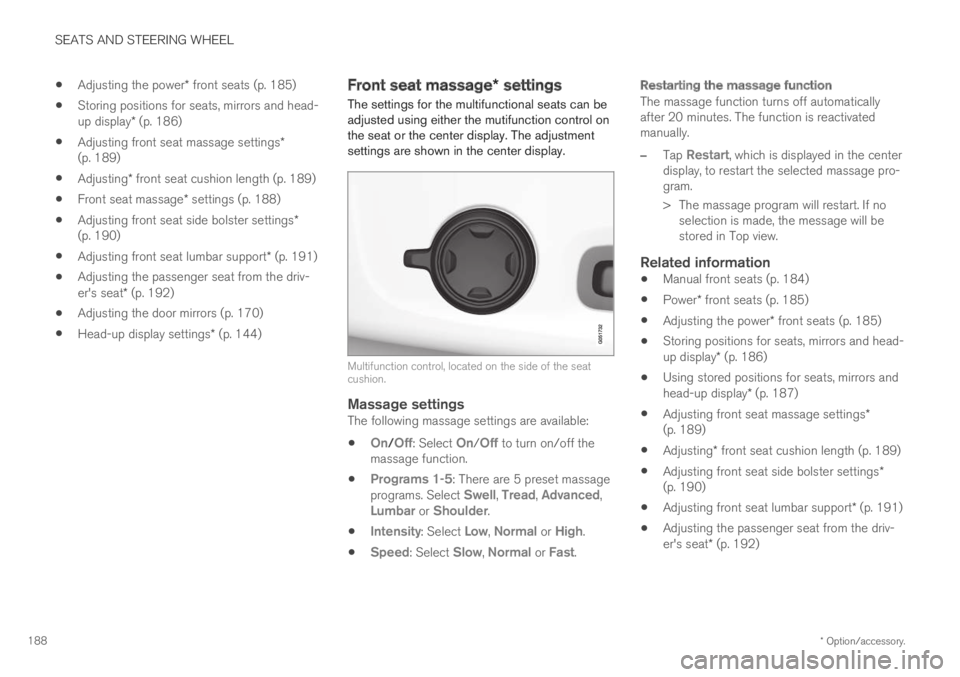
The settings for the multifunctional seats can beadjusted using either the mutifunction control onthe seat or the center display. The adjustmentsettings are shown in the center display.
Multifunction control, located on the side of the seatcushion.
Massage settings
The following massage settings are available:
On/Off: Select On/Off to turn on/off themassage function.
Programs 1-5: There are 5 preset massageprograms. Select Swell, Tread, Advanced,Lumbar or Shoulder.
Intensity: Select Low, Normal or High.
Speed: Select Slow, Normal or Fast.
Restarting the massage function
The massage function turns off automaticallyafter 20 minutes. The function is reactivatedmanually.
–Tap Restart, which is displayed in the centerdisplay, to restart the selected massage pro-gram.
>The massage program will restart. If noselection is made, the message will bestored in Top view.
Related information
Manual front seats (p. 184)
Power* front seats (p. 185)
Adjusting the power* front seats (p. 185)
Storing positions for seats, mirrors and head-up display* (p. 186)
Using stored positions for seats, mirrors andhead-up display* (p. 187)
Adjusting front seat massage settings*(p. 189)
Adjusting* front seat cushion length (p. 189)
Adjusting front seat side bolster settings*(p. 190)
Adjusting front seat lumbar support* (p. 191)
Adjusting the passenger seat from the driv-er's seat* (p. 192)
Page 191 of 695
SEATS AND STEERING WHEEL
}}
* Option/accessory.189
Adjusting front seat massage
settings*
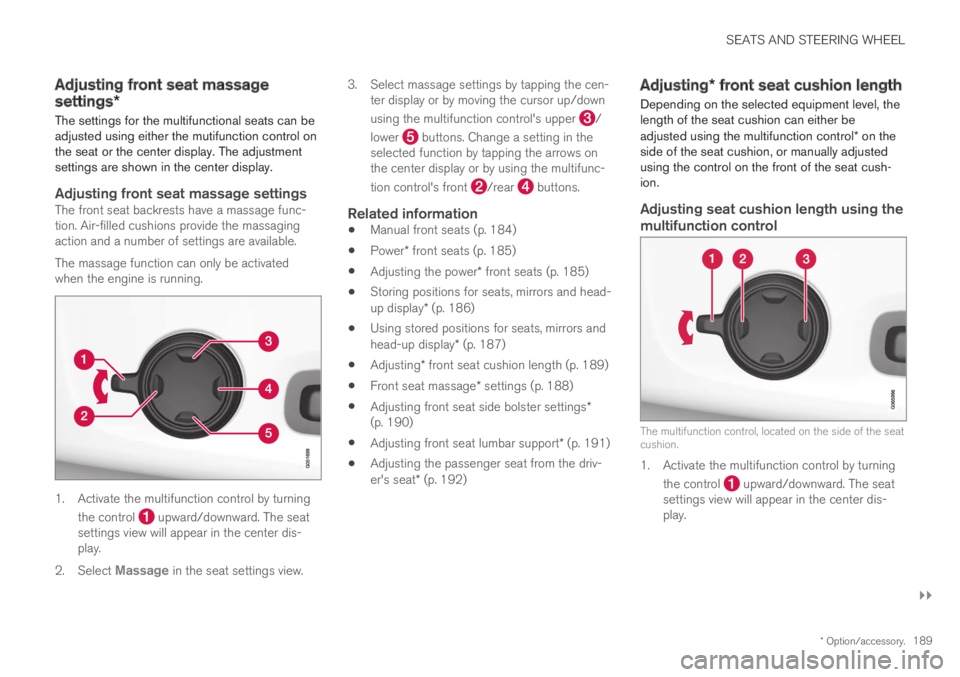
The settings for the multifunctional seats can beadjusted using either the mutifunction control onthe seat or the center display. The adjustmentsettings are shown in the center display.
Adjusting front seat massage settings
The front seat backrests have a massage func-tion. Air-filled cushions provide the massagingaction and a number of settings are available.
The massage function can only be activatedwhen the engine is running.
1. Activate the multifunction control by turning
the control upward/downward. The seatsettings view will appear in the center dis-play.
2.Select Massage in the seat settings view.
3.Select massage settings by tapping the cen-ter display or by moving the cursor up/down
using the multifunction control's upper /
lower buttons. Change a setting in theselected function by tapping the arrows onthe center display or by using the multifunc-
tion control's front /rear buttons.
Related information
Manual front seats (p. 184)
Power* front seats (p. 185)
Adjusting the power* front seats (p. 185)
Storing positions for seats, mirrors and head-up display* (p. 186)
Using stored positions for seats, mirrors andhead-up display* (p. 187)
Adjusting* front seat cushion length (p. 189)
Front seat massage* settings (p. 188)
Adjusting front seat side bolster settings*(p. 190)
Adjusting front seat lumbar support* (p. 191)
Adjusting the passenger seat from the driv-er's seat* (p. 192)
Adjusting* front seat cushion length
Depending on the selected equipment level, thelength of the seat cushion can either beadjusted using the multifunction control* on theside of the seat cushion, or manually adjustedusing the control on the front of the seat cush-ion.
Adjusting seat cushion length using the
multifunction control
The multifunction control, located on the side of the seatcushion.
1. Activate the multifunction control by turning
the control upward/downward. The seatsettings view will appear in the center dis-play.
Page 192 of 695
||
SEATS AND STEERING WHEEL
* Option/accessory.190
2.Select Cushion extension in the seat set-tings view.
Push in the front part of the four-way but-
ton to extend the seat cushion.
Press the rear part of the four-way button
to shorten the seat cushion.
Manually adjusting seat cushion length
Control for adjusting seat cushion.
1.Grasp the handle on the front of the seatand pull upward.
2.Adjust the length of the seat cushion.
3. Release the handle and make sure the seatcushion locks into position.
Related information
Manual front seats (p. 184)
Power* front seats (p. 185)
Adjusting the power* front seats (p. 185)
Storing positions for seats, mirrors and head-up display* (p. 186)
Using stored positions for seats, mirrors andhead-up display* (p. 187)
Adjusting front seat massage settings*(p. 189)
Front seat massage* settings (p. 188)
Adjusting front seat side bolster settings*(p. 190)
Adjusting front seat lumbar support* (p. 191)
Adjusting the passenger seat from the driv-er's seat* (p. 192)
Adjusting front seat side bolster
settings*
Enhance comfort in the front seat by adjustingthe sides of the backrest.
Multifunction control, located on the side of the seatcushion.
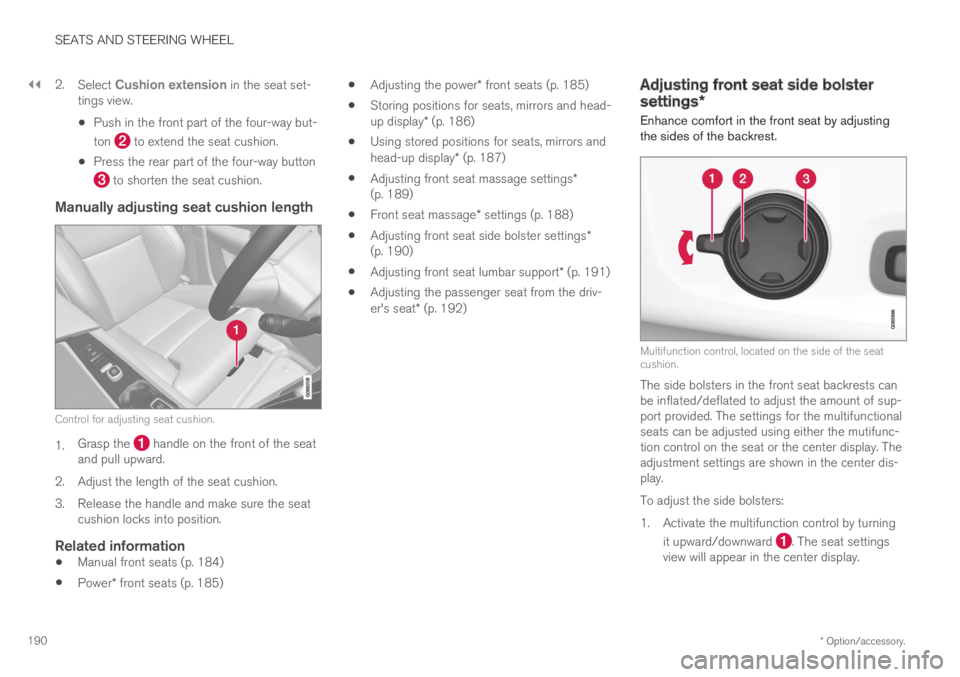
The side bolsters in the front seat backrests canbe inflated/deflated to adjust the amount of sup-port provided. The settings for the multifunctionalseats can be adjusted using either the mutifunc-tion control on the seat or the center display. Theadjustment settings are shown in the center dis-play.
To adjust the side bolsters:
1.Activate the multifunction control by turning
it upward/downward . The seat settingsview will appear in the center display.