Storage VOLVO XC60 TWIN ENGINE 2020 Owners Manual
[x] Cancel search | Manufacturer: VOLVO, Model Year: 2020, Model line: XC60 TWIN ENGINE, Model: VOLVO XC60 TWIN ENGINE 2020Pages: 687, PDF Size: 14.65 MB
Page 11 of 687

9
Activating or deactivating Park Assist*
363
Park Assist limitations 363
Park Assist symbols and messages 365
Park Assist Camera *
366
Location and field of vision of Park Assist Cameras * 367
Park Assist Camera trajectory lines *
369
Park Assist sensor field 371
Activating Park Assist Camera 372
Park Assist Camera symbols and messages 374
Park Assist Pilot *
375
Types of parking with Park Assist Pilot * 376
Using Park Assist Pilot *
377
Leaving a parallel parking spacewith Park Assist Pilot *379
Park Assist Pilot * limitations
380
Park Assist Pilot * messages
382
HYBRID INFORMATION
General information about Twin Engine 384
Charging the hybrid battery 385
Charging current 387
Charge cable 387
Charging cable residual current device 389
Charging cable temperature moni-toring 390
Opening and closing the chargingsocket cover 390
Initiating hybrid battery charging 390
Charging status in the vehicle'scharging socket 392
Charging status in the chargingcable's charging module 393
Charging status in the instrumentpanel 394
Stopping hybrid battery charging 396
Twin Engine symbols and mes-sages in the instrument panel 397
Long-term storage of vehicleswith hybrid batteries 399
STARTING AND DRIVING
Starting the vehicle
402
Switching off the vehicle 404
Ignition modes 405
Selecting ignition mode 406
Brake functions 407
Brakes 407
Brake Assist System 409
Braking on wet roads 410
Braking on salted roads 410
Maintenance of the brake system 410
Parking brake 411
Activating and deactivating the parking brake 411
Settings for automatically activat-ing the parking brake 413
Parking on a hill 413
Parking brake malfunction 413
Auto-hold brakes 414
Activating and deactivating Auto-hold at a standstill 415
Hill Start Assist 416
Braking assist after a collision 416
Transmission 416
Automatic transmission 417
Gear selector positions for auto-matic transmissions 418
Page 14 of 687

12
Connecting the vehicle to the Inter- net via a phone (Wi-Fi)517
Connecting the vehicle to the Inter-net via vehicle modem (SIM card) 518
Vehicle modem settings 519
Sharing Internet from the vehiclevia Wi-Fi hotspot (tethering) 520
No or poor Internet connection 521
Deleting Wi-Fi networks 521
Wi-Fi technology and security 522
Terms of use and data sharing 522
Activating and deactivating datasharing 523
Data sharing for services 523
Hard disk storage space 524
License agreement for audio and media 525
VOLVO ON CALL
Planning and scheduling vehicle charging with the Volvo On Call app536
WHEELS AND TIRES
Tires
538
Tire direction of rotation 540
Tread wear indicator 541
Tire terminology 541
Tire sidewall designations 542
Uniform Tire Quality Grading 544
Checking tire pressure 545
Adjusting tire pressure 546
Recommended tire pressure 547
Tire pressure monitoring system *
547
Saving a new inflation pressure in the monitoring system *549
Viewing tire pressure status in thecenter display * 550
Action when warned of low tire pressure 551
When changing wheels 552
Tool kit 552
Jack *
553
Wheel bolts 553
Removing a wheel 554
Installing a wheel 556
Spare wheel 557
Handling spare tires 558
Snow tires 559
Page 15 of 687

13
Snow chains560
Tire sealing system 561
Using the tire sealing system 562
Inflate tires with the compressor included in the tire sealing system 565
Determining the vehicle's permit-ted weight 566
LOADING, STORAGE AND PASSENGER COMPARTMENT
Passenger compartment interior
570
Tunnel console 571
Electrical outlets 572
Using the electrical outlets 574
Using the glove compartment 575
Sun visors 577
Cargo compartment 577
Loading recommendations 577
Roof loads and load carriers 579
Grocery bag holders 579
Load anchoring eyelets 580
Rear seat ski hatch 580
Installing and removing the cargo compartment cover * 581
Operating the cargo compartmentcover * 583
Installing and removing the steelcargo grid * 584
Installing and removing the cargo net *
586
MAINTENANCE AND SERVICE
Volvo's service program
590
Data transfer between vehicle and workshop over Wi-Fi 593
Download Center 593
Handling system updates viaDownload Center 594
Vehicle status 595
Scheduling service and repairs 595
Sending vehicle information to theworkshop 596
Hoisting the vehicle 597
Climate control system service 599
Replacing a windshield with head- up display * 599
Opening and closing the hood 599
Engine compartment overview 601
Engine oil 602
Checking and filling engine oil 603
Refilling coolant 604
Replacing bulbs 606
Start battery 607
Hybrid battery 611
Battery symbols 612
Battery recycling 612
Fuses and fuseboxes 613
Replacing fuses 613
Page 169 of 687

LIGHTING
* Option/accessory.167
lighting can be adjusted in the center display and also fine-tuned using the thumb wheel inthe dashboard.
Lighting in the door storage
compartments
Lighting in the door storage compartmentscomes on when the doors are opened andgoes out when the vehicle is locked. Thebrightness can be adjusted using the thumbwheel in the dashboard.
Lighting in the tunnel console's front
cup holder
The lighting in front console cup holdersswitches on when the vehicle is unlocked andoff when the vehicle is locked. The brightnesscan be adjusted using the thumb wheel in thedashboard.
Related information
Adjusting interior lighting (p. 167)
Lighting control and panel (p. 156)
Ignition modes (p. 405)
Passenger compartment interior (p. 570)
Adjusting interior lighting
Illumination in the vehicle varies depending on ignition mode. The interior lighting can beadjusted with a thumb wheel in the dash-board and certain light functions can also beadjusted via the center display.
The thumb wheel on the dashboard to the left of thesteering wheel can be usedto adjust the brightness ofthe display lighting, instru-ment lights, ambient lighting and mood lighting *.
Adjust ambient decor lighting1.
Tap Settings in the Top view in the center
display.
2. Tap
My CarLights and LightingInterior Lighting.
3. Choose from among the following set- tings:
Under
Ambient Light Intensity, selectOff, Low or High.
Under
Ambient Light Level, selectReduced or Full.
Adjusting mood lighting
*The vehicle is equipped with several LEDs that provide faint lighting in various colors. Thislighting is on when the engine is running.
Changing the brightness
1.
Tap Settings in the Top view in the center
display.
2. Tap
My CarLights and Lighting
Interior LightingInterior Mood
Lighting.
3. Under
Interior Mood Light Intensity,
select Off, Low or High.
Changing the color of the light
1. Tap Settings in the Top view in the center
display.
2. Tap
My CarLights and Lighting
Interior LightingInterior Mood
Lighting.
3. Choose
By Temperature or By Color to
change the color of the light. If
By Temperature is selected, the light
will change according to the temperature set for the passenger compartment. If
By Color is selected, the subcategoryTheme Colors can be used to make fur-
ther adjustments.
Related information
Interior Lighting (p. 165)
Adjusting light functions via the center display (p. 157)
Ignition modes (p. 405)
Page 387 of 687
HYBRID INFORMATION
}}
385
Factors affecting electric motor range (p. 439)
Automatic transmission (p. 417)
Towing using a towline (p. 461)
Charging the hybrid battery
In addition to the conventional fuel tank, your vehicle is also equipped with a rechargeablelithium-ion hybrid battery.
WARNING
California Proposition 65 Operating, servicing and maintaining a pas- senger vehicle can expose you to chemi-cals including engine exhaust, carbon mon-oxide, phthalates, and lead, which areknown to the State of California to causecancer and birth defects or other reproduc-tive harm. To minimize exposure, avoidbreathing exhaust, do not idle the engineexcept as necessary, service your vehicle ina well ventilated area and wear gloves orwash your hands frequently when servicingyour vehicle. For more information go towww.P65Warnings.ca.gov/passenger-vehicle.
The hybrid battery can be recharged using the charging cable stored in a storage space in thecargo compartment.
WARNING
The hybrid electrical system in your vehicle uses high voltage electrical current. Anydamage to this system or to the hybrid bat-tery may result in the danger of overheat-ing, fire, or serious injury. If the vehicle isinvolved in a collision or subjected to flood-ing, fire, etc., have it inspected by a trainedand qualified Volvo service technician. Priorto this inspection, the vehicle should beparked outdoors at a safe distance fromany building or potentially flammable mate-rials.
The hybrid battery's charging time depends on the charging current used.
NOTE
The capacity of the hybrid battery dimin- ishes somewhat with age and use, whichcould result in increased use of the gaso-line engine and consequently, slightlyhigher fuel consumption.
WARNING
If the hybrid battery needs to be replaced, this may only be done by a Volvo retailer orauthorized Volvo workshop.
Page 388 of 687

||
HYBRID INFORMATION
386
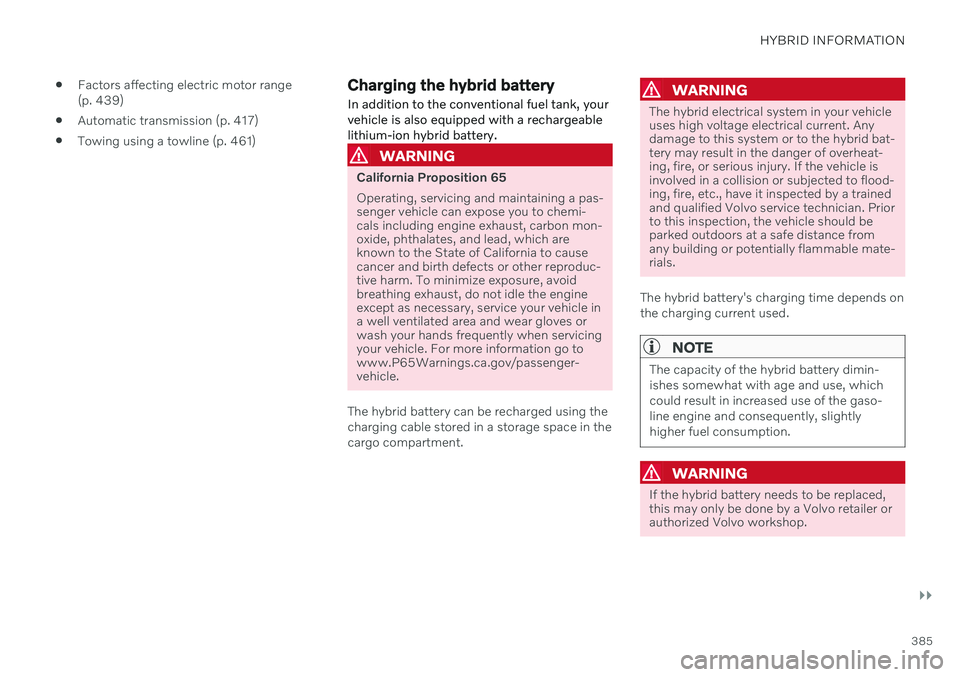
Charging cable handle and charging socket.
Charging status is indicated in three ways:
The indicator lights in the charging module (the unit connected to the wall outlet).
Indicator light in the vehicle's chargingsocket.
Images and text in the instrument panel.
The start battery is charged while the hybridbattery is charging and stops charging whenthe hybrid battery is fully charged. If the hybrid battery's temperature is below -10 ºC (14 ºF) or above 40 ºC (104 ºF), some
of the vehicle's functions may be reduced ornot available at all. The electric motor cannot be used if the bat- tery's temperature is too low or too high. If thePURE drive mode is selected, the gasolineengine will start.
Charging using the gasoline engine
The vehicle generates electrical current to charge the battery, e.g. when the driver lightly presses the brakepedal or when engine braking is used on down-grades.
The vehicle can also generate current to the hybrid battery to charge it. The hybrid battery can also be recharged by lightly depressing the brake pedal, i.e.during light braking. This converts thevehicle's kinetic energy to electricalenergy, which is used to charge the hybridbattery.
In gear position
B, the electric motor
brakes the vehicle when the acceleratorpedal is released and the hybrid battery isrecharged at the same time.
The combustion engine can also helprecharge the hybrid battery.
Related information
Charge cable (p. 387)
Charging current (p. 387)
Opening and closing the charging socketcover (p. 390)
Initiating hybrid battery charging (p. 390)
Stopping hybrid battery charging (p. 396)
Charging status in the charging cable'scharging module (p. 393)
Charging status in the vehicle's chargingsocket (p. 392)
Charging status in the instrument panel(p. 394)
Twin Engine symbols and messages in theinstrument panel (p. 397)
Automatic transmission (p. 417)
Changing drive mode (p. 428)
Long-term storage of vehicles with hybridbatteries (p. 399)
Page 389 of 687

HYBRID INFORMATION
}}
387
Charging current Charging current is used to charge the hybrid battery and precondition the vehicle. Charg-ing is performed by connecting a chargingcable between the vehicle's charging socketand a 120/240 V electrical socket (alternat-ing current).
When the charging cable is activated, a mes- sage will be displayed in the instrument paneland an indicator light in the vehicle's chargingsocket will illuminate. Charging current is pri-marily used for battery charging, but is alsoused for preconditioning. The vehicle's startbattery is charged along with the hybrid bat-tery.
CAUTION
Never detach the charging cable from the 120/240 V outlet (AC, alternating current)while charging is in progress – the120/240 V outlet could be damaged insuch circumstances. Always interruptcharging first and then disconnect thecharging cable – first from the vehicle'scharging socket and then from the120/240 V outlet.
NOTE
In extremely cold or hot weather, part of the charging current is used to heat/cool the hybrid battery and the passen-ger compartment, resulting in a longercharging time.
The charging time is longer if precondi-tioning has been selected. The timerequired depends primarily on theambient temperature.
FuseThere are normally several 120/240 V power consumers in one fuse circuit, which meansthat more than one power consumer (e.g.lighting, vacuum cleaner, electric drill, etc.)may use the same fuse.
Related information
Charge cable (p. 387)
Charging status in the instrument panel(p. 394)
Charging status in the vehicle's chargingsocket (p. 392)
Starting and stopping preconditioning(p. 226)
Stopping hybrid battery charging (p. 396)
Charge cable
The charging cable is used to recharge your vehicle's hybrid battery.
The charging cable is stored in a storage compart- ment under the cargo compartment floor.
WARNING
Only use the charging cable provided with your vehicle or a replacement cable pur-chased from a Volvo retailer.
Specifications, charging cable Enclosure class Compliance IP67
SAE J1772
Ambient tempera- ture -32
ºC to 50 ºC
(-25 ºF till 122 ºF)
Page 393 of 687
HYBRID INFORMATION
}}
391
WARNING
The charging cable must be grounded when in use. It is equipped with a cordwith a grounding conductor and agrounding plug. The plug must beinserted into an appropriate outlet thatis properly installed and grounded inaccordance with all local codes andordinances and is not damaged in anyway.
Children should be supervised when inthe vicinity of the charging cable whenit is plugged in.
High voltage is present in your electricmeter housing and power distributionservice panel. Contact with high volt-age can cause death or serious per-sonal injury.
Do not use the charging cable if it isdamaged in any way. A damaged ormalfunctioning charging cable mayonly be repaired by a workshop – anauthorized Volvo workshop is recom-mended.
Always position the charging cable sothat it will not be driven over, steppedon, tripped over or otherwise damaged,or cause personal injury.
Disconnect the charger from the walloutlet before cleaning it.
Never connect the charging cable to an extension cord or a multiple plugsocket.
Also, refer to the manufacturer's instruc- tions for using the charging cable and itscomponents.
CAUTION
Make sure that the 120/240 V outlet (AC, alternating current) has a power capacitysufficient for charging electric vehicles. Ifyou are uncertain of the capacity, have theoutlet checked by a licensed electrician.
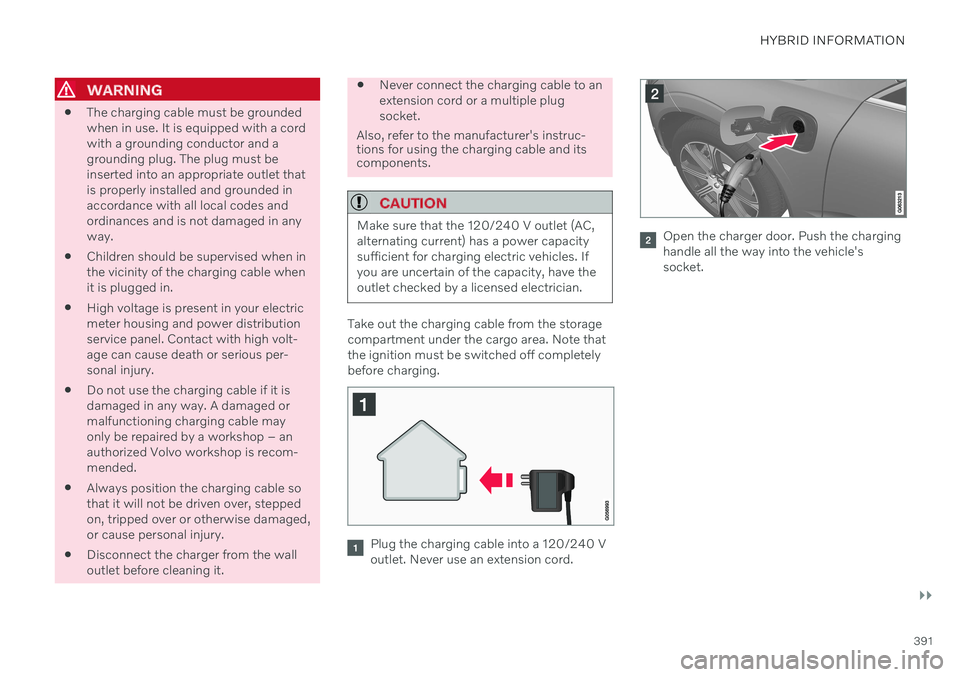
Take out the charging cable from the storage compartment under the cargo area. Note thatthe ignition must be switched off completelybefore charging.
Plug the charging cable into a 120/240 V outlet. Never use an extension cord.
Open the charger door. Push the charging handle all the way into the vehicle'ssocket.
Page 398 of 687
HYBRID INFORMATION
* Option/accessory.
396
Stopping hybrid battery charging To stop charging of the hybrid battery, unlock the vehicle, unplug the charging cable fromthe vehicle's charging socket and thenunplug the cable from the 120/240 V outlet(alternating current).
CAUTION
Before the charging cable is removed from the vehicle's charging socket, the vehiclemust be unlocked using the unlock buttonon the remote key. This must be done evenif the vehicle's doors are already unlocked.If the vehicle is not unlocked using theunlock button, the charging cable or sys-tem may be damaged.
NOTE
Always unlock the vehicle so that charging is cut off before the connection to the120/240 V outlet (AC, alternating current)is disconnected. Note that the chargingcable must be disconnected from the vehi-cle's charging socket before it is discon-nected from the 120/240 V outlet, partlyto prevent damage to the system and partyto prevent unintentional interruption ofcharging.
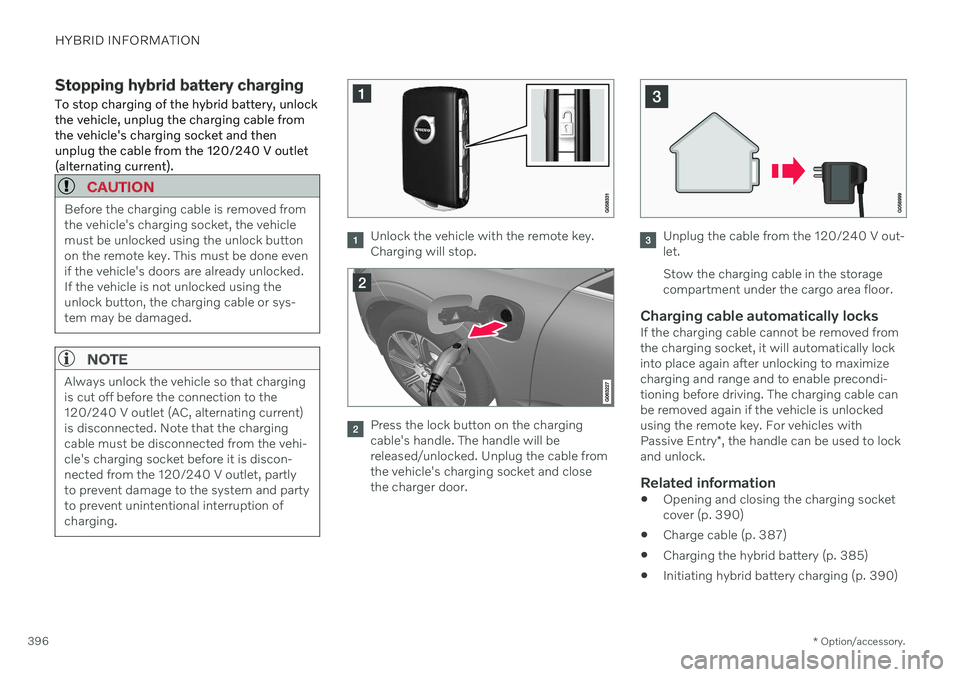
Unlock the vehicle with the remote key. Charging will stop.
Press the lock button on the charging cable's handle. The handle will bereleased/unlocked. Unplug the cable fromthe vehicle's charging socket and closethe charger door.
Unplug the cable from the 120/240 V out- let. Stow the charging cable in the storage compartment under the cargo area floor.
Charging cable automatically locksIf the charging cable cannot be removed fromthe charging socket, it will automatically lockinto place again after unlocking to maximizecharging and range and to enable precondi-tioning before driving. The charging cable canbe removed again if the vehicle is unlockedusing the remote key. For vehicles with Passive Entry *, the handle can be used to lock
and unlock.
Related information
Opening and closing the charging socket cover (p. 390)
Charge cable (p. 387)
Charging the hybrid battery (p. 385)
Initiating hybrid battery charging (p. 390)
Page 401 of 687
HYBRID INFORMATION
399
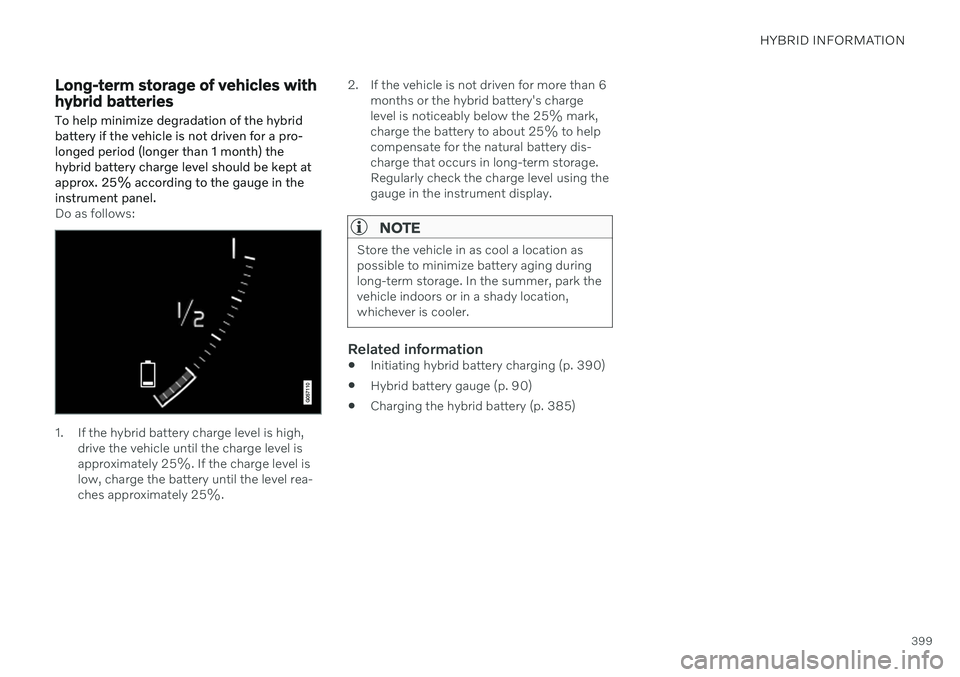
Long-term storage of vehicles with hybrid batteries To help minimize degradation of the hybrid battery if the vehicle is not driven for a pro-longed period (longer than 1 month) thehybrid battery charge level should be kept atapprox. 25% according to the gauge in theinstrument panel.
Do as follows:
1. If the hybrid battery charge level is high,drive the vehicle until the charge level is approximately 25%. If the charge level islow, charge the battery until the level rea-ches approximately 25%. 2. If the vehicle is not driven for more than 6
months or the hybrid battery's chargelevel is noticeably below the 25% mark,charge the battery to about 25% to helpcompensate for the natural battery dis-charge that occurs in long-term storage.Regularly check the charge level using thegauge in the instrument display.
NOTE
Store the vehicle in as cool a location as possible to minimize battery aging duringlong-term storage. In the summer, park thevehicle indoors or in a shady location,whichever is cooler.
Related information
Initiating hybrid battery charging (p. 390)
Hybrid battery gauge (p. 90)
Charging the hybrid battery (p. 385)