change wheel VOLVO XC60 TWIN ENGINE 2020 Owner's Manual
[x] Cancel search | Manufacturer: VOLVO, Model Year: 2020, Model line: XC60 TWIN ENGINE, Model: VOLVO XC60 TWIN ENGINE 2020Pages: 687, PDF Size: 14.65 MB
Page 350 of 687

DRIVER SUPPORT
* Option/accessory.
348
Driver Alert Control limitations
Driver Alert Control (DAC) functionality may be reduced in certain situations.
In certain situations, the system may provide a warning even if it has not detected a change indriving behavior, e.g.: in strong crosswinds
on grooved road surfaces.
WARNING
In certain cases, driving behavior might not be affected despite the driver's fatigue – when using the Pilot Assist
* function –
resulting in the driver not getting a warning from DAC. It is therefore very important to always stop and take a break at the slightest signof fatigue, regardless of whether the func-tion has issued a warning or not.
NOTE
The function uses the vehicle's camera and radar sensor, which has certain generallimitations.
Related information
Driver Alert Control (p. 346)
Camera/radar sensor limitations (p. 313)
Lane Keeping Aid
Lane Keeping Aid (LKA 89
) is designed to
actively steer the vehicle on freeways, high- ways and other major roads to help the driverreduce the risk of the vehicle unintentionallyveering out of the lane.
Lake Keeping Aid steers the vehicle back into the lane and/or alerts the driver using vibra-tions in the steering wheel. Lane Keeping Aid is active at speeds between 65–200 km/h (40–125 mph) on roads withclearly visible traffic lane marker lines. On narrow roads, the function may be unavail- able and go into standby mode. The functionwill become available again when the roadbecomes sufficiently wide.
A camera monitors the road/traffic lane's marker lines.
Lane Keeping Aid steers the vehicle back into its lane.
89 Lane Keeping Aid
Page 374 of 687

||
DRIVER SUPPORT
* Option/accessory.
372
Side sensor fields
Warning signals vary depending on the vehi- cle's intended direction of travel. Dependingon the steering wheel position, warnings maybe given for obstacles diagonally in front of orbehind the vehicle, not only directly behind thevehicle.
Parking sensor sectors where obstacles can be detected.
Left-side front sensor field
Obstacle sector in the vehicle's intended direction of travel forward – varies accord-ing to steering wheel position
Sector with RED field color and rapidly pulsing tone
Right-side rear sensor field
Obstacle sector in the vehicle's intended direction of travel rearward – variesaccording to steering wheel position.
The color of the side field changes as the vehi-cle moves closer to the object – from YEL-LOW to RED.
Side field color Distance in meters
(feet)
Yellow 0,25–0,9 (0,8–3,0) Red 0–0,25 (0–0,8)
When the sensor field is RED, the audible pulsing signal will become more rapid.
Related information
Park Assist
* (p. 361)
Park Assist Camera
* (p. 366)
Location and field of vision of Park Assist Cameras
* (p. 367)
Camera/radar sensor limitations (p. 313)
Activating Park Assist Camera
The Park Assist Camera is automatically acti- vated when reverse gear is engaged or canbe started manually using one of the centerdisplay's function buttons.
Camera view when backing upWhen reverse gear is engaged, the screen shows the rear view 99
.
Camera view when manually
activating the camera
Activate the Park Assist Cam- era using this button in thecenter display's Functionview. The screen will first show the most recently used camera
view. However, each time the engine isstarted, the previous side view will be replacedby the 360° view and a previously displayedzoomed-in rear view will be replaced by theregular rear view.
GREEN button indicator light – the func- tion is activated.
GRAY button indicator light – the functionis deactivated.
99
In Canada, it is also possible to choose the 360° view. For the US, rear view is standard and cannot be changed.
Page 415 of 687

STARTING AND DRIVING
}}
413
Settings for automatically activating the parking brake Choose whether the parking brake should be activated automatically when the vehicle isswitched off.
To change this setting: 1.Tap
Settings in the center display's Top
view.
2. Tap
My CarParking Brake and
Suspension and select or deselect theAuto Activate Parking Brake function.
Related information
Activating and deactivating the parking brake (p. 411)
Parking brake (p. 411)
Parking on a hill
Always use the parking brake when parking on a hill.
WARNING
Always apply the parking brake when park- ing on an incline. Selecting a gear or put-ting the automatic transmission in P may
not be sufficient to keep the vehicle sta-tionary in all situations.
If the vehicle is pointing uphill:
Turn the front wheels so they are pointing away from
the curb.
If the vehicle is pointing downhill:
Turn the front wheels so they are pointingtoward
the curb.
Heavy load uphill
Heavy loads, such as a trailer, could cause the vehicle to roll backward when the parkingbrake is released automatically on steep uphillgradients. To help avoid this, pull the controlupward while you are driving away. Releasethe control when the vehicle gains traction.
Related information
Activating and deactivating the parkingbrake (p. 411)
Parking brake malfunction
If you are unable to deactivate or activate the parking brake after several attempts, contactan authorized Volvo workshop.
A audible warning signal will sound if the park- ing brake is activated while the vehicle isbeing driven. If the vehicle must be parked before the prob- lem is rectified, turn the wheels as when park-ing on an incline and put the gear selector inP .
Low battery charge levelIf the battery charge level is too low, it will notbe possible to activate or deactivate the park-ing brake. Connect an auxiliary battery to thevehicle if the battery is discharged.
Replacing brake padsDue to the design of the electric parkingbrake, the rear brake pads must be replacedby a workshop. An authorized Volvo workshopis recommended.
Page 418 of 687

STARTING AND DRIVING
* Option/accessory.
416
Hill Start Assist
The function for assisting when starting the vehicle on inclines (HSA 4
) helps prevent the
vehicle from rolling backward when starting on an uphill gradient. When backing up a hill,HSA helps prevent the vehicle from rollingforward.
The function retains pressure from the brake pedal in the brake system for several secondsafter the brake pedal has been released. This temporary braking effect is released after a few seconds or when the driver begins driv-ing. Hill Start Assist is available even when the Auto-hold brake function is switched off.
Related information
Auto-hold brakes (p. 414)
Brakes (p. 407)
Braking assist after a collision
In a collision in which the activation level is reached for the pyrotechnic seat belt tension-ers or airbags, or if a collision with a large ani-mal is detected, the vehicle's brakes will beautomatically activated. This function isintended to help prevent or reduce the effectsof any subsequent collision.
After a serious collision, it may no longer be possible to control and steer the vehicle. Inorder to avoid or mitigate a possible furthercollision with a vehicle or an object in the vehi-cle's path, the brake assist system is activatedautomatically to help stop the vehicle safely. If braking is not appropriate, e.g. if there is a risk of being hit by passing traffic, the drivercan override the system by depressing theaccelerator pedal. This function assumes that the brake system is intact after a collision.
Related information
Rear Collision Warning
* (p. 332)
BLIS
* (p. 333)
Brake functions (p. 407)
Transmission
The transmission is part of the vehicle's drive- line (power transmission) between the engineand the drive wheels. The function of thetransmission is to change gears dependingon speed and power needs.
The vehicle has an 8-speed automatic trans- mission and an electric motor for rear-wheeldrive. The number of gears allows the engine'storque and power band to be effectively uti-lized. Two of the gears are overdrive gears thatsave fuel when driving at a constant enginespeed. Manual shifting is also possible. Theinstrument panel shows the gear currently inuse.
Related information
Automatic transmission (p. 417)
4
Hill Start Assist
Page 420 of 687
STARTING AND DRIVING
418
Gear selector positions for automatic transmissions
With an automatic transmission, a suitable gear is selected automatically according tocurrent speed and power requirements.
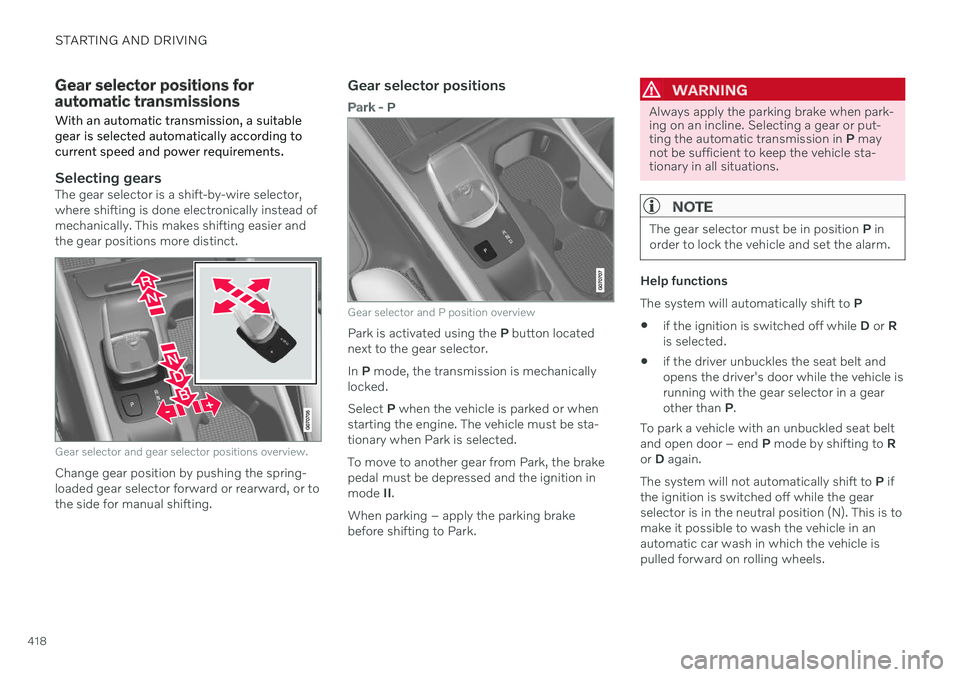
Selecting gearsThe gear selector is a shift-by-wire selector, where shifting is done electronically instead ofmechanically. This makes shifting easier andthe gear positions more distinct.
Gear selector and gear selector positions overview.
Change gear position by pushing the spring- loaded gear selector forward or rearward, or tothe side for manual shifting.
Gear selector positions
Park - P
Gear selector and P position overview
Park is activated using the P button located
next to the gear selector. In P mode, the transmission is mechanically
locked.Select P when the vehicle is parked or when
starting the engine. The vehicle must be sta- tionary when Park is selected. To move to another gear from Park, the brake pedal must be depressed and the ignition inmode II.
When parking – apply the parking brake before shifting to Park.
WARNING
Always apply the parking brake when park- ing on an incline. Selecting a gear or put-ting the automatic transmission in P may
not be sufficient to keep the vehicle sta-tionary in all situations.
NOTE
The gear selector must be in position P in
order to lock the vehicle and set the alarm.
Help functions The system will automatically shift to P
if the ignition is switched off while
D or R
is selected.
if the driver unbuckles the seat belt and opens the driver's door while the vehicle isrunning with the gear selector in a gearother than
P.
To park a vehicle with an unbuckled seat beltand open door – end P mode by shifting to R
or D again.
The system will not automatically shift to P if
the ignition is switched off while the gearselector is in the neutral position (N). This is tomake it possible to wash the vehicle in anautomatic car wash in which the vehicle ispulled forward on rolling wheels.
Page 422 of 687
||
STARTING AND DRIVING
420
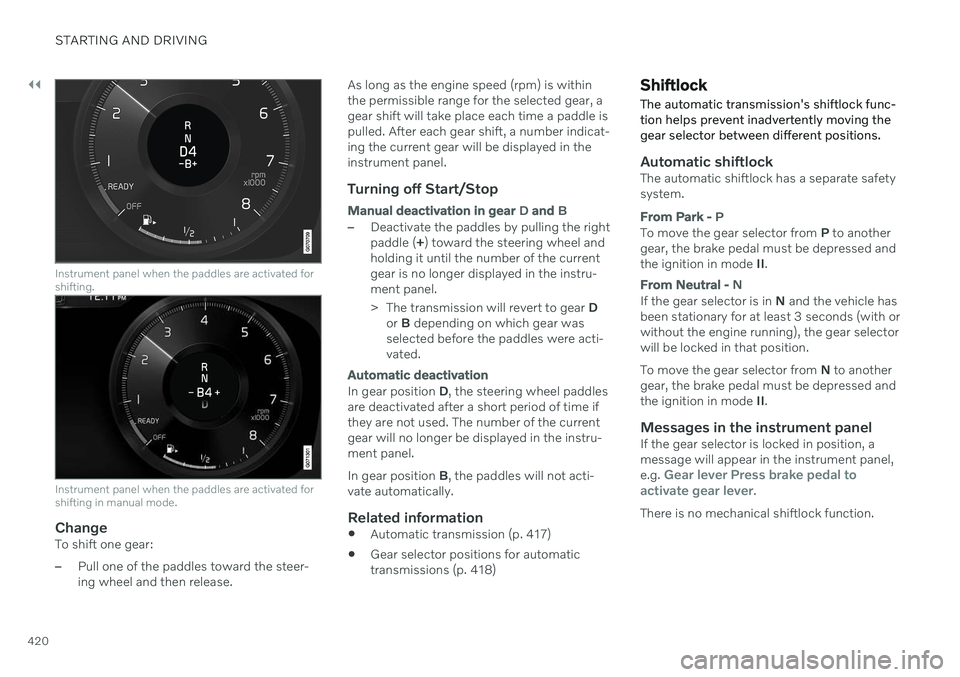
Instrument panel when the paddles are activated for shifting.
Instrument panel when the paddles are activated for shifting in manual mode.
ChangeTo shift one gear:
–Pull one of the paddles toward the steer- ing wheel and then release.As long as the engine speed (rpm) is withinthe permissible range for the selected gear, agear shift will take place each time a paddle ispulled. After each gear shift, a number indicat-ing the current gear will be displayed in theinstrument panel.
Turning off Start/Stop
Manual deactivation in gear
D and B
–Deactivate the paddles by pulling the right paddle ( +) toward the steering wheel and
holding it until the number of the currentgear is no longer displayed in the instru-ment panel.
> The transmission will revert to gear D
or B depending on which gear was
selected before the paddles were acti- vated.
Automatic deactivation
In gear position D, the steering wheel paddles
are deactivated after a short period of time if they are not used. The number of the currentgear will no longer be displayed in the instru-ment panel. In gear position B, the paddles will not acti-
vate automatically.
Related information
Automatic transmission (p. 417)
Gear selector positions for automatic transmissions (p. 418)
Shiftlock The automatic transmission's shiftlock func- tion helps prevent inadvertently moving thegear selector between different positions.
Automatic shiftlockThe automatic shiftlock has a separate safety system.
From Park -
P
To move the gear selector from P to another
gear, the brake pedal must be depressed and the ignition in mode II.
From Neutral - N
If the gear selector is in N and the vehicle has
been stationary for at least 3 seconds (with or without the engine running), the gear selectorwill be locked in that position. To move the gear selector from N to another
gear, the brake pedal must be depressed and the ignition in mode II.
Messages in the instrument panelIf the gear selector is locked in position, amessage will appear in the instrument panel, e.g.
Gear lever Press brake pedal to
activate gear lever.
There is no mechanical shiftlock function.
Page 428 of 687

||
STARTING AND DRIVING
* Option/accessory.
426 This drive mode is adapted for optimal control when driving at low speeds on very poor roads or difficult terrain. It raises the chassis
7
,
reduces driveline throttle response, and locks the vehicle in all-wheel drive. The Hill DescentControl function facilitates controlled drivingon steep downgrades.
NOTE
This drive mode is not designed to be used for normal street driving.
NOTE
Due to the increased ground clearance, if the Off Road mode was selected when
the engine was switched off, the suspen- sion will lower when the engine is restar-ted.
CAUTION
Do not use the Off Road drive mode when
towing a trailer without an electrical con- nection. This could result in damage to thepneumatic suspension system's bellows.
Constant AWD
Improves the vehicle's traction and han- dling by increasing all-wheel drive. This drive mode locks the vehicle in all-wheeldrive. An adapted distribution between frontand rear axle torque provides effective control,stability and traction, e.g. on slippery roads orwhen towing a heavy trailer or another vehicle. The
Constant AWD drive mode is always
available regardless of the hybrid battery's charge status. Both the combustion engine and the electric motor are engaged to enable all-wheel drive,which results in higher fuel consumption. In the other drive modes, the vehicle automati- cally adapts the need for all-wheel driveaccording to the road surface, and can acti-vate the electric motor or start the combustionengine as needed.
Power
The vehicle gets sportier driving characte- ristics and a faster acceleration response.
This drive mode adapts the combined powerfrom the combustion engine and the electricmotor by providing power to both the frontand rear wheels. Gear shifting will be fasterand more distinct and the transmission willprioritize gears with a higher traction force.Steering response is faster, suspension is stiffer and ground clearance is lower 7
to help
reduce body roll when cornering. Both the combustion engine and the electric motor are engaged to enable all-wheel drive,which results in higher fuel consumption. This drive mode is adapted for optimal per- formance and response during acceleration. Itchanges the throttle response, gear shiftingprogram and turbo boost system. Chassis set-tings and steering and brake response are also optimized. The
Power drive mode is always
available regardless of the hybrid battery's charge status.
Power mode is also available in a Polestar
Engineered* version.
7
For vehicles with pneumatic suspension.
Page 430 of 687
||
STARTING AND DRIVING
* Option/accessory.
428
Related information
Changing drive mode (p. 428)
Economical driving (p. 438)
Energy distribution in hybrid mode using map data
* (p. 429)
Hybrid gauge (p. 89)
General information about Twin Engine (p. 384)
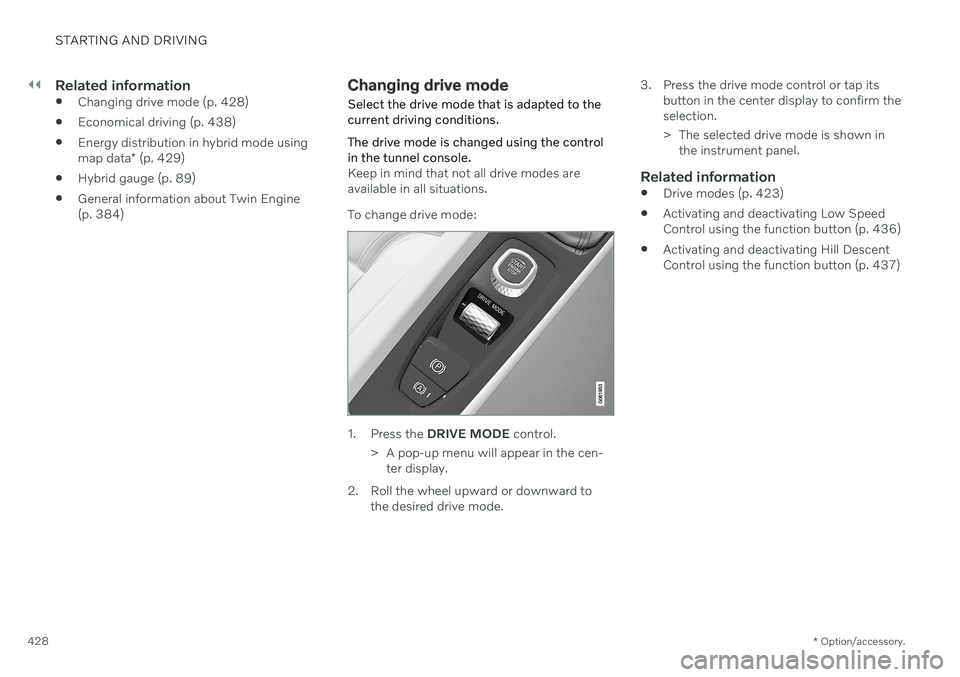
Changing drive mode Select the drive mode that is adapted to the current driving conditions. The drive mode is changed using the control in the tunnel console.
Keep in mind that not all drive modes are available in all situations. To change drive mode:
1. Press the
DRIVE MODE control.
> A pop-up menu will appear in the cen- ter display.
2. Roll the wheel upward or downward to the desired drive mode. 3. Press the drive mode control or tap its
button in the center display to confirm the selection.
> The selected drive mode is shown inthe instrument panel.
Related information
Drive modes (p. 423)
Activating and deactivating Low Speed Control using the function button (p. 436)
Activating and deactivating Hill DescentControl using the function button (p. 437)
Page 436 of 687

||
STARTING AND DRIVING
434
Location of adjustment knob, rear wheel.
NOTE
Each adjustment knob has 22 adjustment positions. The closer to position 0 the knobis set, the stiffer the suspension.
Adjusting front suspension settingsMake sure the adjustment knob is set to 0 before starting the adjustment. This makes iteasier to determine what adjustment positionis set.
Turn the adjustment knob clockwise or counterclock- wise to change the adjustment position.
Turn the knob clockwise until it stops to get to adjustment position 0.
Turn the knob counterclockwise to the desired adjustment position.
> Then follow the same procedure for thesecond tire.
Adjusting rear suspension settingsThe rear adjustment knobs are located above the tire inside the wheel housing. To accessthe rear adjustment knobs, the vehicle mustbe raised using a jack; see separate section.
The rubber cap is located above the adjustment knob.
Turn the adjustment knob clockwise or counterclock- wise to change the adjustment position.
Remove the protective rubber cap over the adjustment knob.
Turn the knob clockwise until it stops to get to adjustment position 0.
Page 437 of 687

STARTING AND DRIVING
* Option/accessory.435
Turn the adjustment knob counterclock- wise to the desired adjustment position.
> When the desired position has been
reached, replace the protective rubber cap. Then follow the same procedurefor the second tire.
NOTE
For optimal performance, Volvo recom- mends setting the adjustment knobs to thesame position for each axle.
Recommended positions
Position Front Rear Performance mode adjustmentposition 4adjustmentposition 4
Engineered,factory setting adjustmentposition 10adjustmentposition 10
Comfort mode adjustment position 15adjustmentposition 15
Related information
Hoisting the vehicle (p. 597)
Leveling control
* and suspension (p. 430)
Low Speed Control
The low-speed function (LSC 10
) facilitates
and improves control and traction on rough roads and slippery surfaces, e.g. when towinga trailer on grass or up boat ramps. The function is included in the
Off Road drive
mode.
Low Speed Control is designed for driving on rough roads and when towing trailers at lowspeeds, up to approximately 40 km/h (25mph). When driving at low speeds, LSC prioritizes low gears and all-wheel drive to help avoidwheel spin and improve traction on all wheels.The accelerator pedal will be less responsiveto improve traction and speed control at lowspeeds. The function is activated together with Hill Descent Control (HDC 11
), which makes it pos-
sible to control speed going down steep hills using the accelerator pedal and reduces theneed to use the brake pedal. The systemmakes it possible to maintain a low and uni-form speed when driving down steep hills.
NOTE
When LSC with HDC is activated in theOff Road drive mode, the feel of the accel-
erator pedal and engine response will change.
NOTE
This drive mode is not designed to be used for normal street driving.
NOTE
The function is deactivated when driving at high speeds and must be reactivated atlower speeds if so desired.
Related information
Activating and deactivating Low Speed Control using the function button (p. 436)
Changing drive mode (p. 428)
Hill Descent Control (p. 436)
All Wheel Drive (AWD) (p. 421)
10
Low Speed Control
11 Hill Descent Control