change wheel VOLVO XC60 TWIN ENGINE 2020 Owner's Guide
[x] Cancel search | Manufacturer: VOLVO, Model Year: 2020, Model line: XC60 TWIN ENGINE, Model: VOLVO XC60 TWIN ENGINE 2020Pages: 687, PDF Size: 14.65 MB
Page 439 of 687

STARTING AND DRIVING
}}
437
the vehicle will return to very low speed regardless of how steep the hill is and withoutthe brakes needing to be applied. The brakelights will illuminate when the function is acti-vated. The driver can brake to stop or slow the vehi- cle at any time by depressing the brake pedal. HDC is activated along with Low Speed Con- trol (LSC
13
), which facilitates and improves
traction and control on rough and slippery sur- faces. The system is intended to be used atlow speeds, up to approximately 40 km/h (25mph).
To keep in mind when using HDC
If the function is switched off while drivingon a steep downhill gradient, brakingeffect will be gradually reduced.
HDC can be used in gear positions
D and
R , and in manual gears 1 or 2.
It is not possible to manually shift to thirdgear or higher when HDC is active.
NOTE
When LSC with HDC is activated in theOff Road drive mode, the feel of the accel-
erator pedal and engine response will change.
NOTE
This drive mode is not designed to be used for normal street driving.
NOTE
The function is deactivated when driving at high speeds and must be reactivated atlower speeds if so desired.
Related information
Activating and deactivating Hill Descent Control using the function button (p. 437)
Changing drive mode (p. 428)
Low Speed Control (p. 435)
All Wheel Drive (AWD) (p. 421)
Activating and deactivating Hill Descent Control using the functionbutton There is a function button for assistance on steep gradients with
Hill Descent Control in
the center display's Function view if the vehi- cle is not equipped with a drive mode controlin the tunnel console.
Selecting Hill Descent Control in the center display's Function view
HDC only works at low speeds.
–Tap the Hill Descent Control button to
activate or deactivate the function.
> An indicator light in the button will illu- minate when the function is activated.
When the engine is switched off, the function will be automatically deactivated.
NOTE
The function is deactivated when driving at high speeds and must be reactivated atlower speeds if so desired.
13 Low Speed Control
Page 478 of 687
AUDIO, MEDIA AND INTERNET
476
Changing waveband and radio station
Instructions for changing wavebands, wave- band lists and radio stations in the selectedlist are provided here.
Changing wavebandsSwipe from App view on the center display and select the desired waveband (e.g. FM) or
open the App menu in the instrument panel with the right-side steering wheel keypad andmake your selection there.
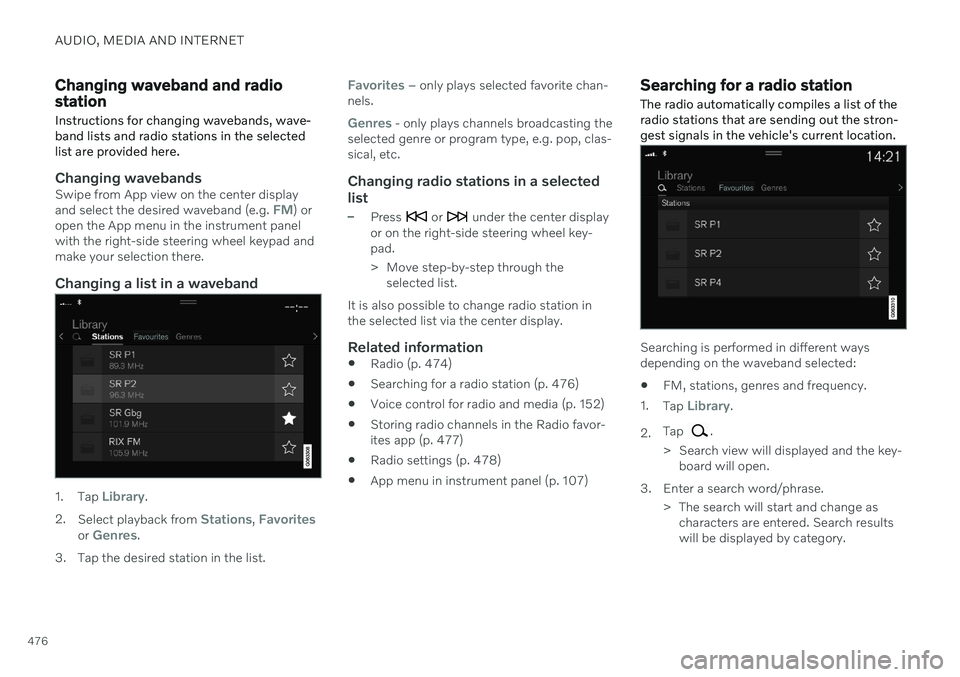
Changing a list in a waveband
1. Tap Library.
2. Select playback from
Stations, Favoritesor Genres.
3. Tap the desired station in the list.
Favorites – only plays selected favorite chan-
nels.
Genres - only plays channels broadcasting the
selected genre or program type, e.g. pop, clas- sical, etc.
Changing radio stations in a selected
list
–Press or under the center display
or on the right-side steering wheel key- pad.
> Move step-by-step through the selected list.
It is also possible to change radio station in the selected list via the center display.
Related information
Radio (p. 474)
Searching for a radio station (p. 476)
Voice control for radio and media (p. 152)
Storing radio channels in the Radio favor-ites app (p. 477)
Radio settings (p. 478)
App menu in instrument panel (p. 107)
Searching for a radio station
The radio automatically compiles a list of the radio stations that are sending out the stron-gest signals in the vehicle's current location.
Searching is performed in different ways depending on the waveband selected:
FM, stations, genres and frequency.
1. Tap
Library.
2. Tap
.
> Search view will displayed and the key- board will open.
3. Enter a search word/phrase. > The search will start and change ascharacters are entered. Search results will be displayed by category.
Page 483 of 687
AUDIO, MEDIA AND INTERNET
481
Selecting sub-channels
To listen to a station's sub-channel(s), tap the station on the screen or press the forward/back arrow keys on the right-side steeringwheel keypad or below the screen. Sub-channels can also be saved as radio favorites. If you tap a sub-channel favorite, it may take up to 6 seconds before the channel becomes
audible. If you tap a station while you are out of digital range of the transmitter,
No
reception will be displayed.
Related information
HD Radio
™
(p. 479)
Activating and deactivating the HD Radio
™ (p. 480)
Changing waveband and radio station(p. 476)
Searching for a radio station (p. 476)
HD Radio
™
limitations (p. 481)
HD Radio ™ limitations
Limitations
Main channel vs. sub-channels (FM only)
: The main channel is the only chan-
nel that can receive in hybrid mode (bothdigital and analog). If a frequency has sub-channels, they are broadcast in digitalmode only. The main FM channel will bedisplayed as, for example, "WRIF-FMHD1". The sub-FM channels will be dis-played as"WRIF-FM HD2", "WRIF-FMHD3", etc.
Reception coverage area
: Due to current
IBOC transmitter power limitations, thereception coverage area in digital mode issomewhat more limited than the station'sanalog coverage area. Be aware that, likeall radio transmission technology, terrain,time of day, vegetation and buildings canhave a positive or negative effect on radioreception.
Analog to digital/digital to analogblending
: Analog to digital blending will
occur as the signal strength reaches a pre-set threshold in the receiver. This will benoticeable in fringe areas (areas with weakreception) and is normal.
NOTE
There may be a noticeable difference in sound quality when a change from ana-logue to digital or digital to analogueoccurs, such as:
Volume increase or decrease
Equalizer settings, i.e., Bass/ Mid-range/Treble cut or boost
Time alignment (Digital program mate-rial in extreme cases can be as muchas 8 seconds behind the analogue).This will noticeable as a "stuttering"effect.
The above items are dependant on thebroadcaster's equipment settings anddo not indicate a fault in the vehicle'sradio receiver or antenna systems .
Related information
HD Radio
™ (p. 479)
Activating and deactivating the HD Radio
™ (p. 480)
HD Radio
™ sub-channels (p. 480)
Page 547 of 687

WHEELS AND TIRES
* Option/accessory.545
Checking tire pressure
Correct inflation pressure helps improve driv- ing stability, save fuel and increase the serv-ice life of the tires.
Tire pressure decreases over time, which is normal. Tire pressure also varies depending onthe ambient temperature. Driving on under-inflated tires could cause the vehicle to over-heat and lead to damage. Tire pressure affectstraveling comfort, road noise and driving cha-racteristics. Check the pressure in the tires every month. Use the recommended inflation pressure forcold tires to help maintain good tire perform-ance. Under-inflated or over-inflated tirescould cause uneven tread wear. Use an air pressure gauge and check the infla- tion pressure on all the tires, including the spare tire 4
, at least once a month and before
long trips. Volvo recommends buying a relia- ble air pressure gauge, as the automaticgauges provided at service stations may beinaccurate.
WARNING
Under-inflation is the most common cause of tire failure and may result insevere tire cracking, tread separation,or "blow-out," with unexpected loss ofvehicle control and increased risk ofinjury.
Under-inflated tires reduce the loadcarrying capacity of your vehicle.
Cold tiresInflation pressure should be checked when thetires are cold. The tires are considered to becold when they have the same temperature asthe surrounding (ambient) air. This tempera-ture is normally reached after the vehicle hasbeen parked for at least 3 hours. After driving for approximately 1.6 km (1 mile), the tires are considered to be warm. If youneed to drive longer than that to inflate thetires, check and record the inflation pressureof the tires first and inflate accordingly whenyou arrive at the pump. When the ambient temperature changes, so does the inflation pressure. A 10-degree tem-perature drop causes a corresponding drop ininflation pressure of 1 psi (7 kPa). Check theinflation pressure of the tires regularly andadjust to the correct pressure, which can be found on the vehicle's tire information decal orcertification label. If you check inflation pressure when the tires are warm, you should never release air. Thetires become warm after driving and it is nor-mal for warm tires to have an inflation pres-sure above the recommended pressure forcold tires. A warm tire with an inflation pres-sure equal to or under the recommended pres-sure for cold tires could be significantly under-inflated.Related information
Adjusting tire pressure (p. 546)
Recommended tire pressure (p. 547)
Tire pressure monitoring system
*
(p. 547)
Tires (p. 538)
4
Not available in all models.
Page 549 of 687
WHEELS AND TIRES
}}
* Option/accessory.547
Recommended tire pressure
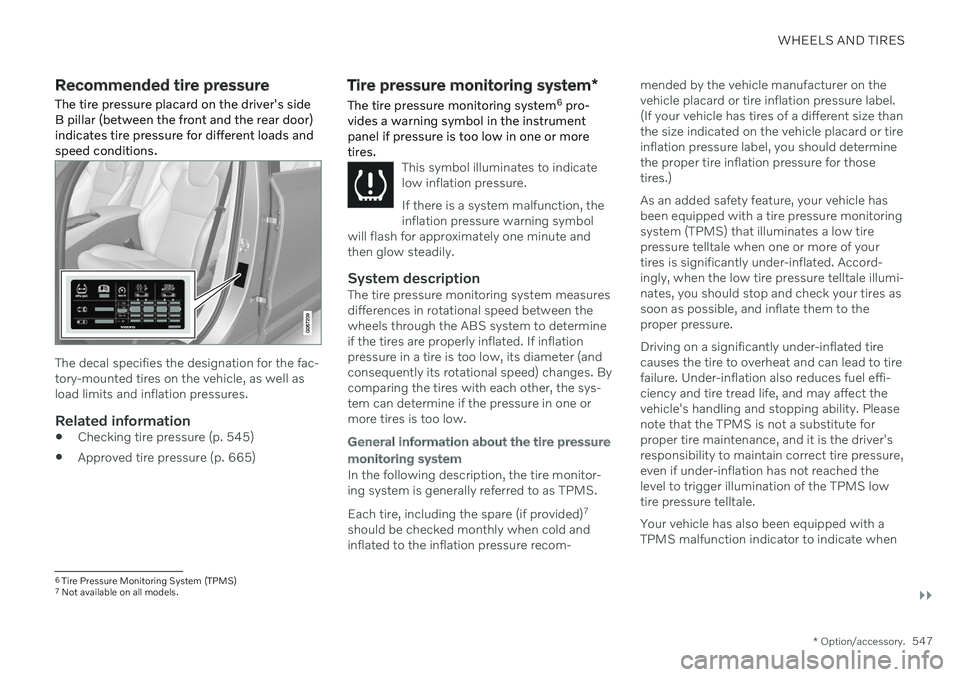
The tire pressure placard on the driver's side B pillar (between the front and the rear door)indicates tire pressure for different loads andspeed conditions.
The decal specifies the designation for the fac- tory-mounted tires on the vehicle, as well asload limits and inflation pressures.
Related information
Checking tire pressure (p. 545)
Approved tire pressure (p. 665)
Tire pressure monitoring system
*
The tire pressure monitoring system 6
pro-
vides a warning symbol in the instrument panel if pressure is too low in one or moretires.
This symbol illuminates to indicate low inflation pressure. If there is a system malfunction, the inflation pressure warning symbol
will flash for approximately one minute andthen glow steadily.
System descriptionThe tire pressure monitoring system measures differences in rotational speed between thewheels through the ABS system to determineif the tires are properly inflated. If inflationpressure in a tire is too low, its diameter (andconsequently its rotational speed) changes. Bycomparing the tires with each other, the sys-tem can determine if the pressure in one ormore tires is too low.
General information about the tire pressure monitoring system
In the following description, the tire monitor- ing system is generally referred to as TPMS. Each tire, including the spare (if provided) 7
should be checked monthly when cold and inflated to the inflation pressure recom- mended by the vehicle manufacturer on thevehicle placard or tire inflation pressure label.(If your vehicle has tires of a different size thanthe size indicated on the vehicle placard or tireinflation pressure label, you should determinethe proper tire inflation pressure for thosetires.) As an added safety feature, your vehicle has been equipped with a tire pressure monitoringsystem (TPMS) that illuminates a low tirepressure telltale when one or more of yourtires is significantly under-inflated. Accord-ingly, when the low tire pressure telltale illumi-nates, you should stop and check your tires assoon as possible, and inflate them to theproper pressure. Driving on a significantly under-inflated tire causes the tire to overheat and can lead to tirefailure. Under-inflation also reduces fuel effi-ciency and tire tread life, and may affect thevehicle's handling and stopping ability. Pleasenote that the TPMS is not a substitute forproper tire maintenance, and it is the driver'sresponsibility to maintain correct tire pressure,even if under-inflation has not reached thelevel to trigger illumination of the TPMS lowtire pressure telltale. Your vehicle has also been equipped with a TPMS malfunction indicator to indicate when
6
Tire Pressure Monitoring System (TPMS)
7 Not available on all models.
Page 551 of 687

WHEELS AND TIRES
* Option/accessory.549
Saving a new inflation pressure in the monitoring system *
In order for the tire pressure monitoring sys- tem 9
to function correctly, tire pressure refer-
ence values must be saved correctly. To help ensure that the system can correctly alert thedriver of low inflation pressure, this must bedone each time the tires are changed or theinflation pressure is adjusted.
For example, when driving with a heavy load or at high speeds (over 160 km/h (100 mph)),tire pressure should be adjusted to the Volvo-recommended tire pressure values. The sys-tem should then be reset by saving the newinflation pressure. To store the new inflation pressure as a refer- ence value in the system:
1. Switch off the ignition.
2. Inflate the tire to the correct inflation pres- sure; see the tire pressure placard on the driver's side B pillar for recommendedpressures for factory-mounted tires.
3. Start the vehicle. 4. Open the
Car Status app in App view.
5. Tap
TPMS.
NOTE
The vehicle must be stationary for theStore Pressure button to be selectable.
6.Tap Store Pressure.
7. Tap
OK to confirm that the tire pressure in
all four tires has been checked and adjusted.
8. Drive the vehicle until the new inflation pressure has been saved. The new infla-tion pressure is stored when the vehicle isdriven at speeds over 35 km/h (22 mph).
> When enough data has been collectedfor the system to detect low inflation pressure, the animation showing theprogress of the storing procedure willdisappear from the center display. Thesystem will not provide any further con-firmation that the new inflation pres-sure has been stored.
If storing cannot be performed,
Storing
pressure unsuccessful. Try again. will be
displayed. If the vehicle's ignition is switched off before the new inflation pressure has been saved, theprocedure must be performed again. To helpensure that the new inflation pressure is saved correctly, allow the storing procedure to com-plete during a single operating cycle.
WARNING
The exhaust gases contain carbon monox- ide, which is invisible and odorless but verypoisonous. The procedure for saving a newinflation pressure must therefore always beperformed outdoors or in a workshop withexhaust gas extraction.
Related information
Recommended tire pressure (p. 547)
Adjusting tire pressure (p. 546)
Viewing tire pressure status in the center display
* (p. 550)
Action when warned of low tire pressure (p. 551)
Tire pressure monitoring system
* (p. 547)
9
Tire Pressure Monitoring System (TPMS)
Page 554 of 687
WHEELS AND TIRES
* Option/accessory.
552
When changing wheels
The wheels can be changed, e.g. to switch to snow tires or spare tires. Follow the applica-ble instructions for removing and installingthe wheel.
Changing to tires of another dimension
Make sure that the tire dimension is approved for use on the vehicle.
Related information
Removing a wheel (p. 554)
Installing a wheel (p. 556)
Tool kit (p. 552)
Snow tires (p. 559)
Spare wheel (p. 557)
Wheel bolts (p. 553)
Tool kit
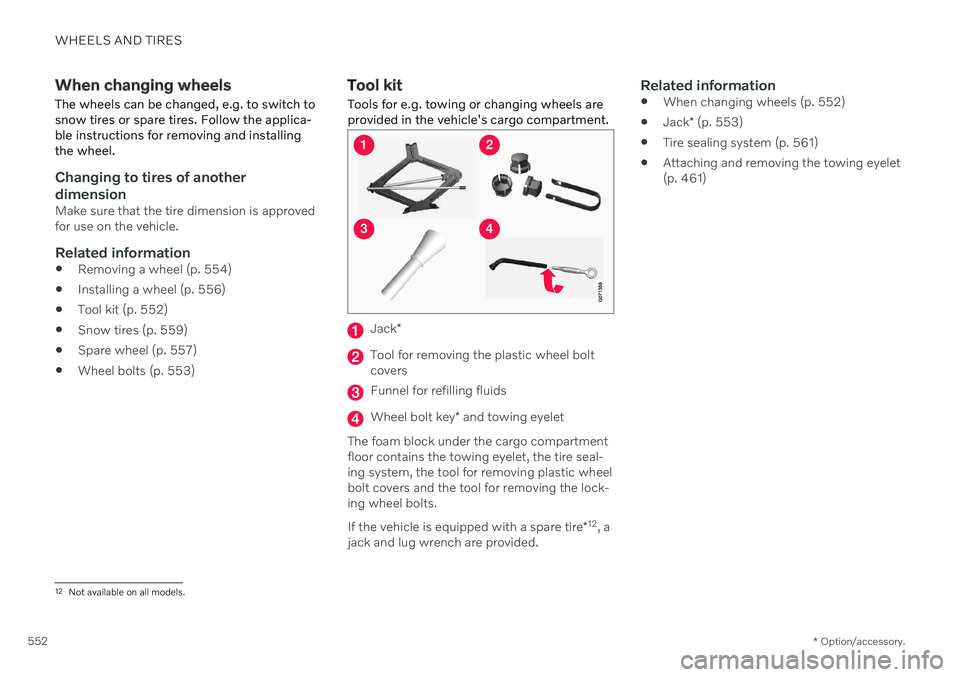
Tools for e.g. towing or changing wheels are provided in the vehicle's cargo compartment.
Jack *
Tool for removing the plastic wheel bolt covers
Funnel for refilling fluids
Wheel bolt key * and towing eyelet
The foam block under the cargo compartment floor contains the towing eyelet, the tire seal-ing system, the tool for removing plastic wheelbolt covers and the tool for removing the lock-ing wheel bolts. If the vehicle is equipped with a spare tire *12
, a
jack and lug wrench are provided.
Related information
When changing wheels (p. 552)
Jack
* (p. 553)
Tire sealing system (p. 561)
Attaching and removing the towing eyelet (p. 461)
12
Not available on all models.
Page 555 of 687

WHEELS AND TIRES
* Option/accessory.553
Jack*
The jack can be used to lift the vehicle to e.g. change a wheel.CAUTION
When not in use, the jack
* should be
kept in its storage compartment under the cargo compartment floor.
The jack provided with your vehicle isintended to be used only in temporarysituations such as changing wheels inthe event of a flat tire. Only the jackthat came with your particular modelshould be used to lift the vehicle. If thevehicle needs to be lifted more fre-quently or for a prolonged period, usinga garage jack or hoist is recommended.Always follow this device's instructionsfor use.
The jack needs to be cranked together to the correct position in order to fit. For vehicles with
Leveling Control*
: If the
vehicle is equipped with the optional pneu- matic suspension, it must be turned off beforethe vehicle is lifted on a jack.
Related information
Tool kit (p. 552)
Hoisting the vehicle (p. 597)
Wheel bolts
The wheel bolts hold the wheel in place on the wheel hub.
Only use rims that have been tested and approved by Volvo and are included in Volvo'soriginal product range. Use a torque wrench to check that the wheel bolts are tightened correctly. Do not grease the wheel bolt threads.
WARNING
The wheel bolts may need to be tightened again several days after a wheel change.Temperature fluctuations and vibrationscan cause them to loosen slightly.
CAUTION
The wheel bolts should be tightened to 140 Nm (103 ft. lbs.). Over-tightening orunder-tightening could damage the threa-ded joints.
Locking wheel bolts *A tool for removing the locking wheel bolts is located in the foam block under the cargocompartment floor.
Related information
Removing a wheel (p. 554)
Installing a wheel (p. 556)
Page 556 of 687

WHEELS AND TIRES
* Option/accessory.
554
Removing a wheel Wheel changes must always be carried out correctly. The following instructions showhow to remove a wheel and what is impor-tant to keep in mind.
CAUTION
When not in use, the jack
* should be
kept in its storage compartment under the cargo compartment floor.
The jack provided with your vehicle isintended to be used only in temporarysituations such as changing wheels inthe event of a flat tire. Only the jackthat came with your particular modelshould be used to lift the vehicle. If thevehicle needs to be lifted more fre-quently or for a prolonged period, usinga garage jack or hoist is recommended.Always follow this device's instructionsfor use.
WARNING
Apply the parking brake and put the gear selector in the Park (
P) position.
Block the wheels standing on theground, use rigid wooden blocks orlarge stones.
Check that the jack is not damaged,the threads are properly lubricated andit is free from dirt.
Be sure the jack is on a firm, level, non-slippery surface and that it is uprightand not leaning.
The jack must correctly engage in thejack attachment.
No objects should be placed betweenthe base of the jack and the ground, orbetween the jack and the attachmentbar on the vehicle.
Never let anyone remain in the vehiclewhen it is raised on a jack.
If a tire must be changed near passingtraffic, make sure all passengers moveto a safe location.
Use a jack intended for the vehiclewhen changing a tire. For any otherjob, use stands to support the vehicle.
Never crawl under or allow any part ofyour body to be extended under a vehi-cle supported by a jack. 1. Turn on the vehicle's hazard warning
flashers if a wheel change must be per-formed in an area with traffic.
2. Apply the parking brake and put the gear selector in P, or first gear if the vehicle has
a manual transmission. For vehicles with
Leveling Control* : If the
vehicle is equipped with pneumatic sus- pension, this must be switched off before the vehicle is lifted with the jack *.
3. Take out the jack *, lug wrench * and tool for
removing the plastic covers, which are stowed in the foam block.
Tool for removing the plastic covers on the wheel bolts.
4. Place chocks in front of and behind the wheels that are still on the ground. For example, use heavy wooden blocks orlarge stones.
Page 557 of 687

WHEELS AND TIRES
* Option/accessory.555
5. Using the lug wrench, screw the towing
eye into place as far as possible according to the instructions.
CAUTION
The towing eyelet must be screwed into the lug wrench * as far as possible.
6. Remove the plastic covers from the wheel
bolts using the designated tool.
7. With the vehicle still on the ground, use the lug wrench/towing eye to loosen the wheel bolts ½-1 turn by pressing down-ward (counterclockwise). 8. When hoisting the vehicle, it is important
that the jack or garage lift arms are posi-tioned on the designated points under thevehicle. The triangle markings on the plas-tic cover indicate where the jack attach-ment points/lifting points are located.There are two jack attachment points oneach side of the vehicle. There is a groovefor the jack at each attachment point.
9. Position the jack under the attachmentpoint being used, ensuring that the sur- face is firm, flat and not slippery. 10. Crank it up until it is properly aligned and
it is in contact with the vehicle's jackattachment point. Make sure the top ofthe jack (or the garage lift arms) is cor-rectly positioned in the attachment point,with the bump on the top of the jack in therecess in the attachment point and thebase positioned vertically under theattachment point.
11. Turn the jack so that the crank is as far as possible from the side of the vehicle,which will position the jack's arms per-pendicular to the vehicle's direction ofmovement.
12. Raise the vehicle until the wheel to be changed can move freely. Unscrew thewheel bolts and lift off the wheel.
Related information
Leveling control settings
* (p. 433)
When changing wheels (p. 552)
Hoisting the vehicle (p. 597)
Jack
* (p. 553)
Attaching and removing the towing eyelet(p. 461)
Installing a wheel (p. 556)