light VOLVO XC60 TWIN ENGINE 2020 Workshop Manual
[x] Cancel search | Manufacturer: VOLVO, Model Year: 2020, Model line: XC60 TWIN ENGINE, Model: VOLVO XC60 TWIN ENGINE 2020Pages: 687, PDF Size: 14.65 MB
Page 201 of 687
SEATS AND STEERING WHEEL
}}
* Option/accessory.199
Pull up the handle on the backrest while folding down the backrest. The han- dle for the head restraint will be automati-cally pulled up when the backrest is low-ered. A red indicator light near the back- rest lock
indicates that the backrest is
no longer locked.
NOTE
When the backrest is folded down, the head restraint may come in contact withthe seat cushion of the seat being foldeddown. Adjust the head restraint of the seatbeing folded down to help prevent damageto the upholstery.
3. The backrest lock will release and the backrest will automatically fold down to the horizontal position.
Folding up the backrestTo fold up the backrest to the upright positionmanually:
1. Move the backrest upward/rearward.
2. Press the backrest until it locks into posi-tion.
3. Fold up the head restraints manually. 4. Adjust the center head restraint if neces-
sary.
WARNING
When the backrest is restored to an upright position, the red indicator shouldno longer be visible. If it is still visible, thebackrest is not locked in place.
WARNING
Make sure that the rear seat backrest and head restraint are locked securely in placeafter the seat is folded up. The head restraints at the outer seats must always be raised when there is a passengerin one of these spots of the rear seat.
Related information
Adjusting the rear seat head restraints (p. 199)
Private Locking (p. 266)
Activating and deactivating private locking(p. 266)
Adjusting the rear seat head restraints
Adjust the center head restraint in the rear seat to the seat occupant's height. Fold down the outboard head restraints * to improve rear
visibility.
Adjusting the center seat head restraint
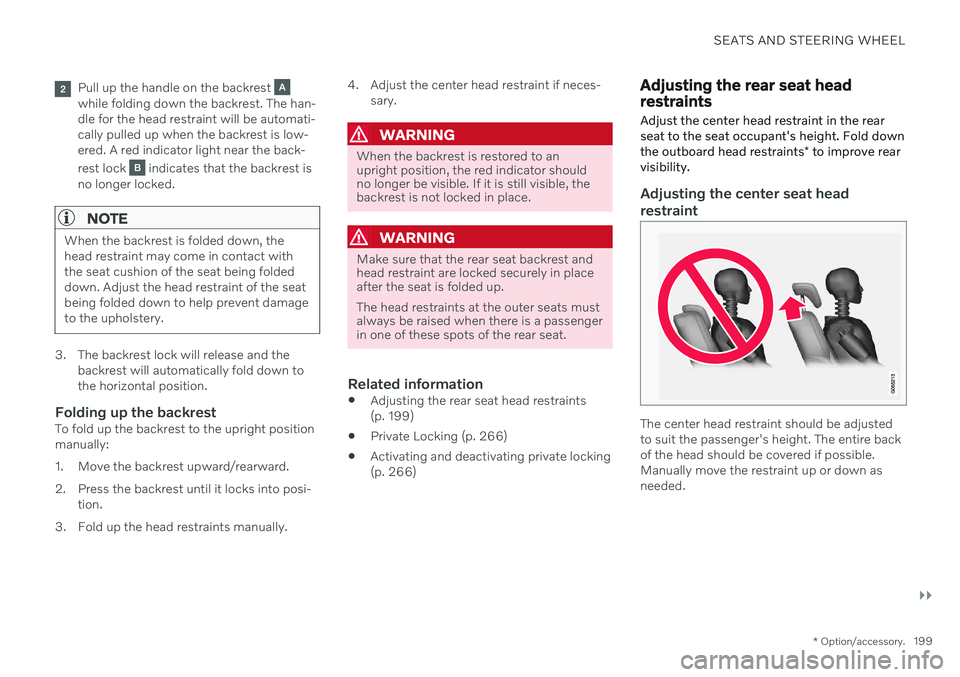
The center head restraint should be adjusted to suit the passenger's height. The entire backof the head should be covered if possible.Manually move the restraint up or down asneeded.
Page 204 of 687
SEATS AND STEERING WHEEL
* Option/accessory.
202
Adjusting the steering wheel The steering wheel can be adjusted to various positions.
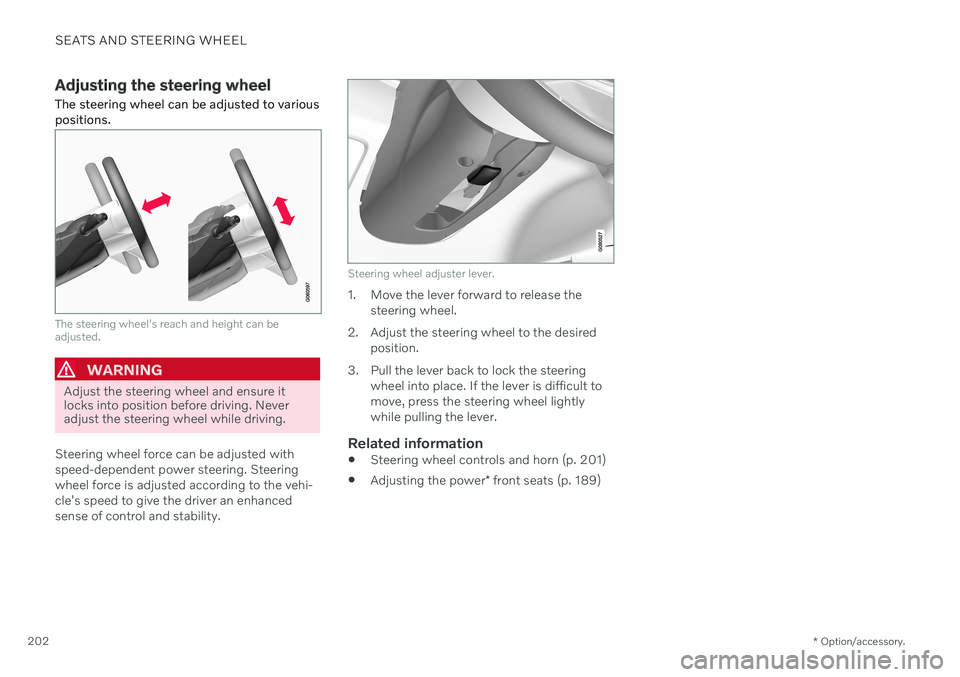
The steering wheel's reach and height can be adjusted.
WARNING
Adjust the steering wheel and ensure it locks into position before driving. Neveradjust the steering wheel while driving.
Steering wheel force can be adjusted with speed-dependent power steering. Steeringwheel force is adjusted according to the vehi-cle's speed to give the driver an enhancedsense of control and stability.
Steering wheel adjuster lever.
1. Move the lever forward to release the steering wheel.
2. Adjust the steering wheel to the desired position.
3. Pull the lever back to lock the steering wheel into place. If the lever is difficult to move, press the steering wheel lightlywhile pulling the lever.
Related information
Steering wheel controls and horn (p. 201)
Adjusting the power
* front seats (p. 189)
Page 206 of 687

CLIMATE CONTROL
* Option/accessory.
204
Climate The vehicle is equipped with electronic cli- mate control. The climate system cools, heatsand dehumidifies the air in the passengercompartment.
All of the climate system functions are con- trolled from the center display and the buttonson the center console. Certain rear seat functions can also be con- trolled from the climate controls * on the rear
of the tunnel console.
Related information
Climate zones (p. 204)
Climate control sensors (p. 204)
Perceived temperature (p. 205)
Climate control system voice commands (p. 205)
Parking climate (p. 225)
Heater (p. 233)
Air quality (p. 206)
Air distribution (p. 209)
Climate system controls (p. 215)
Climate zones The vehicle is divided into climate zones to make it possible to set different temperaturesfor different parts of the passenger compart-ment.
2-zone climate system
Climate zones with 2-zone climate system.
In 2-zone climate systems, the passenger compartment temperature can be set sepa-rately for the left and right sides of the vehicle.
Related information
Climate (p. 204)
Climate control sensors
The climate system has a number of sensors to help regulate the climate settings in thevehicle.
Location of the sensors
Sunlight sensors - on the upper side of the dashboard.
Humidity sensor - in the rearview mirror console.
Ambient temperature sensor - in the right- side door mirror.
Passenger compartment temperature sen- sor - near the buttons in the center con-sole.
Page 207 of 687

CLIMATE CONTROL
}}
* Option/accessory.205
NOTE
Do not cover or block the sensors with clothing or other objects.
On vehicles equipped with the Interior Air Quality System*, there is also an air quality
sensor in the climate system's air intake.
Related information
Climate (p. 204)
Interior Air Quality System
* (p. 208)
Perceived temperature
The climate control system regulates the cli- mate in the passenger compartment basedon perceived temperature, not actual tem-perature.
The selected passenger compartment tem- perature is based on the physical perception ofthe current ambient temperature, airflowspeed, humidity, sunlight in the passengercompartment, etc. The system has a sunlight sensor that detects which side of the vehicle the sunlight is shin-ing on and adjusts the temperature accord-ingly. This means that the temperature of theair coming out of the vents may be differentfor the left and right sides, even if the tem-perature setting is the same for both sides.
Related information
Climate (p. 204)
Climate control system voice commands 1
Voice commands can be used for the climate control system to e.g. change temperature, activate seat heating * or change blower
speed.
Tap and say one of the following com-
mands: "
Climate" - starts a command dialog for
climate controls and provides examples of commands that can be used.
"
Set temperature to X degrees" - sets
desired temperature.
"
Raise temperature"/"Lower
temperature" - raises/lowers the set tem-
perature.
"
Sync temperature" - synchronizes the
temperature for all climate zones in the vehicle with the temperature set for thedriver's side.
"
Air on feet"/"Air on body" - opens the
desired air vent.
"
Air on feet off"/"Air on body off" -
closes the desired air vent.
"
Set fan to max"/"Turn off fan" -
changes blower speed to Max/Off.
"
Raise fan speed"/"Lower fan speed" -
raises/lowers the set blower speed.
1 Certain markets only.
Page 212 of 687

||
CLIMATE CONTROL
210
Related information
Climate (p. 204)
Adjusting air distribution (p. 210)
Opening, closing and directing air vents (p. 211)
Air distribution options (p. 212)
Adjusting air distribution
Air distribution can be adjusted manually if needed.
1. Tap the symbol in the center of the climate bar to open Climate view in the center dis- play.
Air distribution buttons in Climate view.
Air distribution - windshield defrost vents
Air distribution - dashboard and center console air vents
Air distribution - floor air vents
2. Tap one or more air distribution buttons to open/close the airflow for that vent.
> The air distribution changes and the
buttons will light up or go out.
Related information
Air distribution (p. 209)
Opening, closing and directing air vents (p. 211)
Air distribution options (p. 212)
Page 219 of 687
CLIMATE CONTROL
}}
* Option/accessory.217
Activating and deactivating the heated front seat *
The seats can be heated for added comfort for the driver and passengers in cold weather.
Seat heating can be set to automatically acti- vate when the engine is started. When set toautomatically activate, heating will be turnedon at low ambient temperatures. 1. Tap
Settings in the Top view in the center
display.
2. Tap
Climate.
3. Select
Auto Driver Seat Heating Leveland Auto Passenger Seat Heating Levelto activate/deactivate automatic start of heated driver's and passenger seat.
> An "A" will be displayed next to the rel-
evant seat heating button in the climate bar when auto start has been activated.
4. Select
Low, Medium or High to select
level after the function has been activated.
Related information
Climate system controls (p. 215)
Activating and deactivating power front seats
* (p. 216)
Activating and deactivating the heated rear seats *
The seats can be heated for added comfort for the driver and passengers in cold weather.
Activating and deactivating the heated rear seats from the rear seat
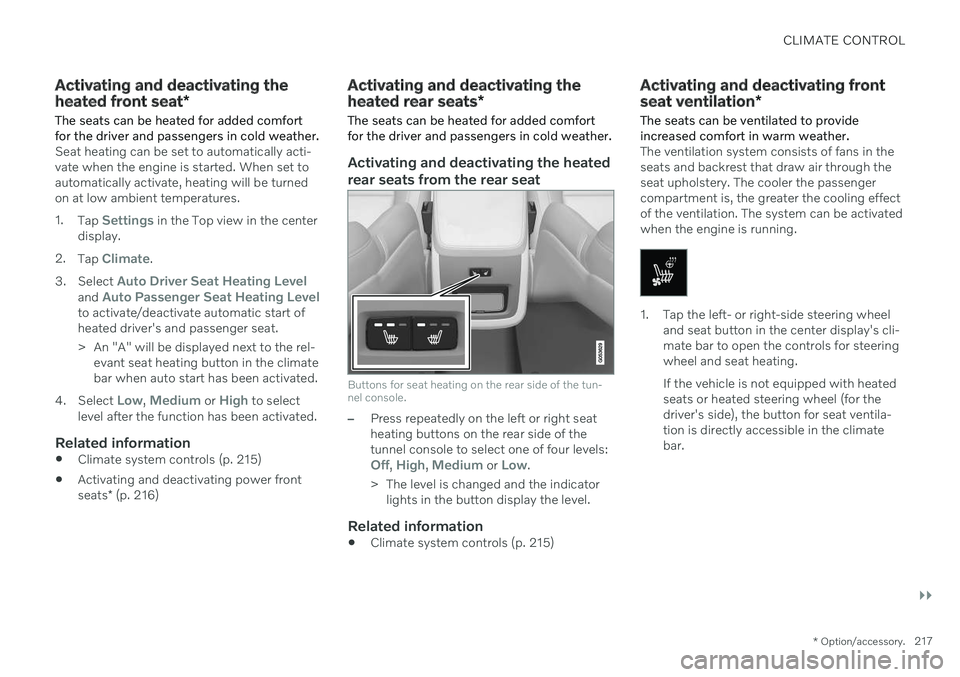
Buttons for seat heating on the rear side of the tun- nel console.
–Press repeatedly on the left or right seat heating buttons on the rear side of thetunnel console to select one of four levels:
Off, High, Medium or Low.
> The level is changed and the indicator lights in the button display the level.
Related information
Climate system controls (p. 215)
Activating and deactivating front seat ventilation
*
The seats can be ventilated to provide increased comfort in warm weather.
The ventilation system consists of fans in the seats and backrest that draw air through theseat upholstery. The cooler the passengercompartment is, the greater the cooling effectof the ventilation. The system can be activatedwhen the engine is running.
1. Tap the left- or right-side steering wheel and seat button in the center display's cli- mate bar to open the controls for steeringwheel and seat heating. If the vehicle is not equipped with heated seats or heated steering wheel (for thedriver's side), the button for seat ventila-tion is directly accessible in the climatebar.
Page 221 of 687
CLIMATE CONTROL
}}
219
Activating auto climate control
If auto climate control is activated, several cli- mate system functions are controlled auto-matically.
1. Tap the symbol in the center of the climate bar to open Climate view in the center dis- play.
2. Tap or press and hold
AUTO Climate
Tap - air recirculation, air conditioning and air distribution are controlled auto-matically.
Press and hold - air recirculation, airconditioning and air distribution arecontrolled automatically. Temperatureand blower speed are changed tostandard settings: 22 °C (72 °F) and speed
3.
> Auto climate mode is activated and the button lights up.
NOTE
It is possible to change the temperature and blower speed without deactivatingautomatic climate control. Automatic cli-mate control is deactivated when the airdistribution is changed manually or whenthe max defroster is activated.
Related information
Climate system controls (p. 215)
Activating and deactivating recirculation The climate system's recirculation function helps shut out smog, smoke, exhaust fumes,etc. by reusing the air in the passenger com-partment.
1. Tap the symbol in the center of the climate
bar to open Climate view in the center dis- play.
2.Tap Recirc.
> Air recirculation is activated/deacti- vated and the button lights up/goes out.
CAUTION
If the air in the vehicle is recirculated too long, there is a risk of fogging on the insideof the windows.
NOTE
Recirculation cannot be activated when the max defroster is on.
Page 223 of 687
CLIMATE CONTROL
}}
221
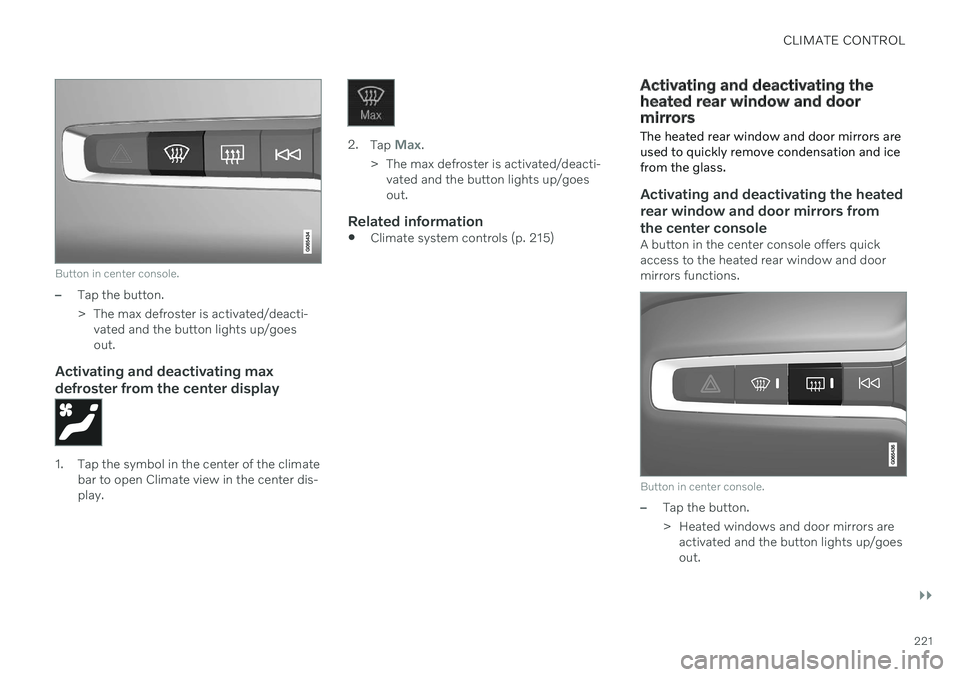
Button in center console.
–Tap the button.
> The max defroster is activated/deacti-vated and the button lights up/goes out.
Activating and deactivating max defroster from the center display
1. Tap the symbol in the center of the climate bar to open Climate view in the center dis- play.
2.Tap Max.
> The max defroster is activated/deacti- vated and the button lights up/goes out.
Related information
Climate system controls (p. 215)
Activating and deactivating the heated rear window and doormirrors The heated rear window and door mirrors are used to quickly remove condensation and icefrom the glass.
Activating and deactivating the heated rear window and door mirrors fromthe center console
A button in the center console offers quick access to the heated rear window and doormirrors functions.
Button in center console.
–Tap the button.
> Heated windows and door mirrors are
activated and the button lights up/goes out.
Page 224 of 687

||
CLIMATE CONTROL
222
Activating and deactivating the heated rear window and door mirrors fromthe center display
1. Tap the symbol in the center of the climatebar to open Climate view in the center dis- play.
2.Tap Rear.
> Heated windows and door mirrors are activated and the button lights up/goes out.
Related information
Climate system controls (p. 215)
Automatically activating and deactivatingthe heated rear window and door mirrors(p. 222)
Automatically activating and deactivating the heated rearwindow and door mirrors
The heated rear window and door mirrors are used to quickly remove condensation and icefrom the glass.
It is possible to select whether rear window and door mirror heating should be automati-cally activated or deactivated when the engineis started. With automatic start activated,heating will be activated when there is a riskof ice or condensation on the windows or mir-rors. Heating is automatically switched offwhen the window or door mirror is sufficientlywarm and the condensation or ice is gone. 1. Tap
Settings in the Top view in the center
display.
2. Tap
Climate.
3. Select
Auto Rear Defroster to activate/
deactivate automatic rear window and door heating.
Related information
Activating and deactivating the heatedrear window and door mirrors (p. 221)
Setting the blower speed for the front seats 2
The blower can be set to several different automatically controlled speeds for the frontseat.
1. Tap the symbol in the center of the climate bar to open Climate view in the center dis- play.
2The same setting applies to the rear seats with the 2-zone climate system.
Page 225 of 687
CLIMATE CONTROL
}}
223
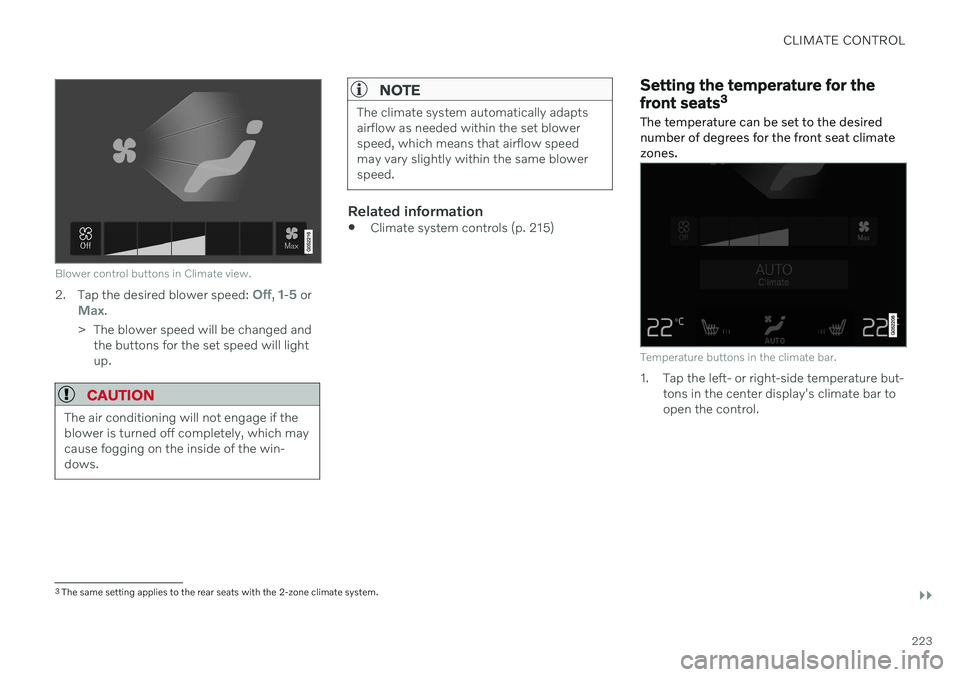
Blower control buttons in Climate view.
2.Tap the desired blower speed: Off, 1-5 orMax.
> The blower speed will be changed and the buttons for the set speed will light up.
CAUTION
The air conditioning will not engage if the blower is turned off completely, which maycause fogging on the inside of the win-dows.
NOTE
The climate system automatically adapts airflow as needed within the set blowerspeed, which means that airflow speedmay vary slightly within the same blowerspeed.
Related information
Climate system controls (p. 215)
Setting the temperature for the front seats 3
The temperature can be set to the desired number of degrees for the front seat climatezones.
Temperature buttons in the climate bar.
1. Tap the left- or right-side temperature but- tons in the center display's climate bar to open the control.
3The same setting applies to the rear seats with the 2-zone climate system.