lock VOLVO XC70 2004 User Guide
[x] Cancel search | Manufacturer: VOLVO, Model Year: 2004, Model line: XC70, Model: VOLVO XC70 2004Pages: 241, PDF Size: 5.78 MB
Page 36 of 241

2004 VOLVO XC70
The stability systems consist of a number of functions:
The following two functions are common to both STC/DSTC
1. Traction control (TC)
This function is designed to help reduce wheel spin by transferring powe\
r from a drive wheel that begins
to lose traction to the wheel on the opposite side of the car (on the s\
ame axle). TC monitors and
compares the rotational speed of the drive wheels. If one of the drive w\
heels shows a tendency to spin,
the difference in speed is immediately detected. This triggers the Anti-\
lock Brake System, which brakes
the spinning wheel until the difference in rotational speed is corrected\
.
TC is most active at low speeds, and a pulsating sound will be audible w\
hen the system is regulating
wheel spin. This is quite normal.
This is one of the STC/DSTC's permanent functions and is not affected wh\
en the button on the center
control panel is pressed.
2. Spin control (SC)
The spin control function is designed to help prevent the drive wheels f\
rom spinning while the car is
accelerating. This is done by temporarily reducing engine torque to the \
drive wheels, which helps
improve stability and tractive force.
Under certain circumstances, such as when driving with snow chains, or d\
riving in deep snow or loose
sand, it may be advisable to temporarily switch off this function for ma\
ximum tractive force. This is
done by pressing the STC/DSTC button on the center control panel for at \
least a half a second.
When the SC function has been switched off:
l The text window (see page 27) will briefly display "SPIN CONTROL OFF"
l The LED in the STC/DSTC button will be off.
The following two functions are only available with DSTC:
3. Active Yaw Control (AYC)
This function helps maintain directional stability, for example when cor\
nering, by braking one or more
of the wheels if the car shows a tendency to skid or slide laterally. Th\
is is done by activating the Anti-
lock Braking System. A pulsating sound will be audible when the function\
is active, which is quite
normal. If you apply the brakes while this function is active, the brake\
pedal will feel stiffer than usual.
This is also one of the DSTC system's permanent functions and is not aff\
ected when the DSTC button on
the center control panel is pressed.
R-models only:
The AYC function can be deactivated. This is done by pressing the DSTC b\
utton on the center control
panel (see the illustration on
page 31) for approximately one second. This procedure must be repeated 5
times, after which "DSTC REDUCED FUNCTION" will be displayed in the text\
window. AYC will be
file:///K|/ownersdocs/2004/2004_XC70/04xc70_01b.htm (13 of 15)12/30/20\
06 4:32:55 PM
Page 39 of 241

2004 VOLVO XC70
2 0 0 4
VOLVO XC70
Chapter 2 - Instruments, switches and controls
pg. 23 Instruments, switches and controls
Interior 24
Exterior 25
Instruments 26
Instrument panel 27
Indicator and warning lights 28
Text information window 30
Switches in the center console 31
Trip computer 32
Cruise control 33
Light switch panel 34
Steering wheel adjustment/lock 35
Ignition switch, Turn signals 36
Windshield wipers/washers 37
Warning flashers, heated mirrors/rear window, heated front
seats 38
Parking brake, auxiliary socket/ashtrays 39
Electrically operated windows 40
Rearview/sideview mirrors 41
file:///K|/ownersdocs/2004/2004_XC70/04xc70_02a.htm (1 of 14)12/30/200\
6 4:32:56 PM
Page 43 of 241

2004 VOLVO XC70
information.
If the engine temperature remains high, check coolant level - see
page 133.
4 Trip odometer/reset button
The trip odometer is used for measuring shorter distances. The last digi\
t indicates 1/10 mile/kilometer. Press
the button quickly to toggle between trip odometers 1 and 2. Hold in the\
button for more than 2 seconds to
reset.
5 Odometer
6 Speedometer
7 General warning light (see
page 28).
8 High beam indicator light
9 Tachometer
Indicates engine speed in thousands of rpm. Do not drive for long with t\
he needle in the red section. The
engine has an built-in function preventing too high an engine speed. Whe\
n this function operates, you may
discern some pulsation, which is normal.
10 Gear and driving mode indicator
The currently selected driving mode is displayed here. If you use the Ge\
artronic function on the automatic
transmission, the currently selected gear will be displayed.
11 Ambient temperature indicator
This display indicates the air temperature outside your car. A "snowflak\
e" symbol in the text window is
displayed when the temperature is in the range of 23 - 36° F (-5 - +\
2° C).
Please note that this symbol does not indicate a fault with your car.
At low speeds or when the car is not moving, the temperature readings ma\
y be slightly higher than the actual
ambient temperature.
12 Clock/reset button
Turn the button to adjust the clock.
13 Fuel gauge
The fuel tank holds approximately:
Front wheel drive models:18.5 US gal. (70 liters)
All Wheel Drive models: 19 US gal. (72 liters)
V70R: 18 US gal. (68 liters)
file:///K|/ownersdocs/2004/2004_XC70/04xc70_02a.htm (5 of 14)12/30/200\
6 4:32:56 PM
Page 46 of 241
2004 VOLVO XC70
pg. 29 Indicator and warning lights
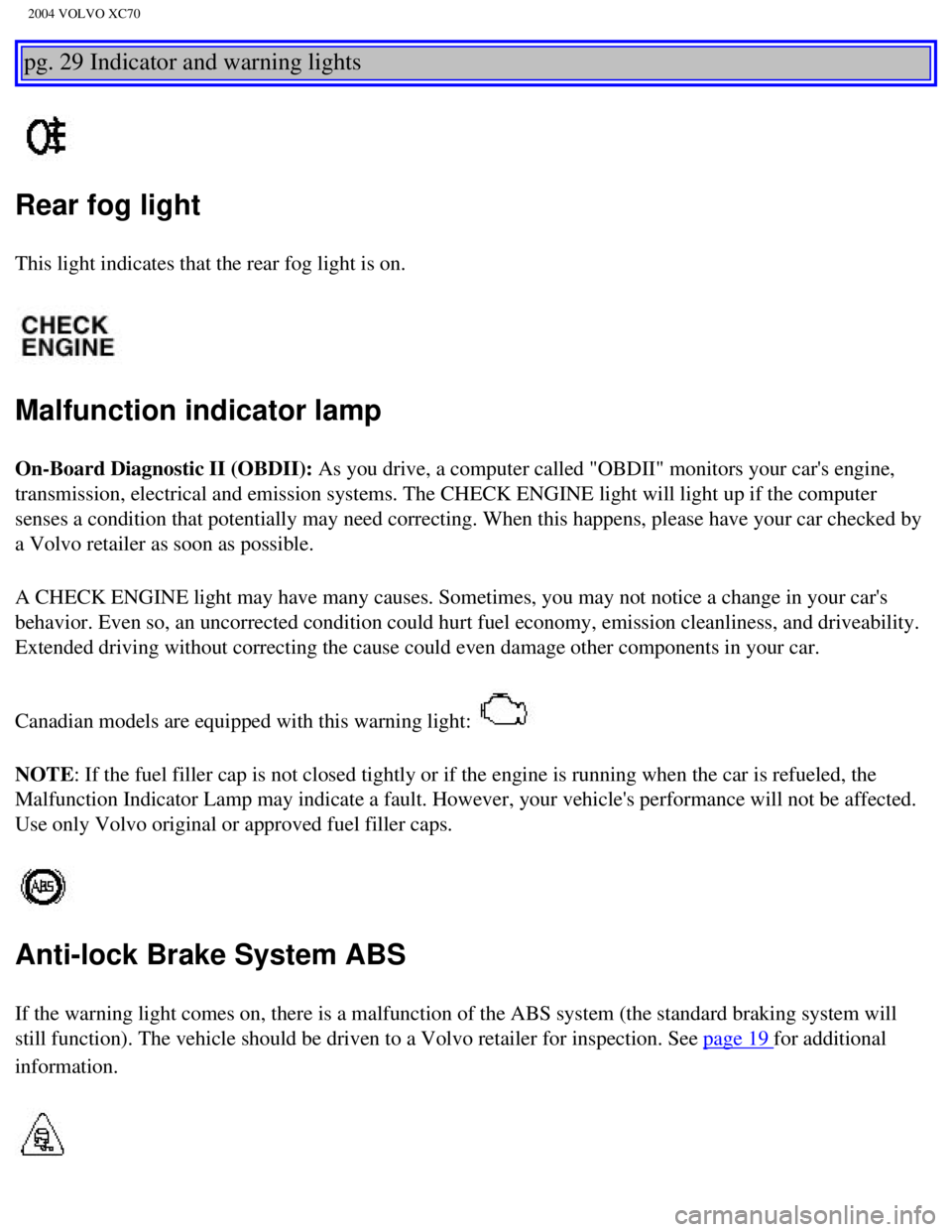
Rear fog light
This light indicates that the rear fog light is on.
Malfunction indicator lamp
On-Board Diagnostic II (OBDII): As you drive, a computer called "OBDII" monitors your car's engine,
transmission, electrical and emission systems. The CHECK ENGINE light wi\
ll light up if the computer
senses a condition that potentially may need correcting. When this happe\
ns, please have your car checked by
a Volvo retailer as soon as possible.
A CHECK ENGINE light may have many causes. Sometimes, you may not notice\
a change in your car's
behavior. Even so, an uncorrected condition could hurt fuel economy, emi\
ssion cleanliness, and driveability.
Extended driving without correcting the cause could even damage other co\
mponents in your car.
Canadian models are equipped with this warning light:
NOTE: If the fuel filler cap is not closed tightly or if the engine is runni\
ng when the car is refueled, the
Malfunction Indicator Lamp may indicate a fault. However, your vehicle's\
performance will not be affected.
Use only Volvo original or approved fuel filler caps.
Anti-lock Brake System ABS
If the warning light comes on, there is a malfunction of the ABS system \
(the standard braking system will
still function). The vehicle should be driven to a Volvo retailer for i\
nspection. See
page 19 for additional
information.
file:///K|/ownersdocs/2004/2004_XC70/04xc70_02a.htm (8 of 14)12/30/200\
6 4:32:56 PM
Page 55 of 241

2004 VOLVO XC70
darkness, the daytime running lights will switch off and the Bi-Xenon he\
adlights will switch on.
Parking lights on
Headlights, parking lights, license plate lights and instrument panel i\
llumination are on if the
ignition key is in position II.
If the headlight switch is in position
all lights will go out when the ignition is switched off.
The headlight switch must be in this position before the high beams will\
function (this also applies on
models equipped with the optional Bi-Xenon headlights).
Switch from high to low beams and vice versa by pulling the turn signal \
switch lever on the left side of
steering column toward you.
B - Instrument illumination
Move the thumbwheel up to increase brightness or down to decrease bright\
ness. There is also an
instrument panel illumination sensor (see illustration on
page 48) which automatically adjusts the level
of illumination.
C -Unlocking the fuel filler door
Press this button when the car is at a standstill to unlock the fuel fil\
ler door. Please note that the fuel
filler door will remain unlocked until the car begins to move forward. A\
n audible click will be heard
when the fuel filler door relocks.
See also
page 86.
file:///K|/ownersdocs/2004/2004_XC70/04xc70_02b.htm (3 of 18)12/30/200\
6 4:32:58 PM
Page 56 of 241
, stop the car, and press the button again. \")
2004 VOLVO XC70
NOTE: If the fuel filler door does not unlock after the button has been press\
ed, drive the car at a speed
of at least 5 mph (8 km/h), stop the car, and press the button again. \
pg. 35 Light switch panel, Steering wheel adjustment/lock
D - Front fog lights (option)
The front fog lights will function only in combination with the low beam\
headlights.
An LED in the switch indicates when the front fog lights are on.
E - Rear fog light
The rear fog light is considerably brighter than the normal tail lights \
and should be used only when
conditions such as fog, rain, snow, smoke or dust reduce visibility for \
other vehicles to less than 500 ft
(150 meters).
An LED in the switch indicates when the rear fog light is on.
The rear fog light will only function in combination with the high/low b\
eam headlights.
By design, there is one rear fog light only, located in the driver's sid\
e tail light cluster.
Rear fog light in the instrument panel
This light indicates that the rear fog light is on.
Pull down the lever (A) to adjust height (B), or reach (C)
Steering wheel adjustment
file:///K|/ownersdocs/2004/2004_XC70/04xc70_02b.htm (4 of 18)12/30/200\
6 4:32:58 PM
Page 57 of 241

2004 VOLVO XC70
Both the height and the reach of the steering wheel can be adjusted to a\
comfortable position for the
driver. Pull down the lever on the left of the steering column. Adjust t\
he steering wheel to a suitable
position and press the lever back into place to lock the steering wheel \
in the new position. Check that the
steering wheel is locked in the new position. WARNING!
Never adjust the steering wheel while
driving.
Steering wheel lock
The steering wheel lock might be under tension when the car is parked.
Turn the steering wheel slightly to free the ignition key.
In order to help reduce car theft, make sure the steering wheel lock is \
engaged before leaving the
car. WARNING!
Never switch off the ignition (turn the ignition key to position 0) or\
remove the key from the ignition
switch while the car is in motion. This could cause the steering wheel t\
o lock, which would make the
car impossible to steer.
pg. 36 Ignition switch, Turn signals
file:///K|/ownersdocs/2004/2004_XC70/04xc70_02b.htm (5 of 18)12/30/200\
6 4:32:58 PM
Page 67 of 241
2004 VOLVO XC70
Electrically operated sideview mirrors
The mirror control switches are located on the driver's door armrest.
Driver's side: Press the L switch (an LED in the switch will light up) to activate th\
e adjustment control
and then use this control to adjust the driver's door mirror.
Passenger's door: Press the R switch (an LED in the switch will light up) and then use t\
he adjustment
control to adjust the passenger's door mirror.
After you have adjusted the mirror(s), press the L or R switch again (\
the LED will go out) to deactivate
the adjustment control.
Remote central locking and sideview mirror memory
If you lock the car and later unlock it with the same remote control and open the driver's door, the
sideview mirrors will automatically move to the position they were in wh\
en you left the car. This feature
will work in the same way with all of the remote control transmitters (\
up to 3) that you use with your
car.
This feature will not function if you lock your car with the key. WARNING!
The mirrors should always be adjusted prior to driving. Objects seen in \
the wide-angle sideview
mirror are closer than they appear to be.
pg. 42 Power moonroof (option)
file:///K|/ownersdocs/2004/2004_XC70/04xc70_02b.htm (15 of 18)12/30/20\
06 4:32:58 PM
Page 78 of 241

2004 VOLVO XC70
Blower control
Turn the control clockwise to increase or counterclockwise to decrease t\
he blower speed. Pressing the
AUTO switch will automatically regulate blower speed and override manual\
adjustment.
NOTE: Turning the blower control counterclockwise as far as possible (an oran\
ge LED next to the
control will light up) will turn both the blower and the air conditioni\
ng off.
pg. 51 Electronic Climate Control (ECC) with Interior Air Quality syst\
em (option)
Interior Air Quality system (option)
Some cars are equipped with a Multifilter and Air quality sensor. The fi\
lter separates gases and particles,
thereby reducing the amounts of odors and contaminants entering the car.\
The Air quality sensor detects
increased levels of contaminants in the outside air. When the Air qualit\
y sensor detects contaminated
outside air, the air intake closes and the air inside the passenger comp\
artment is recirculated, i.e. no
outside air enters the car. The filter also cleans recirculated passenge\
r compartment air. When the Air
quality sensor is activated, the LED AUT comes on in
Operation:
Press to activate the Air quality sensor (normal setting).
Or select one of three functions by pressing
.
file:///K|/ownersdocs/2004/2004_XC70/04xc70_03.htm (8 of 12)12/30/2006\
4:32:59 PM
Page 84 of 241

From the time the drivers door is unlocked, the drivers seat can be ad\
justed with the ignition off during
a 10 minute period, if the do")
2004 VOLVO XC70
Electrically operated front seats (option)
From the time the driver's door is unlocked, the driver's seat can be ad\
justed with the ignition off during
a 10 minute period, if the door remains opened. If the door is closed, the seat can be adjusted for 40
seconds.
1 - Power seat control panel
2 - Lumbar support
Turn the control for softer or firmer lumbar support.
Move the seat as far rearward as possible for easiest access to the lumb\
ar support control.
Electrically operated seats with memory function (option)*
Power seat control panel
A Front edge of seat (raise/lower)
B Forward - rearward
C Rear edge of seat (raise/lower)
D Backrest tilt
file:///K|/ownersdocs/2004/2004_XC70/04xc70_04a.htm (2 of 11)12/30/200\
6 4:32:59 PM