lock VOLVO XC70 2004 Owner's Manual
[x] Cancel search | Manufacturer: VOLVO, Model Year: 2004, Model line: XC70, Model: VOLVO XC70 2004Pages: 241, PDF Size: 5.78 MB
Page 85 of 241

2004 VOLVO XC70
WARNING!
l Because the driver's seat can be adjusted with the ignition off, childre\
n should never be left
unattended in the car.
l Movement of the seat can be STOPPED at any time by pressing any button o\
n the power seat
control panel.
l Do not adjust the seat while driving. The seat should be adjusted so tha\
t the brake pedal can be
depressed fully. In addition, position the seat as far rearward as comfo\
rt and control allow.
l The seat rails on the floor must not be obstructed in any way when the s\
eat is in motion.
Programming the memory
Three seat positions can be programmed. To program a seat position:
1 Adjust the seat to the desired position.
2 Hold down the MEM button.
3 While holding down the MEM button, press button 1 to program the curren\
t position of the seat.
Buttons 2 and 3 can be programmed in the same way.
To move the seat to a programmed position, press and hold down button 1,\
2 or 3 until the seat moves to
the preset position and stops.
As a safety precaution, the seat will stop automatically if the button i\
s released before the seat has
reached the programmed position.
NOTE: The seat has an overload protector which engages if an object blocks the\
movement of the seat.
If this happens, remove the object and wait 20 seconds before operating \
the seat again.
* This option is only available on the driver's seat.
file:///K|/ownersdocs/2004/2004_XC70/04xc70_04a.htm (3 of 11)12/30/200\
6 4:32:59 PM
Page 86 of 241

2004 VOLVO XC70
pg. 57 Front seats
Electrically operated seats - general information
Adjusting the front seats:
Passengers's seat: The passenger's seat can only be adjusted if the ignition key is in posi\
tion I or II.
Driver's seat: The driver's seat can be adjusted if the ignition key is in position I o\
r II (see
page 36).
However, it can also be adjusted:
l Within 40 seconds after the ignition has been switched off (even if the\
key has been removed from the
ignition switch).
l Within 40 seconds after the driver's door has been unlocked with the key\
or remote control and
opened. The key does not have to be in the ignition switch during this p\
eriod.
Remote keyless entry system and driver's seat
The remote control transmitter also controls the electrically operated d\
river's seat in the following way:
l Adjust the seat to your preferences.
l When you leave your car, lock it using the remote control.
l The next time you unlock the driver's door with the same remote control(the one you used to lock the
doors with) and open the driver's door, the driver's seat will automatically move to the position in which
you left it.
The seat will move to this position even if someone else has adjusted it\
since you last unlocked the car
with the same remote control.
NOTE:
l This feature will work in the same way with all of the remote control tr\
ansmitters (up to 3) that you
use with your car.
l This feature will not function if you lock your car with the key.
file:///K|/ownersdocs/2004/2004_XC70/04xc70_04a.htm (4 of 11)12/30/200\
6 4:32:59 PM
Page 88 of 241

2004 VOLVO XC70
The seat can be moved forward or rearward by pulling up on the front-rea\
r adjustment bar.
Check that the seat is securely locked into position after adjusting. WARNING!
Do not adjust the seat while driving. The seat should be adjusted so tha\
t the brake pedal can be
depressed fully. In addition, position the seat as far rearward as comfo\
rt and control allow.
pg. 59 Storage compartments
Clip for toll booth tickets, etc.
file:///K|/ownersdocs/2004/2004_XC70/04xc70_04a.htm (6 of 11)12/30/200\
6 4:32:59 PM
Page 90 of 241

To remove the coin compartment: Press the middle of the compartment whil\
e pulling it straight up.
Storage compartment and armrest
Inside the armrest there")
2004 VOLVO XC70
Coin compartment (option)
To remove the coin compartment: Press the middle of the compartment whil\
e pulling it straight up.
Storage compartment and armrest
Inside the armrest there is a storage compartment which you may use for \
different personal accessories.
The armrest's lid is twofold.
To open only the upper lid: press the locking mechanism underneath the u\
pper lid and fold the lid
backwards to desired position.
To open the upper and lower lid: lift the lid from underneath upwards an\
d fold to desired position.
pg. 60 Cup holders, Glove compartment
Cup holder in the center console for rear seat passengers
(XC70 only)
This cup holder is only available on the XC70 with a 3-section rear seat\
.
l To use the cup holder, open the cover on the center console and fold it \
rearward. The cup holder and
the cover open together.
l The cup holder and the cover can be closed separately.
NOTE: If the cup holder is subjected to weights above approximately 12 lbs (\
5 kg), it will fold down
slightly to help prevent damage to the hinges.
file:///K|/ownersdocs/2004/2004_XC70/04xc70_04a.htm (8 of 11)12/30/200\
6 4:32:59 PM
Page 95 of 241

2004 VOLVO XC70
Models with 2-section rear seat
Lower the center seat head restraint if it is raised. Press the release \
button behind the right-hand support.
See illustration above.
Folding the outboard backrests down
Models with 2 or 3-section rear seat
Press the backrest catch to the rear and tip the backrest forward. See t\
he illustration in the right-hand
column.
A - Catch in closed position.
B - Catch in open position.
Tipping an outboard backrests forward
WARNING!
The red lock indicator is VISIBLE (B) when the backrest is NOT locked in position and not vi\
sible
(A) when the backrest is correctly locked in place. When the backrest \
is in the upright position, it
must always be correctly locked in place.
When the rear seat is folded down, do not place heavy objects against th\
e backs of the front seats.
This places a severe strain on the folded down backrest of the rear seat\
. Be sure to secure cargo.
Cargo must not be stacked higher than the top of seatbacks. This will re\
duce the possibility of
luggage, etc. becoming projectiles during sudden maneuvers, rapid brakin\
g or an accident.
file:///K|/ownersdocs/2004/2004_XC70/04xc70_04b.htm (2 of 21)12/30/200\
6 4:33:00 PM
Page 96 of 241
2004 VOLVO XC70
pg. 64 Rear seat and cargo area
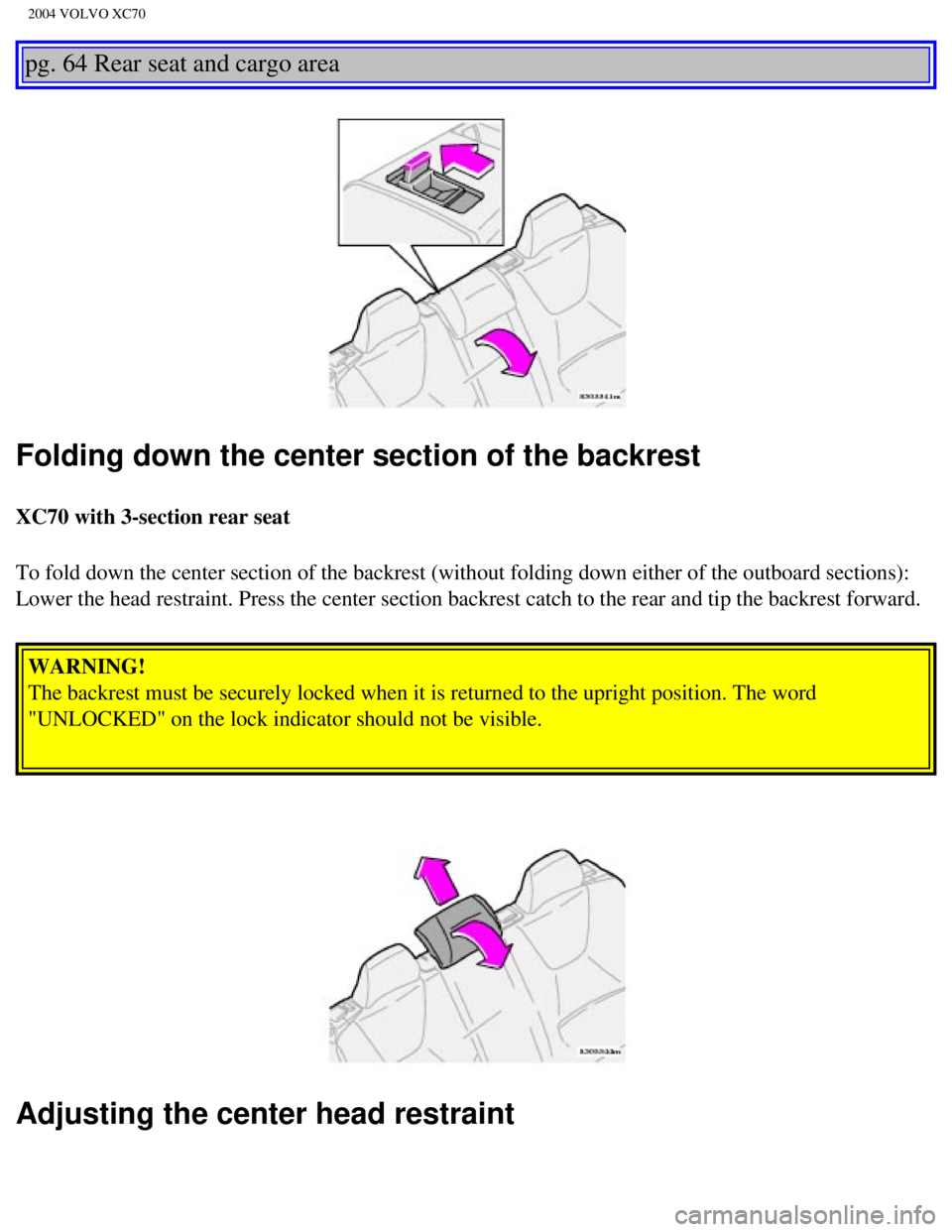
Folding down the center section of the backrest
XC70 with 3-section rear seat
To fold down the center section of the backrest (without folding down e\
ither of the outboard sections):
Lower the head restraint. Press the center section backrest catch to the\
rear and tip the backrest forward.
WARNING!
The backrest must be securely locked when it is returned to the upright \
position. The word
"UNLOCKED" on the lock indicator should not be visible.
Adjusting the center head restraint
file:///K|/ownersdocs/2004/2004_XC70/04xc70_04b.htm (3 of 21)12/30/200\
6 4:33:00 PM
Page 98 of 241

2004 VOLVO XC70
Removing the center backrest
XC70 with 3-section rear seat
l Press the button at the top of the center section to the rear to release\
the locking mechanism.
l Fold the backrest section slightly forward.
l Pull up on the handle at the upper rear side of the backrest (see illus\
tration above) to release this
section of the backrest from the retaining bar at the base of the backre\
st. Lift out the backrest.
Replacing the center backrest
l Before the center section is put back in place, the right section of the\
backrest must be locked in the
upright position.
l Replace the backrest by pressing the bottom section onto the retaining b\
ar until the backrest clicks
into place.
Please consult your Volvo retailer for information about accessory equip\
ment that can be placed in the
center section of the backrest.
WARNING!
l For safety reasons, the center section of the backrest or seat cushion s\
hould not be left in the car
after they have been removed.
l Please be aware that with the center section of the backrest removed, un\
anchored objects in the rear
cargo area could be thrown forward between the outboard sections of the \
backrest in the event of a
sudden stop.
l When the center section of the backrest is put back in place, the right-\
hand section of the backrest
must be in the upright position in order to lock the center section secu\
rely in place and to be able to
use the center seat belt.
file:///K|/ownersdocs/2004/2004_XC70/04xc70_04b.htm (5 of 21)12/30/200\
6 4:33:00 PM
Page 99 of 241
2004 VOLVO XC70
Center armrest
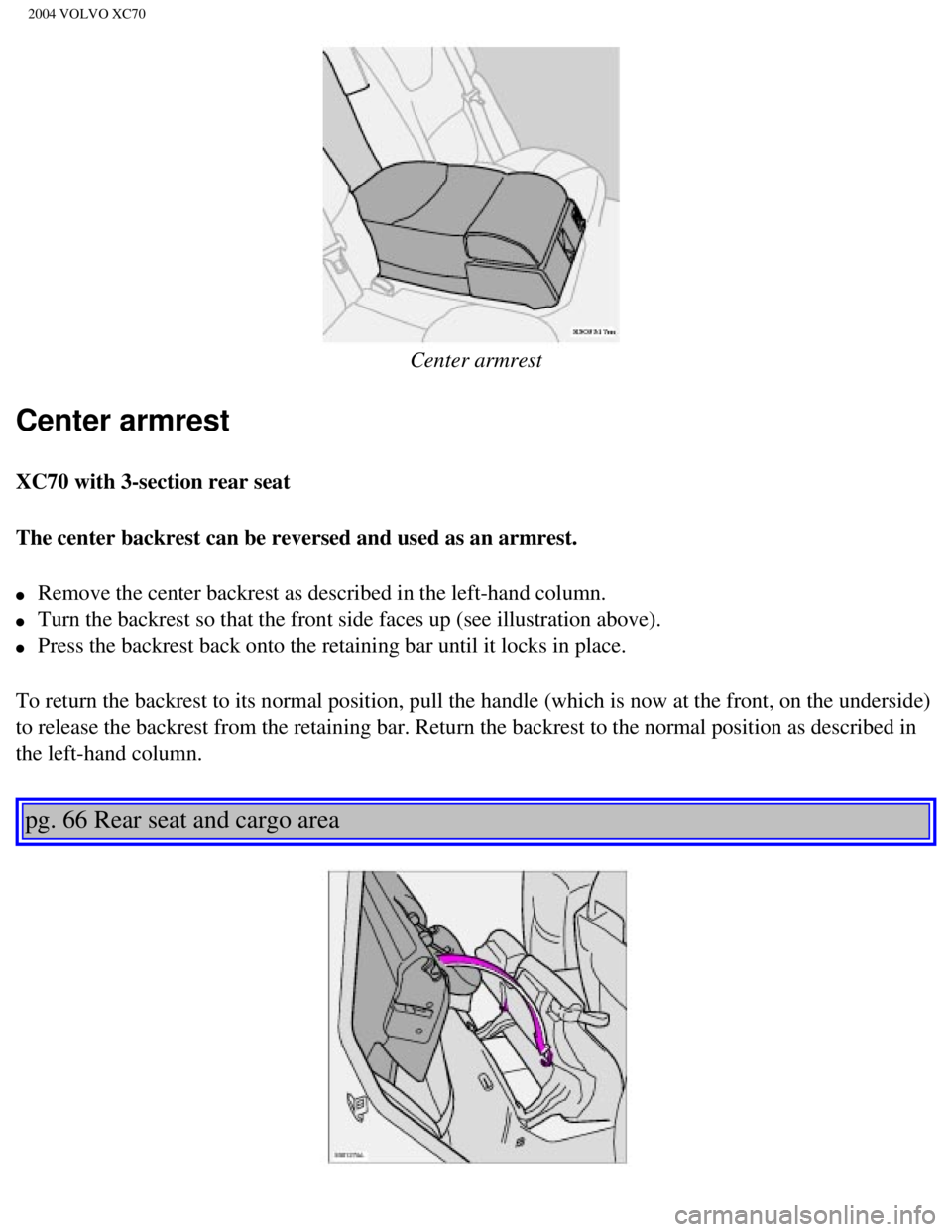
Center armrest
XC70 with 3-section rear seat
The center backrest can be reversed and used as an armrest.
l Remove the center backrest as described in the left-hand column.
l Turn the backrest so that the front side faces up (see illustration abo\
ve).
l Press the backrest back onto the retaining bar until it locks in place.
To return the backrest to its normal position, pull the handle (which i\
s now at the front, on the underside)
to release the backrest from the retaining bar. Return the backrest to t\
he normal position as described in
the left-hand column.
pg. 66 Rear seat and cargo area
file:///K|/ownersdocs/2004/2004_XC70/04xc70_04b.htm (6 of 21)12/30/200\
6 4:33:00 PM
Page 100 of 241

2004 VOLVO XC70
NOTE: Make sure that the holes in the plastic ferrules on the top of the backr\
est engage the hooks on
the bottom of the seat cushion. When you later raise the backrest and se\
at cushion, the head restraints
must be returned to their normal positions.
Removing the seat cushion
Models with 2 or 3-section rear seat
Pull up the seat by the handle. Unlock the two red locking tabs. Lift ou\
t the seat. When replacing, do
everything in reverse order. Make sure the red locking tabs are in a loc\
ked position. WARNING!
The red lock indicator is VISIBLE (B) when the backrest is NOT locked in position and not vi\
sible
(A) when the backrest is correctly locked in place. When the backrest \
is in the upright position, it
must always be correctly locked in place.
file:///K|/ownersdocs/2004/2004_XC70/04xc70_04b.htm (7 of 21)12/30/200\
6 4:33:00 PM
Page 101 of 241

2004 VOLVO XC70
A - Catch in closed position. B - Catch in open position.
Rear seat backrest
You can adjust the angle of the rear seat backrests. To adjust a backres\
t to a more upright position:
l Press the catch until the red mark is visible.
l Pull the backrest forward to a new locked position.
l Make sure that the backrest is secured in a locked position and that the\
red mark is no longer visible.
Follow the same procedure to adjust the backrest to a less upright posit\
ion.
pg. 67 Cargo area
Cargo area lighting
file:///K|/ownersdocs/2004/2004_XC70/04xc70_04b.htm (8 of 21)12/30/200\
6 4:33:00 PM