engine VOLVO XC70 2014 Owner´s Manual
[x] Cancel search | Manufacturer: VOLVO, Model Year: 2014, Model line: XC70, Model: VOLVO XC70 2014Pages: 394, PDF Size: 11.55 MB
Page 157 of 394

04 Driver support
Adaptive Cruise Control (ACC)*
04
* Option/accessory, for more information, see Introduction.155
•
The gear selected is moved to
P,N or R
• The driver presses the
button to put
ACC in standby mode
The parking brake is applied
automatically
In certain situations, ACC will apply the park- ing brake in order to continue keeping thevehicle at a standstill. This happens if:
• The driver opens the door or takes off his/her seat belt
• DSTC is put in Sport mode (seepage 142)
• ACC has kept the vehicle at a standstillfor more than 2 minutes
• The engine has been switched off
• The brakes have overheated
The radar sensor and its limitations
In addition to being used by ACC, the radar sensor is also used by Distance Alert (seepage 159) and Collision Warning with FullAuto-brake and Pedestrian Detection (seepage 168). This sensor is designed to detectcars or larger vehicles driving in the samedirection as your vehicle, in the same lane.
WARNING
• If there is visible damage to the front grille or you suspect that the radarsensor may be damaged in any way,contact a trained and qualified Volvoservice technician as soon as possible.The radar sensor may only functionpartially (or not at all) if it is damagedor is not securely fastened in place.
• Accessories or other objects, such asextra headlights, must not be installedin front of the grille.
• Modification of the radar sensor couldmake its use illegal.
The radar sensor's capacity to detect vehi- cles ahead is impeded:
• if the radar sensor is obstructed and can- not detect other vehicles, for example inheavy rain, or if snow or other objects areobscuring the radar sensor.
NOTE
Keep the area in front of the radar sensor clean.
• if the speed of vehicles ahead is signifi- cantly different from your own speed.
Situations where ACC may not function optimally
WARNING
•The radar sensor has a limited field of vision. In some situations it may detecta vehicle later than expected or notdetect other vehicles at all.
• If ACC is not functioning properly,cruise control will also be disabled.
Page 165 of 394

04 Driver support
City Safety™
04
163
WARNING
•City Safety™ only reacts to vehicles traveling in the same direction as yourvehicle and does not react to smallvehicles or motorcycles or to people oranimals.
• City Safety™ is not activated whenyour vehicle is backing up.
• City Safety™ functions at speeds upto 30 mph (50 km/h). This system canhelp prevent a collision if the
differ-
ence in speed between your vehicle
and the vehicle ahead is less than9 mph (15 km/h). If the difference inspeed is greater, a collision cannot beavoided but the speed at which thecollision occurs can be reduced. Thedriver must apply the vehicle’s brakesfor full braking effect.
• City Safety™ will not intervene in apotential collision situation if the vehi-cle is being driven actively. The driveris always responsible for maintaining asafe distance to a vehicle or objectahead.
Function
Location of the laser sensor in the windshield 2
City Safety™ monitors traffic ahead of you using a laser sensor mounted in the uppersection of the windshield. If a collision isimminent, City Safety™ will automaticallyapply the brakes, which may feel like hardbraking. If the difference in speed between your vehi- cle and the vehicle ahead is more thanapproximately 9 mph (15 km/h), City Safety™alone cannot prevent a collision from takingplace. The driver must apply the brakes tohelp avoid a collision or reduce its effect. When the function activates and applies the brakes, a message will appear in the informa- tion display to indicate that the system is/hasbeen active.
NOTE
•
When City Safety™ applies the brakes, the brake lights will illuminate.
• In cases where City Safety™ has stop-ped the vehicle, the system will thenrelease the brakes. The driver mustapply the brakes to keep the vehicle ata standstill.
Using City Safety™
NOTE
The City Safety™ function is activated automatically each time the engine hasbeen switched off and restarted.
On and OffIn certain situations, it may be desirable to switch City Safety™ off, such as when drivingin close quarters where leaves, branches, etc.may obscure the hood and windshield. When the engine is running, City Safety™ can be switched off as follows:
2
The illustration is generic; certain details may vary from model to model
Page 166 of 394

04 Driver support
City Safety™
04
164
Press My Car in the center console control
panel and go to
SettingsCar settings
Driver support systemsCity Safety.
Select
Off.
If the engine is switched off, City Safety™ will reactivate when the engine is restarted.
WARNING
The laser sensor emits light when the igni- tion is in mode II or higher, even if City
Safety™ has been switched off.
To switch City Safety™ on again:
• Follow the same procedure as for switch- ing City Safety™ off but select
On.
Limitations
The sensor used by City Safety™ is designed to detect cars and other larger motor vehiclesahead of your vehicle in both daylight anddarkness.
WARNING
The laser sensor has certain limitations and its function may be reduced (or it maynot function at all) in conditions such asheavy rain or snowfall, or by dense fog orthick, blowing dust or snow. Condensa-tion, dirt, ice or snow on the windshieldmay also interfere with the sensor’s func-tion.
Objects such as warning flags hanging from long objects on the roof or accessories suchas auxiliary lights or protective arches on thefront of the vehicle that are higher than thehood may also impede the sensor’s function. Braking distance to the vehicle ahead increa- ses on slippery road surfaces, which mayreduce City Safety’s capacity to avoid a colli-sion. In situations like this, the DSTC system(see page 142) will help provide the best pos-sible braking capacity and stability. City Safety™ emits a laser beam and meas- ures the way in which the light is reflected.Therefore, vehicles or objects with low-reflec-tive surfaces may not be detected. Normally,the license plate and taillight reflectors givethe rear section of a vehicle ahead sufficientreflective surfaces to be detected.
NOTE
•Keep the windshield in front of the laser sensor free of ice, snow, dirt, etc.See page 163.
• Snow or ice on the hood deeper than2 inches (5 cm) may obstruct the sen-sor. Keep the hood free of ice andsnow.
• Do not mount or in any way attachanything on the windshield that couldobstruct the laser sensor.
Troubleshooting
If Windscreen Sensors blocked appears in
the information display, this indicates that the City Safety™ laser sensor is obstructed insome way and cannot detect vehicles aheadof you, which means that the system is notfunctioning. However, this message will not be displayed in all situations in which the sensor isobstructed. For this reason, the driver mustensure that the area of the windshield in frontof the sensor is always kept clean. The following table shows some of the situa- tions that can cause the message to be dis-played and suggested actions.
Page 172 of 394

04 Driver support
Collision warning with Full Auto-brake and Pedestrian Detection*
04
170* Option/accessory, for more information, see Introduction.
Operation
Settings are made by pressing MY CAR on
the center console control panel and using the menus displayed.
Activating/deactivating both warning
signals
To switch Collision Warning's audible and
visual signals on or off at the same time,
press MY CAR on the center console control
panel and go to
SettingsCar settings
Driver support systemsCollision
Warning. If Collision Warning is on, the sys-
tem will perform a self-test each time the engine is started by briefly illuminating thewarning light. See page 199 for a descriptionof the menu system. When the engine is switched on, the Collision Warning setting that was being used when itwas switched off will be the default setting.
NOTE
The auto-brake and pedestrian detection features are always on, even if the audibleand visual warning signals have beendeactivated.
Activating/deactivating the audible warning signal only
The audible warning signal can be activated/ deactivated by pressing MY CAR on the cen-
ter console control panel and going to
SettingsCar settingsDriver support
systems
Warning sound if risk of
collision.
Setting a warning distanceThis setting determines the distance at which the visual and audible warnings are triggered. Select
Long, Normal or Short by pressing
MY CAR on the center console control panel
and going to
SettingsCar settings
Driver support systemsCollision
Warning
Warning distance.
The warning distance determines the level of sensitivity used by the system. The warning distance
Long provides an earlier warning.
Begin by using Long and if the system gives
too many warnings, try changing to Normal.
WARNING
• The setting Short should only be used
in situations where traffic is light and moving at low speeds.
• Collision Warning alerts the driver tothe risk of a collision but this functioncannot reduce the driver’s reactiontime.
• For Collision Warning to be as effec-tive as possible, it is recommendedthat Distance Alert be set to 4 or 5, seepage 159.
NOTE
•When Adaptive Cruise Control is used, the warning light and signal will beused by that function, even if thewarnings provided by Collision Warn-ing have been deactivated by thedriver.
• In situations where traffic is moving atconsiderably different speeds, or if thevehicle ahead brakes suddenly, warn-ings may be considered to be late, even if the setting
Long has been
selected.
Checking settingsThe current Collision Warning settings can be checked by pressing MY CAR on the center
Page 174 of 394
04 Driver support
Collision warning with Full Auto-brake and Pedestrian Detection*
04
172* Option/accessory, for more information, see Introduction.
NOTE
If warnings are given too frequently, the warning distance can be reduced (seepage 170). This causes the system to pro-vide later warnings, which decreases thetotal number of warnings provided.
WARNING
• The system is not activated at speeds under approx. 2 mph (4 km/h). There-fore, it will not brake your vehicle if youapproach a vehicle ahead at very lowspeed, such as when parking.
• The driver's actions always have high-est priority and override the CollisionWarning system. This means that thesystem will not intervene in situationswhere the driver is actively steering,braking or pressing the acceleratorpedal, even if a collision is imminent.
• When Auto-brake has prevented a col-lision with a stationary object, yourvehicle will remain at a standstill forapprox. 1.5 seconds. If your vehiclehas been braked for a moving vehicleahead, your vehicle's speed will bereduced to the same speed as thatvehicle's.
The camera’s limitationsThe camera is used by Collision Warning with Auto-brake, Driver Alert Control (seepage 176), and Lane Departure Warning (seepage 179).
NOTE
•To help protect the camera in very hot conditions, it may be temporarilyswitched off for approximately 15minutes after the engine has beenstarted.
• Keep the section of the windshield infront of the camera clean and free ofice, snow, or condensation.
WARNING
•The camera has the same limitations as the human eye. In other words, its“vision is impaired” by adverseweather conditions such as heavysnowfall, dense fog, etc. These condi-tions may reduce the function of sys-tems that depend on the camera orcause these systems to temporarilystop functioning.
• Never place any objects, decals, etc.,on the windshield in front of the cam-era. This could reduce or block thecamera’s function, and could causeone or more of the systems that utilizethe camera to stop functioning.
• Strong sunlight, reflections from theroad surface, ice or snow covering theroad, a dirty road surface, or unclearlane marker lines may drasticallyreduce the camera’s capacity todetect the side of a lane, a pedestrianor another vehicle.
Page 176 of 394
04 Driver support
Collision warning with Full Auto-brake and Pedestrian Detection*
04
174* Option/accessory, for more information, see Introduction.
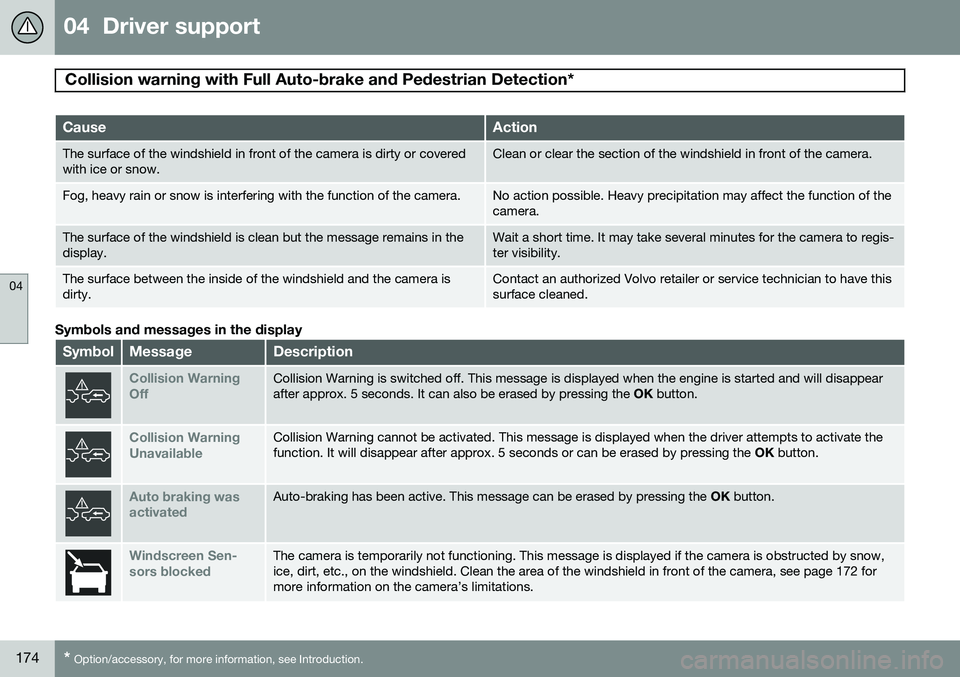
CauseAction
The surface of the windshield in front of the camera is dirty or covered with ice or snow.Clean or clear the section of the windshield in front of the camera.
Fog, heavy rain or snow is interfering with the function of the camera.No action possible. Heavy precipitation may affect the function of the camera.
The surface of the windshield is clean but the message remains in the display.Wait a short time. It may take several minutes for the camera to regis- ter visibility.
The surface between the inside of the windshield and the camera is dirty.Contact an authorized Volvo retailer or service technician to have this surface cleaned.
Symbols and messages in the display
SymbolMessageDescription
Collision Warning OffCollision Warning is switched off. This message is displayed when the engine is started and will disappear after approx. 5 seconds. It can also be erased by pressing the OK button.
Collision Warning UnavailableCollision Warning cannot be activated. This message is displayed when the driver attempts to activate the function. It will disappear after approx. 5 seconds or can be erased by pressing the OK button.
Auto braking was activatedAuto-braking has been active. This message can be erased by pressing the OK button.
Windscreen Sen- sors blockedThe camera is temporarily not functioning. This message is displayed if the camera is obstructed by snow, ice, dirt, etc., on the windshield. Clean the area of the windshield in front of the camera, see page 172 formore information on the camera’s limitations.
Page 182 of 394
04 Driver support
Driver Alert System*
04
180* Option/accessory, for more information, see Introduction.
WARNING
The driver will only be warned once for each time the wheels cross a marker line.No alarm will be given if a marker line isbetween the wheels.
Limitations
The camera used by LDW has the same limi- tations as the human eye. See page172 for
more information about the camera's limita-tions.
NOTE
No warning signal will be given in the cer-
tain situations, such as:
• If the turn signal is being used
• The driver’s foot is on the brake pedal 1
• The accelerator pedal is pressed quickly 1
• If the steering wheel is moved quickly 1
• In sharp turns that cause the vehicle’s body to sway
Settings
Settings for Lane Departure Warning can be made in the menu system by pressing
My
Car . Go to
SettingsCar settings
Driver support systemsLane Departure
Warning.
There are two alternatives:
On at start-up: This selection switches LDW
on each time the engine is started. Otherwise, the system will be in the mode that it was inwhen the engine was switched off.
Increased sensitivity: This selection increa-
ses the function’s sensitivity. Warnings will be given at an earlier stage and fewer limitationsapply. When this setting is being used, thesystem only needs to monitor lane markerlines on one side of the vehicle to change sta- tus to
Lane Depart Warn Available.
1 When Increased sensitivity has been selected, a warning will be issued if a side marker line is crossed in this situation.
Page 184 of 394

04 Driver support
Park assist*
04
182* Option/accessory, for more information, see Introduction.
Introduction
The park assist system is designed to assist you when driving into parking spaces,garages, etc. It utilizes ultrasound sensors inthe front bumper and rear bumper(s) to meas-ure the distance to a vehicle or an object thatmay be close to the front or rear of your vehi-cle. An audible signal and symbols in theaudio system’s display indicate the distanceto the object.
NOTE
A trailer hitch whose wiring is integrated with the vehicle's electrical system will beincluded in the measurement of the availa-ble space behind the vehicle.
WARNING
Park Assist is an information system, NOT a safety system. This system is designedto be a supplementary aid when parkingthe vehicle. It is not, however, intended toreplace the driver's attention and judge-ment.
Function
Park assist button
The system is activated automatically when the vehicle is started. The indicator light in thebutton in the center console illuminates whenthe system is on.
• The front park assist system is active from the time the engine is started untilthe vehicle exceeds a speed of approxi-mately 6 mph (10 km/h). It is also activewhen the vehicle is backing up.
• Rear park assist is active when the engineis running and reverse gear has beenselected.
Activating/deactivatingThe system is activated automatically when the vehicle is started.
–Press the Park assist button on the center console to temporarily deactivate the sys-tem(s).
> The indicator light in the button will go
out when the system has been deacti- vated.
Park assist will be automatically reactivatedthe next time the engine is started, or if thebutton is pressed (the indicator light in thebutton will illuminate).
NOTE
Park assist is disengaged automatically when the parking brake is applied.
Page 200 of 394
05 Comfort and driving pleasure
Menus and messages
05
198
Messages
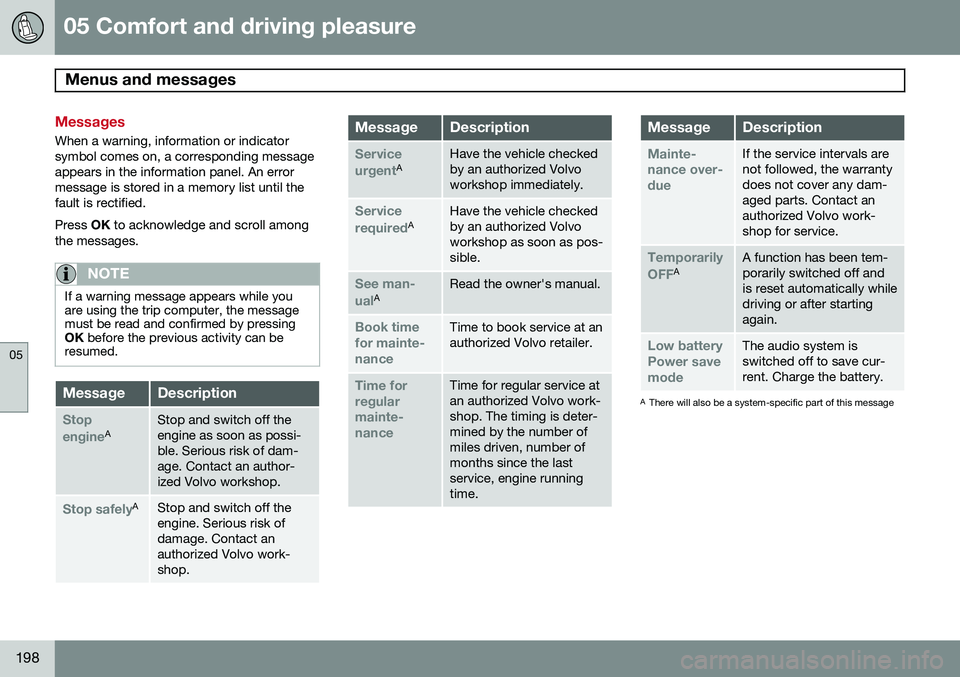
When a warning, information or indicator symbol comes on, a corresponding messageappears in the information panel. An errormessage is stored in a memory list until thefault is rectified. Press OK to acknowledge and scroll among
the messages.
NOTE
If a warning message appears while you are using the trip computer, the messagemust be read and confirmed by pressingOK before the previous activity can be
resumed.
MessageDescription
Stop engineAStop and switch off the engine as soon as possi-ble. Serious risk of dam-age. Contact an author-ized Volvo workshop.
Stop safelyAStop and switch off the engine. Serious risk ofdamage. Contact anauthorized Volvo work-shop.
MessageDescription
Service urgentAHave the vehicle checked by an authorized Volvoworkshop immediately.
Service requiredAHave the vehicle checked by an authorized Volvoworkshop as soon as pos-sible.
See man- ualARead the owner's manual.
Book time for mainte-nanceTime to book service at an authorized Volvo retailer.
Time for regularmainte-nanceTime for regular service at an authorized Volvo work-shop. The timing is deter-mined by the number ofmiles driven, number ofmonths since the lastservice, engine runningtime.
MessageDescription
Mainte- nance over-dueIf the service intervals are not followed, the warrantydoes not cover any dam-aged parts. Contact anauthorized Volvo work-shop for service.
Temporarily OFFAA function has been tem- porarily switched off andis reset automatically whiledriving or after startingagain.
Low battery Power savemodeThe audio system is switched off to save cur-rent. Charge the battery.
A There will also be a system-specific part of this message
Page 211 of 394
05 Comfort and driving pleasure
Climate system
05
}}
* Option/accessory, for more information, see Introduction.209
The ventilation can be used at the same time as seat heating. The ventilation system can be activated when the engine is running. There are three comfortlevels that produce different cooling anddehumidifying effects:
• Level three: press the button once for maximum output – three indicator lightscome on.
• Level two: press the button twice for alower output – two indicator lights comeon.
• Level one: press the button three timesfor the lowest output – one indicator lightcomes on.
• Press the button a fourth time to switchoff the function – the indicator light will goout.
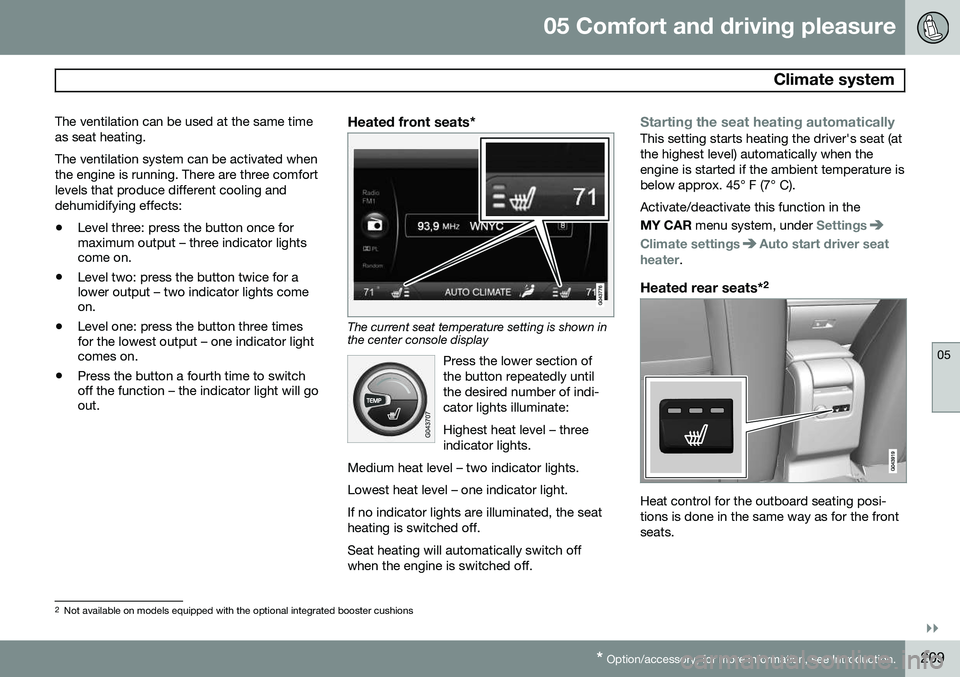
Heated front seats*
The current seat temperature setting is shown in the center console display
Press the lower section of the button repeatedly untilthe desired number of indi-cator lights illuminate: Highest heat level – three indicator lights.
Medium heat level – two indicator lights. Lowest heat level – one indicator light.If no indicator lights are illuminated, the seat heating is switched off.
Seat heating will automatically switch off when the engine is switched off.
Starting the seat heating automaticallyThis setting starts heating the driver's seat (at the highest level) automatically when theengine is started if the ambient temperature isbelow approx. 45° F (7° C). Activate/deactivate this function in the MY CAR menu system, under
Settings
Climate settingsAuto start driver seat
heater.
Heated rear seats* 2
Heat control for the outboard seating posi- tions is done in the same way as for the frontseats.
2
Not available on models equipped with the optional integrated booster cushions