my car VOLVO XC70 2015 Owner´s Manual
[x] Cancel search | Manufacturer: VOLVO, Model Year: 2015, Model line: XC70, Model: VOLVO XC70 2015Pages: 408, PDF Size: 11.26 MB
Page 278 of 408
06 Infotainment
Bluetooth® hands-free connection
06
276
New contacts can be added in phone mode in
Phone menuPhone bookNew
contact.
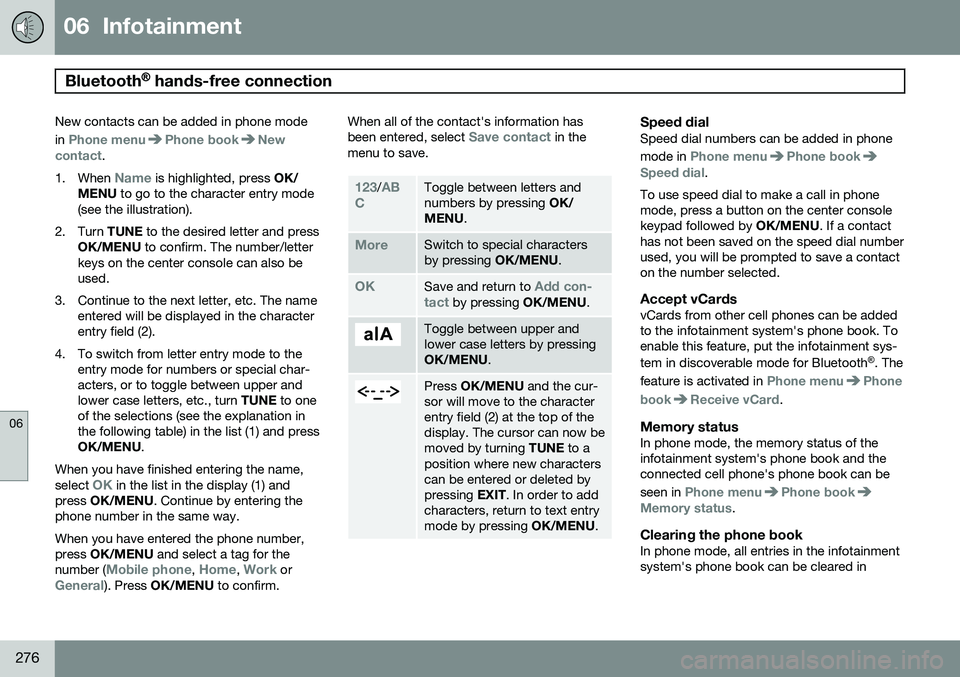
1. When
Name is highlighted, press OK/
MENU to go to the character entry mode
(see the illustration).
2. Turn TUNE to the desired letter and press
OK/MENU to confirm. The number/letter
keys on the center console can also be used.
3. Continue to the next letter, etc. The name entered will be displayed in the characterentry field (2).
4. To switch from letter entry mode to the entry mode for numbers or special char-acters, or to toggle between upper andlower case letters, etc., turn TUNE to one
of the selections (see the explanation inthe following table) in the list (1) and pressOK/MENU .
When you have finished entering the name, select
OK in the list in the display (1) and
press OK/MENU . Continue by entering the
phone number in the same way. When you have entered the phone number, press OK/MENU and select a tag for the
number (
Mobile phone, Home, Work orGeneral). Press OK/MENU to confirm. When all of the contact's information has been entered, select
Save contact in the
menu to save.
123/AB
CToggle between letters and numbers by pressing OK/
MENU .
MoreSwitch to special characters by pressing OK/MENU.
OKSave and return to Add con-
tact by pressing OK/MENU.
Toggle between upper and lower case letters by pressingOK/MENU.
Press OK/MENU and the cur-
sor will move to the character entry field (2) at the top of thedisplay. The cursor can now bemoved by turning TUNE to a
position where new characterscan be entered or deleted bypressing EXIT. In order to add
characters, return to text entrymode by pressing OK/MENU.
Speed dialSpeed dial numbers can be added in phone mode in
Phone menuPhone bookSpeed dial.
To use speed dial to make a call in phone mode, press a button on the center consolekeypad followed by OK/MENU. If a contact
has not been saved on the speed dial numberused, you will be prompted to save a contacton the number selected.
Accept vCardsvCards from other cell phones can be addedto the infotainment system's phone book. Toenable this feature, put the infotainment sys- tem in discoverable mode for Bluetooth ®
. The
feature is activated in
Phone menuPhone
book
Receive vCard.
Memory statusIn phone mode, the memory status of the infotainment system's phone book and theconnected cell phone's phone book can be seen in
Phone menuPhone bookMemory status.
Clearing the phone bookIn phone mode, all entries in the infotainment system's phone book can be cleared in
Page 279 of 408
06 Infotainment
Bluetooth® hands-free connection
06
277
Phone menuPhone bookClear phone
book.
NOTE
Clearing the entries in the infotainment system's phone book does not deleteentries in the cell phone's phone book.
Bluetooth® version information
For information about the Bluetooth ®
version
installed in the vehicle, go to
Phone menu
Phone settingsBluetooth software
version in car.
Page 280 of 408
06 Infotainment
Cell phone voice control*
06
278* Option/accessory, for more information, see Introduction.
Introduction
The infotainment system's voice control fea- ture 1
enables the driver to voice-activate cer-
tain functions in a Bluetooth ®
-connected cell
phone or the navigation system.
NOTE
• The information in this section applies to using voice commands to operate a Bluetooth
®
-connected cell phone .
See also the section "Bluetooth ®
hands-free connection" beginning on page 269 for detailed informationabout using a cell phone with the vehi-cle's infotainment system.
• The navigation system has a separateuser's guide containing informationabout voice commands for operatingthat system.
Voice commands offer convenience and help avoid distractions so that you can concen-trate on driving and focus your attention onroad and traffic conditions.
WARNING
As the driver, you have full responsibility for operating the vehicle safely and adher-ing to all applicable traffic regulations.
The voice control feature provides access to a number of functions in the Bluetooth ®
hands-free and navigation systems while allowing you to keep your hands on the steer-ing wheel. Input is in dialogue form usingspoken commands from the user and verbalprompts from the system. Voice control uses the same microphone as the Bluetooth ®
hands-free system (see the illustration on page 269) and system prompts are providedthrough the infotainment system's frontspeakers.
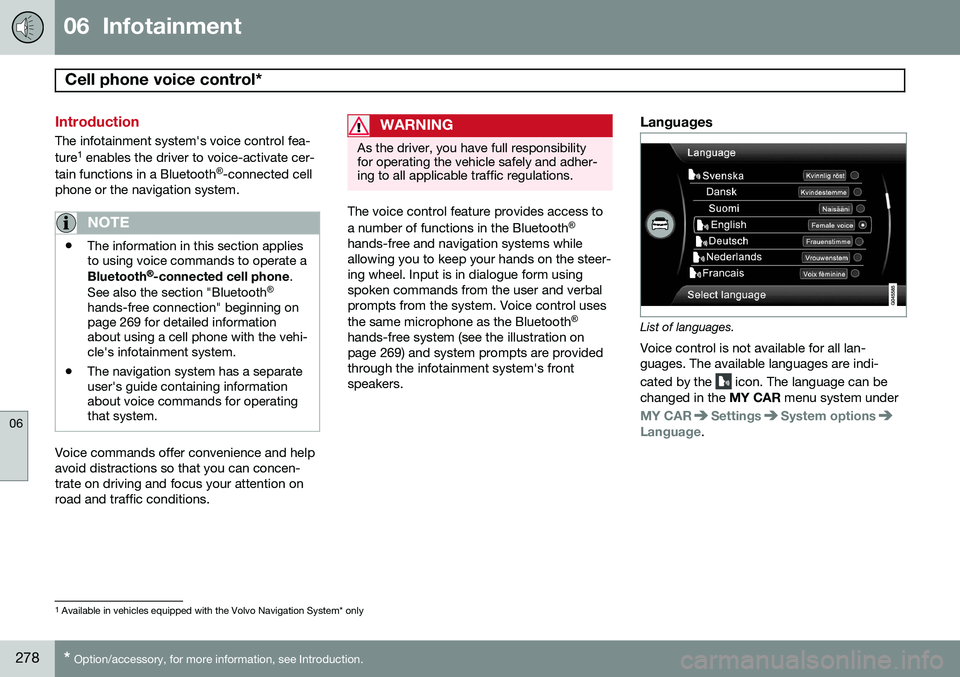
Languages
List of languages.
Voice control is not available for all lan- guages. The available languages are indi- cated by the
icon. The language can be
changed in the MY CAR menu system under
MY CARSettingsSystem optionsLanguage.
1
Available in vehicles equipped with the Volvo Navigation System* only
Page 281 of 408
06 Infotainment
Cell phone voice control*
06
}}
* Option/accessory, for more information, see Introduction.279
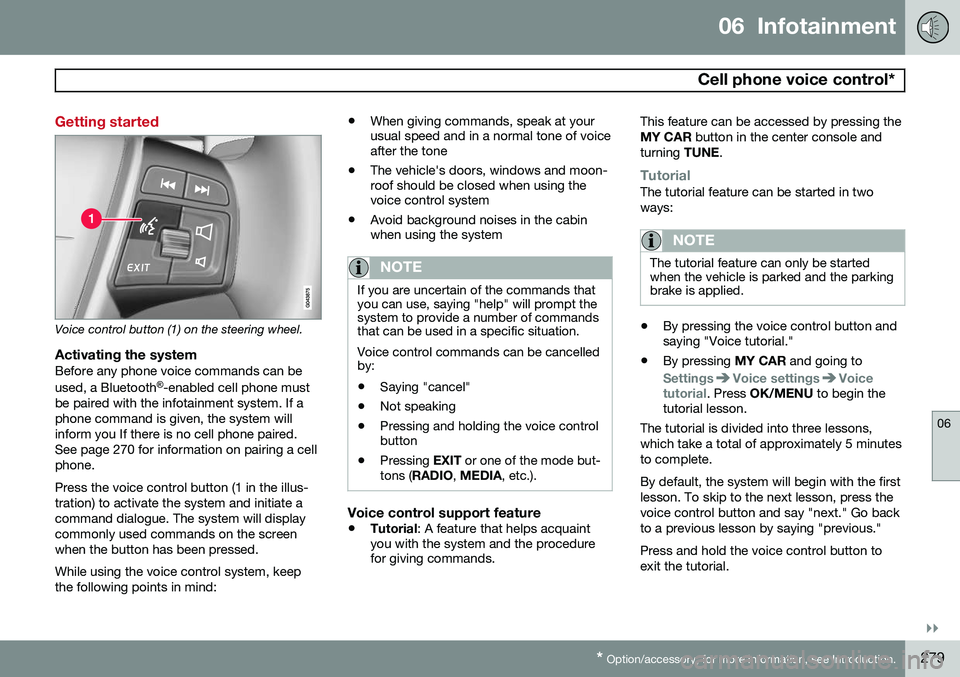
Getting started
Voice control button (1) on the steering wheel.
Activating the systemBefore any phone voice commands can be used, a Bluetooth ®
-enabled cell phone must
be paired with the infotainment system. If a phone command is given, the system willinform you If there is no cell phone paired.See page 270 for information on pairing a cellphone. Press the voice control button (1 in the illus- tration) to activate the system and initiate acommand dialogue. The system will displaycommonly used commands on the screenwhen the button has been pressed. While using the voice control system, keep the following points in mind: •
When giving commands, speak at your usual speed and in a normal tone of voiceafter the tone
• The vehicle's doors, windows and moon-roof should be closed when using thevoice control system
• Avoid background noises in the cabinwhen using the system
NOTE
If you are uncertain of the commands that you can use, saying "help" will prompt thesystem to provide a number of commandsthat can be used in a specific situation. Voice control commands can be cancelled by:
• Saying "cancel"
• Not speaking
• Pressing and holding the voice control button
• Pressing
EXIT or one of the mode but-
tons ( RADIO , MEDIA , etc.).
Voice control support feature
•Tutorial
: A feature that helps acquaint
you with the system and the procedure for giving commands. This feature can be accessed by pressing the MY CAR
button in the center console and
turning TUNE.
TutorialThe tutorial feature can be started in two ways:
NOTE
The tutorial feature can only be started when the vehicle is parked and the parkingbrake is applied.
•By pressing the voice control button and saying "Voice tutorial."
• By pressing
MY CAR and going to
SettingsVoice settingsVoice
tutorial. Press OK/MENU to begin the
tutorial lesson.
The tutorial is divided into three lessons, which take a total of approximately 5 minutesto complete. By default, the system will begin with the first lesson. To skip to the next lesson, press thevoice control button and say "next." Go backto a previous lesson by saying "previous." Press and hold the voice control button to exit the tutorial.
Page 282 of 408
06 Infotainment
Cell phone voice control*
06
280* Option/accessory, for more information, see Introduction.
Voice output volume
Press MY CAR and go to SettingsVoice
settings
Voice output volume. Press OK/
MENU and turn TUNE to raise or lower the
volume. Press EXIT to save the change and
exit the menu.
Using voice commands
The driver initiates a voice command dialogue by pressing the voice control button (see theillustration on page 279). When a dialogue has been initiated, com- monly used commands will be shown in thedisplay. Grayed-out texts or texts in paren-theses are not part of the spoken command. Once you become familiar with the system, you can speed up the command dialogue bybriefly pressing the voice control button toskip prompts from the system. Commands can be given in several ways .
For example, the command "Phone call con- tact" can be spoken as:
• "Phone > Call contact"—say "Phone," wait for a system response, and thencontinue by saying "Call contact."
• "Phone call contact"—give the entirecommand at one time The following is a list of features that can be voice-controlled with a Bluetooth
®
-connected
cell phone.
ShortcutsShortcut commands for using the phone can be found in the MY CAR menu system, under
SettingsVoice settingsVoice
command list
Phone commands and
General commands. See page 209 for more
information on the menu system.
Dialing a numberThe system understands the digits zero to nine. These numbers can be spoken individu-ally, in groups of several digits at a time, orthe entire number can be given at once.Numbers above nine will not be recognized. The following is an example of a voice com- mand dialogue. The system's response mayvary depending on the situation.
The user initiates the dialogue by
saying:
Phone > dial number orPhone dial number
System responseNumber please
User actionBegin saying the digits in the phone number. If you say several digits and pause, the sys-tem will repeat them and prompt you by say-ing "Continue." Continue saying the digits. When you have finished, complete the command by saying"Dial." • You can also change the number by using the commands "Correction" (whichdeletes the last group of digits spoken) or"Delete" (which will erase the entirephone number).
Dialing from a call listThe dialogue below enables you make a call from one of your cell phone's call lists.
The user initiates the dialogue by saying:
Phone > dial from call list orPhone dial from call listContinue by responding to the system's prompts.
Calling a contactThe dialogue below enables you to call thepre-defined contacts in your cell phone. Seethe phone's user's guide if necessary.
Page 284 of 408
282
Driving recommendations..................................................................... 284 Refueling............................................................................................... 288Loading................................................................................................. 293Cargo area ........................................................................................... 299Towing a trailer...................................................................................... 303
Emergency towing................................................................................ 306
Page 286 of 408
07 During your trip
Driving recommendations
07
284
General information
Economical driving conserves natural
resources
Better driving economy may be obtained by thinking ahead, avoiding rapid starts andstops and adjusting the speed of your vehicleto immediate traffic conditions. Observe the following rules:
• Bring the engine to normal operating tem- perature as soon as possible by drivingwith a light foot on the accelerator pedalfor the first few minutes of operation. Acold engine uses more fuel and is subjectto increased wear.
• Whenever possible, avoid using the vehi-cle for driving short distances. This doesnot allow the engine to reach normaloperating temperature.
• Drive carefully and avoid rapid accelera-tion and hard braking.
• Use the transmission's Drive (
D) position
as often as possible and avoid using kick-down.
• Using the engine's optional Eco function 1
can help improve fuel economy. Seepage 134 for additional information. •
Using the transmission's Sport mode 2
may increase fuel consumption some-what. Use the transmission's Drive ( D)
position as often as possible. See page129 for additional information about Sportmode.
• Do not exceed posted speed limits.
• Avoid carrying unnecessary items (extraload) in the vehicle.
• Maintain correct tire pressure. Check tirepressure regularly (when tires are cold).
• Remove snow tires when threat of snowor ice has ended.
• Note that roof racks, ski racks, etc,increase air resistance and also fuel con-sumption.
• At highway driving speeds, fuel consump-tion will be lower with the air conditioningon and the windows closed than with theair conditioning off and the windowsopen.
• Using the onboard trip computer's fuelconsumption modes can help you learnhow to drive more economically.
Other factors that decrease gas mileage are: •
Dirty air cleaner
• Dirty engine oil and clogged oil filter
• Dragging brakes
• Incorrect front end alignment
Some of the above mentioned items and oth-ers are checked at the standard maintenanceintervals.
WARNING
Driving with the tailgate open: Driving
with the tailgate open could lead to poi- sonous exhaust gases entering the pas-senger compartment. If the tailgate mustbe kept open for any reason, proceed asfollows: • Close the windows
• Set the ventilation system control to air flow to floor, windshield and side win-dows and the blower control to itshighest setting.
Weight distribution affects handlingAt the specified curb weight your vehicle has a tendency to understeer, which means thatthe steering wheel has to be turned morethan might seem appropriate for the curva-ture of a bend. This ensures good stabilityand reduces the risk of rear wheel skid.
1
Available on certain 4-cyl. engines
2 Models with the T6 turbo engine only.
Page 287 of 408
07 During your trip
Driving recommendations
07
}}
285
Remember that these properties can alter with the vehicle load. The heavier the load inthe cargo area, the less the tendency toundersteer.
Handling, roadholdingVehicle load, tire design and inflation pres-sure all affect vehicle handling. Therefore,check that the tires are inflated to the recom-mended pressure according to the vehicleload. See the "Tire pressure" section. Loadsshould be distributed so that capacity weightor maximum permissible axle loads are notexceeded.
Driving through water
•
The vehicle can be driven through water up to a depth of approximately 10 in.(25 cm), at a maximum speed of 6 mph(10 km/h).
• Take particular care when driving throughflowing water.
• Clean the electrical connections for trailerwiring after driving in mud or water.
• When driving through water, maintain lowspeed and do not stop in the water.
WARNING
•Avoid driving through standing or rushing water. Doing so can be dan-gerous and it may also be difficult todetermine the actual depth of thewater.
• If water cannot be avoided, after driv-ing through the water, press lightly onthe brake pedal to ensure that thebrakes are functioning normally. Wateror mud can make the brake liningsslippery, resulting in delayed brakingeffect.
CAUTION
• Engine damage will occur if water is drawn into the air cleaner.
• If the vehicle is driven through waterdeeper than 10 in (25 cm), water mayenter the differential and the transmis-sion. This reduces the oil's lubricatingcapacity and may shorten the servicelife of these components.
• Do not allow the vehicle to stand inwater up to the door sills longer thanabsolutely necessary. This could resultin electrical malfunctions.
• If the engine has been stopped whilethe vehicle is in water, do not attemptto restart it. Have the vehicle towedout of the water.
Engine and cooling systemUnder special conditions, for example when driving in hilly terrain, extreme heat or withheavy loads, there is a risk that the engineand cooling system will overheat. Proceed asfollows to avoid overheating the engine. •
Maintain a low speed when driving with a trailer up long, steep hills.
• Do not turn the engine off immediatelywhen stopping after a hard drive.
Page 288 of 408
07 During your trip
Driving recommendations
07
286
WARNING
The cooling fan may start or continue to operate (for up to 6 minutes) after theengine has been switched off.
•Remove any auxiliary lights from in front of the grille when driving in hot weatherconditions.
• Do not exceed engine speeds of4500 rpm if driving with a trailer in hillyterrain. The oil temperature could becometoo high.
Conserving electrical currentKeep the following in mind to help minimize battery drain:
• When the engine is not running, avoid using ignition mode
II. Many electrical
systems (the audio system, the optionalnavigation system, power windows, etc)will function in ignition modes 0 and I.
These modes reduce drain on the battery.
• Please keep in mind that using systems,accessories, etc., that consume a greatdeal of current when the engine is notrunning could result in the battery beingcompletely drained. Driving or having theengine running for approximately15 minutes will help keep the batterycharged. •
The optional 12-volt socket in the cargoarea provides electrical current even withthe ignition switched off, which drains thebattery.
Before a long distance tripIt is always worthwhile to have your vehicle checked by a trained and qualified Volvoservice technician before driving long dis-tances. Your retailer will also be able to sup-ply you with bulbs, fuses, spark plugs andwiper blades for your use in the event thatproblems occur. As a minimum, the following items should be checked before any long trip:
• Check that engine runs smoothly and that fuel consumption is normal.
• Check for fuel, oil, and fluid leakage.
• Have the transmission oil level checked.
• Check condition of drive belts.
• Check state of the battery's charge.
• Examine tires carefully (the spare tire aswell), and replace those that are worn.Check tire pressures.
• The brakes, front wheel alignment, andsteering gear should be checked by atrained and qualified Volvo service techni-cian only.
• Check all lights, including high beams. •
Reflective warning triangles are legallyrequired in some states/provinces.
• Have a word with a trained and qualifiedVolvo service technician if you intend todrive in countries where it may be difficultto obtain the correct fuel.
• Consider your destination. If you will bedriving through an area where snow or iceare likely to occur, consider snow tires.
Cold weather precautionsIf you wish to check your vehicle before the approach of cold weather, the followingadvice is worth noting:
• Make sure that the engine coolant con- tains 50 percent antifreeze. Any othermixture will reduce freeze protection. Thisgives protection against freezing down to–31 °F (–35 °C). The use of "recycled"antifreeze is not approved by Volvo. Dif-ferent types of antifreeze must not bemixed.
• Volvo recommends using only genuineVolvo antifreeze in your vehicle's radiator.
• Try to keep the fuel tank well filled – thishelps prevent the formation of condensa-tion in the tank. In addition, in extremelycold weather conditions it is worthwhileto add fuel line de-icer before refueling.
• The viscosity of the engine oil is impor-tant. Oil with low viscosity (thinner oil)
Page 290 of 408
07 During your trip
Refueling
07
288
Fuel requirements
Deposit control gasoline (detergentadditives)
Volvo recommends the use of detergent gas- oline to control engine deposits. Detergentgasoline is effective in keeping injectors andintake valves clean. Consistent use of depositcontrol gasolines will help ensure good driva-bility and fuel economy. If you are not surewhether the gasoline contains deposit controladditives, check with the service station oper-ator.
NOTE
Volvo does not recommend the use of external fuel injector cleaning systems.
Unleaded fuelEach Volvo has a three-way catalytic con- verter and must use only unleaded gasoline.U.S. and Canadian regulations require thatpumps delivering unleaded gasoline belabeled "UNLEADED". Only these pumpshave nozzles which fit your vehicle's fillerinlet. It is unlawful to dispense leaded fuelinto a vehicle labeled "unleaded gasolineonly". Leaded gasoline damages the three-way catalytic converter and the heated oxy-gen sensor system. Repeated use of leaded gasoline will lessen the effectiveness of theemission control system and could result inloss of emission warranty coverage. Stateand local vehicle inspection programs willmake detection of misfueling easier, possiblyresulting in emission test failure for misfueledvehicles.
NOTE
Some U.S. and Canadian gasolines con- tain an octane enhancing additive calledmethyl-cyclopentadienyl manganese tri-carbonyl (MMT). If such fuels are used,your Emission Control System perform-ance may be affected, and the CheckEngine Light (malfunction indicator light)located on your instrument panel maylight. If this occurs, please return yourvehicle to a trained and qualified Volvoservice technician for service.
Gasoline containing alcohol and ethers, "Oxygenated fuels"
Some fuel suppliers sell gasoline containing "oxygenates" which are usually alcohols orethers. In some areas, state or local lawsrequire that the service pump be marked indi- cating use of alcohols or ethers. However,there are areas in which the pumps areunmarked. If you are not sure whether there isalcohol or ethers in the gasoline you buy,check with the service station operator. Tomeet seasonal air quality standards, someareas require the use of "oxygenated" fuel. Volvo allows the use of the following "oxy- genated" fuels; however, the octane ratingslisted on page 289 must still be met.
Alcohol – EthanolFuels containing up to 10% ethanol by vol- ume may be used. Ethanol may also be refer-red to as Ethyl alcohol, or "Gasohol". Ethers – MTBE: Fuels containing up to 15% MTBE may be used.
MethanolDo not use gasolines containing methanol(methyl alcohol, wood alcohol). This practicecan result in vehicle performance deteriora-tion and can damage critical parts in the fuelsystem. Such damage may not be coveredunder the New Vehicle Limited Warranty.