light VOLVO XC70 2016 Owner´s Manual
[x] Cancel search | Manufacturer: VOLVO, Model Year: 2016, Model line: XC70, Model: VOLVO XC70 2016Pages: 396, PDF Size: 10.01 MB
Page 33 of 396
02 Safety
02
}}
* Option/accessory, for more information, see Introduction.31
a distance as possible between their belly and the steering wheel.
Related information
•
Seat belts – buckling/unbuckling (p. 29)
• Seat belt reminder (p. 30)
• Child restraints (p. 47)
Supplemental Restraint System (SRS)
As an enhancement to the three-point seat belts (p. 28), your Volvo is equipped with aSupplemental Restraint System (SRS).
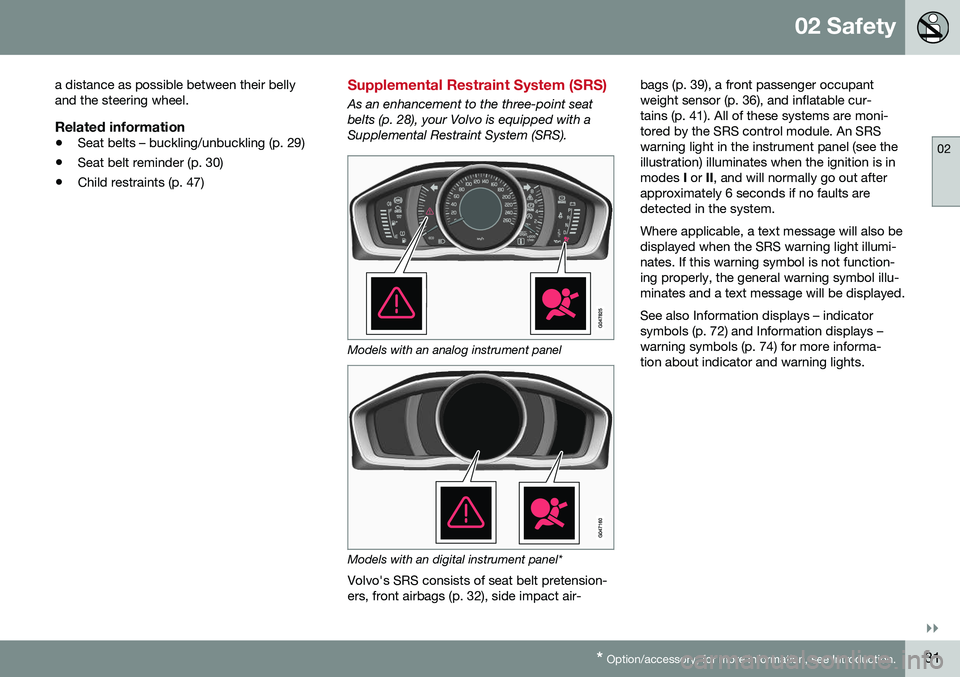
Models with an analog instrument panel
Models with an digital instrument panel*
Volvo's SRS consists of seat belt pretension- ers, front airbags (p. 32), side impact air- bags (p. 39), a front passenger occupantweight sensor (p. 36), and inflatable cur-tains (p. 41). All of these systems are moni-tored by the SRS control module. An SRSwarning light in the instrument panel (see theillustration) illuminates when the ignition is inmodes
I or II, and will normally go out after
approximately 6 seconds if no faults aredetected in the system. Where applicable, a text message will also be displayed when the SRS warning light illumi-nates. If this warning symbol is not function-ing properly, the general warning symbol illu-minates and a text message will be displayed. See also Information displays – indicator symbols (p. 72) and Information displays –warning symbols (p. 74) for more informa-tion about indicator and warning lights.
Page 34 of 396
||
02 Safety
02
32
WARNING
•If the SRS warning light stays on after the engine has started or if it illumi-nates while you are driving, have thevehicle inspected by a trained andqualified Volvo service technician assoon as possible.
• Never try to repair any component orpart of the SRS yourself. Any interfer-ence in the system could cause mal-function and serious injury. All work onthese systems should be performed bya trained and qualified Volvo servicetechnician.
WARNING
If your vehicle has become flood-damaged in any way (e.g., soaked carpeting/stand-ing water on the floor of the vehicle), donot attempt to start the vehicle or insertthe remote key into the ignition slot beforedisconnecting the battery (see below). Thismay cause airbag deployment which couldresult in serious injury. Have the vehicletowed to a trained and qualified Volvoservice technician for repairs. Before attempting to tow the vehicle:
1. Switch off the ignition for at least
10 minutes and disconnect the bat- tery.
2. Follow the instructions for manually overriding the shiftlock system Trans-mission – shiftlock override (p. 255).
Related information
• Crash mode – general information (p. 44)
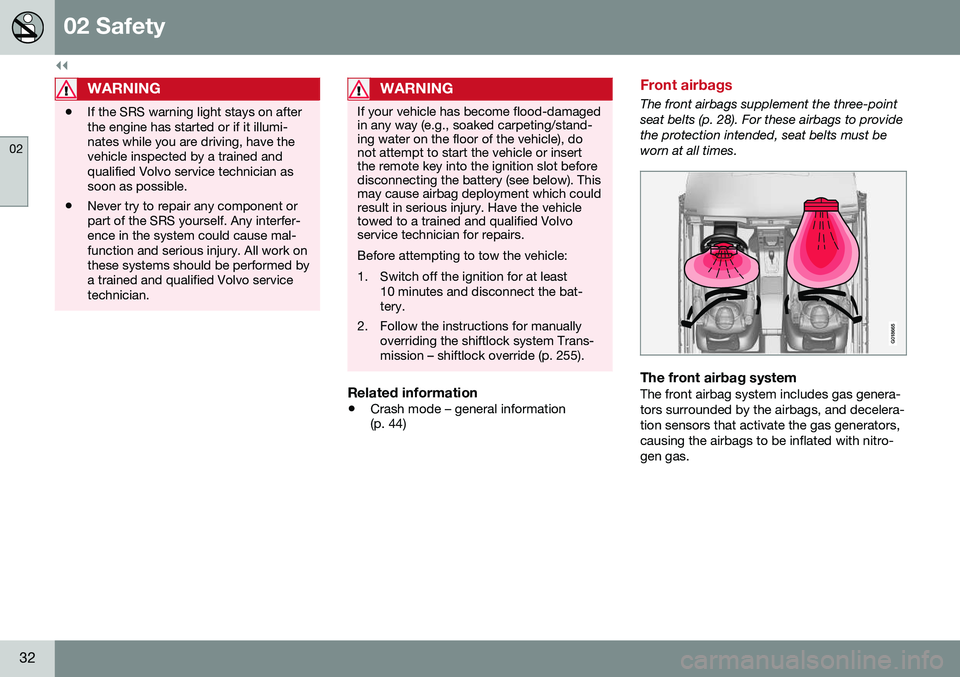
Front airbags
The front airbags supplement the three-point seat belts (p. 28). For these airbags to providethe protection intended, seat belts must beworn at all times.
G018665
The front airbag systemThe front airbag system includes gas genera- tors surrounded by the airbags, and decelera-tion sensors that activate the gas generators,causing the airbags to be inflated with nitro-gen gas.
Page 38 of 396
02 Safety
02
36
Occupant Weight Sensor
The Occupant Weight Sensor (OWS) is designed to meet the regulatory requirementsof Federal Motor Vehicle Safety Standard(FMVSS) 208 and is designed to disable (willnot inflate) the passenger's side front airbagunder certain conditions.
2
2
G017724
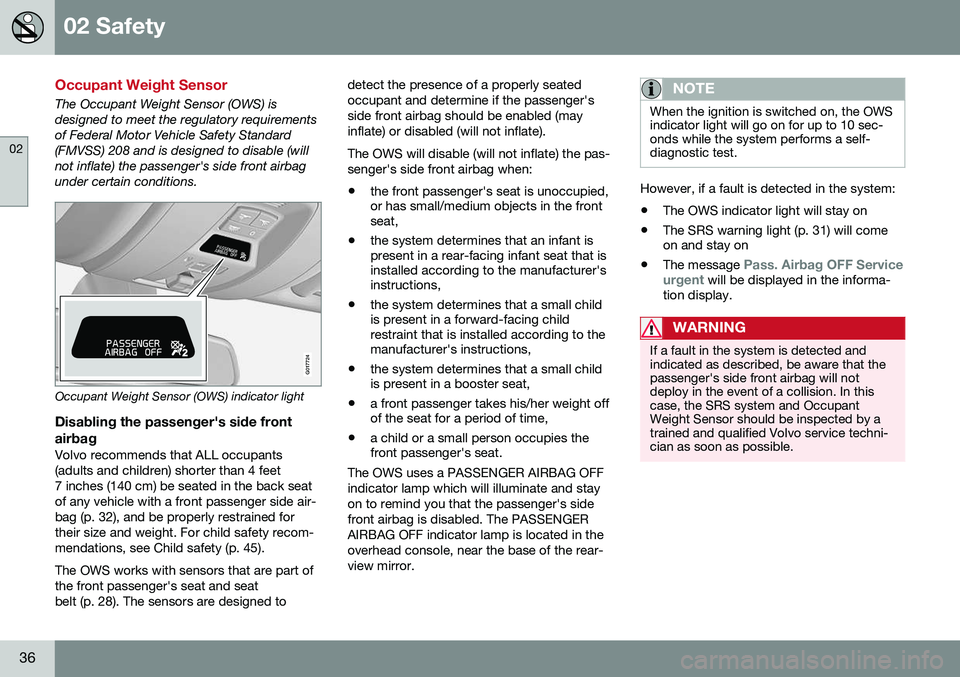
Occupant Weight Sensor (OWS) indicator light
Disabling the passenger's side frontairbag
Volvo recommends that ALL occupants (adults and children) shorter than 4 feet7 inches (140 cm) be seated in the back seatof any vehicle with a front passenger side air-bag (p. 32), and be properly restrained fortheir size and weight. For child safety recom-mendations, see Child safety (p. 45). The OWS works with sensors that are part of the front passenger's seat and seatbelt (p. 28). The sensors are designed to detect the presence of a properly seatedoccupant and determine if the passenger'sside front airbag should be enabled (mayinflate) or disabled (will not inflate). The OWS will disable (will not inflate) the pas- senger's side front airbag when:
• the front passenger's seat is unoccupied, or has small/medium objects in the frontseat,
• the system determines that an infant ispresent in a rear-facing infant seat that isinstalled according to the manufacturer'sinstructions,
• the system determines that a small childis present in a forward-facing childrestraint that is installed according to themanufacturer's instructions,
• the system determines that a small childis present in a booster seat,
• a front passenger takes his/her weight offof the seat for a period of time,
• a child or a small person occupies thefront passenger's seat.
The OWS uses a PASSENGER AIRBAG OFF indicator lamp which will illuminate and stayon to remind you that the passenger's sidefront airbag is disabled. The PASSENGERAIRBAG OFF indicator lamp is located in theoverhead console, near the base of the rear-view mirror.
NOTE
When the ignition is switched on, the OWS indicator light will go on for up to 10 sec-onds while the system performs a self-diagnostic test.
However, if a fault is detected in the system:
• The OWS indicator light will stay on
• The SRS warning light (p. 31) will come on and stay on
• The message
Pass. Airbag OFF Service
urgent will be displayed in the informa-
tion display.
WARNING
If a fault in the system is detected and indicated as described, be aware that thepassenger's side front airbag will notdeploy in the event of a collision. In thiscase, the SRS system and OccupantWeight Sensor should be inspected by atrained and qualified Volvo service techni-cian as soon as possible.
Page 39 of 396
02 Safety
02
}}
37
WARNING
•Never try to open, remove, or repair any components in the OWS system.This could result in system malfunc-tion. Maintenance or repairs shouldonly be carried out by an a trained andqualified Volvo service technician.
• The front passenger's seat should notbe modified in any way. This couldreduce pressure on the seat cushion,which might interfere with the OWSsystem's function.
Passeng- er's seatoccu-pancy sta-tusOWS indicatorlight sta-tusPasseng- er's sidefront air-bag status
Seat unoc- cupiedOWS indi- cator lightlights up.Passenger's side front air-bag disabled
Seat occu- pied by lowweightoccupant/ object AOWS indi- cator lightlights upPassenger's side front air-bag disabled
Seat occu- pied byheavy occu-pant/objectOWS indi- cator lightis
not litPassenger's side front air-bag enabled
A
Volvo recommends that children always be properly restrained in appropriate child restraints in the rear seats.Do not assume that the passenger's side front airbag isdisabled unless the PASSENGER AIRBAG OFF indicatorlamp is lit. Make sure the child restraint is properly instal-led. If there is any doubt as to the status of the passeng-er's side front airbag, move the child restraint to the rearseat.
The OWS is designed to enable (may inflate) the passenger's side front airbag in the eventof a collision anytime the system senses thata person of adult size is sitting properly in thefront passenger's seat. The PASSENGERAIRBAG OFF indicator lamp will be off andremain off. If a person of adult size is sitting in the frontpassenger's seat, but the PASSENGER AIR-BAG OFF indicator lamp is on, it is possiblethat the person isn't sitting properly in theseat. If this happens:
• Turn the vehicle off and ask the person to place the seatback in an upright position.
• Have the person sit upright in the seat,centered on the seat cushion, with theperson's legs comfortably extended.
• Restart the vehicle and have the personremain in this position for about twominutes. This will allow the system todetect that person and enable the pas-senger's frontal airbag.
• If the PASSENGER AIRBAG OFF indica-tor lamp remains on even after this, theperson should be advised to ride in therear seat.
This condition reflects limitations of the OWS classification capability. It does not indicateOWS malfunction.
ModificationsIf you are considering modifying your vehiclein any way to accommodate a disability, forexample by altering or adapting the driver'sor front passenger's seat(s) and/or airbagsystems, please contact Volvo at: In the USA Volvo Cars of North America, LLC Customer Care Center
Page 44 of 396
02 Safety
02
42
Whiplash Protection System (WHIPS)
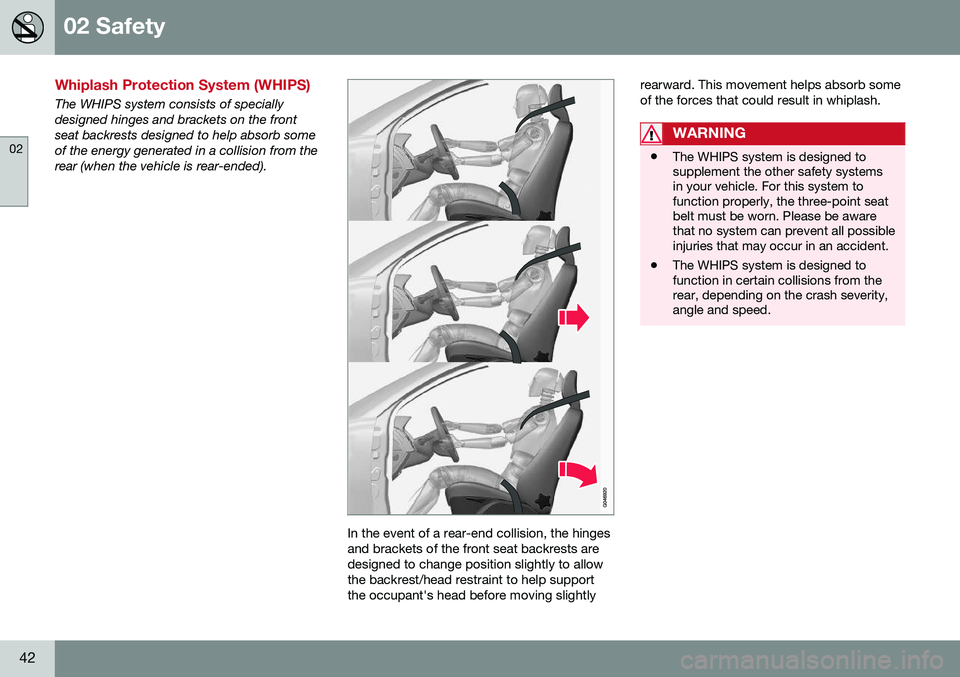
The WHIPS system consists of specially designed hinges and brackets on the frontseat backrests designed to help absorb someof the energy generated in a collision from therear (when the vehicle is rear-ended).
In the event of a rear-end collision, the hinges and brackets of the front seat backrests aredesigned to change position slightly to allowthe backrest/head restraint to help supportthe occupant's head before moving slightlyrearward. This movement helps absorb someof the forces that could result in whiplash.
WARNING
•
The WHIPS system is designed to supplement the other safety systemsin your vehicle. For this system tofunction properly, the three-point seatbelt must be worn. Please be awarethat no system can prevent all possibleinjuries that may occur in an accident.
• The WHIPS system is designed tofunction in certain collisions from therear, depending on the crash severity,angle and speed.
Page 63 of 396
02 Safety
02
}}
* Option/accessory, for more information, see Introduction.61
WARNING
DEATH or SERIOUS INJURY can occur Follow all instructions on the booster cushion and in the vehi-cle's owner's manual. MAKE SURE THE BOOSTER CUSHION IS SECURELYLOCKED BEFORE THE CHILD ISSEATED. • Use this booster cushion only with children whose height and weight arewithin the permitted limits shown inthe table (Integrated booster cushion –general information (p. 57)).
• In the event of a collision while theintegrated booster cushion was occu-pied, the entire booster cushion andseat belt must be replaced. Thebooster cushion should also bereplaced if it is badly worn or damagedin any way. This work should be per-formed by a trained and qualifiedVolvo service technician only.
Related information
•
Integrated booster cushion – using (p. 59)
Child safety locks
Power child safety locks* help prevent chil- dren from inadvertently opening one of therear doors or windows from inside the vehicle.
Manual child safety locks
G021077
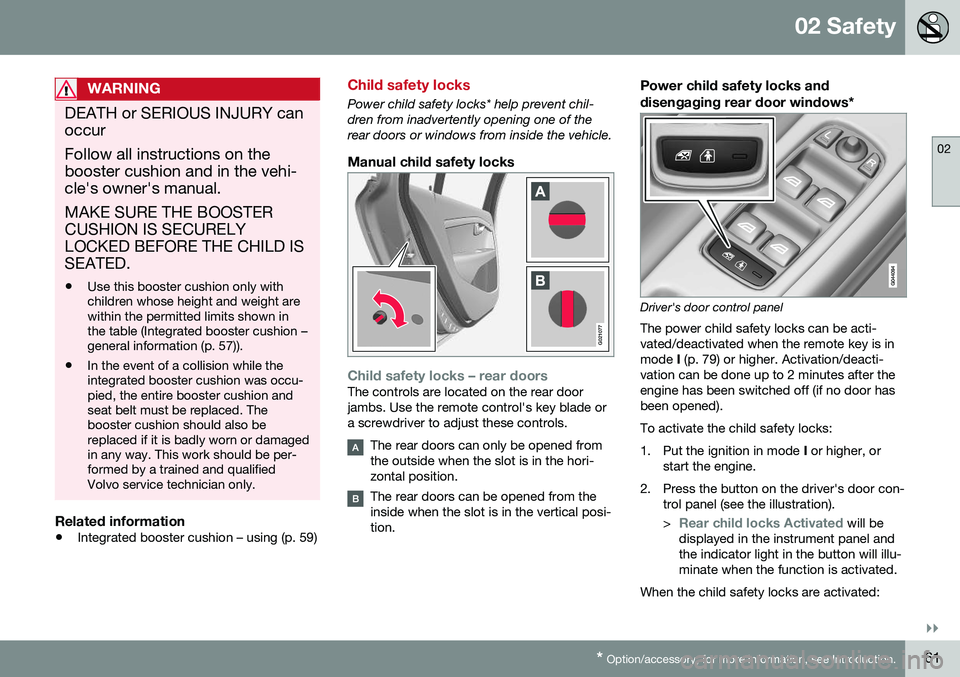
Child safety locks – rear doorsThe controls are located on the rear door jambs. Use the remote control's key blade ora screwdriver to adjust these controls.
The rear doors can only be opened from the outside when the slot is in the hori-zontal position.
The rear doors can be opened from the inside when the slot is in the vertical posi-tion.
Power child safety locks and
disengaging rear door windows*
Driver's door control panel
The power child safety locks can be acti- vated/deactivated when the remote key is inmode I (p. 79) or higher. Activation/deacti-
vation can be done up to 2 minutes after theengine has been switched off (if no door hasbeen opened). To activate the child safety locks:
1. Put the ignition in mode I or higher, or
start the engine.
2. Press the button on the driver's door con- trol panel (see the illustration). >
Rear child locks Activated will be
displayed in the instrument panel and the indicator light in the button will illu-minate when the function is activated.
When the child safety locks are activated:
Page 69 of 396
03 Instruments and controls
03
* Option/accessory, for more information, see Introduction.67
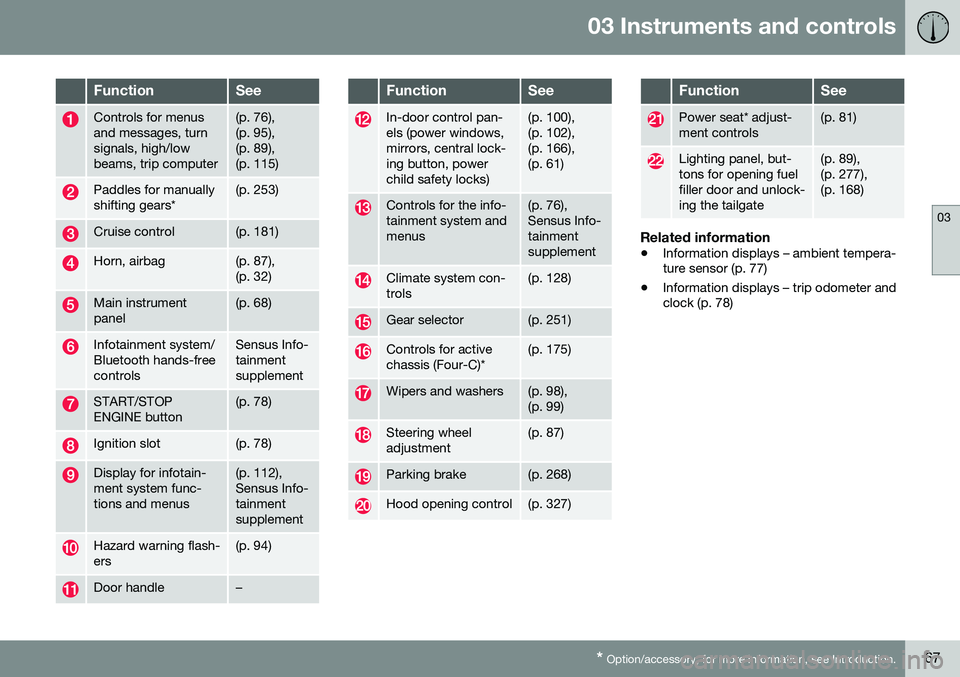
FunctionSee
Controls for menus and messages, turnsignals, high/lowbeams, trip computer(p. 76), (p. 95),(p. 89),(p. 115)
Paddles for manually shifting gears*(p. 253)
Cruise control(p. 181)
Horn, airbag(p. 87), (p. 32)
Main instrument panel(p. 68)
Infotainment system/ Bluetooth hands-freecontrolsSensus Info- tainmentsupplement
START/STOP ENGINE button(p. 78)
Ignition slot(p. 78)
Display for infotain- ment system func-tions and menus(p. 112), Sensus Info-tainmentsupplement
Hazard warning flash- ers(p. 94)
Door handle–
FunctionSee
In-door control pan- els (power windows,mirrors, central lock-ing button, powerchild safety locks)(p. 100), (p. 102),(p. 166),(p. 61)
Controls for the info- tainment system andmenus(p. 76), Sensus Info-tainmentsupplement
Climate system con- trols(p. 128)
Gear selector(p. 251)
Controls for active chassis (Four-C)*(p. 175)
Wipers and washers(p. 98), (p. 99)
Steering wheel adjustment(p. 87)
Parking brake(p. 268)
Hood opening control(p. 327)
FunctionSee
Power seat* adjust- ment controls(p. 81)
Lighting panel, but- tons for opening fuelfiller door and unlock-ing the tailgate(p. 89), (p. 277),(p. 168)
Related information
• Information displays – ambient tempera- ture sensor (p. 77)
• Information displays – trip odometer andclock (p. 78)
Page 70 of 396
03 Instruments and controls
03
68* Option/accessory, for more information, see Introduction.
Information displays – introduction
The displays show information on some of the vehicle's functions, such as cruise control, thetrip computer and messages. The informationis shown with text and symbols.
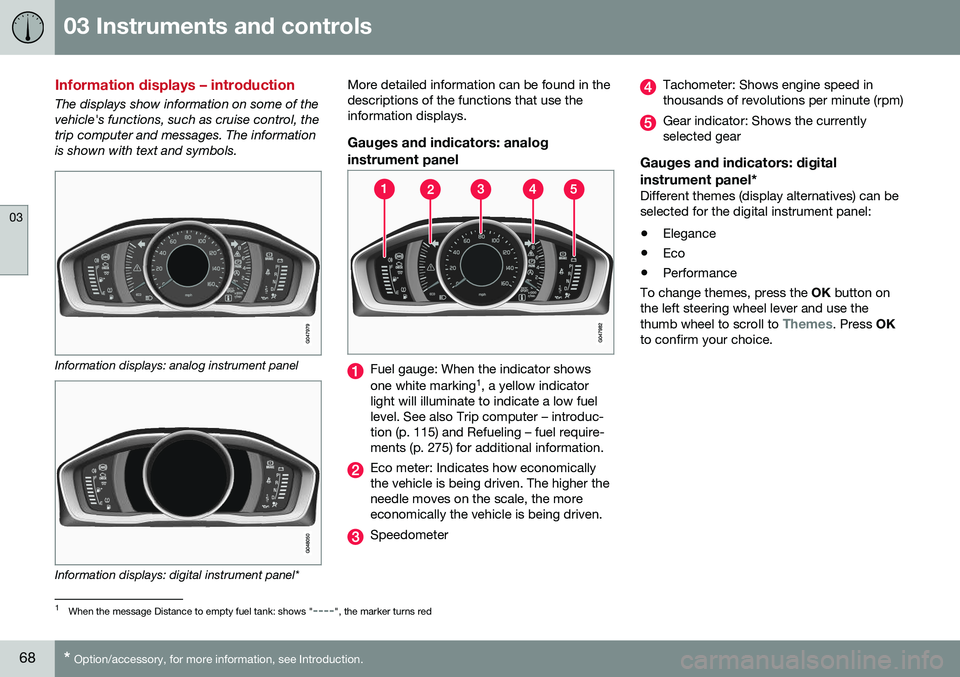
Information displays: analog instrument panel
Information displays: digital instrument panel* More detailed information can be found in the descriptions of the functions that use theinformation displays.
Gauges and indicators: analog
instrument panel
Fuel gauge: When the indicator shows one white marking 1
, a yellow indicator
light will illuminate to indicate a low fuel level. See also Trip computer – introduc-tion (p. 115) and Refueling – fuel require-ments (p. 275) for additional information.
Eco meter: Indicates how economically the vehicle is being driven. The higher theneedle moves on the scale, the moreeconomically the vehicle is being driven.
Speedometer
Tachometer: Shows engine speed in thousands of revolutions per minute (rpm)
Gear indicator: Shows the currently selected gear
Gauges and indicators: digital instrument panel*
Different themes (display alternatives) can be selected for the digital instrument panel: • Elegance
• Eco
• Performance
To change themes, press the OK button on
the left steering wheel lever and use the thumb wheel to scroll to
Themes. Press OK
to confirm your choice.
1 When the message Distance to empty fuel tank: shows "----", the marker turns red
Page 71 of 396
03 Instruments and controls
03
}}
* Option/accessory, for more information, see Introduction.69
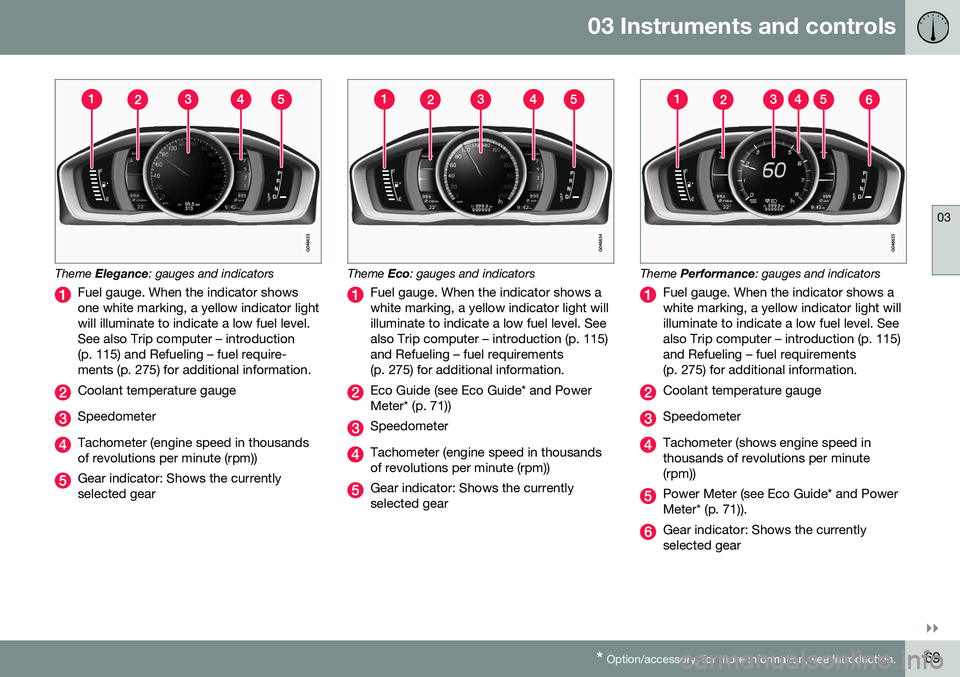
Theme Elegance : gauges and indicators
Fuel gauge. When the indicator shows one white marking, a yellow indicator lightwill illuminate to indicate a low fuel level.See also Trip computer – introduction(p. 115) and Refueling – fuel require-ments (p. 275) for additional information.
Coolant temperature gauge
Speedometer
Tachometer (engine speed in thousands of revolutions per minute (rpm))
Gear indicator: Shows the currently selected gear
Theme Eco: gauges and indicators
Fuel gauge. When the indicator shows a white marking, a yellow indicator light willilluminate to indicate a low fuel level. Seealso Trip computer – introduction (p. 115)and Refueling – fuel requirements(p. 275) for additional information.
Eco Guide (see Eco Guide* and Power Meter* (p. 71))
Speedometer
Tachometer (engine speed in thousands of revolutions per minute (rpm))
Gear indicator: Shows the currently selected gear
Theme Performance : gauges and indicators
Fuel gauge. When the indicator shows a white marking, a yellow indicator light willilluminate to indicate a low fuel level. Seealso Trip computer – introduction (p. 115)and Refueling – fuel requirements(p. 275) for additional information.
Coolant temperature gauge
Speedometer
Tachometer (shows engine speed in thousands of revolutions per minute(rpm))
Power Meter (see Eco Guide* and Power Meter* (p. 71)).
Gear indicator: Shows the currently selected gear
Page 72 of 396
||
03 Instruments and controls
03
70
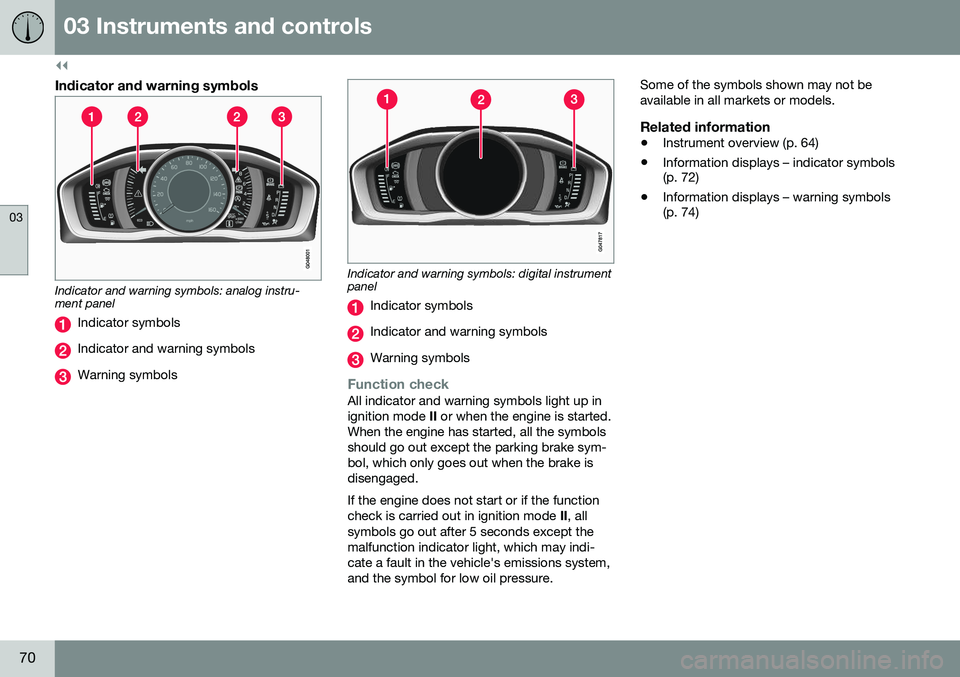
Indicator and warning symbols
Indicator and warning symbols: analog instru- ment panel
Indicator symbols
Indicator and warning symbols
Warning symbols
Indicator and warning symbols: digital instrument panel
Indicator symbols
Indicator and warning symbols
Warning symbols
Function checkAll indicator and warning symbols light up in ignition mode II or when the engine is started.
When the engine has started, all the symbolsshould go out except the parking brake sym-bol, which only goes out when the brake isdisengaged. If the engine does not start or if the function check is carried out in ignition mode II, all
symbols go out after 5 seconds except themalfunction indicator light, which may indi-cate a fault in the vehicle's emissions system,and the symbol for low oil pressure. Some of the symbols shown may not beavailable in all markets or models.
Related information
•
Instrument overview (p. 64)
• Information displays – indicator symbols (p. 72)
• Information displays – warning symbols(p. 74)