remote start VOLVO XC70 2016 Owner´s Manual
[x] Cancel search | Manufacturer: VOLVO, Model Year: 2016, Model line: XC70, Model: VOLVO XC70 2016Pages: 396, PDF Size: 10.01 MB
Page 157 of 396
06 Locks and alarm
06
}}
* Option/accessory, for more information, see Introduction.155
MessageMeaning
Insert car keyRemote key not recognized during start. Try to start thevehicle again.
Car key not foundVehicles with keyless drive* only. Remote key not recog-nized during start. Try tostart the vehicle again. If the problem continues, insert the remote key into theignition slot and try to startthe vehicle again.
Immobil- izer TrystartagainRemote key fault during start. Contact an authorizedVolvo workshop.
CAUTION
Never use force when inserting the remote key in the ignition slot. The vehicle cannotbe started if the transponder is damaged.
USA–FCC ID: LTQWFS 125VO This device complies with part 15 of the FCC rules. Operation is subject to the followingcondition: (1) This device may not causeharmful interference, and (2) this device mustaccept any interference received, including interference that may cause undesired opera-tion. Canada–IC: 3659A-WFS125VOOperation is subject to the following condi- tions: (1) this device may not cause interfer-ence, and (2) this device must accept anyinterference, including interference that maycause undesired operation of the device. For information on starting the vehicle, see Starting the engine (p. 246).
Remote key – functions
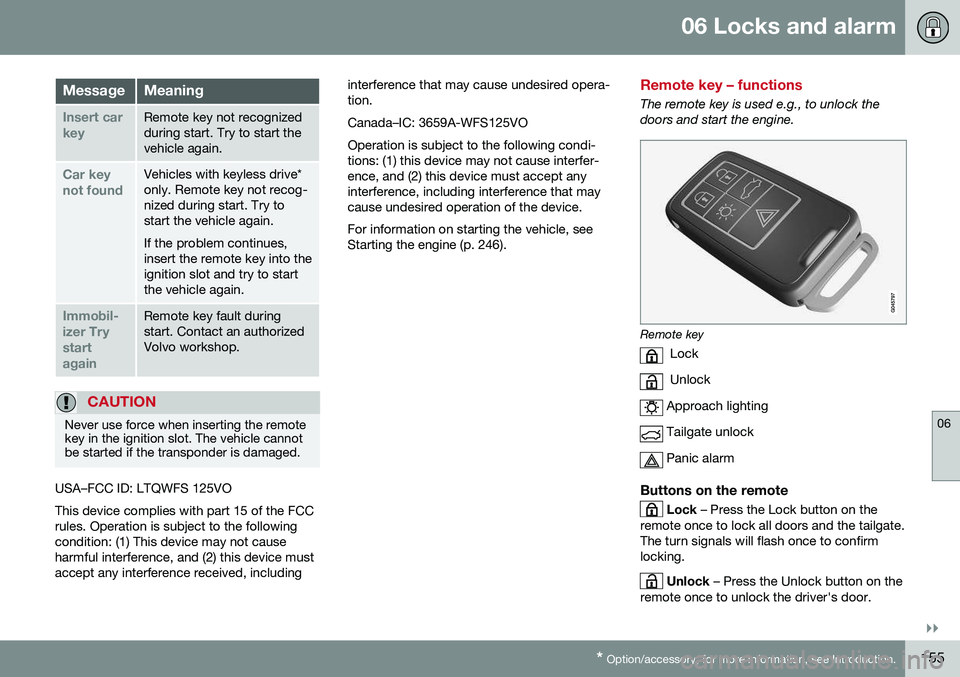
The remote key is used e.g., to unlock the doors and start the engine.
Remote key
Lock
Unlock
Approach lighting
Tailgate unlock
Panic alarm
Buttons on the remote
Lock – Press the Lock button on the
remote once to lock all doors and the tailgate. The turn signals will flash once to confirmlocking.
Unlock – Press the Unlock button on the
remote once to unlock the driver's door.
Page 161 of 396
06 Locks and alarm
06
}}
159
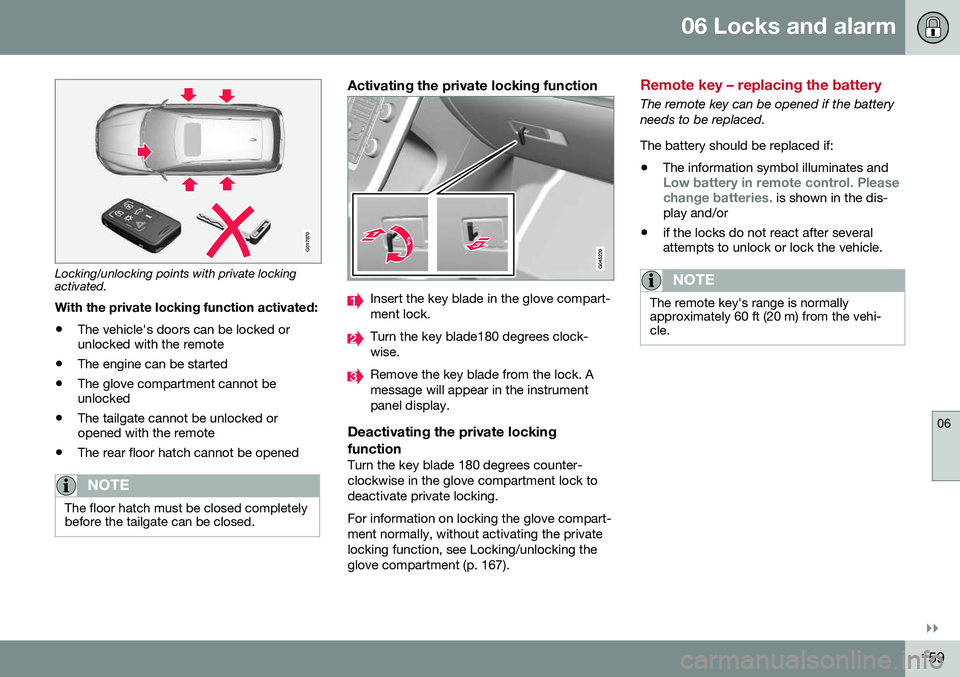
G017870
Locking/unlocking points with private locking activated.With the private locking function activated:
• The vehicle's doors can be locked or unlocked with the remote
• The engine can be started
• The glove compartment cannot beunlocked
• The tailgate cannot be unlocked oropened with the remote
• The rear floor hatch cannot be opened
NOTE
The floor hatch must be closed completely before the tailgate can be closed.
Activating the private locking function
Insert the key blade in the glove compart- ment lock.
Turn the key blade180 degrees clock- wise.
Remove the key blade from the lock. A message will appear in the instrumentpanel display.
Deactivating the private locking function
Turn the key blade 180 degrees counter- clockwise in the glove compartment lock todeactivate private locking. For information on locking the glove compart- ment normally, without activating the privatelocking function, see Locking/unlocking theglove compartment (p. 167).
Remote key – replacing the battery
The remote key can be opened if the battery needs to be replaced. The battery should be replaced if:
• The information symbol illuminates and
Low battery in remote control. Please change batteries. is shown in the dis-
play and/or
• if the locks do not react after several attempts to unlock or lock the vehicle.
NOTE
The remote key's range is normally approximately 60 ft (20 m) from the vehi-cle.
Page 166 of 396
06 Locks and alarm
06
164* Option/accessory, for more information, see Introduction.
CAUTION
• Keyless drive remote keys should never be left in the vehicle. In the eventof a break-in, a remote found in thevehicle could make it possible to startthe engine.
• Electromagnetic fields or metalobstructions can interfere with thekeyless drive system. The remote keyshould never be placed closer thanapproximately 4-6 in. (10-15 cm) tocell phones, metallic objects or e.g.,stored in a metal briefcase.
USA – FCC ID:KR55WK48952, KR55WK48964 NOTEThis device complies with part 15 of the FCC Rules. Operation is subject to the followingtwo conditions: (1) This device may not causeharmful interference, and (2) this device mustaccept interference received, including inter-ference that may cause undesired operation. CAUTIONChanges or modifications not expressly approved by the manufacturer could void theuser's authority to operate the equipment. Siemens VDO5WK48891Tested To Comply With FCC Standards For Automobile UseCanada – IC:267T-5WK48952, 267T-5WK48964, 267T-5WK48891 NOTEThis device complies with RSS -210 of Indus- try Canada. Operation is subject to the fol-lowing two conditions: (1) This device maynot cause harmful interference, and (2) thisdevice must accept interference received,including interference that may cause unde-sired operation. CAUTIONChanges or modifications not expressly approved by the manufacturer could void theuser's authority to operate the equipment.
Keyless drive* – antenna locations
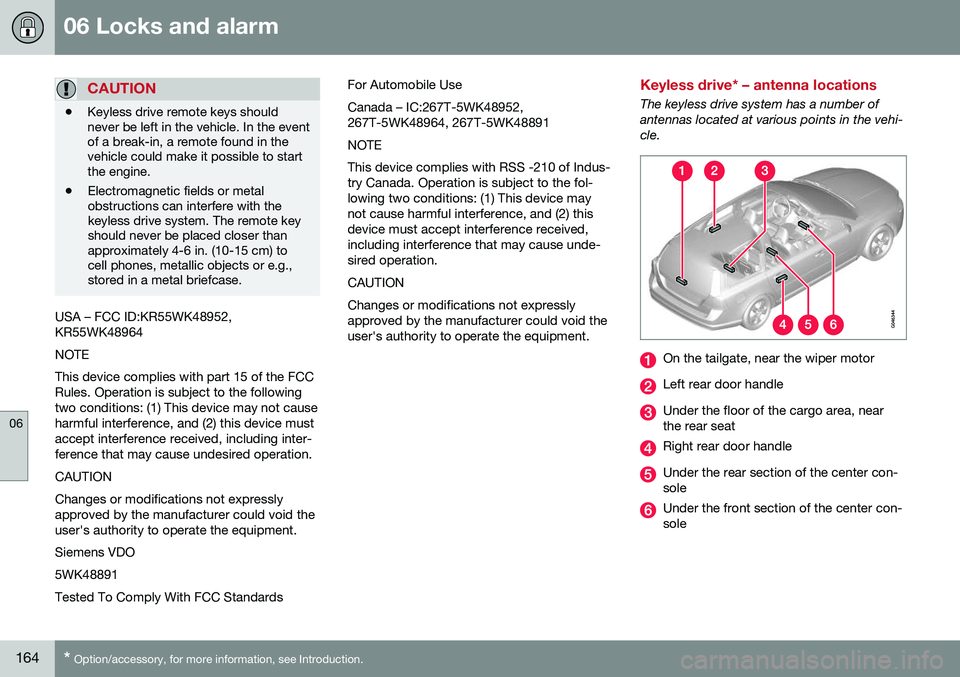
The keyless drive system has a number of antennas located at various points in the vehi-cle.
On the tailgate, near the wiper motor
Left rear door handle
Under the floor of the cargo area, near the rear seat
Right rear door handle
Under the rear section of the center con- sole
Under the front section of the center con- sole
Page 169 of 396

06 Locks and alarm
06
167
Locking
•Press the lock button after the front
doors have been closed.
• Each door can be locked individually with the lock button on the respective doors.The door must be closed first.
Alternative locking when parkingThe central locking button on the driver's door can also be used to lock the vehiclewhen you leave it. To do so:
1. Open the door.
2. Press the lock section of the button.
3. Close the door. This will lock the vehicle
completely and arm the alarm.
NOTE
Please be aware that locking the vehicle in this way makes it possible to lock theremote key in the passenger compartment.To help avoid this, lock the vehicle fromthe outside by pressing the lock button onthe remote key. If the vehicle is locked using the central locking button, be sure that the remote keyis in your possession before closing thedoor.
Automatic relockingIf the doors are unlocked, the locks will auto- matically reengage (re-lock) and the alarm willre-arm after 2 minutes unless a door or thetailgate has been opened.
Automatic lockingWhen the vehicle starts to move, the doorsand tailgate can be locked automatically. Thisfeature can be turned on or off by pressing MY CAR and going to
Car settingsLock
settings
Automatic door locking.
Related information
• Locking/unlocking – from the outside (p. 165)
• Alarm – general information (p. 171)
• Remote key – functions (p. 155)
Locking/unlocking – glove compartment
The glove compartment can only be locked and unlocked using the detachable key bladein the remote key. For information on remov-ing the key blade from the remote key, seeDetachable key blade – detaching/reinserting(p. 157).
Insert the key blade in the glove compart- ment lock.
Turn the key blade 90 degrees clockwise.
Remove the key blade from the lock.
Page 171 of 396
06 Locks and alarm
06
169
Power tailgate – automatic opening/ closing
The power tailgate can be opened/closed using a button on the lighting panel or on theremote key.
Automatic openingThe power tailgate can be opened automati-cally in the three ways:
• By pressing and holding the
but-
ton on the lighting panel until the tailgate begins to open.
• By pressing and holding the
but-
ton on the remote key until the tailgate begins to open.
• By pressing the rubber-covered buttonunder the outer handle on the tailgate.
The taillights illuminate automatically when the automatic open function is used.
CAUTION
Be sure that there is adequate space above and behind the vehicle before open-ing the tailgate automatically. The vehicle should not be driven or moved with the tailgate in the open position. How-ever, if the vehicle is moved with the tail-gate in the open position, the automaticclosing function will be inoperative untilone of the following occurs:
• The tailgate is closed manually
• The ignition is switched off and the key is removed for approximately 10minutes (the tailgate will function againafter restart).
NOTE
If the tailgate has been opened and closed continuously too long, the automatic func-tion will be deactivated to avoid overload-ing the electrical system. The automaticfunction can be used again after approxi-mately 2 minutes. If the vehicle's battery has been dis- charged or disconnected, or if the tailgatehas been open for more than 24 hours, thetailgate must be opened and closed oncemanually to reset the system.
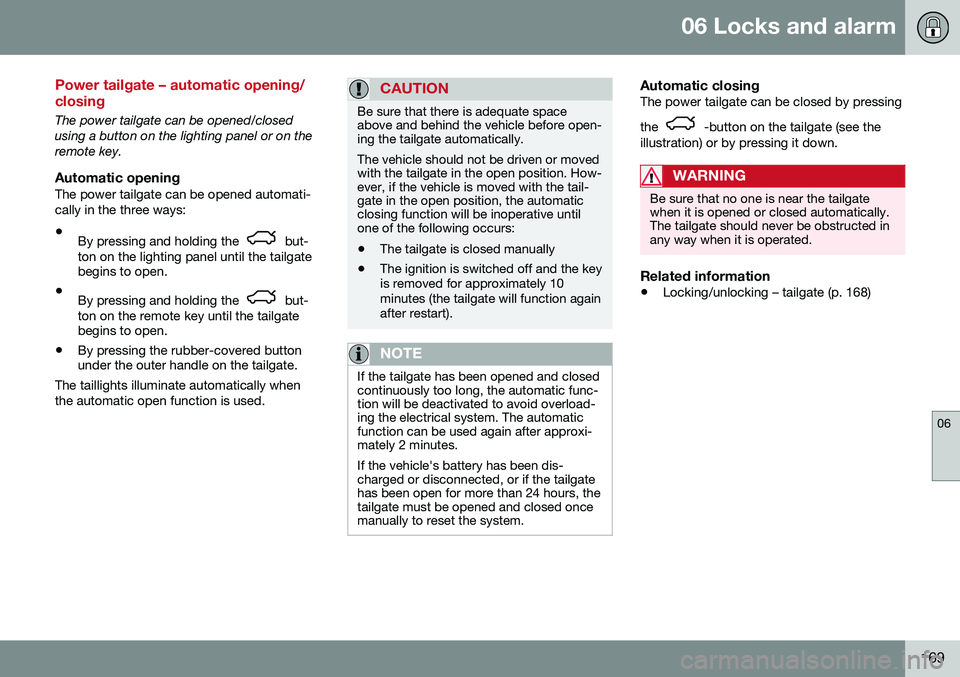
Automatic closingThe power tailgate can be closed by pressing the
-button on the tailgate (see the
illustration) or by pressing it down.
WARNING
Be sure that no one is near the tailgate when it is opened or closed automatically.The tailgate should never be obstructed inany way when it is operated.
Related information
• Locking/unlocking – tailgate (p. 168)
Page 173 of 396
06 Locks and alarm
06
171
Alarm – general information
The alarm system provides a warning if an attempt is made to break into the vehicle. The alarm is automatically armed (p. 172) whenever the vehicle is locked with theremote key. When armed, the alarm continuously monitors a number of points on the vehicle. The follow-ing conditions will trigger the alarm:• The hood is forced open.
• The tailgate is forced open.
• A door is forced open.
• The ignition slot is tampered with.
• An attempt is made to start the vehicle with a non-approved key (a key notcoded to the car's ignition).
• The battery is disconnected (while thealarm is armed).
• The siren is disconnected when the alarmis disarmed.
A message will appear in the information dis- play if a fault should occur in the alarm sys-tem. Contact a trained and qualified Volvoservice technician.
NOTE
Do not attempt to repair any of the compo- nents in the alarm system yourself. Thiscould affect the insurance policy on thevehicle.
Related information
• Alarm – turning off (p. 173)
• Alarm signal (p. 172)
• Alarm indicator (p. 171)
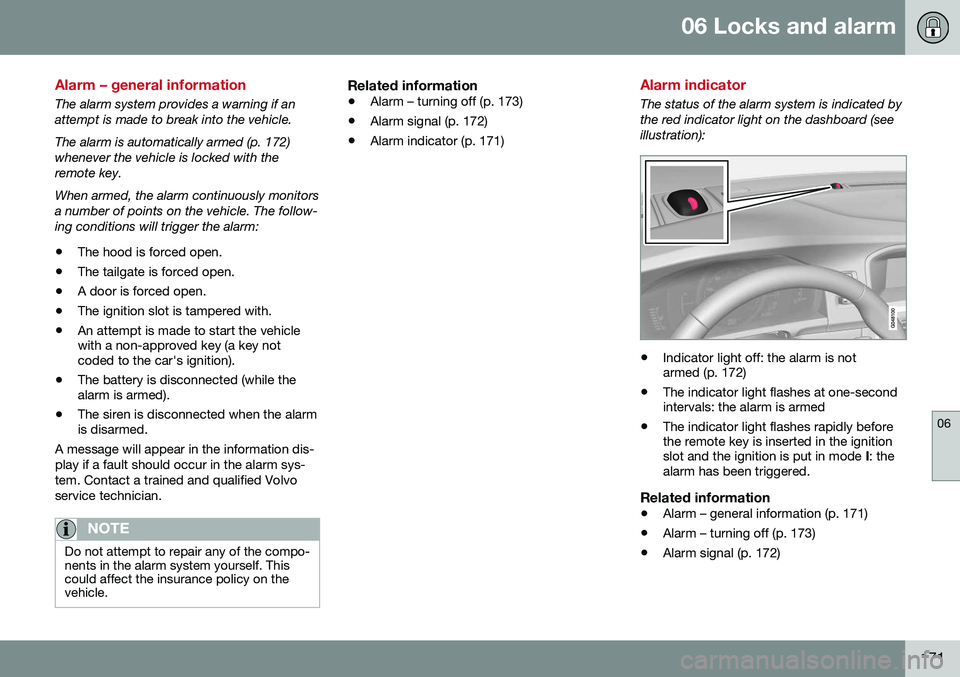
Alarm indicator
The status of the alarm system is indicated by the red indicator light on the dashboard (seeillustration):
•Indicator light off: the alarm is not armed (p. 172)
• The indicator light flashes at one-secondintervals: the alarm is armed
• The indicator light flashes rapidly beforethe remote key is inserted in the ignitionslot and the ignition is put in mode
I: the
alarm has been triggered.
Related information
• Alarm – general information (p. 171)
• Alarm – turning off (p. 173)
• Alarm signal (p. 172)
Page 175 of 396
06 Locks and alarm
06
173
Alarm – turning off
The alarm system provides a warning if an attempt is made to break into the vehicle. If the alarm is sounding, it can be stopped by pressing the Unlock button on the remote keyor by inserting the remote key in the ignitionslot. Two short flashes from the car's turn sig-nals confirm that the alarm has been turnedoff.
Related information
•Alarm indicator (p. 171)
• Alarm – arming/disarming (p. 172)
• Remote key – replacing the battery (p. 159)
Alarm-related functions
The following is general information regarding the alarm system in your vehicle.
Automatic re-armingIf the doors are unlocked, the locks will auto-matically re-engage (re-lock) and the alarmwill re-arm after 2 minutes unless a door orthe tailgate has been opened.
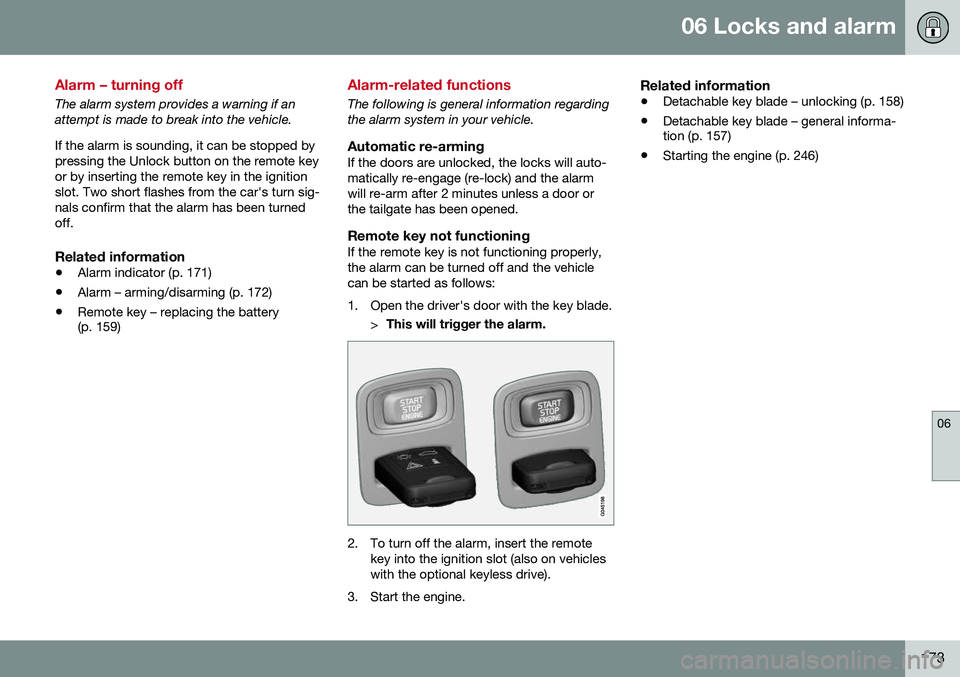
Remote key not functioningIf the remote key is not functioning properly,the alarm can be turned off and the vehiclecan be started as follows:
1. Open the driver's door with the key blade.
>This will trigger the alarm.
2. To turn off the alarm, insert the remote
key into the ignition slot (also on vehicles with the optional keyless drive).
3. Start the engine.
Related information
• Detachable key blade – unlocking (p. 158)
• Detachable key blade – general informa- tion (p. 157)
• Starting the engine (p. 246)
Page 248 of 396
08 Starting and driving
08
246* Option/accessory, for more information, see Introduction.
Starting the engine
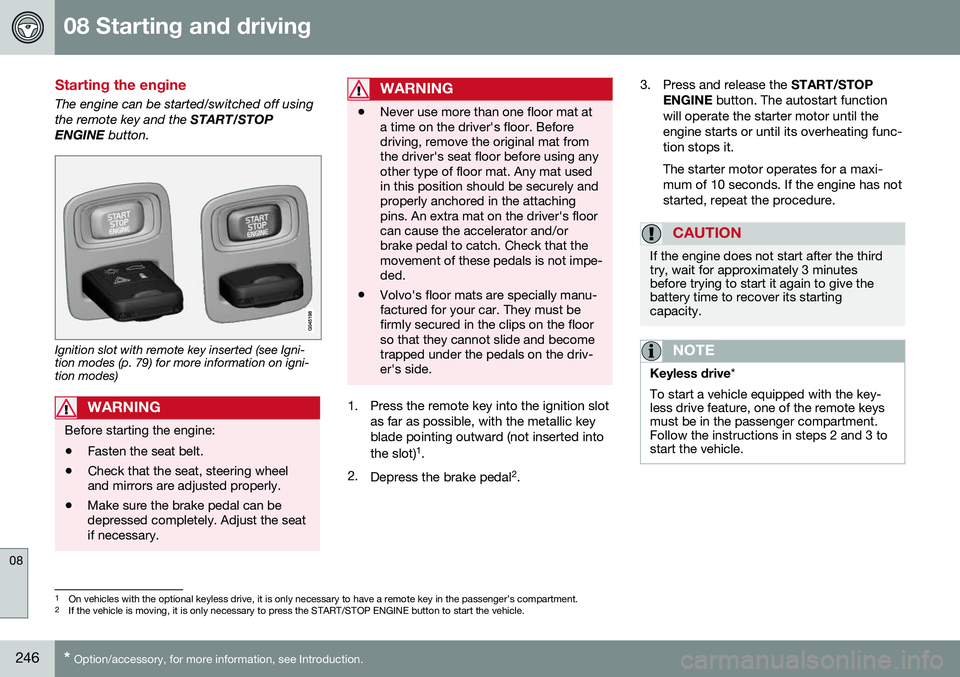
The engine can be started/switched off using the remote key and the START/STOP
ENGINE button.
Ignition slot with remote key inserted (see Igni- tion modes (p. 79) for more information on igni-tion modes)
WARNING
Before starting the engine:
• Fasten the seat belt.
• Check that the seat, steering wheel and mirrors are adjusted properly.
• Make sure the brake pedal can bedepressed completely. Adjust the seatif necessary.
WARNING
•Never use more than one floor mat at a time on the driver's floor. Beforedriving, remove the original mat fromthe driver's seat floor before using anyother type of floor mat. Any mat usedin this position should be securely andproperly anchored in the attachingpins. An extra mat on the driver's floorcan cause the accelerator and/orbrake pedal to catch. Check that themovement of these pedals is not impe-ded.
• Volvo's floor mats are specially manu-factured for your car. They must befirmly secured in the clips on the floorso that they cannot slide and becometrapped under the pedals on the driv-er's side.
1. Press the remote key into the ignition slot
as far as possible, with the metallic key blade pointing outward (not inserted into the slot) 1
.
2. Depress the brake pedal 2
. 3. Press and release the
START/STOP
ENGINE button. The autostart function
will operate the starter motor until the engine starts or until its overheating func-tion stops it. The starter motor operates for a maxi- mum of 10 seconds. If the engine has notstarted, repeat the procedure.
CAUTION
If the engine does not start after the third try, wait for approximately 3 minutesbefore trying to start it again to give thebattery time to recover its startingcapacity.
NOTE
Keyless drive *
To start a vehicle equipped with the key- less drive feature, one of the remote keysmust be in the passenger compartment.Follow the instructions in steps 2 and 3 tostart the vehicle.
1 On vehicles with the optional keyless drive, it is only necessary to have a remote key in the passenger’s compartment.
2 If the vehicle is moving, it is only necessary to press the START/STOP ENGINE button to start the vehicle.
Page 249 of 396
08 Starting and driving
08
247
WARNING
•Always remove the remote key from the ignition slot when leaving the vehi-cle and ensure that the ignition inmode
0 (see Ignition modes (p. 79) for
information about the ignition modes).
• On vehicles with the optional keylessdrive, never remove the remote keyfrom the vehicle while it is being drivenor towed.
• Always place the gear selector in Parkand apply the parking brake beforeleaving the vehicle. Never leave thevehicle unattended with the enginerunning.
• Always open garage doors fully beforestarting the engine inside a garage toensure adequate ventilation. Theexhaust gases contain carbon monox-ide, which is invisible and odorless butvery poisonous.
NOTE
•
After a cold start, idle speed may be noticeably higher than normal for ashort period. This is done to help bringcomponents in the emission controlsystem to their normal operating tem-perature as quickly as possible, whichenables them to control emissions andhelp reduce the vehicle's impact on the environment 3
.
CAUTION
• When starting in cold weather, the automatic transmission may shift up atslightly higher engine speeds than nor-mal until the automatic transmissionfluid reaches normal operating tem-perature.
• Do not race a cold engine immediatelyafter starting. Oil flow may not reachsome lubrication points fast enough toprevent engine damage.
• The engine should be idling when youmove the gear selector. Never acceler-ate until after you feel the transmissionengage. Accelerating immediately afterselecting a gear will cause harshengagement and premature transmis-sion wear.
• Selecting
P or N when idling at a
standstill for prolonged periods of timewill help prevent overheating of theautomatic transmission fluid.
Related information
• Switching off the engine (p. 248)
3
If the gear selector is in the D or R positions and the car is not moving, engine speed (rpm) will be lower and it will take longer for the engine to reach normal operating temperature.
Page 250 of 396
08 Starting and driving
08
248* Option/accessory, for more information, see Introduction.
Switching off the engine
Switch off the engine by pressing the START/
STOP ENGINE button.
If the gear selector is not in the P position or
if the vehicle is moving, press the START/
STOP ENGINE button twice or press and
hold it in until the engine switches off.
Related information
• Ignition modes (p. 79)
Engine Remote Start (ERS)* – introduction
ERS is a feature that makes it possible to remotely start the engine using the remotekey to cool or heat the passenger compart-ment before driving. The climate/ and infotainment systems will start using the same settings as when theengine was switched off. When the engine is started using ERS, it will run for a maximum of 15 minutes beforeautomatically switching off again. After 2 ERSstarts, the engine must be started in the nor-mal way before ERS can be used again.
NOTE
•Always adhere to applicable State, Province and/or Local laws regardingengine idling when using ERS.
• The service life of the remote key'sbattery is affected by ERS use. If thisfeature is used frequently, the batteryshould be replaced once a year, seeRemote key – replacing the battery(p. 159).
WARNING
Keep the following in mind before using ERS:
• The vehicle should be in view.
• The vehicle should be unoccupied.
• The vehicle must not be parked indoors or in an enclosed area.Exhaust fumes are harmful to thehealth.
Related information
•
Engine Remote Start (ERS)* – starting the engine (p. 249)
• Engine Remote Start (ERS)* – switchingoff the engine (p. 249)