phone VOLVO XC90 2006 User Guide
[x] Cancel search | Manufacturer: VOLVO, Model Year: 2006, Model line: XC90, Model: VOLVO XC90 2006Pages: 254, PDF Size: 8.43 MB
Page 201 of 254
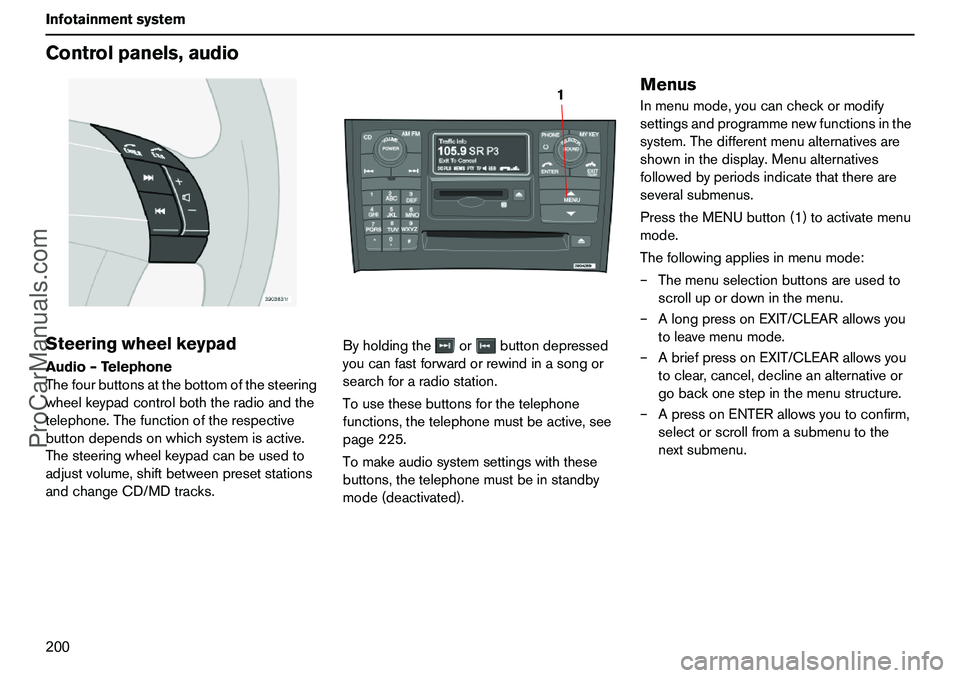
200 InfotainmentsystemControlpanels,audioSteeringwheelkeypadAudio–Telephone
Thefourbuttonsatthebottomofthesteering
wheelkeypadcontrolboththeradioandthe
telephone.Thefunctionoftherespective
buttondependsonwhichsystemisactive.
Thesteeringwheelkeypadcanbeusedto
adjustvolume,shiftbetweenpresetstations
andchangeCD/MDtracks.Byholdingtheorbuttondepressed
youcanfastforwardorrewindinasongor
searchforaradiostation.
Tousethesebuttonsforthetelephone
functions,thetelephonemustbeactive,see
page225.
Tomakeaudiosystemsettingswiththese
buttons,thetelephonemustbeinstandby
mode(deactivated).
MenusInmenumode,youcancheckormodify
settingsandprogrammenewfunctionsinthe
system.Thedifferentmenualternativesare
showninthedisplay.Menualternatives
followedbyperiodsindicatethatthereare
severalsubmenus.
PresstheMENUbutton(1)toactivatemenu
mode.
Thefollowingappliesinmenumode:
–Themenuselectionbuttonsareusedto
scrollupordowninthemenu.
–AlongpressonEXIT/CLEARallowsyou
toleavemenumode.
–AbriefpressonEXIT/CLEARallowsyou
toclear,cancel,declineanalternativeor
gobackonestepinthemenustructure.
–ApressonENTERallowsyoutoconfirm,
selectorscrollfromasubmenutothe
nextsubmenu.
1
ProCarManuals.com
Page 202 of 254
201 Infotainmentsystem
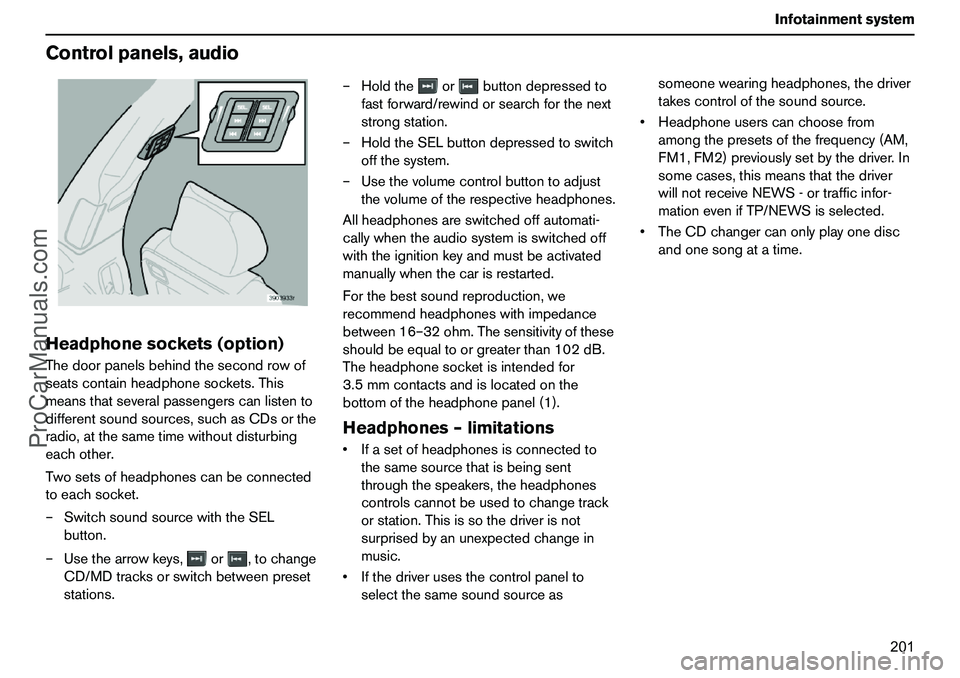
Controlpanels,audioHeadphonesockets(option)Thedoorpanelsbehindthesecondrowof
seatscontainheadphonesockets.This
meansthatseveralpassengerscanlistento
differentsoundsources,suchasCDsorthe
radio,atthesametimewithoutdisturbing
eachother.
Twosetsofheadphonescanbeconnected
toeachsocket.
–SwitchsoundsourcewiththeSEL
button.
–Usethearrowkeys,or,tochange
CD/MDtracksorswitchbetweenpreset
stations.–Holdtheorbuttondepressedto
fastforward/rewindorsearchforthenext
strongstation.
–HoldtheSELbuttondepressedtoswitch
offthesystem.
–Usethevolumecontrolbuttontoadjust
thevolumeoftherespectiveheadphones.
Allheadphonesareswitchedoffautomati-
callywhentheaudiosystemisswitchedoff
withtheignitionkeyandmustbeactivated
manuallywhenthecarisrestarted.
Forthebestsoundreproduction,we
recommendheadphoneswithimpedance
between16–32ohm.Thesensitivityofthese
shouldbeequaltoorgreaterthan102dB.
Theheadphonesocketisintendedfor
3.5mmcontactsandislocatedonthe
bottomoftheheadphonepanel(1).
Headphones–limitationsIfasetofheadphonesisconnectedto
thesamesourcethatisbeingsent
throughthespeakers,theheadphones
controlscannotbeusedtochangetrack
orstation.Thisissothedriverisnot
surprisedbyanunexpectedchangein
music.
Ifthedriverusesthecontrolpanelto
selectthesamesoundsourceassomeonewearingheadphones,thedriver
takescontrolofthesoundsource.
Headphoneuserscanchoosefrom
amongthepresetsofthefrequency(AM,
FM1,FM2)previouslysetbythedriver.In
somecases,thismeansthatthedriver
willnotreceiveNEWS-ortrafficinfor-
mationevenifTP/NEWSisselected.
TheCDchangercanonlyplayonedisc
andonesongatatime.
ProCarManuals.com
Page 203 of 254
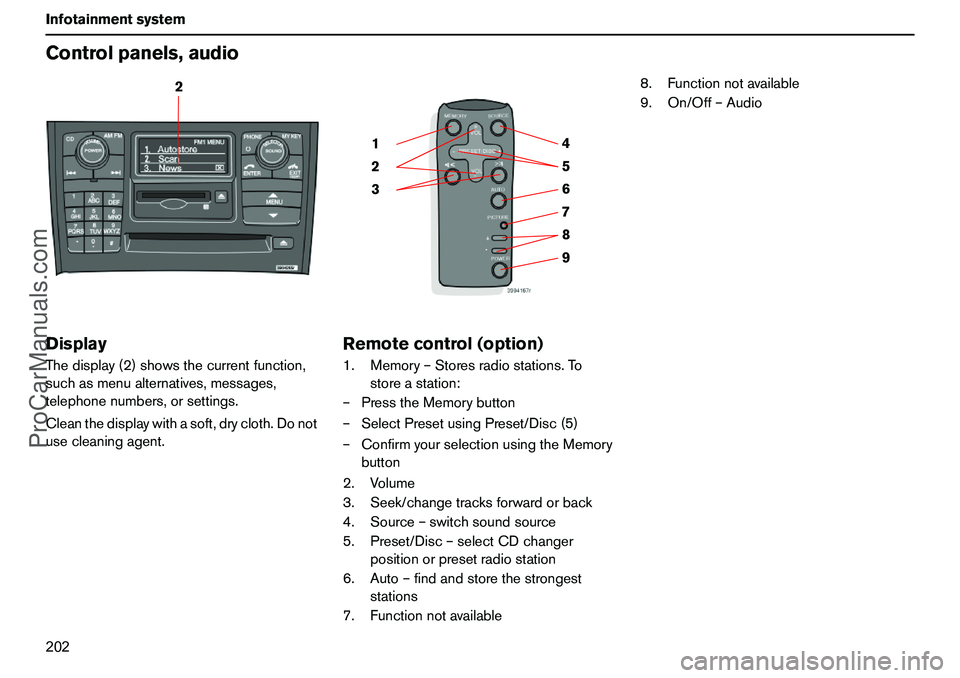
202 InfotainmentsystemControlpanels,audioDisplayThedisplay(2)showsthecurrentfunction,
suchasmenualternatives,messages,
telephonenumbers,orsettings.
Cleanthedisplaywithasoft,drycloth.Donot
usecleaningagent.
Remotecontrol(option)1.Memory–Storesradiostations.To
storeastation:
–PresstheMemorybutton
–SelectPresetusingPreset/Disc(5)
–ConfirmyourselectionusingtheMemory
button
2.Volume
3.Seek/changetracksforwardorback
4.Source–switchsoundsource
5.Preset/Disc–selectCDchanger
positionorpresetradiostation
6.Auto–findandstorethestrongest
stations
7.Functionnotavailable8.Functionnotavailable
9.On/Off–Audio
2
9 876 5 4
3 21
ProCarManuals.com
Page 213 of 254
212 InfotainmentsystemRadiofunctionsAlarmAlarmsaretransmittedautomaticallyandthe
functioncannotbedeactivated.
"Alarm!"isshownintheradiodisplaywhen
analarmmessageissent.Thisfunctionis
usedtowarnmotoristsofmajoraccidents
andcatastrophes,suchasabridgecollapse
oranaccidentatanuclearplant.
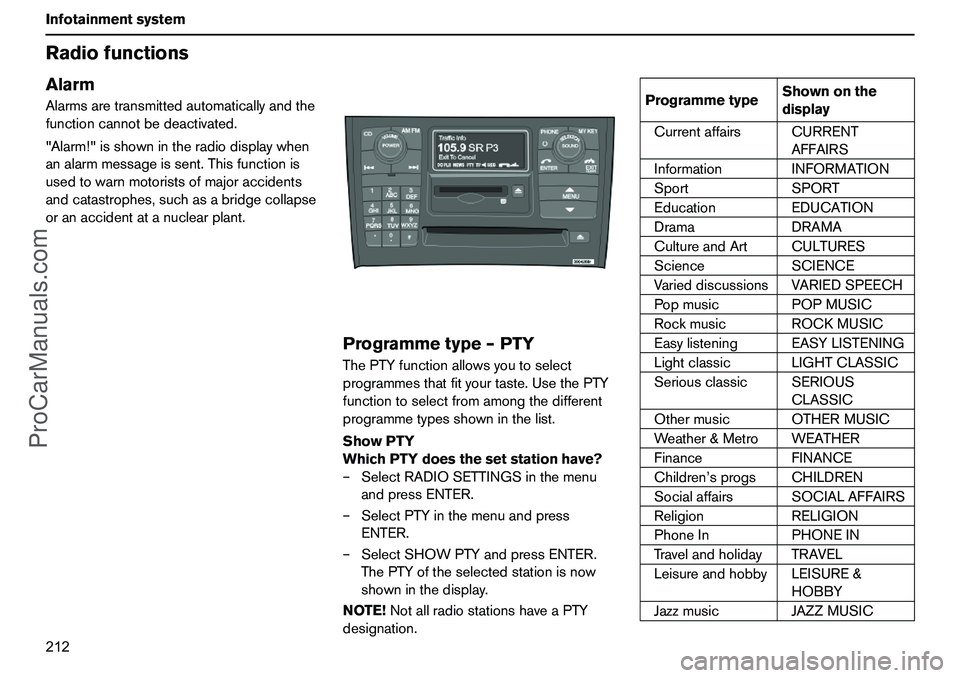
Programmetype–PTYThePTYfunctionallowsyoutoselect
programmesthatfityourtaste.UsethePTY
functiontoselectfromamongthedifferent
programmetypesshowninthelist.
ShowPTY
WhichPTYdoesthesetstationhave?
–SelectRADIOSETTINGSinthemenu
andpressENTER.
–SelectPTYinthemenuandpress
ENTER.
–SelectSHOWPTYandpressENTER.
ThePTYoftheselectedstationisnow
showninthedisplay.
NOTE!NotallradiostationshaveaPTY
designation.
ProgrammetypeShownonthe
display
CurrentaffairsCURRENT
AFFAIRS
InformationINFORMATION
SportSPORT
EducationEDUCATION
DramaDRAMA
CultureandArtCULTURES
ScienceSCIENCE
VarieddiscussionsVARIEDSPEECH
PopmusicPOPMUSIC
RockmusicROCKMUSIC
EasylisteningEASYLISTENING
LightclassicLIGHTCLASSIC
SeriousclassicSERIOUS
CLASSIC
OthermusicOTHERMUSIC
Weather&MetroWEATHER
FinanceFINANCE
Children’sprogsCHILDREN
SocialaffairsSOCIALAFFAIRS
ReligionRELIGION
PhoneInPHONEIN
TravelandholidayTRAVEL
LeisureandhobbyLEISURE&
HOBBY
JazzmusicJAZZMUSIC
ProCarManuals.com
Page 223 of 254
222 InfotainmentsystemTelephone(option)
ProCarManuals.com
Page 224 of 254
223 Infotainmentsystem
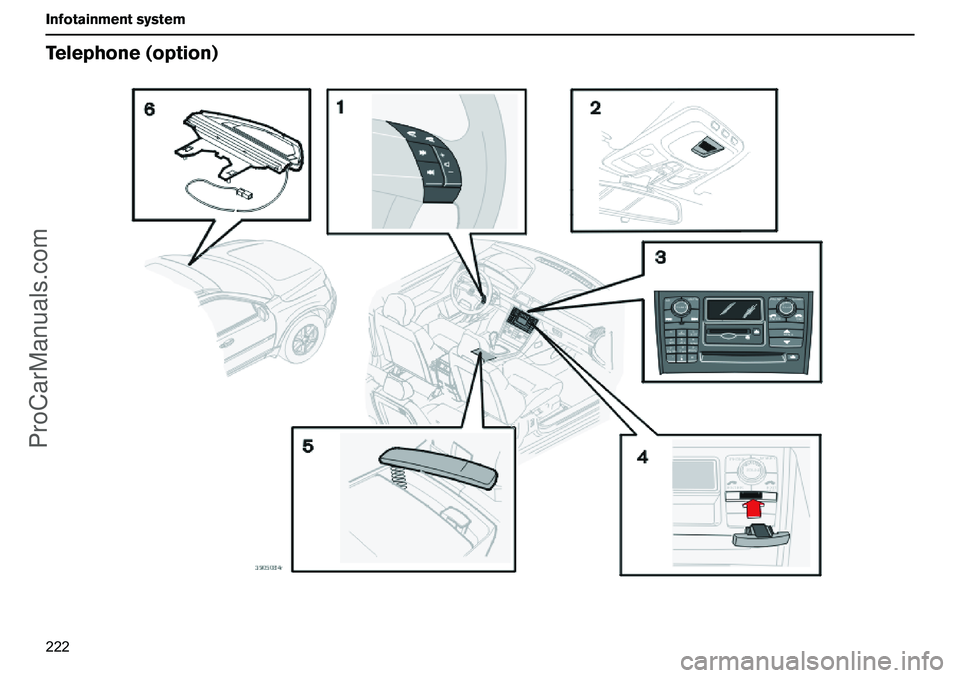
Telephone(option)Telephonesystemcomponents1.Steeringwheelkeypad
Youcancontrolthemajorityoftelephone
functionsusingthesteeringwheelkeypad.
Whenthetelephoneisactive,thesteering
wheelkeypadcanonlybeusedfortelephone
functions.Wheninactivemode,telephone
informationisalwaysshowninthecontrol
paneldisplay.
2.Microphone
Thehandsfreemicrophoneisintegratedin
theceilingpanel.
3.Controlpanel
Alltelephonesystemfunctions,exceptcall
volume,canbecontrolledfromthecontrol
panelkeypad.Thedisplayshowsmenu
functions,messages,telephonenumbers,
etc.
4.SIMcard
TheSIMcardisinsertedintothefrontofthe
controlpanel.
5.Privacyhandset
Theprivacyhandsetcanbeusedwhenyou
donotwishtobedisturbed.
6.Antenna
Theantennaismountedagainstthe
windscreeninfrontoftherearviewmirror.
GeneralrulesPuttrafficsafetyfirst!Ifasthedriveryou
needtousetheprivacyhandset,parkthe
carinasafeplacefirst.
Switchoffthesystemwhenrefuellingthe
car.
Switchoffthesystemnearblastingwork.
Letonlyauthorisedpersonnelservice
yourtelephonesystem.EmergencycallsEmergencycallstoalarmcentrescanbe
madewithoutaSIMcardaslongasthereis
coveragebyaGSMoperator.
–Activatethetelephone.
–Ringtheemergencynumberthatapplies
toyourregion(withinEU:112).
–PresstheENTERbuttononthecontrol
panelorsteeringwheel.LoudspeakerThetelephoneusesthespeakerinthe
driver’sdoororthecentrespeakerofthe
audiosystem(ifthereisone).
ProCarManuals.com
Page 225 of 254
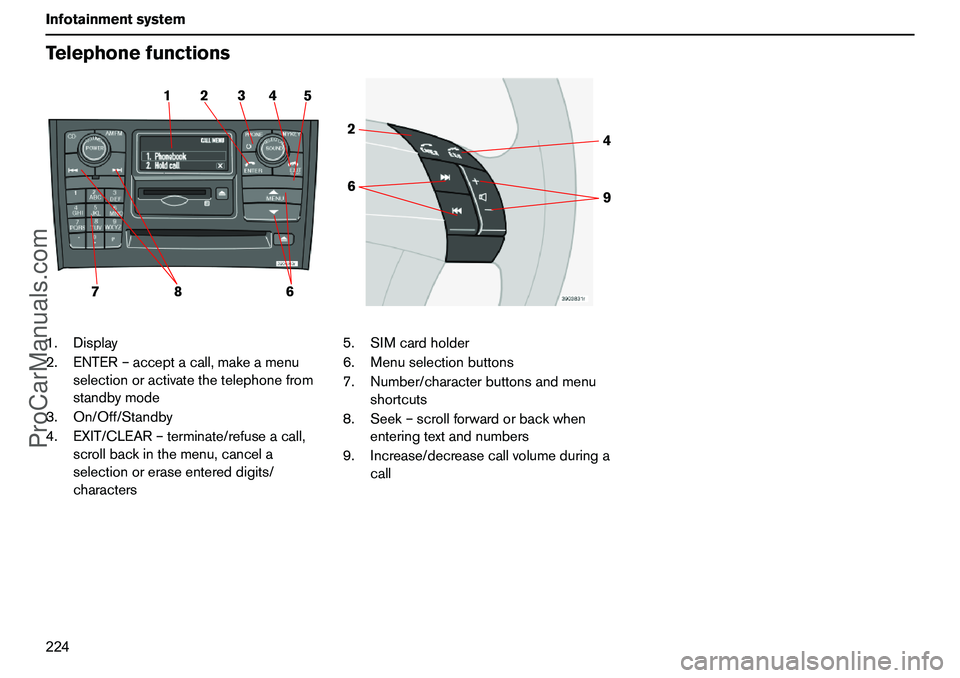
224 InfotainmentsystemTelephonefunctions1.Display
2.ENTER–acceptacall,makeamenu
selectionoractivatethetelephonefrom
standbymode
3.On/Off/Standby
4.EXIT/CLEAR–terminate/refuseacall,
scrollbackinthemenu,cancela
selectionoreraseentereddigits/
characters5.SIMcardholder
6.Menuselectionbuttons
7.Number/characterbuttonsandmenu
shortcuts
8.Seek–scrollforwardorbackwhen
enteringtextandnumbers
9.Increase/decreasecallvolumeduringa
call
2 15 4 3
78
6
64 2
9
ProCarManuals.com
Page 226 of 254
225 Infotainmentsystem
TelephonefunctionsSwitch,On/Off/Standby–
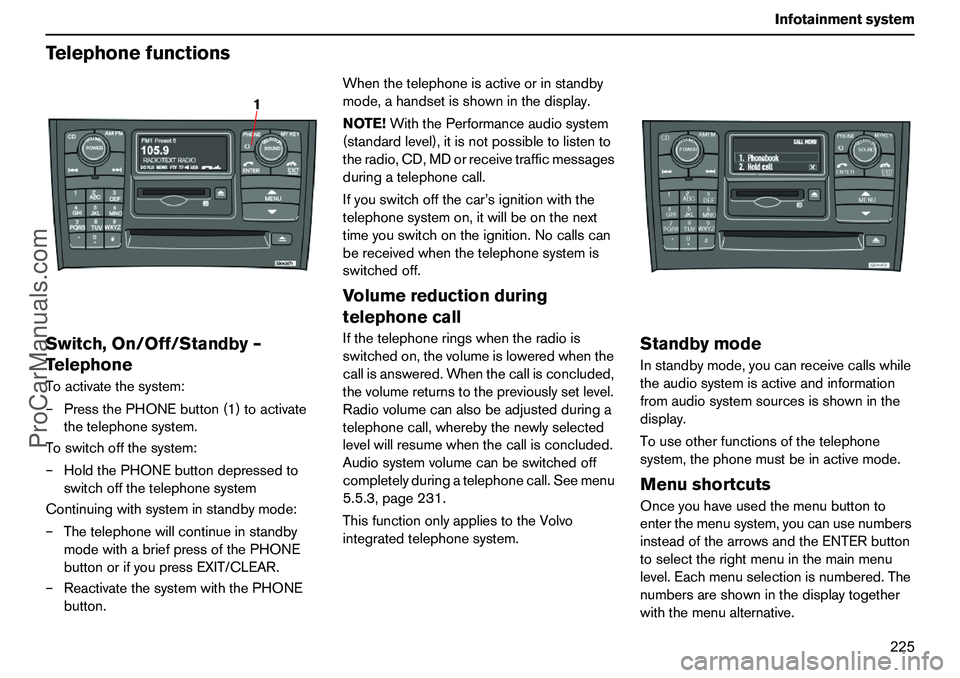
TelephoneToactivatethesystem:
–PressthePHONEbutton(1)toactivate
thetelephonesystem.
Toswitchoffthesystem:
–HoldthePHONEbuttondepressedto
switchoffthetelephonesystem
Continuingwithsysteminstandbymode:
–Thetelephonewillcontinueinstandby
modewithabriefpressofthePHONE
buttonorifyoupressEXIT/CLEAR.
–ReactivatethesystemwiththePHONE
button.Whenthetelephoneisactiveorinstandby
mode,ahandsetisshowninthedisplay.
NOTE!WiththePerformanceaudiosystem
(standardlevel),itisnotpossibletolistento
theradio,CD,MDorreceivetrafficmessages
duringatelephonecall.
Ifyouswitchoffthecar’signitionwiththe
telephonesystemon,itwillbeonthenext
timeyouswitchontheignition.Nocallscan
bereceivedwhenthetelephonesystemis
switchedoff.
Volumereductionduring
telephonecallIfthetelephoneringswhentheradiois
switchedon,thevolumeisloweredwhenthe
callisanswered.Whenthecallisconcluded,
thevolumereturnstothepreviouslysetlevel.
Radiovolumecanalsobeadjustedduringa
telephonecall,wherebythenewlyselected
levelwillresumewhenthecallisconcluded.
Audiosystemvolumecanbeswitchedoff
completelyduringatelephonecall.Seemenu
5.5.3,page231.
ThisfunctiononlyappliestotheVolvo
integratedtelephonesystem.
StandbymodeInstandbymode,youcanreceivecallswhile
theaudiosystemisactiveandinformation
fromaudiosystemsourcesisshowninthe
display.
Touseotherfunctionsofthetelephone
system,thephonemustbeinactivemode.MenushortcutsOnceyouhaveusedthemenubuttonto
enterthemenusystem,youcanusenumbers
insteadofthearrowsandtheENTERbutton
toselecttherightmenuinthemainmenu
level.Eachmenuselectionisnumbered.The
numbersareshowninthedisplaytogether
withthemenualternative.
1
ProCarManuals.com
Page 227 of 254
226 InfotainmentsystemTelephonefunctionsTrafficsafetyForreasonsofsafety,partsofthetelephone
menusystemcannotbeaccessedatspeeds
inexcessof8km/h.Youmayonlycomplete
menusystemactivitiesthathavealready
beenstarted.
Thespeedlimitercanbedisconnectedusing
menufunction5.6.
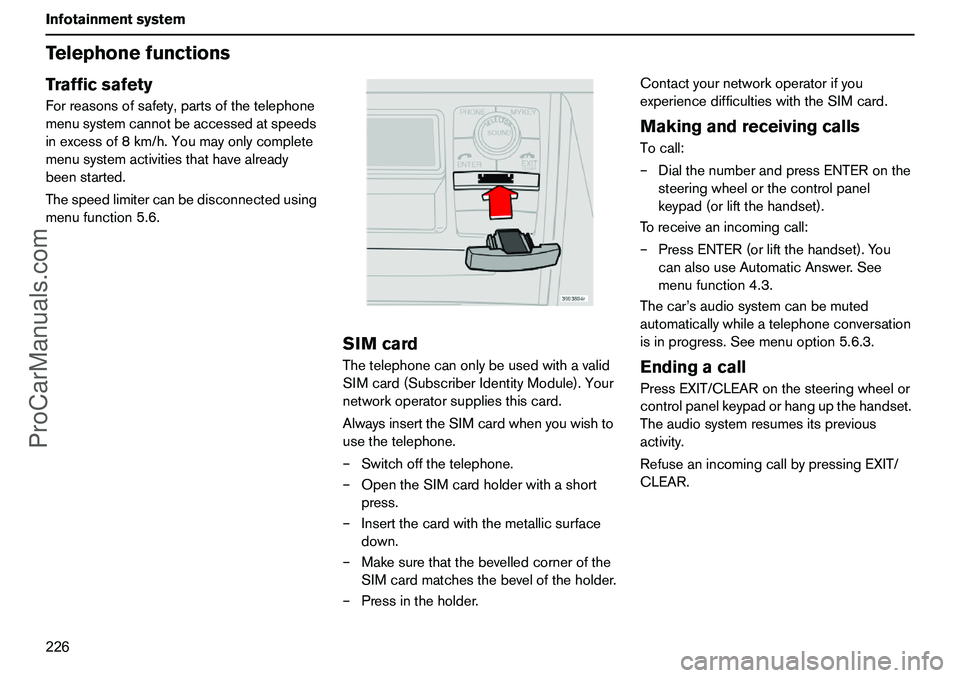
SIMcardThetelephonecanonlybeusedwithavalid
SIMcard(SubscriberIdentityModule).Your
networkoperatorsuppliesthiscard.
AlwaysinserttheSIMcardwhenyouwishto
usethetelephone.
–Switchoffthetelephone.
–OpentheSIMcardholderwithashort
press.
–Insertthecardwiththemetallicsurface
down.
–Makesurethatthebevelledcornerofthe
SIMcardmatchesthebeveloftheholder.
–Pressintheholder.Contactyournetworkoperatorifyou
experiencedifficultieswiththeSIMcard.
MakingandreceivingcallsTocall:
–DialthenumberandpressENTERonthe
steeringwheelorthecontrolpanel
keypad(orliftthehandset).
Toreceiveanincomingcall:
–PressENTER(orliftthehandset).You
canalsouseAutomaticAnswer.See
menufunction4.3.
Thecar’saudiosystemcanbemuted
automaticallywhileatelephoneconversation
isinprogress.Seemenuoption5.6.3.EndingacallPressEXIT/CLEARonthesteeringwheelor
controlpanelkeypadorhangupthehandset.
Theaudiosystemresumesitsprevious
activity.
RefuseanincomingcallbypressingEXIT/
CLEAR.
ProCarManuals.com
Page 228 of 254
227 Infotainmentsystem
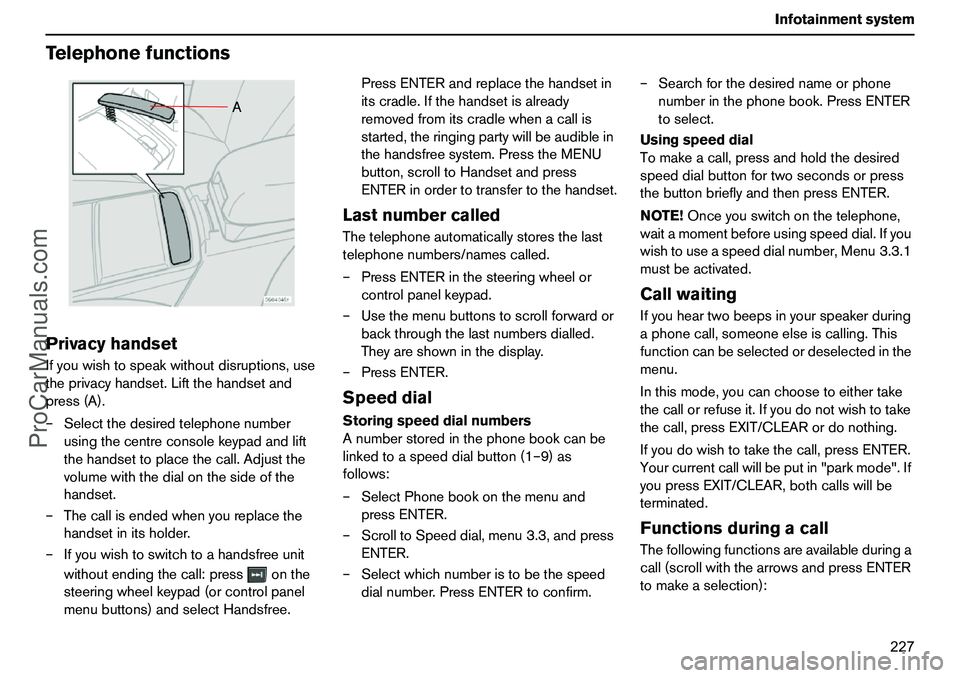
TelephonefunctionsPrivacyhandsetIfyouwishtospeakwithoutdisruptions,use
theprivacyhandset.Liftthehandsetand
press(A).
–Selectthedesiredtelephonenumber
usingthecentreconsolekeypadandlift
thehandsettoplacethecall.Adjustthe
volumewiththedialonthesideofthe
handset.
–Thecallisendedwhenyoureplacethe
handsetinitsholder.
–Ifyouwishtoswitchtoahandsfreeunit
withoutendingthecall:pressonthe
steeringwheelkeypad(orcontrolpanel
menubuttons)andselectHandsfree.PressENTERandreplacethehandsetin
itscradle.Ifthehandsetisalready
removedfromitscradlewhenacallis
started,theringingpartywillbeaudiblein
thehandsfreesystem.PresstheMENU
button,scrolltoHandsetandpress
ENTERinordertotransfertothehandset.
LastnumbercalledThetelephoneautomaticallystoresthelast
telephonenumbers/namescalled.
–PressENTERinthesteeringwheelor
controlpanelkeypad.
–Usethemenubuttonstoscrollforwardor
backthroughthelastnumbersdialled.
Theyareshowninthedisplay.
–PressENTER.SpeeddialStoringspeeddialnumbers
Anumberstoredinthephonebookcanbe
linkedtoaspeeddialbutton(1–9)as
follows:
–SelectPhonebookonthemenuand
pressENTER.
–ScrolltoSpeeddial,menu3.3,andpress
ENTER.
–Selectwhichnumberistobethespeed
dialnumber.PressENTERtoconfirm.–Searchforthedesirednameorphone
numberinthephonebook.PressENTER
toselect.
Usingspeeddial
Tomakeacall,pressandholdthedesired
speeddialbuttonfortwosecondsorpress
thebuttonbrieflyandthenpressENTER.
NOTE!Onceyouswitchonthetelephone,
waitamomentbeforeusingspeeddial.Ifyou
wishtouseaspeeddialnumber,Menu3.3.1
mustbeactivated.
CallwaitingIfyouheartwobeepsinyourspeakerduring
aphonecall,someoneelseiscalling.This
functioncanbeselectedordeselectedinthe
menu.
Inthismode,youcanchoosetoeithertake
thecallorrefuseit.Ifyoudonotwishtotake
thecall,pressEXIT/CLEARordonothing.
Ifyoudowishtotakethecall,pressENTER.
Yourcurrentcallwillbeputin"parkmode".If
youpressEXIT/CLEAR,bothcallswillbe
terminated.FunctionsduringacallThefollowingfunctionsareavailableduringa
call(scrollwiththearrowsandpressENTER
tomakeaselection):
A
ProCarManuals.com